2018 CHEVROLET BOLT EV lock
[x] Cancel search: lockPage 238 of 370
Chevrolet BOLT EV Owner Manual (GMNA-Localizing-U.S./Canada/Mexico-
11434431) - 2018 - crc - 2/14/18
Driving and Operating 237
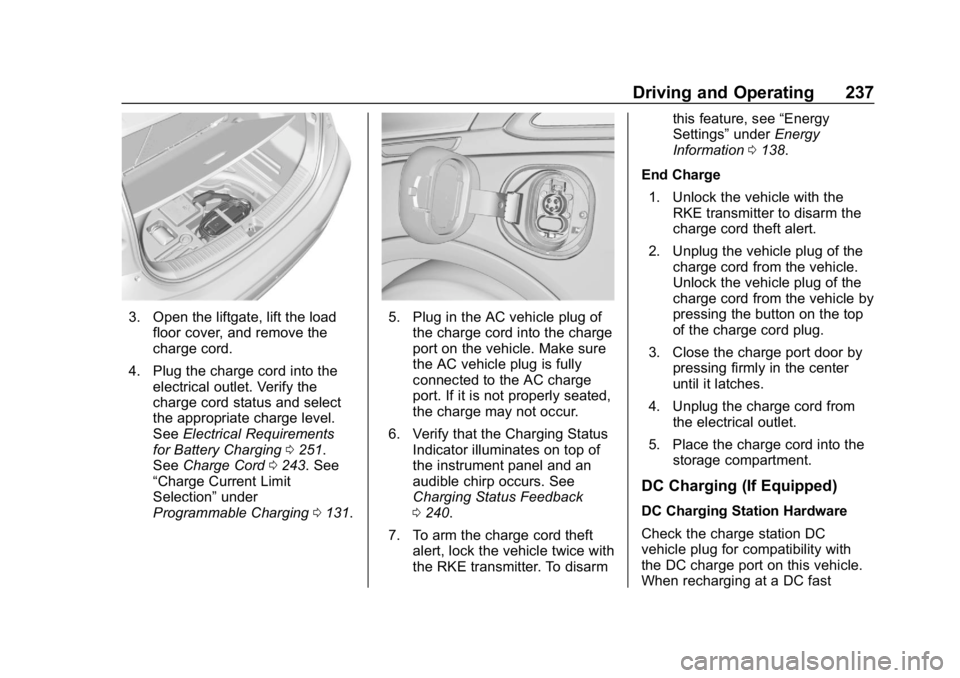
3. Open the liftgate, lift the loadfloor cover, and remove the
charge cord.
4. Plug the charge cord into the electrical outlet. Verify the
charge cord status and select
the appropriate charge level.
See Electrical Requirements
for Battery Charging 0251.
See Charge Cord 0243. See
“Charge Current Limit
Selection” under
Programmable Charging 0131.5. Plug in the AC vehicle plug of
the charge cord into the charge
port on the vehicle. Make sure
the AC vehicle plug is fully
connected to the AC charge
port. If it is not properly seated,
the charge may not occur.
6. Verify that the Charging Status Indicator illuminates on top of
the instrument panel and an
audible chirp occurs. See
Charging Status Feedback
0240.
7. To arm the charge cord theft alert, lock the vehicle twice with
the RKE transmitter. To disarm this feature, see
“Energy
Settings” underEnergy
Information 0138.
End Charge 1. Unlock the vehicle with the RKE transmitter to disarm the
charge cord theft alert.
2. Unplug the vehicle plug of the charge cord from the vehicle.
Unlock the vehicle plug of the
charge cord from the vehicle by
pressing the button on the top
of the charge cord plug.
3. Close the charge port door by pressing firmly in the center
until it latches.
4. Unplug the charge cord from the electrical outlet.
5. Place the charge cord into the storage compartment.
DC Charging (If Equipped)
DC Charging Station Hardware
Check the charge station DC
vehicle plug for compatibility with
the DC charge port on this vehicle.
When recharging at a DC fast
Page 239 of 370
Chevrolet BOLT EV Owner Manual (GMNA-Localizing-U.S./Canada/Mexico-
11434431) - 2018 - crc - 2/14/18
238 Driving and Operating
charge station, the power cable
connected to the vehicle must be
less than 10 m (33 ft) in length.
Follow the steps listed on the
charging station to perform a DC
vehicle charge.
If for any reason DC charging does
not begin or is interrupted, check
the DC charge station display for
messages. Unplug to restart the DC
charge process.
Start Charge1. Make sure the vehicle is parked.
2. Push the rearward edge of the charge port door and release to
open the door.
In cold weather conditions, ice
may form around the charge
port door. The charge port door
may not open on the first
attempt. Remove ice from the
area and repeat attempting to
open the charge port door.
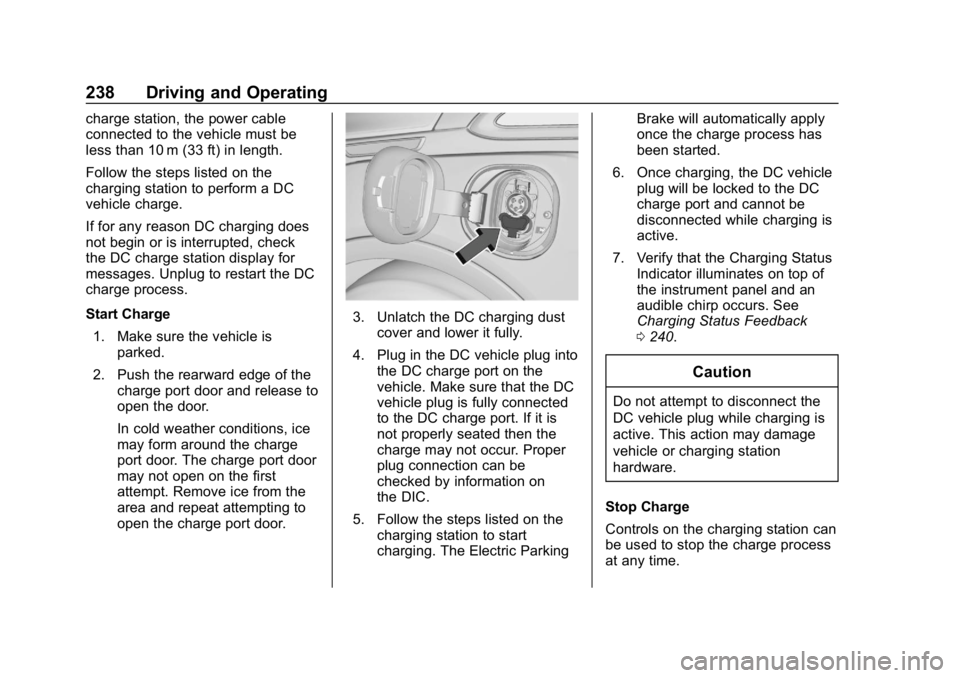
3. Unlatch the DC charging dustcover and lower it fully.
4. Plug in the DC vehicle plug into the DC charge port on the
vehicle. Make sure that the DC
vehicle plug is fully connected
to the DC charge port. If it is
not properly seated then the
charge may not occur. Proper
plug connection can be
checked by information on
the DIC.
5. Follow the steps listed on the charging station to start
charging. The Electric Parking Brake will automatically apply
once the charge process has
been started.
6. Once charging, the DC vehicle plug will be locked to the DC
charge port and cannot be
disconnected while charging is
active.
7. Verify that the Charging Status Indicator illuminates on top of
the instrument panel and an
audible chirp occurs. See
Charging Status Feedback
0240.
Caution
Do not attempt to disconnect the
DC vehicle plug while charging is
active. This action may damage
vehicle or charging station
hardware.
Stop Charge
Controls on the charging station can
be used to stop the charge process
at any time.
Page 240 of 370
Chevrolet BOLT EV Owner Manual (GMNA-Localizing-U.S./Canada/Mexico-
11434431) - 2018 - crc - 2/14/18
Driving and Operating 239
To stop the charge when inside the
vehicle, you may use the stop
charging button on the Charging
screen. SeeProgrammable
Charging 0131.
There is also an available mobile
app with several charging functions.
See KeyPass 045.
Stop Charge —Automatic
When the vehicle no longer needs
to use power from the charging
station, it will stop charging and the
DC vehicle plug will be unlocked
from the DC charge port.
Energy can still be consumed from
the charging station when the
vehicle’s displays and indicators
show that the battery is fully
charged. This is to ensure the
battery is in optimal temperature
operating range to maximize vehicle
range. See Programmable Charging
0 131. End Charge
1. Wait until the charging process has been fully stopped, the
vehicle plug is unlocked, and
the Charging Status Indicator is
solid green or off.
If the vehicle plug does not
unlock from the vehicle charge
port after a charge, contact
Roadside Assistance for
assistance. See Roadside
Assistance Program 0336.
2. Unplug the DC vehicle plug from the DC charge port on the
vehicle and close the dust
cover.
3. Close the charge port door by pressing firmly in the center
until it latches.
4. The Electric Parking Brake should be manually
disengaged before driving the
vehicle.
5. To start another DC charge, remove the DC vehicle plug
and reconnect.Delayed Charging
Override
To temporarily override a delayed
charge event, unplug the charge
cord from the charge port and then
plug it back in within five seconds.
A single audible chirp will sound
and charging will begin immediately.
To cancel a temporary override,
unplug the charge cord, wait for
10 seconds, and then plug the
charge cord back in. A double
audible chirp will sound and
charging will be delayed.
See Programmable Charging 0131
for advanced charge scheduling
options.
Page 251 of 370
Chevrolet BOLT EV Owner Manual (GMNA-Localizing-U.S./Canada/Mexico-
11434431) - 2018 - crc - 2/14/18
250 Driving and Operating
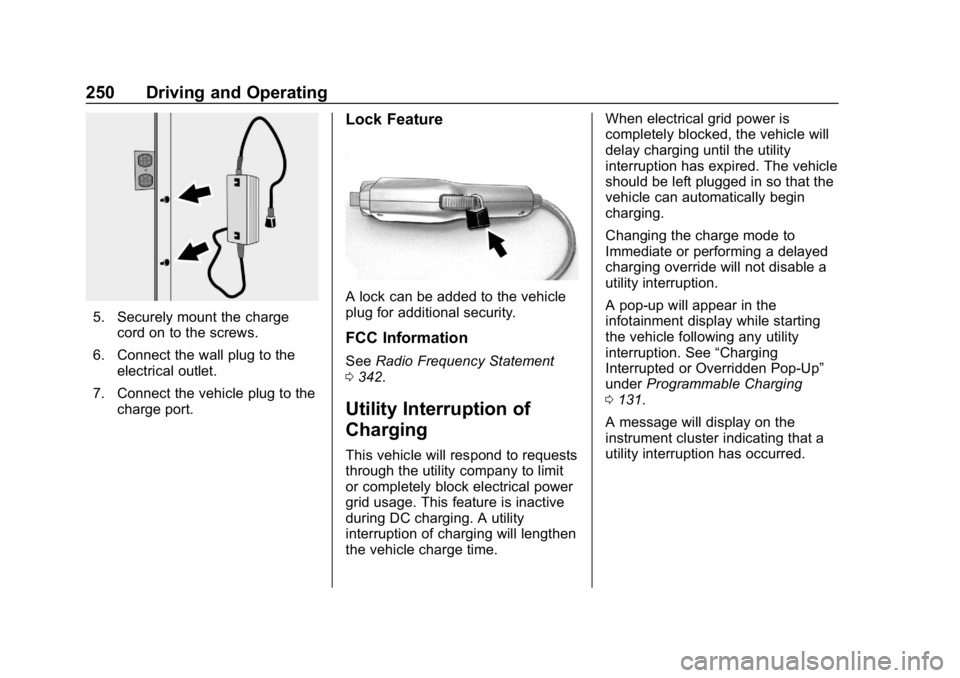
5. Securely mount the chargecord on to the screws.
6. Connect the wall plug to the electrical outlet.
7. Connect the vehicle plug to the charge port.
Lock Feature
A lock can be added to the vehicle
plug for additional security.
FCC Information
See Radio Frequency Statement
0 342.
Utility Interruption of
Charging
This vehicle will respond to requests
through the utility company to limit
or completely block electrical power
grid usage. This feature is inactive
during DC charging. A utility
interruption of charging will lengthen
the vehicle charge time. When electrical grid power is
completely blocked, the vehicle will
delay charging until the utility
interruption has expired. The vehicle
should be left plugged in so that the
vehicle can automatically begin
charging.
Changing the charge mode to
Immediate or performing a delayed
charging override will not disable a
utility interruption.
A pop-up will appear in the
infotainment display while starting
the vehicle following any utility
interruption. See
“Charging
Interrupted or Overridden Pop-Up”
under Programmable Charging
0 131.
A message will display on the
instrument cluster indicating that a
utility interruption has occurred.
Page 255 of 370

Chevrolet BOLT EV Owner Manual (GMNA-Localizing-U.S./Canada/Mexico-
11434431) - 2018 - crc - 2/14/18
254 Vehicle Care
Vehicle Care
General Information
General Information . . . . . . . . . . 255
California Proposition65 Warning . . . . . . . . . . . . . . . . . 255
California Perchlorate Materials Requirements . . . . . 256
Accessories and Modifications . . . . . . . . . . . . . . . . 256
Vehicle Checks
Doing Your OwnService Work . . . . . . . . . . . . . . . 256
Hood . . . . . . . . . . . . . . . . . . . . . . . . . 257
Underhood Compartment Overview . . . . . . . . . . . . . . . . . . . . 259
Cooling System . . . . . . . . . . . . . . 260
Washer Fluid . . . . . . . . . . . . . . . . . 261
Brakes . . . . . . . . . . . . . . . . . . . . . . . 262
Brake Fluid . . . . . . . . . . . . . . . . . . . 263
Battery - North America . . . . . . 264
Wiper Blade Replacement . . . . 266
Windshield Replacement . . . . . 267
Gas Strut(s) . . . . . . . . . . . . . . . . . . 267
Headlamp Aiming
Headlamp Aiming . . . . . . . . . . . . 269
Bulb Replacement
Bulb Replacement . . . . . . . . . . . . 269
Halogen Bulbs . . . . . . . . . . . . . . . . 269
High Intensity Discharge (HID) Lighting . . . . . . . . . . . . . . . . . . . . . 269
LED Lighting . . . . . . . . . . . . . . . . . 269
Taillamps, Turn Signal,
Stoplamps, and Back-Up
Lamps . . . . . . . . . . . . . . . . . . . . . . 270
License Plate Lamp . . . . . . . . . . 270
Electrical System
High Voltage Devices and Wiring . . . . . . . . . . . . . . . . . . . . . . . 271
Electrical System Overload . . . 271
Fuses and Circuit Breakers . . . 272
Underhood Compartment Fuse Block . . . . . . . . . . . . . . . . . . . . . . . . 272
Instrument Panel Fuse Block . . . . . . . . . . . . . . . . . . . . . . . . 276
Wheels and Tires
Tires . . . . . . . . . . . . . . . . . . . . . . . . . . 278
All-Season Tires . . . . . . . . . . . . . . 279
Winter Tires . . . . . . . . . . . . . . . . . . 279
Self-Sealing Tires . . . . . . . . . . . . 279
Tire Sidewall Labeling . . . . . . . . 280
Tire Designations . . . . . . . . . . . . . 281
Tire Terminology andDefinitions . . . . . . . . . . . . . . . . . . 282
Tire Pressure . . . . . . . . . . . . . . . . . 284 Tire Pressure Monitor
System . . . . . . . . . . . . . . . . . . . . . . 285
Tire Pressure Monitor Operation . . . . . . . . . . . . . . . . . . . 286
Tire Inspection . . . . . . . . . . . . . . . . 289
Tire Rotation . . . . . . . . . . . . . . . . . 290
When It Is Time for New
Tires . . . . . . . . . . . . . . . . . . . . . . . . 291
Buying New Tires . . . . . . . . . . . . . 291
Different Size Tires and Wheels . . . . . . . . . . . . . . . . . . . . . . 293
Uniform Tire Quality Grading . . . . . . . . . . . . . . . . . . . . . 293
Wheel Alignment and Tire Balance . . . . . . . . . . . . . . . . . . . . . 295
Wheel Replacement . . . . . . . . . . 295
Tire Chains . . . . . . . . . . . . . . . . . . . 296
If a Tire Goes Flat . . . . . . . . . . . . 296
Tire Sealant and Compressor Kit . . . . . . . . . . . . . 297
Storing the Tire Sealant and Compressor Kit . . . . . . . . . . . . . 303
Jump Starting
Jump Starting - NorthAmerica . . . . . . . . . . . . . . . . . . . . . 304
Towing the Vehicle
Towing the Vehicle . . . . . . . . . . . 307
Recreational VehicleTowing . . . . . . . . . . . . . . . . . . . . . . 309
Page 257 of 370
Chevrolet BOLT EV Owner Manual (GMNA-Localizing-U.S./Canada/Mexico-
11434431) - 2018 - crc - 2/14/18
256 Vehicle Care
California Perchlorate
Materials Requirements
Certain types of automotive
applications, such as airbag
initiators, seat belt pretensioners,
and lithium batteries contained in
Remote Keyless Entry transmitters,
may contain perchlorate materials.
Special handling may be necessary.
For additional information, see
www.dtsc.ca.gov/hazardouswaste/
perchlorate.
Accessories and
Modifications
Adding non-dealer accessories or
making modifications to the vehicle
can affect vehicle performance and
safety, including such things as
airbags, braking, stability, ride and
handling, emissions systems,
aerodynamics, durability, and
electronic systems like antilock
brakes, traction control, and stability
control. These accessories or
modifications could even cause
malfunction or damage not covered
by the vehicle warranty.Damage to suspension components
caused by modifying vehicle height
outside of factory settings will not be
covered by the vehicle warranty.
Damage to vehicle components
resulting from modifications or the
installation or use of non-GM
certified parts, including control
module or software modifications, is
not covered under the terms of the
vehicle warranty and may affect
remaining warranty coverage for
affected parts.
GM Accessories are designed to
complement and function with other
systems on the vehicle. See your
dealer to accessorize the vehicle
using genuine GM Accessories
installed by a dealer technician.
Also, see
Adding Equipment to the
Airbag-Equipped Vehicle 081.
Vehicle Checks
Doing Your Own
Service Work
{Warning
Never try to do your own service
on high voltage battery
components. You can be injured
and the vehicle can be damaged
if you try to do your own service
work. Service and repair of these
high voltage battery components
should only be performed by a
trained dealer technician with the
proper knowledge and tools.
Exposure to high voltage can
cause shock, burns, and even
death. The high voltage
components in the vehicle can
only be serviced by technicians
with special training.
(Continued)
Page 259 of 370
Chevrolet BOLT EV Owner Manual (GMNA-Localizing-U.S./Canada/Mexico-
11434431) - 2018 - crc - 2/14/18
258 Vehicle Care
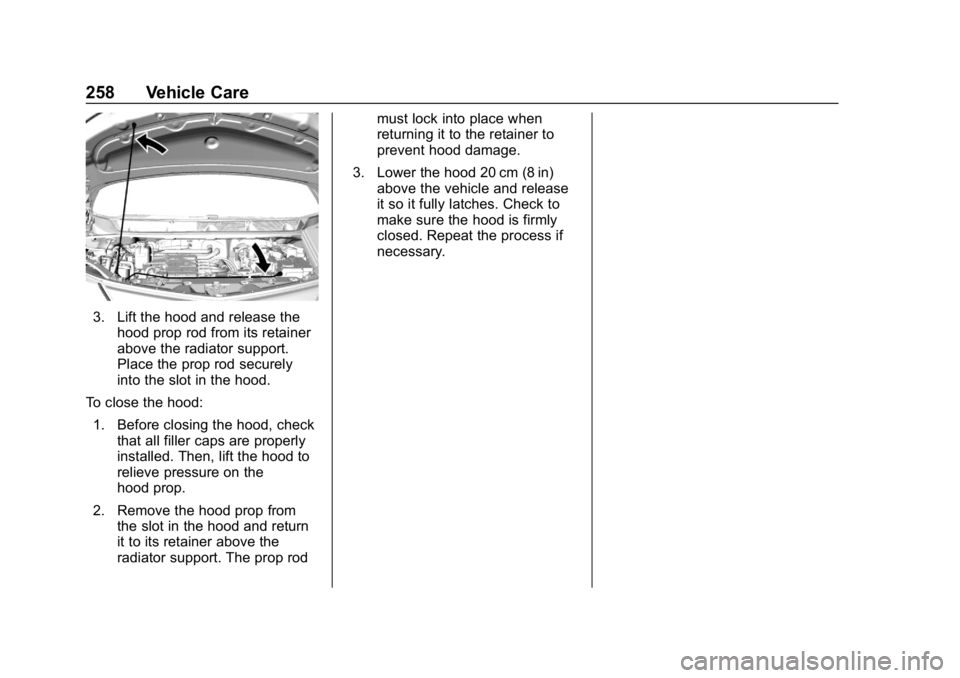
3. Lift the hood and release thehood prop rod from its retainer
above the radiator support.
Place the prop rod securely
into the slot in the hood.
To close the hood:
1. Before closing the hood, check that all filler caps are properly
installed. Then, lift the hood to
relieve pressure on the
hood prop.
2. Remove the hood prop from the slot in the hood and return
it to its retainer above the
radiator support. The prop rod must lock into place when
returning it to the retainer to
prevent hood damage.
3. Lower the hood 20 cm (8 in) above the vehicle and release
it so it fully latches. Check to
make sure the hood is firmly
closed. Repeat the process if
necessary.
Page 261 of 370

Chevrolet BOLT EV Owner Manual (GMNA-Localizing-U.S./Canada/Mexico-
11434431) - 2018 - crc - 2/14/18
260 Vehicle Care
1. Windshield Washer FluidReservoir. See Washer Fluid
0 261.
2. Cabin Heating Coolant Reservoir. See Cooling System
0 260.
3. High Voltage Battery Coolant Reservoir. See Cooling System
0 260.
4. HPDM (High Power Distribution Module).
5. APM (Accessory Power Module), OBCM (On-Board
Charging Module).
6. Brake Fluid Reservoir. See Brake Fluid 0263.
7. SPIM, APM, and Charger Module Coolant Reservoir. See
Cooling System 0260.
8. Battery. See Battery - North
America 0264.
9. Underhood Compartment Fuse Block. Underhood
Compartment Fuse Block
0 272.Cooling System
It is not necessary to regularly
check coolant unless a leak is
suspected or an unusual noise is
heard. A coolant loss could indicate
a problem. Have it inspected and
repaired by your dealer.
The following explains the cooling
systems and how to check coolant
levels.
.
High Voltage Battery
. Single Power Inverter Module
(SPIM), Accessory Power
Module (APM), and Charger
Module
. Cabin Heating
High Voltage Battery
During vehicle operation and also
during charging, the high voltage
battery cells in the vehicle are kept
within a normal operating
temperature range. If the
temperature rises above this
temperature, the battery cooling
system turns on the air conditioning
compressor and cools the coolant until the correct temperature is
reached. If the temperature falls
below this temperature, a high
voltage heater, located outside the
battery on a cradle, heats the
coolant until the correct temperature
is reached.
Single Power Inverter Module
(SPIM), Accessory Power
Module (APM), and Charger
Module
The SPIM, APM, and charger
module are cooled using a separate
coolant loop. These modules are
kept below a maximum temperature.
If the temperature rises above this
temperature, the electric cooling fan
will turn on to cool the coolant.
Cabin Heating
Cabin heating is maintained by
coolant heated by the Coolant
Heater Control Module (CHCM),
separate from the power electronics
and battery coolant loops. This
module heats the coolant based on
temperature inputs from the cabin
climate control systems.