2018 CADILLAC ESCALADE ac system
[x] Cancel search: ac systemPage 16 of 399

Cadillac Escalade Owner Manual (GMNA-Localizing-U.S./Canada/Mexico-
11349344) - 2018 - crc - 11/7/17
IN BRIEF 15
Refer to the following sections for
important information on how to use
seat belts properly:
.Seat Belts 075.
. How to Wear Seat Belts Properly
076.
. Lap-Shoulder Belt 077.
. Lower Anchors and Tethers for
Children (LATCH System) 0103.
Passenger Sensing System
United States
Canada and Mexico
The passenger sensing system will
turn off the front outboard passenger
frontal airbag under certain
conditions. No other airbag is affected
by the passenger sensing system. See
Passenger Sensing System 090
The passenger airbag status indicator
will light on the overhead console
when the vehicle is started. See
Passenger Airbag Status Indicator
0 135.
Mirror Adjustment
Interior Mirror
Adjustment
Adjust the rearview mirror for a clear
view of the area behind the vehicle. Automatic Dimming Rearview Mirror
The mirror automatically dims to
reduce the glare of headlamps from
behind. The dimming feature comes
on when the vehicle is started.
Rear Camera Mirror
If equipped, this automatic dimming
rearview mirror provides a wide angle
camera view of the area behind the
vehicle. Adjust the mirror with the tab
pushed forward so that the display is
off. See
Rear Camera Mirror 052.
Exterior Mirrors
Power Mirrors
Page 17 of 399

Cadillac Escalade Owner Manual (GMNA-Localizing-U.S./Canada/Mexico-
11349344) - 2018 - crc - 11/7/17
16 IN BRIEF
To adjust the mirrors:1. Press (1) or (2) to select the driver or passenger side mirror.
2. Press the arrows on the control pad to move each mirror in the
desired direction.
3. Press either (1) or (2) again to deselect the mirror.
See Power Mirrors 050.
Power Folding Mirrors
1. Press{to fold the mirrors
inward. 2. Press
{again to return the
mirrors to the driving position.
Heated Mirrors
Press
Kto heat the outside mirrors.
See “Rear Window Defogger” under
Dual Automatic Climate Control System
0 173.
Steering Wheel Adjustment
To adjust the power tilt and
telescoping steering wheel:
Press the control to move the steering
wheel up and down or forward and
rearward. Do not adjust the steering wheel while
driving.
Throttle and Brake Pedal
Adjustment
If equipped, the position of the
throttle and brake pedals can be
changed.
Press the top of the switch to move
the pedals closer to your body. Press
the bottom of the switch to move the
pedals away.
See
Adjustable Throttle and Brake Pedal
0 198.
Page 19 of 399

Cadillac Escalade Owner Manual (GMNA-Localizing-U.S./Canada/Mexico-
11349344) - 2018 - crc - 11/7/17
18 IN BRIEF
P:Turns off the automatic
headlamps and Daytime Running
Lamps (DRL). Turning the headlamp
control to
Pagain will turn the
automatic headlamps and DRL
back on.
For vehicles first sold in Canada, the
off position only works when the
vehicle is shifted into the P (Park)
position.
AUTO : Automatically turns the
exterior lamps on and off, depending
on outside lighting.
;: Turns on the parking lamps
including all lamps, except the
headlamps.
5: Turns on the headlamps together
with the parking lamps and
instrument panel lights.
See:
. Exterior Lamp Controls 0164
. Daytime Running Lamps (DRL)
0166
. Automatic Headlamp System 0167
Windshield Wiper/Washer
The windshield wiper control is on the
turn signal lever.
The windshield wipers are controlled
by turning the band with
zFRONT
on it.
1: Fast wipes.
w: Slow wipes.
3INT : Use this setting for
intermittent wipes or Rainsense ™. For
intermittent wipes, turn the
z
FRONT band up for more frequent
wipes or down for less frequent wipes. To turn on Rainsense, press
z
AUTO on the lever, then turn thez
FRONT band on the wiper lever to
adjust the sensitivity.
.
Turn the band up to a higher INT
setting for more sensitivity to
moisture.
. Turn the band down to the lower
INT setting for less sensitivity to
moisture.
Move the band out of the
3INT
position to deactivate Rainsense.
OFF : Turns the windshield wipers off.
8:For a single wipe, turn to8,
then release. For several wipes, hold
the band on
8longer.
Lm: Push the paddle at the top of
the lever to spray washer fluid on the
windshield.
See Windshield Wiper/Washer 0121.
Climate Controls
The climate control buttons and the
touch screen are used to adjust the
heating, cooling, and ventilation.
Page 20 of 399

Cadillac Escalade Owner Manual (GMNA-Localizing-U.S./Canada/Mexico-
11349344) - 2018 - crc - 11/7/17
IN BRIEF 19
Center Stack Climate Controls
1. Driver and Passenger Temperature Controls
2. Fan Control
3. OFF (Fan)
4. Driver and Passenger Heated and Cooled Seats
5. Recirculation
6. Rear Window Defogger
7. Defrost
8. AUTO (Automatic Operation)Climate Control Display
1. Outside Temperature Display
2. Driver and Passenger Temperature Controls
3. Fan Control
4. SYNC (Synchronized Temperature)
5. A/C Mode (Air Conditioning)
6. Climate Control Selection (Application Tray Button)
7. Rear (Rear Climate Control Touch Screen)
8. Air Delivery Mode Control See
Dual Automatic Climate Control
System 0173 and Rear Climate Control
System 0178 (If Equipped).
Transmission
Range Selection Mode
The Range Selection Mode switch,
if equipped, is on the shift lever.
1. To enable the Range Selection feature, move the shift lever to
the L (Manual Mode) position.
The current range will appear
next to the L. This is the highest
attainable range with all lower
gears accessible. As an example,
when 5 (Fifth) gear is selected,
1 (First) through 5 (Fifth) gears
are available.
Page 22 of 399

Cadillac Escalade Owner Manual (GMNA-Localizing-U.S./Canada/Mexico-
11349344) - 2018 - crc - 11/7/17
IN BRIEF 21
Vehicle Features
Infotainment System
See the infotainment manual for
information on the radio, audio
players, phone, navigation system,
Rear Seat Entertainment (RSE), and
voice or speech recognition. It also
includes information on settings.
Steering Wheel Controls
The infotainment system can be
operated by using the steering wheel
controls. See "Steering Wheel
Controls" in the infotainment manual.
Cruise Control
J:Press to turn the system on and
off. A white indicator appears in the
instrument cluster when cruise is
turned on.
+RES : If there is a set speed in
memory, press the control up briefly
to resume that speed or press and
hold to accelerate. If the cruise control
is already active, use to increase
vehicle speed. SET−
:Press the control down briefly
to set the speed and activate cruise
control. If the cruise control is already
active, use to decrease vehicle speed.
*: Press to disengage cruise control
without erasing the set speed from
memory.
See Cruise Control 0222 orAdaptive
Cruise Control 0225 (if equipped).
Driver Information
Center (DIC)
The DIC display is in the instrument
cluster. It shows the status of many
vehicle systems.
Page 23 of 399

Cadillac Escalade Owner Manual (GMNA-Localizing-U.S./Canada/Mexico-
11349344) - 2018 - crc - 11/7/17
22 IN BRIEF
yorz:Move SEL up or down to
go to the previous or next selection.
SorT: Press to move between the
interactive display zones in the
cluster. Press
Sto go back to the
previous menu.
SEL : Press to open a menu or select a
menu item. Press and hold to reset
values on certain screens.
See Driver Information Center (DIC)
0 145.
Forward Collision Alert
(FCA) System
If equipped, FCA may help avoid or
reduce the harm caused by front-end
crashes. FCA provides a green
indicator,
V, when a vehicle is
detected ahead. This indicator
displays amber if you follow a vehicle
too closely. When approaching a
vehicle ahead too quickly, FCA
provides a flashing red alert on the
windshield and rapidly beeps or pulses
the driver seat. See
Forward Collision Alert (FCA)
System 0240.
Forward Automatic
Braking (FAB)
If the vehicle has Forward Collision
Alert (FCA), it also has FAB, which
includes Intelligent Brake Assist (IBA).
When the system detects a vehicle
ahead in your path that is traveling in
the same direction that you may be
about to crash into, it can provide a
boost to braking or automatically
brake the vehicle. This can help avoid
or lessen the severity of crashes when
driving in a forward gear.
See Forward Automatic Braking (FAB)
0 242.
Lane Keep Assist (LKA)
If equipped, LKA may help avoid
crashes due to unintentional lane
departures. It may assist by gently
turning the steering wheel if the
vehicle approaches a detected lane
marking without using a turn signal in
that direction. It may also provide a
Lane Departure Warning (LDW) alert as the lane marking is crossed. The
system will not assist or alert if it
detects that you are actively steering.
Override LKA by turning the steering
wheel. LKA uses a camera to detect
lane markings between 60 km/h (37
mph) and 180 km/h (112 mph).
See
Lane Departure Warning (LDW)
0 246 and Lane Keep Assist (LKA)
0 246.
Lane Change Alert (LCA)
If equipped, the LCA system is a
lane-changing aid that assists drivers
with avoiding lane change crashes
that occur with moving vehicles in the
side blind zone (or spot) areas or with
vehicles rapidly approaching these
areas from behind. The LCA warning
display will light up in the
corresponding outside mirror and will
flash if the turn signal is on. The Side
Blind Zone Alert (SBZA) system is
included as part of the LCA system.
See Side Blind Zone Alert (SBZA) 0244
and Lane Change Alert (LCA) 0244.
Page 24 of 399

Cadillac Escalade Owner Manual (GMNA-Localizing-U.S./Canada/Mexico-
11349344) - 2018 - crc - 11/7/17
IN BRIEF 23
Surround Vision
If equipped, views around the vehicle
appear in the infotainment display to
aid with parking and low-speed
maneuvers.
See“Surround Vision ”under
Assistance Systems for Parking or
Backing 0233.
Front Vision Camera
If equipped, a view of the area in front
of the vehicle appears on the
infotainment display to aid with
parking and low-speed maneuvers.
See “Front Vision Camera ”under
Assistance Systems for Parking or
Backing 0233.
Rear Vision Camera (RVC)
If equipped, RVC shows a view of the
area behind the vehicle on the
infotainment display when the vehicle
is shifted into R (Reverse) to aid with
parking and low-speed backing
maneuvers.
See Assistance Systems for Parking or
Backing 0233.
Rear Cross Traffic Alert
(RCTA) System
If equipped, the RCTA system shows a
triangle with an arrow on the
infotainment display to warn of traffic
behind your vehicle that may cross
your vehicle's path while in
R (Reverse). In addition, beeps will
sound, or the driver seat will pulse.
See Assistance Systems for Parking or
Backing 0233.
Parking Assist
If equipped, Front and Rear Parking
Assist (FRPA) uses sensors on the
front and rear bumpers to assist with
parking and avoiding objects during
low speed parking maneuvers.
It operates at speeds less than 8 km/h
(5 mph). FRPA may display a warning
triangle on the Rear Vision Camera
screen and a graphic on the
instrument cluster to provide the
object distance. In addition, multiple
beeps or seat pulses may occur if very
close to an object. The vehicle may also have a higher
speed Backing Warning System and
the Reverse Automatic Braking
system.
See
Driver Assistance Systems 0233.
Automatic Parking
Assist (APA)
If equipped, the APA system helps to
search for and maneuver the vehicle
into parallel or perpendicular parking
spots using automatic steering,
displays, and beeps. When the vehicle
speed is below 30 km/h (18 mph),
touch
Oto enable the system.
See “Automatic Parking Assist (APA)”
under Assistance Systems for Parking
or Backing 0233.
Reverse Automatic
Braking (RAB)
If the vehicle has Adaptive Cruise
Control (ACC) it also has the RAB
system, which is designed to help
avoid or reduce the harm caused by
backing crashes when the vehicle is
shifted into R (Reverse). If the system
Page 25 of 399
Cadillac Escalade Owner Manual (GMNA-Localizing-U.S./Canada/Mexico-
11349344) - 2018 - crc - 11/7/17
24 IN BRIEF
detects the vehicle is backing too fast
to avoid a crash with a detected object
behind your vehicle in your path, it
may automatically brake hard to
a stop.
SeeAssistance Systems for Parking or
Backing 0233.
Power Outlets
Power Outlets 12 Volt Direct
Current
Accessory power outlets can be used
to plug in electrical equipment, such
as a cell phone, MP3 player, etc.
The vehicle has five accessory power
outlets:
.
One near the cupholders on the
center console
. One inside the center console
. One on the rear of the center
console
. One in the third row seat on the
driver side
. One in the rear cargo area on the
passenger side Lift the cover to access and replace
when not in use.
See
Power Outlets 0125.
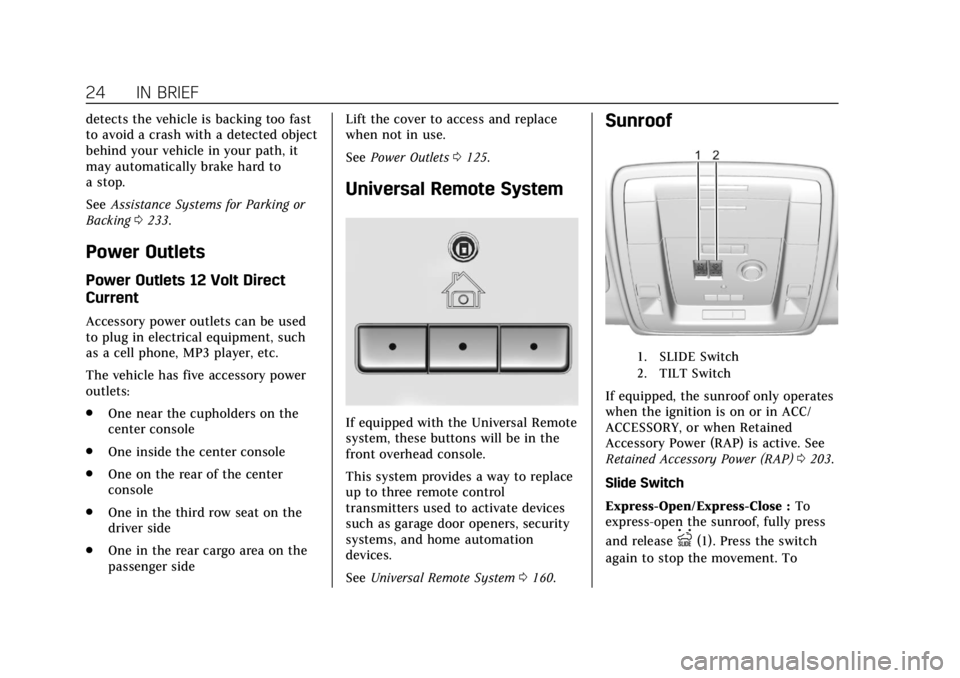
Universal Remote System
If equipped with the Universal Remote
system, these buttons will be in the
front overhead console.
This system provides a way to replace
up to three remote control
transmitters used to activate devices
such as garage door openers, security
systems, and home automation
devices.
See Universal Remote System 0160.
Sunroof
1. SLIDE Switch
2. TILT Switch
If equipped, the sunroof only operates
when the ignition is on or in ACC/
ACCESSORY, or when Retained
Accessory Power (RAP) is active. See
Retained Accessory Power (RAP) 0203.
Slide Switch
Express-Open/Express-Close : To
express-open the sunroof, fully press
and release
I(1). Press the switch
again to stop the movement. To