2018 CADILLAC CT6 battery
[x] Cancel search: batteryPage 91 of 445

Cadillac CT6 Owner Manual (GMNA-Localizing-U.S./Canada-11292458) -
2018 - crc - 2/21/17
90 SEATS AND RESTRAINTS
{Warning
When an airbag inflates, there may
be dust in the air. This dust could
cause breathing problems for
people with a history of asthma or
other breathing trouble. To avoid
this, everyone in the vehicle should
get out as soon as it is safe to do
so. If you have breathing problems
but cannot get out of the vehicle
after an airbag inflates, then get
fresh air by opening a window or a
door. If you experience breathing
problems following an airbag
deployment, you should seek
medical attention.
The vehicle has a feature that may
automatically unlock the doors, turn
on the interior lamps and hazard
warning flashers, and shut off the fuel
system after the airbags inflate. The
feature may also activate, without
airbag inflation, after an event that
exceeds a predetermined threshold.
You can lock the doors, turn off the interior lamps, and turn off the hazard
warning flashers by using the controls
for those features.
{Warning
A crash severe enough to inflate the
airbags may have also damaged
important functions in the vehicle,
such as the fuel system, brake and
steering systems, etc. Even if the
vehicle appears to be drivable after
a moderate crash, there may be
concealed damage that could make
it difficult to safely operate the
vehicle.
Use caution if you should attempt
to restart the engine after a crash
has occurred.
PLUG-IN vehicles have a high voltage
battery and a standard 12-volt battery.
If an airbag inflates or the vehicle has
been in a crash, the vehicle's sensing
system may shut down the high
voltage system. When this occurs, the
high voltage battery is disconnected
and the vehicle is not charging the
12-volt battery or the electrical system. The vehicle may start but it
shuts down once the 12-volt battery is
depleted. The airbag readiness light
and/or the 12-volt battery warning
light are displayed. Before the vehicle
can be operated again, it must be
serviced at your dealer.
In many crashes severe enough to
inflate the airbag, windshields are
broken by vehicle deformation.
Additional windshield breakage may
also occur from the front outboard
passenger airbag.
.
Airbags are designed to inflate
only once. After an airbag inflates,
you will need some new parts for
the airbag system. If you do not
get them, the airbag system will
not be there to help protect you in
another crash. A new system will
include airbag modules and
possibly other parts. The service
manual for the vehicle covers the
need to replace other parts.
Page 96 of 445

Cadillac CT6 Owner Manual (GMNA-Localizing-U.S./Canada-11292458) -
2018 - crc - 2/15/17
SEATS AND RESTRAINTS 95
Servicing the
Airbag-Equipped Vehicle
Airbags affect how the vehicle should
be serviced. There are parts of the
airbag system in several places around
the vehicle. Your dealer and the
service manual have information
about servicing the vehicle and the
airbag system. To purchase a service
manual, seeService Publications
Ordering Information 0416.
{Warning
For up to 10 seconds after the
vehicle is turned off and the 12‐volt
battery is disconnected, an airbag
can still inflate during improper
service. You can be injured if you
are close to an airbag when it
inflates. Avoid yellow connectors.
They are probably part of the airbag
system. Be sure to follow proper
service procedures, and make sure
the person performing work for you
is qualified to do so.
Adding Equipment to the
Airbag-Equipped Vehicle
Adding accessories that change the
vehicle's frame, bumper system,
height, front end, or side sheet metal
may keep the airbag system from
working properly. The operation of the
airbag system can also be affected by
changing any parts of the front seats,
seat belts, airbag sensing and
diagnostic module, steering wheel,
instrument panel, any of the airbag
modules, ceiling or pillar garnish trim,
overhead console, front sensors, side
impact sensors, or airbag wiring.
Your dealer and the service manual
have information about the location of
the airbag sensors, sensing and
diagnostic module, and airbag wiring.
In addition, the vehicle has a
passenger sensing system for the front
outboard passenger position, which
includes sensors that are part of the
passenger seat. The passenger sensing
system may not operate properly if
the original seat trim is replaced with
non-GM covers, upholstery, or trim; or
with GM covers, upholstery, or trim
designed for a different vehicle. Any object, such as an aftermarket seat
heater or a comfort-enhancing pad or
device, installed under or on top of
the seat fabric, could also interfere
with the operation of the passenger
sensing system. This could either
prevent proper deployment of the
passenger airbag(s) or prevent the
passenger sensing system from
properly turning off the passenger
airbag(s). See
Passenger Sensing
System 091.
If the vehicle has rollover roof-rail
airbags, see Different Size Tires and
Wheels 0357 for additional important
information.
If you have to modify your vehicle
because you have a disability and have
questions about whether the
modifications will affect the vehicle's
airbag system, or if you have
questions about whether the airbag
system will be affected if the vehicle is
modified for any other reason, call
Customer Assistance. See Customer
Assistance Offices 0410.
Page 119 of 445

Cadillac CT6 Owner Manual (GMNA-Localizing-U.S./Canada-11292458) -
2018 - crc - 2/14/17
118 INSTRUMENTS AND CONTROLS
Instruments and
Controls
Controls
Steering Wheel Adjustment . . . . . 119
Steering Wheel Controls . . . . . . . . . 119
Heated Steering Wheel . . . . . . . . . . 119
Horn . . . . . . . . . . . . . . . . . . . . . . . . . . . . . . . 120
Windshield Wiper/Washer . . . . . . . 120
Compass . . . . . . . . . . . . . . . . . . . . . . . . . . 122
Clock . . . . . . . . . . . . . . . . . . . . . . . . . . . . . . 122
Power Outlets . . . . . . . . . . . . . . . . . . . . . 123
Wireless Charging . . . . . . . . . . . . . . . . 124
Cigarette Lighter . . . . . . . . . . . . . . . . . . 125
Ashtrays . . . . . . . . . . . . . . . . . . . . . . . . . . 126
Warning Lights, Gauges, and
Indicators
Warning Lights, Gauges, andIndicators . . . . . . . . . . . . . . . . . . . . . . . 126
Instrument Cluster (Base
Level) . . . . . . . . . . . . . . . . . . . . . . . . . . . . 127
Instrument Cluster (Uplevel) . . . . 130
Speedometer . . . . . . . . . . . . . . . . . . . . . . 134
Odometer . . . . . . . . . . . . . . . . . . . . . . . . . 134
Trip Odometer . . . . . . . . . . . . . . . . . . . . 134
Tachometer . . . . . . . . . . . . . . . . . . . . . . . 134
Battery Gauge (High Voltage) . . . 135
Fuel Gauge . . . . . . . . . . . . . . . . . . . . . . . . 135 Power Indicator Gauge
(PLUG-IN Only) . . . . . . . . . . . . . . . . . 136
Boost Gauge (Performance Configuration Only) . . . . . . . . . . . . 136
Engine Oil Pressure Gauge (Base
Level Cluster Only) . . . . . . . . . . . . . 137
Engine Oil Temperature Gauge (Performance
Configuration Only) . . . . . . . . . . . . 138
Engine Coolant Temperature Gauge . . . . . . . . . . . . . . . . . . . . . . . . . . . . 139
Voltmeter Gauge (Base Level Cluster Only) . . . . . . . . . . . . . . . . . . . . 140
Seat Belt Reminders . . . . . . . . . . . . . . 140
Airbag Readiness Light . . . . . . . . . . 141
Passenger Airbag Status Indicator . . . . . . . . . . . . . . . . . . . . . . . . . 141
Charging System Light . . . . . . . . . . . 142
Malfunction Indicator Lamp (Check Engine Light) . . . . . . . . . . . 143
Service Vehicle Soon Light (PLUG-IN Only) . . . . . . . . . . . . . . . . . 145
Brake System Warning Light . . . . 145
Electric Parking Brake Light . . . . . 145
Service Electric Parking Brake Light . . . . . . . . . . . . . . . . . . . . . . . . . . . . . 146
Antilock Brake System (ABS) Warning Light . . . . . . . . . . . . . . . . . . 146
Sport Mode Light . . . . . . . . . . . . . . . . . 146
Winter Driving Mode Light . . . . . . 146 Automatic Vehicle Hold (AVH)
Light . . . . . . . . . . . . . . . . . . . . . . . . . . . . . 147
Lane Keep Assist (LKA) Light . . . 147
Vehicle Ahead Indicator . . . . . . . . . 147
Pedestrian Ahead Indicator . . . . . . 147
Traction Off Light . . . . . . . . . . . . . . . . 148
StabiliTrak OFF Light . . . . . . . . . . . . 148
Traction Control System (TCS)/ StabiliTrak Light . . . . . . . . . . . . . . . . 148
Engine Coolant Temperature Warning Light . . . . . . . . . . . . . . . . . . 149
Tire Pressure Light . . . . . . . . . . . . . . . 149
Engine Oil Pressure Light . . . . . . . . 149
Low Fuel Warning Light . . . . . . . . . 150
Auto Stop Mode (Uplevel Cluster) . . . . . . . . . . . . . . . . . . . . . . . . . . 150
Security Light . . . . . . . . . . . . . . . . . . . . . 150
Vehicle Ready Light (PLUG-IN Only) . . . . . . . . . . . . . . . . . 151
High-Beam On Light . . . . . . . . . . . . . 151
Lamps On Reminder . . . . . . . . . . . . . 151
Cruise Control Light . . . . . . . . . . . . . . 151
Door Ajar Light . . . . . . . . . . . . . . . . . . . 152
Information Displays
Power Flows (PLUG-IN Only) . . . . 152
Programmable Charging (PLUG-IN Only) . . . . . . . . . . . . . . . . . 152
Energy Information (PLUG-IN Only) . . . . . . . . . . . . . . . . . 161
Page 133 of 445
Cadillac CT6 Owner Manual (GMNA-Localizing-U.S./Canada-11292458) -
2018 - crc - 2/14/17
132 INSTRUMENTS AND CONTROLS
The PLUG-IN instrument cluster
displays a preview of information that
includes electric range, charging,
odometer, and battery status. This
happens upon entry when the driver
door is opened before starting the
vehicle. This preview will dismiss after
starting the vehicle or soon after
closing the driver door.
There are several screens that may
display depending on the current
charging status.
The CHARGING OVERRIDE/
INTERRUPTION OCCURRED message
may display to indicate that a
charging override or interruption has
occurred due to one or more of the
following events:
.Override of the charge settings by
the owner.
. Unintended interruption of AC
power at the vehicle's charge port.
Reconfigurable Instrument
Cluster
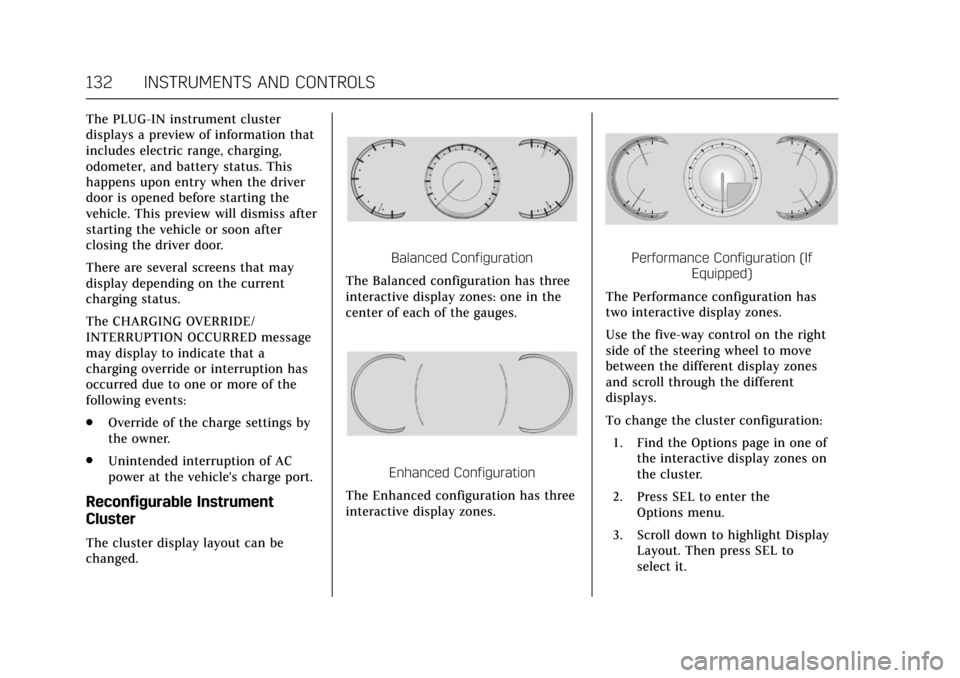
The cluster display layout can be
changed.
Balanced Configuration
The Balanced configuration has three
interactive display zones: one in the
center of each of the gauges.
Enhanced Configuration
The Enhanced configuration has three
interactive display zones.
Performance Configuration (If Equipped)
The Performance configuration has
two interactive display zones.
Use the five-way control on the right
side of the steering wheel to move
between the different display zones
and scroll through the different
displays.
To change the cluster configuration:
1. Find the Options page in one of the interactive display zones on
the cluster.
2. Press SEL to enter the Options menu.
3. Scroll down to highlight Display Layout. Then press SEL to
select it.
Page 136 of 445

Cadillac CT6 Owner Manual (GMNA-Localizing-U.S./Canada-11292458) -
2018 - crc - 2/14/17
INSTRUMENTS AND CONTROLS 135
Battery Gauge (High
Voltage)
This gauge shows the high voltage
battery charge level.
The arrow next to the battery symbol
points to the side of the vehicle the
charge port is on.
SeePlug-In Charging (PLUG-IN Only)
0 274.
Fuel Gauge
Base Level Standard Theme
Uplevel Balanced Configuration
When the ignition is on, the fuel
gauge indicates about how much fuel
is left in the tank.
There is an arrow near the fuel gauge
pointing to the side of the vehicle the
fuel door is on.
When the indicator nears empty, the
low fuel light comes on. There still is
a little fuel left, but the vehicle should
be refueled soon.
Page 137 of 445

Cadillac CT6 Owner Manual (GMNA-Localizing-U.S./Canada-11292458) -
2018 - crc - 2/14/17
136 INSTRUMENTS AND CONTROLS
Here are four things that some owners
ask about. None of these show a
problem with the fuel gauge:
.At the service station, the fuel
pump shuts off before the gauge
reads full.
. It takes a little more or less fuel to
fill up than the gauge indicated.
For example, the gauge may have
indicated the tank was half full,
but it actually took a little more or
less than half the tank's capacity
to fill the tank.
. The gauge moves a little while
turning a corner or speeding up.
. The gauge takes a few seconds to
stabilize after the ignition is
turned on, and goes back to empty
when the ignition is turned off.Power Indicator Gauge
(PLUG-IN Only)
The power gauge shows the vehicle’s
total power consumption coming from
the engine and/or battery.
When the power indicator is green,
battery power is being regenerated.
The blue area indicates power
provided by the engine and/or battery.
The yellow area shows high power
usage. Operating the vehicle closer to
the zero power position both during
acceleration and braking will result in
higher efficiency.
Boost Gauge (Performance
Configuration Only)
Metric
Page 141 of 445

Cadillac CT6 Owner Manual (GMNA-Localizing-U.S./Canada-11292458) -
2018 - crc - 2/14/17
140 INSTRUMENTS AND CONTROLS
Voltmeter Gauge (Base
Level Cluster Only)
Standard Theme
When the ignition is on, this gauge
indicates the battery voltage.
When the engine is running, this
gauge shows the condition of the
charging system. The gauge can
transition from a higher to lower or a
lower to higher reading. This is
normal. If the vehicle is operating
outside the normal operating range,
the charging system light comes on.
See Charging System Light 0142. Readings outside the normal operating
range can also occur when a large
number of electrical accessories are
operating in the vehicle and the
engine is left idling for an extended
period. This condition is normal since
the charging system is not able to
provide full power at engine idle. As
engine speeds are increased, this
condition should correct itself as
higher engine speeds allow the
charging system to create maximum
power.
The vehicle can only be driven for a
short time with the readings outside
the normal operating range. If the
vehicle must be driven, turn off all
accessories, such as the radio and air
conditioner, and unplug all chargers
and accessories.
Readings outside the normal operating
range indicate a possible problem in
the electrical system. Have the vehicle
serviced as soon as possible.
Seat Belt Reminders
Driver Seat Belt Reminder Light
There is a driver seat belt reminder
light on the instrument cluster.
When the vehicle is started, this light
flashes and a chime may come on to
remind the driver to fasten their seat
belt. Then the light stays on solid
until the belt is buckled. This cycle
may continue several times if the
driver remains or becomes unbuckled
while the vehicle is moving.
If the driver seat belt is buckled,
neither the light nor the chime
comes on.
Page 143 of 445

Cadillac CT6 Owner Manual (GMNA-Localizing-U.S./Canada-11292458) -
2018 - crc - 2/14/17
142 INSTRUMENTS AND CONTROLS
United States
Canada
When the vehicle is started, the
passenger airbag status indicator will
light ON and OFF, or the symbol for
on and off, for several seconds as a
system check. Then, after several more
seconds, the status indicator will light
either ON or OFF, or either the on or
off symbol, to let you know the status
of the front outboard passenger
frontal airbag and knee airbag.
If the word ON or the on symbol is lit
on the passenger airbag status
indicator, it means that the front
outboard passenger frontal airbag and
knee airbag are allowed to inflate. If the word OFF or the off symbol is lit
on the airbag status indicator, it
means that the passenger sensing
system has turned off the front
outboard passenger frontal airbag and
knee airbag.
If, after several seconds, both status
indicator lights remain on, or if there
are no lights at all, there may be a
problem with the lights or the
passenger sensing system. See your
dealer for service.{Warning
If the airbag readiness light ever
comes on and stays on, it means
that something may be wrong with
the airbag system. To help avoid
injury to yourself or others, have
the vehicle serviced right away. See
Airbag Readiness Light
0141 for
more information, including
important safety information.
Charging System Light
On some vehicles the charging system
light comes on briefly when the
ignition is turned on, but the engine is
not running, as a check to show the
light is working. It should go out when
the engine is started. For vehicles with
a reconfigurable cluster, this light may
not come on when the ignition is
turned on.
If the light stays on, or comes on
while driving, there may be a problem
with the electrical charging system.
Have it checked by your dealer.
Driving while this light is on could
drain the battery.
When this light comes on, or is
flashing, the Driver Information
Center (DIC) also displays a message.