2018 CADILLAC CT6 charging battery
[x] Cancel search: charging batteryPage 133 of 445
Cadillac CT6 Owner Manual (GMNA-Localizing-U.S./Canada-11292458) -
2018 - crc - 2/14/17
132 INSTRUMENTS AND CONTROLS
The PLUG-IN instrument cluster
displays a preview of information that
includes electric range, charging,
odometer, and battery status. This
happens upon entry when the driver
door is opened before starting the
vehicle. This preview will dismiss after
starting the vehicle or soon after
closing the driver door.
There are several screens that may
display depending on the current
charging status.
The CHARGING OVERRIDE/
INTERRUPTION OCCURRED message
may display to indicate that a
charging override or interruption has
occurred due to one or more of the
following events:
.Override of the charge settings by
the owner.
. Unintended interruption of AC
power at the vehicle's charge port.
Reconfigurable Instrument
Cluster
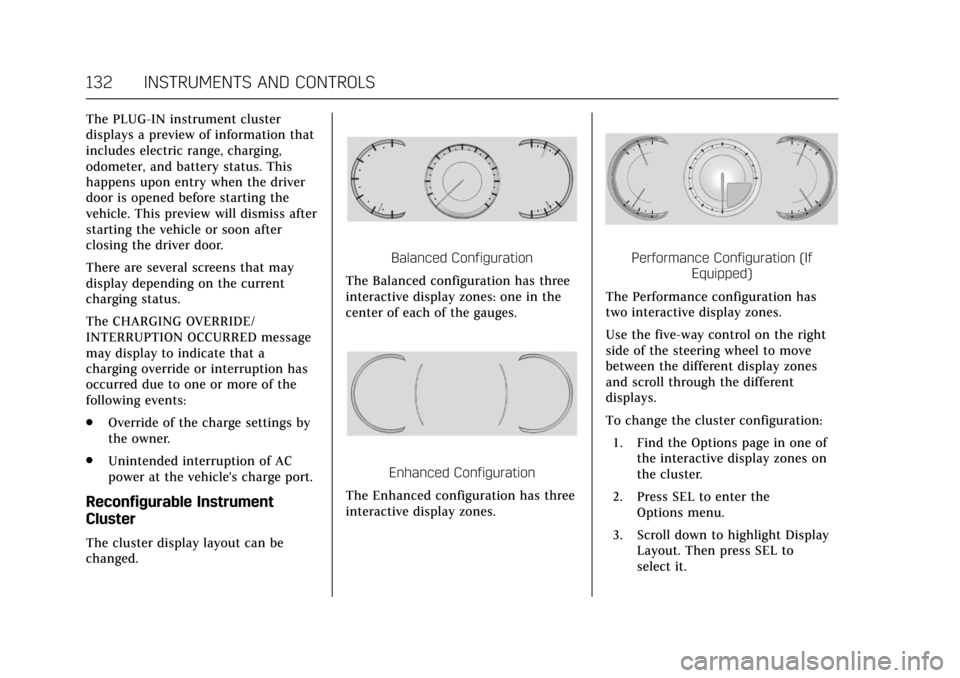
The cluster display layout can be
changed.
Balanced Configuration
The Balanced configuration has three
interactive display zones: one in the
center of each of the gauges.
Enhanced Configuration
The Enhanced configuration has three
interactive display zones.
Performance Configuration (If Equipped)
The Performance configuration has
two interactive display zones.
Use the five-way control on the right
side of the steering wheel to move
between the different display zones
and scroll through the different
displays.
To change the cluster configuration:
1. Find the Options page in one of the interactive display zones on
the cluster.
2. Press SEL to enter the Options menu.
3. Scroll down to highlight Display Layout. Then press SEL to
select it.
Page 136 of 445

Cadillac CT6 Owner Manual (GMNA-Localizing-U.S./Canada-11292458) -
2018 - crc - 2/14/17
INSTRUMENTS AND CONTROLS 135
Battery Gauge (High
Voltage)
This gauge shows the high voltage
battery charge level.
The arrow next to the battery symbol
points to the side of the vehicle the
charge port is on.
SeePlug-In Charging (PLUG-IN Only)
0 274.
Fuel Gauge
Base Level Standard Theme
Uplevel Balanced Configuration
When the ignition is on, the fuel
gauge indicates about how much fuel
is left in the tank.
There is an arrow near the fuel gauge
pointing to the side of the vehicle the
fuel door is on.
When the indicator nears empty, the
low fuel light comes on. There still is
a little fuel left, but the vehicle should
be refueled soon.
Page 141 of 445

Cadillac CT6 Owner Manual (GMNA-Localizing-U.S./Canada-11292458) -
2018 - crc - 2/14/17
140 INSTRUMENTS AND CONTROLS
Voltmeter Gauge (Base
Level Cluster Only)
Standard Theme
When the ignition is on, this gauge
indicates the battery voltage.
When the engine is running, this
gauge shows the condition of the
charging system. The gauge can
transition from a higher to lower or a
lower to higher reading. This is
normal. If the vehicle is operating
outside the normal operating range,
the charging system light comes on.
See Charging System Light 0142. Readings outside the normal operating
range can also occur when a large
number of electrical accessories are
operating in the vehicle and the
engine is left idling for an extended
period. This condition is normal since
the charging system is not able to
provide full power at engine idle. As
engine speeds are increased, this
condition should correct itself as
higher engine speeds allow the
charging system to create maximum
power.
The vehicle can only be driven for a
short time with the readings outside
the normal operating range. If the
vehicle must be driven, turn off all
accessories, such as the radio and air
conditioner, and unplug all chargers
and accessories.
Readings outside the normal operating
range indicate a possible problem in
the electrical system. Have the vehicle
serviced as soon as possible.
Seat Belt Reminders
Driver Seat Belt Reminder Light
There is a driver seat belt reminder
light on the instrument cluster.
When the vehicle is started, this light
flashes and a chime may come on to
remind the driver to fasten their seat
belt. Then the light stays on solid
until the belt is buckled. This cycle
may continue several times if the
driver remains or becomes unbuckled
while the vehicle is moving.
If the driver seat belt is buckled,
neither the light nor the chime
comes on.
Page 143 of 445

Cadillac CT6 Owner Manual (GMNA-Localizing-U.S./Canada-11292458) -
2018 - crc - 2/14/17
142 INSTRUMENTS AND CONTROLS
United States
Canada
When the vehicle is started, the
passenger airbag status indicator will
light ON and OFF, or the symbol for
on and off, for several seconds as a
system check. Then, after several more
seconds, the status indicator will light
either ON or OFF, or either the on or
off symbol, to let you know the status
of the front outboard passenger
frontal airbag and knee airbag.
If the word ON or the on symbol is lit
on the passenger airbag status
indicator, it means that the front
outboard passenger frontal airbag and
knee airbag are allowed to inflate. If the word OFF or the off symbol is lit
on the airbag status indicator, it
means that the passenger sensing
system has turned off the front
outboard passenger frontal airbag and
knee airbag.
If, after several seconds, both status
indicator lights remain on, or if there
are no lights at all, there may be a
problem with the lights or the
passenger sensing system. See your
dealer for service.{Warning
If the airbag readiness light ever
comes on and stays on, it means
that something may be wrong with
the airbag system. To help avoid
injury to yourself or others, have
the vehicle serviced right away. See
Airbag Readiness Light
0141 for
more information, including
important safety information.
Charging System Light
On some vehicles the charging system
light comes on briefly when the
ignition is turned on, but the engine is
not running, as a check to show the
light is working. It should go out when
the engine is started. For vehicles with
a reconfigurable cluster, this light may
not come on when the ignition is
turned on.
If the light stays on, or comes on
while driving, there may be a problem
with the electrical charging system.
Have it checked by your dealer.
Driving while this light is on could
drain the battery.
When this light comes on, or is
flashing, the Driver Information
Center (DIC) also displays a message.
Page 153 of 445

Cadillac CT6 Owner Manual (GMNA-Localizing-U.S./Canada-11292458) -
2018 - crc - 2/14/17
152 INSTRUMENTS AND CONTROLS
Door Ajar Light
For vehicles equipped with this light,
it comes on when a door is open or
not securely latched. Before driving,
check that all doors are properly
closed.
Information Displays
Power Flows
(PLUG-IN Only)
To view the Power Flow screens in the
infotainment display, touch
Uon the
Home page or on the Application Tray
on the top of the infotainment display.
Then touch FLOW at the bottom of
the display.
The Power Flow screens indicate the
current system operating condition.
The screens show the energy flow
between the engine, generator, and
high voltage battery. These
components will be highlighted when
they are active.
Programmable Charging
(PLUG-IN Only)
Important Information About
Portable Electric Vehicle Charging
. Charging an electric vehicle can
stress a building’s electrical
system more than a typical
household appliance.
. Before you plug in to any electrical
outlet, have a qualified electrician
inspect and verify the electrical
system (electrical outlet, wiring,
junctions, and protection devices)
for heavy-duty service at a 12 amp
continuous load.
. Electrical outlets may wear out
with normal usage or be damaged
over time, making them unsuitable
for electric vehicle charging.
. Check the electrical outlet/plug
while charging and discontinue
use if the electrical outlet/plug is
hot, then have the electrical outlet
serviced by a qualified electrician.
. When outdoors, plug into an
electrical outlet that is
weatherproof while in use.
Page 155 of 445

Cadillac CT6 Owner Manual (GMNA-Localizing-U.S./Canada-11292458) -
2018 - crc - 2/14/17
154 INSTRUMENTS AND CONTROLS
Delay (Electric Rate and Departure
Time) :The vehicle estimates the
charging start time based on the
utility rate schedule, utility rate
preference, and the programmed
departure time for the current day of
the week. The vehicle will charge
during the least expensive rate periods
to achieve a full battery charge by the
departure time. Electrical rate
information from the utility company
for the charging location is required
for this mode.
Also, if the selected electric rate
settings result in a very long charge
completion time, the vehicle will start
charging immediately upon plug-in.
For example, if the electric rate table
is set up with all “Peak”rates and the
rate preference is to charge during “Off-Peak”
rates only, then the vehicle
will start charging immediately upon
plug-in.
Charge Limit Selection
The Charge Limit Preference setting
allows the customer to select their
vehicle’s charge level so it matches the
capability of their charging location.
If the vehicle consistently stops
charging after plugging in, or if a
circuit breaker continues to trip,
reducing to a lower Charge Limit
Preference may resolve the issue.
The Charge Limit Preference should be
configured to match the electrical
current rating for the electrical outlet
that the charge cord is connected to.
The Charge Limit Preference
settings are: .
Maximum: Limits AC current to
12 amps
. Reduced: Limits AC current to
8 amps
Exact current levels may vary from
the values shown in this manual.
Check the vehicle for the current
available levels.
The Charge Limit Preference setting
can be changed at any time while the
infotainment display is operable.
For some vehicles, the Charge Limit
Preference must be updated prior to
the vehicle being charged and the
Charge Limit Preference will reset to a
default value when the vehicle is
shifted from P (Park).
{Warning
Using a charge level that exceeds
the electrical circuit or electrical
outlet capacity may start a fire or
damage the electrical circuit. Use
the lowest charge level until a
qualified electrician inspects the
electrical circuit capacity. Use the (Continued)
Page 157 of 445

Cadillac CT6 Owner Manual (GMNA-Localizing-U.S./Canada-11292458) -
2018 - crc - 2/14/17
156 INSTRUMENTS AND CONTROLS
is a planned departure prior to the
scheduled departure time. Use the
Latest setting to optimize energy
usage.
Charge Rate Preference Selection
From the Charge Rate Information
screen, touch Charge Rate Preference.
Touch one of the following options to
select the Charge Rate Preference:
.Charge during Peak, Mid-Peak, and
Off-Peak Rates: The vehicle can
charge during any rate period to
satisfy the next planned departure
time. However, it will select when
to charge to minimize the total
cost of the charge.
. Charge during Mid-Peak and
Off-Peak Rates: The vehicle will
charge during Off-Peak and/or Mid-Peak rate periods only and
will select when to charge to
minimize the total cost of the
charge.
. Charge during Off-Peak Rates: The
vehicle will only charge during
Off-Peak rate periods.
Charging begins at the start time and
is complete by the departure time
only if sufficient time is allowed after
the charge cord is plugged in. For
example, if the vehicle is plugged in
for only one hour prior to the
departure time, and the battery is
completely discharged, the vehicle will
not be fully charged by the departure
time regardless of the rate selection.
Also, if the selected electric rate
settings result in a very long charge
completion time, the vehicle will start
charging immediately upon plug-in.
For example, if the electric rate table
is set up with all Peak rates and the
rate preference is to charge during
Off-Peak rates only, then the vehicle
will start charging immediately upon
plug-in. Electric Rate Plan Selection
Electric rates, or cost per unit, may
vary based on time, weekday/weekend,
and season. During the day when the
demand for electricity is high, the
rates are usually higher and called
Peak rates. At night when the demand
for electricity is low, the rates are
usually lower and called Off-Peak
rates. In some areas, a Mid-Peak rate
is offered.
Contact the utility company to obtain
the rate schedule for your area. The
summer and winter start dates must
be established to use a summer/winter
schedule.
From the Charge Rate Information
screen, touch Electric Rate Schedule.
Page 162 of 445
Cadillac CT6 Owner Manual (GMNA-Localizing-U.S./Canada-11292458) -
2018 - crc - 2/14/17
INSTRUMENTS AND CONTROLS 161
Programmable Charging
Disabled
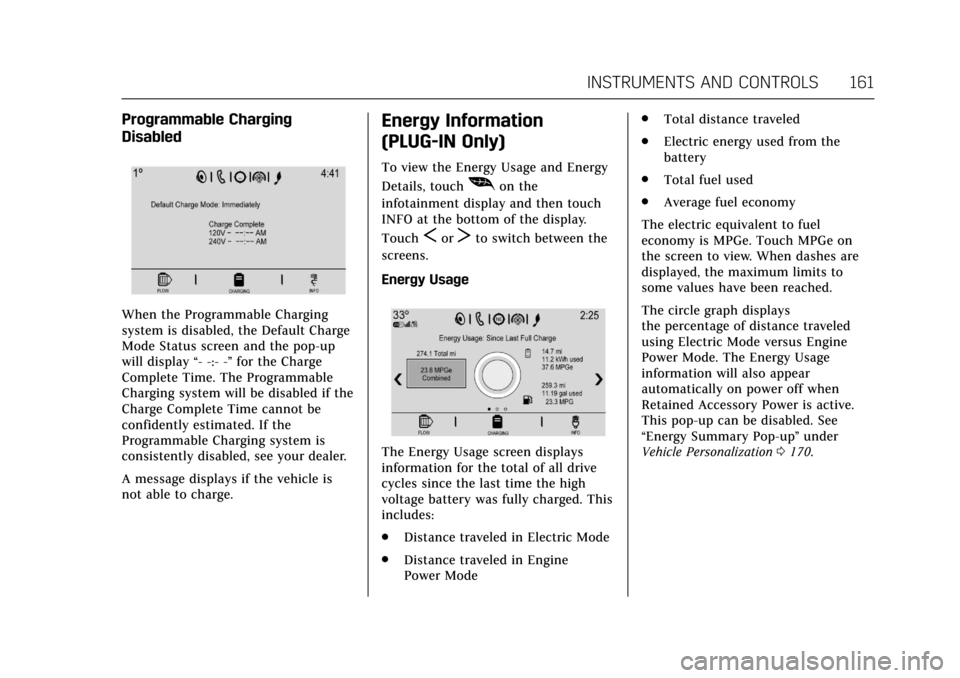
When the Programmable Charging
system is disabled, the Default Charge
Mode Status screen and the pop-up
will display“- -:- -”for the Charge
Complete Time. The Programmable
Charging system will be disabled if the
Charge Complete Time cannot be
confidently estimated. If the
Programmable Charging system is
consistently disabled, see your dealer.
A message displays if the vehicle is
not able to charge.
Energy Information
(PLUG-IN Only)
To view the Energy Usage and Energy
Details, touch
[on the
infotainment display and then touch
INFO at the bottom of the display.
Touch
SorTto switch between the
screens.
Energy Usage
The Energy Usage screen displays
information for the total of all drive
cycles since the last time the high
voltage battery was fully charged. This
includes:
. Distance traveled in Electric Mode
. Distance traveled in Engine
Power Mode .
Total distance traveled
. Electric energy used from the
battery
. Total fuel used
. Average fuel economy
The electric equivalent to fuel
economy is MPGe. Touch MPGe on
the screen to view. When dashes are
displayed, the maximum limits to
some values have been reached.
The circle graph displays
the percentage of distance traveled
using Electric Mode versus Engine
Power Mode. The Energy Usage
information will also appear
automatically on power off when
Retained Accessory Power is active.
This pop-up can be disabled. See
“Energy Summary Pop-up ”under
Vehicle Personalization 0170.