2018 BUICK LACROSSE open
[x] Cancel search: openPage 10 of 362

Buick LaCrosse Owner Manual (GMNA-Localizing-U.S./Canada-10999169) -
2018 - crc - 3/28/17
In Brief 9
Canceling a Remote Start
To cancel a remote start, do one of
the following:
.Press and hold
/until the
parking lamps turn off.
. Turn on the hazard warning
flashers.
. Turn the vehicle on and then off.
See Remote Vehicle Start 034.
Door Locks
To lock or unlock the doors:
.
From inside the vehicle, use the
power door lock controls. Pull
once on the door handle to
unlock it, and a second time to
open it.
. From outside, press
QorKon
the Remote Keyless Entry (RKE)
transmitter, or use the key in the
door. The key cylinder is
covered with a cap. See Remote
Keyless Entry (RKE) System
Operation 028.
See Door Locks 036.
Power Door Locks
The power door lock controls are on
the front door panels.
K:Press to unlock all doors.
Q: Press to lock all doors.
See Power Door Locks 038.
Keyless Access
The RKE transmitter must be within
1 m (3 ft) of the door being opened.
Press the button on the door handle
to open. See “Keyless Access
Operation” underRemote Keyless
Entry (RKE) System Operation 028.
Trunk Release
To open the trunk from outside the
vehicle, press
Xtwice quickly on
the Remote Keyless Entry (RKE)
transmitter.
Press the bottom of the emblem
above the license plate when all
doors are unlocked.
To open the trunk from inside the
vehicle, press
|on the driver
door when the vehicle is off or in
P (Park). See Trunk040.
Page 11 of 362
Buick LaCrosse Owner Manual (GMNA-Localizing-U.S./Canada-10999169) -
2018 - crc - 3/28/17
10 In Brief
Windows
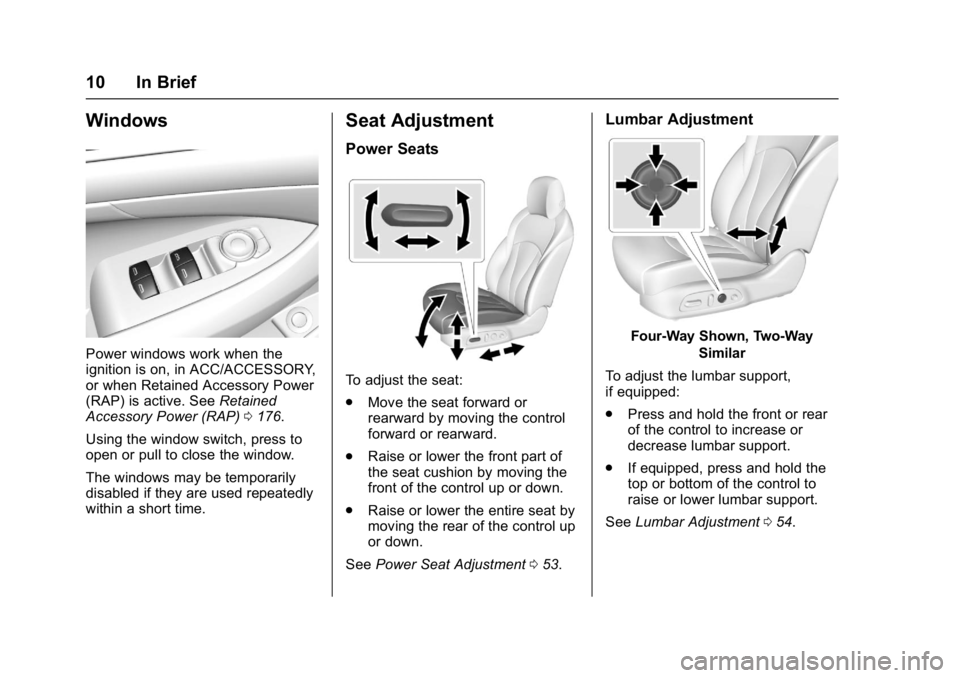
Power windows work when the
ignition is on, in ACC/ACCESSORY,
or when Retained Accessory Power
(RAP) is active. SeeRetained
Accessory Power (RAP) 0176.
Using the window switch, press to
open or pull to close the window.
The windows may be temporarily
disabled if they are used repeatedly
within a short time.
Seat Adjustment
Power Seats
To adjust the seat:
. Move the seat forward or
rearward by moving the control
forward or rearward.
. Raise or lower the front part of
the seat cushion by moving the
front of the control up or down.
. Raise or lower the entire seat by
moving the rear of the control up
or down.
See Power Seat Adjustment 053.
Lumbar Adjustment
Four-Way Shown, Two-Way
Similar
To adjust the lumbar support,
if equipped:
. Press and hold the front or rear
of the control to increase or
decrease lumbar support.
. If equipped, press and hold the
top or bottom of the control to
raise or lower lumbar support.
See Lumbar Adjustment 054.
Page 16 of 362

Buick LaCrosse Owner Manual (GMNA-Localizing-U.S./Canada-10999169) -
2018 - crc - 3/28/17
In Brief 15
Press the control forward or
rearward to move the steering wheel
closer or away from you.
Do not adjust the steering wheel
while driving.
Interior Lighting
Dome Lamps
The dome lamp controls are in the
overhead console.
To operate, press the following
buttons:
jOFF :Press to turn off the
dome lamps when a door is open.
An indicator light on the button will turn on when the dome lamp
override is activated. Press
j
OFF again to deactivate this feature
and the indicator light will turn off.
The dome lamps will come on when
doors are opened.
+
ON/OFF : Press to turn the dome
lamps on manually.
Reading Lamps
There are front and rear reading
lamps.
The front reading lamps are in the
overhead console. Press the lamp lenses to turn the
front reading lamps on or off.
The rear reading lamps are over the
rear passenger doors.
Press the lamp lenses to turn the
rear reading lamps on or off.
For more information on interior
lighting, see
Instrument Panel
Illumination Control 0148.
Page 20 of 362

Buick LaCrosse Owner Manual (GMNA-Localizing-U.S./Canada-10999169) -
2018 - crc - 3/28/17
In Brief 19
*:Press to disengage cruise
control without erasing the set
speed from memory.
See Cruise Control 0193 and
Adaptive Cruise Control 0195 (if
equipped).
Driver Information
Center (DIC)
The DIC display is in the instrument
cluster. It shows the status of many
vehicle systems.
yorz: Press to move up or
down in a list.
SorT: PressSto open
application menus on the left. Press
Tto open interaction menus on the
right.
V: Press to open a menu or select
a menu item. Press and hold to
reset values on certain screens.
See Driver Information Center (DIC)
0 126.
Forward Collision Alert
(FCA) System
If equipped, FCA may help avoid or
reduce the harm caused by
front-end crashes. FCA provides a
green indicator,
V, when a vehicle
is detected ahead. This indicator
displays amber if you follow a
vehicle much too closely. When
approaching a vehicle ahead too
quickly, FCA provides a flashing red
alert on the windshield and rapidly
beeps or pulses the driver seat.
See Forward Collision Alert (FCA)
System 0208.
Forward Automatic
Braking (FAB)
If the vehicle has Adaptive Cruise
Control (ACC), it also has FAB,
which includes Intelligent Brake
Assist (IBA). When the system
detects a vehicle ahead in your path
that is traveling in the same
direction that you may be about to
crash into, it can provide a boost to
braking or automatically brake the
vehicle. This can help avoid or
lessen the severity of crashes when
driving in a forward gear.
See Forward Automatic Braking
(FAB) 0210.
Front Pedestrian Braking
(FPB) System
If equipped, the FPB system may
help avoid or reduce the harm
caused by front-end crashes with
nearby pedestrians when driving in
a forward gear. FPB displays an
amber indicator,
~, when a nearby
pedestrian is detected directly
ahead. When approaching a
detected pedestrian too quickly,
Page 22 of 362

Buick LaCrosse Owner Manual (GMNA-Localizing-U.S./Canada-10999169) -
2018 - crc - 3/28/17
In Brief 21
Automatic Parking
Assist (APA)
If equipped, the APA system helps
to search for and maneuver the
vehicle into parallel or perpendicular
parking spots using automatic
steering, DIC displays, and beeps.
When the vehicle speed is below
30 km/h (18 mph), press
Oto
enable the system.
See “Automatic Parking Assist
(APA)” underAssistance Systems
for Parking or Backing 0204.
Power Outlets
The 12-volt power outlets can be
used to plug in electrical equipment,
such as a cell phone or MP3 player.
The vehicle has three power outlets:
.
Under the front of the center
console
. Inside the center console
storage
. On the rear of the center
console
Open the protective cover to use the
power outlet.
The outlet is powered when the
ignition is on or in ACC/
ACCESSORY, or until the driver
door is opened within 10 minutes of
turning off the vehicle. See Retained
Accessory Power (RAP) 0176.
See Power Outlets 0106.Universal Remote System
If equipped, this system provides a
way to replace up to three remote
control transmitters used to activate
devices such as garage door
openers, security systems, and
home automation devices.
Read the instructions completely
before attempting to program the
Universal Remote system. Because
of the steps involved, it may be
helpful to have another person
available to assist with programming
the Universal Remote system.
See Universal Remote System
0 140.
Page 23 of 362
Buick LaCrosse Owner Manual (GMNA-Localizing-U.S./Canada-10999169) -
2018 - crc - 3/28/17
22 In Brief
Sunroof
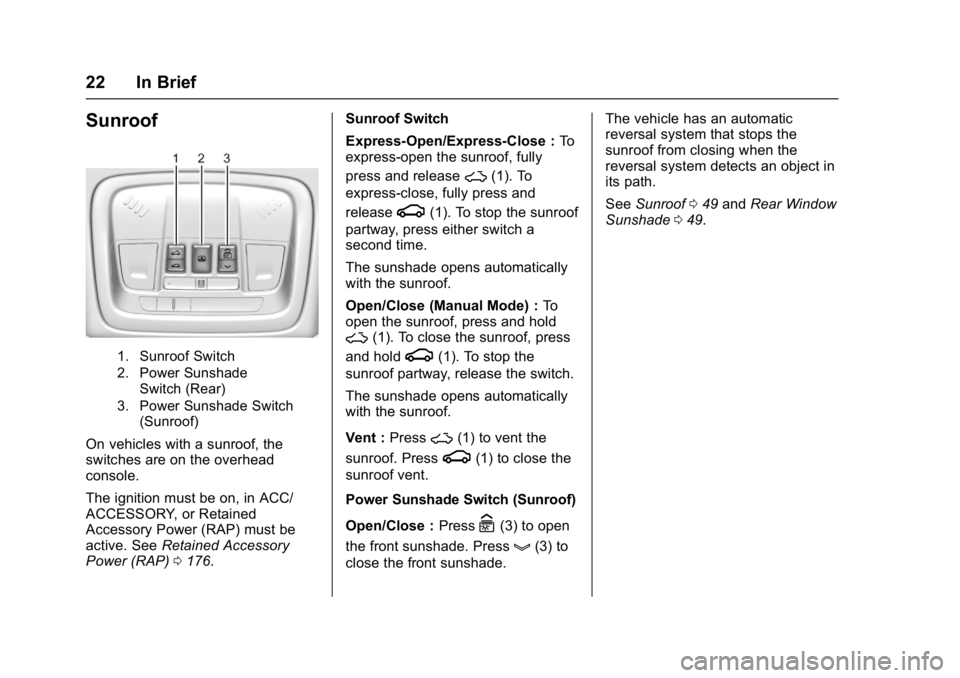
1. Sunroof Switch
2. Power SunshadeSwitch (Rear)
3. Power Sunshade Switch (Sunroof)
On vehicles with a sunroof, the
switches are on the overhead
console.
The ignition must be on, in ACC/
ACCESSORY, or Retained
Accessory Power (RAP) must be
active. See Retained Accessory
Power (RAP) 0176. Sunroof Switch
Express-Open/Express-Close :
To
express-open the sunroof, fully
press and release
~(1). To
express-close, fully press and
release
g(1). To stop the sunroof
partway, press either switch a
second time.
The sunshade opens automatically
with the sunroof.
Open/Close (Manual Mode) : To
open the sunroof, press and hold
~(1). To close the sunroof, press
and hold
g(1). To stop the
sunroof partway, release the switch.
The sunshade opens automatically
with the sunroof.
Vent : Press
~(1) to vent the
sunroof. Press
g(1) to close the
sunroof vent.
Power Sunshade Switch (Sunroof)
Open/Close : Press
C(3) to open
the front sunshade. Press
g(3) to
close the front sunshade. The vehicle has an automatic
reversal system that stops the
sunroof from closing when the
reversal system detects an object in
its path.
See
Sunroof 049 and Rear Window
Sunshade 049.
Page 30 of 362

Buick LaCrosse Owner Manual (GMNA-Localizing-U.S./Canada-10999169) -
2018 - crc - 3/28/17
Keys, Doors, and Windows 29
Q:Press to lock all doors.
The turn signal indicators may flash
and/or the horn may sound on the
second press to indicate locking.
See Vehicle Personalization 0133.
If the driver door is open when
Qis
pressed and enabled through
vehicle personalization, all doors will
lock and the driver door will
immediately unlock.
If the passenger door is open when
Qis pressed, all doors lock.
Pressing
Qmay also arm the
theft-deterrent system. See Vehicle
Alarm System 042.
K:Press to unlock the driver door.
Press again within five seconds to
unlock all doors. The RKE
transmitter can be programmed to
unlock all doors on the first button
press. See Vehicle Personalization
0 133.
The turn signal indicators may flash
to indicate unlocking. See Vehicle
Personalization 0133.
Pressing
Kwill disarm the
theft-deterrent system. See Vehicle
Alarm System 042.
Memory seat positions may be
recalled when unlocking the vehicle.
See Memory Seats 055 and
Vehicle Personalization 0133.
X:Press twice quickly to release
the trunk.
7: Press and release to initiate
vehicle locator. The exterior lamps
flash and the horn chirps three
times.
Press and hold
7for at least
three seconds to sound the panic
alarm. The horn sounds and the turn signals flash for 30 seconds
until
7is pressed again or the
vehicle is started.
/: If equipped, pressQand
release and then immediately press
and hold
/for at least
four seconds to start the engine
from outside the vehicle using the
RKE transmitter. See Remote
Vehicle Start 034.
Keyless Access Operation
If equipped with a Keyless Access
system, it allows for locking and
unlocking the doors and accessing
the trunk without removing the RKE
transmitter from your pocket, purse,
briefcase, etc. The RKE transmitter
should be within 1 m (3 ft) of the
trunk or door being opened. If the
vehicle has this feature, there will be
buttons on the outside of the door
handles.
Keyless Access can be
programmed to unlock all doors on
the first unlock/lock button press
from the driver door. See Vehicle
Personalization 0133.
Page 31 of 362
Buick LaCrosse Owner Manual (GMNA-Localizing-U.S./Canada-10999169) -
2018 - crc - 3/28/17
30 Keys, Doors, and Windows
If equipped with memory seats, RKE
transmitters 1 and 2 are linked to
seating positions of memory 1 or 2.
SeeMemory Seats 055.
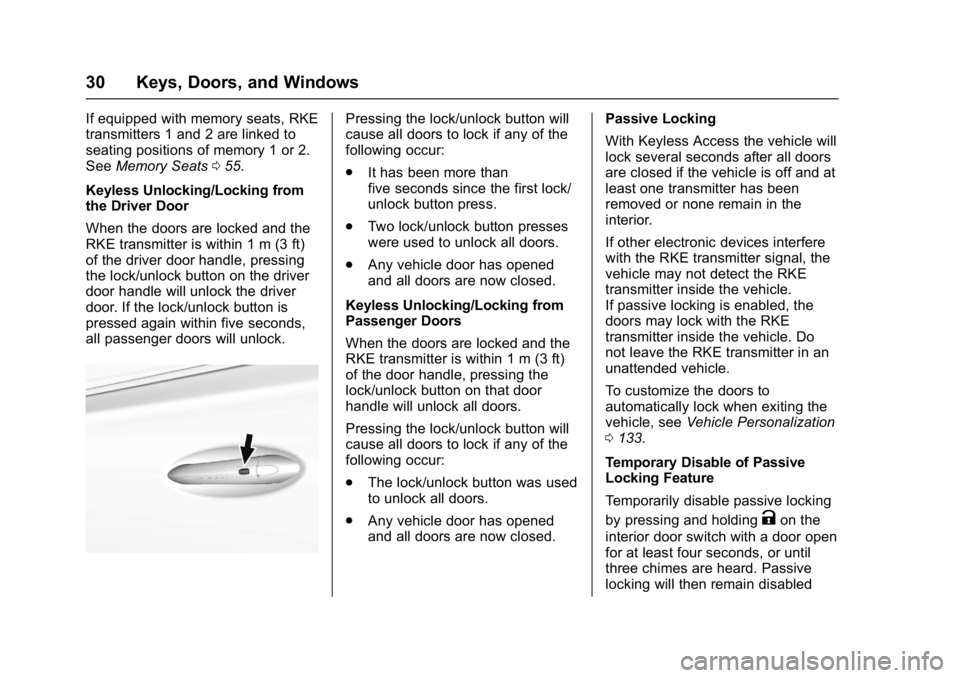
Keyless Unlocking/Locking from
the Driver Door
When the doors are locked and the
RKE transmitter is within 1 m (3 ft)
of the driver door handle, pressing
the lock/unlock button on the driver
door handle will unlock the driver
door. If the lock/unlock button is
pressed again within five seconds,
all passenger doors will unlock.Pressing the lock/unlock button will
cause all doors to lock if any of the
following occur:
. It has been more than
five seconds since the first lock/
unlock button press.
. Two lock/unlock button presses
were used to unlock all doors.
. Any vehicle door has opened
and all doors are now closed.
Keyless Unlocking/Locking from
Passenger Doors
When the doors are locked and the
RKE transmitter is within 1 m (3 ft)
of the door handle, pressing the
lock/unlock button on that door
handle will unlock all doors.
Pressing the lock/unlock button will
cause all doors to lock if any of the
following occur:
. The lock/unlock button was used
to unlock all doors.
. Any vehicle door has opened
and all doors are now closed. Passive Locking
With Keyless Access the vehicle will
lock several seconds after all doors
are closed if the vehicle is off and at
least one transmitter has been
removed or none remain in the
interior.
If other electronic devices interfere
with the RKE transmitter signal, the
vehicle may not detect the RKE
transmitter inside the vehicle.
If passive locking is enabled, the
doors may lock with the RKE
transmitter inside the vehicle. Do
not leave the RKE transmitter in an
unattended vehicle.
To customize the doors to
automatically lock when exiting the
vehicle, see
Vehicle Personalization
0 133.
Temporary Disable of Passive
Locking Feature
Temporarily disable passive locking
by pressing and holding
Kon the
interior door switch with a door open
for at least four seconds, or until
three chimes are heard. Passive
locking will then remain disabled