2018 BUICK LACROSSE ignition
[x] Cancel search: ignitionPage 8 of 362

Buick LaCrosse Owner Manual (GMNA-Localizing-U.S./Canada-10999169) -
2018 - crc - 3/28/17
In Brief 7
1.Air Vents 0157.
2. Exterior Lamp Controls 0144.
Fog Lamps 0147.
Instrument Panel Illumination
Control 0148.
3. Turn and Lane-Change Signals
0147.
4. Tap Shift Controls (If Equipped). See Manual Mode
0 185.
5. Instrument Cluster 0110.
Driver Information Center (DIC)
Display. See Driver Information
Center (DIC) 0126.
6. Windshield Wiper/Washer
0105.
7. Hazard Warning Flashers
0146.
8. Light Sensor. See Automatic
Headlamp System 0145.
9. Infotainment 0151.
10. Dual Automatic Climate Control
System 0152.
11. Traction Control/Electronic
Stability Control 0190. Parking Assist Button. See
Driver Assistance Systems
0
203.
SPORT Button (If Equipped).
See Selective Ride Control
0 192.
Lane Keep Assist (LKA) 0216
(If Equipped).
Automatic Parking Assist
Button (If Equipped). See
Driver Assistance Systems
0 203.
12. Shift Lever. See Automatic
Transmission 0181.
13. ENGINE START/STOP Button (Out of View). See Ignition
Positions 0170.
14. Steering Wheel Controls. See the infotainment manual.
Driver Information Center (DIC)
Controls. See Driver
Information Center (DIC) 0126.
15. Horn 0105.
16. Steering Wheel Adjustment
0104 (Out of View). 17.
Cruise Control 0193 (If
Equipped).
Adaptive Cruise Control 0195
(If Equipped).
Forward Collision Alert (FCA)
System 0208 (If Equipped).
Heated Steering Wheel 0104
(If Equipped).
18. Head-Up Display (HUD) 0129
(If Equipped).
19. Hood Release (Out of View). SeeHood 0230.
20. Front Storage.
21. Data Link Connector (DLC) (Out of View). See Malfunction
Indicator Lamp (Check Engine
Light) 0117.
22. Electric Parking Brake 0188.
Page 11 of 362
Buick LaCrosse Owner Manual (GMNA-Localizing-U.S./Canada-10999169) -
2018 - crc - 3/28/17
10 In Brief
Windows
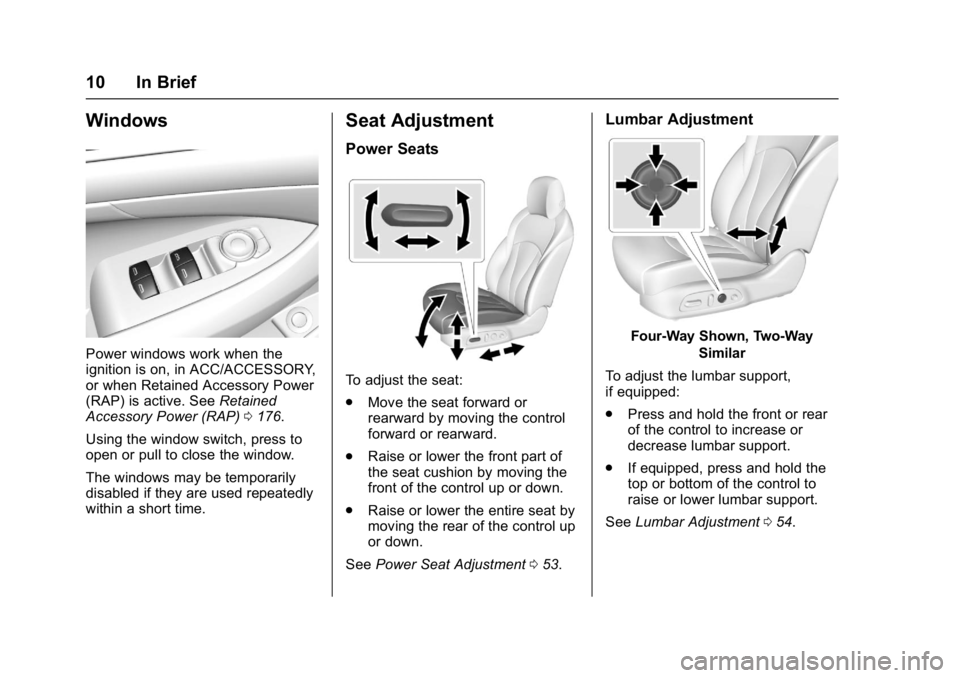
Power windows work when the
ignition is on, in ACC/ACCESSORY,
or when Retained Accessory Power
(RAP) is active. SeeRetained
Accessory Power (RAP) 0176.
Using the window switch, press to
open or pull to close the window.
The windows may be temporarily
disabled if they are used repeatedly
within a short time.
Seat Adjustment
Power Seats
To adjust the seat:
. Move the seat forward or
rearward by moving the control
forward or rearward.
. Raise or lower the front part of
the seat cushion by moving the
front of the control up or down.
. Raise or lower the entire seat by
moving the rear of the control up
or down.
See Power Seat Adjustment 053.
Lumbar Adjustment
Four-Way Shown, Two-Way
Similar
To adjust the lumbar support,
if equipped:
. Press and hold the front or rear
of the control to increase or
decrease lumbar support.
. If equipped, press and hold the
top or bottom of the control to
raise or lower lumbar support.
See Lumbar Adjustment 054.
Page 12 of 362

Buick LaCrosse Owner Manual (GMNA-Localizing-U.S./Canada-10999169) -
2018 - crc - 3/28/17
In Brief 11
Massage
If equipped, the ignition must be on
to use the massage feature.
If equipped, press the massage
button to use the massage feature.
To stop massage, press this button
again.
The massage feature will turn off
after approximately 10 minutes.
Press the massage button to restart
the massage feature.
Reclining Seatbacks
Power Reclining Seatbacks
.Tilt the top of the control
rearward to recline.
. Tilt the top of the control forward
to raise.
See Reclining Seatbacks 054.
Memory Features
If equipped, memory seats allow two
drivers to store and recall their
unique seat positions for driving the
vehicle, and a shared exit position
for getting out of the vehicle. Other
feature positions may also be set,
such as power mirrors and power
steering wheel, if equipped. Memory
positions are linked to RKE
transmitter 1 or 2 for automatic
memory recalls.
Before storing, adjust all available
memory feature positions. Turn the
ignition on and then press and
release SET; a beep will sound.
Page 13 of 362
Buick LaCrosse Owner Manual (GMNA-Localizing-U.S./Canada-10999169) -
2018 - crc - 3/28/17
12 In Brief
Then immediately press and hold 1,
2, or
B(Exit) on the driver door
until two beeps sound. To manually
recall these positions, press and
hold 1, 2, or
Buntil the saved
position is reached.
When Auto Memory Recall is
enabled in the personalization
menu, positions previously stored to
memory buttons 1 and 2 are
recalled when the ignition is
changed from OFF to ON/RUN or
ACC/ACCESSORY.
When Easy Exit Options is enabled
in the personalization menu, the
feature automatically recalls the
previously stored exit position when
exiting the vehicle. See Memory
Seats 055.
Heated and Ventilated
Seats
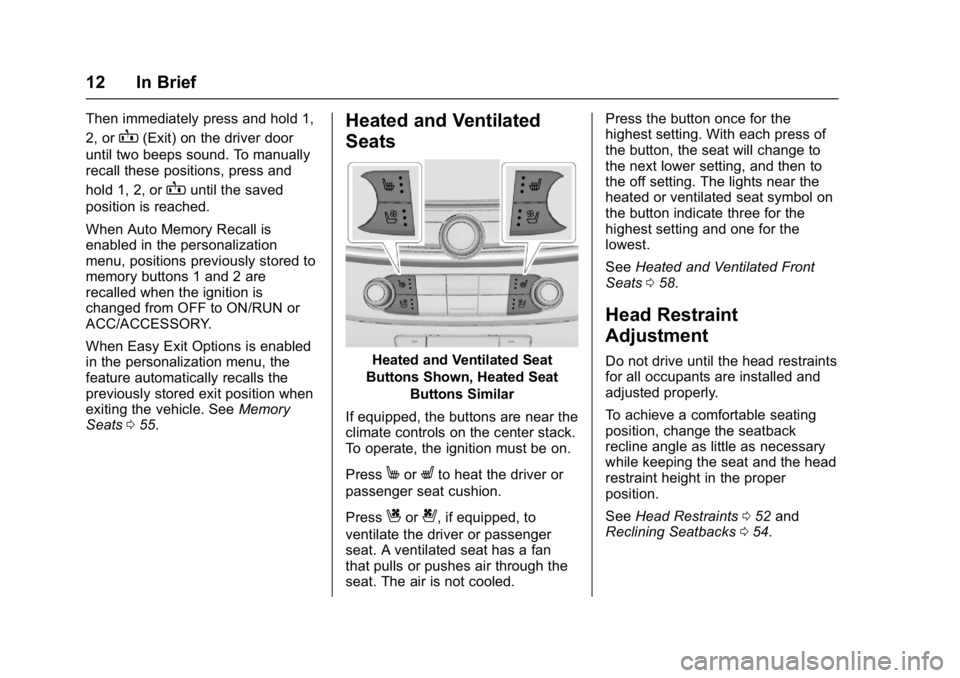
Heated and Ventilated Seat
Buttons Shown, Heated Seat Buttons Similar
If equipped, the buttons are near the
climate controls on the center stack.
To operate, the ignition must be on.
Press
MorLto heat the driver or
passenger seat cushion.
Press
Cor{, if equipped, to
ventilate the driver or passenger
seat. A ventilated seat has a fan
that pulls or pushes air through the
seat. The air is not cooled. Press the button once for the
highest setting. With each press of
the button, the seat will change to
the next lower setting, and then to
the off setting. The lights near the
heated or ventilated seat symbol on
the button indicate three for the
highest setting and one for the
lowest.
See
Heated and Ventilated Front
Seats 058.
Head Restraint
Adjustment
Do not drive until the head restraints
for all occupants are installed and
adjusted properly.
To achieve a comfortable seating
position, change the seatback
recline angle as little as necessary
while keeping the seat and the head
restraint height in the proper
position.
See Head Restraints 052 and
Reclining Seatbacks 054.
Page 17 of 362

Buick LaCrosse Owner Manual (GMNA-Localizing-U.S./Canada-10999169) -
2018 - crc - 3/28/17
16 In Brief
Exterior Lighting
The exterior lamp control is on the
instrument panel to the left of the
steering column.
There are four positions.
O:Turns the exterior lamps off and
deactivates the AUTO mode. Turn
to
Oagain to reactivate the
AUTO mode.
In Canada, the headlamps will
automatically reactivate when the
vehicle is shifted out of P (Park).
AUTO : Turns the exterior lamps on
and off automatically depending on
outside lighting.
;: Turns on the parking lamps
including all lamps, except the
headlamps.
5: Turns on the headlamps
together with the parking lamps and
instrument panel lights.
See:
. Exterior Lamp Controls 0144.
. Daytime Running Lamps (DRL)
0145.
Windshield Wiper/Washer
With the ignition on or in ACC/
ACCESSORY, move the windshield
wiper lever to select the wiper
speed.
HI : Use for fast wipes.
LO : Use for slow wipes.
INT : Use for intermittent wipes. To
adjust wipe frequency, turn the band
up for more frequent wipes or down
for less frequent wipes.
OFF : Use to turn the wipers off.
1x : For a single wipe, briefly move
the wiper lever down. For several
wipes, hold the wiper lever down.
f: Pull the windshield wiper
lever toward you to spray windshield
washer fluid and activate the wipers.
See Windshield Wiper/Washer
0 105.
Page 22 of 362

Buick LaCrosse Owner Manual (GMNA-Localizing-U.S./Canada-10999169) -
2018 - crc - 3/28/17
In Brief 21
Automatic Parking
Assist (APA)
If equipped, the APA system helps
to search for and maneuver the
vehicle into parallel or perpendicular
parking spots using automatic
steering, DIC displays, and beeps.
When the vehicle speed is below
30 km/h (18 mph), press
Oto
enable the system.
See “Automatic Parking Assist
(APA)” underAssistance Systems
for Parking or Backing 0204.
Power Outlets
The 12-volt power outlets can be
used to plug in electrical equipment,
such as a cell phone or MP3 player.
The vehicle has three power outlets:
.
Under the front of the center
console
. Inside the center console
storage
. On the rear of the center
console
Open the protective cover to use the
power outlet.
The outlet is powered when the
ignition is on or in ACC/
ACCESSORY, or until the driver
door is opened within 10 minutes of
turning off the vehicle. See Retained
Accessory Power (RAP) 0176.
See Power Outlets 0106.Universal Remote System
If equipped, this system provides a
way to replace up to three remote
control transmitters used to activate
devices such as garage door
openers, security systems, and
home automation devices.
Read the instructions completely
before attempting to program the
Universal Remote system. Because
of the steps involved, it may be
helpful to have another person
available to assist with programming
the Universal Remote system.
See Universal Remote System
0 140.
Page 23 of 362
Buick LaCrosse Owner Manual (GMNA-Localizing-U.S./Canada-10999169) -
2018 - crc - 3/28/17
22 In Brief
Sunroof
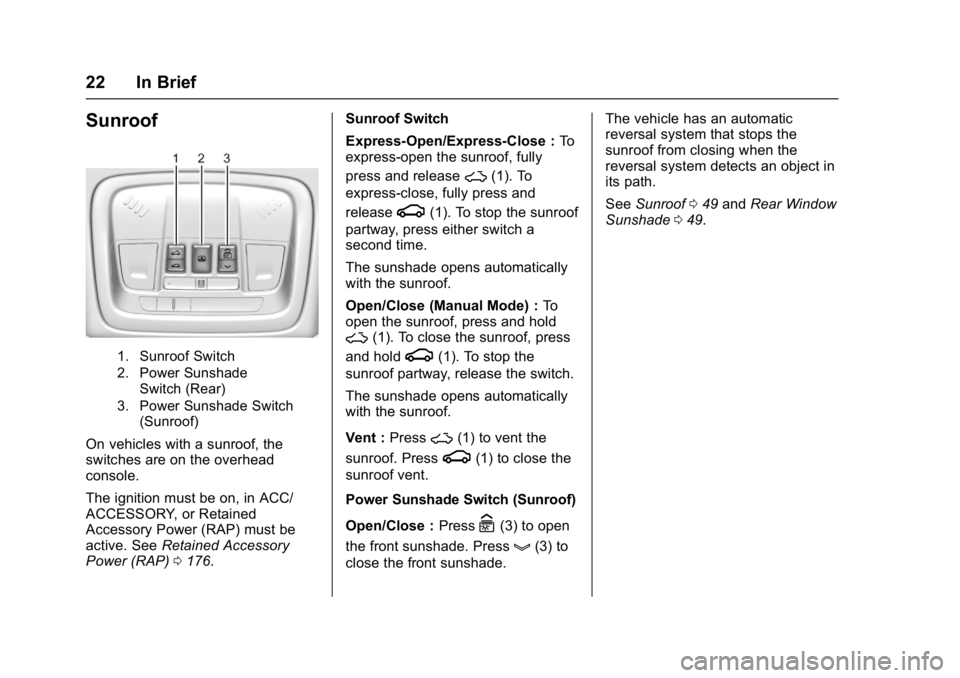
1. Sunroof Switch
2. Power SunshadeSwitch (Rear)
3. Power Sunshade Switch (Sunroof)
On vehicles with a sunroof, the
switches are on the overhead
console.
The ignition must be on, in ACC/
ACCESSORY, or Retained
Accessory Power (RAP) must be
active. See Retained Accessory
Power (RAP) 0176. Sunroof Switch
Express-Open/Express-Close :
To
express-open the sunroof, fully
press and release
~(1). To
express-close, fully press and
release
g(1). To stop the sunroof
partway, press either switch a
second time.
The sunshade opens automatically
with the sunroof.
Open/Close (Manual Mode) : To
open the sunroof, press and hold
~(1). To close the sunroof, press
and hold
g(1). To stop the
sunroof partway, release the switch.
The sunshade opens automatically
with the sunroof.
Vent : Press
~(1) to vent the
sunroof. Press
g(1) to close the
sunroof vent.
Power Sunshade Switch (Sunroof)
Open/Close : Press
C(3) to open
the front sunshade. Press
g(3) to
close the front sunshade. The vehicle has an automatic
reversal system that stops the
sunroof from closing when the
reversal system detects an object in
its path.
See
Sunroof 049 and Rear Window
Sunshade 049.
Page 24 of 362

Buick LaCrosse Owner Manual (GMNA-Localizing-U.S./Canada-10999169) -
2018 - crc - 3/28/17
In Brief 23
eAssist Features
eAssist Overview
Vehicles with the 2.5L engine have
eAssist, with additional features that
contribute to increased efficiency.
Vehicles with eAssist have an
automatic engine Stop/Start feature.
This feature saves fuel by shutting
the engine off when the vehicle is
stopped. When the engine shuts off
automatically, all the accessories
will continue to operate normally. In
very hot or cold conditions, the
engine may not shut off. See
Starting the Engine0172.
There are two air conditioning
settings available. The MAX setting
maximizes cabin comfort. The ECO
setting maximizes efficiency
allowing more frequent, and longer
engine stops than the MAX setting.
See Dual Automatic Climate Control
System 0152.
Vehicles with eAssist include an
AUTO STOP indicator on the
tachometer. See Instrument Cluster
0 110. The eAssist system uses a high
voltage battery, which is cooled with
air drawn from the vehicle interior.
The cold air intake for the battery is
under the leading edge of the rear
seat. The exhaust for warm air is in
the trunk. Do not cover the intake or
exhaust. See
Battery - North
America 0247.
High Voltage Safety
Information
Vehicles with eAssist have a
standard 12-volt battery and a high
voltage battery. Only a trained
service technician with the proper
knowledge and tools should inspect,
test, or replace the high voltage
battery. See your dealer if the high
voltage battery needs service.
In emergency situations, first
responders can cut the two clearly
labeled cut points in the engine
compartment to disable the high
voltage battery and air bag systems.
Do not cut the high voltage cable.
Automatic Engine Stop/
Start Feature
Vehicles with eAssist have an
automatic engine Stop/Start feature.
After the engine is started and has
reached operating temperature, this
feature may cause Auto Stop which
will turn the engine off when the
brake pedal is applied and the
vehicle comes to a complete stop.
When the brake pedal is released,
or the accelerator pedal is applied,
the engine will restart. The engine
will continue to run until the next
Auto Stop.
AUTO STOP on the tachometer
signifies that the engine is in Auto
Stop mode. See Tachometer0112.
Remember to put the transmission
in P (Park) and turn the ignition off
before exiting the vehicle.
See Starting the Engine 0172.