2018 AUDI TT ROADSTER change time
[x] Cancel search: change timePage 172 of 310

Media Problem Solution
Audi music interface* :
the portable For many cell phones or mobile devices, playback is not possi-
device is not recognized as a source. ble when the battery level is too low (less than 5% of its ca-
pacity) . The mobile device w ill only be recognized as a media
source in the MMI after connecting if the battery charge level
is sufficient .
Audi music interface* : malfunctions
The Bluetooth audio player function is switched on . Switch
dur ing audio p layback throug h an this
funct ion off
i::> page 175 when you are not using the
iPod/ iPhone.
Bluetooth audio player.
AUX input :
there is stat ic when con- When connecting and disconnecting, the External audio play-
necting and disconnect ing the AUX er source is al ready selected . Before connecting or disconnect-
connection cable. ing
the mobi le device, either m ute the device (see
<=:>page 177) or switch to a different audio source (for exam -
ple
i::> page 149, Opening the radio) .
Bluetooth audio player* /Wi-Fi audio Only one interface should be act ive ly used at a time to ensu re
player *: audio playback interfe re nc e. problem -free playback.
Wi-Fi audio player* : audio playback Aud io playback interference can occur on some cell phones if
interference. the Internet connection in the ve hicle was no t established
through the SIM card reader* on the MMI control panel and
the
mobile data option on the cell phone is sw itched on . De-
activate the
mobile data option on your cell phone.
Jukebox* : tracks on the imported When importing playlists, all of the files themselves must be
playlist are grayed out. imported
.
Jukebox*: imported tracks cannot be If you cannot find imported tracks in the media center, they
played or found. may not be supported. Only copy supported files
i::> page 168
to the Jukebox .
Wi-Fi audio player *: multiple devices Close the Audi MMI connect app on the connected devices
are connected to the Wi-Fi hotspot. A (for example, smartphones) that are not being used as the
media pla ye r (suc h as a smartphone) Wi-Fi audio player*. Likewise , close the UPn P serve r apps or
appears as the media source and can- t he media permissions on the integ rated UPnP/DLNA server.
not be changed. Connect the desired device as a Wi-Fi audio player*
<=:> page 158.
Online media *: connection fa iled be- To establish a connection to the MMI, the MMI connection
tween the MMI and the
Audi MMI switch must be switched on in the Audi MMI connect app sta-
connect app. tus screen .
Bluetooth audio player *: interference Playback interference can occur when using the Bluetooth au-
with track d isplay and audio p layback. dio player if a music player app from a third party provider is
open . Audi recommends using the integrated media player on
your Bluetoo th device (such as a smartphone) .
Wi-Fi hotspot*: your Wi-Fi device is
Make sure the network optimization functions are switched
disconnected from the Wi-Fi hotspot. off in the Wi- Fi settings or in the network settings for your
Wi-Fi device. For additiona l information refer to the user
guide for your W i-F i dev ice.
170
Page 173 of 310

Cl 00 ... N r--N ... 0 r--Vl 00
Audi smartphone interface
Setup
A ppl ies to : ve hicles w ith Audi smartpho ne inte rfa ce
You con connect your smortphone to the MMI us
ing the Audi smortphone interface . Certain con
tent on your smortphone is adopted to the Info
tainment system display while driving and con
be operated through the
MMI control panel .
Requirement:
The vehicle must be stat ionary and the ignition
must be switched on .
iPhone generation 5 or h igher w ith Lightning
connector and iOS 7 .1.2 operating system or h igher.
O r:
Smartphone with Android Auto app and Android
5 .0 Loll ipop operating system or higher.
.,. Connec t your sma rtphone to the Audi music in
terface
¢ page 161 using a USB adapte r
¢page 160, fig. 139 .
.. Select and confirm A ctivate Apple CarPlay or
Acti vate And roid Auto now .
.. Follow the system instruct ions.
.. Pay attention to any additiona l system prompts
on your smartphone if applicable .
If you chose not to use Apple CarP lay or Android
Auto when connecting your smartphone for the
first time, you can start the Audi smartphone in
terface later on using the
Connection manager.
.,. Se lect : I MENU I button > Audi smartphone in-
terfa ce
> Change to connection manager .
.. Connect your sma rtphone to the A udi music in
terface
¢ page 161 using a USB adapter
¢ page 160, fig. 139 .
.. Select and confirm Audi smartphone in t he
Connection manager ¢ page 174. You can se
l ect your smartphone in the list of devices that
are already paired
¢page 175.
.,. Follow the system instruct ions .
ll In prep arat io n at t he t im e of pr in tin g .
Aud i smartph one interfac e
@ Note
Always fo llow the information fo und in ¢ @ in
Wi-Fi hotspot on page 130.
(D Tips
-T he f unctions that can be used depend on
the fo llow ing factors, among others:
-the brand of your smartphone
-the vers io n of the ope rating system in
your smartphone
-the software ve rsion of the app used
-the USB adapter cab le an d correct connec -
tion
-your cell phone service provide r
-the customized se tt in g s on yo ur sm art-
phone
-O ne of t he factors above o r a com binat ion
o f any of them could cause you r sma rtphone
to be incompatib le wit h the Audi smart
phone interface. Compatibility cannot be
guaranteed for all types of smartphones.
For more informat ion and assistance, refe r
to the user guide and the man ufacturer of
your smartphone .
-If the connected smartphone has voice con
trol, you can operate you r smartp hon e usi ng
t he ex ter nal voice recognition system*
¢page 110.
-T he menu language show n in t he MMI is
based on t he sett ings in you r smartp ho ne.
-The time d isplayed in the MMI is based o n
t he settings in yo ur smartphone .
-Several M MI functions a re not avai lab le
w hen Apple Car Play or Andro id A uto is ac
t ive .
-You cannot co nnect any mob ile dev ices via
Bluetooth whe n an Apple CarPlay connec
tion is act ive.
-Whe n the App le CarPlay connection is ac
t ive,
Tag this song for iTunes*1
) is not ava il
able
¢page 150 .
171
Page 175 of 310
Cl 00 .-< N r-N .-< 0 r-Vl 00
System settings
Setting the date and
time
You can set the clock time manually or using the
CPS .
.. Select : IMENUI button> Settings> left control
button >
MMI settings > Date & time.
.. Or : select: IMENUI button> Vehicle> left con-
trol button >
Vehicle settings > Date & time .
Automatic setting
When this function is switched on~. the time
and date are automatically set.
Time
Requirement: the Automatic setting must be
switched
off .
Press the control knob. You can set the Time
manually by turning and pressing the control
knob.
Date
Requirement: the Automatic setting must be
switched
off.
Press the control knob . You can set the Date
manually by turning and press ing the control
knob.
Time zone
When selecting the appropriate time zone, a
sampling of countries in this zone will be listed .
Automatic time zone*
When this function is switched on~. the time
will automatically adjust to the corresponding
time zone.
Time format
If you select 24h , the clock will display, for ex
ample,
13:00. If you se lect AM/PM, the clock
will disp lay, for examp le,
1:00 PM.
Date format
I f you select DD.MM.YYYY , the date display will
show, for example,
31.08.2017 . If you select
MM/DD/YYYY , the date disp lay wi ll show, for ex-
System settings
ample, 08/31/2017. If you select YYYY-MM
DD ,
the date display will show, for example,
2017-08-31.
MMI settings
.. Select: IMENUI button> Settings > left control
button >
MMI settings .
Language
You can change the display language as well as
t h e la nguage for the voice guidance* and voice
recognition system*.
T he number of languages available depends on
the market .
Measurement units
The following measurement un its can be set de
pend ing on ava ilab ility:
Speed , Distance , Tem
perature , Fuel consumption , Volume , Pressure.
Tool tips
When this funct ion is switched on~. your MMI
shows you tips for input. The frequency of how
often it displays decreases w ith time . You can
switch
off the operating tips at any time .
Speech dialog system
Applies to: vehicles with voice recognition system
Command display: when this function is switch
ed
on~. the MMI will show you the possible
commands for voice input in the respective
menu. You can sw itch the funct ion
off at any
t ime .
Short dialog : when this function is sw itched on
~. a shorter form of the prompts is used . You
can switch the function
off at any time .
Speech dialog system volume: you can adjust
the volume of the prompts by turning the contro l
knob.
Individual speech training (only when the vehi
cle is stationary): you can adapt the voice recog
nition system to your voice or pronunciation in
order to improve the system's ability to recogn ize
your speech. Ind iv idual speech tra ining is com
prised of 20 speech entr ies that consist of com-
mands and sequences of numbers . You can
.,,_
173
Page 178 of 310

System settings
Select Invisible for t he MMI to not be v is ibl e to
othe r devices. Howeve r, it is still possib le to es
ta bli sh a B luetooth con nection with paired de
vices when the v is ibility is switched off . Se lect
Off to turn visibi lity off . Then a B luetooth con
nect io n is not possible .
-Bluetooth audio player : when this function is
switched on
g, t h e Blue tooth aud io player is
available as a so urce in t he
Media menu .
-Delete Bluetooth device : th e se lected cell
phone/mobile device is d isconnected from t he
MMI.
- Show Bluetooth profiles : you ca n Connect or
Disconnect the Handsfree profi le a nd the Di
rectory /contacts *
separately.
- Bluetooth audio player : switch th is function on
g to be a ble to selec t the B luetoo th a udio p lay
er as a source in t he M edia me nu.
-Bluetooth name : the MMI B luetoo th name (for
example ,,AUDI M MI 2017") is displayed and
can be changed .
W hen the function is switched on
g , the symbo l
@<=>page 102, fig . 110 appears in the Infotain
ment sys tem disp lay.
Online settings*
- Data connection settings :
see<=> page 130,
Configuring the data connection
- Data usage counter : th e amount of data pack
ets that a re sent and received throug h the MMI
is d isp layed. You can reset the data usage infor
mation to zero using the
Reset data counter
opt ion.
- Network status : the mobile netwo rk p rovider
for data se rvice as well as the network status
are disp layed .
Wi-Fi settings*
See <=> page 129, Wi -Fi hotspot.
SIM PIN settings*
- Automatic PIN entry:
when this funct ion is
swi tched on
g , th e S IM PIN is automatically
saved in the MMI after it is entered for t he first
time. The SI M PIN for four d ifferent SIM ca rds
can be saved i n the MMI. With the function
switched off, the cur rently stored SI M PIN i s
dele ted from the MMI. When the a utomat ic
176
P IN entry is swi tched on, the re a re no S IM P IN
prompts .
-Disable PIN query : when sw itche d on, there are
no SIM PIN queries . The a utomatic PIN entry is
not use d in this case .
-Change PIN : you can change the P IN on you r
SI M card . First ente r th e cur rent SI M PIN. T he
SI M PIN may on ly conta in digits 0 -9 . T he new
SI M PIN must be entered twice for security a nd
then it w ill be saved to the SI M card .
Apple CarPlay sound settings/ Android Auto
sound settings
App lies to : vehicles wit h Audi s m artph one interface
See<=> page 177.
About Apple CarPlay/ About Android Auto
App lies to : vehicles wi th Audi sma rtphone interface
Here you w ill find leg al inform ation reg arding
t h e use o f A pple Car Play o r And ro id Auto and in
fo rmat ion about devi ce -s p ecific data exc han ge.
Delete CarPlay device/Delete Android Auto
device
App lies to : vehicles wi th Audi s m artph one interface
Requirement: yo ur cell phone m ust not be con
necte d to the Au di music interface with a USB
adapter.
S e le ct :
Audi smartphone > a d evice from th e list
> righ t con trol button .
To re m ove your cell p ho ne from the list, se lect
a nd con firm
Delete CarPlay device or Delete An
droid Auto device .
© Tips
Some SIM cards do not allo w the SIM PIN
qu eri es to be sw itch ed off .
System update
.,. Selec t: !ME NUI butt on> Settings > left cont rol
bu tton >
System maintenance.
- System update :
slide the storage device with
t he upda te da ta into the a pprop ria te d rive
r=;, page 155. Selec t an d co nfirm t he drive>
Start update . The leng th of the p rocess de
pe nd s on the s ize of the up dat e.
Page 179 of 310
-Rese t driver in stallat ion: the selected media
driver package is reset to the settings at the
t ime of de livery.
- Ver sion inf orm ation : information on the MMI
software version and the navigat ion database *
software version is displayed. The
S oftwa re in
format io n
function a lso provides information
on the software contained in the MMI and the licens ing agreement .
Sound settings
The sound distribution and volume of the MMI
can be adjusted individually . The settings depend
on vehicle equipment.
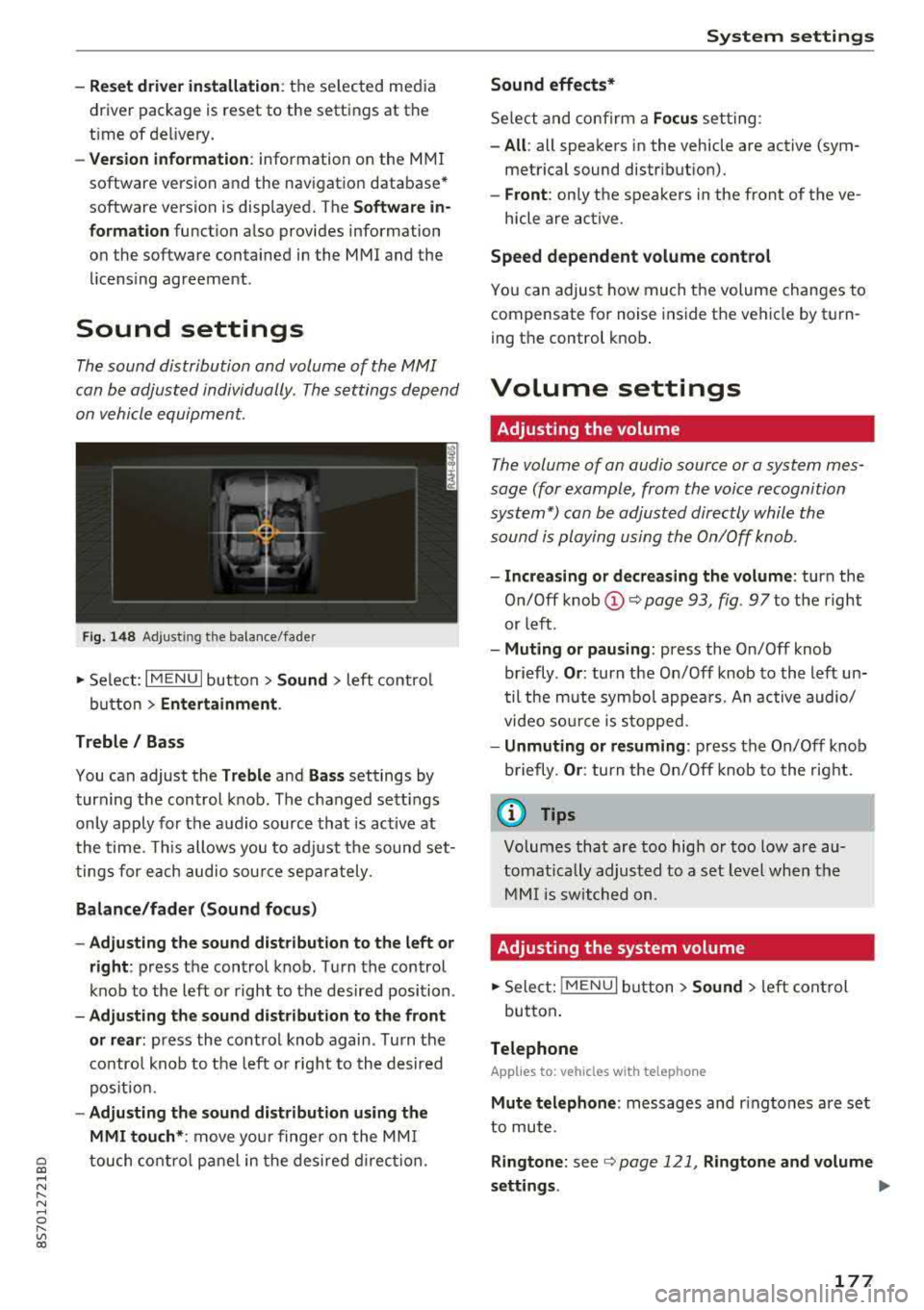
F ig . 1 48 Adj ustin g the balance /fade r
~ Select : I MENU I button >Sound > left contro l
button
> Ent ertainm ent .
Treble / Bass
You can adjust the Treble and Ba ss settings by
turn ing t he control knob . The changed sett ings
only apply for the audio source that is act ive at
the time. This allows you to ad just the sound set
t ings for each audio sour ce separately .
Bal ance /fader (Sound focus )
- Adju sting th e sound d istribution to the left or
right :
press the control knob . Turn the control
knob to the left or right to the desired position .
-Ad ju sting th e sound d istribution to the front
or rear :
press the control knob again . Turn the
contro l knob to the left o r right to the desired
pos ition.
- Adjusting the so und d istribution u sing th e
MMI touch* :
move your finger on the MM I
~ touch contro l panel in the desired d irec tion.
.... N ,....
N ...... 0 ,....
Vl co
S ys tem settings
Sound effects*
Select and confirm a Focu s setting:
-All : all speakers in the vehicle are active (sym
metrical sound distribut ion).
- Front : only the speakers in the front of the ve -
hicle are active .
Speed depend ent v olume control
You can adjust how much t he volume changes to
compensate for noise inside the vehicle by turn
ing t he control knob .
Volume settings
Adjusting the volume
The volume of an audio source or a system mes
sage (for example, from the voice recognition
system*) can be adjusted directly while the
sound is playing using the On/Off knob .
-Incr easing or decr eas ing the volume : turn the
O n/Off knob
(D ¢ page 93 , fig. 97 to t he right
or left .
-Muting or p au sing : press the On/Off knob
briefly .
Or: turn the On/Off knob to the left un
til the mute symbol appea rs. An active audio/
video so urce is stopped.
- Unmuting o r re suming : press the On/Off knob
briefly .
Or: turn the O n/Off knob to the right.
(D Tips
Volumes that are too high or too low are au
tomatically adjus ted to a set level when the
MM I is switched on.
Adjusting the system volume
~ Sele ct: ! MENU I button> Sound> le ft control
button .
Telephone
Applies to: vehicles with telephone
Mute t elephone : messages and r ingtones are set
to mute.
Ringtone : see ¢ page 121, Rin gton e and volume
s ettings .
.,.
177
Page 209 of 310

Cl 00 .-< N r-N .-< 0 r-Vl 00
met, be sure to check the light regularly to make
certain that the
PASSENGER AIR BAG OFF "1;
light stays on continuously whenever the ignition
is on. If the
PASSENGER AIR BAG OFF "1; light
does not appear on and does not stay on all the
time, stop as soon as it is safe to do so and
- reactivate the system by turning the ign ition
off for more than 4 seconds and then turning it
on again;
- remove and reinstall the child restraint. Make
sure that the child restraint is properly instal led and that the safety belt for the front pas
senger seat has been correctly routed through
the child restraint as descr ibed in the child re
straint manufacturer's i nstr uctions;
- make sure that the convertible locking retrac
tor on the safety be lt for the front passenger
seat has bee n activated and that the safety belt
has been pulled tight.
- make sure that no electrical device (such as a
laptop, CD player, elect ronic games dev ice,
power inverter or seat heater for child seats) is
placed or used on the front passenger seat if
the device is connected to the 12 ·vo lt socket or
the cigarette lighter socket;
- make sure that no seat heater has been retro
fitted or otherwise added to the front passen
ger seat;
- make sure that nothing can interfere with the
safety belt buckles and that they are not ob
structed;
- make sure that there are no wet objects (such
as a wet towel) and no water or other liquids on
the front passenger seat cush ion.
If the PASSENGER AIR BAG OFF~; light still
does not come on ...
If the PASSENGER AIR BAG OFF "1; light still
does not come on and does not stay on continu
ously (when the ignition is sw itched on),
- take the child restraint off the front passenger
seat and have the airbag system inspected by
your Audi dealer immed iate ly.
The PASSENGER AIR BAG OFF ~; light
should NOT come on ...
The PASSENGER AIR BAG OFF ~; light should
NOT come on when the ign ition is on and an
Airbag system
adult is sitting in a proper seating position on the
front passenger seat. If the
PASSENGER AIR
BAG
OFF ~; light comes on and stays on whi le
driv ing, under these c ircumstances, make sure
that:
- the adult on the front passenger seat is proper
ly seated on the center of the seat cushion w ith
his or her back up against the backrest and the
backrest is not reclined,
- the adult is not taking weight off the seat by holding on to the passenger assist handle
above the front passenger door or support ing
their weight on the armrest,
- the safety belt is being properly worn and that
there is not a lot of slack in the safety belt web
b ing,
- there are no aftermarket seat covers or cush
ions or other things (such as blankets) on the
front passenger seat that might cause the ca
pacitive passenge r detection system to miscal
culate e lectr ica l capacitance.
Important safety instructions on
monitoring the Advanced Airbag System
A WARNING
-
-If the status of the Advanced Airbag System
has changed while the vehicle is moving, the
PASSENGER AIR BAG OFF "1; ON@ light
blinks for about 5 seconds to catch the driv
er 's attention. If this happens, always stop
as soon as it is safe to do so and check the
steps described above .
- If the
PASSENGER AIR BAG OFF "1; light
does not go off when an adult who is not
very small is sitting on the front passenger
seat after taking the steps described above,
have the airbag system inspected by your
author ized Audi dealer before transporting
anyone on the front passenger seat.
A WARNING
-
An air bag system that is not functioning prop
erly cannot provide supplemental protection
in a fronta l crash.
- If the airbag indicator light <=> page 14
comes when the vehicle is being used, have
207
Page 220 of 310

Child sa fety
Advanced front airbag system and children
Your veh icle is equipped w ith a front "Advanced
A irbag System" in comp liance w it h United States
F edera l Motor Vehicle Safety Standard ( FMVSS)
208, as well as Canada Motor Vehicle Safety
Standard (CMVSS) 208 as applicable at the time
your vehicle was manufactured.
The Advanced Airbag system in your veh icle has
been certified to meet the " low-risk" require
ments for 3- and 6-year old children on the pas
senger side and small adults on the driver side.
The low risk deployment criteria are intended to
reduce the risk of injury through interaction with
the airbag that can occur, for example, by being
too close to the steering wheel and instrument
panel when the a irbag inflates. In addit ion, the
system has been certified to comply w ith the
" su ppress io n" req uirements of the Safety S tand
ard, to tu rn off the front airbag for infants up to
12 months who are restrained on the front pas
senger seat in child restraints that are listed in
the Standard.
E ven tho ugh yo ur vehicle is equipped with an
Ad a
vanced Airbag system, a chi ld should a lways ride
in the seat proper ly restrained for its age and
size. The airbag on the passenger side makes the
front seat a potentially dangerous p lace for a
child to r ide . The front seat is not the safest place
for a child in a forward-facing child safety seat .
It
can be a very dange rous place for a n infant or a
larger child in a rearward-fac ing seat.
The vehicle's Advanced Airbag System has a ca
pac itive passenger detect ion system in the front
passenger seat cush ion that ca n detect the pres
ence of a baby or a child in a ch ild restraint sys
tem on t his seat .
The capac it ive passenger detect ion system regis
ters the changes that result in an electr ical field
when a c hild, a child restra int, and a baby blanket
a re on the front passenge r seat. The change in
t he meas ured capacitance due to t he p resence o f
a child, a chi ld restraint, and a baby b lanket on
the front passenger seat is re lated to the chi ld
restraint system resting on the seat . The meas
ured capacitance of a ch ild restraint system var-
218
ies depending on the type of system and specific
make and mode l.
The elect rical capac ita nce of the va rious types,
makes, and models of child restra in ts speci fied
by the U.S . National Highway Tra ffic Safety Ad
ministration (NHTSA) in the relevant safety
standard are stored in the Advanced Airbag Sys
tem control unit together with the capacitances
typ ica l of infants and a 1-year old child. When a
c hi ld restraint is used on the front passenger
seat w it h a typical 1 year-old infant, t he Ad
vanced Airbag System compares the capacitance measured by the capacitive passenge r detect ion
system wi th the data stored in the e lec tronic co n
tro l unit .
Child restraints and Advanced front airbag
system
Regardless of the ch ild restraint that you use,
make sure that it has been certified to meet Safe
ty Standards and has been cert ified by its manu
factu rer for use w ith an airbag . If in exceptional
c ir cumstances you m ust use it on the front pas
senger seat, ca refully read all of the information
o n chi ld safety and Advanced Airbags and heed
a ll of th e app licab le WARNINGS . Make certain
that the chi ld and chi ld restraint are correctly
recognized by the capacitive passenger detection
system in the front passenger seat, that the front passenger a irbag is turned off, and that the air
bag status is always correct ly signa led by the
PASSENGER AIR BAG OFF ~; light.
Many types and models of child restra ints have
been available over the years, new models are in
troduced regularly incorporating new and im
proved designs and older models are taken out of
production . Ch ild rest rai nts are not standa rdized .
Child res tra ints of the same type typically have
d iffe rent weights and sizes and diffe re nt "foot
pr ints", the size and shape o f th e bo ttom of the
ch ild restraint that sits on the seat, w hen they
are installed on a vehicle seat . These differences
make it virtua lly impossib le to certify comp liance
with the requirements for advanced a irbags w ith
each and every child restra int that has ever been
sold in the past or will be sold over the course of
the useful life of your veh icle .
.,.
Page 239 of 310
Cl co .... N ,....
N .... 0 ,....
Vl co
Audi recommend s
~castrol /Jg/g/!i;lg ?nw.::<-.1-:J.oNAl.
Aud i recomm ends using the Lo ng Life h igh
pe rfo rm ance e ng ine oil from Audi G enu ine
Parts.
Checking the engine oil level
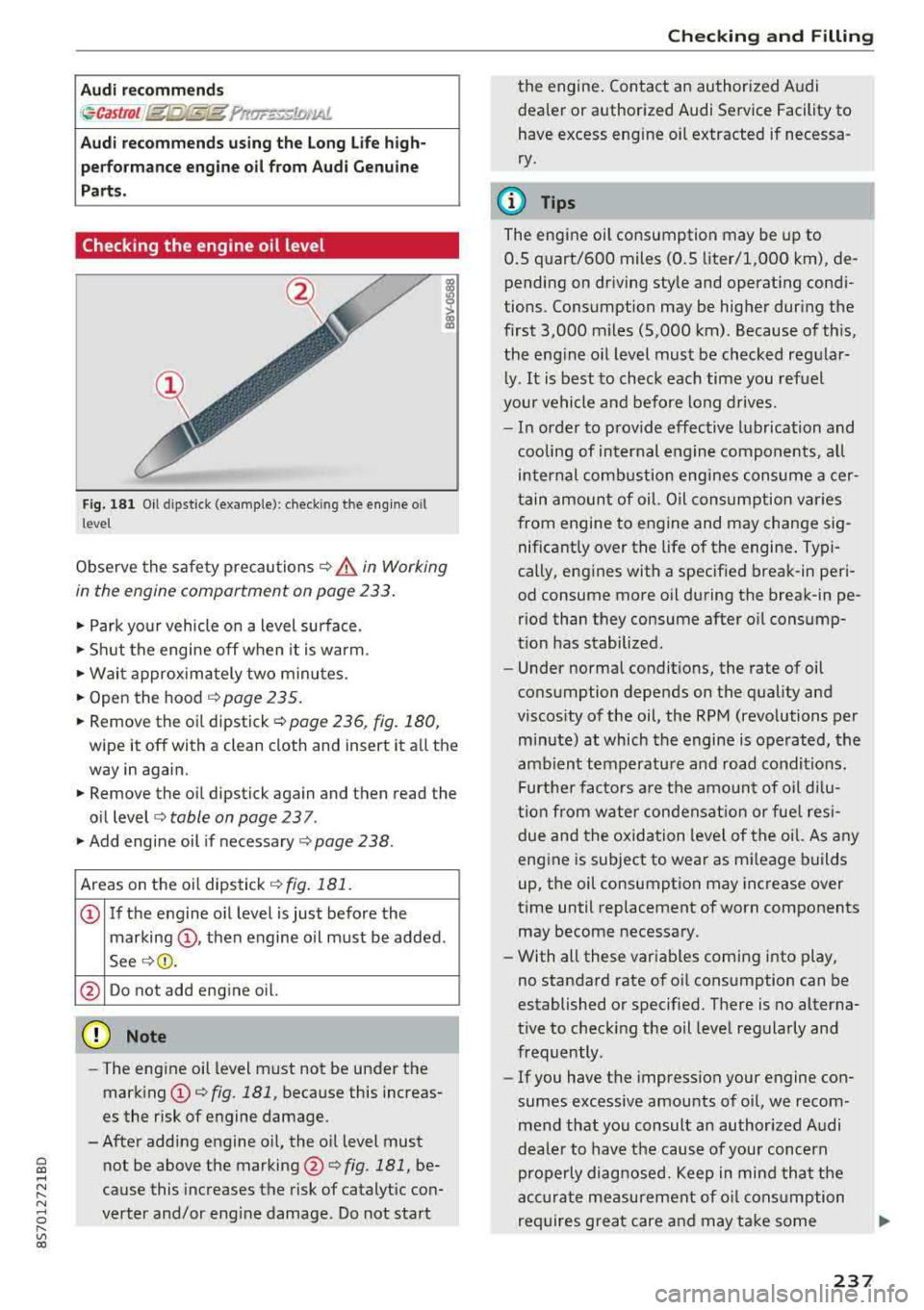
F ig. 181 O il dipstick (example): check ing the engine o il
leve l
Observe the safety precautions¢ &_ in Working
in the engine compartment on page 233 .
.. Park your vehicle on a level surface.
.. Shu t the engine off when it is warm .
.. Wait approx imately two minutes.
.. Open the hood ¢ page 235.
.. Remove the oi l dipstick ¢page 236, fig. 180,
wipe it off with a clean cloth and insert it all the
way in again.
.. Remove the o il dipstick again and then read the
o il level <=>
table on page 2 3 7.
.. Add engine oil if necessary ¢ page 238.
Areas on the oil dipstick¢ fig. 181.
© If t he engine o il level is just before the
marking ©, then engine oil must be added.
See
¢ (1) .
@ Do not add eng ine oil.
@ Note
- The eng ine oil level must not be under the
mark ing © <=>
fig. 181, because this increas
es the risk of engine damage.
-After adding engine oil, the o il level must
not be above the marking @¢
fig. 181, be
cause this increases the risk of catalytic con
verter and/or eng ine damage . Do not start
Chec king and Filling
the engine . Con tact an authorized A udi
dealer or authorized Audi Service Facility to
have excess eng ine oil extracted if necessa
ry.
@ Tips
The engine oil consumption may be up to
0.5 quart/600 miles (0.5 liter/1,000 km), de
pending on driving style and operat ing condi
tions. Consumption may be hig her during the
first 3,000 m iles (5,000 km) . Because of th is,
the engine o il level must be checked reg ular
l y .
It is best to check each time you refuel
your vehicle and befo re long drives.
- In order to prov ide effec tive lubrication and
cooling of internal engine components, a ll
internal combustion engines consume acer
tain amount of oil. Oil consumption var ies
from engine to engine and may change sig nificantly over the life of the engine . Typi
cally, eng ines with a specified break-in peri
od consume more oil during the break-in pe
r iod than they consume after oil consump
tion has stabilized .
- Under normal condit ions, the rate of oil
consumption depends on the quality and
viscos ity of the oil, the RPM (revolutions per
m in ute) at which the engine is operated, the
ambient temperatu re and road conditions .
Further factors a re t he amo unt of oi l di lu
t ion from water condensat ion or fue l resi
due and the oxidation level of the oil. As any
eng ine is subject to wear as m ileage builds
up, the oil consumption may increase over
time until replacement of worn components may become necessary.
- With all these var iables coming into play,
no standard rate of o il consumption can be
established or specified. There is no alterna
t ive to check ing the oil leve l regularly and
frequently.
- If you have the impression your engine con
sumes excessive amounts of oil, we recom
mend that you consult a n author ized Audi
dea le r to have the cause of your conc ern
properly diagnosed. Keep in mind tha t the
acc ura te measurement of o il cons umption
requires great care and may take some
237