2018 AUDI TT ROADSTER center console
[x] Cancel search: center consolePage 43 of 310

Cl co .... N ,....
N ...... 0 ,....
Vl co
Instrument illumination
Fig. 41 Instrument illumination
The brightness of the instrument cluster and the
center console can be adjusted.
~ Press the knob to release it.
~ Turn the knob toward"·" or"+" to reduce or in
crease the brightness .
~ Press the knob again to return it to its original
posit ion.
Vision
Adjusting the exterior mirrors
Fig. 42 Driver 's door: knob for the ex ter ior mirrors
Turn the knob to the desired pos ition:
Q/P -Adjusting the left/ right exter io r mir ror.
Move the knob in the desired direction .
C@-Heats the mirror glass depend ing on the out
side temperature.
8 -Folds the exterior mirrors* . In the Infotain
ment system, you can select if the mirrors fold in
automatically when you lock the veh icle
9 page26.
Lights and Vision
Front passenger 's exterior mirror tilt
function*
To help you see the curb when backing into a
parking space, the surface of the mirror tilts
slight ly. For this to happen, the knob must be in
the position for the front passenger's exterior
mirror .
You can adjust the tilted mirror surface by turn ing the knob in the desired direction. When you
move out of reverse and into another gear, the
new mirror position is stored and assigned to the
key you are using .
The mirror goes back into its original position
once you drive forward faster than 9 mph
(15 km/h) or turn the ignition off .
A WARNING
Curved mirror surfaces (convex) enlarge the
f ield of vision. However, they make objects in
the m irror appear smaller and farther away.
You may estimate incorrectly when you use
these mirrors to gauge your distance from the
vehicles behind you when changing lanes,
which increases the risk of an accident.
(D Note
If th e mirror housing was moved by outs ide
fo rces (such as an impact when maneuver
i ng), you must use the power fold ing funct ion
to fold the mirror a ll the way out . The mirror
housing must not be moved back into place
by hand because th is would impair the func
tion of the mirror mechanism.
(D Tips
If the power adjusting function malfunctions,
the glass in both mirrors can be adjusted by
pressing on the edge of it by hand.
41
Page 49 of 310

Cl co .... N ,....
N ...... 0 ,....
Vl co
_& WARNING
-To reduce the risk of an accident, only adjust
the seat when the veh icle is stationary.
- Exercise caution when adjusting the seat
height . Adjusting the seat care lessly or
without checking can pinch hands and fin
gers .
- For safety reasons, the seat backrests must
always be locked while driving .
- Never drive with a safety belt through the
openings in the backrest . Otherw ise the
backrest could fold forward wh ile driving
and cause an accident.
Multifunction button
Applies to: vehicles with multifunction button
You con adjust the side bolsters using the multi
function button .
"If you turn the multifun ction button (D
¢ page 46, fig. 49 to the left or r ight, the side
bolsters on the seat backrests will increase or
decrease the lateral support.
@ Tips
The air in the side bolsters* is released as
soon as the driver's door opens . T his makes is
possible to enter and exit the vehicle more
comfortably. As soon as you start driving the
veh icle, the side bolsters fill.
Center armrest
Applies to: vehicles with center armrest
Fig. 51 A rm rest betwee n the dr ive r's/fr ont passe nge r's
s e a ts.
S eats and storag e
"To adjust the angle, raise the armrest ¢ fig. 51
notch by notch.
.. To br ing the armrest back down, ra ise it out of
the top notch and fold it back down. Then lift
the armrest to the desired position, if necessa ry .
Please note that the d river 's ability to move his or
arm may be restricted when the armrest is folded
down . Because of this , the armrest should not be
folded down dur ing c ity dr iving .
The a rm rest can slide forward and back.
T here is a storage compartment under the arm
rest.
Ashtray
Applies to: vehicles with ashtray
F ig. 52 Cen te r arm re st fo lded up: ash tray
The ashtray is placed in the center console under
the center a rm rest.
Lift up the cover to open . In
sert the ashtray securely back into the holder af
ter every removal (emptying).
_& WARNING
Never use the ashtray to hold paper, because
this increases the risk of a fire.
47
Page 80 of 310

Assistance systems
Messages
App lies to: ve hicles w ith Aud i side ass ist
If th e side assist sw itches off automatically, a
message appears in the Infotainment system dis
p la y.
@j Audi side assist: currently unavailable.
Sensor vision restricted due to surroundings.
See owner's manual
The radar sensor vision is impaired . Do not cover
the area in front of the sensors with bike wheels,
stickers, dirt or other objects. Clean the area in
front of the sensors, if necessary
c:> page 76,
fig . 84 .
@j Audi side assist: currently unavailable.
See owner's manual
Side assist cannot be switched on at th is time be
cause there is a malfunction (for example, the battery charge level may be too low) .
@j Audi side assist: malfunction! Please
contact Service
The system cannot guarantee that it will detect
veh icles correctly and it has switched off . The
sensors have been moved or are faulty. Have the
system checked by an author ized Audi deale r or
authorized Audi Service Facility soon.
Audi drive select (drive
settings)
Introduction
A pp lies to: ve hicles w ith Aud i d rive select
Drive select makes it possible to expe rience d if
fe rent types of vehicle settings in one vehicle.
The driver can select from three modes, Comfort,
Auto and Dynamic , using the
i:l:ta button in the
center console or by using the Infotainment sys
tem . T his allows you to switch between a sporty
and a comfortab le driving mode, for examp le. In
the Indi vidual mode, the settings can be adjust
ed to your personal preferences. This makes it
possible to combine sett ings such as a sporty en
g ine setting w ith light steering.
78
A WARNING
Using Aud i drive select incorrectly can lead to
coll is ions, other accidents and serious inju
ries.
Description
App lies to: vehicles with A udi drive se lect
The veh icle setup in each mode depends on the
vehicle's features.
Engine and automatic transmission
Depending on the mode, the engine and auto
matic transmission respond more quickly or in a
more balanced manner to accelerator pedal
movements.
Suspension control (Audi magnetic ride)*
The suspension control uses sensors to record in
format ion regarding steering movements, brak
i ng and acceleration operations by the driver, as
well as information about the road surface, driv
i ng speed, and load. W ith dr ive se lect, you can
adjust the suspension control to sporty (dynam
ic ), comfortable (comfort) or balanced (auto).
Steering
The power steering adapts . Indirect steering that
moves eas ily as in comfort mode is espec ially
su ited to long drives on a highway . The dynamic
mode provides sporty, direct steering.
Engine sound*
The engine sound adapts to the current mode
and can be subtle to sporty .
(D Tips
In some models, the maximum vehicle speed
can only be reached in the auto and dynamic
modes .
Page 84 of 310

Parking systems
Switching on/off
Applies to: ve hicles w ith pa rking system p lus
F ig. 87 Center console: parking aid button
Fig. 88 opt ical distance display
Switching on
• Shift into reverse, or
.. Press the PwA button in the center console
c> fig. 87. A short confirmat ion tone sounds and
the LED in the button turns on .
Switch ing off
.. Drive faster than 6 mph (10 km/h), or
• Press the P,, ,A button, or
.. Switch the ignition off.
Activating automatically
The parking aid is activated automatically at
speeds less than 6 mph (10 km/h) and when ap
proaching an obstacle from approximately 3.1 ft (95 cm) away. There are audible signals when ap
proximately 1.6
ft (SO cm) away from the obsta
cle .
If you press the p,,1.I! button to switch the park
ing a id off, it can only be reactivated automati
cally when one of the following conditions is met :
- The vehicle speed exceeds 6 mph (10 km/h).
- The ignition is switched off and back on again.
- The parking brake is set and then re leased.
82
- The selector lever must be in the "P " position.
Segments in the visual display
The segments in front of and behind the vehicle
(vehicles with parking system plus*)
c> fig. 88
help you to determine the distance between your
vehicle and an obstacle. The red lines mark the
expected direction of travel according to the
steering ang le. A white segment indicates an
identified obstacle that is outside of the vehicle's
path. Red segments show identified obstacles
that are in your vehicle's path. As your vehicle comes closer to the obstacle, the segments move
closer to the vehicle . The collision area has been
reached when the next to last segment is dis
played. Obstacles in the collision a rea, including
those outside of the vehicle 's path, are shown in
red. Do not continue driving forward or in reverse
c> .& in General information on page 80, c>(D in
General information on page
80!
Rearview camera
Introduction
App lies to: vehicles wit h rearv iew camera
Fig. 89 Diagram: lines to ai d in parking
The rearview camera helps you to park or maneu
ver using the orientation lines .
Page 85 of 310
Cl co .... N ,....
N ...... 0 ,....
Vl co
General information
Applies to: ve hicles with rearview camera
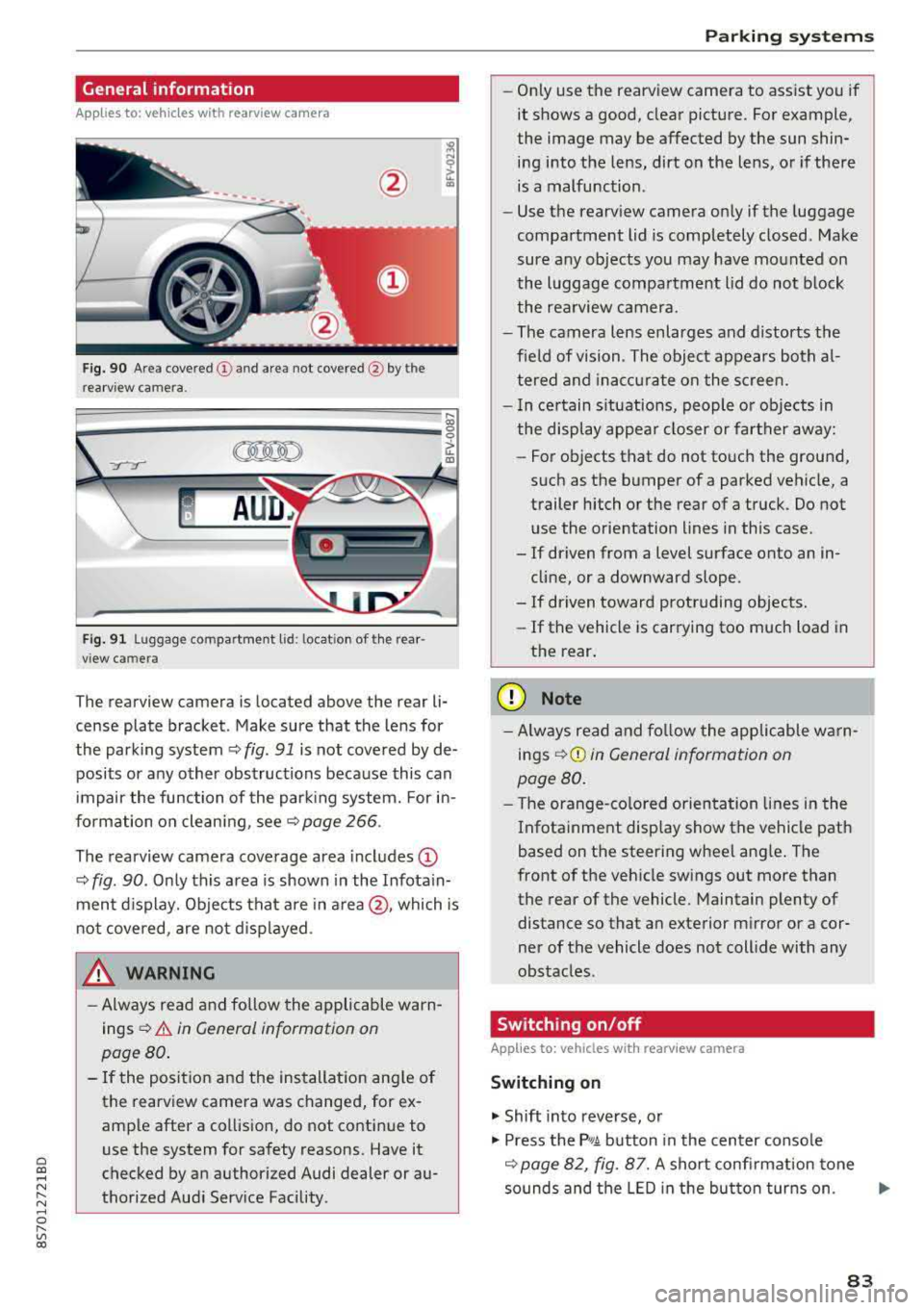
Fig . 90 Area covered (!) and area not covered @ by the
rea rview camera.
:;,
~;..------: :.·~- ---~ _.,- ,.,,.--------g
(Jo00oD ~
Fig. 91 Luggag e compartment lid: locat ion of the rear
view camera
The rearview camera is located above the rear li
cense plate bracket. Make sure that the lens for
the parking system¢
fig. 91 is not covered by de
posits or any other obstructions because this can
impair the function of the parking system. For in
formation on cleaning, see¢
page 266 .
The rearview camera coverage area includes
(D
¢ fig. 90. Only this area is shown in the Infotain
ment display. Objects that are in
area @, which is
not covered, are not displayed.
A WARNING
-Always read and follow the applicable warn
ings ¢
A in General information on
page 80.
- If the position and the installation angle of
the rearv iew camera was changed, for ex
ample after a collision, do not continue to
use the system for safety reasons. Have it
checked by an authorized Audi dealer or au
thorized Audi Service Facility .
Parking systems
-Only use the rearview camera to assist you if
it shows a good, clear picture. For example,
the image may be affected by the sun shin
ing into the lens, dirt on the lens, or if there
is a malfunction.
- Use the rearview camera only if the luggage
compartment lid is completely closed. Make
sure any objects you may have mounted on
the luggage compartment lid do not block
the rearview camera.
- The camera lens enlarges and distorts the
field of vision. The object appears both al
tered and inaccurate on the screen.
- In certain situations, people or objects in
the display appear closer or farther away:
- For objects that do not touch the ground,
such as the bumper of a parked vehicle, a
trailer hitch or the rear of a truck. Do not use the orientation lines in this case.
- If driven from a level surface onto an in cline, or a downward slope .
- If driven toward protruding objects.
- If the vehicle is carrying too much load in
the rear.
(D Note
-Always read and follow the applicable warn
ings
¢ (D in General information on
page 80.
- The orange-colored orientation lines in the
Infotainment display show the vehicle path
based on the steering wheel angle. The
front of the vehicle swings out more than
the rear of the vehicle. Maintain plenty of
distance so that an exterior mirror or a cor
ner of the vehicle does not collide with any
obstacles.
Switching on/off
App lies to : vehicles wi th rearv iew camera
Switching on
.,. Shift into reverse, or
.,. Press the P,q.A button in the center console
¢ page 82, fig. 87. A short confirmation tone
sounds and the LED in the button turns on.
..,.
83
Page 89 of 310

Cl co .... N ,....
N .... 0 ,....
Vl co
Intelligent Technology
Switching on and off
ESC turns on automatically when you start the engine.
Fig . 9 4 Upper center console, fJ. OFF b utton
The ESC is designed to function in levels . Depend
ing on the level selected, the ESC stabilization funct
ion is limited or switched off. The amount of
stab ilizat ion control will differ depending on the
level.
T he following examples are unusua l situations
where it may make sense to switch sport mode
o n in order to allow the wheels to spin:
- Rocking the vehicle to free it when it is stuck
- Dr iving in deep snow or on loose ground
- Dr iving with snow chains
Sport mode on ESC/ASR off Sport mode off or ESC/ASR
on
Behavio r
The ESC and ASR stabiliza- The stabilization funct ion is The full stabilization func-
tion funct ions are limited not availab le
¢ & . ESC and tion of the ESC and ASR is
¢ &. ASR are switched off. availab le aga in.
Operating Press the i.i, OFFI but ton Press and hold the 1-~ OFFI Press the j.i, OFFI but ton
briefly. button longer than 3 sec- aga in .
onds .
Indicator II turns on. Iii and 14-'ll•)H* tu rn on. II turns off or II and
light s 14-'ll•IH * tu rn off.
Messages Stab
ilization control (ESC ): Stab ilization con trol (ESC ): Stab ilization control
sport . Warning! Reduced off. Wa rning! Reduced sta -(ESC): on
stability
A WARNING
You shou ld only swit ch sport mode on or
switch ESC/ ASR off if your driving abilities
an d roa d conditions permi t.
bility
- T he stabilization func tion is limited w hen
sport mode is sw itched on. The driving
whee ls co uld spi n and the vehicle cou ld
swerve, espec ially on s lick or s lippery roa d
surfaces.
- There is no vehicle stabilization when ESC/
ASR are switched off.
(D Tips
- When t he cr uise control system is sw itched
on, ES C/ ASR cannot be sw itched off or sport
mode cannot be sw itche d on. -
Ma lfunctions in the rear spoiler or the A udi
magnetic ride may make it impossible to
switch t he ESC/ ASR off or to switch sport
mode on .
Brakes
New brake pads
New brake pads do not achieve their full braking
effect d uring the first 250 mi (400 km) . They
must be "broken in" first . Howeve r, you can com
pensate fo r th e slig htly reduced b raking force by
pressing fi rm ly on t he b rake ped al. Avo id heavy
bra king d uring the brea k-i n pe riod .
.,.
87
Page 296 of 310

Index
A
A/C (climate control system) . . . . . . . . . . . . . 52
Accessories . . . . . . . . . . . . . . . . . . . . . . . . . . 292
Active lane assist . . . . . . . . . . . . . . . . . . . . . . 72
Activating vibration warning . . . . . . . . . . . . 75
Adjusting steering time . . . . . . . . . . . . . . . . 75
Cleaning the camera area . . . . . . . . . . . . . 267
Indicator l ight . . . . . . . . . . . . . . . . . . . . . . . 73
Messages . . . . . . . . . . . . . . . . . . . . . . . . . . . 74
Switching on/off . . . . . . . . . . . . . . . . . . . . . 73
Adaptive light . . . . . . . . . . . . . . . . . . . . . . . . . 78
Adaptive light (indicator light) . . . . . . . . . . . 16
Adjusting the air d istr ibut ion (climate control
system) . . . . . . . . . . . . . . . . . . . . . . . . . . . . . . 52
Adjusting the air vents . . . . . . . . . . . . . . . . . . 53
Adjusting the center console lighting . . . . . . 41
Adjusting the sound . . . . . . . . . . . . . . . . . . . 177
Adjusting the temperature (climate contro l
system) . . . . . . . . . . . . . . . . . . . . . . . . . . . . . . 52
Advanced Airbag System Children
....... .. .............. ....
Components ...... .............. ... .
Front airbags ..... .............. ... .
How the components work together ... .
Ai rba g .. .. .. .. .. ............. .. .. .. .
I ndicator light .... .............. .... .
Airbag system .. .. .. .............. ... .
Advanced Airbag System ....... .. .. .. .
Care
. . .. .. .. .. ............. .. .. .. .
Ch ild rest raints .............. .... .. .
Components (front airbags) .......... .
Danger of fitting a child safety seat on the
front passenger seat ................ .
Disposal ... .. .. ............. .... .. .
Front airbags ... ............. .... .. .
H ow do the front airbags work? . .. .. .. .
H ow many airbags does my vehicle have?
Important information .............. .
I mportant safety instructions on the knee
airbag system . .. ............. .. .. .. .
Knee airbags .. .. ............. .... .. .
Monitoring ....... .............. ... .
PASSENGER AIR BAG light ........... .
Repairs
Safety instructions ................ .. .
Side airbags .. .. ............. .... .. .
294
218
201
199
202
194 14
213 198
208
218
201
195
208 198
203 201
194
211
210
205
206 208
207
212 Warning/Indicator
lights . . . . . . . . . . . . . 205
When must the system be inspected? . . . 205
Ala rm system
refer to Anti-theft ala rm system . . . . . . 22, 27
Alignment pin (tire change) . . . . . . . . . . . . . 272
All-weather lights . . . . . . . . . . . . . . . . . . . . . . 38
All season tires . . . . . . . . . . . . . . . . . . . . . . . 259
All wheel drive . . . . . . . . . . . . . . . . . . . . . . . . 89
Alte rnative routes . . . . . . . . . . . . . . . . . . . . . 141
Ambient lighting . . . . . . . . . . . . . . . . . . . . . . 40
AMI
refer to Audi music interface . . . . . . . 160, 161
Android Auto
refer to Audi smartphone interface . . . . . 171
Announcements (sett ings)
refer to Voice guidance . . . . . . . . . . . . . . . 141
Anti-freeze Windshield washer system . . . . . . . . . . . . 243
Anti- lock braking system (ABS) . . . . . . . . . . . 86
Ant i-slip regulat ion . . . . . . . . . . . . . . . . . . . . 86
Anti-theft alarm system . . . . . . . . . . . . . . . . . 27
Apple CarPlay
refer to Audi smartphone interface . . . . . 171
Armrest . . . . . . . . . . . . . . . . . . . . . . . . . . . . . . 47
Ashtray . . . . . . . . . . . . . . . . . . . . . . . . . . . . . . 47
Aspect ratio (video) . . . . . . . . . . . . . . . . . . . 165
Audi connect . . . . . . . . . . . . . . . . . . . . . . . . . 124
Data connection . . . . . . . . . . . . . . . . . . . . . 130
Data protection . . . . . . . . . . . . . . . . . . . . . 132
Services (overview) . . . . . . . . . . . . . . . . . . 126
Setup . . . . . . . . . . . . . . . . . . . . . . . . . . . . . 124
Audi magnetic ride
refer to Suspension control . . . . . . . . . . . . . 78
Audi music interface . . . . . . . . . . . . . . . . . . . 160
Audi music stream
refer to Wi-Fi . . . . . . . . . . . . . . . . . . . . . . . 158
Audio files . . . . . . . . . . . . . . . . . . . . . . . . . . . 162
Audio player
B luetooth audio player . . . . . . . . . . . . . . . 157
Wi-Fi audio player . . . . . . . . . . . . . . . . . . . 158
Audio track . . . . . . . . . . . . . . . . . . . . . . . . . . 165
Audi Service Repair Manuals and Literature 290
Audi smartphone interface ......... 171,175
Audi virtual cockpit (instrument cluster) . . . . 8