2018 AUDI S3 SEDAN start
[x] Cancel search: startPage 175 of 404

u. 00 .-< N l' N .-< 0 N > 00
Voice recognition system
Messages (Audi connect (Infotainment))
Applies to: vehicles with voice recognition system and Audi connect (Infotainment)
Requirement : a cell phone w it h an ac tive MAP
( M essage Access Profi le) mus t be con nected to
the M MI
c::>page 183 .
Function Say:
T ext ed it ing commands Read out
I Add / Delete / Rec ord everything again / Replace
with (XY) / Add recipient / Send
Read ing out a new message Read out new te xt me ssage / Read out new e-mail
Reading a message Read out text message / Read out e-mail
Replying to the open text message Reply
Forwarding the open text message Forward > Add recipient / Insert template / Send
Correcting data inp ut No I meant (XV)
(D Tips
-Fo r more information on sup ported ce ll
phones, v is it www.aud iusa .com/b luetoot h
or con tact a n au thor ized A udi dealer or au
t h or ized Audi Serv ice Facili ty.
-Always read the chapter c::> page 196 , Audi
connect (Infotainment) gen eral informa
tion.
Navigation
Applies to: vehicles with voice recognitio n system and navigation system
Requi rement: the Navigation men u m ust be
open
c::> table on page 171 .
You can say the following commands fo r en ter ing
a destination depending on the se lected men u
item:
Function Say:
Opening the list of previous naviga -Last destinations
tion destinations
Access ing favo rit es Navigation favorites
Selecting the home add ress Home address or Drive home
E nte ring a n add ress with guida nce Enter address
> follow the system prompts
from the system
Individua l commands for entering a Enter country/state/ Enter city / Enter ZIP code / Enter
destination street/ Enter house number
Ma king a co rrection wh ile ente ring a Correction
destination
Navigating to a contact Drive me to (XY) or Navigate to contact , for examp le Drive me
to "John Smith"
N avigating to a specific address for Navigate to conta
ct (XV) business / private ,
a contact for example "Navigate to John Smith pr ivate"
N avigating to favor ites Navigation favorites > Line (XV) /
Line con tents> Start rou te
guidan ce when promp ted
173
Page 176 of 404

Voice recognition system
Function Say:
Starting route guidance with an ad-Navigate/ Navigate to private address / Navigate to business
dress card open address
Ent ering a new destination/stop- Enter address
> enter the desired address when prompted>
over when ro ut e gu idan ce is active confirm the new destination/stopover if prompted
Starting route guidance after enter- Start route guidance
ing a destination
Canceling current route guidance Cancel route guidance
Calculating alternat ive routes Calculate alternative routes
Entering a point of interest by se -Point of interest
> Change search area > category or subcote-
lecting a search area with guidance gory when prompted, for example
"restaurant"
from the system
Destination input categor ies Audi Service / Train station /Airport / Hotel / Hospital / Park-
ing / Rest area /Restaurant / Gas station
etc.
Search areas for entering points of Nearby/ Along the route / Near destination / Near stopover /
interest In new city/ In a new state/country
Entering an online destination * Online destination
(XV), for example "Online destination
"Lakeview Hotel""
Co rrect ing data input No I meant (XV)
Clos ing the full-screen command
Close
list
Requirement: you must be in the Navigation or
Map menu. You can say the fo llowing commands
for more settings in Navigation:
Function Say:
Genera l map options Map/ Day map / Night map / Automatically change map color
Map type 2D heading up map/ 2D north up map / 3D map / Destination
map / Overview map / Standard map* / Google Earth
map* albl
Showing the route list Route list
Showing the remaining distance/ Destination information
time when route guidance is active
Speed l imit prompt How fast can I drive here?
Setting voice guidance for active Voice guidance on
I Voice guidance off I Voice guidance short-
route guidance ened
I Voice guidance complete I Voice guidance traffic
Blocking a certain section on the Block route for (XV) meters/kilometers/yards/miles / Block
route next route / Avoid next section of route
a) P rov ider a t tim e of prin ting.
bl AUDI AG p rovides access to services fro m thir d party prov iders. Perm anent ava ilab ility cannot be guaranteed , because t hat
depends on the th ird party p rov ide r.
(D Tips
- Destinations may have to be spelled when
entered, depending on which region you are
174
in and wh ich menu language you have se
lected.
Page 178 of 404

Voice recognition s ystem
A cell p hone m ust be connected to the M MI w ith
the
Handsfree profile ~ page 177.
The cell phone bei ng connected must have vo ice
con trol that can be controlled externally .
.,. Switching on : press and hold the 51 button on
the m ult if u nct ion steer ing whee l* and say the
desired command after the exte rnal spee ch d i
alog beg ins .
... Continuing /resuming the dialog: the system
remains ready to use for a short time after end
ing t he d ia log . You can start a new external dia
log during this time. Press the
10•1 button if
needed, and say a new command .
Or: selec t
and confirm
Re sume on the MM I control panel.
.,. Switching off: press and hold the 51 button .
Or: select and confirm Cancel on the MM I con
t rol panel.
(D Tips
- There a re no voice guidance* prompts when
a d ia log is active.
- This funct ion depends on the cell phone
u sed. You can obtai n more informat ion
from your cell p hone se rvi ce p rovide r or
from your cell p hone use r g ui de .
- AUDI AG simply prov ides access to cont rol
you r ce ll phone with vo ice opera tion and
does no t take any respons ibility for the co n
tents and commands wi thin the externa l
voice contro l.
176
Page 189 of 404

u. 00 ... N l' N ... 0 N > 00
~ Select: IMENUI button> Telephone > left con
t ro l button .
~ Select and confirm Dire ctory > a contact from
the directory.
~ Se lect : rig ht contro l button > Show contact de·
tails .
- Calling :
select and confi rm the desired tele
phone number.
- Navigating : to start navigation, se lect a nd co n
firm the des ired address. Select and confi rm
Start route guidance.
P re ss the r ig ht cont ro l bu tton to o pen additional
options fo r th e contact details.
Add destination
To s tart n avig atio n, se le ct and co nf irm the de
sire d address . Sele ct an d confirm
Start route
guidance .
Store as favorite
Se e¢ page 182, Favorites .
Send text message*
You can send a text message¢ page 183 to the
se lected contact.
Delete contact
The se lected contact can be delete d.
(D Tips
- Contacts ed it ed in th e MM I dire ctory c annot
b e au tomat ic al ly up dat ed in t he connected
ce ll phone. Audi recomme nds editing cell
ph one contacts direct ly in t he ce ll phone .
- Only the co nt acts in t he lo cal MM I me mory
ca n be e dite d or de leted .
Importing and exporting contacts
Applies to: veh icles with telephone
C on tacts in vCard forma t (. vcf) can be impor ted
into the directory o r exported .
Requi reme nt: an S D car d m us t b e in ser ted in one
of the S D c ard
readers *¢ page 224 or a U SB
sto rage dev ice m ust be conne cte d to the Aud i
music
interface *¢ page 229 o r th e require -
Telephone
ments fo r Audi connect In fota inme nt serv ices*
must be met
¢ page 190.
~ Sele ct: ! ME NUI bu tton> Telephone > left con
t rol button >
Directory .
~ Select: r ight con trol button> Directory set
tings.
- Importing conta cts from a storage device :
se
lec t and conf irm
Import contact s > SD card 1 /
SD card 2 or USB device 1 /USB device 2
> de
sired contacts
> Start import.
- Exporting contacts to a storage device :
selec t
an d confirm
Export contacts > SD card 1 /SD
card 2 or USB device 1 /USB device 2
> desired
contacts
> Start export .
- Selecting all contacts at once to import/ex
port :
select and con firm Import contacts /E x
port contacts > SD card 1 /SD card 2 or USB de·
vice 1 /USB device 2
> All > Start import /Start
export .
(D Tips
-Always read the chapter¢ page 196, Audi
connect (Infotainment) general informa
tion .
-Fo r ad ditiona l informati on o n the my Audi
acco unt, visi t www.a udiusa .com/myau di.
- The imported contacts a re stored in the lo
cal memory of t he di re cto ry.
- A max imum of 1,000 contacts can be im
ported. Yo u ca n check the d irectory memory
capacity at any
t ime ¢ page 188.
- Never save impo rtant data on memo ry ca rds
o r USB storage devices. Audi i s n ot responsi
ble fo r damaged o r lost f il e s a nd media.
- Contacts t hat wer e downloa ded from a cell
phone cannot be e xp orted.
- The re should be no ot her files o r fo lders o n
the st orage med iu m contain ing t he contacts
t o b e im port ed .
Additional settings
Telephone settings
Applies to: vehicles with telephone
~ Select: IME NUI bu tton> Telephone > rig ht con -
trol button >
Telephone settings. ..,_
187
Page 193 of 404

LL co .... N
" N .... 0 N > co
• Enter your myAudi user data. Or: enter your
e ight-d igit myAudi PIN .
• Confirm your entry with OK.
Then you can open your persona l settings from
your myAudi account in your vehicle .
(D Tips
You can receive your my Aud i PIN if you have
set up a myAudi account. For additional infor
mat ion, see www.audiusa .com/myaudi.
Opening Audi connect
(Infotainment)
A ppl ies to veh icles w ith A ud i con nect (Infotainment)
_________ A _o _d _, _c _o _" _" _°"' _ t·_A
_ ,1_ ,_ •_ r_, _ ,_ •_ •_____ _ ,
:· . l : ~
I;;~ .,_lJre,; --· (. '
44 ,6 °F .:;·, .44 6 F
J ;9 O nline dest inations
.,. ,', ': . 37 r-·~·· -1
~ Online traffic information =
Fig. 181 Aud i co nn ect (Infot ainm ent) home p age
• Select : the I M ENU ! button> Audi connect .
• If necessary, confirm the note displayed with
Accept .
A list of all of the available Audi connect Infotain
ment services is shown in the Infotainment sys
tem display
r::;, fig. 181 .
You can also filter the Audi connect Infotainment
services by category:
• Select : I MENU I button > Audi connect> left
control button > for example,
Navigation for
the Audi connect Infotainment services in the
navigation menu
r::;, page 193 .
Audi connect
Infotainment services
Basic functions
A pplies to vehicles w ith A ud i con nect (Infota inme nt)
If available, functions specific to certa in services
are in the selection menu of that particular Aud i
l) Not avail able in all lang uag es .
Audi connect (Infotainment)
connect Infotainment service r::;, page 156. The
basic functions are in the corresponding options
menu:
• Select: ! MENU I button> Audi connect> desired
Audi connect Infotainment service>
right con
trol button .
Depending on the Audi connect Infotainment
service selected, the following basic functions are
available:
Save as preview*
You can also see a preview of the selected Audi
connect Infotainment services on the Aud i con
nect Infotainment home page
(Dr=;, page 191,
fig . 181.
Show on map
You can show selected contents on the map and
use them for route guidance.
Login
Seer::;, page 190, Logging in to myAudi in the vehi
cle .
Read out1>
You can allow the MMI to read out the selected
contents .
Call*
If a phone number was assigned to an entry , you
can call the number, for example to reserve tick
ets.
Start route guidance
If a c ity was added to an entry, such as for City
Events ,
you can use it as a navigation destina
tion. Route gu idance sta rts immed iate ly .
Change search area
The set search area can be changed at any time .
Additional information on search areas can be
found under
r::;, page 204.
191
Page 200 of 404
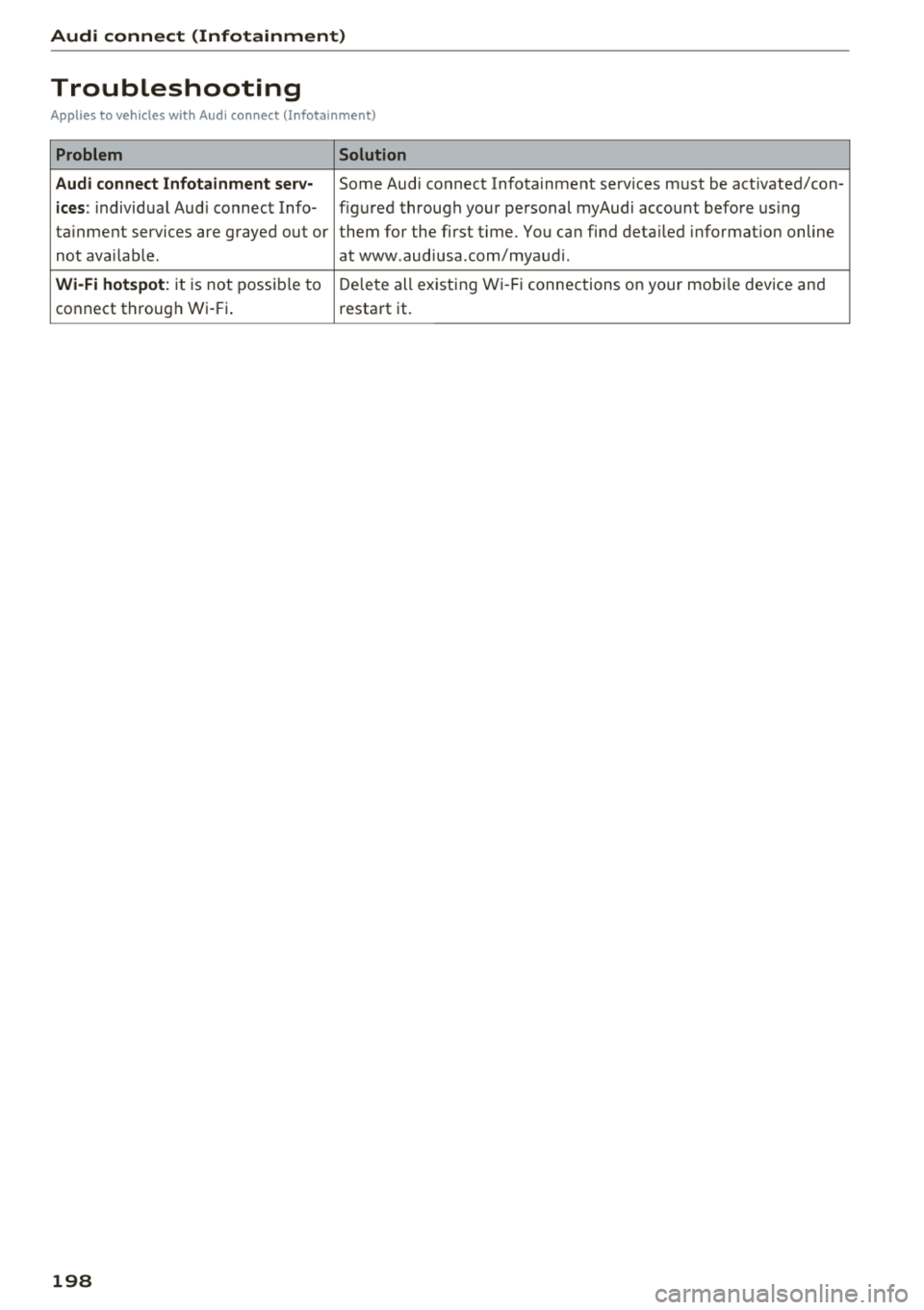
Audi connect (Infotainment)
Troubleshooting
Applies to vehicles with Audi connect (Infotainment)
Problem Solution
Audi connect Infotainment serv·
Some Audi connect Infotainment services must be activated/con-
ices: individual Audi connect Info- figured through your personal myAudi account before using
ta inment serv ices are grayed out or them for the first time. You can find deta iled information on line
not available . atwww.audiusa.com/myaudi.
Wi-Fi hotspot : it is not possible to Delete all existing Wi-Fi connections on your mobi le device and
connect through Wi-Fi. restart it.
198
Page 202 of 404

Audi conn ect e-tron ser vic es
Vehicle status report
Applies to: vehicles with Audi connect e-tron services
You can access various vehicle statuses using the
services, such as:
- high-voltage battery charge level ,
- electric range,
- mileage,
- next inspection.
F or additional information, s ee
¢ page 95, Power
meter overview
and ¢ page 97, Range display.
A WARNING
Do not ignore messages and warning or indi
cator lights that turn on in the vehicle be
cause of the information in the status report.
Th is could lead to break downs in on the road,
accidents and se rious injuries.
Car Finder
Applies to: vehicles with Audi connect e-tron services
The vehicle collects data under certain conditions
and sends it to a server .
When data is stored, you can access values such
as these us ing the service:
- Vehicle location disp lay,
- Display of one's own location,
- Ro ute to your veh icle.
If your mobile device also has a nav igation func
tion, you can navigate to your last know n parking
locat ion.
@ Tips
- The new parking location cannot be deter
mined with this service if the vehicle is
moved after shutt ing the veh icle
off and
wi thout sw itching the ign ition on and
off
again, for example when be ing towed o r if
the vehicle is stolen .
- If the vehicle is moved an d shut
off again
us ing the second key, for example, the new
parking location is t ransmitted to the server
after switching the ignition off .
200
Charging
Applies to: vehicles with Audi connect e-tron services
You can control and access the hig h-voltage bat
tery c harging proc ess r emotely using these serv
i ces. You have the following options:
- check the battery charge leve l,
- star t/end t he cha rging process,
- prog ram the charging t imer with/w itho ut cl i-
mate cont rol,
- deactivate/activate the cha rg in g timer .
Fo r addi tional information,
see ¢ page 106,
Charging the battery with the Audi e-tron charg
ing system .
A WARNING
Only perform charging f unctions on the high
voltage battery if the vehicle is shut
off co r
rect ly, is connected to a suitable socket and if
the ign ition is swi tched off.
Temperature control
Applies to: vehicles with Audi connect e-tron services
You can contro l the climate control in your vehi
cle remotely using these services:
- start/end climate control ,
- program the timer,
- deactivate/activate the timer.
For addi tional informa tion, see
¢ page 116, Cli
mate control .
A WARNING
Only perform the climate control functions if
your vehicle was shut
off correct ly and the ig
n ition is switched off.
Page 204 of 404

Navigat ion
-If avai lab le, confirm the input suggestion* to
complete the entry or a word suggestion*. See
¢ page 161 , Letter/number speller.
- Turn the control knob to the rig ht to change
the results list.
- Se lect and confirm a destination from the re -
su lts list .
- Se lect and confirm
Start rout e guidance .
The route d isplays as an ove rview in the map.
Route g uidance is a lready act ive.
Na rrow ing the se arch area
All countr ies/states are se lected at the factory
for the free text search.
- Se lect the right control button >
Country /state
selection
i n the input field (D ¢ page 201,
fig. 182.
- Se lect the country or state ( • ) that shou ld be
searched for in the free text search in order to
narrow the number of results and increase the
search speed. The selected entry in the coun
try/state se lection is sto red .
Or : select All
countrie s/ state s.
(D Tips
- The MMI input suggest ions depend on the
l ast navigated destinations .
- Up to 50 entries ca n be sto red in the last
dest inat ions list.
- Additional informat io n on free text searches
ca n be found unde r
¢page 162.
Loading previous destinations
App lies to: ve hicles w ith navigation system
Your last destinations are automatically stored
and can be loaded directly as a destination .
Requirement: a destination was already navigat
ed to.
~ Press the I NAV/MAPI button repeated ly until
the
Enter destination menu is displayed
¢ page 201, fig . 182.
Your last destination is listed direct ly in t he Enter
de stination
menu under the home add ress and
ident ified with the
symbol @¢ page 201,
fig. 182.
202
- Select and confirm one of the last destinations
from the list .
- Select and confirm
Start route guidance.
D eleting previous destinations
- Select one of the last destinations from the list.
- Select: r ight control button>
Delete destina-
tion
> Del ete this last de stination or Delete all
last destinations.
The selected destinat ion or all last dest inat ions
i s/are deleted and no longer d isplayed in the
En
ter destination
men u.
Entering an address
App lies to: vehicles wit h navigat ion syste m
As an alternative to free text search, you can al
so enter an address in stages .
~ Press the I NAV/MAPI button repeatedly until
the
Enter destinat ion menu is displayed
¢page 201, fig . 182 .
~ Select: left control button > Enter address .
- Ente ring a destination using a country /state :
select and confirm Country . Select and confirm
a country/state d irectly from the list .
Or :
search for a co unt ry/state us ing the input f ield .
-Entering a de stination u sing the City /ZIP
code :
select and confirm City/ZIP code . Enter a
city or a ZI P code .
Or: select and co nfirm a city
from the list.
- Select and confirm additional details about t he
destination s uch as
Street , Hou se number or
Downtown .
- De stination entry using a street intersection *:
Requirement: you must ente r a street. Select
and co nfirm
Int erse ction . Selec t and confi rm a
s tr eet directly from the list.
Or : search for a
s treet us ing the inp ut fie ld .
- Sele ct and confirm
Start route guidance .