2018 AUDI Q5 instrument cluster
[x] Cancel search: instrument clusterPage 42 of 392

Opening and closing
Luggage compartment lid emergency
release
Fig. 30 Inne r luggage compartment lid : access to the
emergency release
.. Remove the screwdriver from the vehicle tool
kit.
.. Use the screwdriver to pry the cover off
<=>fig. 30.
.. Press the lever in the direct ion of the arrow to
release the luggage compartment lid .
Child safety lock
The child safety lock prevents the rear doors
from being opened from the inside and the rear
power windows from be operated.
F ig. 31 Sect ion of drive r's door: contro ls
Fig . 32 Re ar doo r: child safety lock
40
.. To deactivate/activate the power window
switch in the rear doors, press
the@ button in
the driver's
door ¢ fig. 31. The indicator light in
the button turns on/blinks .
.. To also deactivate/activate the inner door han
dle, open the respect ive rear door and turn the
key switch with the mechanical key in the direc
tion of the arrow or oppos ite the direction of
the arrow
¢fig. 32.
Message in the instrument cluster display
(81 Childproof catch: malfunction! Please con
tact Service
There is a ma lfunction in the chi ld safety lock .
Press
the @ button again .
If the message stays on, drive immediate ly to an
authorized Audi dealer or authorized Audi Service
Facility to have the malfunction repaired .
A WARNING
-- If you leave the vehicle, sw itch the ignition
off and take the veh icle key with you. This
applies particularly when children remain in
the vehicle. Otherwise ch ildren could start
the engine or operate electrical equipment
(such as power windows), which increases
the ris k of an accident.
- A malfunction in the child safety lock could
allow the rear doors to be opened from the
inside, which increases the risk of an acci
dent.
Power windows
Controls
The driver can control all power windows .
Fig. 33 Driver's doo r: power window cont rols
Cl) ~
"" 0
='> Cl) m
Page 48 of 392

Lights and Vision
Turn signal and high beam lever
The lever operates the turn signals, the high
beams and the headlight flasher .
Fig. 38 Turn sig nal and high beam lever
Turn signals¢ Q
N
0 0
> u.. a,
The turn signals activate when you move the lev
er into a turn signal position when the ignition is
switched on.
@ -Right turn signal
@-Left turn signal
The turn signal blinks three times if you just tap
the lever.
High beams and headlight flasher ~D
Move the lever to the corresponding position:
@ -High beams on (vehicles with high beam as
sistant*¢ page 46)
©-High beams off or headlight flasher
The
II indicator light in the instrument cluster
turns on .
A WARNING
High beams can cause glare for other drivers,
wh ich increases the risk of an accident. For
this reason, only use the high beams or the
headlight flasher when they will not create
glare for other drivers.
46
High beam assistant
App lies to : vehicles with high beam ass istant
The high beam assistant automatically turns the
high beams on or off depending on the surround
ing conditions .
A camera on the rearview mirror mount can de
tect light sources from other road users. The high
beams switch on or off automatically depending
on the posit ion of vehicles driving ahead and on
coming vehicles, the vehicle speed and other en
vironmen tal and traffic conditions.
Activating high beam assistant
Requirement: the light sw itch must be set to the
AUTO posit ion and the high beam assistant must
be switched on in the Infotainment system
¢page 47 .
• To act ivate the high beam ass istant, tap the
lever
forward @~ page 46, fig . 38. The Ii] in
dicator light appears in the instrument cluster
display and the high beams are switched on/off
automatically. If the high beams were com
pletely or partially switched on, the
SI indica
tor light turns on .
Switching the high beams on/off manually
If the high beams did not switch on/off automat
icall y as expected, you may switch them on or off
manua lly instead :
• To switch the h igh beams on manually, tap the
lever
forward @~ page 46, fig. 38. The II in
dicator light turns on.
• To switch the high beams off manually, pull the
lever back ©¢
page 46, fig. 38. The high beam
assistant is deactivated.
Operating the headlight flasher
• To operate the headlight flasher when the high
beam assistant is activated and high beams are
switched off, pull the lever back ©¢
page 46,
fig. 38.
The high beam assistant remains ac
tive.
Messages in the instrument cluster display
EIJ Audi adaptive light: malfunction! See own
er's manual
Page 74 of 392

Warm and cold
SYNC Syn chr oniz ation
Use t he rocker sw itc h® to select the f unct ion.
When synchronization is switched on, the set
tings for the driver's side are applied to the front
passenger's side and the rear (except for seat
heating/venti lation*). When the settings on the
front passenger's side or in the rear are changed,
the synchron izat ion is automatically switched off
and
3 -z one appears in the display .
SET REAR function
Use the rocker switch ® to select the function .
When the function is switched on, you can adjust
all settings for the rear us ing the climate control
system controls in the cockpit . The rear climate
control system controls cannot be operated at
the same time . T his function switches off auto
mat ica lly after a ce rtain per iod of t ime or after
leav ing the menu.
Vents
You can open or close the center and rear vents in
the cockpit and the vents in the rear center con
sole us ing the r idged thumbwhee ls . T he levers
adjust the d irection of the airflow from the vents.
Re sidu al he at
You can activate the residual heat function when
the ignition is switched off by pressing the knob
(!) . The res idual heat from the coolant is used to
heat the vehicle interior. The residual heat func
tion switches off automatically afte r about 15
m inutes.
A WARNING
- Yo u should not use the re circulation mode
for an extended period of time, because no
fres h air is drawn in and the windows can
fog when cooling mode is sw itched off. This
increases the risk of an accident.
- Individuals with reduced sensitivity to pain
or temperature cou ld deve lop burns when
using the seat heating* funct ion. To reduce
the risk of injury, these ind iv iduals should
not use seat heati ng*.
72
@ Note
To avoid damaging the seat heating* ele
ments, do not knee l on the seats or p lace
heavy pressure on one area of the seat.
Setup
The climate control system basic settings ore ac
cessed in the Infotainment system .
.. Select in the Infotainment system : IMENU! but
ton
> Veh icle > left control button > Air condi
t ioning
Auto recirculation
When sw itched on, a utomat ic rec ircu lat ion con
tro ls the recircu lation mode automatically . If the
windows fog up, press
the® MAX button .
Automatic au xiliary heater *
The auxiliary heater he lps to wa rm the vehicle in
te rior more qu ic kl y.
Steering wheel heating
Applies to: vehicles with steering wheel heating
The steering wheel rim con be heated .
.. Press the lg\~ page 14, fig . 11 button on the
mu ltifu nction stee ring wheel to switch the
steer ing whee l heating on and off . The mes
sage
S teering wheel h eating : on /Ste ering
wheel heating: off
appears in the instrument
cluster display.
The tempe ra ture is ma inta ined at a constant lev
el when steering wheel heating is switc hed on .
The steer ing whee l heating sett ings are stored
automat ica lly and assigned to the remote control
k ey tha t is in use .
Page 81 of 392

u co ..... N r--N ..... 0 <( 0 00
(D Tips
-Depending on the driving situation, the en
gine may already stop when
coasting before
the vehicle has come to a complete stop
ll.
- If you select the "D" selector lever position
after shifting into reverse, the vehicle must be driven faster than 6 mph (10 km/h) in or
der for the Start/Stop system to be active
again.
Stopping/starting the engine
Applies to: vehicles with Start/Stop system
"'Apply the brakes and keep your foot on the
brake pedal until the vehicle has stopped. The
rl1 indicator light appears in the instrument
cluster once the engine stops automatically .
"'The engine starts again when you take your
foot off the brake pedal. The indicator light
turns off.
(D Tips
-The ignition will turn off if you press the
I START ENGINE STOP I button during a stop
phase .
- You can determine for yourself if the engine
will stop or not by reducing or increasing
the amount of force you use to press the brake pedal. For example, if you only lightly
press on the brake pedal in stop-and-go
traffic or when turning, the engine will not
switch off when the vehicle is stationary. As
soon as you press the brake down harder,
the engine will switch off.
- Press the brake pedal during a Stop phase
to keep the vehicle from rolling.
Starting/stopping the engine automat
ically
Applies to: vehicles with Start/Stop system
The system checks if certain conditions are met
before and during the "stop" phase, and deter
mines if and how long the engine is stopped de
pending on the situation. For example, if power
usage is high, the engine will not be stopped .
ll Market-specific
Driving
Along with other conditions, the following fac
tors influence the automatic engine start or stop:
- Environmenta l conditions (slopes, inclines, ele-
vation, temperature)
- Battery (charge status, temperature, power us-
age)
- Engine temperature
- Assistance systems
- Driving behavior
If the
rid indicator light appears in the instru
ment cluster display, the engine will not be stop
ped.
Switching the ignition off automatically
Applies to: vehicles with Start/Stop system
If you leave the vehicle during a "stop" phase, the
engine can be restarted within approximately 30
seconds if the doors are closed, the driver's safe
ty belt is fastened and the brake pedal is pressed.
If you leave the vehicle longer than 30 seconds,
the ignition will switch off automatically to pre
vent the vehicle battery from draining. If this is
the case, the message
Start/stop system: igni
tion will be switched off in 30s
will appear in the
instrument cluster and, if the low beam head
lights are switched on, the parking lights will
switch on instead. The parking lights will switch
off after approximately 30 minutes or when you
lock the vehicle.
The ignition also switches off when you lock the
vehicle from the outside during a stop phase.
If the Start/Stop system has not turned off the
engine or if you have switched the Start/Stop sys
tem off manually, the ignition will not be auto matically switched off and the engine will contin
ue to run.
A WARNING
-To reduce the risk of poisoning, never allow
the engine to run in confined spaces.
-
79
Page 82 of 392

Drivin g
(D Tips
If you leave t he vehicle with the "D/S" or "R"
selector lever pos ition engaged, the parking
brake is automatically set.
Manually switching the Start/Stop system
off/on
A pp lies to: ve hicles w ith Sta rt/Stop system
The (A_) oFF button is located in the center conso le .
.. Press (A_) OfF to switch on or off. The LED in the
button turns on when the funct ion is switched
off.
@ Tips
If you switch the system off dur ing a stop
phase, the engine w ill start again automati
cally .
Messages
App lies to: ve hicles w ith Sta rt/Stop system
Start /stop system: deactivated . Please start
engin e manually
This message appea rs when specific conditions
are not met during a stop phase. The Sta rt/Stop
system wi ll not be ab le to restart the engine . The
engine must be started wit h the
I S TAR T ENGINE STOP I button.
Start /stop sy stem: malfunction! Function
una vailable . Please cont act Se rvice
There is a malfunction in the Start/Stop system .
Drive the vehicle to an authorized Audi dealer or
author ized Service Facility as soon as poss ible to
have the malfunction corrected.
80
Electromechanical
parking brake
F ig . 88 Center console: parking brake
,-.. ,-..
0
1 m
Your vehicle is equipped with an electromechani
ca l parking
brake (!)¢ fig . 88 . The parking brake
is designed to prevent the vehicle from ro lling
unintentionally and replaces the hand brake.
Setting /manuall y re leasing the parking
br ake
.. Pull the®> switch to set the parking brake. The
LED in the switch turns on. The
-(USA mod
els)/ . (Canada models) indicator light also
turns on in the instrument cluster display .
.. To release the parking brake manually, press
the brake or accelerator peda l w hile the ign i
tion is switched on and press
the®) sw itc h at
the same t ime. The LED in the button and the
indicator light in t he disp lay turn off .
Releasing the parking brake automatically
Requirement: the doors m ust be closed and the
drive r's safety belt must be fastened.
.. To start driving and release the parking brake
automatically, press the accelerator pedal as
usual.
In add ition to releasing the parking brake auto
matically, other convenience and safety functions
are available when you start
driving¢ page 82,
Starting to drive .
Preventing the automatic parking br ake
release
The vehicle could beg in rolling un intentionally,
depend ing on the hill or if towi ng a tra iler.
.,.
Page 87 of 392
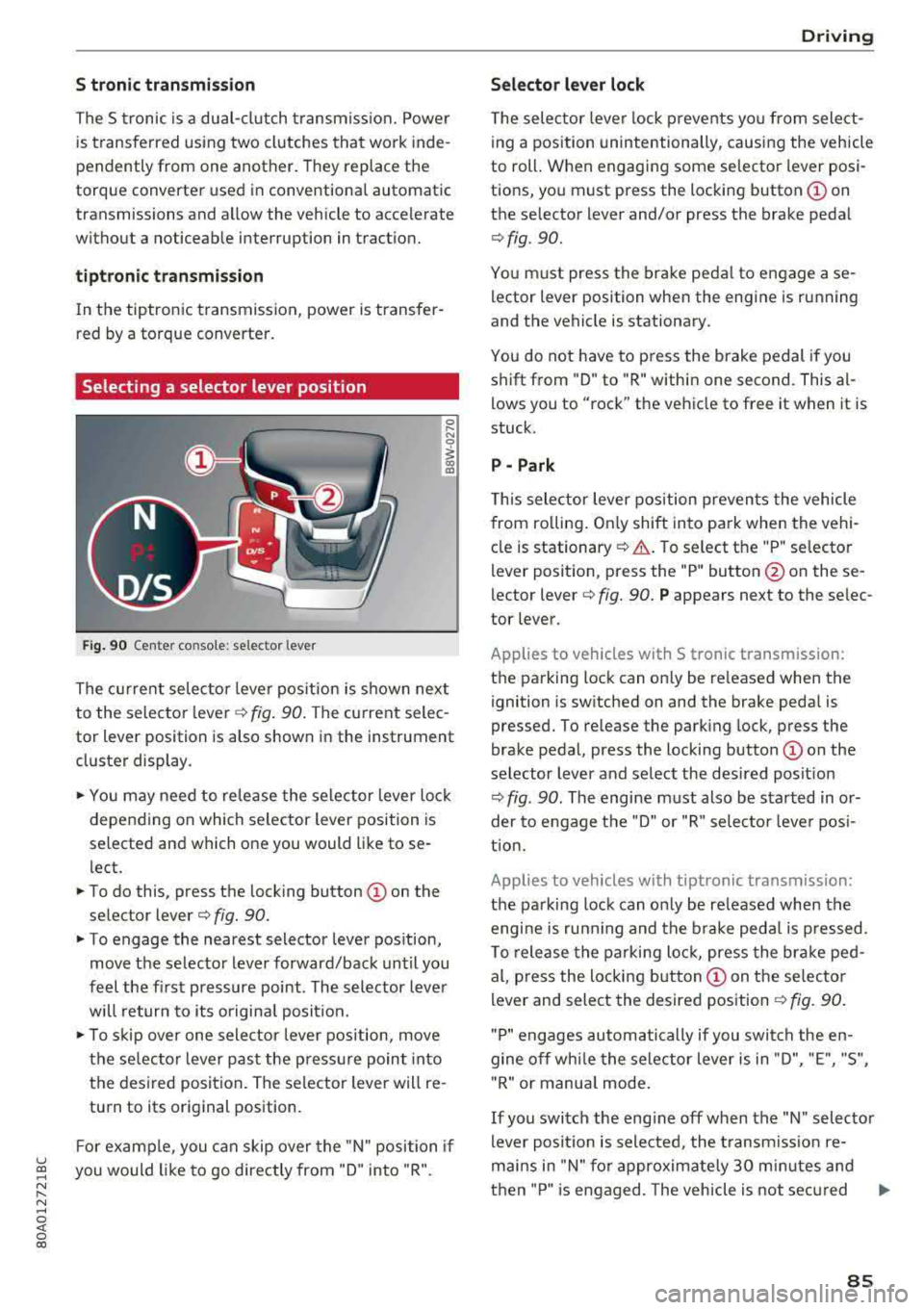
S tronic transmission
The S tronic is a dual-clutch transmiss ion. Power
is transferred using two clutches that work inde
pendently from one another. They replace the
torque converter used in conventional automatic
transmissions and allow the vehicle to accelerate
without a noticeable interruption in traction.
tiptron ic transmission
In the tiptronic transmission, power is transfer
red by a torque converter.
Selecting a selector lever position
Fig. 90 Center co nso le: selector lever
0 ,.... N
0
1 a,
The current selector lever position is shown next
to the selector
l ever ¢ fig. 90. The current selec
tor lever position is also shown in the instrument
cluster display .
... You may need to release the selector lever lock
depending on which selector lever position is
selected and which one you would like to se
l ect.
... To do this, press the locking button © on the
selector
lever¢ fig. 90.
... To engage the nearest selector lever position,
move the selector lever forward/back until you
feel the first pressure point . The selector lever
will return to its original posit ion.
.., To skip over one selector lever position, move
the selec tor lever past the pressure point into
the desired position . The selector lever will re
turn to its original position.
F or example, you can skip over the "N" position if
u ~ you would like to go directly from "D" into "R".
N ...... N ......
~ 0 co
Driving
Selector lever lock
The selector lever lock prevents you from select
ing a position unintentionally, causing the vehicle
to roll. When engaging some selector lever posi
tions, you must press the locking
button © on
the selector lever and/or press the brake pedal
¢ fig . 90.
You must press the brake pedal to engage a se
lector lever position when the engine is running
and the vehicle is stationary.
You do not have to p ress the brake pedal if you
shift from "D" to "R" within one second. This
al
lows you to "rock" the vehicle to free it when it is
stuck.
P - Park
This selector lever position prevents the vehicle
from ro lling . On ly shift into pa rk when the vehi
cle is
stationary ¢.&. . To select the "P" selector
lever position, press the "P" button @ on these
lector
lever¢ fig. 90. P appears next to the selec
tor lever.
Applies to vehicles with S t ronic transm ission:
the parking lock can only be re leased when the
ignition is switched on and the brake pedal is
pressed. To release the parking lock, press the
brake pedal, press the locking
button @ on the
selector lever and select the desired posit ion
¢ fig . 90. The engine must also be started in or
der to engage the "D" or "R" selector leve r pos i
tion.
Applies to vehicles with tiptronic transmission:
the parking lock can only be re leased when the
engi ne is ru nning and the brake pedal is pressed .
To release the parking lock, press the brake ped
al, press the locking
button @ on the selector
lever and select the desired position
¢ fig. 90.
"P " engages automatically if you switch the en
gine off whi le the selector lever is in "D", "E", "S",
" R" or manua l mode.
If you switch the eng ine off when the "N" selector
lever position is selected, the transmission re
mai ns in "N" for approximately 30 m inutes and
then "P" is engaged. The vehicle is not secured
..,
85
Page 93 of 392

u co .... N r--N .... 0 <( 0 00
Releasing the parking lock using th e
e m erg enc y re leas e
~ To prevent the vehicle from ro lling unintention
ally, set the parking brake(®}
c> page 80 or
press the brake pedal.
~ There are two slits o n the cover . Position the
screwdriver from the vehicle tool kit in one of
the slits on the cover and pry the cover off .
~ Insert the socket wrench (from the vehicle tool
ki t) into the openi ng
c> fig. 93.
~ T urn the soc ket wrench all the way clockw ise (!)
and press it downward @unti l it locks into
place .
~ Leave the socket wrench inserted i::> .&_.
Re setting the parking lock
~ Press t he b rake peda l and sta rt the eng ine.
~ Keep the brake pedal pressed and engage the
f o llowing se lector lever positions one afte r the
other : "N", "D" and back to "N" .
~ Turn the engine off again .
~ Grasp the socket wrench w ith both hands and
pull it up and out carefully to remove
c> (D .
~ Install the cover .
When the parking lock emergency re lease is
used, the
[O] ind icator light and the "N" selector
lever position turn on in the instrument cluster.
The message
D ang er of rolling a way! P not pos
s ible . Plea se apply parking brake
also appears .
A WARNING
-Only activate the eme rgency re lease while
on a level s urface o r a s light slope.
- T he pa rking lock may only be released us ing
the emergency release if the parking brake
is set.
If i t i s no t fu nct ion ing, secure the ve
hicle from rolling using the brake ped al or
ot her s uitab le means, such as blocking a
front and a rear whee l. An unsec ured vehicle
may roll away, wh ich increases the r isk of an
acc ident.
- To reduce the risk of an accident, you m ust
not drive when the emergency re lease is ac
t ivated.
-
Driving
@ Note
- Read and follow the important instructions
about
tow ing ¢ page 365 .
-The risk of damage increases if yo u do not
remove the socket wrench caref ully w hen
resetting the parking lock.
91
Page 97 of 392

u co ..... N r-N .....
~ 0 co
Assistance systems Speed warning system
Description
App lies to: vehicles with speed warning system
The speed warning system helps you to stay be
low a specified maximum speed that can be set,
changed or deleted in the Infotainment system .
The speed warning system warns you if you are
exceeding the maximum speed that you have set .
A warning tone will sound as soon as your speed
exceeds the stored value slightly. The
(Ol (USA
models)/
(01 (Canada models) indicato r light
and a message appear i n the ins trumen t cluster
d isplay at the same time. The
(Sl / (Ol indicator
light and the message turn
off if the speed falls
back below the stored maximum speed .
Sett ing a threshold is recommended if you would
like to be reminded when yo u reach a certa in
maximum speed . Situations where you may want
to do so include driving in a country with a gener
al speed limit or if there is a specified maximum
speed for winter tires.
Setting the warning threshold
Select in the I nfotai nment system: IMENU I but
ton
> Ve hicle > le ft control button > Dri ver a ssis
tan ce
> Speed warning > Manual.
@ Tips
Regard less of the speed warning system, you
should always monitor your speed using the
speedometer and make sure you are following
the legal speed limit.
A ssi st a nce systems
Cruise control system
Switching on
Applies to: vehicles with cruise control system
The cruise control system makes it possible to
drive at a constant speed starting at 15 mph
(20 km/h).
0
f
~
0
Fig . 94 Operat ing leve r: cru ise control system
.,. To switch t he system on, pull the lever into po-
sition
(D ¢ fig. 94.
.,. Drive at the speed to be maintained.
.,. To store the speed, press the button @.
T he stored speed and the
@jltJ~i, (USA models) /
l'I (Canada models) ind icator lig ht appear in the
instrument cluster display. An additional indica
tor appears in the head-up display*.
T he speed is mainta ined by modifyi ng engine
power or through an active brake intervention.
A WARNING
-Always pay attention to the traffic around
you when the cruise control system is in op
eration. You are always responsible for you r
speed and the distance between your vehi
cle and othe r vehicles .
- For safety reasons, cru ise control should not
be used in the city, in stop -and-go t raff ic, on
winding roads a nd when road conditions a re
poor (such as ice, fog, g rave l, heavy ra in and
hy droplani ng), bec ause this in cr eases the
risk of an acciden t.
- S witch the cr uise con trol
off tempor arily
when dr iv ing in turning lanes, highway exits
or in construction zones.
- P lease no te th at unconsc iously
"rest ing"
your foot on the accelerator ped al prevents
95