2018 AUDI Q5 ECU
[x] Cancel search: ECUPage 66 of 392

Seats and stor age
Increasing the size of the luggage
compartment
The rear seat backrests can be folded forward ei
ther separa tely* or toge ther.
F ig . 71 Luggage compartment: release lever (example)
Folding the backre st forwa rd
.,. Pull the release lever .:!>fig. 71 in the d irection
of the arrow to fold the backrest forward.
F olding the backrest ba ck into the upr ight
po sit ion
.,. Fo ld the backrest back up aga in until it latches
or the red mark ing
c!> page 63, fig. 69 is no lon
ger
visible ¢ & in Increasing the size of the ve
hicle interior on page 63.
A WARNING
- When releas ing the rear seat backrest,
make sure there are no peop le or animals
within its range of motion. The back rest will
fold fo rw ard automatically after it
is re
leased.
- Be careful when releas ing the backrest and
folding it forward. To reduce the risk of be ing pinched, pay attention and check when
folding backrests forward.
(D Note
To reduce the risk of damage, move the rea r
he ad res traints down before f olding the rear
backrests forward
¢ page 58.
64
Partition net
App lies to : vehicles with partit ion net
The partition net prevents objects from sliding
from the luggage compartment into the passen
ger compartment.
F ig . 72 Fo lded backrest: attach ing the partit ion net
Fig . 73 Beh ind the backrest: pos it ion ing the partit ion net
Attaching
.,. Attach the part ition net to the top mounting
eyelets first and then at the bottom eyelets ®
c!> fig. 72.
.,. Tighten and secure the straps @.
Attaching with the backrests folded down
.,. Fold the backrests down ¢ page 63.
.,. Attach the part ition net to the mounting eye -
lets@¢ fig. 72 .
.,. Tighten and secure the straps @.
Positioning
.,. Posit ion the part ition net at the desired heigh t
@¢ fig. 73 .
Removing
.,. Loosen the straps @ .
.,. Disengage the partit ion net .
Page 67 of 392

u co ..... N r-N .....
~ 0 co
The height of the partition net can be adjusted.
This a llows you to transport long objects using
the cargo pass-through, wh ile keep ing the parti
tion net attached at the same time.
(D Tips
-The straps must face tow a rd the rear when
attaching the part ition net.
- You must disengage the part ition net before
fo lding the backrest back into the upright
position.
- The partition net can also be attached to the
adjustable
tie-downs* ~ page 65.
Tie-downs and luggage compartment net
A ppl ies to: ve hicles with tie -dow ns a nd l uggage compartment
n et
The cargo net prevents small objects from slid
tng .
liil
ell I
Fig. 74 Luggage compartment: cargo net stretched out
Fig. 75 Luggage compartment : adjusta ble* tie-downs
Fixed tie-downs
.. Attach the hooks for the luggage compartment
net in the tie-downs
c>fig . 74.
Seats and storage
Removing and installing adjustable tie
downs*
.. To install the tie-downs, press both buttons at
the sides and insert the tie-down in the rai l@
r=> fig. 75 .
.. To remove the tie-downs, press both buttons at
the sides and remove the tie-down from the
rail.
.. To secure the luggage compartment net, fold
the tie-down retaine r upward .
.. Attach the hooks for the lu ggage compa rtment
net in the tie-downs.
Sliding the adjustable tie-downs*
.. To slide the tie-downs, press both of the side
buttons a nd slide the tie-downs to the desired
position @r=>fig. 75.
Fixture set
A pp lies to: veh icles w ith a fixture se t
The securing attachments prevent objects in the
luggage compartment from sliding back and
for th.
Fig. 76 Luggage compartment: secur ing attachments
Make sure the backrests are folded upright and
the partit ion net is installed
c> page 64.
Installing the securing strap @
.. Insert the tie-downs c> page 65.
.. Press the button @on the retainers (D and
place them on the tie-downs
r::> fig. 76 .
.. Make sure the brackets are locked into place .
.. Slide the tie-downs in order to move the secur
ing strap to the desired pos ition
c> page 65.
.. Press the button @ to tighten the secur ing
straps .
1111>
65
Page 68 of 392

Seats and stor age
Install ing tel escoping rod @
.,. Inse rt the tie -downs ¢ page 65 .
.. Press the button @on the retainers (!) and
place them on the tie-downs
¢ fig. 76 .
.. Make sure the brackets are locked into place .
.. Slide the tie-downs in order to move the tele
scoping rod to the desired
posit ion¢ page 65 .
.,. Press the bracket (!) downward @and, using
you r other hand, slide the lower area to the de
sired position .
.,. Make sure the b rackets a re locked into p lace .
.&, WARNING
- The backrest must be securely latched so
objects cannot slide forward out of the l ug
gage compartment during sudden braking .
- Loose objects in the passenger compar t
ment can fly forward during abrupt mane u
vers or acc idents and can inju re occupants.
Folding cargo mat
Applies to: vehicles with cargo mat
The cargo mat protects the luggage compart
ment and bumper from dirt and scratches.
F ig. 77 Luggage compartment: cargo mat sp read out
lengthw ise
66
-
F ig . 78 Luggage compartment: © crosswise cargo mat/@
lengthw ise cargo mat
The cargo mat is fo ldable and makes it poss ible
to partition t he load ing surfaces into separate
sections
¢ fig . 78.
You can extend the cargo mat lengthw ise when
the backrest is fo lded up or
down ¢ fig. 77. If you
extend it crossw ise, you can also protect the s ide
trim panels.
The cargo mat can be used on both sides. After l oad ing or unloading, fold up the cargo mat and
close t he luggage compartment lid. Only store
the cargo mat if it is dry.
You can save room by stor ing the cargo mat at
the sides of the luggage compartment.
Cargo floor
Fig. 79 Luggage compartment: install ing the cargo floor
Page 77 of 392

u co ..... N r-N .....
~ 0 co
(D Note
-Have your vehicle maintained properly and
in accordance with the service recommenda
tions in your Warranty
& Maintenance book
let. Lack of proper maintenance as well as
improper use of the vehicle will impair the
function of the emission control system and
could lead to damage.
- Do not alter or remove any component of the Emission Control System unless approved by the manufacturer.
- Do not alter or remove any device, such as
heat shields, switches, ignition wires,
valves, which are designed to protect your
vehicle's Emission Control System and other important vehicle components.
(D Tips
The consumption estimates as published by
ENVIRONMENTAL PROTECTION AGENCY
(EPA) and Transport Canada may not corre
spond to your actual consumption on the
road, which will vary depending upon vehicle
load and speed, road and weather conditions,
trip length, etc.
Steering
Manual steering wheel position adjustment
Applies to: vehicle s with manu al steering wheel adjustment
The steering wheel position is adjustable up and
down and forward and back.
Fig. 84 Steeri ng column: lever for adjust ing the steer ing
wheel position
"Pull the lever in the direction of the arrow
¢ .&.-
Driving
"Bring the steering wheel into the desired posi
tion.
" Push the leve r against the steer ing column un
til it is secure.
A WARNING
-Incorrect use of the steering wheel adjust
ment and an incorrect seating position can
cause serious injuries.
-
- Only adjust the steering column when the
vehicle is stationary so that you do not lose
control of the vehicle.
-Adjust the driver's seat or steering wheel so that there is at least a 10 in (25 cm) dis
tance between your chest and the steering
wheel. If you do not maintain this distance
I
the airbag system will not be able to provide
its full protection.
- If your physical characteristics prevent you
from sitting at least 10 in (25 cm) or more
away from the steering wheel, see if an au
thorized Audi dealer or authorized Audi Service Facility can provide adapters that
will help.
- If your face is level with the steering wheel,
the airbag does not provide as much protec
tion during a collision. Always make sure
that the steering wheel is level with your
chest.
- Always hold the steering wheel with your
hands in the 9 o'clock and 3 o'clock posi
tions to reduce the risk of injury if the airbag
deploys.
- Never hold the steering wheel in the 12
o'clock position or with both hands on the
rim or the center of the steering wheel.
Holding the steering wheel incorrectly sig
nificantly increases the risk of injury to the
hands, arms and head if the driver airbag
deploys.
75
Page 83 of 392

u co ..... N r--N ..... 0 <( 0 00
~ To prevent the parking brake from releasing au
tomatica lly, pull and ho ld
the(®) switch and
press the acce lerator pedal. The park ing brake
remains set and prevents the veh icle from ro ll
ing backward.
~ You can release the(®) switch again once you are sure that you are g iv ing enough dr iv ing
force to the whee ls by pressing the accele rator
pedal.
Emergency braking function
You can use the emergency brak ing funct ion in an
emergency situation, or if the standard brake op
erat ion malfunct ions or is disabled .
~ Pull and hold the(®) switch.
~ As soon as you release the (®) switch or acceler-
ate, the brak ing stops .
Pu lling and holding the(®) switch while driv ing
the vehicle activates the emergency braking func
tion . The vehicle is braked at all four wheels by
activating the hydraulic brake system . The brak
i ng effect is s imilar to heavy
braking ~.,&. .
To reduce the r isk of activating the emergency
braking by mistake, a warn ing tone (buzzer)
sounds when
the(®) switch is pulled . Emergency
braking stops as soon as
the(®) switch is released
or the accele rato r peda l is p ressed .
Parking
~ Press the brake pedal to stop the vehicle.
~ Pull the(®) switch to set the parking brake.
~ Select the "P" selector lever posit ion .
~ Turn the eng ine off ~.,&. .
~ Turn the steer ing whee l w hen pa rking on in
clin es so that the whee ls will roll into the curb
i f t he ve hicle starts moving.
A WARNING
- Do not press the accelerator pedal inadver
tent ly if a gear is selected when the vehicle
is stationary and the engine is running. Oth
erwise, the veh icle w ill start to move imme
diately and th is could result in an acc ident.
- Emergency braking should only be used in an emergency, when the normal brake peda l
has failed or the brake pedal is obstructed .
Driving
During emergency braking, your vehicle will
brake s imilar to heavy braking. ESC and the
associated components (ABS, ASR, EDL)
cannot overcome the laws of physics .
Around curves and when road or weather
conditions are bad, a full brake applicat ion
can cause the veh icle to skid o r the rear end
to swerve, which inc reases the risk of an ac
cident.
- I f the power supply fails, you cannot set the
p ar king brake if it is released . In this case,
park the veh icle on leve l ground and secu re
it by placing the selector lever in the "P" po
sition. See an authorized Audi dealer or au
thor ized Audi Service Facility for assistance.
- Always set the parking brake when leaving
your veh icle, even if for a sho rt period of
time. Otherwise the vehicle could roll away, increasing the risk of an accident .
- If you leave the vehicle, switch the ignition off and take the veh icle key with you. This
applies particularly when children remain in
the vehicle . Otherwise, ch ildren cou ld start
the engine, release the parking brake or op
erate e lectr ica l equipment such as power
windows, wh ich increases the r is k of an acci
dent.
- No one, especially children, should remain
in the vehicle when it is lo cked. Lo cked
doors ma ke it more diffic ult for emergency
workers to get into the vehicle, which puts lives at risk .
(D Tips
When stopp ing at a t raff ic sign al or stopp ing
i n city traffic, yo u can set the park ing brake
manua lly . The vehicle does not have to be
held with the brake pedal. The parking brake
eliminates the tendency to creep when a se l ector lever position is engaged. As soon as
you press the accelerator peda l, the parking
brake re leases automatically and your vehicle
starts to move
~page 82 .
(D Tips
- Occasional noises when the parking brake is
set and released are normal and are not a
cause for concern .
.,.
81
Page 84 of 392

Driving
-The parking brake goes through a se lf -test
cycle at regular intervals when the vehicle is
stopped . Any noises associated w ith this are
normal.
- If there is a power failure , the parking brake
will not set if it is re leased, and it will not
release if it is
set¢,&. See an authorized
Audi dealer or authorized Audi Service Fa
cility for ass istance .
Starting to drive
Various convenience and safety functions may be
ava ilable when the vehicle begins driving , de
pending on vehicle equipment.
Starting on hills with the parking brake set
Requirement: the doors must be closed and the
driver's safety belt must be fastened .
~ To start driving comfortably when on a hill, set
the parking brake and begin driving as usual.
The braking force of the parking brake does not
release automatically until the wheels build up
enough dr iv ing force .
Starting on hills with hill hold assist
Hill hold assist makes it easier to start on hills .
Requirement: the driver's door must be closed
and the engine must be running.
~ To activate hill hold assist, press and hold the
brake peda l for several seconds. The veh icle
must be in an uph ill direction of travel.
After releasing the brake pedal, the brak ing pow
er is ma intained for a brief
moment ¢.& to pre
ve nt the vehicle from rolling back when starting.
During this time, you can easily beg in to move
your ve hicle.
A WARNING
-If you do not begin driving immediately or
the engine stalls after releasing the brake
pedal, your vehicle may begin to roll back
ward . Press the brake pedal or set the park
ing brake immed iate ly.
- The intelligent techno logy of hill hold assist
cannot overcome the limitations imposed by
82
-
natural physica l laws. The increased comfort
offered by hill hold assist should not cause
you to take safety risks .
- Hill hold assist cannot hold the vehicle in
place on all hills (for examp le, if the ground
is s lippery or icy).
- To reduce the r isk of an accident, always
make sure the veh icle is situated safely
while stationary .
Off road driving
General information
The Electronic Stabilization Control (ESC) func
tions were enhanced for driving offroad. Offroad
mode can be activated when driving in situations
where slippage or a differential lock function is
necessary ¢ page 141. The hill descent assist is
also available, wh ich automatically brakes the ve
hicle to maintain a constant speed
¢ page 142 .
In add it ion, your Audi provides cont inuous all
whee l drive .
However, your Audi is not a purely offroad vehi
cle . Your vehicle was not designed to dr ive under
extreme operating conditions such as driving in
an expedition style.
Only drive on terrain that is suitable for the ve
hicle and your driving ability. Never take any
unnecessary risks!
Before driving offroad
- Check the engine oil level, the tire pressure, the coo lant level and the fluid level in the washer
fluid reservoir.
- Store pieces of luggage and other objects in the
luggage compartment and secure them from
sliding out of place .
After driving offroad
-After driving offroad, remove branches and
other debris from the radiator grille, under
body, and wheels. Look especially for foreign
objects (such as s tones) that may be stuck in
the t ire tread .
- Clean the vehicle body and underbody and in-
spect the vehicle for possible damage .
.,,.
Page 87 of 392
S tronic transmission
The S tronic is a dual-clutch transmiss ion. Power
is transferred using two clutches that work inde
pendently from one another. They replace the
torque converter used in conventional automatic
transmissions and allow the vehicle to accelerate
without a noticeable interruption in traction.
tiptron ic transmission
In the tiptronic transmission, power is transfer
red by a torque converter.
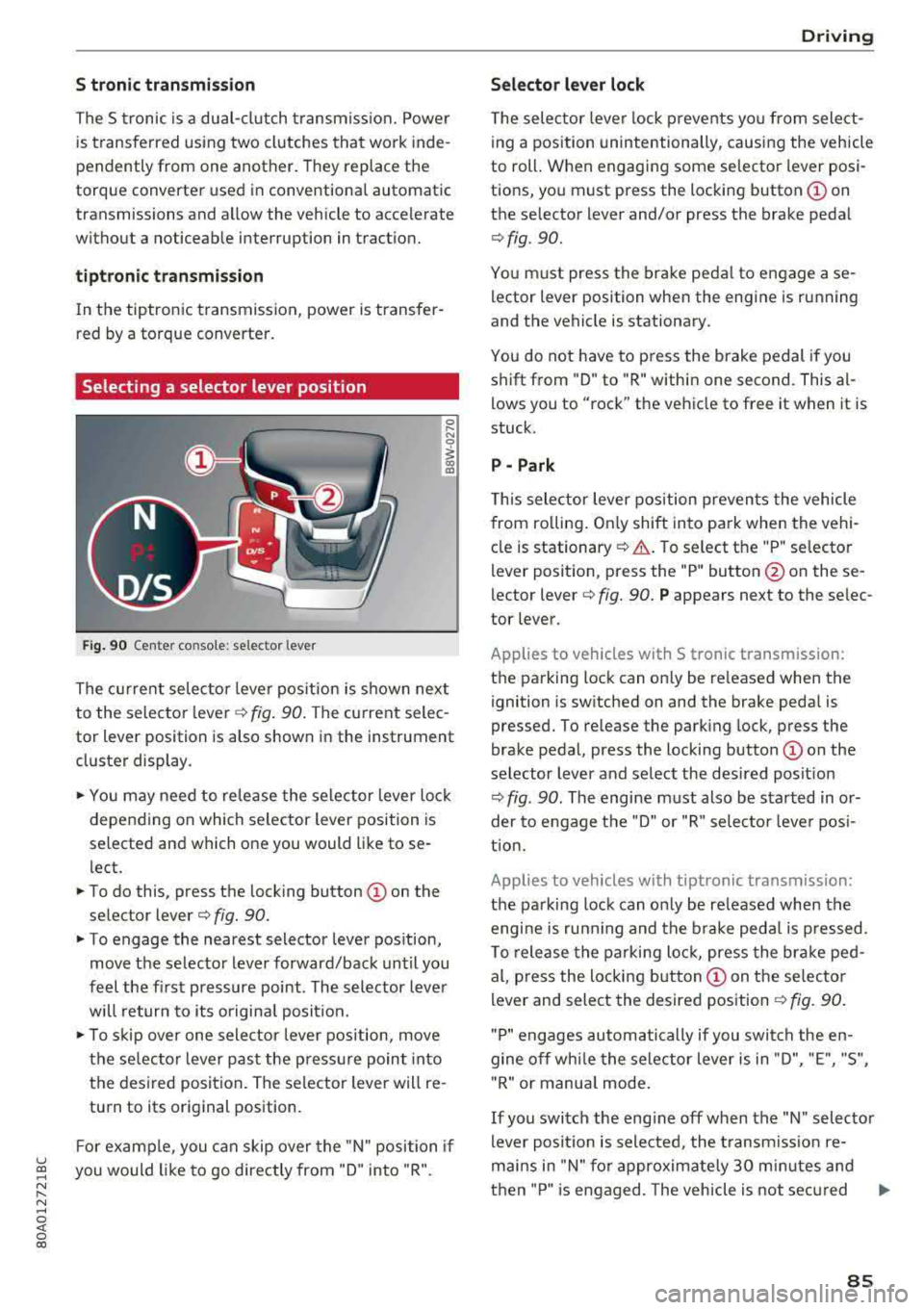
Selecting a selector lever position
Fig. 90 Center co nso le: selector lever
0 ,.... N
0
1 a,
The current selector lever position is shown next
to the selector
l ever ¢ fig. 90. The current selec
tor lever position is also shown in the instrument
cluster display .
... You may need to release the selector lever lock
depending on which selector lever position is
selected and which one you would like to se
l ect.
... To do this, press the locking button © on the
selector
lever¢ fig. 90.
... To engage the nearest selector lever position,
move the selector lever forward/back until you
feel the first pressure point . The selector lever
will return to its original posit ion.
.., To skip over one selector lever position, move
the selec tor lever past the pressure point into
the desired position . The selector lever will re
turn to its original position.
F or example, you can skip over the "N" position if
u ~ you would like to go directly from "D" into "R".
N ...... N ......
~ 0 co
Driving
Selector lever lock
The selector lever lock prevents you from select
ing a position unintentionally, causing the vehicle
to roll. When engaging some selector lever posi
tions, you must press the locking
button © on
the selector lever and/or press the brake pedal
¢ fig . 90.
You must press the brake pedal to engage a se
lector lever position when the engine is running
and the vehicle is stationary.
You do not have to p ress the brake pedal if you
shift from "D" to "R" within one second. This
al
lows you to "rock" the vehicle to free it when it is
stuck.
P - Park
This selector lever position prevents the vehicle
from ro lling . On ly shift into pa rk when the vehi
cle is
stationary ¢.&. . To select the "P" selector
lever position, press the "P" button @ on these
lector
lever¢ fig. 90. P appears next to the selec
tor lever.
Applies to vehicles with S t ronic transm ission:
the parking lock can only be re leased when the
ignition is switched on and the brake pedal is
pressed. To release the parking lock, press the
brake pedal, press the locking
button @ on the
selector lever and select the desired posit ion
¢ fig . 90. The engine must also be started in or
der to engage the "D" or "R" selector leve r pos i
tion.
Applies to vehicles with tiptronic transmission:
the parking lock can only be re leased when the
engi ne is ru nning and the brake pedal is pressed .
To release the parking lock, press the brake ped
al, press the locking
button @ on the selector
lever and select the desired position
¢ fig. 90.
"P " engages automatically if you switch the en
gine off whi le the selector lever is in "D", "E", "S",
" R" or manua l mode.
If you switch the eng ine off when the "N" selector
lever position is selected, the transmission re
mai ns in "N" for approximately 30 m inutes and
then "P" is engaged. The vehicle is not secured
..,
85
Page 93 of 392

u co .... N r--N .... 0 <( 0 00
Releasing the parking lock using th e
e m erg enc y re leas e
~ To prevent the vehicle from ro lling unintention
ally, set the parking brake(®}
c> page 80 or
press the brake pedal.
~ There are two slits o n the cover . Position the
screwdriver from the vehicle tool kit in one of
the slits on the cover and pry the cover off .
~ Insert the socket wrench (from the vehicle tool
ki t) into the openi ng
c> fig. 93.
~ T urn the soc ket wrench all the way clockw ise (!)
and press it downward @unti l it locks into
place .
~ Leave the socket wrench inserted i::> .&_.
Re setting the parking lock
~ Press t he b rake peda l and sta rt the eng ine.
~ Keep the brake pedal pressed and engage the
f o llowing se lector lever positions one afte r the
other : "N", "D" and back to "N" .
~ Turn the engine off again .
~ Grasp the socket wrench w ith both hands and
pull it up and out carefully to remove
c> (D .
~ Install the cover .
When the parking lock emergency re lease is
used, the
[O] ind icator light and the "N" selector
lever position turn on in the instrument cluster.
The message
D ang er of rolling a way! P not pos
s ible . Plea se apply parking brake
also appears .
A WARNING
-Only activate the eme rgency re lease while
on a level s urface o r a s light slope.
- T he pa rking lock may only be released us ing
the emergency release if the parking brake
is set.
If i t i s no t fu nct ion ing, secure the ve
hicle from rolling using the brake ped al or
ot her s uitab le means, such as blocking a
front and a rear whee l. An unsec ured vehicle
may roll away, wh ich increases the r isk of an
acc ident.
- To reduce the risk of an accident, you m ust
not drive when the emergency re lease is ac
t ivated.
-
Driving
@ Note
- Read and follow the important instructions
about
tow ing ¢ page 365 .
-The risk of damage increases if yo u do not
remove the socket wrench caref ully w hen
resetting the parking lock.
91