2018 AUDI A6 warning lights
[x] Cancel search: warning lightsPage 20 of 266
Instruments and indicator lights
Drive to an autho rized Aud i dea le r or a uth orized
Audi Service Facility immediately to have the
malfunct io n corrected .
Vehicle lights : Malfunction
There is a malfunc tion in the headl ights or the
lig ht switch .
Drive to an a uthorized Aud i dea ler or a uthorized
Aud i Serv ice Facility immediately to have the
malfunct io n corrected .
~(D Dynamic headlight range control
Applies to: vehicles with dynamic headlight range control
II Headlight rang e control : System fault
There is a malfunction in the head ligh t range
con trol system, wh ich may ca use g lare fo r othe r
d rivers.
Drive to an a uthori zed Aud i dea ler or a uth orized
Aud i Serv ice Facility immediately to have the
malfunc tion corrected .
@.D Light/rain sensor
!'al Automatic headlights / automati c wipers :
System faul t
The light/ra in senso r is malf unct io ni ng .
The low beams remain switched on at all times
for safety reasons when the lig ht switch is in the
AUTO position . H owever, you can continue to
tur n the lights on and off using the light sw itch .
You can s till con trol a ll func tions that are inde
pendent of the ra in se nsor thro ug h the w ind
sh ie ld w iper lever.
Dr ive to an a utho rized Aud i dea le r or a uthorized
Au di Serv ice Fac ility immedia tely to have t he
malfunc tion corre cted.
I--! Sport differential
Applies to: vehicle s with sport differential
Ill Sport differential: System fault
There is a malfunc tion wi th t he sport diffe re nt ial.
Drive to an a uthori zed Aud i dea le r or a uth ori zed
Aud i Serv ice Facility immediately to have t he
malfunc tion corrected .
18
Ill Sport differential: Overheating
The t ra nsmission temperatu re has increased sig
nificantly due to t he sporty dr iv ing m anner. Drive
i n a less s port y manne r until t he temperat ure re
turns to t he norma l range and t he in dicator lig ht
switches of .
A WARNING
Contact an author ized Audi dealer or author
ized A udi Service Fac ility if the spo rt differen
tial is fa ulty o r malfunctioning . The repai r
must be p erf ormed by trained p ersonnel us
ing the correc t oil in or der to ensure safety.
¢i Q Turn signals
If the . or. in d icator lig ht blinks , the turn
s ignals a re activ ate d. If both in dicator lights a re
blink ing, t he emergency flas hers are activ at ed .
If an ind icator light bl inks tw ice as fast as us ual,
a turn signal bu lb has fai led . Care fully d rive to an
a uth orize d Au di dealer o r au th ori ze d Aud i Serv ice
Fa cility i mmed iate ly to h ave the mal function co r
r ec ted .
(D Tips
Addi tio na l informat ion about the tur n signals
c a n be f ound
u nd er~ page 3 9 .
Page 21 of 266

a co ,...,
N
" N ,...,
0 0 \,;J "
system
Overview
Fig . 4 Dr iver informa tion sy stem in t he inst rum ent clus ter
Fig. S Instrum en t cl us ter: examp le in formation line
The information in the driver information system
is shown in @tabs @
¢ fig. 4. The following
content is possible depending on vehicle equip
ment:
® ®
First tab Vehicle functions:
On-board computer
¢page20
Efficiency program*
¢page 21
Digital speedometer
Cru ise control system*
¢ page84
Adaptive cruise control* and braking
guard*
¢ page 86
Act ive lan e assist*
¢page95
Reduced display
Driver information system
® ®
Second Indicator lights and messages
tab Warning when a door, the hood, or
the luggage compartment lid is not
closed
Service interval display
¢ page 199
Speed warning system*
¢page84
Third tab Night vision assist*
¢page 101
Fourth Audio/Video
tab
Fi fth tab Telephone*
Sixth tab Navigation*
The second and third tabs are only visible if at least one indicator light or message is shown or if
that system is switched on .
The status line © is located in the bottom part of
the
display¢ fig. 4. It displays the exterior tem
perature, time, selector lever position, tripod
ometer and odometer .
For some vehicle functions, you can access the
trip information from the temporary memory
¢ page21 in line (D¢fig . 5.
A WARNING ,.___
Do not assume the roads are free of ice based
on the outside temperature display . Be aware
that there may be ice on roads even when the
outside temperature is around 41 °F (+5 °C)
and that ice can increase the risk of accidents.
(D Tips
-You can select the units used for tempera
ture, speed and other measurements in the
Infotainment system.
- If your vehicle is stationary or if you are driv
ing at very low speeds, the temperature dis
played may be slightly higher than the ac
tual temperature outside due to the heat ra
diating from the engine.
- For information on the audio/video and nav
igation* functions, refer to the separate In
fotainment system operating manual.
19
Page 38 of 266

Opening and closing
Valet parking function
Applies to: vehicles w ith valet parking function
The valet parking function protects the luggage
comportment from unauthorized access .
Fig. 33 Glove compartment: valet parking function button
You can switch the valet parking function on, for
example when someone else is parking your vehi
cle
l }_ When the function is switched on, the ve
hicle can be driven, locked and unlocked using
the master key, but access to the luggage com
partment is not permitted .
... Remove the integrated mechanical key
¢page 26.
... Open the glove compartment.
... Press the I VALET I button to switch the va let
parking function on. The LED in the button
turns on.
... lock the glove compartment with the mechani
cal key .
... Applies to vehicles with lockable backrests in
the rear: to also secure the luggage compart
ment from the vehicle interior, lock the backr
ests using the mechanical key ¢
page 55.
... Only give the remote control key to the service
personnel parking your car and keep the re
moved mechanical key with you.
The following buttons are deactivated when the
valet parking function is switched on:
-1""' 1 button in the driver's door
-I a I button on the remote control key
- Handle in the luggage compartment lid
When the valet parking function is switched on,
the message
Valet parking activated appears in
ll This fun ctio n is not availa ble in all c oun tries.
36
the instrument cluster display when yo u switch
the ignition on.
(D Tips
Please note that the luggage compartment
can still be accessed from the vehicle interior
in vehicles w ith a pass-through, even when
the valet parking function is switched on.
Garage door opener
(Homelink)
Description
Applies to: vehicles with garage door opener (Home Link}
Fig. 34 Garage door opener: exa mples of usage fo r d iffer ·
ent syste ms
With the garage door opener (Homelink), you
can activa te systems such as the garage doors ,
security systems or house lights from inside your
vehicle. Three buttons a re integrated in the head
liner that can be prog rammed to up to three re
mote controls.
To be able to operate systems using the garage
door opener, the buttons in the headliner must
first be programmed .
A WARNING
When operating or programming the garage
door opener, make sure that no people or ob
jects are in the area immediately s urrounding
the equipment . People can be injured or prop -
erty can be damaged if struck when closing.
~
Page 40 of 266
Lights and Vision
Lights and Vision
Exterior lighting
Switching lights on and off
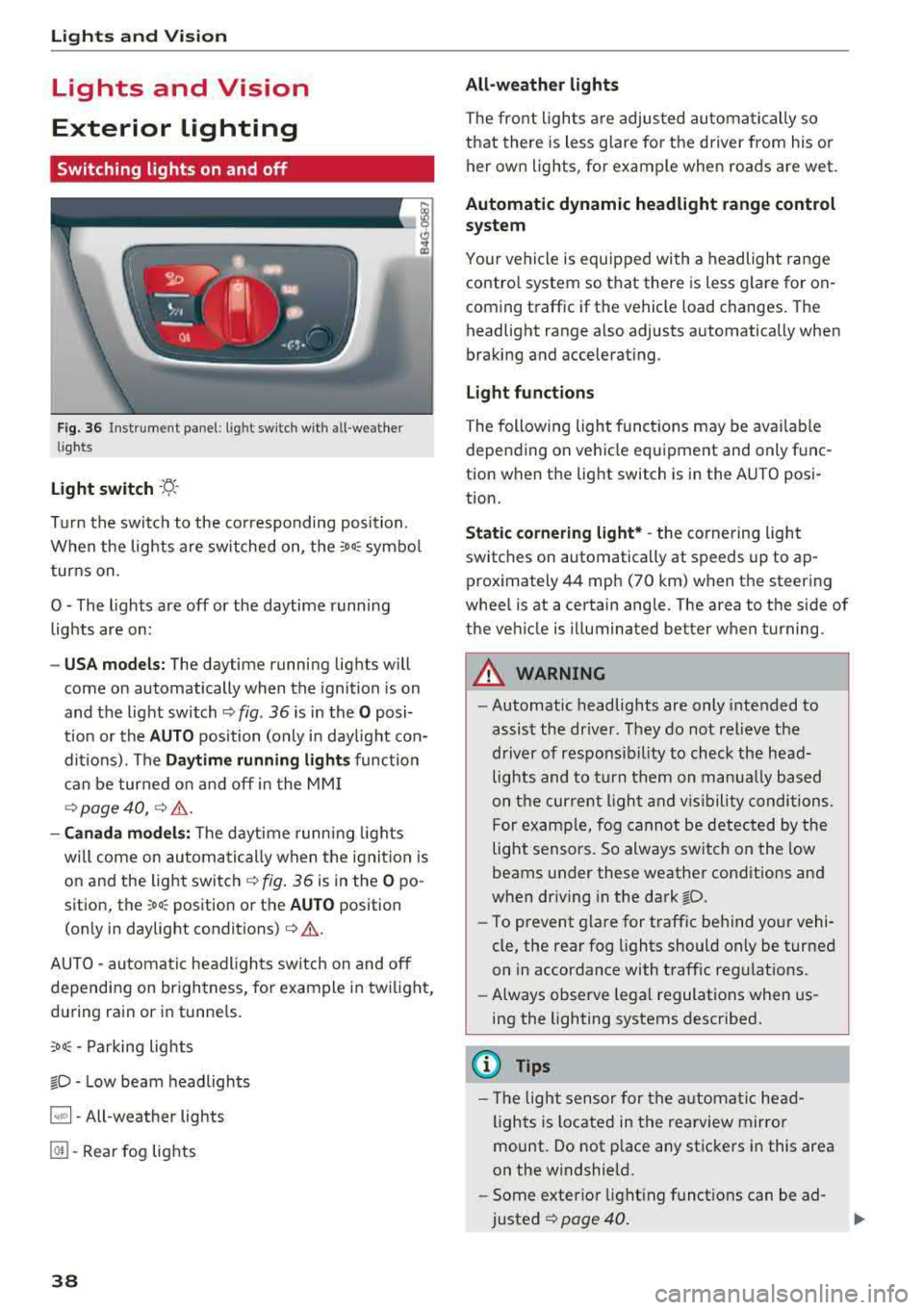
F ig. 36 Instrument panel: l ight sw itch w ith all -weather
lights
Light switch · 'A ·
Tur n the switch to the co rresponding position.
W hen the lights are sw itched on, the
:oo: symbo l
tur ns on .
0 - The lights are off or the daytime running lights are on:
- USA mode ls: The daytime running lig hts will
come on automatically when the ignition is on
and the light switch ¢
fig. 36 is in the O posi
t ion or the
AUTO pos ition (only in day light con
ditions). The
Daytime running lights func tion
can be turned o n and off in the MM I
9 page 40, 9 &.
-Canada model s: T he d aytime runn ing lights
will come on automati cally when the ignit io n is
o n and the ligh t switch
9 fig . 36 is in the O po
sition, the
; oo : position or the AU TO position
(on ly in daylight conditions) ¢
&.
AUTO - au toma tic headligh ts switch on and off
depending on br igh tness, for example i n tw ilig ht,
du ring rain or in tunne ls.
::oo : -Parking lights
io -Low beam headlights
~ - All-weather lights
@] -Rear fog lights
38 All-weather lights
The fron
t lights a re adjus ted au tom atica lly so
that there is less g lare fo r the d river from his o r
her own lights, fo r example when roads are wet .
Automatic dynamic headlight range control
system
Yo ur vehicle is equ ipped with a headlight range
contro l system so that there is less g la re for on
coming t raffic if the vehicle load changes. The
headlight range also adjusts automatically when
bra king and accelerat ing .
Light funct ion s
The following light func tions may be ava ila bl e
depe nding on ve hicle equ ipment and only f unc
tion when the lig ht switch is in the AUTO posi
tion.
Static cornering light* -the cornering ligh t
switches on automatically at speeds up to ap
proximately 44 mph (70 km) when th e steering
whee l is at a ce rtain angle. The area to t he side of
the ve hicle is illumina ted be tter when turning.
A WARNING
- Automatic headlig hts are only intended to
assis t the driver. They do not relieve the
driver of responsib ility to check the head
lights and to t urn th em on m anua lly b ased
on t he cur re nt ligh t and vis ib ility conditions.
F or examp le, fog cannot be detec ted by the
light sensors. So always switch on the low
beams under these weather con dit ions and
when driv ing in the dark
io.
- To prevent glare for traffic be hind yo ur vehi
cle, the rear fog lights should only be turned
on in accordance with t raff ic regulat ions.
- Always observe le g al regulations when us
ing the lighting systems described.
(D Tips
- Th e light senso r for the a utomat ic head
lights is locate d in the re arview mirro r
mount . Do not p lace any stic kers i n this area
on the w indshield.
- Some exter ior light ing f unct ions can be ad
justed
¢ page 40 .
Page 41 of 266

a co .... N
" N .... 0 0 \,;J '
lights are on and open the door, a warning
tone sounds.
-In coo l or damp weather, the inside of the
headlights, turn signals and tai l lights can
fog over due to the temperature d ifference
between the inside and outs ide. They will
clear shortly after switch ing them on. This
does not affect the serv ice life of the light
ing .
Turn signal and high beam lever
The turn signal lever operates the turn signals,
the high beams and the headlight flasher .
Fig. 37 Turn s ignal and h igh bea m lever
Turn signals ¢¢
N 0 .... 0 ± SI' a,
The turn s ignals activate when you move the lev
e r into a turn signal position w hen the ignition is
switched on.
(D -Right turn signa l
@-Left turn s ignal
The turn signal blinks three times if you tap the lever (conven ience turn s ignal).
High b eams and h eadlight flash er ~D
Move the lever to the co rresponding position :
@-High beams on (vehicles with High beam as
sistant*
9 page 39)
© -High beams off or headlight flasher
The
El indicator light in the instrument cluster
turns on .
Lights and Vision
A WARNING
--
High beams can cause glare for other drivers,
which increases the risk of an accident . For
th is reason, only use the high beams or the
h eadlight flasher when they will not create
g la re for ot her dr ive rs.
High beam assistant
App lies to : vehicles wi th high beam assis tan t
A camera on t he rearv iew m irror mo unt can de
tect ligh t sources from o ther road use rs . The hig h
beams sw itch on or off automatically depending
on the position of vehicles driving ahead and on
coming vehicles, the vehicle speed and other en
vironmental and traffic cond it ions.
Acti vating high beam as sistant
Requirement: the light sw itch mus t be set to the
A UTO posit ion and the high beam ass istant must
be switched on in the Infotainment system
~ page 40 .
.. To act ivate the hig h beam ass istant, tap the
lever forward @. The
El indicator light ap
pears in the instrument cluster display and the
high beam head lights are switched on/off auto
matically . The
El indicator light also turns on if
the high beams are switched on.
Switching the high beam s on /off manuall y
If the high beams did not switch on/off automat
ica lly as expected, yo u may switc h them on or off
manua lly instead:
.. To switch the high beams on manua lly, tap the
lever forward @. The
El indicator light turns
on .
.. To switch the h igh beams off man ua lly, pull the
lever
back @. The high beam assistant is deac
tivated .
Operating the headlight flasher
.. To operate the headlight flasher when the high
beam assistant is activated and hig h beams are
sw itched off, pull the lever
back @. The high
beam ass istant remains active.
Ill>
39
Page 42 of 266

Lights and Vision
Messages in the instrument cluster display
Headlight a ssis t: System fault
D rive to an authorized Aud i dealer or a uthorized
Aud i Serv ice Facility immediately to have the
malfunct io n corre cted. You can still switch the
h igh beams on or off manually.
Headlight as sist: Unavailable No camera view
The camera view is blocked, for example by a
sticker or debris.
The senso r is located between the interior rear
view mirror and the windshield. Do not place any stickers in th is area on the windshield.
A WARNING
H igh beam assistant is only i ntended to assist
the driver . The dr iver is still responsible for
cont ro ll ing the head ligh ts a nd switch ing
t hem manually depend ing o n light and v isibil
i t y condition s.
It may be necessary to operate
th em ma nually i n sit uations such as:
- In adve rse weathe r condit ions such as fog,
heavy ra in, b low ing snow or sp raying wate r.
- On roads whe re oncoming traffi c may be
pa rtiall y o bscu red, s uch as ex pressways.
- W hen there are road users t hat do not have
s ufficient ligh ting, s uch as bicy clers o r
vehicles wi th dirty ta il la mps.
- In tight cu rves and o n steep hills.
- In poorly lit areas .
- With stro ng reflectors, such as signs.
- If the area of the windshield near the senso r
is fogged over, dirty, icy or covered with a
sticker.
Adjusting the exterior lighting
The functions are adjusted in the Infotainment
sys tem.
~ Se lect : I CAR I functio n button> (Car)* Systems
contro l button > Vehicle settings > Exterior
light ing .
Automatic headlights
You can adju st the fo ll ow ing settings in the Au
tomatic headlights
menu:
40
Headlights activation time -you can adjust if the
headlights switch on
Early , Medium or Late ac
cording to the sensit ivity of the light sensor.
Auto-dimming high beams * -yo u can switch t he
high beam assistant *
On and Off .
Daytime running lights*
USA models :
the daytime running lights can be
swi tched on/off. Sele ct
On or Off .
Canada models:
this function cannot be sw itched
off . They act ivate automatically each time the ig
nit ion is switched on .
Coming home, Leaving home
The coming home function illuminates the area
outside the vehicle when you turn the ig nit ion off
and open the d river's doo r. To turn the function
o n, select
Light s when leaving car > On .
The leaving home illum inates the area outside
the vehicle when you unlock the vehicle . To turn
t h e f unction on, se lect
Lights when unlocking
car > On .
The coming home and leav ing home functions
on ly operate when it is dark and the l ight switch
i s in the
AUTO pos ition .
Emergency flashers
------
Fig. 3 8 Cente r conso le : emergency f las her bu tton
The eme rgency flashe rs makes other d rivers
aware of your veh icle in dangerous situations.
~ Press the ~ button to switch the emergency
flashers on or of f.
You can indicate a lane cha nge or a turn w hen the
eme rgency flashers are switched o n by using the
..,.
Page 44 of 266

Lights and Vision
Vision
Adjusting the exterior mirrors
Fig. 42 Driver"s door: knob for the exter ior mirro rs
Turn the knob to the desired position:
Q/ P -adjusts the left/right exterior mirror.
Mov e the knob in the desired direction.
®-Heat the mirror glass depend ing on the out
side temperature.
.9 -Folds the exterior mirrors* . In the Infotain
ment system, you can select if the mirrors fold in
automatically when you lock the vehicle
c::>page29.
Front passenger's exterior mirror tilt
function*
To help you see the curb when back ing into a
parking space, the surface of the mirror tilts
slightly. For this to happen, the knob must be in
the posit ion for the front passenger's exterior
mirror .
You can adjust the tilted mirror surface by turn
ing the knob in the desired direction. When you
move out of reverse and into another gear, the
new mirror position is stored and assigned to the
key you are using.
The mirror goes back into its original position
once you drive forward faster than 9 mph
(15 km/h) or turn the ignition off.
A WARNING
Curved mirror surfaces (convex or aspheric*)
enlarge the field of vision. However, they
make objects in the mirror appear smaller
and farther away. You may estimate incor-
42
rectly when you use these mirrors to gauge
your distance from the vehicles behind you
when changing lanes, which increases the risk
of an accident.
(D Note
- If the mirror housing was moved by force
(for example, by running into an object
when maneuvering the vehicle), the mirror must be folded all the way in using the pow
er folding function. The mirror hous ing
must not be moved back into place by hand
because this would impair the function of
the mirror mechanism.
- If you wash the vehicle in an automatic car
wash, you must fold the exter ior mirrors in
to reduce the risk of damage to the mirrors.
Never fold power fold ing exterior mirrors *
by hand. Only fold them in and out using
the power controls .
(D Tips
-If the power adjusting function malfunc
tions, the glass in both mirrors can be ad
justed by pressing on the edge of it by hand.
- The exterior mirror settings are stored with
the memory function*
c::> page 49.
Dimming the mirrors
Your vehicle is equipped with a manual or auto
matic* dimming rearview mirror.
Fig. 43 Automatic dimming rearview mirror*
Manual dimming rearview mirror
.,. Pull the lever on the bottom of the mirror back . ..,.
Page 45 of 266

a co ,...,
N
" N ,...,
0 0 <..:l '
.,. Press the button @¢ fig. 43. T he ind icator
light @ turns on. Interior and exterior mirrors *
will dim when there is incoming light (such as headlights from the rear) .
A WARNING
If the glass on an automatic dimming mirror
breaks, electrolyte can leak out. This liquid
can irritate the skin, eyes and respiratory sys
tem . If there is contact with the flu id, flush
immediately with plenty of wate r. Consult a
physician if necessary.
- Repeated or long-term exposure to electro
lyte fluid can lead to irritation of the air
ways, especially in people with asthma or
other respiratory conditions. Take deep
breaths immediate ly after leaving the veh i
cle or, if this is not possible, open all of the
doors and windows as wide as possible.
- If electrolyte fluid enters the eyes, flush
them thoroughly with a large amount of
clean water for at least 15 minutes and then
seek medical attention.
- If electrolyte f luid comes into contact with
the skin, flush the affected area with clean
water for at least 15 minutes and then clean
with soap and water and seek med ical at
tent ion . Clean affected cloth ing and shoes
thoroughly before wear ing again .
- If the fluid was swallowed and the person is
conscious, fl ush the mouth with water for at
least 15 minutes. Do not induce vomiting
unless this is recommended by medical pro
fessionals. Seek medical attention immedi
ately .
(D Note
If the glass on an automatic dimming mirror
breaks, e lectrolyte can leak out . This liquid
damages plastic surfaces and paint. Clean
this liquid as quickly as possible, for example
with a wet sponge.
Lights and Vision
(D Tips
-If the light reaching the rearview mirror is
obstructed, the automatic dimming mirror
will not function correctly,
- The automatic dimming mirrors do not dim
when the interior lighting is turned on or
the reverse gear is se lected.
Sun visors
[ }
Fi g. 44 Fr ont pass eng er's s id e: sun vis or
T he sun visors for the driver and front passeng er
can be released from their mounts and tu rned to
ward the
doors @.
The mirror light switches on when the cover over
the vanity m irror @opens.
Sunshades on the rear doors
Applies to: vehicles with sunshades on the rear doors
Fig. 45 Raised sunshade on a rear door
... Pull the sunshade ou t and secure it in the hooks
on the upper door frame
¢ fig. 45.
43