2018 AUDI A4 Control
[x] Cancel search: ControlPage 150 of 403
Intelligent Technology
Applies to: allroad
Offroad mode on
ESC/ASR off Offroad mode off or
ESC /ASR on
Beha vior
T he ESC and ASR stabiliza -The stabi lization f unction is The f ull stabilization tune -
tion functions are limited not available
¢ .&. . ESC and tion of the ESC and ASR is
¢ & . ASR are sw itched off . available aga in .
Operation Press the l~ m l button b rief- Press an d ho ld the l~ "'' I but- Press the l~ "" I button again .
ly. ton longer than three sec-
onds.
Indicator II turns on. Iii and lf'tii•)H turn on. II turns off or II and
light s li'tii•)H turn off .
Message s Stabilization cont
rol (ESC ): Stabiliza tion control (ESC ): Stabilization cont rol (ESC ):
offroad . Warning! Redu ced off . Warning! Restricted
on
s tability stability
A WARNING
You should only switch sport/offroad mode
on or switch ESC/ASR off if you r drivi ng abili
ties and road cond it ions permit .
- The stabilization function is lim ited w hen
sport mode/offroad mode is swi tched on.
T he driving w heels could sp in and the veh i
cl e could swerve, especi ally o n slick or slip
pery road sur faces.
- T here is no vehicle sta biliz at ion when ESC/
ASR a re swi tched off.
Hill descent assist
Applies to: allroad
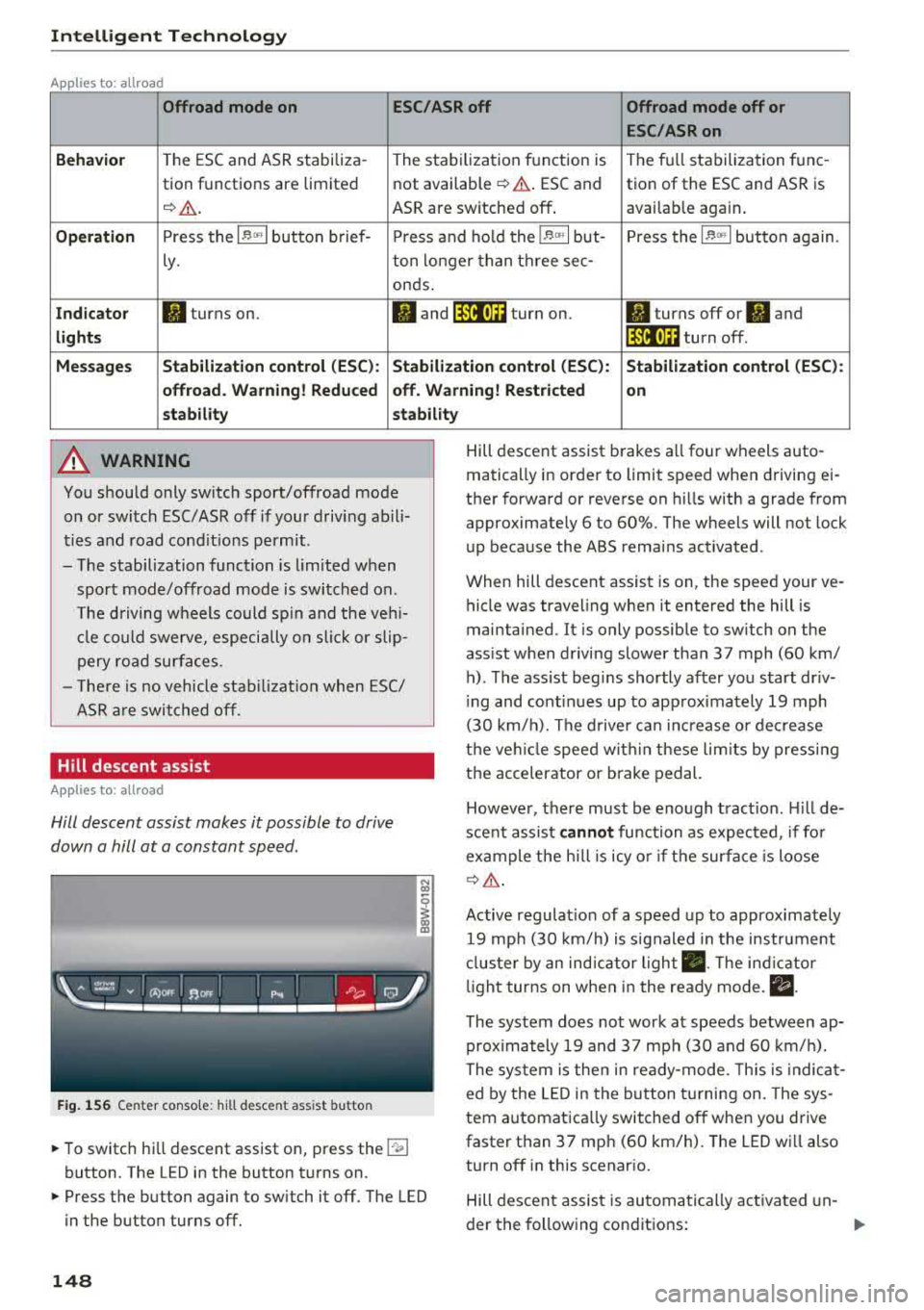
Hill descent assist makes it possible to drive
down a hill at a constant speed.
F ig. 1 56 Center co nso le: hil l desce nt ass ist button
~ To switc h hill descent assist on, press the !"~I
button. The LED in the button t urns on.
~ Press the button again to switch it off. The LED
in the button turns off.
148
Hill descent assist brakes a ll four wheels auto
matically in order to limit speed when d riving ei
ther forward or reverse on hills with a grade from
approximately 6 to 60%. The wheels will not lock
u p because the ABS remains activated.
When hill descent assist is on, the speed your ve
hicle was traveling when it entered the hill is
maintained. It is only possib le to sw itch on the
ass ist when driving slower tha n 37 mph (60 km/
h) . The ass ist beg ins shortly af ter you start dr iv
i ng and cont inues up to app roxima tely 19 mph
(30 km/h). The d rive r ca n in crease o r de crease
t h e ve hicle spee d wit hin these lim its by press ing
t h e accelerator or brake pedal.
However, there must be enough t ract ion . Hill de
sce nt assist
cannot function as e xpec ted, if fo r
ex ample the h ill is icy o r if t he surface is loose
¢ &.
Active regulat io n of a speed up to approximate ly
19 mp h (30 km/h) is s ignaled in the instr ument
cl us ter by an ind ic a tor light
• . The in dica tor
li gh t tur ns on when i n the ready mode.
II.
The system does not work at speeds between ap
prox imately 19 and 37 mph (30 and 60 km/ h).
The system is the n in ready-mode. This is indica t
ed by the L ED in the b utton t urnin g on. The sys
tem a utomatica lly switched o ff when you drive
faster than 37 mph (60 km/h). The LED w ill also
turn off in this scenar io.
Hill descen t assis t is au tomatically ac tiva ted un-
der the fo llowing cond itions:
.,.
Page 153 of 403

a co .... N ,....
N .... 0 0
3 co
Also see¢ page 146, Electronic stabilization
control (ESC) .
The all-wheel drive system dist ributes the d riving
power var iably to the front and rear axle. It works
together with selective whee l torque cont rol,
which activates when driving through curves
c:> page 146. With the sport differentia l*, power
d istribution to the rear wheels is variable and can
be adjusted using the dr ive select
c:> page 134.
The all wheel drive concept is designed for high
engine power. Your ve hicle is exceptionally pow
erful and has excellent driving characterist ics
both under norma l dr iving condit ions and on
snow and ice . Always read and fo llow safety pre
cautions
c:> .&. .
Winter t ires
By us ing all wheel drive, yo ur vehicle has good
forward motion with standard tires in w inte r con
d itions. However, using winter or all season tires
on
all four wheels in the winter is recommended ,
because this will improve the
braking effec t.
Snow chains
If there are snow chain laws, snow chains must
also be used on vehicles with all wheel drive
c:> page 350, Snow chains .
Replacing tire s
For vehicles with all whee l drive, only whee ls with
the same ro lling circumference s hou ld be used.
Avoid using tires w ith different tread depths
c:> page 341, New tires or wheels.
Offroad vehicle?
The ground clearance is too low on some mode ls
to drive on rough terrain. Therefore, avoid off road trips.
A WARNING
-Also, in vehicles with a ll w heel d rive, adapt
your dr iv ing style to the current road and
t raff ic conditions . Do not let the increased
safety provided tempt you into tak ing risks,
because t his increases the r is k of an acci
dent .
Intellig ent Technology
- The braking ab ility o f your vehicle is limited
to the traction of the wheels. In this way, it
is not different from a two wheel drive vehi
cle . Do not be tempted to accelerate to a
h igh speed whe n the road is sli ppery, be
cause this i ncreases the risk of an accident.
- No te that o n wet streets, the fron t wheels
can "hydrop la ne" if dr iv ing at speeds that
are too high. Unlik e front wheel d rive
veh icles, the engine does not rev h ig her sud
denly when the vehicle begins hydrop laning.
F orthisre ason,ad aptyo urspeedto the
road conditions to re duce the risk of an acci
dent .
Energy management
The starting ability is optimized
The energy management system manages the
electrical energy distribution and optimizes the
availability of electrical energy for starting the
engine .
When a vehicle with a conventional energy sys
tem is not drive n for a long time, the ve hicle bat
te ry is d rained by equipment (for example, t he
immob ilizer). In certa in circ ums tances , there
c ou ld m ay no t be eno ugh e nergy to start the en
gine.
You r vehicle is equi pped with an in tell igent ener
gy manageme nt system fo r dist ributing electrici
ty. This sig nifican tly improves the start ing ability
and in cre ase s t he vehicle battery life.
The ene rgy ma nagement system Is made up of
battery diagnosi s, idling current management ,
and dynamic energy management .
Battery diagnosis
The battery diagnos is determines the vehicle bat
te ry c harge level. The sensors determine the bat
te ry vo ltage, the batte ry cu rrent, and the batte ry
temperat ure. The current c ha rge level and t he
perfo rman ce of the vehicle battery a re de ter-
mine d base d on this.
..,.
151
Page 154 of 403

Intelligent Technology
Idling current management
The idling c urrent management dec reases the
energy used w hile pa rked. With the engine
sw itched off, it manages the energy distribution
to the different elect rical components . Data from
the battery diagnosis is taken into account for
this .
Depending on the vehicle battery charge level,
e lectrical equipment is switched off one item af
ter the other to prevent the vehicle battery from
draining and to maintain the starting ability.
Dynamic energy manag em ent
W hil e driving, dynamic energy management dis
tr ibutes the appropriate amount of energy to the
electrical equipment. It controls the battery
charge level so that the amount of energy is not
greater than the amount being generated in or
der to mai nta in a n optimal vehicle battery charge
level.
(D Tips
- Energy management cannot overcome the
l aws of phys ics . Note that the charge leve l
and leng th of the vehicle battery life a re
li mi ted .
- When the starting ability is endanger ed, the
(•) ind icator light turns on~ page 30.
What you should know
Maintaining the starting ability is the highest
priority.
A lot of stress is placed on the vehicle battery
when dr iv ing short d istances, dur ing c ity dr iv ing,
and at cold times of the year . A lot of energy is
used but little is gene rated . It is a lso cri tical
wh en the engine is not runn ing but e lectr ica l
e qui pment is swi tc h ed o n. In this case, energy is
u sed bu t none is ge nera te d.
In s ituatio ns l ike this, energy management will
actively regu late the d ist ribu tion of ene rgy.
Long pe riods without use
If you do not drive your vehicle for several days or
weeks, electrica l equipment is gradually scaled
back or swi tched off . This reduces energy use and
152 ensures
the vehicle will be ab le to s tart a fter long
periods of time. Some conven ience f unctions,
such as interior lig hting or power seat ad just
ment, may not be avai lab le under ce rtain circum
stances. These conven ience functions will be
available again once you switch the ignit ion on
and sta rt the eng ine.
With the engine switched off
The vehicle battery will drain if you use Infotain
ment functions such as listening to the radio
whi le the engine is switched off.
If the vehicle's ability to start may be impaired by
the energy use, a message will appear i n the In
fota inment system display. The message indi
cates that the system will switc h off automatical
l y soon. If yo u wou ld like to continue using the
funct io ns, you must s tart the engine .
With the engine running
Although electr ica l energy is generated w hile
driv ing, the veh icle battery can d ra in. This can
happe n if litt le ene rgy is generated but much is
used, and the charge level of the vehicle battery
is not optimal.
To resto re t he ba lance of energy, components
that require large amounts of energy are tempo rarily scaled back or sw itched off. Heat ing sys
te ms in pa rticula r r equir e a great deal of e nergy .
I f you notice, fo r example, t hat the seat heati ng*
o r r ear window defogger is not wor king, then it
h as been tempor arily reduce d or switched off.
These sys tems are avai lab le aga in as soon as t he
energy supp ly has been restored.
I n add it ion, yo u may notice tha t the idle speed
h as slig htly incre ase d. Tha t is normal and no
ca use for concer n. By in creasing the idling spee d,
the addit io na l required energy will be gene rated
and t he vehicle battery w ill be charged.
Page 155 of 403

a co .... N ,....
N .... 0 0
3 co
Notice about data
recorded by the Event
Data Recorder and
vehicle control modules
Event Data Recorder
This vehicle is equipped with an Event Data Re
corder (EDR) . The main purpose of an EDR is to
record, in certain crash or near crash-like situa
tions, such as an airbag deployment or hitting a
road obstacle, data that will assist in understand
ing how a vehicle's systems performed. The EDR
is designed to record data related to vehicle dy
namics and safety systems for a short period of
time, typically 30 seconds or less . The EDR in this
veh icle is designed to record such data as :
- How various systems in your vehicle were oper
at ing;
- Whether or not the driver and passenger safety
belts were buckled/fastened;
- How far (if at all) the driver was depressing the
accelerator and/or brake pedal; and,
- How fast the vehicle was traveling.
These data can he lp prov ide a better understand
ing of the circumstances in which crashes and in
juries occur. NOTE: EDR data are recorded by your
vehicle only if a non-trivial crash situation occurs;
no data are recorded by the EDR under normal
driving conditions and no personal data (e .g.,
name, gender, age, and crash location) are re
corded. Howeve r, other parties, such as law en
forcement, could combine the EDR data with the
type of personally identifying data routinely ac
quired during a crash investigation.
To read data recorded by an EDR, specia l equip
ment is required, and access to the vehicle or the
EDR is needed. In addition to the vehicle manu
facturer, other parties, such as law enforcement,
that have the specia l equipment, can read the in
formation if they have access to the vehicle or the
EDR.
Some state laws restrict the retrieval or down
l oading of data stored by ED Rs insta lled in a vehi
cle for the express purpose of retrieving data af
ter an accident or crash event without the own er's consent.
Intelligent Technology
Audi will not access the EDR and/or simi la r data
or give it to others -
- unless the vehicl e owner (or lessee if the vehi
cle has been leased) agrees; or
- upon the official request by the police; or
- upon the order of a court of law or a govern-
ment agency; or
- for the defense of a lawsuit through the jud ic ial
discovery process.
- Aud i may also use the data for research about
veh icle operation and safety performance or
prov ide the data to a th ird party for research
purposes without ide ntify ing the specific vehi
cle or information about the identity of its own
er or lessee and only after the reco rded vehicle
data has been accessed.
Vehicle control modules
Your vehicle is also equipped w ith a number of
electronic control modules for various vehicle
systems, such as engine management, emiss ion
contro l, airbags, and safety be lts.
T hese elect ronic contro l modu les record data
dur ing normal vehicle operation that may be
needed by trained technicians for diagnostic and
repair purposes. The recording capab ility of these
modules is limited to data (no sound is record
ed). Only a small amount of data is actually re
corded over a very limited period of time, or stor
ed when a system fault is detected by a control
module . Some of the data stored may relate to
vehicle speed, direction, or braking, as well as re
straint system use and performance in the event
of a crash. Stored data can also only be read and
down loaded w it h special equipment that is di
rectly connected to the vehicle .
(D Tips
Your vehicle may be equipped w ith Aud i con
nect. Your use of certain Audi connect fea
tures requires wire less services that are pro
vided by a third party wireless telecommuni
cations provider . For details regarding how in
formation obtained through Audi connect is
collected, processed, transmitted, used, and
shared, please see your contract with the
wireless telecommunications provider and the
IJJJ,-
153
Page 156 of 403

Intelligent Technology
"About Aud i connect" tab in your vehicle's In
fotainment system:
! MENUI b utton> Audi
conne ct >
right control button> About Audi
connect .
154
Page 157 of 403

Multi Media Interface
Traffic safety information
Audi recommends performing certain Infotain
ment system functions, such as entering a desti
nation, only when the vehicle is stationary . Al
ways be prepared to stop operating the Infotain
ment system in the interest of your safety and
the safety of other road users.
A WARNING
Only use the Infotainment system when traf
fic conditions permit and always in a way that
allows you to maintain complete control over
your vehicle.
@ Tips
Certain functions are not available while driv
ing .
Introduction
The Multi Media Interface, or MMI for short,
combin es various systems for communication,
navigation* and entertainment in your Audi. You
can operate the MMI using the MMI control pan
el, the multifunction steering wheel or the voice
recognition system*.
Applies to: vehicles with automatic transmiss ion:
Fig. 157 MMI contro l panel· integrated shortc ut keys
Multi Media Interface
Applies to: ve hicles w ith manua l transmission:
Fig . 158 MMI cont rol p anel
-separa te shortcut keys o n
t he ce nte r conso le
MM I control panel overview
(D Control knob , if needed with joy-
stick funct ion* . .. .. .... .. .... . 157 ,160
@ MMI touch control pad* ....... .
@
@
®
Left control button ........... .
Right control button .......... .
Buttons for opening menus
directly .. ... .. .. ............ .
® IMENUI button . .. .. .... ...... .
0
®
I BA CKI button
Shortcut keys
@ Tips
The shortcut keys @~ fig. 158 for the MMI
control panel (manual transmission) are on
the center console .
MMI On/Off knob with
joystick function
Operating
Fig. 159 MMI On/O ff knob with jo ystick f unction
158
157
1 5 7
15 7
157
157
162
155
Page 159 of 403

MMI operation
Selecting and confirming a function
Fig. 16 2 Operat ing t he cont ro l knob
Selecting and confirming a function in a
menu /list
.,. Selecting a function : turn the control k no b(!)
¢ fig. 162 to the desired function (such as se
l ecting a frequ ency) .
.,. Confirming a selection : press the control knob
@ r::!vfig.162 .
Returning to functions at higher levels
.,. Press the I BACK I bu tto n 0 ¢ page 155,
fig . 157
or r::!v page 155, fig. 158 .
Opening the main menu/menu
Fig. 163 D ia gram: main m en u
Multi Media Interface
Opening the main menu
.,. Press the I MEN u I b utt on @ ¢ page 155,
fig . 157
or ¢ page 155, fig . 158 . The MMI me
nus (s uch as
Radio ) are displayed ¢ fig. 163.
Then yo u can sel ect and confirm a f unction us
ing the contro l knob .
Opening a menu directly
.,. Press the applicab le bu tto n t o d irec tly open the
menu ®¢ pag e 155, fig . 157 o r c;> pag e 155 ,
fig . 158
in the direction of the desired me nu
( such as
I RADIO I) . T hen you can s ele ct and con
firm a funct ion using the contro l knob .
Opening the selection menu/options menu
with the control buttons
Fig . 164 Co ntro l b utto ns on t he MM I co ntr ol p an el
Selection menu : thr ough the s election men u,
yo u can open additional funct ions wit hin a menu
item (s uch as
Radio) .
Requireme nt: the se lection menu symbo l must
b e display ed in the Info tainmen t system disp lay
¢ fig . 164.
Opening /closing the selection menu : press the
left cont rol button
¢ fig . 164 . Then you can se
lect and confirm a function us ing the con trol
k nob.
157
Page 160 of 403

Multi Media Interface
Option s menu :
using the opt ions menu, you can
select and conf irm context-dependent functions
as well as sett ings within a menu item (such as
Rad io ).
R eq uiremen t: the options menu symbol B must
be disp layed i n the I nfotainment system display
¢ fig . 164.
Opening /clo sing the option s menu : press the
right control button
~ fig. 164.
Information about paths
This guide sho ws you at a glan ce the paths for
opening a desired menu and its settings and
functions.
Example of a path
• Se lect : IRADIO I button> left cont rol knob> FM.
Following the path
• Press the I RADIO I button .
• Press the left co ntro l button.
• Turn the control knob to the FM menu item to
select it .
• Press the con trol knob to confirm the se lected
FM menu item.
• The selec ted and confirmed f un cti on is execu t
ed. In this example, the FM frequency band is
set .
158
MMI touch
MMI touch control pad
Applies to: vehicles with MMI touch
You can enter data using handwriting recogni
tion on the
MMI touch control pad.
Fi g. 16 5 E xamp le : en te ring a navigat ion dest inat ion us ing
t h e MM I touch
The M MI touch cont rol pa d is on the surfa ce with
the con trol knob
¢ fig. 165 .
Entering numbers, letters, and symbols
Applies to: vehicles with MMI touch
The MMI touch allows you to enter data on the
MMI touch control pad u sing handwri ting recog
nition .
Fig. 166 D isp lay whe n MMI to uch is active