Page 237 of 609

236
uuAudio System Basic Operation uVoice Control Operation
Features
The system accepts these commands on the
Music Search screen.
■Using Song By Voice
Song By VoiceTM is a feature that allows you
to select music from your iPod or HDD
device using Voice Commands. To activate
this mode, you must press the (Talk)
button and say: “Music Search”.
■Song By Voice Commands
• Music Search
• What am I listening to?
• Who am I listening to?
• Who is this?
• What's playing?
• Who's playing?
• What album is this?
■Music Search Commands■Play Commands
• Play artist
• Play album
• Play song
• Play composer
• Play genre
• Play playlist
■List Commands
• List artist
• List album
• List composer
• List genre
• List playlist
• What time is it?
• What is today's date?
■General Commands
The system accepts these commands on the
Climate control screen.
• Climate Control Automatic
• Climate Control On
*1
•Climate Control Off*1
•Air conditioner On*1
•Air conditioner Off*1
•Defrost On*1
•Defrost Off*1
•Vent
• Dash and Floor
• Floor Vents
• Floor and Defrost
• Fan Speed Up
• Fan Speed Down
• Fan Speed <1-7>
• Temperature Up
• Temperature Down
• Temperature Max Heat
• Temperature Max Cool
• Temperature <57-87> Degrees (U.S.)
• Temperature <18-32> Degrees (Canada)
*1: These commands to ggle the function
on and off, so the command may not match
your intended action.
■Climate Control Commands
18 ACURA RLX E-AWD-31TY36400.book 236 ページ 2017年7月20日 木曜日 午後6時 8分
Page 239 of 609
uuAudio System Basic Operation uPlaying AM/FM Radio
238
Features
To store a station:
1. Tune to the selected station.
2. Move or to select the Preset tab.
3. Rotate to select the preset number you want to store the station.
4. Press and hold for a few seconds.
You can also store that statio n by the following procedure.
1. Tune to the selected station.
2. Press the MENU button.
3. Rotate to select Save Preset, then press .
4. Rotate to select the preset number you want to store that station, then press
.
1. Tune to the selected station.
2. Change the display to the preset screen.
3. Select and hold the preset number you want to store that station.
You can also store that statio n by the following procedure.
1. Tune to the selected station.
2. Select More.
3. Select Save Preset .
4. Select the preset number you wa nt to store that station.
■Preset Memory1Playing AM/FM Radio
You can control the AM/FM radio using voice
commands.
2 Voice Control Operation P. 232
The ST indicator appears on the display indicating
stereo FM broadcasts.
Stereo reproduction in AM is not available.
Switching the Audio Mode
Press the SOURCE button on the steering wheel.
2 Audio Remote Controls P. 215
You can also switch the mode by pressing the MENU
button and selecting Change Source on the Audio
menu screen.
You can store 6 AM stations and 12 FM stations into
the preset memory.
HD Radio Technology manufactured under license
from iBiquity Digital Cor poration. U.S. and Foreign
Patents. HD Radio
TM and the HD, HD Radio, and
"Arc" logos are proprietary trademarks of iBiquity
Digital Corp.
Models with HD RadioTM feature
Interface Dial
On Demand Multi-Use DisplayTM
18 ACURA RLX E-AWD-31TY36400.book 238 ページ 2017年7月20日 木曜日 午後6時 8分
Page 244 of 609
Continued243
uuAudio System Basic Operation uPlaying SiriusXM ® Radio
Features
1. Select the SiriusXM ® mode.
2Audio Remote Controls P. 215
2 On Demand Multi-Use DisplayTM P. 217
2.Press the MENU button.
3. Rotate to select Channel List, then press .
4. Rotate to select a channel from a list, then press .
2. Select a channel using the , , , ic ons on the tune mode screen or
the preset numbers ( 1-12) on the preset mode screen.
To change the tune mode:
1. Press the MENU button.
2. Rotate to select XM Tune Mode, then press .
3. Rotate to select Channel Mode or Category Mode , then press .
1. Select More.
2. Select XM Tune Mode .
3. Select Channel Mode or Category Mode .
■To Play the SiriusXM ® Radio1 Playing SiriusXM ® Radio
You can control the SiriusXM ® radio using voice
commands.
2 Voice Control Operation P. 232
In the channel mode, all available channels are
selectable. In the categor y mode, you can select a
channel within a ca tegory (Jazz, Rock, Classical, etc.).
There may be instances when SiriusXM ® Radio does
not broadcast all the data fi elds (artist name, title).
This does not indicate a problem with your audio
system.
SiriusXM ® Radio stations load in ascending order,
which can take about a minute. Once they have
loaded you will be able to scroll up or down to make
your selections.
Interface Dial
On Demand Multi-Use DisplayTM
Interface Dial
On Demand Multi-Use DisplayTM
18 ACURA RLX E-AWD-31TY36400.book 243 ページ 2017年7月20日 木曜日 午後6時 8分
Page 247 of 609
uuAudio System Basic Operation uPlaying a CD
246
Features
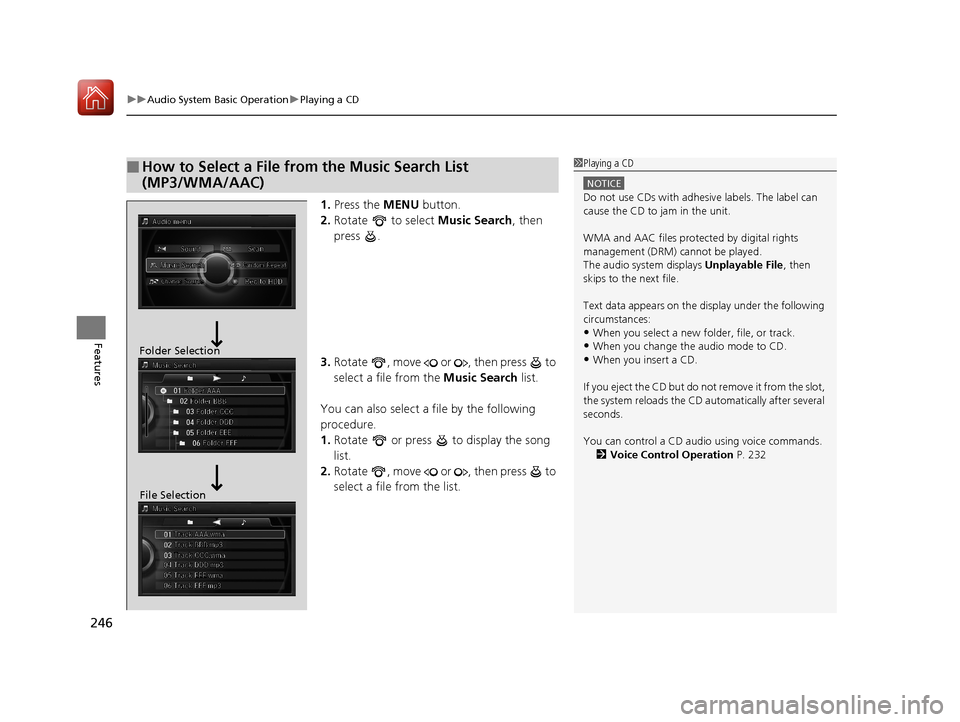
1. Press the MENU button.
2. Rotate to select Music Search, then
press .
3. Rotate , move or , then press to
select a file from the Music Search list.
You can also select a file by the following
procedure.
1. Rotate or press to display the song
list.
2. Rotate , move or , then press to
select a file from the list.
■How to Select a File from the Music Search List
(MP3/WMA/AAC)1Playing a CD
NOTICE
Do not use CDs with adhesive labels. The label can
cause the CD to jam in the unit.
WMA and AAC files protected by digital rights
management (DRM) cannot be played.
The audio system displays Unplayable File, then
skips to the next file.
Text data appears on the di splay under the following
circumstances:
•When you select a new folder, file, or track.
•When you change the audio mode to CD.
•When you insert a CD.
If you eject the CD but do not remove it from the slot,
the system reloads the CD automatically after several
seconds.
You can control a CD audio using voice commands. 2 Voice Control Operation P. 232Folder Selection
File Selection
18 ACURA RLX E-AWD-31TY36400.book 246 ページ 2017年7月20日 木曜日 午後6時 8分
Page 251 of 609
uuAudio System Basic Operation uPlaying Hard Disk Drive (HDD) Audio
250
Features
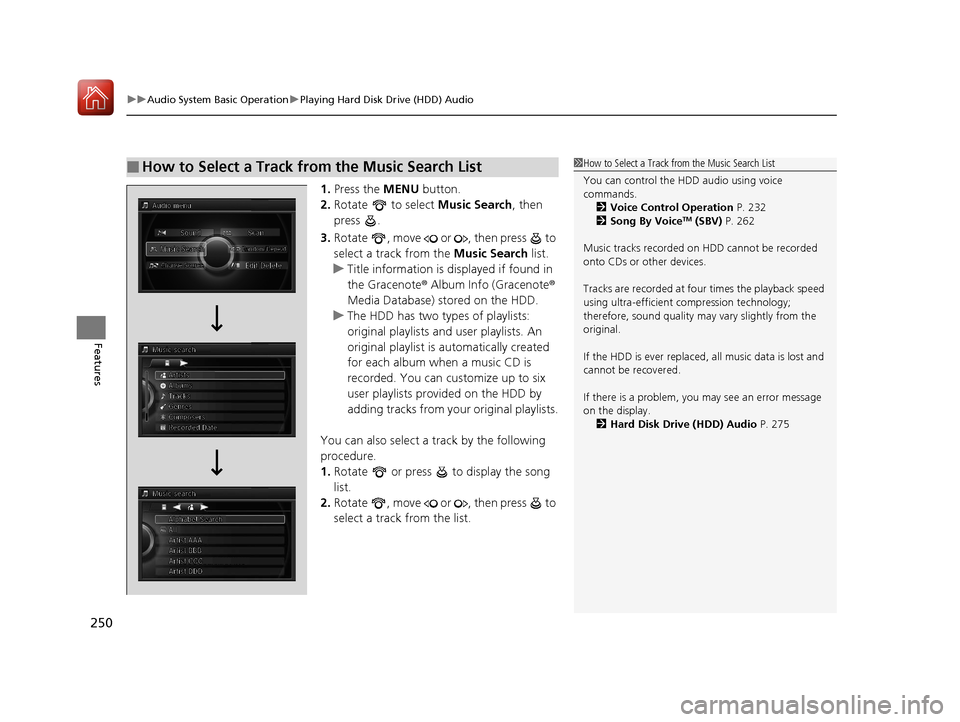
1. Press the MENU button.
2. Rotate to select Music Search, then
press .
3. Rotate , move or , then press to
select a track from the Music Search list.
u Title information is displayed if found in
the Gracenote ® Album Info (Gracenote ®
Media Database) stored on the HDD.
u The HDD has two types of playlists:
original playlists and user playlists. An
original playlist is automatically created
for each album when a music CD is
recorded. You can customize up to six
user playlists provided on the HDD by
adding tracks from your original playlists.
You can also select a track by the following
procedure.
1. Rotate or press to display the song
list.
2. Rotate , move or , then press to
select a track from the list.
■How to Select a Track from the Music Search List1How to Select a Track from the Music Search List
You can control the HDD audio using voice
commands.
2 Voice Control Operation P. 232
2 Song By Voice
TM (SBV) P. 262
Music tracks recorded on HDD cannot be recorded
onto CDs or other devices.
Tracks are recorded at four times the playback speed
using ultra-efficient compression technology;
therefore, sound quality ma y vary slightly from the
original.
If the HDD is ever replaced, all music data is lost and
cannot be recovered.
If there is a problem, you may see an error message
on the display. 2 Hard Disk Drive (HDD) Audio P. 275
18 ACURA RLX E-AWD-31TY36400.book 250 ページ 2017年7月20日 木曜日 午後6時 8分
Page 261 of 609
uuAudio System Basic Operation uPlaying an iPod
260
Features
1. Press the MENU button.
2. Rotate to select Music Search, then
press .
3. Rotate , move or , then press to
select a song from the Music Search list.
You can also select a song by the following
procedure.
1. Rotate or press to display the song
list.
2. Rotate , move or , then press to
select a song from the list.
■How to Select a Song from the Music Search List1How to Select a Song from the Music Search List
You can control an iPod using voice commands.
2 Voice Control Operation P. 232
2 Song By Voice
TM (SBV) P. 262
Available operating functi ons vary on models or
versions. Some functions ma y not be available on the
vehicle’s audio system.
If there is a problem, you may see an error message
on the audio/information screen. 2 iPod/USB Flash Drive P. 276
18 ACURA RLX E-AWD-31TY36400.book 260 ページ 2017年7月20日 木曜日 午後6時 8分
Page 263 of 609
262
uuAudio System Basic Operation uSong By VoiceTM (SBV)
Features
Song By VoiceTM (SBV)
Use SBV to search for and play music from your HDD or iPod using voice commands.
■To enable SBV
1.Press the SETTINGS button.
2. Rotate to select System Settings, then
press .
3. Move or to select the Voice Reco
tab.
4. Rotate to select Song By Voice, then
press .
5. Rotate to select On or Off , then press
.
1 Song By VoiceTM (SBV)
Setting options:
•On (factory default): Song By VoiceTM commands
are available.
•Off : Disable the feature.
18 ACURA RLX E-AWD-31TY36400.book 262 ページ 2017年7月20日 木曜日 午後6時 8分
Page 264 of 609

Continued263
uuAudio System Basic Operation uSong By VoiceTM (SBV)
Features
■Searching for music using SBV
1.Set the Song By Voice setting to On.
2. Press the (Talk) button and say “Music
Search” to activate the SBV feature for the
HDD and iPod.
3. Press the button and say a command.
u Example 1: Say “(List) ‘Artist A’“ to view a
list of songs by that artist. Select the
desired song to start playing.
u Example 2: Say “Play ‘Artist A’“ to start
playing songs by that artist.
4. To cancel SBV, press the (hang-up/
back) button on the steering wheel. The
selected song continues playing.
Once you have canceled this mode, you need
to press the button and say “Music Search”
again to re-activate this mode.1 Searching for music using SBV
Song By Voice
TM Commands List
2 Song By Voice Commands P. 236
NOTE:
Song By Voice
TM commands are available for tracks
stored on the HDD or iPod.
You can add phonetic modi fications of difficult
words so that it is easier for SBV to recognize artists,
songs, albums, and composers in voice commands. 2 Phonetic Modification P. 264
18 ACURA RLX E-AWD-31TY36400.book 263 ページ 2017年7月20日 木曜日 午後6時 8分

