Page 69 of 453
68
Instrument Panel
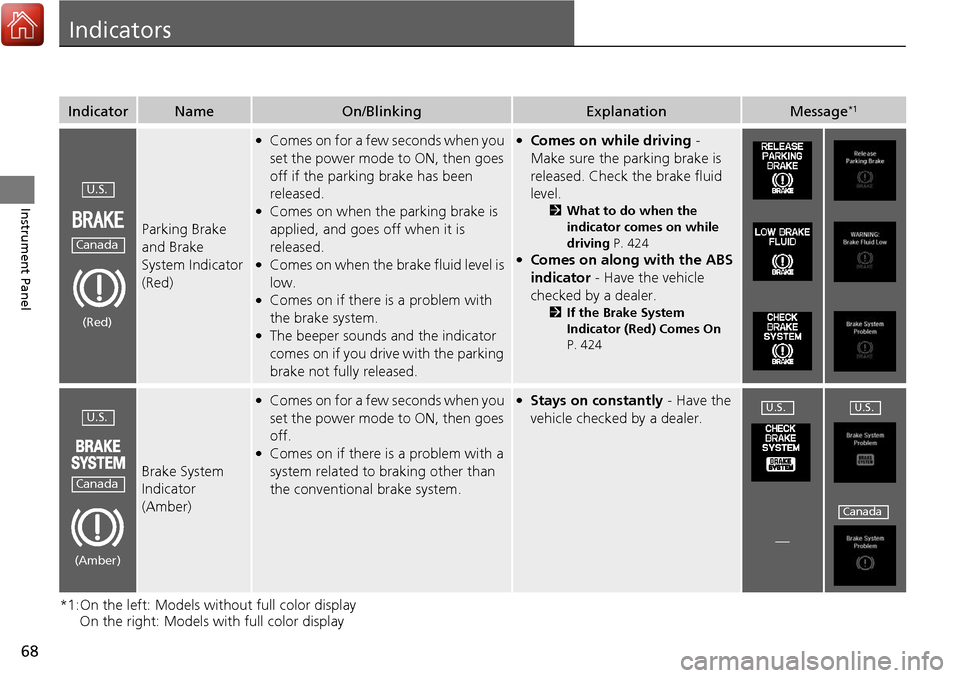
Indicators
*1:On the left: Models without full color display On the right: Models with full color display
IndicatorNameOn/BlinkingExplanationMessage*1
Parking Brake
and Brake
System Indicator
(Red)
●Comes on for a few seconds when you
set the power mode to ON, then goes
off if the parking brake has been
released.
●Comes on when the parking brake is
applied, and goes off when it is
released.
●Comes on when the brake fluid level is
low.
●Comes on if there is a problem with
the brake system.
●The beeper sounds and the indicator
comes on if you drive with the parking
brake not fully released.
●Comes on while driving -
Make sure the parking brake is
released. Check the brake fluid
level.
2 What to do when the
indicator comes on while
driving P. 424
●Comes on along with the ABS
indicator - Have the vehicle
checked by a dealer.
2 If the Brake System
Indicator (Red) Comes On
P. 424
Brake System
Indicator
(Amber)
●Comes on for a few seconds when you
set the power mode to ON, then goes
off.
●Comes on if there is a problem with a
system related to braking other than
the conventional brake system.
●Stays on constantly - Have the
vehicle checked by a dealer.
—
U.S.
Canada
(Red)
U.S.
Canada
(Amber)
U.S.U.S.
Canada
Page 73 of 453

72
uuIndicators u
Instrument Panel
*1:On the left: Models without full color display
On the right: Models with full color display
IndicatorNameOn/BlinkingExplanationMessage*1
Supplemental
Restraint System
Indicator
●Comes on for a few seconds when
you set the power mode to ON,
then goes off.
●Comes on if a problem with any of
the following is detected:
-Supplemental restraint system
- Side airbag system
- Side curtain airbag system
- Seat belt tensioner
●Stays on constantly or does not
come on at all - Have the vehicle
checked by a dealer.
All-Wheel Drive
( AWD ) with
Intelligent
Control System
Indicator
*
●Comes on for a few seconds when
you set the power mode to ON,
then goes off.
●Comes on if there is a problem with
the AWD with intelligent control
system.
●Blinks when the AWD with
intelligent control system is
overheated. The system is inactive.
●Stays on constantly - the engine
drives only the front wheels in this
state. Have the vehicle checked by a
dealer.
●Blinks while driving - the engine
drives only the front wheels in this
state. Stop in a safe place, shift to
(P,
and idle the engine until the indicator
goes off. If the indicator does not
stop blinking, take your vehicle to a
dealer.
2 All-Wheel Drive (AWD) with
Intelligent Control System*
P. 316
—
—
* Not available on all models
Page 77 of 453
76
uuIndicators u
Instrument Panel
*1:On the left: Models without full color display
On the right: Models with full color display
IndicatorNameOn/BlinkingExplanationMessage*1
Lights On
Indicator
●Comes on whenever the light
switch is on, or in AUTO when the
exterior lights are on.●If you set the power mode to
ACCESSORY or VEHICLE OFF (LOCK)
while the lights are on, a chime sounds
when the driver’s door is opened.
——
Fog Light
Indicator*
●Comes on when the fog lights are
on.———
Immobilizer
System Indicator
●Comes on briefly when you set the
power mode to ON, then goes off.
●Comes on if the immobilizer system
cannot recognize the key
information.
●Blinks - You cannot start the engine.
Set the power mode to VEHICLE OFF
(LOCK), then select the ON mode
again.
●Repeatedly blinks - The system may
be malfunctioning. Have the vehicle
checked by a dealer.
●Do not attempt to alter this system or
add other devices to it. Electrical
problems can occur.
——
* Not available on all models
Page 87 of 453
86
uuIndicators uMulti-Information Display Warn ing and Information Messages
Instrument Panel
*1:On the left: Models without full color display
On the right: Models with full color display
Message*1ConditionExplanation
●Appears if there is a problem with the starting
system.●As a temporary measure, press and hold the
ENGINE START/STOP button for 15
seconds while depressing the brake pedal
and manually start the engine.
Have the vehicle checked by a dealer.
—
●Appears after you unlock and open the
driver’s door.
2 Starting the Engine P. 270
●Appears three seconds after the TO START
ENGINE/ To Start Engine message appears.
2Starting the Engine P. 270
●Appears when the steering wheel is locked.●Move the steering wheel left and right after
pressing the ENGINE START/STOP button.
U.S.U.S.
Canada
Page 88 of 453
87
uuIndicators uMulti-Information Display Warning and Information Messages
Continued
Instrument Panel
*1:On the left: Models wi thout full color display
On the right: Models with full color display
Message*1ConditionExplanation
●Appears if you press the ENGINE START/
STOP button to turn the engine off without
the shift lever in
(P.
●Press the ENGINE START/STOP button twice
after moving the shift lever to
(P.
●Appears when the power mode is in
ACCESSORY.
—
●Appears after the driver’s door is opened
when the power mode is in ACCESSORY.●Press the ENGINE START/STOP button twice
with your foot off the brake pedal to change
the power mode to VEHICLE OFF (LOCK).
●Appears when you close the door with the
power mode in ON without the keyless access
remote inside the vehicle.●The message goes off when you bring the
keyless access remote back inside the vehicle,
and close the door.
2Keyless Access Remote Reminder P. 148
Page 90 of 453
89
uuIndicators uMulti-Information Display Warning and Information Messages
Continued
Instrument Panel
*1:On the left: Models wi thout full color display
On the right: Models with full color display
Message*1ConditionExplanation
—
●Appears if any door or the tailgate is not
completely closed.
●The beeper sounds and the message appears
if any door or the tailgate is opened while
driving.
●Goes off when all doors and the tailgate are
closed.
—
—
●Appears when there is a problem with the
headlights.●Appears while driving - The low beam
headlights may not be on. When conditions
allow you to drive safely, have your vehicle
checked by a dealer as soon as possible.
Page 93 of 453
92
uuIndicators uMulti-Information Display Warn ing and Information Messages
Instrument Panel
MessageConditionExplanation
●Appears when you unlock and open the driver’s door
while the engine is running by two-way keyless access
remote.
2Remote Engine Start with Vehicle Feedback* P. 272
Models with two-way keyless access remote
* Not available on all models
Page 101 of 453

uuGauges and Multi-Information Display uMulti-Information Display
100
Instrument Panel
Shows the total number of miles (U.S.) or kilometers (Canada) driven since the last
reset. Meters A and B can be used to measure two separate trips.
■Resetting a trip meter
To reset a trip meter, display it, then press and hold the SEL/RESET button. The trip
meter is reset to 0.0.
Shows the outside temperature in Fahr enheit (U.S.) or Celsius (Canada).
■Adjusting the outside temperature display
Adjust the temperature reading up to ±5°F or ±3°C if the temperature reading
seems incorrect.
Shows the estimated average fuel economy of each trip meter in mpg (U.S.) or l/100
km (Canada). The display is updated at set intervals. When a trip meter is reset, the
average fuel economy is also reset.
Shows the instant fuel economy as a bar gr aph in mpg (U.S.) or l/100 km (Canada).
■Trip Meter
■Outside Temperature
■Average Fuel Economy
■Instant Fuel Economy
1Trip Meter
Switch between trip meter A and trip meter B by
pressing the SEL/RESET button.
1Outside Temperature
The temperature sensor is in the front bumper.
Road heat and exhaust fr om another vehicle can
affect the temperature reading when your vehicle
speed is less than 19 mph (30 km/h).
It may take several minutes for the display to be
updated after the temperature reading has stabilized.
Use the multi-information display’s customized
features to correct the temperature. 2 Customized Features P. 102, 108
1Average Fuel Economy
You can change when to reset the average fuel
economy.
2 Customized Features P. 102, 108


