Page 268 of 697
267
uuAudio System Basic Operation uPlaying SiriusXM ® Radio
Features
Sample each channel on the selected mode for 10 seconds.
1. Select Presets /Controls to set the Controls.
2. Select SCAN.
3. Select Scan Channels or Scan Presets.
To turn off scan, select Stop Scan.
■Scan1Scan
You can select desired channel by songs using Scan
Presets .
The “Scan Songs in Preset s” function is based on
TuneScan
TM technology of SiriusXM ®.
The “Featured Channels ” function is based on
Featured Favorites
TM technology of SiriusXM ®.
TuneScan
TM and Featured FavoritesTM are registered
trademarks of SiriusXM ® Radio, Inc.
Scan Mode Menu Items
Scan Channels: Scans for channels with a strong
signal in the selected mode.
Scan Presets: Scans for desired preset channel by
songs. Select (skip up) or (skip down) to
skip to the next/previ ous stored selection.
18 ACURA MDX-31TZ56400.book 267 ページ 2017年8月23日 水曜日 午後4時1分
Page 293 of 697

uuAudio System Basic Operation uPlaying Pandora ®*1
292
Features
1.Select Stations .
2. Select a item to select a track.
■Create Station
You can create a station by Genre, Current
Track or Current Artist .
1. Select Stations .
2. Select Create Station .
3. Select the item you want to create a station.
You can also create a st ation by the following
procedure.
1. Select track name or artist name.
2. Select Yes.
■Select the connecting method
If the two devices that install Pan dora app are connected via the USB and Bluetooth ®
connection separately, you can select the USB or Bluetooth® connection to use the
Pandora ®.
1. Select the PANDORA on the source list screen.
2. Select USB or Bluetooth .
■How to Select a Track from the Stations List1Playing Pandora ®*1
Pandora® is a personalized Internet radio service that
selects music based on an arti st, track, or genre a user
enters, and streams what is likely to be of interest.
To use this service in your vehicle, the Pandora ® app
must first be installed on your phone. Visit
www.pandora.com . for more information.
If you cannot operate Pandora ® through the audio
system, it may be streaming through Bluetooth®
Audio. Make sure Pandora ® mode on your audio
system is selected.
Available operating functi ons vary on software
versions. Some functions ma y not be available on the
vehicle’s audio system.
If there is a problem, you may see an error message
on the On Demand Multi-Use Display
TM.
2 Pandora ® P. 312
There are restrictions on the number of tracks you
can skip or dislike in a given hour.
If your phone is connec ted to Android Auto,
Pandora ® is only available through the Android Auto
interface.
Visit the Android Auto website to check
compatibility.
Select track or artist name.
18 ACURA MDX-31TZ56400.book 292 ページ 2017年8月23日 水曜日 午後4時1分
Page 317 of 697

316
Features
General Information on the Audio System
SiriusXM® Radio Service
1. You need your radio ID ready before regist ering for subscription. To see the ID in
the On Demand Multi-Use DisplayTM, select channel up/down icons until CH000
and the radio ID appears.
2. Have your radio ID and credit card num ber ready, and either call or visit the
SiriusXM ® website to subscribe.
Switch to the SiriusXM ® mode by pressing the SOURCE button on the steering
wheel, or through the On Demand Multi-Use Display
TM, and stay in this mode for
about 30 minutes until the service is activated. Make sure your vehicle is in an open
area with good reception.
Loading...:
SiriusXM ® is loading the audio or program information.
No Signal:
The signal is too weak in the current location.
Unsubscribed channel:
You are not subscribed to the channel selected.
Unavailable channel:
No such channel exists, the channel is not pa rt of your subscription, or the artist or
title information is unavailable.
Check the antenna, Disconnect ed antenna, Shorted antenna:
There is a problem with the SiriusXM ® antenna. Contact a dealer.
■Subscribing to SiriusXM® Radio
■Receiving SiriusXM® Radio
■SiriusXM® Radio Display Messages
1 Subscribing to SiriusXM ® Radio
Contact Information for SiriusXM ® Radio:
•U.S.: SiriusXM ® Radio at www.siriusxm.com/
subscribenow or 1-877-447-0011
•Canada: SiriusXM ® Canada at www.siriusxm.ca/
subscribe-now or 1-877-209-0079
1Receiving SiriusXM ® Radio
The SiriusXM ® satellites are in orbit over the equator;
therefore, objects south of the vehicle may cause
satellite reception interruptions. Sa tellite signals are
more likely to be blocked by tall buildings and
mountains the farther north you travel from the
equator.
You may experience rece ption problems under the
following circumstances:
•In a location with an obstruction to the south of
your vehicle.
•In tunnels
•On the lower level of a multi-tiered road•Large items carried on the roof rack
18 ACURA MDX-31TZ56400.book 316 ページ 2017年8月23日 水曜日 午後4時1分
Page 336 of 697

335
Features
Rear Entertainment System (RES)*
Allows the rear passengers to enjoy a different entertainment source, such as DVD,
CD, and radio, than the front passengers.
Wireless Headphones
The rear seat passengers can listen to audio from the rear entertainment system by
a wireless headphone that comes with your vehicle.
To turn on the switch: Press the (power)
button at the right earpiece. The indicator
comes on.
To adjust the volume: Turn the dial at the
right earpiece.
1 Rear Entertainment System (RES)*
CAUTION: Radio Frequency Radiation Exposure
The Rear Entertainment System remote complies with
FCC radiation exposure lim its set forth for an
uncontrolled environment and meets the FCC radio
frequency (RF) Exposure Guidelines.
The Rear Entertainment Sy stem remote should be
kept at least 7.9 inch (20 cm) or more away from a
person’s body when operated.
1 Wireless Headphones
Your vehicle comes with two wireless headphones.
Wear the headphone correc tly with the earpiece
marked with L goes to y our left ear and R goes to
your right ear.
Wearing the headphone back ward may affect the
audio reception.
Indicator Volume Dial
(Power) Button
* Not available on all models
18 ACURA MDX-31TZ56400.book 335 ページ 2017年8月23日 水曜日 午後4時1分
Page 341 of 697
340
uuRear Entertainment System (RES)*uRear Control Panel Operation
Features
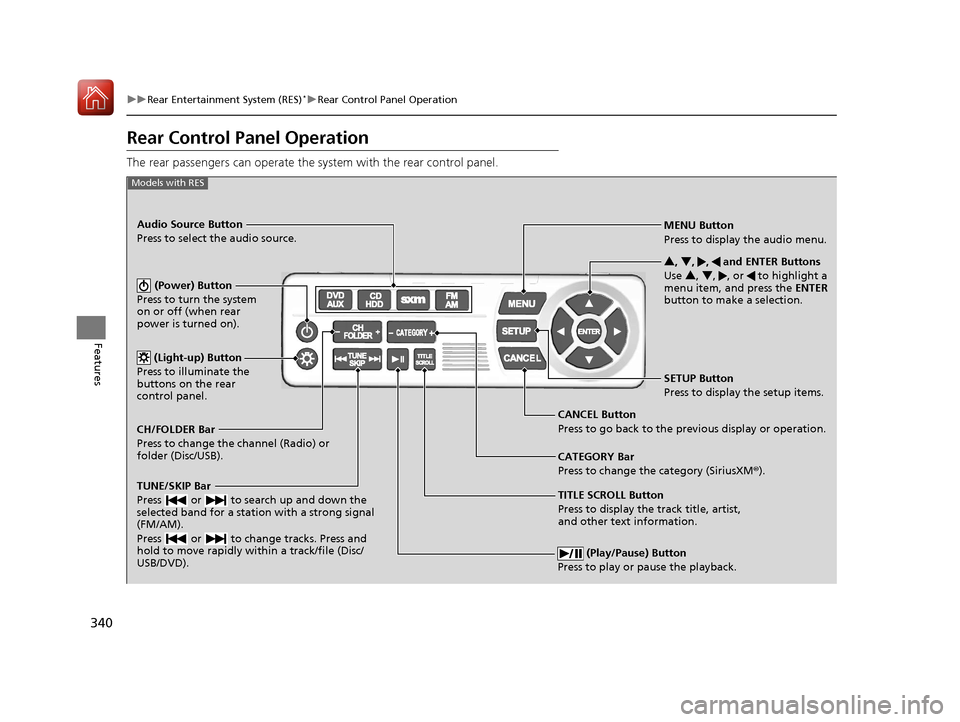
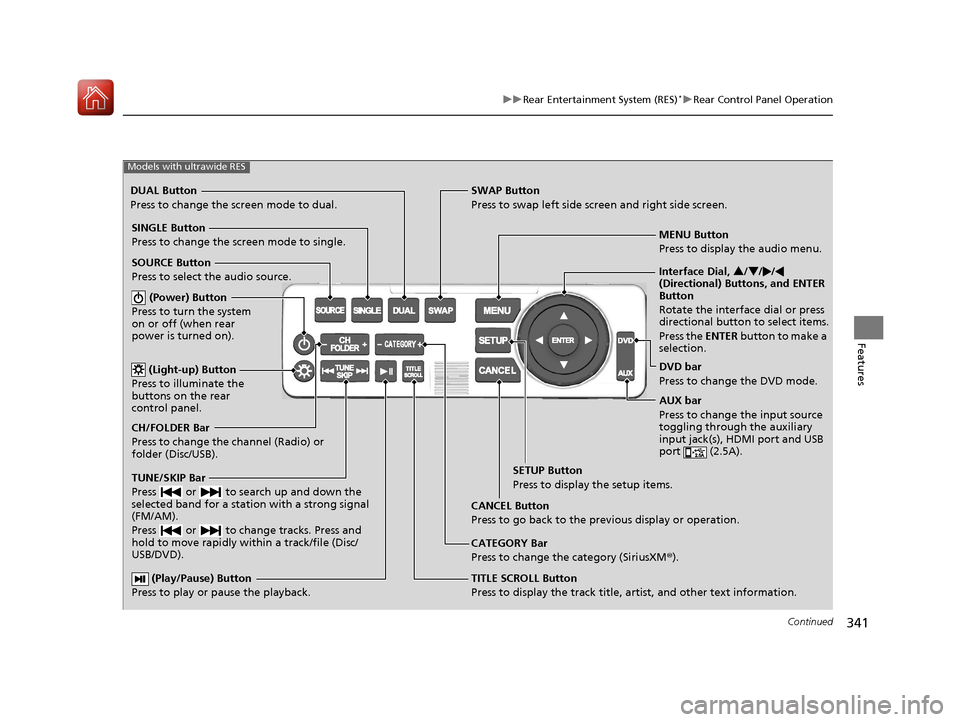
Rear Control Panel Operation
The rear passengers can operate the system with the rear control panel.
(Play/Pause) Button
Press to play or pause the playback.
TITLE SCROLL Button
Press to display the track title, artist,
and other text information. MENU Button
Press to display the audio menu.
SETUP Button
Press to display the setup items.
CANCEL Button
Press to go back to the previous display or operation. 3
, 4 , , and ENTER Buttons
Use 3 , 4 , , or to highlight a
menu item, and press the ENTER
button to make a selection.
Models with RES
CATEGORY Bar
Press to change the category (SiriusXM ®).
(Power) Button
Press to turn the system
on or off (when rear
power is turned on).
Audio Source Button
Press to select the audio source.
(Light-up) Button
Press to illuminate the
buttons on the rear
control panel.
TUNE/SKIP Bar
Press or to search up and down the
selected band for a station with a strong signal
(FM/AM).
Press or to change tracks. Press and
hold to move rapidly within a track/file (Disc/
USB/DVD).
CH/FOLDER Bar
Press to change the channel (Radio) or
folder (Disc/USB).
18 ACURA MDX-31TZ56400.book 340 ページ 2017年8月23日 水曜日 午後4時1分
Page 342 of 697
341
uuRear Entertainment System (RES)*uRear Control Panel Operation
Continued
Features
(Play/Pause) Button
Press to play or pause the playback.TITLE SCROLL Button
Press to display the track title, artist, and other text information.MENU Button
Press to display the audio menu.
SETUP Button
Press to display the setup items.
CANCEL Button
Press to go back to the previous display or operation.
Models with ultrawide RES
CATEGORY Bar
Press to change the category (SiriusXM ®).
DUAL Button
Press to change the screen mode to dual. SWAP Button
Press to swap left side screen and right side screen.
(Power) Button
Press to turn the system
on or off (when rear
power is turned on).
SINGLE Button
Press to change the screen mode to single.
(Light-up) Button
Press to illuminate the
buttons on the rear
control panel.
TUNE/SKIP Bar
Press or to search up and down the
selected band for a station with a strong signal
(FM/AM).
Press or to change tracks. Press and
hold to move rapidly within a track/file (Disc/
USB/DVD).
CH/FOLDER Bar
Press to change the channel (Radio) or
folder (Disc/USB). SOURCE Button
Press to select the audio source. Interface Dial,
3/4 //
(Directional) Buttons, and ENTER
Button
Rotate the interface dial or press
directional button to select items.
Press the ENTER button to make a
selection.
DVD bar
Press to change the DVD mode.
AUX bar
Press to change the input source
toggling through the auxiliary
input jack(s), HDMI port and USB
port (2.5A).
18 ACURA MDX-31TZ56400.book 341 ページ 2017年8月23日 水曜日 午後4時1分
Page 384 of 697
383
uuCustomized Features u
Continued
FeaturesSync Display Brightness
Brightness
Contrast
Black Level
Beep
Keyboard
Screen Settings
RES Settings*Rear Control
Rear Speaker
Single/Dual Screen Mode*
HD Radio Mode*Other
Cover Art
DVD Auto PlayDVD*
Audio Language
Subtitle Language
Menu Language
Dynamic Range
* Not available on all models
18 ACURA MDX-31TZ56400.book 383 ページ 2017年8月23日 水曜日 午後4時1分
Page 387 of 697
386
uuCustomized Features u
Features
*1:Default SettingSetup
Group Customizable Features Descri
ption Selectable Settings
Audio
Settings
DVD*
DVD Auto PlayTurns the auto play feature on or off.On*1/Off
Audio Language
Selects a language for the audio that is available
on the DVD.—
Subtitle Language
Selects a language for the subtitle that is available
on the DVD.—
Menu Language
Selects a language for the DVD menu that is
available on the DVD.—
Dynamic Range
Sets whether to control the range of the loud and
low sounds.On*1/ Off
Other HD Radio Mode
*Selects whether the audio system automatically
switches to the digital radio waves or receives the
analog waves only. Auto*1/
Analog
Cover Art Turns on and off the cover art display. On
*1/Off
* Not available on all models
18 ACURA MDX-31TZ56400.book 386 ページ 2017年8月23日 水曜日 午後4時1分


