Page 260 of 697
Continued259
uuAudio System Basic Operation uPlaying SiriusXM ® Radio
Features
To change the tune mode:
1.Select Tune.
2. Select Channel /Category icon.
To store a station:
1. Tune to the selected channel.
2. Select Presets /Controls icon to set the Presets.
3. Select and hold the preset number you want to store that channel.
Channel/Category Icon
■Preset Memory1Playing SiriusXM ® Radio
You can store 12 SiriusXM ® stations into the preset
memory.
18 ACURA MDX-31TZ56400.book 259 ページ 2017年8月23日 水曜日 午後4時1分
Page 261 of 697
uuAudio System Basic Operation uPlaying SiriusXM ® Radio
260
Features
■TuneMixTM (Multi-channel preset)
You can store up to 10 of your preferre d music channels and listen to them
randomly.
1.Tune a channel.
2. Select and hold the preset number you
want to store that channel.
3. Select Add.
4. Select Done to return the previous screen.
To delete a multi-channel preset:
1. Select and hold the preset number you want to delete that channel.
2. Select the channel icon.
3. Select Delete.
4. Select Done to return the previous screen.1TuneMixTM (Multi-channel preset)
TuneMix
TM is registered tra demarks of SiriusXM®
Radio, Inc.
To store a multi-channel preset, you need to setup
the TuneMix setting to On .
2 Customized Features P. 358
TuneMix
TM is available for music channels only.
Select and hold.
Channel Icon
18 ACURA MDX-31TZ56400.book 260 ページ 2017年8月23日 水曜日 午後4時1分
Page 262 of 697
Continued261
uuAudio System Basic Operation uPlaying SiriusXM ® Radio
Features
Suggested channel listing received from SiriusXM ® can be displayed and selected.
1. Select Browse .
2. Select Featured Channels .
3. Select a channel.
You can check a channel schedule by selected channel list on the On Demand Multi-
Use Display
TM.
1. Select Audio Menu .
2. Select View Channel Schedule .
You can also check the other chan nel by the following procedure.
3. Select Categories , Channels or Presets .
4. Select a channel.
■Listening to Featured Channels
■Displaying a Channel Schedule
1Listening to Featured Channels
Up to three featured channels by SiriusXM ® can be
displayed.
18 ACURA MDX-31TZ56400.book 261 ページ 2017年8月23日 水曜日 午後4時1分
Page 263 of 697

uuAudio System Basic Operation uPlaying SiriusXM ® Radio
262
Features
The system constantly records up to the last 60 minutes of your currently tuned
channel and all the preset channel broadcast, starting from the moment you turn
the power mode to ON. You can rewind and replay the last 60 minutes of each
broadcast. 1.Select Presets /Controls to set the
Controls .
2. Select an option.
The following items are available: : Pauses or plays a storing broadcast.
: Returns to real-time broadcast.
: Skips to the previously stored channel.
: Skips to the next channel.
: Select to skip back 15 seconds in the current selection. Select and hold to fast-
rewind the current selection.
: Select to skip forward 15 seconds in the current selection. Select and hold to
fast-forward the current selection.
■Returning to real-time broadcast
Select while listening to the playback channel.
■Replay Function1Replay Function
The system starts storing broadcast in memory when
the power mode is turned ON. You can go back to
the program from that point.
You can no longer repl ay any program once the
power mode is turned OFF as it erases memory.
You can check how long the program has been
stored in memory from the On Demand Multi-Use
Display
TM.
(A): Shows how much time the replayed segment is
behind the real-time broadcast
(B): Replayed segment
(C): Length stored in memory
(A) (B)
(C)
18 ACURA MDX-31TZ56400.book 262 ページ 2017年8月23日 水曜日 午後4時1分
Page 264 of 697
Continued263
uuAudio System Basic Operation uPlaying SiriusXM ® Radio
Features
While listening to other channels you can re ceive sports alerts such as scores from
your favorite teams.
■To set up a sports alert 1.Select Audio Menu .
2. Select Audio Settings .
3. Select SiriusXM .
4. Select SportsFlash.
5. Select Notification , then select Enable.
6. Select Favorite Teams, then select a team.
■Live Sports Alert1Live Sports Alert
The sports alert function at SiriusXM ® mode only.
1 To set up a sports alert
Sports alerts cut in only when SiriusXM ® mode is on.
Selecting Enable once from customized settings
disables the alert feature next time you turn the
power mode to ON.
2 Customized Features P. 358
18 ACURA MDX-31TZ56400.book 263 ページ 2017年8月23日 水曜日 午後4時1分
Page 265 of 697
264
uuAudio System Basic Operation uPlaying SiriusXM ® Radio
Features
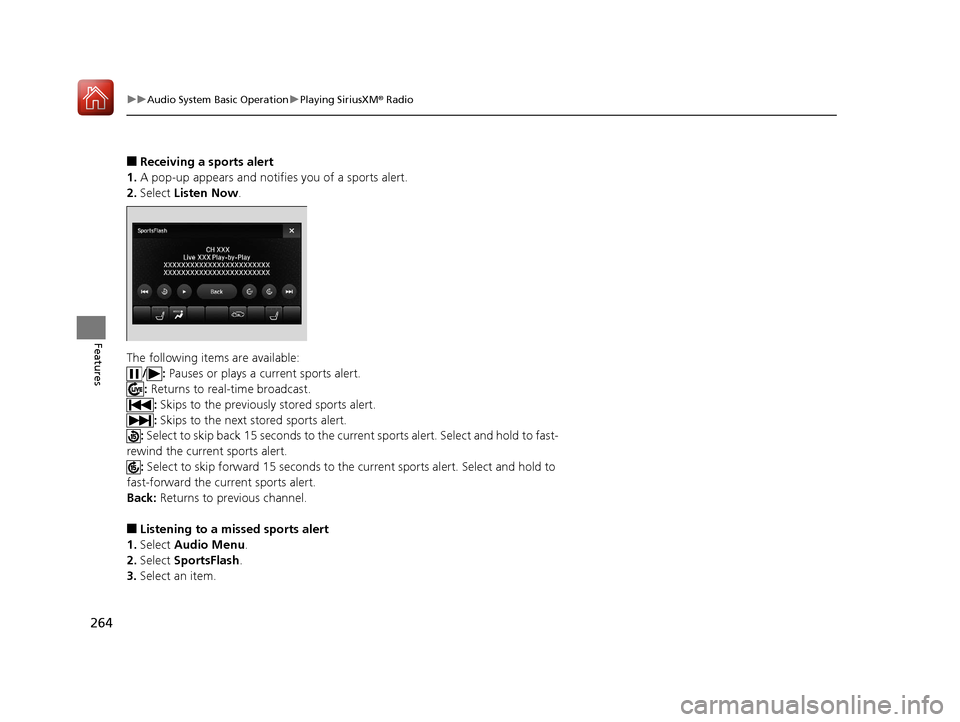
■Receiving a sports alert
1. A pop-up appears and notifies you of a sports alert.
2. Select Listen Now .
The following items are available: /: Pauses or plays a current sports alert.
: Returns to real-time broadcast.
: Skips to the previously stored sports alert.
: Skips to the next stored sports alert.
: Select to skip back 15 seconds to the curre nt sports alert. Select and hold to fast-
rewind the current sports alert. : Select to skip forward 15 seconds to the current sports alert. Select and hold to
fast-forward the current sports alert.
Back: Returns to previous channel.
■Listening to a miss ed sports alert
1. Select Audio Menu .
2. Select SportsFlash .
3. Select an item.
18 ACURA MDX-31TZ56400.book 264 ページ 2017年8月23日 水曜日 午後4時1分
Page 266 of 697
Continued265
uuAudio System Basic Operation uPlaying SiriusXM ® Radio
Features
You can receive the SiriusXM ® traffic and weather inform ation service in SiriusXM®
mode.
■To set up a traffic & weather information 1.Select Audio Menu .
2. Select Audio Settings .
3. Select SiriusXM .
4. Select Traffic & Weather Now Setup .
5. Select the region.
u When you do not want to receive the
information, select No City Selected.
■Traffic and Weather Information1Traffic and Weather Information
The traffic and weather information function in
SiriusXM ® mode only.
Traffic & Weather Now are registered trademarks of
SiriusXM ® Radio, Inc.
1 To set up a traffic & weather information
When you listen to the traffic and weather
information service, set up the applicable city using
Traffic & Weather Now Setup .
18 ACURA MDX-31TZ56400.book 265 ページ 2017年8月23日 水曜日 午後4時1分
Page 267 of 697
266
uuAudio System Basic Operation uPlaying SiriusXM ® Radio
Features
■Listening a traffic an d weather information
1. Select Audio Menu .
2. Select Traffic & Weather Now .
The following items are available: /: Pauses or plays a stored broadcast.
: Returns to real-time broadcast.
: Skips to the previously stored channel.
: Skips to the next channel.
: Select to skip back 15 seconds in the current broadcast. Select and hold to fast-
rewind the current broadcast. : Select to skip forward 15 seconds in th e current broadcast. Select and hold to
fast-forward the current broadcast.
Back: Returns to previous channel.
18 ACURA MDX-31TZ56400.book 266 ページ 2017年8月23日 水曜日 午後4時1分