2017 YAMAHA KODIAK 700 4WD
[x] Cancel search: 4WDPage 47 of 178

4-15
4
To unlock the differential gear, stop the ATV and
push the switch to the “4WD” position.
TIP When the switch is set to “LOCK” or “4WD”, the
differential gear lock indicator and indicator light
will flash until the differential gear is completely
locked or unlocked.
When the indicator and indicator light are flash-
ing, turning the handlebar back and forth will
help the differential gear lock to engage or dis-
engage.
Riding before the differential gear is properly en-
gaged or disengaged (e.g., when the indicator
and indicator light are flashing) will cause the
vehicle speed to be limited until the differential
gear is completely engaged or disengaged.
When the ATV is in four-wheel-drive differential
gear lock, the maximum traveling speed is limit-
ed to 35 km/h (22 mi/h). However, if conditions
require full engine power to be available, push
and hold the override switch to disable the dif-
ferential gear lock speed limiter. (See page 4-11
for a detailed explanation of this switch.)
EBU34130Drive lever “2WD”/“4WD”
(YFM70KDXH / YFM70KPXH /
YFM70KPHH / YFM70KPAH)
WARNING
EWB00164Always stop the ATV before changing from
two-wheel drive to four-wheel drive and vice
versa. The ATV handles differently in two-
wheel drive than in four-wheel drive in some
circumstances. Changing from two-wheel
drive to four-wheel drive or vice versa while
moving may cause the ATV to unexpectedly
1. On-Command differential gear lock switch
“4WD”/“LOCK”
LOCK4WD
1
UB1661E0.book Page 15 Thursday, May 12, 2016 2:47 PM
Page 48 of 178
4-16
4handle differently. This could distract the oper-
ator and increase the risk of losing control and
of causing an accident.
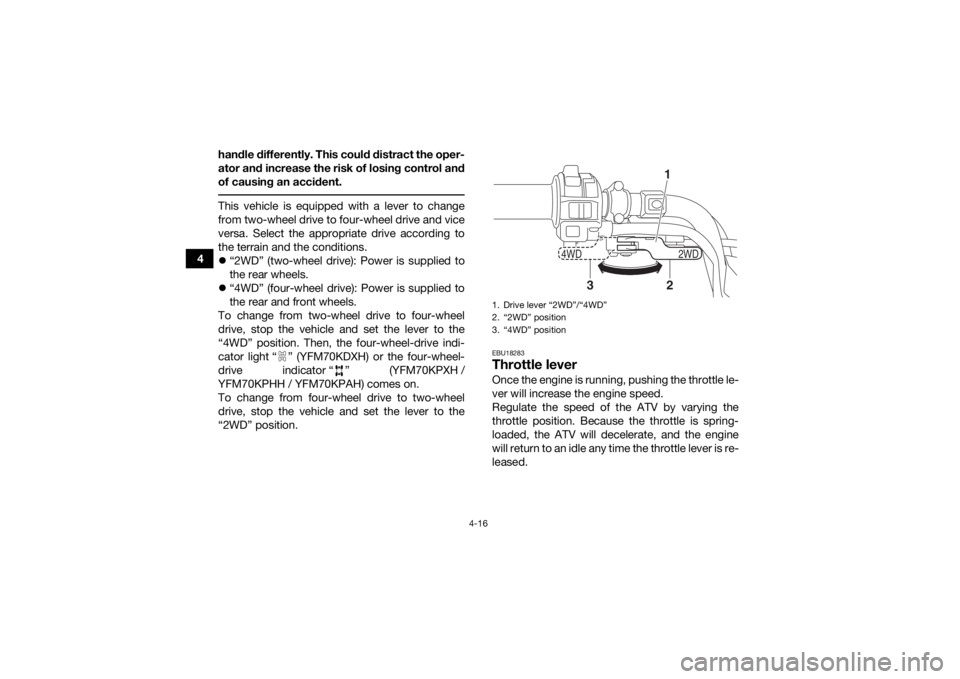
This vehicle is equipped with a lever to change
from two-wheel drive to four-wheel drive and vice
versa. Select the appropriate drive according to
the terrain and the conditions.
“2WD” (two-wheel drive): Power is supplied to
the rear wheels.
“4WD” (four-wheel drive): Power is supplied to
the rear and front wheels.
To change from two-wheel drive to four-wheel
drive, stop the vehicle and set the lever to the
“4WD” position. Then, the four-wheel-drive indi-
cator light “ ” (YFM70KDXH) or the four-wheel-
drive indicator “ ” (YFM70KPXH /
YFM70KPHH / YFM70KPAH) comes on.
To change from four-wheel drive to two-wheel
drive, stop the vehicle and set the lever to the
“2WD” position.
EBU18283Throttle leverOnce the engine is running, pushing the throttle le-
ver will increase the engine speed.
Regulate the speed of the ATV by varying the
throttle position. Because the throttle is spring-
loaded, the ATV will decelerate, and the engine
will return to an idle any time the throttle lever is re-
leased.1. Drive lever “2WD”/“4WD”
2. “2WD” position
3. “4WD” position
2WD
4WD
12
3
UB1661E0.book Page 16 Thursday, May 12, 2016 2:47 PM
Page 49 of 178

4-17
4
Before starting the engine, check the throttle to be
sure it is operating smoothly. Make sure it returns
to the idle position as soon as the lever is released.
EBU18324Speed limiterYour ATV is equipped with an adjustable speed
limiter. The speed limiter keeps the throttle from
fully opening, even when the throttle lever is
pushed to the maximum. 1. Loosen the locknut.
2. To increase the maximum engine power available and the maximum speed of the ATV,
turn the adjusting screw in direction (a). To decrease the maximum engine power avail-
able and the maximum speed of the ATV, turn
the adjusting screw in direction (b). Do not
turn the adjusting screw out more than 12
mm (0.47 in) or the throttle cable could be
damaged. Always make sure the throttle lever
free play is adjusted to 3.0–5.0 mm (0.12–
0.20 in). (See page 8-41.)
WARNING! Im-
proper adjustment of the speed limiter and
throttle could cause throttle cable damage
or improper throttle operation. You could
lose control, resulting in an accident.
[EWB00242]
1. Throttle lever
2WD
4WD
1
1. Locknut
2. Adjusting screw
3. No more than 12 mm (0.47 in)
2
1
3
(b)
(a)
UB1661E0.book Page 17 Thursday, May 12, 2016 2:47 PM
Page 88 of 178

7-15
7Do not attempt to climb hills until you have mas-
tered basic maneuvers on flat ground. Always
check the terrain carefully before attempting any
hill. In all cases avoid inclines with slippery or
loose surfaces, or obstacles that might cause you
to lose control.
To climb a hill, you need traction, momentum, and
steady throttle. For more traction and control for
climbing steeper and/or rougher slopes, select
“4WD” or 4WD-LOCK (“DIFF. LOCK”)
(YFM70KPSH). Travel fast enough to maintain
momentum, but not so fast that you cannot react
to changes in the terrain as you climb.
It is important when climbing a hill to make sure
that your weight is transferred forward on the ATV.
This can be accomplished by leaning forward and,
on steeper inclines, standing on the footboards
and leaning forward over the handlebars. When-
ever possible, ride straight up hills.
Slow down when you reach the crest of the hill if
you cannot see clearly what is on the other side –
there could be another person, an obstacle, or a
sharp drop-off. Use common sense and remem-
ber that some hills are too steep for you to climb
or descend. If you are climbing a hill and you find that you have
not properly judged your ability to make it to the
top, you should turn the ATV around while you still
have forward motion (provided you have the room
to do so) and go down the hill.
If your ATV has stalled or stopped and you believe
you can continue up the hill, restart carefully to
make sure you do not lift the front wheels which
could cause you to lose control. If you are unable
to continue up the hill, dismount the ATV on the
uphill side. Physically turn the ATV around and
then descend the hill.
If you start to roll backwards, DO NOT apply either
brake abruptly. If you are in “2WD”, apply only the
front brake. When fully stopped, apply the rear
brake as well, and then shift to the park position. If
you are in “4WD”, because all wheels are inter-
connected by the drive train, applying either brake
will brake all wheels, therefore, avoid sudden ap-
plication of either the front or rear brake as the
wheels on the uphill side could come off the
ground. The ATV could easily tip over backwards.
Apply both the front and rear brakes gradually.
When fully stopped, lock shift to the park position
and dismount the ATV immediately on the uphill
side. Dismount on uphill side or to a side if pointed
UB1661E0.book Page 15 Thursday, May 12, 2016 2:47 PM
Page 89 of 178

7-16
7
straight uphill. Turn the ATV around and remount,
following the procedure described in the Owner’s
Manual.
WARNING! Stalling, rolling backwards
or improperly dismounting while climbing a hill
could result in ATV overturning. If you cannot
control the ATV, dismount immediately on the
uphill side.
[EWB01803]
RIDING DOWNHILL
WARNING
EWB01622Going down a hill improperly could cause over-
turns or loss of control. Always follow proper
procedures for going down hills as described
in this Owner’s Manual.
Always check the terrain carefully before you
start down any hill.
Never operate the ATV on hills too steep for
the ATV or for your abilities. The ATV can
overturn more easily on extremely steep hills
than on level surfaces or small hills.
Shift your weight backward and to the up
side of the hill.
Never go down a hill at high speed.
Avoid going down a hill at an angle that
would cause the ATV to lean sharply to one
side. Go straight down the hill where possi-
ble.
Improper braking can cause the wheels on
the uphill side to come off the ground or cau-
se loss of traction. Apply brakes gradually. If
in “2WD”, apply only the rear brake.
When riding your ATV downhill, shift your weight
as far to the rear and uphill side of the ATV as pos-
sible. Move back on the seat and sit with your
arms straight. Engine compression will do most of
the braking for you. For maximum engine com-
pression braking effect, select the low-range posi-
tion and change to “4WD” before beginning to
descend the hill.
UB1661E0.book Page 16 Thursday, May 12, 2016 2:47 PM
Page 90 of 178

7-17
7Use caution while descending a hill with loose or
slippery surfaces. Braking ability and traction may
be adversely affected by these surfaces. Improper
braking may also cause a loss of traction.
When this ATV is in “4WD”, all wheels (front and
rear) are interconnected by the drive train. This
means that applying either the front brake or the
rear brake will brake all wheels. When descending
hills, using either brake lever or the brake pedal
will brake the wheels on the downhill side. Avoid
sudden application of either the front or rear brake
because the wheels on the uphill side could come
off the ground. Apply both the front and rear
brakes gradually.
Whenever possible, ride your ATV straight down-
hill. Avoid sharp angles which could allow the ATV
to tip or roll over. Carefully choose your path and
ride no faster than you will be able to react to ob-
stacles which may appear.
CROSSING A SLOPE
WARNING
EWB01633Improperly crossing hills or turning on hills
could cause loss of control or cause the ATV to
overturn.
Always follow proper procedures as de-
scribed in the Owner’s Manual.
Avoid hills with excessively slippery or loose
surfaces.
Avoid crossing the side of a steep hill.
UB1661E0.book Page 17 Thursday, May 12, 2016 2:47 PM
Page 138 of 178

8-42
83. To increase the throttle lever free play, turn
the throttle lever free play adjusting bolt in di-
rection (a). To decrease the throttle lever free
play, turn the adjusting bolt in direction (b).
4. Tighten the locknut.
5. Slide the rubber cover to its original position.
EBU24061Valve clearanceThe valve clearance changes with use, resulting in
improper air-fuel mixture and/or engine noise. To
prevent this from occurring, the valve clearance must be adjusted by a Yamaha dealer at the inter-
vals specified in the periodic maintenance and lu-
brication chart.
EBU29602BrakesReplacement of brake components requires pro-
fessional knowledge. Brake service should be
performed by a Yamaha dealer.
WARNING
EWB02572Operating with improperly serviced or adjust-
ed brakes could lead to a loss in braking ability
and an accident. EBU28414Checking the front br
ake pads and rear
brake friction platesThe front brake pads and the rear brake friction
plates must be checked for wear at the intervals
specified in the periodic maintenance and lubrica-
tion chart.
1. Rubber cover
2. Throttle lever free play adjusting bolt
3. Locknut
4. Throttle lever free play
2WD
4WD
3
2
1
4
(b)
(a)
UB1661E0.book Page 42 Thursday, May 12, 2016 2:47 PM
Page 140 of 178
8-44
8
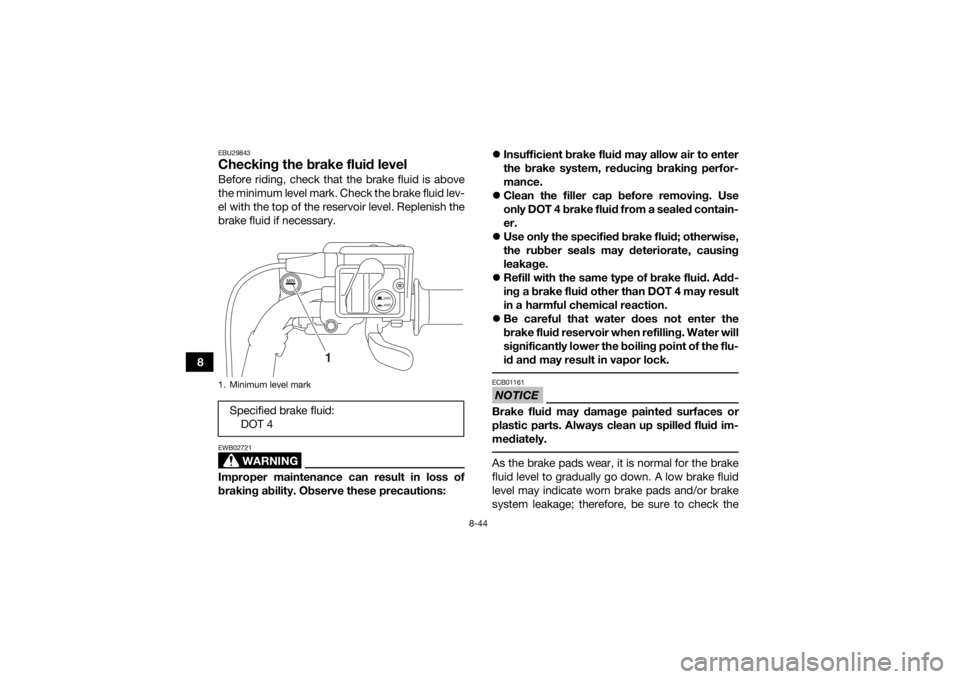
EBU29843Checking the brake fluid levelBefore riding, check that the brake fluid is above
the minimum level mark. Check the brake fluid lev-
el with the top of the reservoir level. Replenish the
brake fluid if necessary.
WARNING
EWB02721Improper maintenance can result in loss of
braking ability. Observe these precautions:
Insufficient brake fluid may allow air to enter
the brake system, reducing braking perfor-
mance.
Clean the filler cap before removing. Use
only DOT 4 brake fluid from a sealed contain-
er.
Use only the specified brake fluid; otherwise,
the rubber seals may deteriorate, causing
leakage.
Refill with the same type of brake fluid. Add-
ing a brake fluid other than DOT 4 may result
in a harmful chemical reaction.
Be careful that water does not enter the
brake fluid reservoir when refilling. Water will
significantly lower the boiling point of the flu-
id and may result in vapor lock.
NOTICEECB01161Brake fluid may damage painted surfaces or
plastic parts. Always clean up spilled fluid im-
mediately. As the brake pads wear, it is normal for the brake
fluid level to gradually go down. A low brake fluid
level may indicate worn brake pads and/or brake
system leakage; therefore, be sure to check the
1. Minimum level markSpecified brake fluid:
DOT 4
2WD
4WD
1
UB1661E0.book Page 44 Thursday, May 12, 2016 2:47 PM