2017 VOLVO XC90 TWIN ENGINE HYBRID ignition
[x] Cancel search: ignitionPage 233 of 584

LOADING AND STORAGE
}}
231
trained and qualified Volvo service techni-cian.
Failure to follow the points above could resultin electrical shock and/or serious injury.
Status indication
An LED (Light Emitting Diode) on the socketindicates its status:
Status indicator lightSocket statusAction
Steady green lightThe socket is providing current to a connected device.None.
Flashing orange lightThe socket's voltage converter is too hot (the connected device draws too muchcurrent, etc. or the temperature in the passenger compartment is very high).Unplug the device, let the converter cool downand plug in the device again.
The connected device draws too much current (constantly or currently) or is notfunctioning properly.None. The device should not be plugged into thesocket.
Indicator light offThe socket has not detected a plugged in device.Be sure the device is correctly plugged into thesocket.
The socket is not active.Put the vehicle's ignition in at least mode I.
The socket has been active but has been deactivated.Start the engine and/or charge the start battery.
If a problem persists, have the socket checked bya trained and qualified Volvo service technician.
Page 234 of 584

||
LOADING AND STORAGE
232
12-volt socket in the tunnel console
12-volt socket in the tunnel console for the front seats
12-volt socket in the tunnel console for the second rowof seats
The electrical sockets can be used for 12-voltdevices such as monitors, MP3 players and cell
phones. For the sockets to provide electrical cur-rent, the ignition must be in at least mode I.
WARNING
Always keep the sockets covered when not inuse.
NOTE
Options and accessories such as monitors,MP3 players and cell phones that are con-nected to the 12-volt sockets may be acti-vated by the climate system even if the igni-tion is completely switched off or when thevehicle is locked if preconditioning is startedby a timer.
For this reason, disconnect these devicesfrom the sockets when they are not in use tohelp avoid battery drain.
CAUTION
Max. current provided is 10 A (120 W) if onesocket is used at a time. If both of the sock-ets in the tunnel console are used at thesame time, the max. current provided persocket is 7.5 A (90 W)
If a tire sealing system's compressor is beingused, no other device should be connected toany of the other sockets while the compres-sor is operating.
12-volt socket in the cargo area
12-volt socket in the cargo area
Fold down the cover to access the socket. Max.current provided is 10 A (120 W).
NOTE
The 12-volt socket in the cargo area provideselectrical current even when the ignition isswitched off. Using the socket while theengine is not running will drain the battery.
Related information
•Passenger compartment storage spaces(p. 220)
•Ignition modes (p. 400)
Page 236 of 584

LOCKS AND ALARM
* Option/accessory, for more information, see Introduction.234
Locks and remote keys
The vehicle can be locked and unlocked in vari-ous ways and there are several types of remotekeys that can be used.
Locking/unlocking/opening/closing
The vehicle can be locked/unlocked from thepassenger compartment, using the buttons onthe remote key or by using the optional PassiveEntry system where it is only necessary to have akey in your possession to lock or unlock thedoors.
On models equipped with a power tailgate*, it canalso be opened/closed by moving your footunder a sensor* beneath the rear bumper.
If for any reason a remote key does not functionproperly, it may be necessary to replace its bat-teries but the vehicle can always be locked orunlocked manually using the remote key'sdetachable key blade.
Remote key
The remote key does not have to be physicallyhandled in order to start the engine because thevehicle is equipped with the standard PassiveStart system (the key only needs to be in thefront part of the passenger compartment). If thevehicle is equipped with the optional PassiveEntry system that enables keyless entry and start,the key can be anywhere in the vehicle when theengine is started.
Models with Passive Entry* also have an extra,smaller key without buttons called a Key Tag.
Additional keys can be ordered from a Volvoretailer.
Related information
•Immobilizer (p. 234)
•Alarm (p. 256)
•Child safety locks (p. 257)
•Remote key (p. 238)
•Foot movement tailgate operation* (p. 243)
•Locking/unlocking from inside the vehicle(p. 246)
•Locking/unlocking from outside the vehicle(p. 244)
•Locking/unlocking the tailgate (p. 249)
•Starting the engine (p. 402)
Immobilizer
The immobilizer is a start inhibitor that helps pre-vent unauthorized persons from starting theengine.
Each of the keys supplied with your vehicle con-tains a unique coded transponder. The vehiclecode in the key is transmitted to the vehicle'signition system where it is compared to the codestored in the start inhibitor module.
The following message (which may appear in theinstrument panel) is related to the immobilizer:
SymbolMessageExplanation
Vehicle keynot found
SeeOwner'smanual
Remote key notrecognized duringstart. Place theremote key on thekey symbol in thetunnel console cupholder and try tostart the vehicleagain.
Related information
•Remote key's range (p. 240)
•Remote key (p. 238)
Page 240 of 584

LOCKS AND ALARM
238
Remote key
The remote key is used to lock/unlock the vehi-cle and must be in the passenger compartmentin order to start the engine.
The standard remote key (left) and the Key Tag (right)
In models with the standard Passive Start system,the remote key only needs to be in the front sec-tion of the passenger compartment or in the tun-nel console cup holders in order to start theengine.
The keyless Passive Entry system for locking/unlocking the vehicle is available as an option.This system has a range of approximately 5 feet(1.5 meters) from the sides of the vehicle orapproximately 3 feet (1 meter) from the tailgate.With this system, a remote key can be anywherein the vehicle.
Each of the remote keys provided with the vehiclecan be linked to a driver profile containing uniquepersonal settings that will be applied when thatparticular key is used. See also the article "Driverprofile" for additional information.
NOTE
Avoid placing the remote key closer thanapprox. (4-6 in.) (10-15 cm) to any metallicobjects or electronic devices such as cellphones, tablets, laptops or chargers.
If interference persists, unlock the vehicle withthe detachable key blade and place the remotekey in the backup key reader in the tunnel con-sole cup holder to disarm the alarm.
WARNING
Always remove the remote key from the pas-senger compartment when leaving the vehicleand ensure that the ignition in mode 0, espe-cially if there are children in the vehicle.
Key Tag
In addition to the two remote keys provided, asmaller third key, called a Key Tag, is also provi-ded for vehicles equipped with the optionalPassive Entry system.
This key functions in the same way as a standardremote key but does not have a detachable keyblade and its battery cannot be replaced; a newKey Tag has to be ordered.
Ordering new keys
Two remote keys are provided with the vehicle (a
Key Tag2 is also included for vehicles equippedwith the optional Passive Entry system). Addi-tional keys (a total of 12) can be ordered andused with the vehicle.
2The Key Tag is also referred to as a Sport key. This key is designed to be waterproof to a depth of approximately 30 ft (10 meters) for up to 60 minutes, making it suitable for use in activities in and around water.
Page 255 of 584
LOCKS AND ALARM
}}
* Option/accessory, for more information, see Introduction.253
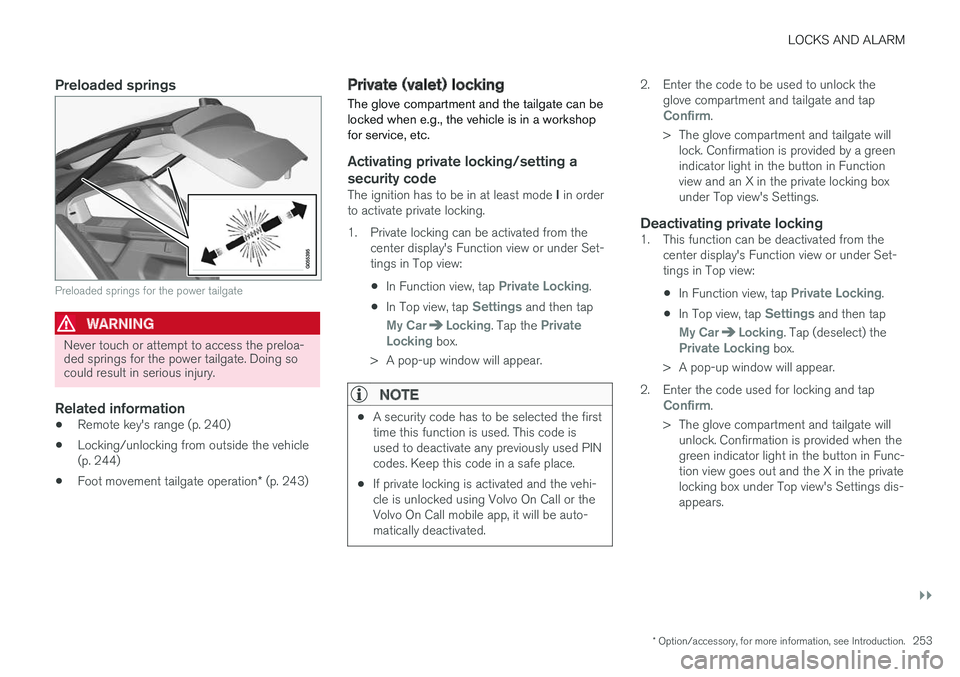
Preloaded springs
Preloaded springs for the power tailgate
WARNING
Never touch or attempt to access the preloa-ded springs for the power tailgate. Doing socould result in serious injury.
Related information
•Remote key's range (p. 240)
•Locking/unlocking from outside the vehicle(p. 244)
•Foot movement tailgate operation* (p. 243)
Private (valet) locking
The glove compartment and the tailgate can belocked when e.g., the vehicle is in a workshopfor service, etc.
Activating private locking/setting a
security code
The ignition has to be in at least mode I in orderto activate private locking.
1. Private locking can be activated from thecenter display's Function view or under Set-tings in Top view:
•In Function view, tap Private Locking.
•In Top view, tap Settings and then tap
My CarLocking. Tap the PrivateLocking box.
>A pop-up window will appear.
NOTE
•A security code has to be selected the firsttime this function is used. This code isused to deactivate any previously used PINcodes. Keep this code in a safe place.
•If private locking is activated and the vehi-cle is unlocked using Volvo On Call or theVolvo On Call mobile app, it will be auto-matically deactivated.
2. Enter the code to be used to unlock theglove compartment and tailgate and tapConfirm.
>The glove compartment and tailgate willlock. Confirmation is provided by a greenindicator light in the button in Functionview and an X in the private locking boxunder Top view's Settings.
Deactivating private locking
1. This function can be deactivated from thecenter display's Function view or under Set-tings in Top view:
•In Function view, tap Private Locking.
•In Top view, tap Settings and then tap
My CarLocking. Tap (deselect) thePrivate Locking box.
>A pop-up window will appear.
2. Enter the code used for locking and tapConfirm.
>The glove compartment and tailgate willunlock. Confirmation is provided when thegreen indicator light in the button in Func-tion view goes out and the X in the privatelocking box under Top view's Settings dis-appears.
Page 258 of 584

LOCKS AND ALARM
* Option/accessory, for more information, see Introduction.256
Alarm
The alarm system provides a warning if anattempt is made to break into the vehicle.
The following conditions will trigger the alarm:
•a door/hood/tailgate are opened
•the battery is disconnected
•the alarm siren is disconnected
If a problem is detected in the alarmsystem, this symbol and Alarmsystem failure Service required willbe displayed in the instrument panel.Do not attempt to repair any of the componentsin the alarm system yourself; this could affect theinsurance policy on the vehicle. Contact a trainedand qualified Volvo service technician.
NOTE
One of the alarm sensors, which is sensitiveto metallic objects, is located under the tunnelconsole cup holders. Avoid leaving coins,keys, etc., in the cup holders because theymay inadvertently trigger the alarm.
Arming the alarm
–Lock the vehicle by pressing the remotekey's lock button. On models with theoptional Passive Entry system, the vehiclecan also be locked by pressing the outerindentation for locking on one of the doorhandles or by pressing the tailgate's rubber-ized pressure plate.
If the vehicle is equipped with a power tail-gate*, the button on the lower edge of thetailgate can also be used to lock the vehicleand arm the alarm.
Disarming the alarm
The alarm can be disarmed by:
•Unlock the vehicle by pressing the remotekey's unlock button
•Pressing the pressure-sensitive area on theinside of one of the door handles on modelswith the optional Passive Entry system.
•Pressing the tailgate's rubberized pressureplate on models with the optional PassiveEntry system.
Turning off a triggered (sounding)
alarm
–Press the remote key's unlock button or putthe ignition in mode I by turning the startknob to START and releasing it.
Alarm signals
The following occurs if the alarm has been trig-gered:
•A siren will sound for 30 seconds or until thealarm is turned off
•All turn signals flash for 5 minutes or untilthe alarm is turned off
If the door that triggered the alarm is left open,the alarm cycle will be repeated 10 times.
Alarm indicator
A red indicator light on the upper side of thedashboard shows the alarm's status:
•Indicator off: the alarm is disarmed
•Indicator flashes once every two seconds:the alarm is armed
•Indicator flashes quickly after the alarm hasbeen disarmed (max. 30 seconds) or until
Page 259 of 584

LOCKS AND ALARM
}}
* Option/accessory, for more information, see Introduction.257
the ignition has been put in mode I (turn thestart knob to START and release it): thealarm has been triggered
Related information
•Automatically arming/disarming the alarm(p. 255)
•Deactivating the alarm without a functioningremote key (p. 257)
Deactivating the alarm without afunctioning remote key
If the remote key is not functioning properly, thealarm can be turned off and the vehicle can bestarted as follows:
1. Unlock and open the driver's door with thedetachable key blade.
>This will trigger the alarm.
Location of the back-up key reader in the cup holder
2. Place the remote key on the back-up keyreader in the tunnel console's cup holder.
3.Turn the start knob to START and release it.
>The alarm will turn off.
Related information
•Alarm (p. 256)
•Detachable key blade (p. 242)
•Starting the engine (p. 402)
•Automatically arming/disarming the alarm(p. 255)
Child safety locks
Child safety locks help prevent children frominadvertently opening one of the rear doors frominside the vehicle.
Electronic * activation/deactivation
The electronic child safety locks can be acti-vated/deactivated as long as the ignition is notcompletely switched off and this can be done forup to two minutes after the engine has beenswitched off if no door has been opened.
To activate:
Child safety lock button on the driver door control panel
1. Switch on the ignition or start the engine.
Page 260 of 584

||
LOCKS AND ALARM
258
2. Press the button on the driver's door controlpanel.
>Rear child lock Activated will be dis-played in the instrument panel and theindicator light in the button will illuminateto show that the child safety locking func-tion is activated.
While the child safety locks are activated:
•the rear door windows can only be openedfrom the driver door control panel
•the rear doors cannot be opened from theinside
To deactivate:
–Press the button in the driver door controlpanel.
>Rear child lock Deactivated will be dis-played in the instrument panel and theindicator light in the button will go out toshow that the child safety locking functionis deactivated.
When the ignition is switched off, the current set-ting for the child safety locks will be stored. If thelocks were activated at that time, they will con-tinue to be activated when the ignition isswitched on again.
SymbolMessageExplanation
Rear childlockActivatedThe rear-doorchild safetylocks are acti-vated.
Rear childlockDeacti-vated
The rear-doorchild safetylocks are deacti-vated.
Manual activation/deactivation
Manual child safety locks in the rear doors
–Use the detachable key blade in the remotekey to adjust these controls.
The rear doors can only be opened from theoutside.
The rear doors can be opened from theinside or the outside.
NOTE
•Each control on the respective doorscontrol that door only, not both doors.
•There are no manual child safety locks onmodels equipped with the electronicoption.
Related information
•Detachable key blade (p. 242)
•Ignition modes (p. 400)