2017 VOLVO XC90 T8 battery
[x] Cancel search: batteryPage 191 of 580

CLIMATE
}}
* Option/accessory.189
Activating/deactivating the parking climate timer
With the vehicle's charging cable connected, the parking climate timer can be activated ordeactivated at any time.
The timer button in the Parking climate tab in Climate
view
1. Open Climate view in the center display. 2. Tap
Parking climate.
3. Activate/deactivate the timer by tapping the button to the right of the setting.
> The timer setting will be activated/deacti-vated and the indicator light in the button will be on/off.
Related information
• Preconditioning timer (p. 190)
• Setting the parking climate (preconditioning)timer (p. 190)
• Hybrid battery charging cable (p. 394)
Activating/deactivating the climate comfort retaining function
*
This function helps keep the passenger com- partment comfortable if anyone remains in thevehicle after the engine has been switched off.
Button for retaining climate comfort in the Parking
climate tab in Climate view
1. Open Climate view in the center display. 2.
Tap
Parking climate.
3. Tap
Keep climate comfort.
> The function for retaining climate comfort in the passenger compartment will be activated/deactivated and the indicatorlight in the button will be on/off.
Page 194 of 580

CLIMATE
* Option/accessory.
192
Starting and stopping preconditioning
Preconditioning heats/cools the passenger com- partment prior to driving. Please note that thecharging cable must be connected.
Starting/stopping from the centerdisplay
The preconditioning button in the Parking climate tab
in Climate view.
1. Open Climate view in the center display. 2. Tap
Parking climate.
The window for seat/steering wheel heating in Climate view's Parking climate tab
3. Tap the boxes to select if seat/steering
wheel heating is to be activated/deactivated when preconditioning starts.
4. Tap
Preconditioning.
> Preconditioning starts/stops and the indi- cator lights in the buttons will be on/off.
NOTE
Full preconditioning is only possible when the vehicle's charging cable is connected. In other cases, the passenger compartment can be cooled for 3 minutes in warm weather. This function is started from the
Parking
climate tab in the center display's Climate
view.
The vehicle's doors and windows should be closed during preconditioning.
Starting from a cell phone *Starting preconditioning and checking the cur-rent settings can be done from a cell phone withthe Volvo On Call mobile app. Preconditioningheats the passenger compartment to a comforta-ble temperature or cools the compartment to thecurrent ambient temperature. If the vehicle is equipped with the optional Engine Remote Start (ERS), the air conditioningcan be used to pre-cool the passenger compart-ment to a comfortable temperature.
Related information
•Setting the parking climate (preconditioning)timer (p. 190)
• Activating/deactivating the parking climatetimer (p. 189)
• Hybrid battery charging cable (p. 394)
Page 195 of 580
CLIMATE
193
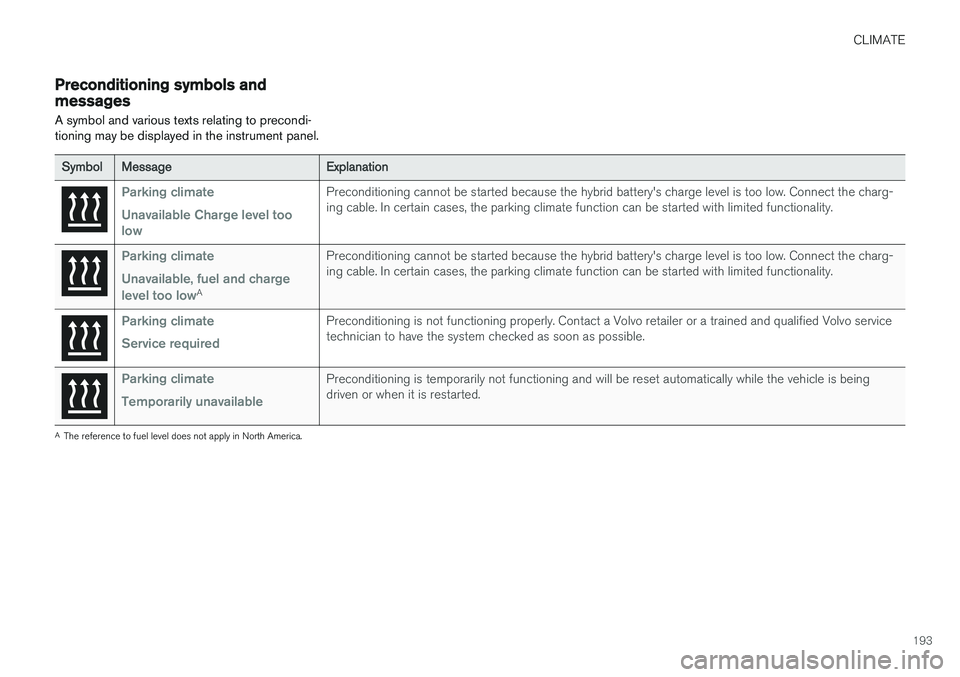
Preconditioning symbols and messages
A symbol and various texts relating to precondi- tioning may be displayed in the instrument panel.
Symbol Message Explanation
Parking climate Unavailable Charge level too lowPreconditioning cannot be started because the hybrid battery's charge level is too low. Connect the charg- ing cable. In certain cases, the parking climate function can be started with limited functionality.
Parking climate Unavailable, fuel and charge level too low
APreconditioning cannot be started because the hybrid battery's charge level is too low. Connect the charg- ing cable. In certain cases, the parking climate function can be started with limited functionality.
Parking climate Service requiredPreconditioning is not functioning properly. Contact a Volvo retailer or a trained and qualified Volvo service technician to have the system checked as soon as possible.
Parking climate Temporarily unavailablePreconditioning is temporarily not functioning and will be reset automatically while the vehicle is being driven or when it is restarted.
A
The reference to fuel level does not apply in North America.
Page 231 of 580

LOADING AND STORAGE
}}
229
trained and qualified Volvo service techni- cian.
Failure to follow the points above could result in electrical shock and/or serious injury.Status indication
An LED (Light Emitting Diode) on the socket indicates its status:
Status indicator light Socket status Action
Steady green light The socket is providing current to a connected device. None.
Flashing orange light The socket's voltage converter is too hot (the connected device draws too much current, etc. or the temperature in the passenger compartment is very high). Unplug the device, let the converter cool down and plug in the device again.
The connected device draws too much current (constantly or currently) or is notfunctioning properly. None. The device should not be plugged into thesocket.
Indicator light off The socket has not detected a plugged in device. Be sure the device is correctly plugged into the socket.
The socket is not active. Put the vehicle's ignition in at least mode I.
The socket has been active but has been deactivated. Start the engine and/or charge the start battery.
If a problem persists, have the socket checked by a trained and qualified Volvo service technician.
Page 232 of 580

||
LOADING AND STORAGE
230
12-volt socket in the tunnel console
12-volt socket in the tunnel console for the front seats
12-volt socket in the tunnel console for the second row of seats
The electrical sockets can be used for 12-volt devices such as monitors, MP3 players and cellphones. For the sockets to provide electrical cur- rent, the ignition must be in at least mode
I.
WARNING
Always keep the sockets covered when not in use.
NOTE
Options and accessories such as monitors, MP3 players and cell phones that are con-nected to the 12-volt sockets may be acti-vated by the climate system even if the igni-tion is completely switched off or when thevehicle is locked if preconditioning is startedby a timer. For this reason, disconnect these devices from the sockets when they are not in use tohelp avoid battery drain.
CAUTION
Max. current provided is 10 A (120 W) if one socket is used at a time. If both of the sock-ets in the tunnel console are used at thesame time, the max. current provided persocket is 7.5 A (90 W) If a tire sealing system's compressor is being used, no other device should be connected toany of the other sockets while the compres-sor is operating.
12-volt socket in the cargo area
12-volt socket in the cargo area
Fold down the cover to access the socket. Max. current provided is 10 A (120 W).
NOTE
The 12-volt socket in the cargo area provides electrical current even when the ignition isswitched off. Using the socket while theengine is not running will drain the battery.
Related information
• Passenger compartment storage spaces (p. 218)
• Ignition modes (p. 389)
Page 235 of 580

LOCKS AND ALARM
}}
233
Changing the remote key's battery The remote key can be opened if the battery needs to be replaced.
The battery should be replaced if:The information symbol illuminates and
Vehicle key bat. low See Owner's
manual is displayed in the instrument
panel.
and/or if the locks do not react after several attempts to unlock or lock the vehicle with the remote keywithin approx. 65 feet (20 meters) of the vehicle.
NOTE
If the locks do not react, move closer to the vehicle and try to unlock it again.
The battery in the smaller extra key without but- tons (Key Tag) provided with models with theoptional Passive Entry system cannot bereplaced. A new Key Tag can be ordered from aVolvo retailer.
NOTE
A Key Tag with a depleted battery should be returned to an authorized Volvo retailer. Thekey should also be erased from the vehicle'selectrical system because it could still beused to start the vehicle from the back-upstart system.
Replacing the battery
Hold the remote key with the front side
(with the Volvo symbol) facing up and move the button on the key ring section of the keyto the right. Slide the front cover slightlyupward.
The cover will loosen and can be
removed from the key.
Move the button to the side and slide
rear cover slightly upward.
The cover will loosen and can be
removed from the key.
Use e.g., a screwdriver to turn the battery cover counterclockwise so that the markers align toward OPEN.
Remove the cover carefully by pressing
e.g., a finger nail into the indentation.
Pry the cover up.
Page 236 of 580

||
LOCKS AND ALARM
234
The battery's positive (+) side is up. Pry
out the battery as shown in the illustration.
CAUTION
When handling batteries, avoid touching their contact surfaces as this could result in poorbattery function in the remote key.
Insert a new battery 1
with the positive ( +)
side up. Put the battery cover back in place by:
Placing the battery's edge downward in
the holder. Slide the battery forward so that it is held in place by the two plastic catches.
Pressing the battery downward so that it
is also held in place by the two upper catches under the upper black holder.
NOTE
Volvo recommends that the batteries used in the remote control meet the UN Manual ofTest and Criteria, Part III, sub-section 38.3. Batteries installed in the key from the factory and batteries exchanged by an authorizedVolvo workshop fulfill the above criteria. Old batteries should be disposed of properly at a recycling center or at your Volvo retailer.
Put the battery cover in place and turn it clockwise until the marker points to CLOSE.
1
Use a CR2032, 3 V battery.
Page 238 of 580

||
LOCKS AND ALARM
* Option/accessory.
236 Each of the remote keys provided with the vehicle can be linked to a driver profile containing uniquepersonal settings that will be applied when thatparticular key is used. See also the article "Driverprofile" for additional information.
NOTE
Avoid placing the remote key closer than approx. (4-6 in.) (10-15 cm) to any metallicobjects or electronic devices such as cellphones, tablets, laptops or chargers.
If interference persists, unlock the vehicle with the detachable key blade and place the remotekey in the backup key reader in the tunnel con-sole cup holder to disarm the alarm.
WARNING
Always remove the remote key from the pas- senger compartment when leaving the vehicle and ensure that the ignition in mode
0, espe-
cially if there are children in the vehicle.
Key TagIn addition to the two remote keys provided, a smaller third key, called a Key Tag, is also provi-ded for vehicles equipped with the optionalPassive Entry system. This key functions in the same way as a standardremote key but does not have a detachable keyblade and its battery cannot be replaced; a newKey Tag has to be ordered.
Ordering new keysTwo remote keys are provided with the vehicle (a Key Tag
2
is also included for vehicles equipped
with the optional Passive Entry system). Addi- tional keys (a total of 12) can be ordered andused with the vehicle.
The remote key's buttons
The remote key has four buttons: one on the left side and three on the right side
Lock: Press to lock the doors/tailgate and
arm the alarm.
Unlock: Press to unlock the doors/tailgate
and disarm the alarm. This setting can be changed in the center display's Settings menu.
Tailgate: Press to unlock the tailgate only
(and disarm the alarm for the tailgate). On vehicles equipped with the power tailgate *,
press and hold to open the tailgate. Press and hold to close an open tailgate (an audi-ble warning signal will sound).
Panic alarm: Press to attract attention dur-
ing emergency situations. To activate, press
and hold this button for at least 3 seconds or press it twice within 3 seconds to activate the turn signals and horn. To deactivate,
wait approximately 5 seconds and press the button again (the panic alarm will also deac-tivate automatically after several minutes).
InterferenceMetallic objects or electromagnetic fields mayinterfere with the remote key's function. Avoidplacing the remote key within 4-6 in. (10-15 cm)of a cell phone or a metallic object. If interference persists, use the remote key's detachable key blade to unlock the vehicle andplace the remote key in the backup key reader inthe tunnel console cup holder.
Loss of a remote keyIf a remote key is lost, the others should be takenwith the vehicle to a Volvo retailer. As an anti-
2 The Key Tag is also referred to as a Sport key. This key is designed to be waterproof to a depth of approximately 30 ft (10 meters) for up to 60 minutes, making it suitable for use in activities in and around water.