2017 VOLVO XC90 T8 light
[x] Cancel search: lightPage 235 of 580

LOCKS AND ALARM
}}
233
Changing the remote key's battery The remote key can be opened if the battery needs to be replaced.
The battery should be replaced if:The information symbol illuminates and
Vehicle key bat. low See Owner's
manual is displayed in the instrument
panel.
and/or if the locks do not react after several attempts to unlock or lock the vehicle with the remote keywithin approx. 65 feet (20 meters) of the vehicle.
NOTE
If the locks do not react, move closer to the vehicle and try to unlock it again.
The battery in the smaller extra key without but- tons (Key Tag) provided with models with theoptional Passive Entry system cannot bereplaced. A new Key Tag can be ordered from aVolvo retailer.
NOTE
A Key Tag with a depleted battery should be returned to an authorized Volvo retailer. Thekey should also be erased from the vehicle'selectrical system because it could still beused to start the vehicle from the back-upstart system.
Replacing the battery
Hold the remote key with the front side
(with the Volvo symbol) facing up and move the button on the key ring section of the keyto the right. Slide the front cover slightlyupward.
The cover will loosen and can be
removed from the key.
Move the button to the side and slide
rear cover slightly upward.
The cover will loosen and can be
removed from the key.
Use e.g., a screwdriver to turn the battery cover counterclockwise so that the markers align toward OPEN.
Remove the cover carefully by pressing
e.g., a finger nail into the indentation.
Pry the cover up.
Page 241 of 580
LOCKS AND ALARM
239
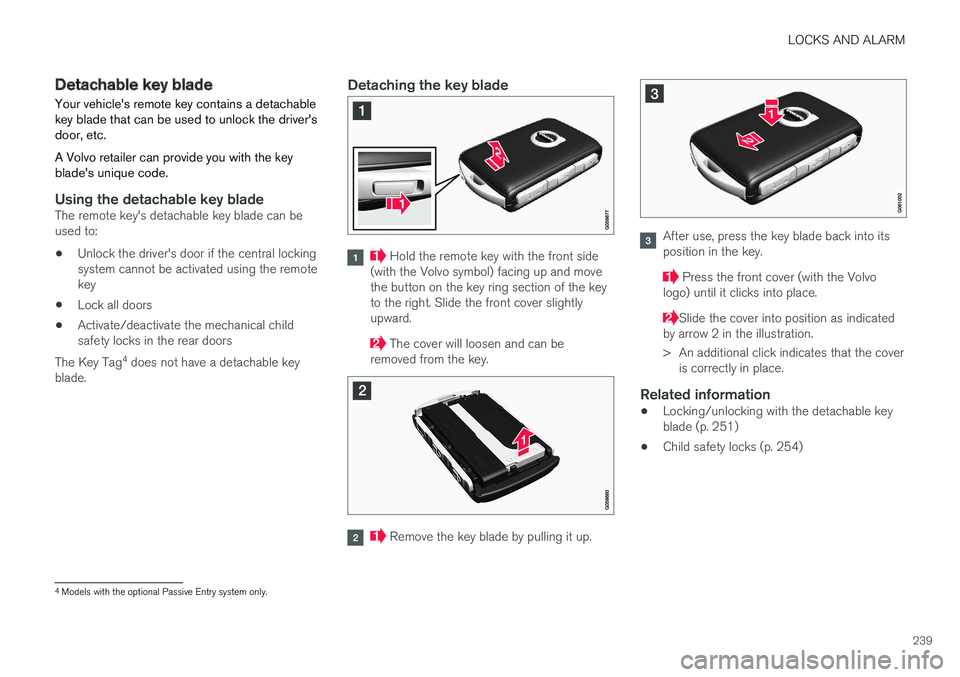
Detachable key blade Your vehicle's remote key contains a detachable key blade that can be used to unlock the driver'sdoor, etc. A Volvo retailer can provide you with the key blade's unique code.
Using the detachable key bladeThe remote key's detachable key blade can be used to:
• Unlock the driver's door if the central lockingsystem cannot be activated using the remotekey
• Lock all doors
• Activate/deactivate the mechanical childsafety locks in the rear doors
The Key Tag 4
does not have a detachable key
blade.
Detaching the key blade
Hold the remote key with the front side
(with the Volvo symbol) facing up and move the button on the key ring section of the keyto the right. Slide the front cover slightlyupward.
The cover will loosen and can be
removed from the key.
Remove the key blade by pulling it up.
After use, press the key blade back into its position in the key.
Press the front cover (with the Volvo
logo) until it clicks into place.
Slide the cover into position as indicated
by arrow 2 in the illustration.
> An additional click indicates that the cover is correctly in place.
Related information
• Locking/unlocking with the detachable key blade (p. 251)
• Child safety locks (p. 254)
4
Models with the optional Passive Entry system only.
Page 242 of 580

LOCKS AND ALARM
* Option/accessory.
240
Foot movement tailgate operation *
The foot movement sensor * simplifies opening or
closing the tailgate if your hands are full. 5
The foot movement sensor is located to the left of cen- ter under the rear bumper
6
NOTE
One of the remote keys must be in your pos- session or within range when you are behindthe vehicle in order to activate the foot move-ment sensor, even if the tailgate is alreadyunlocked. This is done to help prevent thesensor from inadvertently opening the tail-gate, for example, in a car wash. Be sure that the key is not within range when the vehicle is in an automatic carwash.
Operation
Kicking motion under the sensor's activation area
Opening/closing
–With the remote key within range, move your foot slowly forward in a kicking motion belowthe left section of the rear bumper withouttouching the bumper and take a step back.
> A brief audible signal will sound when the
tailgate begins to open/close.
The tailgate can be closed (or closed and locked) by pressing the
or buttons on the lower
edge of the tailgate 7
.
It can also be operated manually or by pressing the button on the lighting panel in the passengercompartment or on the remote key. If several attempts have been made to open/ close the tailgate using the foot sensor without aremote key within range, the function will timeout and will not be available for a short period.
NOTE
Foot operation may not be possible or func- tion normally if the sensor is obstructed bysnow, ice, dirt, etc.
5 Models equipped with the optional power tailgate only.
6 If the vehicle is equipped with a skid plate/diffuser *, the sensor is located under the left corner of the bumper.
7 Vehicles equipped with the optional Passive Entry system only.
Page 244 of 580

||
LOCKS AND ALARM
* Option/accessory.
242 system when a door is opened from inside the vehicle using a door handle. See also the article"Locking/unlocking from inside the vehicle" foradditional information. If the locks repeatedly do not react when the unlock button is pressed, begin by moving closerto the vehicle. However, it may be necessary toreplace the battery in the remote. In this case, thedriver's door can be unlocked with the detacha-ble key blade. See also the article "Detachablekey blade" for additional information.
Keyless Passive Entry
*If the vehicle is equipped with this system, it isonly necessary to have a remote key in your pos-session to operate the central locking system. Models with Passive Entry have an indentation on the outside of the handle for locking the vehicleand a pressure sensitive surface on the inside ofthe handle for unlocking. The tailgate has a rubberized button used only for unlocking.
Outer indentation for locking, the pressure sensitive sur- face on the inside of the handle is for unlocking
Pressure sensitive indentation for locking
Pressure sensitive surface for unlocking
Rubberized button on the tailgate used only for unlock- ing
Locking
All of the doors have to be closed before the vehicle can be locked but the tailgate can beopen. Lock the doors and tailgate by pressing the pres- sure sensitive indentation on the outside of anyof the door handles. The lock indicator light onthe dashboard will begin to flash to show that thevehicle is locked and the alarm has been armed.
NOTE
Only one of a door handle's lock/unlock sur- faces should be pressed at a time. If bothareas are pressed simultaneously, the desiredlocking/unlocking action may not occur ormay be delayed.
To close windows or the panoramic roof * when
locking the vehicle, hold the pressure sensitive surface on the outside of a door handle until thewindow(s)/panoramic roof have closed com-pletely. The windows/panoramic roof will stop ifthe button is released before they are fullyclosed.
Page 245 of 580

LOCKS AND ALARM
}}
* Option/accessory.243
Unlocking
Pull a door handle to unlock and open the door or press the rubberized button under the tailgateopening control. The lock indicator light on thedashboard will go out to show that the vehicle isunlocked and the alarm has been disarmed. The lock/unlock settings can be changed in the center display's Top view: Go to:
SettingsMy CarKeyless Unlockand select All Doors or Single Door.
Automatic relockingIf no door or the tailgate is opened within two minutes after being unlocked, the vehicle willautomatically relock.
Remote door unlockThe vehicle can be unlocked using the Volvo OnCall app.
Related information
•Remote key (p. 235)
• Remote key's range (p. 237)
• Detachable key blade (p. 239)
• Alarm (p. 253)
• Locking/unlocking from inside the vehicle(p. 243)
• Foot movement tailgate operation
* (p. 240)
• Locking/unlocking the tailgate (p. 246)
Locking/unlocking from inside the vehicle The lock buttons on either of the front doors can be used to lock or unlock all doors and the tail-gate at the same time. The rear doors can be locked using their respective lock buttons
*.
The central locking system
Central locking/unlocking buttons and indicator lights on the front doors
–Press the button to lock the vehicle.
Press
to unlock.
Unlocking
• Press the button to unlock all doors and
the tailgate.
• Pull the door opening handle on either of the front doors. This will unlock the vehicle com- pletely 8
and the door will open.
Locking
–Press the button on either of the front
doors to lock the vehicle (both front doors must be closed).
Lock buttons on the rear doors *
Lock button and indicator light in a rear door
The lock buttons in the rear doors lock/unlock each door respectively.
8
The unlock setting "All Doors" must be selected. If the setting "Driver door, then all" has been selected, only that door will unlock and open.
Page 247 of 580

LOCKS AND ALARM
}}
245
Locking and unlocking confirmationThe turn signals can be used to indicate that the vehicle has been locked/unlocked with theremote key. These settings can also be changedin the center display's Top view by going to:
SettingsMy CarLockingVisible
Locking Feedback.
Exterior confirmation
• Locking: the turn signals flash once and the door mirrors will fold in (retract) 12
• Unlocking: the turn signals flash twice andthe door mirrors will fold out 12
When the vehicle is locked, confirmation will only be given if all doors/tailgate and the hood areclosed. If the vehicle is locked while only the driver's door is closed 13
, all doors/tailgate will lock but confir-
mation will only be given when all doors/tailgate/ hood are closed.
Interior confirmation
Lock and alarm indicator light on the dashboard
A long flash indicates the vehicle is locked. While the vehicle is locked, the indicator will flashbriefly. LEDs in the lock buttons on the doors illuminate when the doors are locked.
Indicators in the interior lock buttons
Lock buttons in the front doors
Front door lock button and indicator light
Indicator lights on: all doors are locked. If a door is opened, the lights in both doors will go out.
12 Models with electrically retractable door mirrors only.
13 This does not apply to vehicles equipped with the optional keyless Passive Entry system.
Page 248 of 580

||
LOCKS AND ALARM
246
In all doors
Rear door lock button and indicator light
Indicator light in the respective door on: that door is locked. If a door is opened, the light in thatdoor will out but the other indicator lights willremain on.
Confirmation alternatives
Various alternatives for locking/unlocking confir-mation can be selected in the center display. 1.Tap
Settings in the center display's Top
view.
2. Tap
My CarLocking.
3. Change the settings under
Visible Locking
Feedback.
Related information
• Locking/unlocking from outside the vehicle (p. 241)
• Home safe lighting (p. 154)
• Adjusting the power door mirrors (p. 106)
Locking/unlocking the tailgate The tailgate can be locked/unlocked in different ways, depending on whether the vehicle isequipped with the optional keyless Passive Entrysystem.
Unlocking with the remote key
Remote key tailgate button
1.
Press the button on the remote key.
> The tailgate will be unlocked but remain closed. The alarm indicator on the dash- board will go out to indicate that the tail-gate alarm is no longer armed. The otherdoors will remain locked and the alarm willremain armed for them.
2. Open the tailgate. > If the tailgate is not opened within twominutes, it will relock and the alarm willrearm.
Page 249 of 580

LOCKS AND ALARM
* Option/accessory.247
Keyless unlocking *
Rubberized pressure plate
Opening the tailgate:
1. With the remote key in your possession,
unlock the tailgate by pressing lightly on the rubberized pressure plate under the outertailgate handle. If the remote key is notdetected, the tailgate cannot be unlocked/opened. Three audible signals will sound.
2. Lift the handle to open the tailgate fully.
CAUTION
• When pressing the rubberized pressure plate, only light pressure is necessary torelease the tailgate's electronic lockingmechanism.
• When opening the tailgate, pull it upusing the handle. Too much pressure onthe rubberized pressure plate can dam-age its electrical connections.
WARNING
Avoid driving with the tailgate open if at all possible. Doing so could allow exhaust gasesto enter the passenger compartment.
Unlocking the tailgate from inside the vehicle
Tailgate unlock button
To unlock the tailgate:
–Press the button on the lighting panel.
> The tailgate will unlock and can be opened within two minutes (if the vehicle has been locked from the inside).
Locking with the remote key
–Press the button on the remote key.
> The alarm indicator on the dashboard will begin to flash to show that the alarm has been armed.
Related information
• Remote key (p. 235)
• Power tailgate
* (p. 248)
• Foot movement tailgate operation
* (p. 240)
• Remote key's range (p. 237)