INSTRUMENTS AND CONTROLS
* Option/accessory, for more information, see Introduction.
106
Heated windshield *, rear window
and door mirror defrosters
The heating function is used to defrost/de-ice the windshield and/or the rear window and doormirrors.
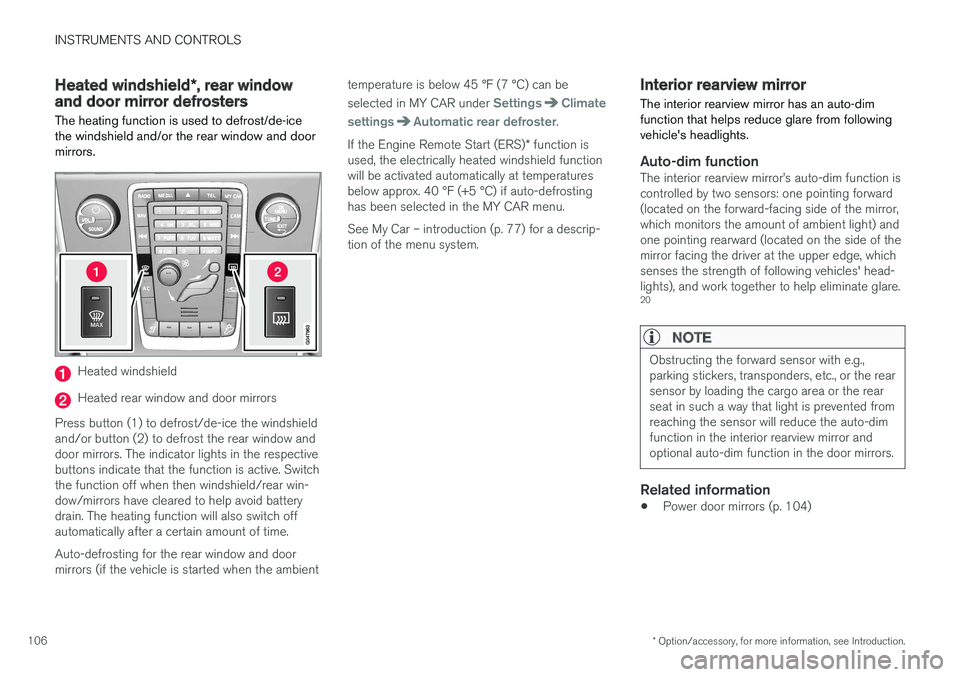
Heated windshield
Heated rear window and door mirrors
Press button (1) to defrost/de-ice the windshield and/or button (2) to defrost the rear window anddoor mirrors. The indicator lights in the respectivebuttons indicate that the function is active. Switchthe function off when then windshield/rear win-dow/mirrors have cleared to help avoid batterydrain. The heating function will also switch offautomatically after a certain amount of time. Auto-defrosting for the rear window and door mirrors (if the vehicle is started when the ambient temperature is below 45 °F (7 °C) can be selected in MY CAR under
SettingsClimate
settings
Automatic rear defroster.
If the Engine Remote Start (ERS) * function is
used, the electrically heated windshield function will be activated automatically at temperaturesbelow approx. 40 °F (+5 °C) if auto-defrostinghas been selected in the MY CAR menu. See My Car – introduction (p. 77) for a descrip- tion of the menu system.
Interior rearview mirror The interior rearview mirror has an auto-dim function that helps reduce glare from followingvehicle's headlights.
Auto-dim functionThe interior rearview mirror
INSTRUMENTS AND CONTROLS
}}
* Option/accessory, for more information, see Introduction.107
Digital compass*
The rear-view mirror has an integrated display that shows the compass direction in which thevehicle is traveling.
Operation
Rearview mirror with compass.
Eight different directions are shown with the abbreviations: N (north), NE (north east), E (east),SE (southeast), S (south), SW (southwest), W(west) and NW (northwest).
The compass is displayed automatically when the vehicle is started or in ignition mode II. To switch
the compass on/off use a pen, paperclip or simi- lar object and press in the button on the under-side of the mirror.
CalibrationNorth America is divided into 15 magnetic zonesand the compass will need to be calibrated if thevehicle is driven into a new one (see the mag-netic zones on the map in the following section"Selecting a magnetic zone"). To do so:
1. Stop the vehicle in a large open area, safely out of traffic and away from steel structures and high-tension electrical wires.
2. Start the vehicle.
NOTE
• For best calibration results, switch off all electrical equipment in the vehicle (climatesystem, windshield wipers, audio system,etc.) and make sure that all doors areclosed.
• Calibration may not succeed or be incor-rect if the vehicle's electrical equipment isnot switched off.
3. Using a pen, paperclip or similar object, press
and hold the button on the underside of mir- ror for approx. 6 seconds until
C is displayed
in the mirror.
4. Press and hold the button for 3 seconds until the number of the current magnetic zone is displayed. 5. Press the button repeatedly until the number
of the desired magnetic zone (
1-15) is dis-
played. See the magnetic zones on the map in the following section "Selecting a mag-netic zone").
6. Wait until
C is again displayed in the mirror.
7. Drive slowly in a circle at a speed of no more than 6 mph (10 km/h) until a direction is dis- played. This indicates that calibration is com-plete.
8. Drive around in a circle an additional two times to fine-tune the calibration.
9. Vehicles with an electrically heated wind- shield: * if
C is displayed when the heating
function is activated, perform step 7 with the heating function on. See also Max. defroster and electrically heated windshield * (p. 133)
for additional information about the heated windshield.
Repeat the calibration procedure if necessary.
20 The auto-dim function is also available as an option on the door mirrors.
||
INSTRUMENTS AND CONTROLS
* Option/accessory, for more information, see Introduction.
108
Selecting a magnetic zone
15
14
13
12
11
9
8
7
6
5
4
3
2
1
10
G018632
Magnetic zones.
The earth is divided into 15 magnetic zones. The correct zone must be selected for the compassto work correctly. 1.Put the ignition in mode II.
2. Using a pen or similar object, press and hold the button on the rear side of mirror for at least 3 seconds. The number for the currentarea will be shown.
3. Press the button repeatedly until the number for the required geographic area (1 – 15) isshown.
4. The display will revert to showing the com- pass direction after several seconds.
Panoramic roof * – introduction
The laminated panoramic roof is divided into two sections. The rear glass section is fixed in placeand cannot be moved but the front glass sectioncan be slid horizontally to the open or closedpositions or its rear edge can be raised and low-ered to allow ventilation.
IntroductionAll references in this section to opening or clos- ing the panoramic roof pertain to the front glasssection. The laminated panoramic roof also has a sun shade made of perforated fabric that is locatedbelow the sections of glass. This shade can beopened or closed, for example when driving inbright sunlight.
Both the laminated panoramic roof and the sun shade are operated by the controls in the ceiling console, near the rear-view mirror. The vehicle's ignition must be in mode
I or II before the lami-
nated panoramic roof/sun shade can be oper- ated.
CAUTION
• Remove ice and snow before opening the laminated panoramic roof.
• Do not operate the laminated panoramicroof if it is frozen closed.
• Never place heavy objects on the lamina-ted panoramic roof.
Wind blocker
The laminated panoramic roof is equipped with a wind blocker that folds up when the roof is open.