2017 VOLVO V90 light
[x] Cancel search: lightPage 295 of 594
DRIVER SUPPORT
* Option/accessory.293
activated to alert the driver that immediate inter- vention is required.
WARNING
The adaptive cruise control only warns of vehicles which its radar unit has detected -hence a warning may not be given, or it maybe given with a certain delay. Do not wait for awarning without braking when so required.
Head-up display
*
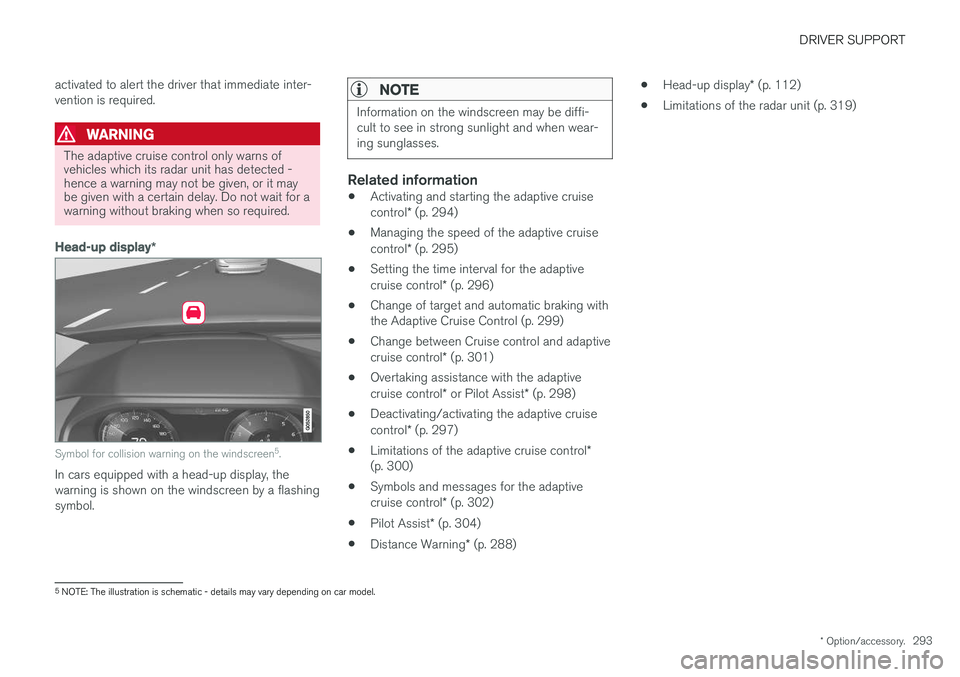
Symbol for collision warning on the windscreen 5
.
In cars equipped with a head-up display, the warning is shown on the windscreen by a flashingsymbol.
NOTE
Information on the windscreen may be diffi- cult to see in strong sunlight and when wear-ing sunglasses.
Related information
• Activating and starting the adaptive cruise control
* (p. 294)
• Managing the speed of the adaptive cruisecontrol
* (p. 295)
• Setting the time interval for the adaptivecruise control
* (p. 296)
• Change of target and automatic braking with the Adaptive Cruise Control (p. 299)
• Change between Cruise control and adaptive cruise control
* (p. 301)
• Overtaking assistance with the adaptivecruise control
* or Pilot Assist * (p. 298)
• Deactivating/activating the adaptive cruisecontrol
* (p. 297)
• Limitations of the adaptive cruise control
*
(p. 300)
• Symbols and messages for the adaptivecruise control
* (p. 302)
• Pilot Assist
* (p. 304)
• Distance Warning
* (p. 288) •
Head-up display
* (p. 112)
• Limitations of the radar unit (p. 319)
5
NOTE: The illustration is schematic - details may vary depending on car model.
Page 298 of 594

DRIVER SUPPORT
* Option/accessory.
296
Setting the time interval for the adaptive cruise control *
The adaptive cruise control (Adaptive Cruise Control -ACC) can be set to different time inter-vals.
Different time intervals to the vehicle in front can be selectedand shown in the driver displayas 1-5 horizontal lines - themore lines the longer the timeinterval. One line representsabout 1 second to the vehicle
in front, 5 lines represents about 3 seconds. The same symbol is also shown when the Dis- tance Warning function is activated.
NOTE
When the symbol in the driver display shows two cars, ACC is following the vehicle in frontat a pre-set time interval. When only one car is shown, there is no vehi- cle within a reasonable distance ahead.
Control for time interval.
Decrease time interval
Increase time interval
Distance indicator
–Press the steering wheel button (1) or (2) to increase or decrease the time interval.
> The distance indicator (3) shows the cur- rent time interval.
The adaptive cruise control allows the time inter- val to vary significantly in certain situations inorder to allow the car to follow the vehicle in frontsmoothly and comfortably. At low speed, whenthe distances are short, the adaptive cruise con-trol increases the time interval slightly. Note that a short time interval only allows the driver a short time to react and take action if anyunforeseen problem should arise.
NOTE
Only use the time intervals permitted by local traffic regulations. If the adaptive cruise control does not appear to react when activated, this may be becausethe time distance to the vehicle in front is pre-venting an increase in speed. The higher the speed the longer the calcula- ted distance in metres for a given time inter-val.
Related information
• Adaptive cruise control
* (p. 290)
• Managing the speed of the adaptive cruise control
* (p. 295)
• Distance Warning
* (p. 288)
Page 301 of 594
DRIVER SUPPORT
}}
* Option/accessory.299
–Activate the direction indicator. Use the left direction indicator in a car with the steering wheel on the left, or the rightdirection indicator in a car with the steeringwheel on the right.
> Overtaking assistance is started.
LimitationsWhen using Overtaking Assistance the driver should be prepared for sudden changes in condi-tions. In some conditions Overtaking Assistancecan cause unwanted acceleration. Some situations should be avoided for this rea- son. Examples of such situations are:
• the car is approaching an exit road in orderto turn off in the same direction that is nor-mally used for overtaking
• the vehicle in front slows before your car hasentered the overtaking lane
• traffic in the overtaking lane is slowing
• a car designed for right-hand traffic is beingdriven in a country with left-hand traffic (orvice versa).
Situations of this kind can be avoided by tempo-rarily setting ACC or Pilot Assist in standby mode.
Related information
• Pilot Assist
* (p. 304)
• Adaptive cruise control
* (p. 290)
Change of target and automatic braking with the Adaptive CruiseControl
In combination with automatic gearbox, the adaptive cruise control (Adaptive Cruise Control- ACC ) has functionality for change of targetand braking at certain speeds.
Change of target
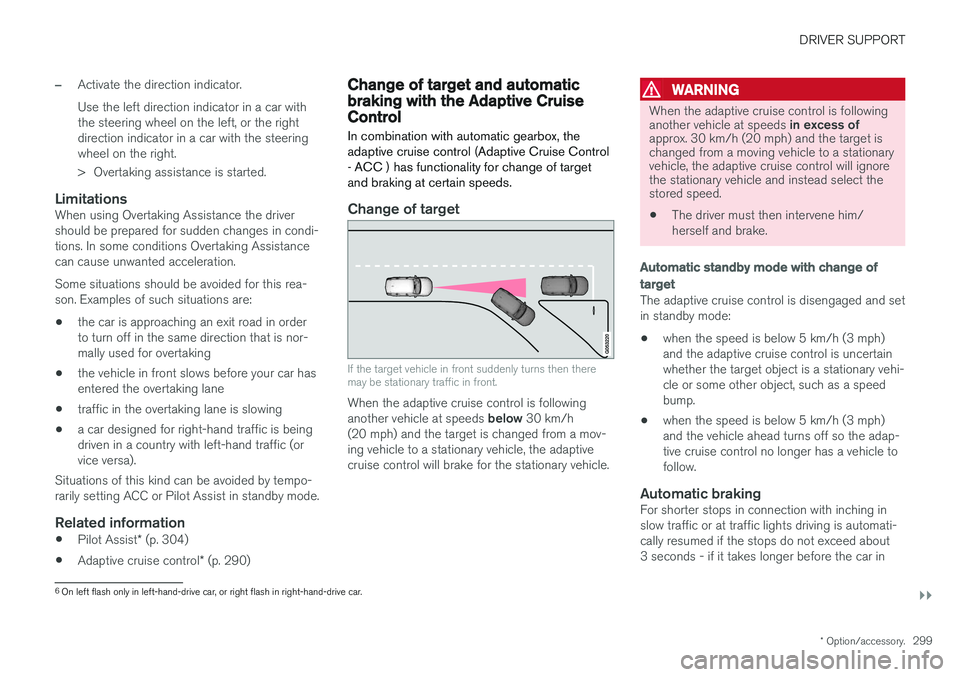
If the target vehicle in front suddenly turns then there may be stationary traffic in front.
When the adaptive cruise control is following another vehicle at speeds below 30 km/h
(20 mph) and the target is changed from a mov- ing vehicle to a stationary vehicle, the adaptivecruise control will brake for the stationary vehicle.
WARNING
When the adaptive cruise control is following another vehicle at speeds in excess of
approx. 30 km/h (20 mph) and the target is changed from a moving vehicle to a stationaryvehicle, the adaptive cruise control will ignorethe stationary vehicle and instead select thestored speed.
• The driver must then intervene him/ herself and brake.
Automatic standby mode with change of target
The adaptive cruise control is disengaged and set in standby mode: • when the speed is below 5 km/h (3 mph) and the adaptive cruise control is uncertainwhether the target object is a stationary vehi-cle or some other object, such as a speedbump.
• when the speed is below 5 km/h (3 mph)and the vehicle ahead turns off so the adap-tive cruise control no longer has a vehicle tofollow.
Automatic brakingFor shorter stops in connection with inching inslow traffic or at traffic lights driving is automati-cally resumed if the stops do not exceed about3 seconds - if it takes longer before the car in
6
On left flash only in left-hand-drive car, or right flash in right-hand-drive car.
Page 309 of 594

DRIVER SUPPORT
}}
* Option/accessory.307
WARNING
Pilot Assist only gives warning about vehicles whose camera and radar unit has beendetected - therefore a warning may not occuror be delayed. Do not wait for a warning with-out braking when so required.
Head-up display *
Symbol for collision warning on the windscreen 9
.
In cars equipped with a head-up display, the warning is shown on the windscreen by a flashingsymbol.
NOTE
Information on the windscreen may be diffi- cult to see in strong sunlight and when wear-ing sunglasses.
Related information
• Activating and starting the Pilot Assist
*
(p. 307)
• Managing the speed for Pilot Assist
*
(p. 309)
• Setting the time interval for Pilot Assist
*
(p. 310)
• Change of target and automatic braking with Pilot Assist
* (p. 313)
• Deactivating/activating the Pilot Assist
*
(p. 311)
• Overtaking assistance with the adaptivecruise control
* or Pilot Assist * (p. 298)
• Limitations of Pilot Assist
* (p. 314)
• Symbols and messages for Pilot Assist
*
(p. 316)
• Adaptive cruise control
* (p. 290)
• Distance Warning
* (p. 288)
• Head-up display
* (p. 112)
• Limitations of the radar unit (p. 319)
• Limitations of the camera unit (p. 327)
Activating and starting the Pilot Assist
*
Pilot Assist must first be activated and then started to be able to control speed and distanceand to give steering assistance.
NOTE: The illustration is schematic - details may vary depending on car model.
In order to start the Pilot Assist it is required that:
• The driver's seatbelt must be buckled and the driver's door must be closed.
• There must be a vehicle (the "target vehicle")within reasonable distance in front of the car,or the current speed must be at least15 km/h (9 mph).
• For cars with manual gearbox. Speed mustbe at the lowest 30 km/h (20 mph).
9
NOTE: The illustration is schematic - details may vary depending on car model.
Page 312 of 594

DRIVER SUPPORT
* Option/accessory.
310
Setting the time interval for Pilot Assist *
Pilot Assist can be set with different time inter- vals.
Different time intervals to the vehicle in front can be selectedand shown in the driver displayas 1-5 horizontal lines - themore lines the longer the timeinterval. One line representsabout 1 second to the vehicle
in front, 5 lines represents about 3 seconds.
NOTE
When the symbol in the driver display shows a car and a steering wheel, Pilot Assist fol-lows a vehicle in front at a preset time gap. When only one steering wheel is shown, there is no vehicle within a reasonable distanceahead.
Control for time interval.
Decrease time interval
Increase time interval
Distance indicator
–Press the steering wheel button (1) or (2) to increase or decrease the time interval.
> The distance indicator (3) shows the cur- rent time interval.
In order to follow the vehicle ahead in a smooth and comfortable way, Pilot Assist allows the timeinterval to vary noticeably in certain conditions.For example, at low speed, when the distancesbecome short, Pilot Assist increases the timeinterval slightly. Note that a short time interval only allows the driver a short time to react and take action if anyunforeseen problem should arise.
NOTE
Only use the time intervals permitted by local traffic regulations. If Pilot Assist does not appear to react when activated, this may be because the time dis-tance to the vehicle in front is preventing anincrease in speed. The higher the speed the longer the calcula- ted distance in metres for a given time inter-val.
Related information
• Pilot Assist
* (p. 304)
• Activating and starting the Pilot Assist
*
(p. 307)
• Managing the speed for Pilot Assist
* (p. 309)
• Change of target and automatic braking with Pilot Assist
* (p. 313)
• Deactivating/activating the Pilot Assist
*
(p. 311)
• Overtaking assistance with the adaptivecruise control
* or Pilot Assist * (p. 298)
• Limitations of Pilot Assist
* (p. 314)
• Symbols and messages for Pilot Assist
*
(p. 316)
• Distance Warning
* (p. 288)
Page 315 of 594

DRIVER SUPPORT
}}
* Option/accessory.313
Change of target and automatic braking with Pilot Assist *
In combination with automatic gearbox, Pilot Assist has functionality for change of target and braking at certain speeds.
Change of target
If the target vehicle in front suddenly turns then there may be stationary traffic in front.
When Pilot Assist is following another vehicle at speeds below 30 km/h (20 mph) and changes
target from a moving to a stationary vehicle, Pilot Assist will slow down for the stationary vehicle.
WARNING
When Pilot Assist is following another vehicle at speeds in excess of approx. 30 km/h
(20 mph) and the target is changed from a moving vehicle to a stationary vehicle, PilotAssist will ignore the stationary vehicle andinstead select the stored speed.
• The driver must then intervene him/ herself and brake.
Automatic standby mode with change of target
Pilot Assist is disengaged and set in standby mode: •when the speed is below 5 km/h (3 mph) and Pilot Assist is uncertain whether the tar-get object is a stationary vehicle or someother object, e.g. a speed bump.
• when the speed is below 5 km/h (3 mph)and the vehicle in front turns off so the PilotAssist no longer has a vehicle to follow.
Automatic brakingFor shorter stops in connection with inching for-ward in slow traffic or at traffic lights, driving isautomatically resumed if the stops do not exceedabout 3 seconds - if it takes longer before thecar in front starts moving again then the PilotAssist is set in standby mode with automaticbraking.
–Pilot Assist is reactivated in the following way:
• Press the steering wheel button
.
• Depress the accelerator pedal.
> Pilot Assist resumes following the vehicle ahead if it starts moving forward within 6 seconds.
NOTE
Pilot Assist can hold the car stationary for a maximum of 5 minutes - then the parkingbrake is applied and the function is disen-gaged. Before Pilot Assist can be reactivated, the parking brake must be released.
Page 317 of 594

DRIVER SUPPORT
}}
* Option/accessory.315
IMPORTANT
In certain situations, Pilot Assist steering assistance may have difficulty helping thedriver in the right way or it may be automati-cally deactivated - in which case, the use ofPilot Assist is not recommended. Examples ofsuch situations may be that: •the lane markings are worn, missing or cross each other.
• lane division is unclear, for example, whenthe lanes divide or merge or at exits or inthe event of multiple sets of markings.
• edges or other lines than lane markingsare present on or near the road, e.g.curbs, joints or repairs to the road sur-face, edges of barriers, roadside edges orstrong shadows.
• the lane is narrow or winding.
• the lane contains ridges or holes.
• weather conditions are poor, e.g. rain,snow or fog or slush or impaired viewwith poor light conditions, back-lighting,wet road surface etc.
The driver should also note that Pilot Assisthas the following limitations: • High kerbs, roadside barriers, temporary obstacles (traffic cones, safety barriers,etc.) are not detected. Alternatively, theymay be detected incorrectly as lane
markings, with a subsequent risk of con- tact between the car and such obstacles.The driver must ensure him/herself thatthe car is at a suitable distance from suchobstacles.
• The camera and radar sensor does nothave the capacity to detect all oncomingobjects and obstacles in traffic environ-ments, e.g. potholes, stationary obstaclesor objects which completely or partiallyblock the route.
• Pilot Assist does not "see" pedestrians,animals, etc.
• The recommended steering input is forcelimited, which means that it cannotalways help the driver to steer and keepthe car within the lane.
The driver always has the possibility of correcting or adjusting a steering intervention imposed byPilot Assist and can turn the steering wheel tothe desired position.
Steep roads and/or heavy loadBear in mind that Pilot Assist is primarilyintended for use when driving on level road surfa-ces. The function may have difficulty in keepingthe correct distance from the vehicle ahead whendriving on steep downhill slopes - in which case,be extra attentive and ready to brake. Do not usePilot Assist with a heavy load or with a trailer con-nected to the car.
Miscellaneous
•Off Road drive mode cannot be selected
when Pilot Assist is activated.
NOTE
The function uses the car's camera unit, which has some general limitations, see the"Limitations for camera unit" section.
NOTE
The function uses the car's radar unit, which has some general limitations, see the "Limita-tions for radar unit" section.
Related information
• Pilot Assist
* (p. 304)
• Activating and starting the Pilot Assist
*
(p. 307)
• Managing the speed for Pilot Assist
* (p. 309)
• Setting the time interval for Pilot Assist
*
(p. 310)
• Change of target and automatic braking with Pilot Assist
* (p. 313)
• Deactivating/activating the Pilot Assist
*
(p. 311)
• Overtaking assistance with the adaptivecruise control
* or Pilot Assist * (p. 298)
Page 329 of 594

DRIVER SUPPORT
}}
327
Limitations of the camera unit
The camera unit has certain limitations - which in turn also limits those functions that use the unit.
Impaired visionThe camera has limitations similar to the human eye, i.e. it can "see" worse in for example intensesnowfall or rain, dense fog, heavy dust stormsand snow flurries. Under such conditions, thefunctions of camera-dependent systems could besignificantly reduced or temporarily disengaged. Strong oncoming light, reflections in the carriage- way, snow or ice on the road surface, dirty roadsurfaces or unclear lane markings can also sig-nificantly reduce camera function when it is usedto scan the carriageway to detect pedestrians,cyclists, large animals and other vehicles.
Blocked unit
The marked area must be kept free from stickers, objects, shade film, etc. 13
.
The camera unit is placed inside the upper sec- tion of the windscreen together with the car'sradar unit.
IMPORTANT
Do not place, stick or mount anything on the outside or inside of the windscreen in front ofor around the camera and radar unit — thiscan interfere with camera and radar-depend-ent functions. This may mean that functions are reduced, deactivated completely or give incorrect func-tion response.
If the driver display shows this symbol with the message Windscreen
sensor Sensor blocked, see
Owner's manual, it means that the
camera and radar unit cannot detect other vehi- cles in front of the car.
The following table presents examples of possi- ble causes for a message being shown, alongwith the appropriate action:
13 NOTE: The illustration is schematic - details may vary depending on car model.