2017 VOLVO V90 remote control
[x] Cancel search: remote controlPage 388 of 594

||
STARTING AND DRIVING
* Option/accessory.
386
NOTE
To reach level I or II without starting the
engine - do not depress the brake pedal, or
the clutch pedal for cars with manual gear changing, when these ignition positions are tobe selected.
• Ignition position I
- Turn the ignition dial to
START and release it. The control automati-
cally returns to its starting position.
• Ignition position II
- Turn the ignition dial to
START and hold it in the START position for
approx. 4 seconds. Then release the knob, which automatically returns to its startingposition.
• Back to ignition position 0
- To return to
ignition position 0 from position I and II -
Turn the ignition dial to STOP and release it.
The control automatically returns to its star-ting position.
Related information
• Starting the car (p. 386)
• Switching off the car (p. 387)
• Driver display (p. 90)
Starting the car
The car is started using the remote control key and the start knob in the tunnel console.
Start knob in the tunnel console.
The remote control key is not physically used when starting the car since the car is equippedwith support for keyless starting (Passive Start). To start the car:
1. The remote control key must be inside the car. For cars with Passive Start, the key needs to be located in the front part of thepassenger compartment. With the keyless locking/unlocking option (Passive Entry *),
the key can be anywhere in the car. 2. For cars with automatic gear changing, make
sure that gear position P or N is selected.
For cars with manual gear changing, make sure that the gear lever is in neutral positionand that either the clutch pedal or the brakepedal is depressed.
3. Depress the brake pedal fully 1
.
4. Turn the start knob to START and release it.
The control automatically returns to its star-ting position.
NOTE
For diesel-engined cars, there may be a slight delay before starting is initiated.
When the engine is started the starter motor works until the engine is started or until its over-heating protection triggers.
Backup reader's location in the tunnel console.
1 If the car is moving, then you simply need to turn the start knob towards START to start the engine.
Page 389 of 594
STARTING AND DRIVING
387
If the message
Car key not found is shown in
the driver display when starting, place the remote control key on the backup reader in the cupholder. Then try to start again.
NOTE
When the remote control key is placed in the cup holder, make sure that no other car keys,metal objects or electronic apparatus (e.g.mobile phones, tablets, laptops or chargers)are in the cup holder. Several car keys closeto each other in the cup holder can causeinterference with each other.
IMPORTANT
If the engine fails to start after 3 attempts - wait for 3 minutes before making a furtherattempt. Starting capacity increases if the bat-tery is allowed to recover.
WARNING
Never remove the remote control key from
the car while driving or during towing.
WARNING
Always take the remote control key out from the car when leaving the car and make surethe car's electrical system is in ignition posi- tion 0 - especially if there are children in the
car.
NOTE
The idling speed can be noticeably higher than normal for certain engine types duringcold starting. This is done in order that theemissions system can reach normal operatingtemperature as quickly as possible, whichminimises exhaust emissions and protects theenvironment.
Related information
• Ignition positions (p. 385)
• Switching off the car (p. 387)
• Remote control key (p. 236)
• Replacing the battery in the remote control key (p. 257)
Switching off the car
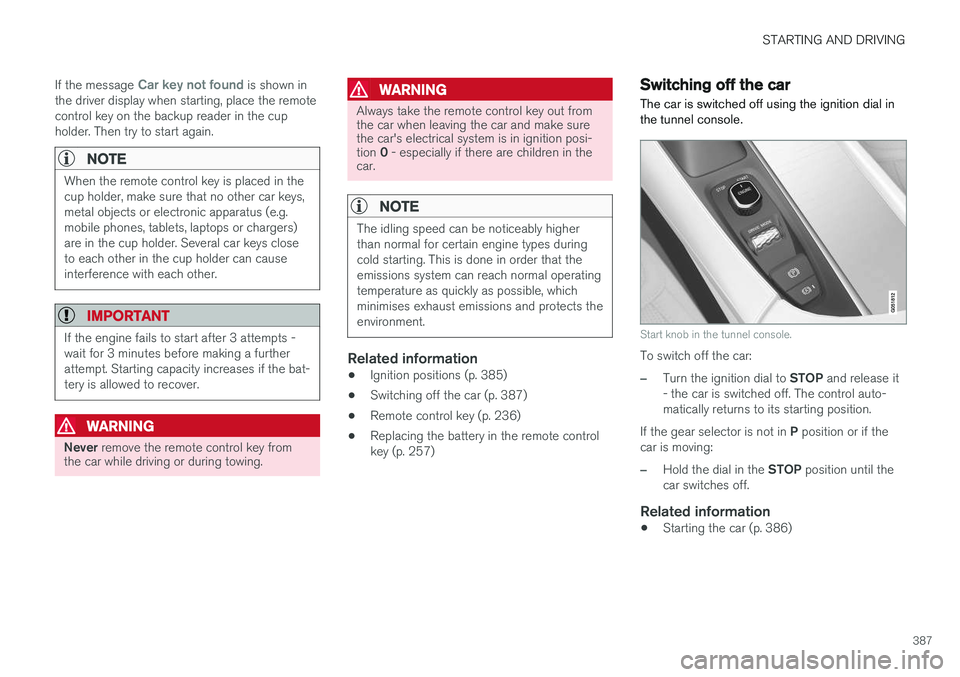
The car is switched off using the ignition dial in the tunnel console.
Start knob in the tunnel console.
To switch off the car:
–Turn the ignition dial to STOP and release it
- the car is switched off. The control auto- matically returns to its starting position.
If the gear selector is not in P position or if the
car is moving:
–Hold the dial in the STOP position until the
car switches off.
Related information
• Starting the car (p. 386)
Page 390 of 594

STARTING AND DRIVING
388
Steering lock
The steering lock makes steering difficult if the car is e.g. taken unlawfully. A mechanical noisecan be perceived when the steering lock locksor unlocks.
Activating the steering lockThe steering lock is activated when the car is locked from the outside and the engine isswitched off. If the car is left unlocked then thesteering lock will lock automatically after a while.
Deactivating the steering lockThe steering lock is deactivated when the car isunlocked from outside. If the car is not locked, itis sufficient that the remote control key is insidethe passenger compartment and the engine is started by turning the start knob towards START
in order to unlock the steering lock.
Related information
• Starting the car (p. 386)
• Switching off the car (p. 387)
• Steering wheel (p. 131)
Using jump starting with another battery
If the starter battery is discharged then the car can be started with current from another battery.
When jump starting the car, the following steps are recommended to avoid short circuits or otherdamage:
1. Set the car's electrical system in ignition position 0.
2. Check that the donor battery has a voltage of 12 V.
3. If the donor battery is installed in another car - switch off the donor car's engine and make sure that the two cars do not touch eachother. 4. Connect one of the red jump lead's clamps
to the donor battery's positive terminal (1).
IMPORTANT
Connect the start cable carefully to avoid short circuits with other components in theengine compartment.
5. Open the positive jump-starting point's cover(2).
6. Connect the red jump lead's other clamp onto the car's positive jump-starting point (2).
7. Connect one of the black jump lead's clamps to the donor battery's negative terminal (3).
8. Connect the black jump lead's other clamp onto the car's negative jump-starting point(4).
9. Check that the jump lead clamps are affixed securely so that there are no sparks duringthe starting attempt.
10. Start the engine of the "donor car" and allow it to run a few minutes at a speed slightlyhigher than idle approx. 1500 rpm.
Page 422 of 594

STARTING AND DRIVING
420
Diesel Diesel is a type of engine fuel that is intended for cars with a diesel engine.
Only use diesel fuel from well-known producers. Never use fuel of dubious quality. Diesel fuelmust fulfil the EN 590 or SS 155435 standard.Diesel engines are sensitive to contaminants inthe fuel, such as excessively high volumes of sul-phur and metals. At low temperatures (lower than 0 °C) a paraffin precipitate may form in the diesel fuel, which maylead to ignition problems. The fuel qualities thatare sold must be adapted for season and climatezone, but for extreme weather conditions, old fuelor moving between climate zones, paraffin precip-itate may occur. The risk of condensation in the fuel tank is reduced if the tank is kept well filled. When refuelling, check that the area around the fuel filler pipe is clean. Avoid spilling fuel onto thepaintwork. Wash off any spillage with detergentand water.
IMPORTANT
Diesel fuel must: •fulfil the EN 590 and/or SS 155435 standards
• have a sulphur content not exceeding10 mg/kg
• have a maximum of 7 vol % FAME 15
(B7).
IMPORTANT
Diesel type fuels that must not be used:
• Special additives
• Marine diesel fuel
• Heating oil
• FAME 16
and vegetable oil.
These fuels do not fulfil the requirements in accordance with Volvo recommendations andgenerate increased wear and engine damagethat is not covered by the Volvo warranty.
Related information
• Empty tank and diesel engine (p. 420)
• Diesel particulate filter (p. 421)
Empty tank and diesel engine
Once the engine has stopped due to fuel starva- tion, the fuel system needs a few moments tocarry out a check.
Before starting the engine after the fuel tank has
been filled with diesel - proceed as follows:
1. The remote control key must be inside the car.
2. Set the car in ignition position II - turn the
ignition dial to START without depressing
the brake pedal and hold the knob in the START position for approx. 4 seconds. Then
release the knob, which automatically returns to its starting position.
3. Wait approx. one minute.
4. To start the engine: Depress the brake pedal and turn the ignition dial to START again.
NOTE
Before filling with fuel in the event of fuel shortage:
• Stop the car on as flat/level ground aspossible - if the car is tilting there is a riskof air pockets in the fuel supply.
15
Fatty Acid Methyl Ester
16 Diesel fuel with maximum 7 vol % FAME (B7) is permitted.
Page 433 of 594

STARTING AND DRIVING
}}
431
The towing eye may be used to pull the car up onto a recovery vehicle with a flatbed platform.The car's position and ground clearance deter-mine whether it is possible. If the slope of the recovery vehicle's ramp is too steep, or if the ground clearance under the car isinadequate, then the car may be damaged if youtry to pull it up using the towing eye. If necessary, raise the car by using the recovery vehicle's lifting device. Do not use the towing eye.
WARNING
No one/nothing is allowed to remain behind the recovery vehicle while the car pulled uponto the flatbed platform.
IMPORTANT
The towing eye is only designed for towing on roads -
not for pulling the car unstuck or out
of a ditch. Call a recovery service for recovery assistance.
Related information
• Towing (p. 431)
• Recovering the car (p. 432)
Towing
During towing, one vehicle pulls another vehicle along behind it by means of a towline.
Find out the statutory maximum speed limit for towing before the towing begins.
Preparations and towing1. Activate the car's hazard warning flashers.
2. Secure the towline in the towing eye.
3. Deactivate the steering lock by unlocking the car.
NOTE
In ignition position II the steering lock is
deactivated if the car has been unlocked. See section “Ignition position” for more informa-tion.
4. Set the car in ignition position II by turning
the ignition dial to START and holding the
ignition dial in the START position for
approx. 4 seconds. Then release the knob, which automatically returns to its startingposition.
5. Move the gear selector to neutral position N
and release the parking brake.
> The towing vehicle can now start towing. 6. Keep the towline taut when the towing vehi-
cle reduces speed by holding your foot gen- tly pressed on the brake pedal - therebyavoiding unnecessary jerking.
7. Be prepared to brake to stop.
IMPORTANT
Note that the car must always be towed with the wheels rolling forward. • Do not tow cars with automatic transmis- sion at speeds higher than 80 km/h(50 mph) or for distances in excess of 80km.
WARNING
•Check that the steering lock is unlocked before towing.
• Ignition position
II must be active - in
ignition position I all airbags are deacti-
vated.
• Always keep the remote control key in thecar when it is being towed.
WARNING
The brake servo and power steering do not work when the engine is switched off - thebrake pedal needs to be depressedabout 5 times more heavily and the steering isconsiderably heavier than normal.
Page 458 of 594

||
AUDIO AND MEDIA
456
Technical specification for USB connector
•Type A socket
• Version 2.0
• Voltage supply 5 V
• Current supply max. 2.1 A
Related information
• Media player (p. 442)
• Media playback (p. 443)
Phone
A mobile phone equipped with Bluetooth can be connected wirelessly to the car's built-in hands-free system.
The audio and media system acts as a handsfree,
with the facility to remotely control a selection of the mobile phone's functions. The mobile phonecan still be operated with its own keys if it is con-nected to the car. When a mobile phone has been connected with the car and connected, it can be used make calls,send/receive messages, stream media and pro-vide an Internet connection.
The phone is operated from thecentre display, but some opera-tions are also available via voicerecognition and the app menu,which are accessed from theright-hand steering wheel key-pad.
Overview
Microphone.
Mobile phone.
Phone operation from centre display.
Keypad for operating phone functions that are shown in the driver display and voice rec-ognition.
Driver display.
Related information
•Connect phone (p. 457)
• Connecting/disconnecting the phone (p. 458)
• Managing phone calls (p. 459)
• Managing text messages (p. 461)
• Settings for phone (p. 462)
Page 587 of 594

ALPHABETICAL INDEX
585
Position lamp 136
Power operated tailgate 253, 256
Power panorama roof 158
Power save mode 415
Power seat 121, 123
Power windows 151
resetting 153
PPS (Pedestrian Protection System) 58
Preconditioning 206 start/shut-off 207
Timer 208
Protective grille 233
Pump up tyre 494
Puncture 490
Q
Queue Assist 304, 309, 316
Queue assistance 304, 309, 316
R
Radar sensor 290 Limitations 319
Radio 436 change and search for radio station 436
DAB 440
settings 441
voice control 118
Rain sensor 149
Raising the car 512Rear door sun blind 153
Rear seat 128 Climate control 187, 188
Fan 193
head restraint 128
heating 203
lowering the backrest 130
Temperature 190
Rearview and door mirrors compass 156, 157
door 153
electrically retractable 155
heating 194
interior 155
rear window
heating 194
Washers 151
Wiper 151
Recommendations during driving 415
Recovery 432
Red Key 239
Refrigerant 520
Refuelling 417
Regeneration 421 Remote control, HomeLink ®
programmable 162
Remote control immobiliser 260
Remote control key 176, 236, 239, 243 battery replacement 257
connect to driver profile 176
detachable key blade 250
loss 236
range 238
Remote control key system, type approval 265
Remote updates 509
Resetting, trip meter 166
Resetting the door mirrors 154
Resetting the power windows 153
Restore settings 179
Retractable power door mirrors 155
Page 589 of 594
ALPHABETICAL INDEX
587
Steering wheel 131, 132
heating 205
keypad 131
paddle 131
steering wheel adjustment 132
Steering wheel paddles 395
Stone chips and scratches 554, 555
Stop/start function 396
Storage spaces 218 glovebox 225
tunnel console 219
Sun blind panorama roof 158
Rear door 153
Sun visor 226
Support 19
Support battery 533
Switching off the engine 387
Switch off engine 387Symbols indicator symbols 95
Symbols and messages Adaptive Cruise Control 302
centre display status field 45
Collision Warning with Auto Brake 339
parking climate 212
Systemupdates 510
T
TailgateLocking/unlocking 247, 249
power 253, 256
Temperature Control 190
experienced 183
Temporary spare spare wheel 498
Through-load hatch 229
Tools 430, 500
Top speed 575Towbar foldable 423
Towing 431, 432
Towing bracket 422, 423 specifications 425
Towing capacity and towball load 564
Towing eye 430
Traction control 273
Traffic information 441
Trailer 428 cable 426
driving with a trailer 426, 428
snaking 428
Trailer stability assist 273, 428
Transmission 389Transmission oil grade 570
Tread 484
Tread depth 484, 499
Tread wear indicators 484
Trip computer 165, 166, 168
Trip meter 165
Trip meter, resetting 166Troubleshooting Adaptive Cruise Control 300
TSA - trailer stability assist 273, 428
Tunnel console 219
Tunnel detection 137TV 449
Type approval radar system 323
remote control key system 265
Type designations 558
Tyre dimension 495, 502
Tyre load index 502