Page 84 of 594
SAFETY
* Option/accessory.
82
Integrated booster cushion *
The integrated booster cushions on the outer seats in the rear seat allow children to sit com-fortably and safely.
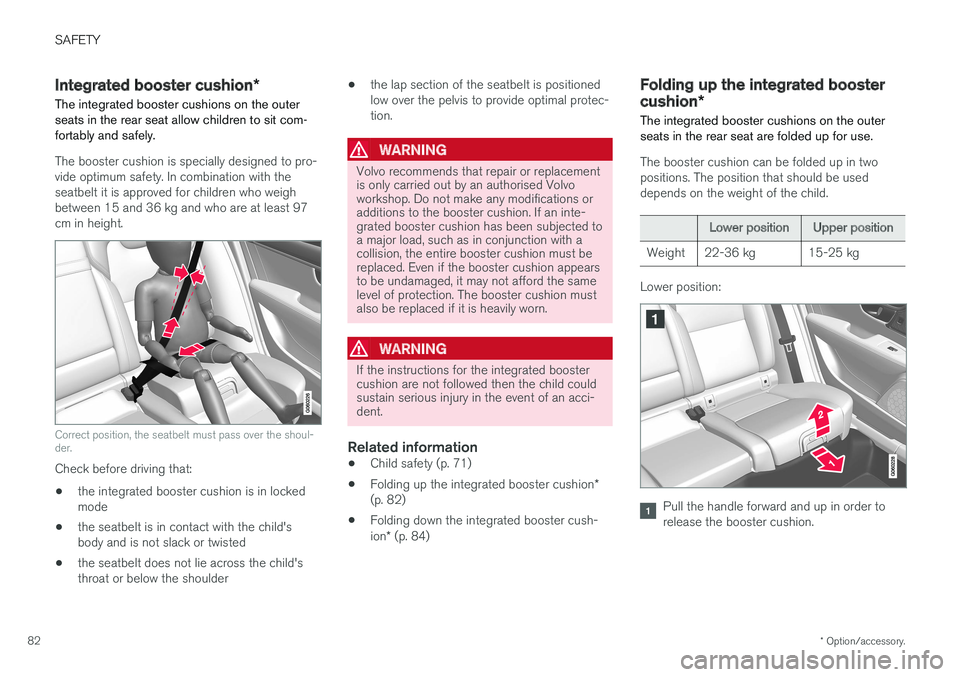
The booster cushion is specially designed to pro- vide optimum safety. In combination with theseatbelt it is approved for children who weighbetween 15 and 36 kg and who are at least 97cm in height.
Correct position, the seatbelt must pass over the shoul- der.
Check before driving that: • the integrated booster cushion is in locked mode
• the seatbelt is in contact with the child'sbody and is not slack or twisted
• the seatbelt does not lie across the child'sthroat or below the shoulder •
the lap section of the seatbelt is positionedlow over the pelvis to provide optimal protec-tion.
WARNING
Volvo recommends that repair or replacement is only carried out by an authorised Volvoworkshop. Do not make any modifications oradditions to the booster cushion. If an inte-grated booster cushion has been subjected toa major load, such as in conjunction with acollision, the entire booster cushion must bereplaced. Even if the booster cushion appearsto be undamaged, it may not afford the samelevel of protection. The booster cushion mustalso be replaced if it is heavily worn.
WARNING
If the instructions for the integrated booster cushion are not followed then the child couldsustain serious injury in the event of an acci-dent.
Related information
•Child safety (p. 71)
• Folding up the integrated booster cushion
*
(p. 82)
• Folding down the integrated booster cush- ion
* (p. 84)
Folding up the integrated booster cushion *
The integrated booster cushions on the outer seats in the rear seat are folded up for use.
The booster cushion can be folded up in two positions. The position that should be useddepends on the weight of the child.
Lower position Upper position
Weight 22-36 kg 15-25 kg
Lower position:
Pull the handle forward and up in order to release the booster cushion.
Page 85 of 594
SAFETY
* Option/accessory.83
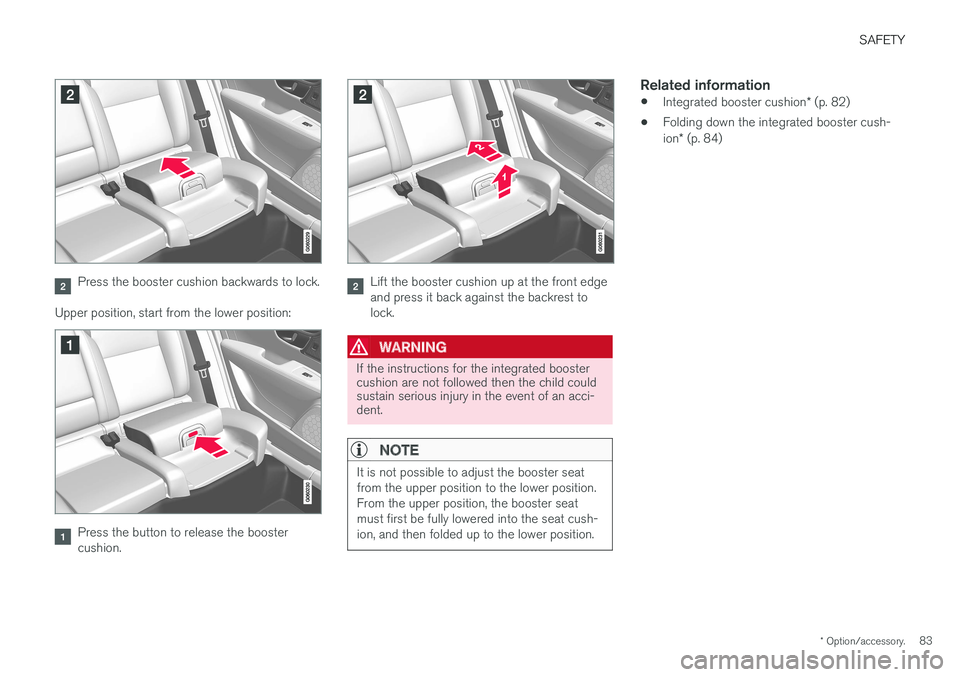
Press the booster cushion backwards to lock.
Upper position, start from the lower position:
Press the button to release the booster cushion.
Lift the booster cushion up at the front edge and press it back against the backrest tolock.
WARNING
If the instructions for the integrated booster cushion are not followed then the child couldsustain serious injury in the event of an acci-dent.
NOTE
It is not possible to adjust the booster seat from the upper position to the lower position.From the upper position, the booster seatmust first be fully lowered into the seat cush-ion, and then folded up to the lower position.
Related information
• Integrated booster cushion
* (p. 82)
• Folding down the integrated booster cush- ion
* (p. 84)
Page 86 of 594
SAFETY
* Option/accessory.
84
Folding down the integrated booster cushion *
The integrated booster cushions on the outer seats in the rear seat can be folded down whennot in use.
NOTE
It is not possible to adjust the booster seat from the upper position to the lower position.From the upper position, the booster seatmust first be fully lowered into the seat cush-ion, and then folded up to the lower position.
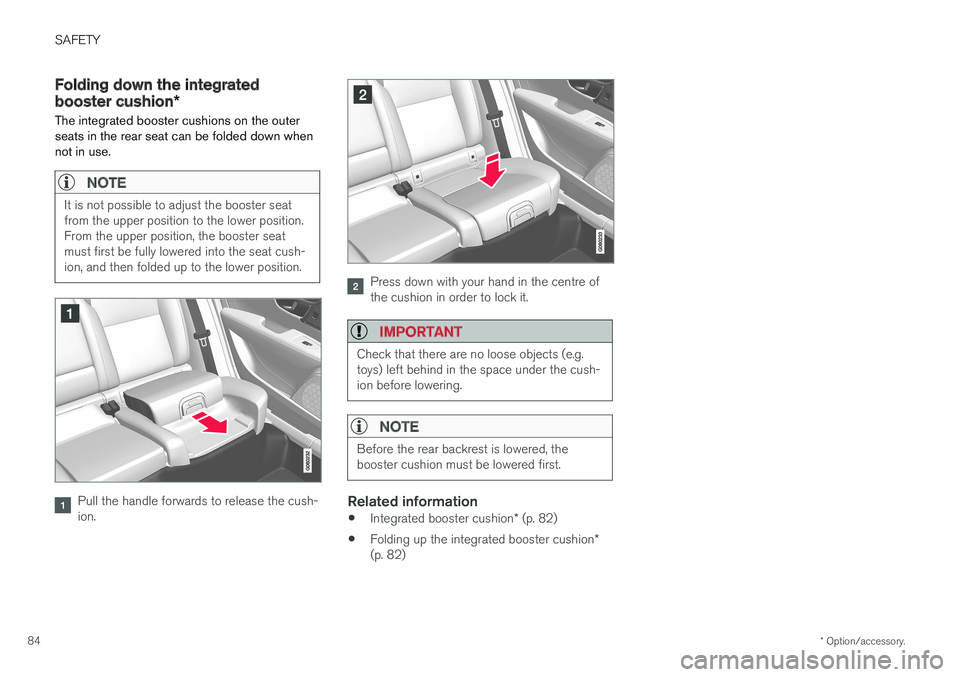
Pull the handle forwards to release the cush- ion.
Press down with your hand in the centre of the cushion in order to lock it.
IMPORTANT
Check that there are no loose objects (e.g. toys) left behind in the space under the cush-ion before lowering.
NOTE
Before the rear backrest is lowered, the booster cushion must be lowered first.
Related information
• Integrated booster cushion
* (p. 82)
• Folding up the integrated booster cushion
*
(p. 82)
Page 88 of 594

INSTRUMENTS AND CONTROLS
* Option/accessory.
86
Instruments and controls, left-hand drive car The overviews show where the displays and controls near the driver are located.
Display/function/control
Position lamps, daytime running lights, dipped beam, main beam, direction indi- cators, front fog lamps/cornering lights *,
rear fog lamp, resetting the trip meter
Steering wheel paddles for manual gear changing in an automatic gearbox *
Head-up display*
Driver display
Wipers and washing, rain sensor *
Display/function/control
Right-hand steering wheel keypad
Steering wheel adjustment
Horn
Left-hand steering wheel keypad
Bonnet opening
Display lighting, tailgate unlocking, tail- gate opening/closing*, halogen head-
lamp levelling
Display/function/control
Front reading lamps and interior lighting
Panorama roof *
Display in roof console
Manual dimming of interior rearview mir- ror
Display/function/control
Centre display
Hazard warning flashers, max defroster/ heated windscreen *, media, glovebox
door opening
Gear selector
Page 89 of 594
INSTRUMENTS AND CONTROLS
}}
* Option/accessory.87
Display/function/control
Ignition dial
Drive mode control *
Parking brake
Automatic braking when stationary
Display/function/control
Memory for setup of:
• power front seat
*
• Door mirrors
• Head-up display
*
Door opening, locking/unlocking of side doors and tailgate
Display/function/control
Power windows, door mirrors
Adjusting front seat
Instruments and controls, right- hand drive car
The overviews show where the displays and controls near the driver are located.
Display/function/control
Position lamps, daytime running lights, dipped beam, main beam, direction indi- cators, front fog lamps/cornering lights *,
rear fog lamp, resetting the trip meter
Steering wheel paddles for manual gear changing in an automatic gearbox *
Head-up display*
Driver display
Wipers and washing, rain sensor *
Page 90 of 594
||
INSTRUMENTS AND CONTROLS
* Option/accessory.
88
Display/function/control
Right-hand steering wheel keypad
Display lighting, unlocking the tailgate, opening/closing the tailgate *
Bonnet opening
Horn
Steering wheel adjustment
Left-hand steering wheel keypad
Display/function/control
Front reading lamps and interior lighting
Panorama roof*
Display in roof console
Manual dimming of interior rearview mir- ror
Display/function/control
Centre display
Hazard warning flashers, max defroster/ heated windscreen *, media, glovebox
door opening
Gear selector
Display/function/control
Ignition dial
Drive mode control *
Parking brake
Automatic braking when stationary
Display/function/control
Memory for setup of:
• power front seat
*
• Door mirrors
• Head-up display
*
Door opening, locking/unlocking of side doors and tailgate
Page 92 of 594

INSTRUMENTS AND CONTROLS
* Option/accessory.
90
Driver display
The driver display shows information about the car and driving.
The driver display contains gauges, indicators and indicator and warning symbols. The content ofthe driver display depends on the car's equip-ment, settings and which functions are active atthat time. The driver display is available in two versions, 12- inch and 8-inch.
WARNING
In the event of a fault in the driver display the information on e.g. brakes, airbags or othersafety systems may not be shown. In whichcase, the driver cannot check the status ofthe car's systems or receive current warningsand information.
WARNING
If the driver display should extinguish, not illu- minate on activation/start or be fully or parti-ally illegible, the car must not be used. Youshould visit a workshop immediately. Volvorecommends an authorised Volvo workshop.
Driver display, 12-inch
Location in the driver display:
On the left In the middleOn the right
Speedometer Indicator and warning symbols
TachometerA
Trip meter Outside temperature gauge
ECO gaugeA
Odometer ClockGear shift indicator
Cruise control and speed limiter information Messages, in some cases with graphics Drive mode Road Sign Information * Door and seatbelt information Fuel gauge
Page 94 of 594
||
INSTRUMENTS AND CONTROLS
* Option/accessory.
92
On the left In the middle On the right
Gear shift indicator Cruise control and speed limiter information Navigation information*
Tachometer A
Door and seatbelt information Clock
ECO gauge A
Status of the Start/Stop function App menu (activated via steering wheel keypad)
Distance to empty tank – Instantaneous fuel consumption
Outside temperature gauge – Odometer
Indicator and warning symbols – Trip meter
– – Indicator and warning symbols
– – Voice recognition
– – Engine temperature gauge
– – Messages, in some cases with graphics
A
Depending on selected drive mode.