2017 VOLVO V90 lane assist
[x] Cancel search: lane assistPage 307 of 594

DRIVER SUPPORT
}}
305
WARNING
Pilot Assist is an aid which cannot handle all traffic, weather and road conditions. The driver must always be observant with regard to the prevailing traffic conditions andintervene if Pilot Assist does not provide suit-able steering assistance or maintain a suita-ble speed or suitable time interval. Read all the sections about this function in the owner's manual in order to learn about itslimitations, of which the driver should beaware before the function is used. Pilot Assist must only be used if there are clear lane lines painted on the road surfaceon each side of the lane. All other useinvolves increased risk of contact with sur-rounding obstacles that are not detected bythe function. The driver always bears responsibility for how the car is controlled as well as for maintainingthe correct distance and speed, even whenPilot Assist is being used.
Pilot Assist regulates the speed with acceleration and braking. It is normal for the brakes to emit alow sound when they are being used to adjustthe speed. Pilot Assist attempts to regulate the speed smoothly. In situations that demand sudden brak-ing the driver must brake himself/herself. Thisapplies in case of large speed differences or ifthe vehicle in front brakes suddenly. Due to the limitations of the camera and radar unit, brakingmay come unexpectedly or not at all. Pilot Assist aims to follow the vehicle ahead in the same lane at a time interval set by the driver.If the radar unit cannot see any vehicle in frontthen the car will instead maintain the speed setand stored by the driver. This also takes place ifthe speed of the vehicle ahead increases andexceeds the stored speed. The following applies for cars with automatic gearbox:
• Pilot Assist can follow another vehicle atspeeds from 0 km/h up to 200 km/h(125 mph).
• Pilot Assist can give steering assistance fromalmost stationary up to 140 km/h (87 mph).
The following applies for cars with manual gear-box: • Pilot Assist can follow another vehicle at speeds from 30 km/h (20 mph) up to200 km/h (125 mph).
• Pilot Assist can give steering assistance from30 km/h (20 mph) up to 140 km/h(87 mph).
WARNING
Pilot Assist is not a collision avoidance sys- tem. The driver must intervene if the systemdoes not detect a vehicle in front. Pilot Assist does not brake for people, ani- mals, objects, small vehicles (e.g. cycles andmotorcycles), low trailers as well as oncoming,slow or stationary vehicles. Do not use Pilot Assist, for example, in city traffic, at junctions, on slippery surfaces, witha lot of water or slush on the road, in heavyrain/snow, in poor visibility, on winding roads,on slip roads, or with a trailer connected tothe car.
IMPORTANT
Maintenance of Pilot Assist components must only be performed at a workshop - an author-ised Volvo workshop is recommended.
Page 313 of 594

DRIVER SUPPORT
}}
* Option/accessory.311
Deactivating/activating the Pilot Assist*
Pilot Assist can be temporarily deactivated so that it is set in the standby mode and can bereactivated later.
Deactivating and setting Pilot Assist in
standby mode
NOTE: The illustration is schematic - details may vary depending on car model.
To temporarily switch off Pilot Assist and set it in standby mode:
–Press the steering wheel button (2).
> Pilot Assist is set in standby mode - the symbol (8) in the driver display changes colour from WHITE to GREY and thestored speed in the centre of the speed-ometer changes from BEIGE to GREY.
...or...
–Press ◀ (3).
> Pilot Assist is switched off and changes to the adaptive cruise control in active mode.
In standby mode, the driver is no longer given anydriver steering recommendations and must con-trol both speed and distance him/herself. When Pilot Assist is in standby mode and the car drives too close to a vehicle ahead, the driver iswarned about the short distance by the DistanceWarning function instead (see reference to theheading "Distance Warning" at the end of thissection).
Standby mode on driver intervention
Pilot Assist is temporarily deactivated and set in standby mode if:
• the foot brake is used
• the gear selector is moved to
N position.
• the direction indicators are used for longerthan 1 minute .
• the driver maintains a speed higher than thestored speed for longer than 1 minute.
• the clutch pedal is depressed forapprox. 1 minute - applies to cars with man-ual gearbox.
A temporary increase in speed with the accelera-tor pedal, e.g. during overtaking, does not affectthe setting - the car returns to the last storedspeed when the accelerator pedal is released. When the direction indicators are used, PilotAssist steering assistance is temporarily disen-gaged. When this is no longer the case, steeringassistance is automatically reactivated if thelane's side markings can still be detected.
Page 316 of 594

||
DRIVER SUPPORT
* Option/accessory.
314
Cessation of automatic braking
In some situations, automatic braking ceases on coming to a standstill and Pilot Assist is set instandby mode. This means that the brakes arereleased and the car may start to roll - the drivermust therefore intervene and brake the car him-self/herself to keep it stationary. This may take place in the following situations:
• the driver puts his/her foot on the brake pedal
• the parking brake is applied
• the gear selector is moved to
P, N , or R posi-
tion
• the driver sets Pilot Assist in the standbymode.
Automatic activation of parking brakeIn certain situations the parking brake is appliedto keep the car stationary. This takes place if Pilot Assist is holding the car stationary with the foot brake and: •
the driver opens the door or takes off his/her seatbelt
• Pilot Assist has kept the car stationary formore than approx. 5 minutes
• the brakes have overheated
• the engine is switched off.
Related information
•
Pilot Assist
* (p. 304)
• Activating and starting the Pilot Assist
*
(p. 307)
• Managing the speed for Pilot Assist
* (p. 309)
• Setting the time interval for Pilot Assist
*
(p. 310)
• Deactivating/activating the Pilot Assist
*
(p. 311)
• Overtaking assistance with the adaptive cruise control
* or Pilot Assist * (p. 298)
• Limitations of Pilot Assist
* (p. 314)
• Symbols and messages for Pilot Assist
*
(p. 316)
Limitations of Pilot Assist *
The Pilot Assist function may have limitations in certain situations.
The Pilot Assist function is an aid which can help the driver in many situations. But the driver is atall times responsible for maintaining a safe dis-tance to surrounding objects and a correct posi-tion in the lane.
Page 317 of 594

DRIVER SUPPORT
}}
* Option/accessory.315
IMPORTANT
In certain situations, Pilot Assist steering assistance may have difficulty helping thedriver in the right way or it may be automati-cally deactivated - in which case, the use ofPilot Assist is not recommended. Examples ofsuch situations may be that: •the lane markings are worn, missing or cross each other.
• lane division is unclear, for example, whenthe lanes divide or merge or at exits or inthe event of multiple sets of markings.
• edges or other lines than lane markingsare present on or near the road, e.g.curbs, joints or repairs to the road sur-face, edges of barriers, roadside edges orstrong shadows.
• the lane is narrow or winding.
• the lane contains ridges or holes.
• weather conditions are poor, e.g. rain,snow or fog or slush or impaired viewwith poor light conditions, back-lighting,wet road surface etc.
The driver should also note that Pilot Assisthas the following limitations: • High kerbs, roadside barriers, temporary obstacles (traffic cones, safety barriers,etc.) are not detected. Alternatively, theymay be detected incorrectly as lane
markings, with a subsequent risk of con- tact between the car and such obstacles.The driver must ensure him/herself thatthe car is at a suitable distance from suchobstacles.
• The camera and radar sensor does nothave the capacity to detect all oncomingobjects and obstacles in traffic environ-ments, e.g. potholes, stationary obstaclesor objects which completely or partiallyblock the route.
• Pilot Assist does not "see" pedestrians,animals, etc.
• The recommended steering input is forcelimited, which means that it cannotalways help the driver to steer and keepthe car within the lane.
The driver always has the possibility of correcting or adjusting a steering intervention imposed byPilot Assist and can turn the steering wheel tothe desired position.
Steep roads and/or heavy loadBear in mind that Pilot Assist is primarilyintended for use when driving on level road surfa-ces. The function may have difficulty in keepingthe correct distance from the vehicle ahead whendriving on steep downhill slopes - in which case,be extra attentive and ready to brake. Do not usePilot Assist with a heavy load or with a trailer con-nected to the car.
Miscellaneous
•Off Road drive mode cannot be selected
when Pilot Assist is activated.
NOTE
The function uses the car's camera unit, which has some general limitations, see the"Limitations for camera unit" section.
NOTE
The function uses the car's radar unit, which has some general limitations, see the "Limita-tions for radar unit" section.
Related information
• Pilot Assist
* (p. 304)
• Activating and starting the Pilot Assist
*
(p. 307)
• Managing the speed for Pilot Assist
* (p. 309)
• Setting the time interval for Pilot Assist
*
(p. 310)
• Change of target and automatic braking with Pilot Assist
* (p. 313)
• Deactivating/activating the Pilot Assist
*
(p. 311)
• Overtaking assistance with the adaptivecruise control
* or Pilot Assist * (p. 298)
Page 318 of 594

DRIVER SUPPORT
* Option/accessory.
316 •
Symbols and messages for Pilot Assist
*
(p. 316)
• Limitations of the camera unit (p. 327)
• Limitations of the radar unit (p. 319)
Symbols and messages for Pilot Assist
*
A number of symbols and messages regarding
Pilot Assist can be shown via the driver display and/or the head-up display *.
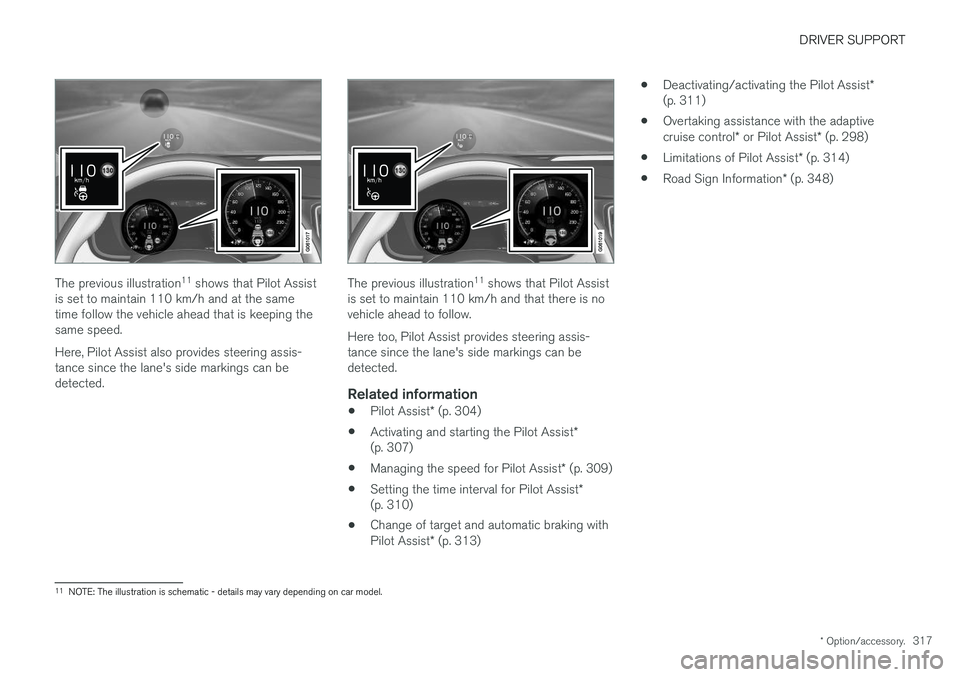
Here are some examples 10
.
The previous illustration 11
shows that Pilot Assist
is set to maintain 110 km/h and that there is no vehicle ahead to follow. Pilot Assist provides no steering assistance since the lane's side markings cannot be detected.
The previous illustration 11
shows that Pilot Assist
is set to maintain 110 km/h and at the same time follow the vehicle ahead that is keeping thesame speed. Pilot Assist provides no steering assistance since the lane's side markings cannot be detected.
10 In the following illustrative example, the RSI (Road Sign Information) function informs that the maximum permitted speed is 130 km/h.
11 NOTE: The illustration is schematic - details may vary depending on car model.
Page 319 of 594
DRIVER SUPPORT
* Option/accessory.317
The previous illustration 11
shows that Pilot Assist
is set to maintain 110 km/h and at the same time follow the vehicle ahead that is keeping thesame speed. Here, Pilot Assist also provides steering assis- tance since the lane's side markings can bedetected.The previous illustration 11
shows that Pilot Assist
is set to maintain 110 km/h and that there is no vehicle ahead to follow. Here too, Pilot Assist provides steering assis- tance since the lane's side markings can bedetected.
Related information
• Pilot Assist
* (p. 304)
• Activating and starting the Pilot Assist
*
(p. 307)
• Managing the speed for Pilot Assist
* (p. 309)
• Setting the time interval for Pilot Assist
*
(p. 310)
• Change of target and automatic braking with Pilot Assist
* (p. 313) •
Deactivating/activating the Pilot Assist
*
(p. 311)
• Overtaking assistance with the adaptivecruise control
* or Pilot Assist * (p. 298)
• Limitations of Pilot Assist
* (p. 314)
• Road Sign Information
* (p. 348)
11
NOTE: The illustration is schematic - details may vary depending on car model.
Page 322 of 594
||
DRIVER SUPPORT
320
CauseAction
Water or snow from the road surface swirls up and blocks the radar signals or camera view. No action. Sometimes the unit does not work on a very wet or snow-coveredroad surface.
Dirt has appeared between the inside of the windscreen and the cameraand radar unit. Visit a workshop to have the windscreen inside the unit's cover cleaned - anauthorised Volvo workshop is recommended.
NOTE
Keep the windscreen clean in front of the camera and radar unit.
Vehicle speedThe capacity of the radar unit to detect vehicles ahead is reduced significantly if:
• the speed of the vehicle ahead is signifi-cantly different from that of your own car
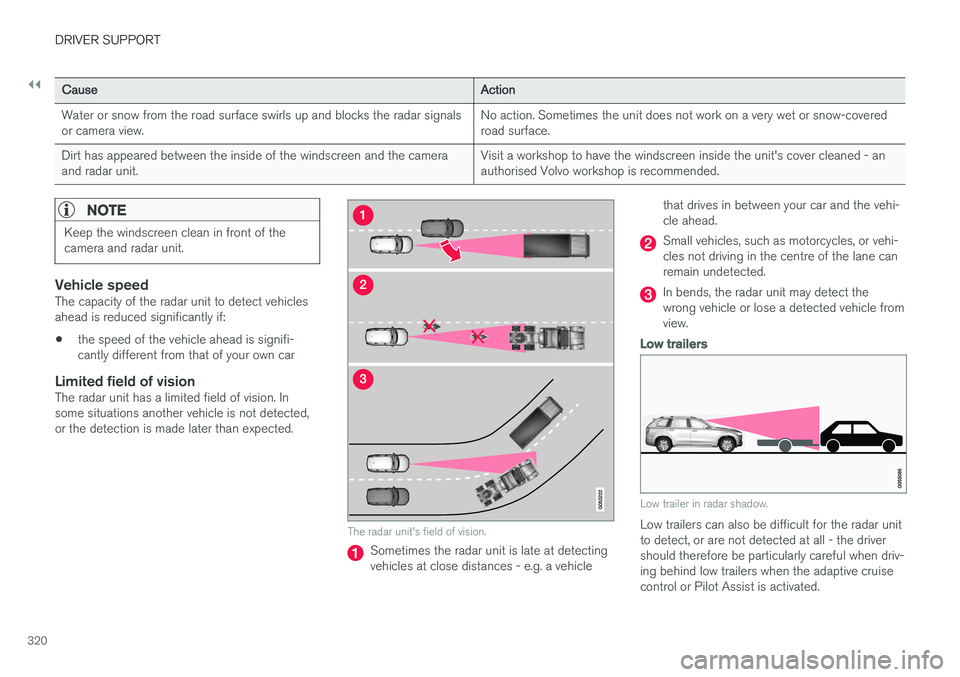
Limited field of visionThe radar unit has a limited field of vision. Insome situations another vehicle is not detected,or the detection is made later than expected.
The radar unit's field of vision.
Sometimes the radar unit is late at detecting vehicles at close distances - e.g. a vehicle that drives in between your car and the vehi-cle ahead.
Small vehicles, such as motorcycles, or vehi- cles not driving in the centre of the lane canremain undetected.
In bends, the radar unit may detect the wrong vehicle or lose a detected vehicle fromview.
Low trailers
Low trailer in radar shadow.
Low trailers can also be difficult for the radar unit to detect, or are not detected at all - the drivershould therefore be particularly careful when driv-ing behind low trailers when the adaptive cruisecontrol or Pilot Assist is activated.
Page 328 of 594

DRIVER SUPPORT
* Option/accessory.
326
Camera unit
The camera unit is used by several driver sup- port systems and has the task of for exampledetecting lane lines or traffic signs.
NOTE: The illustration is schematic - details may vary depending on car model.
The camera unit is used by the following func- tions:
• Adaptive cruise control
*
• Lane assistance
*
• Driver Alert Control
*
• Pilot Assist
*
• City Safety
• Run-off Mitigation
• Road Sign Information
*
• Active main beam
*
Related information
•Limitations of the camera unit (p. 327)
• Adaptive cruise control
* (p. 290)
• Lane Keeping Aid (p. 354)
• Driver Alert Control (p. 352)
• Pilot Assist
* (p. 304)
• City Safety (p. 330)
• Run-off Mitigation (p. 360)
• Road Sign Information
* (p. 348)
• Activating/deactivating main beam (p. 138)