2017 VOLVO V90 fuel
[x] Cancel search: fuelPage 72 of 594

||
SAFETY
70
Related information
•Safety (p. 56)
• Starting/moving the car after safety mode (p. 70)
Starting/moving the car after safety mode
If the car is set in safety mode, it is possible to try to start and then move the car from a danger-ous position.
Starting the car after safety mode1. First, check that no fuel is leaking from the car. There must be no smell of fuel either. If everything seems normal and you have checked for indications of fuel leakage, youmay attempt to start the car.
WARNING
Never, under any circumstances, attempt to restart the car if it smells of fuel when the
Safety mode See Owner's manual mes-
sage is shown in the driver display. Leave the car at once.
2. Turn the start knob to STOP and release it. 3. Then try to start the car.
> The car's electronics carry out a systemscheck and then try to resume normal sta- tus.
IMPORTANT
If the message Safety mode See Owner's
manual is still shown on the display the car
must not be driven or towed but a vehicle recovery service must then be used instead.Even if the car appears to be driveable, hid-den damage may make the car impossible tocontrol once moving.
Moving the car after safety mode1. If the message Normal mode The car is
now in normal mode is shown in the driver
display after a start attempt, the car can be moved carefully out of a dangerous position.
2. Do not move the car further than necessary.
WARNING
If the car is in safety mode it must not be towed. It must be transported from its loca-tion. Volvo recommends that it is transportedto an authorised Volvo workshop.
Related information
• Safety mode (p. 69)
Page 92 of 594

INSTRUMENTS AND CONTROLS
* Option/accessory.
90
Driver display
The driver display shows information about the car and driving.
The driver display contains gauges, indicators and indicator and warning symbols. The content ofthe driver display depends on the car's equip-ment, settings and which functions are active atthat time. The driver display is available in two versions, 12- inch and 8-inch.
WARNING
In the event of a fault in the driver display the information on e.g. brakes, airbags or othersafety systems may not be shown. In whichcase, the driver cannot check the status ofthe car's systems or receive current warningsand information.
WARNING
If the driver display should extinguish, not illu- minate on activation/start or be fully or parti-ally illegible, the car must not be used. Youshould visit a workshop immediately. Volvorecommends an authorised Volvo workshop.
Driver display, 12-inch
Location in the driver display:
On the left In the middleOn the right
Speedometer Indicator and warning symbols
TachometerA
Trip meter Outside temperature gauge
ECO gaugeA
Odometer ClockGear shift indicator
Cruise control and speed limiter information Messages, in some cases with graphics Drive mode Road Sign Information * Door and seatbelt information Fuel gauge
Page 93 of 594

INSTRUMENTS AND CONTROLS
}}
* Option/accessory.91
On the left In the middleOn the right
– Media player Status of the Start/Stop function
– Navigation map* Distance to empty tank
– PhoneInstantaneous fuel consumption
– Voice recognition App menu (activated via steering wheel keypad)
A
Depending on selected drive mode.
Driver display, 8-inch
Location in the driver display:
On the left In the middle On the right
Fuel gauge Speedometer Media player
Drive mode Road Sign Information* Phone
Page 94 of 594

||
INSTRUMENTS AND CONTROLS
* Option/accessory.
92
On the left In the middle On the right
Gear shift indicator Cruise control and speed limiter information Navigation information*
Tachometer A
Door and seatbelt information Clock
ECO gauge A
Status of the Start/Stop function App menu (activated via steering wheel keypad)
Distance to empty tank – Instantaneous fuel consumption
Outside temperature gauge – Odometer
Indicator and warning symbols – Trip meter
– – Indicator and warning symbols
– – Voice recognition
– – Engine temperature gauge
– – Messages, in some cases with graphics
A
Depending on selected drive mode.
Page 98 of 594

||
INSTRUMENTS AND CONTROLS
96
SymbolSpecification
Main beam On The symbol illuminates when main beam is on and with main beamflash.
Active main beam on The symbol lights up blue when active main beam is on. Positionlamps are switched on.
Active main beam off The symbol lights up white when active main beam is off. Positionlamps are switched on.
Main beam On The symbol lights up when main beam and the position lamps areswitched on.
Front fog lamps on This symbol illuminates when the front fog lamp is switched on.
Rear fog lamp on This symbol illuminates when the rear fog lamp is switched on.
SymbolSpecification
Rain sensor on This symbol illuminates when the rain sensor is on.
Preconditioning on The symbol illuminates when the engine block and passenger com-partment heater/air conditioningare preconditioning the car.
Stability system A flashing symbol indicates that the stability system is operating. Ifthe symbol illuminates with con-stant glow then there is a fault inthe system.
Stability system, sport mode The symbol illuminates when the sport mode is activated. Sportmode allows for a more active driv-ing experience. The system thendetects whether the acceleratorpedal, steering wheel movementsand cornering are more active thanin normal driving and then allowscontrolled skidding of the rear sec-tion up to a certain level before itintervenes and stabilises the car.
Symbol Specification
Lane assistance White symbol: Lane assistance is on and road lines are detected. Grey symbol: Lane assistance is on but road lines are not detected. Yellow symbol: Lane assistance warns/intervenes.
Lane assistance and rain sensor White symbol: Lane assistance is on and road lines are detected.Rain sensor is on. Grey symbol: Lane assistance is on but road lines are not detected.Rain sensor is on.
Reminder for doors, bonnet, tailgate and fuel filler flap
If the bonnet, tailgate, fuel filler flap or door is not closed properly then the information or warningsymbol and graphics illuminate in the driver dis-play.
Related information
•Driver display (p. 90)
• Warning symbols in the driver display(p. 97)
• Door and seatbelt reminder (p. 62)
Page 100 of 594

||
INSTRUMENTS AND CONTROLS
98
SymbolSpecification
Low oil pressure If this symbol illuminates during driving then the engine's oil pres-sure is too low. Stop the engineimmediately and check the engineoil level, top up if necessary. If thesymbol illuminates and the oil levelis normal, contact a workshop.Volvo recommends that an author-ised Volvo workshop is contacted.
Alternator not charging This symbol illuminates during driv- ing if a fault has occurred in theelectrical system. Visit a workshop.Volvo recommends that an author-ised Volvo workshop is contacted.
Reminder for doors, bonnet, tailgate and fuel filler flap
If the bonnet, tailgate, fuel filler flap or door is not closed properly then the information or warningsymbol and graphics illuminate in the driver dis-play.
Related information
•Driver display (p. 90)
• Indicator symbols in the driver display (p. 95)
• Door and seatbelt reminder (p. 62)
• Safety (p. 56)
Outside temperature gauge
The outside temperature gauge is shown in the driver display.
A sensor detects the temperature outside of the car.
Outside temperature gauge location in the 12-inch and 8-inch driver display.
If the car has been stationary, the gauge may dis- play a temperature reading that is too high. When the outside temperature is within the range +2°C to -5°C, a snowflake symbol is shown in thedriver display as a warning for potentially slipperyconditions. The snowflake symbol is also illumi-nated briefly in the head-up display, if the car isequipped with one.
Outside temperature gauge settingChange the unit for the temperature gauge viathe centre display's top view.
–Select SettingsSystemUnits of
Measurement and select the required unit
type, Metric, Imperial or US.
Related information
• Driver display (p. 90)
• Climate control - sensors (p. 183)
Page 167 of 594
INSTRUMENTS AND CONTROLS
}}
* Option/accessory.165
1.
Depress buttons 1 and 3 on HomeLink ®
and
hold them depressed until the indicator lamp begins flashing green (about 10 seconds).
2. Release the buttons. >HomeLink ®
is now set to "learn mode"
and is ready to be reprogrammed; see the section "Programming HomeLink ®
"
above.
Programming individual buttons
To reprogram an individual HomeLink ®
button,
proceed as follows: 1. Depress the required button and do not
release .
2. After approx. 20 seconds when the indicator lamp on HomeLink ®
starts to flash yellow,
start with step 1 from the section "Program- ming HomeLink ®
" above.
Note: If the button to be reprogrammed is
not programmed with a new unit, it will resume the previously saved programming.
For more information or to provide feedback about HomeLink ®
, visit www.HomeLink.com,
www.youtube.com/HomeLinkGentex or call the toll-free number 00 8000 466 354 65 (or thetoll number +49 6838 907 277).
Related information
• HomeLink ®
* (p. 162)
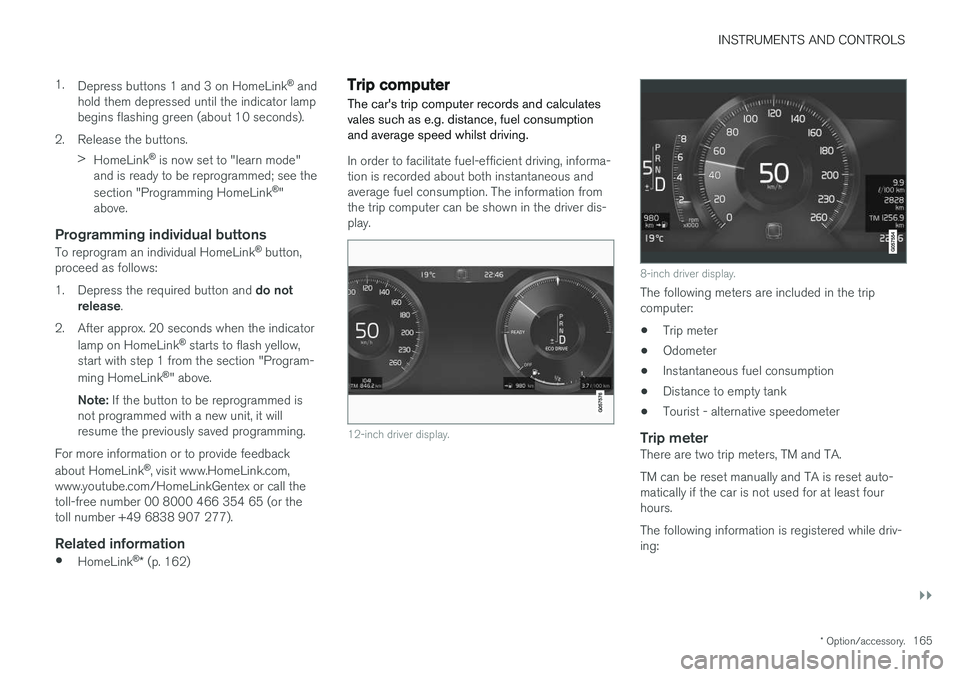
Trip computer The car's trip computer records and calculates vales such as e.g. distance, fuel consumptionand average speed whilst driving.
In order to facilitate fuel-efficient driving, informa- tion is recorded about both instantaneous andaverage fuel consumption. The information fromthe trip computer can be shown in the driver dis-play.
12-inch driver display.
8-inch driver display.
The following meters are included in the trip computer:
• Trip meter
• Odometer
• Instantaneous fuel consumption
• Distance to empty tank
• Tourist - alternative speedometer
Trip meterThere are two trip meters, TM and TA. TM can be reset manually and TA is reset auto- matically if the car is not used for at least fourhours. The following information is registered while driv- ing:
Page 168 of 594
||
INSTRUMENTS AND CONTROLS
166•
Mileage
• Driving time
• Average speed
• Average fuel consumption.
The values apply from the trip meter's latest reset.
OdometerThe odometer records the car's total mileage.This value cannot be reset to zero.
Instantaneous fuel consumptionThis gauge shows the fuel consumption that thecar has at the moment. The value is updatedapproximately every second.
Distance to empty tankThe trip computer calculates the remaining mile-age with the fuel available in the tank. The calculation is based on the average fuel con- sumption over the last 30 km and the remainingdriveable fuel quantity. No guaranteed range remains when the gauge shows "----". In which case, refuel as soon aspossible.
NOTE
There may be a slight deviation if the driving style has been changed.
An economic driving style generally results in a longer driving distance.
Tourist - alternative speedometerThe alternative digital speedometer makes it eas-ier to drive in countries where speed limit signsare in a different unit than that shown in the car'sinstruments. The digital speed is then shown in the opposite unit to that shown in the analogue speedometer.If the analogue speedometer is graduated in mph , the digital speedometer shows the corres-
ponding speed in km/h and vice versa.
Related information
•Show trip data in the driver display (p. 166)
• Show trip statistics in the centre display (p. 168)
Show trip data in the driver display
The trip computer's recorded and calculated val- ues can be shown in the driver display.
The values are saved in a trip computer app. Via the app menu, you can choose which informationis shown on the driver display.