2017 VOLVO V90 air conditioning
[x] Cancel search: air conditioningPage 191 of 594
CLIMATE CONTROL
* Option/accessory.189
•
Regulating the fan level (p. 193)
• Regulating the temperature (p. 190)
Auto-regulating the climate
With an auto-regulated climate, several climate functions are controlled automatically by the cli-mate control system.
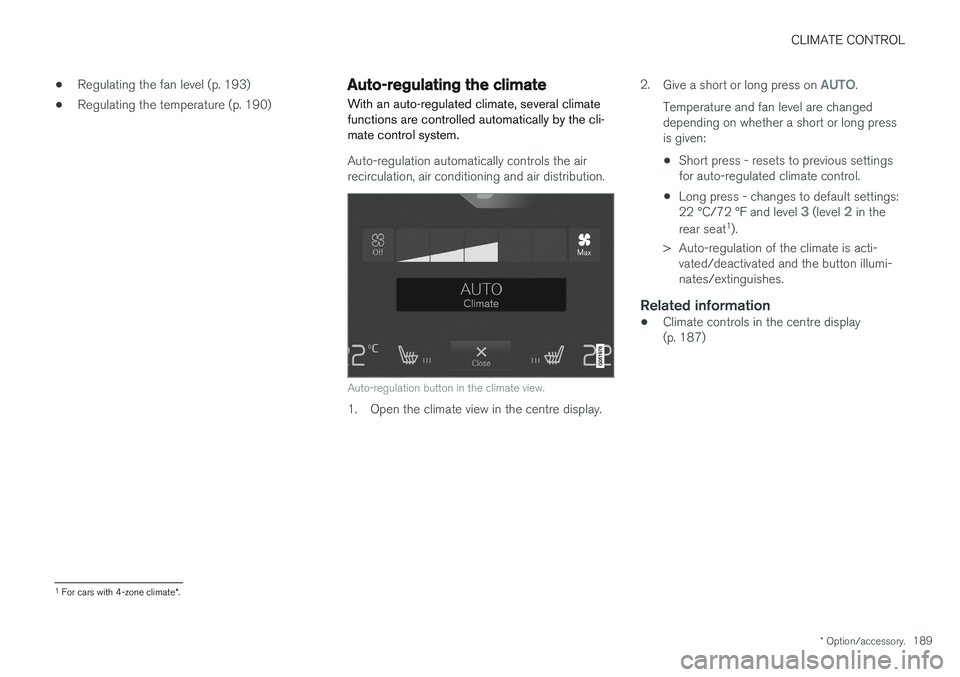
Auto-regulation automatically controls the air recirculation, air conditioning and air distribution.
Auto-regulation button in the climate view.
1. Open the climate view in the centre display. 2.
Give a short or long press on
AUTO.
Temperature and fan level are changed depending on whether a short or long pressis given:
• Short press - resets to previous settingsfor auto-regulated climate control.
• Long press - changes to default settings: 22 °C/72 °F and level
3 (level 2 in the
rear seat 1
).
> Auto-regulation of the climate is acti- vated/deactivated and the button illumi- nates/extinguishes.
Related information
• Climate controls in the centre display(p. 187)
1
For cars with 4-zone climate *.
Page 192 of 594

CLIMATE CONTROL
* Option/accessory.
190
Activating/deactivating air conditioning
The air conditioning cools and dehumidifies incoming air as required.
Activating/deactivating the main air conditioning
The air conditioning button in the climate view.
1. Open the climate view in the centre display. 2. Press
AC.
> The air conditioning is activated/deacti- vated and the button illuminates/extin- guishes. When the air conditioning is activated, the climate control system automatically con-trols starting and switching off asrequired.
NOTE
Close all side windows and the panorama roof * for air conditioning to work optimally.
NOTE
It is not possible to activate the air condition- ing when the fan control is in Off position.
Related information
• Climate controls in the centre display (p. 187)
Regulating the temperature
The temperature can be set separately for the left and right-hand sides. With 4-zone climate *
the temperature can also be set separately for the front and rear seats.
Regulating temperature for front seat 2
Temperature buttons in the climate row.
1. Press the left or right-hand side temperature
button in the centre display's climate row to open the controls.
2For 2-zone climate, also rear seat.
Page 197 of 594

CLIMATE CONTROL
}}
* Option/accessory.195
From the climate view in the centre display
Activating/deactivating max defroster
Max defroster button in the climate view.
1. Open the climate view in the centre display. 2.
Press
Max.
> Max defroster is activated/deactivated and the button illuminates/extinguishes. Max defroster deactivates auto-regulation of the climate and air recirculation, acti-vates air conditioning and changes the fan level to
5 and the temperature to HI.
When max defroster is deactivated, the climate control system returns to the pre-vious settings.
NOTE
Changing the fan level to 5 increases the
noise level.
Activating/deactivating heated windscreen *
The button for heated windscreen in the climate view.
1. Open the climate view in the centre display. 2.
Press
Electric.
> Heated windscreen is activated/deacti- vated and the button illuminates/extin- guishes.
NOTE
A triangular area at the end of each side of the windscreen is not electrically heated,where de-icing may take longer.
NOTE
The heated windscreen may affect the per- formance of transponders and other commu-nication equipment.
NOTE
If the heated windscreen is activated when the Start/Stop function has auto-stopped theengine then the engine will be restarted.
Page 209 of 594

CLIMATE CONTROL
}}
* Option/accessory.207
The function utilises several systems in different cases: •
Residual heat from the engine, in a cold cli- mate, heats the passenger compartment tocomfort temperature.
• The ventilation, in a hot climate, cools thepassenger compartment to the current outertemperature.
NOTE
Climate comfort retention is switched off when the car is locked from the outside toavoid using residual heat unnecessarily. Useof the function is intended to maintain climatecomfort when driver or passengers remaininside the car.
Related information
• Climate control (p. 182)
• Starting/stopping preconditioning
* (p. 207)
• Timer for preconditioning
* (p. 208)
• Starting/switching off climate comfort reten- tion
* (p. 210)
• Symbols and messages for parking climatecontrol
* (p. 212)
• Heater
* (p. 213)
• Parking heater
* (p. 214)
Starting/stopping preconditioning *
Preconditioning warms the passenger compart- ment and engine or airs the passenger compart-ment before driving. The function can use directstart from the centre display or a mobile phone.
Starting/stopping from the centre
display
Preconditioning button in the Parking climate tab in
the climate view.
1. Open the climate view in the centre display. 2. Select the
Parking climate tab.
3. Press
Preconditioning.
> Preconditioning is started/switched off and the button is illuminated/extin- guished.
NOTE
The car's doors and windows should be closed during the preconditioning of the pas-senger compartment.
WARNING
Do not use preconditioning if the car is equip- ped with a heater *:
• In unventilated spaces indoors. Exhaust gases are emitted if the heater starts.
• In locations with combustible or flamma-ble material nearby. Fuel, gas, long grass,sawdust, etc. may ignite.
• When there is a risk that the heater
Page 210 of 594

||
CLIMATE CONTROL
* Option/accessory.
208 To be able to also cool the passenger compart- ment to the comfort temperature (with the car'sair conditioning) the engine remote start function Engine Remote Start - ERS
5
via the Volvo On
Call * app. can be used.
Related information
• Parking climate
* (p. 206)
• Timer for preconditioning
* (p. 208)
• Starting/switching off climate comfort reten- tion
* (p. 210)
• Symbols and messages for parking climatecontrol
* (p. 212)
• Heater
* (p. 213)
Timer for preconditioning *
The timer can be set so that the preconditioning is finished at a predetermined time.
The timer can handle up to 8 different settings for:
• A time on a single date
• A time on one or more days of the week, withor without repetition.
Related information
•
Parking climate
* (p. 206)
• Setting the timer for preconditioning
*
(p. 208)
• Activating/deactivating the timer for precon- ditioning
* (p. 210)
• Starting/stopping preconditioning
* (p. 207)
• Symbols and messages for parking climatecontrol
* (p. 212)
Setting the timer for preconditioning *
The timer for preconditioning can manage up to 8 time settings.
Adding a time setting
The button to add a time setting in the Parking climate
tab in the climate view.
1. Open the climate view in the centre display. 2. Select the
Parking climate tab.
5
Certain car models and markets.
Page 216 of 594
CLIMATE CONTROL
* Option/accessory.
214
Parking heater *
The parking heater helps the passenger com- partment reach the correct temperature beforedriving.
The parking heater is one of two subfunctions of the car's heater. The heater is fitted in the frontright-hand wheel housing.
NOTE
When the heater is running, smoke may be emitted from the right-hand front wheel hous-ing and a low hum may be heard. A tickingsound from the fuel pump may also be heardfrom the rear section of the car. This is per-fectly normal.
The parking heater starts automatically when extra heat is required if the parking climate con- trol's preconditioning * is activated.
It is then switched off automatically when the right temperature, the time of a set timer or theheater's maximum running time has beenreached. The heater's maximum running time is 40 minutes.
NOTE
Make sure there is enough fuel in the car's normal fuel tank if the heater needs to beused. Make sure that there is enough charge in the starter battery if the heater needs to be used.
IMPORTANT
Repeated use of the parking heater combined with short journeys may discharge the batteryand impair starting. If the heater is used on a regular basis, then the car should be driven for the same amountof time that the heater is used in order toensure that the car's battery is recharged withthe same amount of energy as consumed bythe parking heater. The parking heater is usedfor a maximum of 40 minutes each time.
WARNING
Do not use preconditioning if the car is equip- ped with a heater *:
• In unventilated spaces indoors. Exhaust gases are emitted if the heater starts.
• In locations with combustible or flamma-ble material nearby. Fuel, gas, long grass,sawdust, etc. may ignite.
• When there is a risk that the heater
Page 416 of 594

||
STARTING AND DRIVING
414
IMPORTANT
Engine damage can occur if water enters the air filter. In depths greater than 25 cm, water could enter the transmission. This reduces the lubri-cating ability of the oils and shortens theservice life of these systems. Damage to any component, engine, transmis- sion, turbocharger, differential or its internalcomponents caused by flooding, hydrostaticlocking or oil shortage, is not covered by thewarranty. In the event of the engine stalling in water, do not try restart - tow the car from the water toa workshop - an authorised Volvo workshop isrecommended. Risk of engine breakdown.
Related information
•Towing (p. 431)
• Recovering the car (p. 432)
Overheating in the engine and drive system
Under special conditions, for example hard driv- ing in hilly terrain and hot climate, there is a riskthat the engine and drive system may overheat -in particular with a heavy load.
• In the event of overheating, the engine's power may be limited temporarily.
• Remove any auxiliary lamps from in front ofthe grille when driving in hot climates.
• If the temperature in the engine's coolingsystem becomes too high then a warningsymbol is illuminated and the driver display shows the message
Engine temperature
High temperature Stop safely. Stop the
car in a safe way and allow the engine to run at idling speed for several minutes and cooldown.
• If the message
Engine temperature High
temperature Turn off engine or Engine
coolant Level low, turn off engine is
shown, stop the car and switch off the engine.
• In the event of overheating in the gearbox, analternative gear shift program will beselected. In addition, a built-in protectionfunction is activated that, amongst otherthings, illuminates a warning symbol and thedriver display shows the message
Transmission warm Reduce speed to
lower temperature or Transmission hot Stop safely, wait for cooling
. Follow the
recommendation given, reduce speed or stop the car in a safe way and allow the engine torun at idling speed for several minutes toenable the gearbox to cool down.
• If the car overheats, the air conditioning maybe switched off temporarily.
• Do not turn the engine off immediately youstop after a hard drive.
NOTE
It is normal for the engine's cooling fan to operate for a time after the engine has beenswitched off.
Symbols in the driver display
Symbol
Specification
High engine temperature. Follow the recommendation given.
Low level, coolant. Follow the rec- ommendation given.
Gearbox hot/overheated/cooled. Follow the recommendation given.
Page 522 of 594

MAINTENANCE AND SERVICE
520
Servicing the climate control system The air conditioning system must only be serv- iced and repaired by an authorised workshop.
Troubleshooting and repairThe air conditioning system contains fluorescent tracing agents. Ultraviolet light must be used dur-ing leak detection. Volvo recommends that you contact an author- ised Volvo workshop.
Cars with R134a refrigerant
WARNING
The air conditioning system contains pressur- ised refrigerant R134a. This system must onlybe serviced and repaired by an authorisedworkshop.
Cars with R1234yf refrigerant
WARNING
The air conditioning system contains pressur- ised refrigerant R1234yf. In accordance withSAE J2845 (Technician Training for SafeService and Containment of RefrigerantsUsed in Mobile A/C System), service andrepair of the refrigerant system must only beperformed by trained and certified techniciansin order to ensure the safety of the system.
Related information
•Volvo service programme (p. 506)
Bulb replacement
The bulb in the halogen headlamp, reversing lamp and rear fog lamp can be replaced by thedriver.
The bulb in the halogen headlamp can be replaced without the help of a workshop, but theplastic cover over the headlamp must be removedbefore a bulb can be replaced.
–Press down the pins into the plastic cover's four clips using a screwdriver or similar andlift away the cover.