2017 VOLVO S90 Air
[x] Cancel search: AirPage 79 of 548

SAFETY
}}
77
Child restraints
Suitable child restraints should always be used when children travel in the vehicle.
Child restraint systems
Infant seat
There are three main types of child restraint sys- tems: infant seats, convertible seats and boostercushions. They are classified according to thechild's age and size. The child restraint should be secured using a three-point seat belt, ISOFIX/LATCH anchors ortop tether anchors.
Convertible seat
WARNING
A child seat should never be used in the front passenger seat of any vehicle with a frontpassenger airbag – not even if the "Passen-ger airbag off" symbol near the rear-view mir-ror is illuminated (on vehicles equipped withOccupant Weight Sensor). If the severity of anaccident were to cause the airbag to inflate,this could lead to serious injury or death to achild seated in this position.
Booster cushion
WARNING
Always refer to the child restraint manufactur- er's instructions for detailed information onsecuring the restraint.
Page 81 of 548

SAFETY
}}
79
Positioning the seat belt through the infant seat
WARNING
•An infant seat must be in the rear-facing position only.
• The infant seat should not be positionedbehind the driver's seat unless there isadequate space for safe installation.
WARNING
A child seat should never be used in the front passenger seat of any vehicle with a frontpassenger airbag – not even if the "Passen-ger airbag off" symbol near the rear-view mir-ror is illuminated (on vehicles equipped withOccupant Weight Sensor). If the severity of anaccident were to cause the airbag to inflate,this could lead to serious injury or death to achild seated in this position.
3.
Fasten the seat belt
Fasten the seat belt by inserting the latch plate into the buckle (lock) until a distinctclick is audible.
Pull out the shoulder section of the seat belt
4. Pull the shoulder section of the seat belt out as far as possible to activate the belt's auto- matic locking function.
Page 84 of 548

||
SAFETY
82
NOTE
The locking retractor will automatically release when the seat belt is unbuckled andallowed to retract fully.
5. Press the convertible seat firmly in place, letthe seat belt retract and pull it taut. A sound from the seat belt retractor's automatic lock-ing function will be audible at this time and isnormal. The seat belt should now be lockedin place.
Pull out the shoulder section of the seat belt
6. Push and pull the convertible seat along theseat belt path to ensure that it is held securely in place by the seat belt.
WARNING
It should not be possible to move the child restraint (child seat) more than 1 in. (2.5 cm)in any direction along the seat belt path.
The convertible seat can be removed by unbuck- ling the seat belt and letting it retract completely.
Ensure that the seat is securely in place
WARNING
A child seat should never be used in the front passenger seat of any vehicle with a frontpassenger airbag – not even if the "Passen-ger airbag off" symbol near the rear-view mir-ror is illuminated. If the severity of an accidentwere to cause the airbag to inflate, this couldlead to serious injury or death to a childseated in this position.
Related information
• ISOFIX/LATCH lower anchors (p. 84)
• Top tether anchors (p. 86)
• Booster cushions (p. 83)
• Buckling and unbuckling seat belts (p. 62)
• Child safety (p. 75)
Page 87 of 548

SAFETY
}}
85
Related information
•Top tether anchors (p. 86)Lower child seat attachment points 1
The vehicle is equipped with lower attachment points for child seats in the rear seat.
The lower attachment points are intended for use with rear-facing child restraints. Always follow the child restraint manufacturer's installation instructions when attaching a childrestraint to these attachment points.
Location
Attachment points in the front seat
Attachment points in the rear seats
The attachment points in the rear seat are in the rear section of the front seat's floor rails.
WARNING
A child seat should never be used in the front passenger seat of any vehicle with a frontpassenger airbag – not even if the "Passen-ger airbag off" symbol near the rear-view mir-ror is illuminated (on vehicles equipped withOccupant Weight Sensor). If the severity of anaccident were to cause the airbag to inflate,this could lead to serious injury or death to achild seated in this position.
1 Not available in all markets
Page 124 of 548

INSTRUMENTS AND CONTROLS
* Option/accessory.
122
Climate system voice commands Voice commands can be used to control the cli- mate system to e.g., change the temperature, activate seat heating * or change blower (fan)
speed.
To use the voice control system, press the on the right-side steering wheel keypad and say one of the following commands after the tone:
• "
Climate": starts a command dialog and
provides examples of commands that can be used.
• "
Set temperature to X degrees": sets the
desired temperature.
• "
Raise temperature"/"Lower
temperature": raises/lowers the tempera-
ture.
• "
Sync temperature": synchronizes the tem-
perature in all of the vehicle's climate zones with the one set for the driver's side.
• "
Air on feet"/"Air on body": opens the
desired air vent.
• "
Air on feet off"/"Air on body off": closes
the desired air vent.
• "
Set fan to max"/"Turn off fan": changes
the blower speed to Max/Off.
• "
Raise fan speed"/"Lower fan speed":
raises/lowers the blower speed.
• "
Turn on auto": activates automatic climate
control. •
"
Air condition on"/"Air condition off":
activates/deactivates the air conditioning.
• "
Recirculation on"/"Recirculation off":
activates/deactivates recirculation.
• "
Turn on defroster "/"Turn off defroster":
activates/deactivates window and door mirror defrosting.
• "
Turn on max defroster"/"Turn off max
defroster": activates/deactivates max
defroster.
• "
Turn on electric defroster"/"Turn off
electric defroster": activates/deactivates
the electrically heated windshield *.
• "
Turn on rear defroster"/"Turn off rear
defroster": activates/deactivates the electri-
cally heated rear window and door mirrors.
• "
Turn steering wheel heat on"/"Turn
steering wheel heat off": activates/deacti-
vates the electrically heated steering wheel *.
• "
Raise steering wheel heat"/"Lower
steering wheel heat": raises/lowers the
heating level for the electrically heated steer- ing wheel *.
• "
Turn on seat heat"/"Turn off seat heat":
activates/deactivates the electrically heated seats *.
• "
Raise seat heat"/"Lower seat heat": rai-
ses/lowers the heating level for the electri- cally heated seats *. •
"
Turn on seat ventilation"/"Turn off seat
ventilation": activates/deactivates seat ven-
tilation *.
• "
Raise seat ventilation"/"Lower seat
ventilation": raises/lowers the level for seat
ventilation *.
Related information
• Climate system controls (p. 182)
• Voice control (p. 119)
• Using voice commands (p. 119)
Page 126 of 548

INSTRUMENTS AND CONTROLS
* Option/accessory.
124
Voice control settings
There are a number of settings that can be made for the voice control system.
Open the center display's Top view and tap
SettingsSystemVoice Control and
select settings. •
Repeat Mode
•Gender
•Speech Rate
Sound settings
Open Top view and tap SettingsSound
System VolumesVoice Control.
Changing languages
The voice control system only understands the languages marked by the
symbol in the list
of possible system languages. Changing the language for this system also affects menus, messages and help texts. Open Top view and tap
SettingsSystemLanguage.
Related information
• Voice control (p. 119)
• Using voice commands (p. 119)
• Navigation system voice commands (p. 123)
Instrument panel
The instrument panel displays vehicle- and driv- ing-related information.
The gauges, indicators, symbols and functions displayed in the instrument panel depend on theequipment/systems installed in the vehicle andwhich functions are currently activated. The instrument panel is available in two versions: 12" and 8". Some of the functions listed below are optional.
WARNING
• If the instrument panel is not functioning properly, information about e.g., brakes,airbags or other safety-related messagescannot be displayed and the driver cannotbe alerted to possible problems.
• If the instrument panel turns off, does notactivate when the ignition is switched onor is completely/partially not possible toread, do not drive the vehicle. Contact atrained and qualified Volvo service techni-cian.
12" Instrument panel
Left side
• Speedometer
• Trip odometer
• Odometer
• Cruise control/speed limiter information
• Road sign information
*
Page 137 of 548

INSTRUMENTS AND CONTROLS
}}
135
CLAIM, DAMAGES OR OTHER LIABILITY, WHETHER IN AN ACTION OF CONTRACT,TORT OR OTHERWISE, ARISING FROM, OUTOF OR IN CONNECTION WITH THE SOFTWAREOR THE USE OR OTHER DEALINGS IN THESOFTWARE. Except as contained in this notice, the name of Silicon Graphics, Inc. shall not be used inadvertising or otherwise to promote the sale, useor other dealings in this Software without priorwritten authorization from Silicon Graphics, Inc.
Related information
•
Instrument panel (p. 124)
Warning symbols in the instrument panel
The warning symbols alert the driver that an important function is activated or that a seriousfault has occurred.
Symbol Meaning
Warning The red warning symbol alerts the driver that an important function isactivated or that a serious faulthas occurred that may affect thevehicle's drivability. The warningsymbol can also illuminate in com-bination with other symbols.
Seat belt reminder This symbol will flash for approxi- mately 6 seconds if the driver orfront seat passenger has not fas-tened his or her seat belt or if any-one in the rear seat has unbuck-led a seat belt.
Symbol Meaning
Airbags If this light remains on after the vehicle has been started or comeson while the vehicle is beingdriven, a fault has been detectedin one of the vehicle's safety sys-tems. See the message in theinstrument panel. Have the sys-tem(s) inspected by a trained andqualified Volvo service technicianas soon as possible.
A
BBrake system If this symbol illuminates, the brake fluid level may be too low.Stop the vehicle in a safe placeand check the level in the brakefluid reservoir. See also the warn-ing following this table.
A
BParking brake This symbol flashes while the parking brake is being applied andthen glows steadily when theparking brake has been set. If the symbol flashes in any other situation, this indicates a fault. Seethe text message in the instru-ment panel.
Page 156 of 548
INSTRUMENTS AND CONTROLS
154
Handling messages stored from the instrument panel and center display
Messages saved from the instrumentpanel
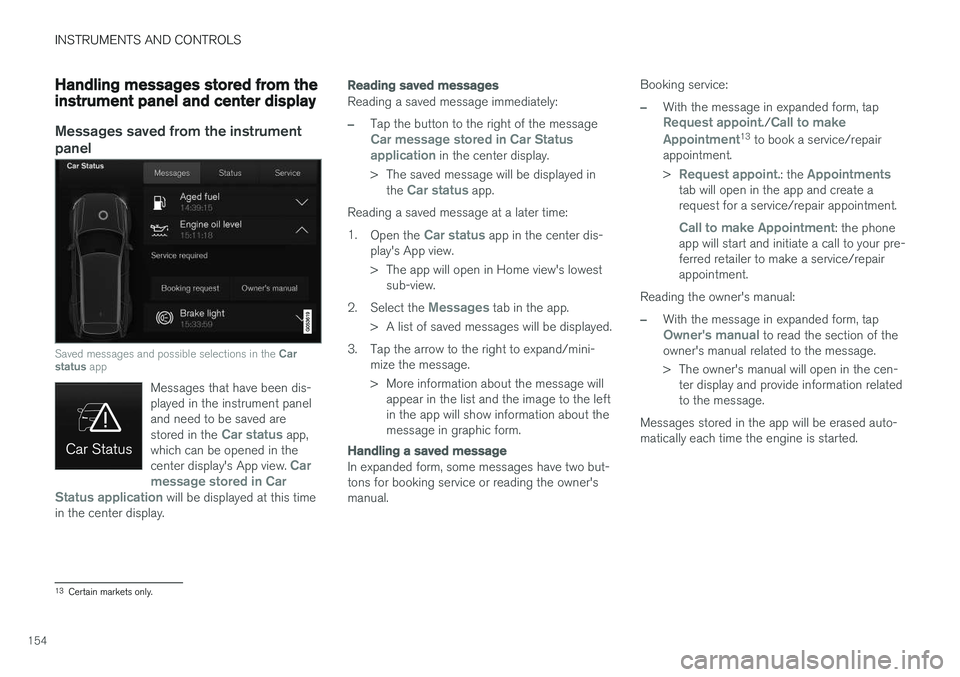
Saved messages and possible selections in the Car
status app
Messages that have been dis- played in the instrument paneland need to be saved are stored in the
Car status app,
which can be opened in the center display's App view.
Car
message stored in Car
Status application
will be displayed at this time
in the center display.
Reading saved messages
Reading a saved message immediately:
–Tap the button to the right of the messageCar message stored in Car Status application in the center display.
> The saved message will be displayed in the
Car status app.
Reading a saved message at a later time: 1. Open the
Car status app in the center dis-
play's App view.
> The app will open in Home view's lowest sub-view.
2. Select the
Messages tab in the app.
> A list of saved messages will be displayed.
3. Tap the arrow to the right to expand/mini- mize the message.
> More information about the message willappear in the list and the image to the left in the app will show information about themessage in graphic form.
Handling a saved message
In expanded form, some messages have two but- tons for booking service or reading the owner'smanual. Booking service:
–With the message in expanded form, tapRequest appoint./Call to make
Appointment13 to book a service/repair
appointment. >
Request appoint.: the Appointmentstab will open in the app and create a request for a service/repair appointment.
Call to make Appointment: the phone
app will start and initiate a call to your pre- ferred retailer to make a service/repairappointment.
Reading the owner's manual:
–With the message in expanded form, tapOwner's manual to read the section of the
owner's manual related to the message.
> The owner's manual will open in the cen- ter display and provide information related to the message.
Messages stored in the app will be erased auto-matically each time the engine is started.
13 Certain markets only.