Page 280 of 684
Browsing audio and media sources
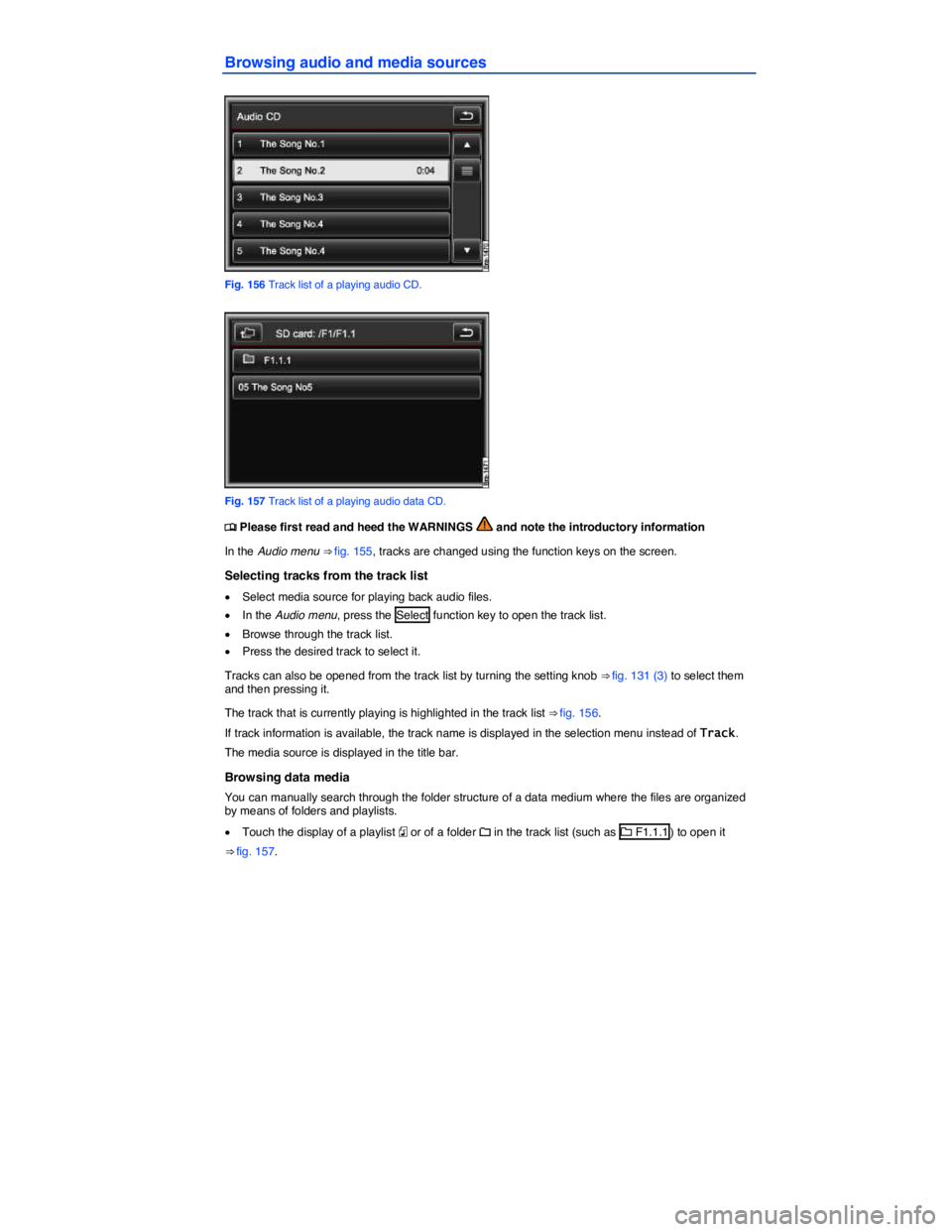
Fig. 156 Track list of a playing audio CD.
Fig. 157 Track list of a playing audio data CD.
Page 281 of 684
x Press the F function key to open the current folder's parent folder (for example : F1).
The audio source and the folder currently opened are displayed in the title bar (in ⇒ fig. 157: SD card and folder F1.1).
Pressing the F function key several times switches from one folder to another until you reach the top selection level of the data media.
If only the name of a data medium is displayed in the title bar, this means the root directory of the data
media is opened ⇒ fig. 160.
Changing playback mode
Fig. 158 Extras pop-up window for audio mode.
Page 284 of 684
x In the pop-up window, press the Delete function key.
x Next search through the media center for files that you want to delete.
x List entries (tracks and folders) can be selected individually by pressing =.
x If you press the Select all function key, all list entries will be selected =.
x Press the Delete function key to delete all selected entries.
x Accept the confirmation dialog by pressing the Delete function key.
The delete process may take some time, depending on the number of files being deleted.
For copyright reasons, all files stored in the media library need to be deleted before the unit is passed on.
Using the voice control, you can also record the name of an artist, album or track stored in the media center after the corresponding voice command
External audio source connected via AUX-IN
Page 285 of 684
External audio source connected via Bluetooth®
Page 286 of 684
Open settings menu
x Connect the external audio source.
x Press the SETUP Infotainment button ⇒ fig. 131.
x Press the Media function key.
x Press the AUX volume function key.
x Move the slider ? to change the setting
Adjusting the output volume
If the sound from the external audio source is too quiet, if possible, increase the output volume on the audio source. If that is not sufficient, increase the AUX volume .
If the sound from the connected audio source is too loud or distorted, if possible, lower the output volume on the audio source. If that is not sufficient, decrease the AUX volume .
The AUX volume function key is only displayed if the playback volume for the connected audio source can be adjusted.
Page 289 of 684
Connectable data media Requirements for playback via the
Infotainment System
– USB flash drives (USB sticks).
– USB data media that do not
need special drivers.
– External USB flash drives.
– External USB hard drives (HDD)
- 1'', 1,8'', 2,5'' with maximum
peak and continuous current
500 mA.
– iPods® and iPhones® of various
generations7.
– USB 2.0 enabled media.
– Subclass 1 and 6 USB devices (note
manufacturer's information).
– Data media in the FAT or FAT32 file
systems.
– Limit of 4 partitions and 4000 files on
the data medium.
– Limit of 1000 files per directory.
Connecting and operating
Fig. 162 Selection menu of available media sources.
Page 290 of 684

x In the Audio menu, press the Source function key ⇒ fig. 162.
x In the pop-up window, press the / AUX feature key.
Further operation of the external data medium (changing track, selecting tracks and playback modes)
is described in the appropriate chapters of this manual ⇒ page 277.
iPod® and iPhone®
When an iPod® or iPhone® is connected, a special iPod selection menu is displayed at the top selec-
tion level similar to the Media center selection menu ⇒ page 277. There you can select list views specific to the iPod (� Playlists, � Artists, � Albums, � Songs, � Podcasts etc.).
The iPod selection menu is used as normal.
The music control of a connected iPod® or iPhone® is disabled.
The output volume of some iPods® or iPhones® can be adjusted to the volume of the other audio sources
Files cannot be imported from an iPod® or iPhone®. The setting for the Repeat feature cannot be changed.
Possible error messages after connecting an external data medium
Error message Cause Remedy
Device is not
supported.
Playback of the external
data medium or commu-
nication via the adapter
cable is not possible.
Check the adapter cable.
Update software of the
MEDIA-IN multimedia jack
via the Volkswagen dealer.
If possible, update the soft-
ware of the external data
medium.
Device not
functional
Communication malfunc-
tioning.
Verify the connection and
functionality of external data
medium.
Due to the large number of different types of data media and several iPod®
and iPhone® generations, no guarantee can be made that all functions
described can be executed without errors.
Page 293 of 684

Opening the DVD film menu manually
The DVD film menu must be opened manually if the DVD film menu does not open automatically with the unit's own menu control, or if the video DVD is already being played.
x In the video DVD menu, press the Menu function key to open the unit's own menu control
⇒ fig. 163.
x If an introduction is playing, it can be skipped by pressing the Menu function key in the unit's own
menu control ⇒ fig. 164 (B).
The DVD film menu is displayed (A).
DVD does not start!
Note that an inserted DVD cannot start automatically if the volume is set to “0” (display: �). A played media source is always stopped (paused) in this case.
The visual appearance of the DVD film menus and the menu options which it offers are the responsibility of the DVD manufacturer.
The language of a video DVD for voice output can be changed
The DVD manufacturer is responsible for the different ways in which individual films respond to identical commands.
Video DVD menu: controlling playback and changing display settings
Fig. 165 Video DVD menu.