Page 1 of 504
YARIS_HV_OM_Europe_OM52G76E
Pictorial indexSearch by illustration
1For safety
and securityMake sure to read through them
2Instrument
cluster
How to read the gauges and meters, the variety of
warning lights and indicators, etc.
3Operation of
each component
Opening and closing the doors and windows,
adjustment before driving, etc.
4DrivingOperations and advices which are necessary for driving
5Audio systemOperating the audio system
6Interior featuresUsage of the interior features, etc.
7Maintenance
and careCaring for your vehicle and maintenance procedures
8When trouble
arisesWhat to do in case of malfunction or emergency
9Vehicle
specificationsVehicle specifications, customizable features, etc.
IndexSearch by symptom
Search alphabetically
Page 2 of 504

TABLE OF CONTENTS2
YARIS_HV_OM_Europe_OM52G76E
For your information .......................6
Reading this manual.....................10
How to search ..............................11
Pictorial index ...............................12
1-1. For safe use
Before driving.......................30
For safety drive ....................32
Seat belts .............................34
SRS airbags.........................41
Airbag manual on-off
system ...............................52
Safety information
for children .........................54
Child restraint systems ........55
Installing child restraints ......65
Exhaust gas precautions .....74
1-2. Hybrid system
Hybrid system features ........75
Hybrid system
precautions ........................79
1-3. Theft deterrent system
Immobilizer system ..............84
Double locking system .........89
2. Instrument cluster
Warning lights and
indicators ...........................92
Gauges and meters .............97
Multi-information display ....100
Energy monitor/
consumption screen ........104
3-1. Key information
Keys .................................. 110
3-2. Opening, closing
and locking the doors
Side doors ......................... 122
Back door .......................... 128
Smart entry & start
system............................. 134
3-3. Adjusting the seats
Front seats ........................ 148
Rear seats ......................... 150
Head restraints .................. 153
3-4. Adjusting the steering
wheel and mirrors
Steering wheel .................. 155
Inside rear view mirror....... 157
Outside rear view
mirrors ............................. 159
3-5. Opening and closing
the windows
Power windows ................. 162
1For safety and security
2Instrument cluster
3Operation of
each component
Page 89 of 504
89
1
1-3. Theft deterrent system
For safety and security
YARIS_HV_OM_Europe_OM52G76E
Double locking system
Vehicles employing this system
have labels on the window glass
of both front doors.
Turn the power switch off, have all the passengers exit the vehicle and
ensure that all the doors are closed.
Using the entry function (vehicles with a smart entry & start system
equipped with entry function):
Touch the sensor area on the outside door handle twice within 5 sec-
onds.
Using the wireless remote control:
Press twice within 5 seconds.
: If equipped
Unauthorized access to the vehicle is prevented by disabling the
door unlocking function from both the interior and exterior of
the vehicle.
Setting the double locking system
Page 90 of 504
901-3. Theft deterrent system
YARIS_HV_OM_Europe_OM52G76E
Using the entry function (vehicles with a smart entry & start system
equipped with entry function):
Hold either front outside door handle or push up the back door opener
switch.
Using the wireless remote control:
Press .
Canceling the double locking system
WARNING
■ Double locking system precaution
Never activate the double locking system when there are people in the vehi-
cle because all the doors cannot be opened from inside the vehicle.
Page 111 of 504
1113-1. Key information
3
Operation of each component
YARIS_HV_OM_Europe_OM52G76E
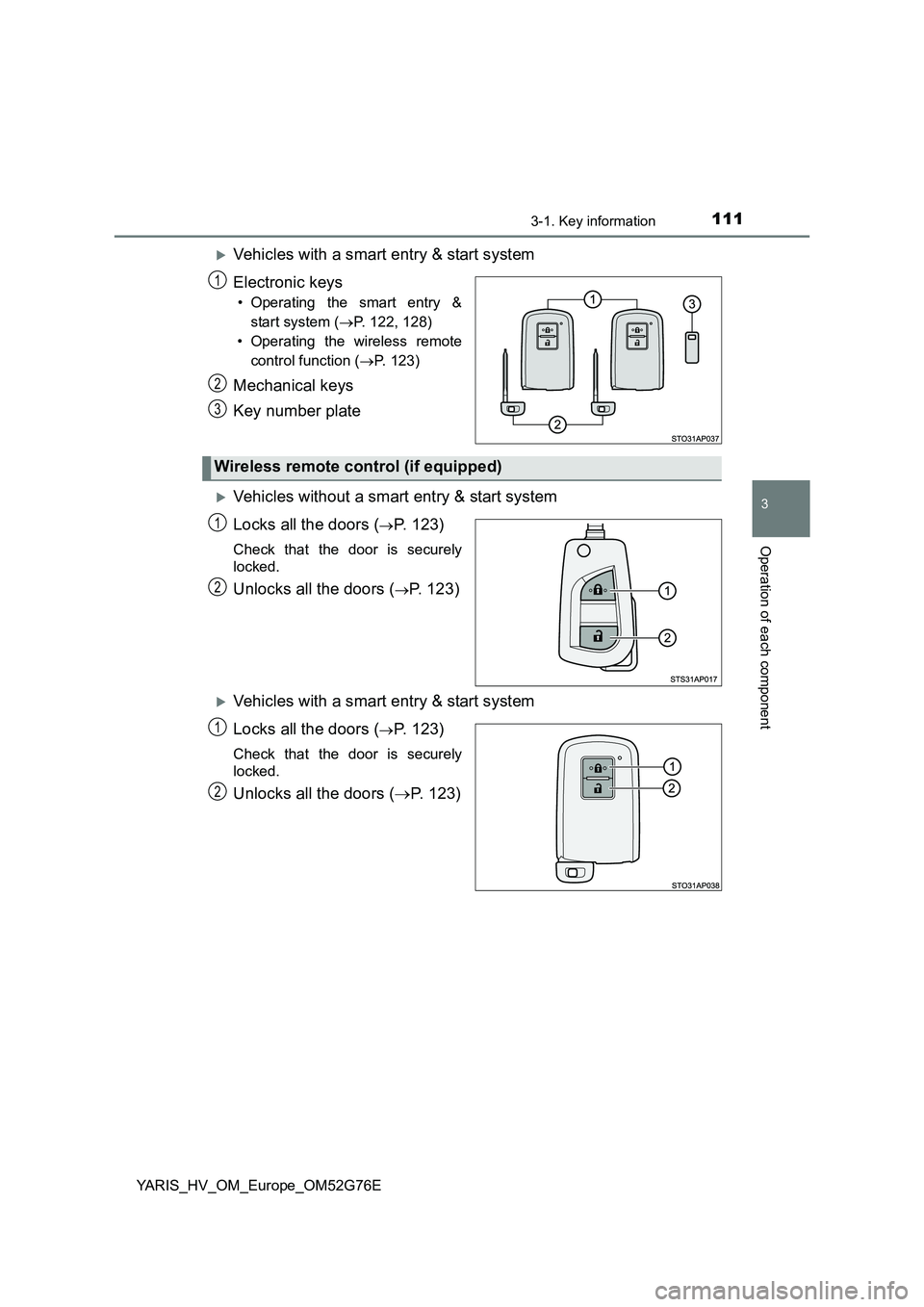
Vehicles with a smart entry & start system
Electronic keys
• Operating the smart entry &
start system ( P. 122, 128)
• Operating the wireless remote
control function ( P. 123)
Mechanical keys
Key number plate
Vehicles without a smart entry & start system
Locks all the doors (P. 123)
Check that the door is securely
locked.
Unlocks all the doors (P. 123)
Vehicles with a smart entry & start system
Locks all the doors (P. 123)
Check that the door is securely
locked.
Unlocks all the doors ( P. 123)
1
2
3
Wireless remote control (if equipped)
1
2
1
2
Page 123 of 504
1233-2. Opening, closing and locking the doors
3
Operation of each component
YARIS_HV_OM_Europe_OM52G76E
◆Wireless remote control (if equipped)
Vehicles without a smart entry & start system
Locks all the doors
Check that the door is securely
locked.
Unlocks all the doors
Vehicles with a smart entry & start system
Locks all the doors
Check that the door is securely
locked.
Unlocks all the doors
◆Keys (vehicles without a smart entry & start system)
Turning the key operates the doors as follows:
■Driver ’s door
Locks all the doors
Unlocks all the doors
1
2
1
2
1
2
Page 124 of 504

1243-2. Opening, closing and locking the doors
YARIS_HV_OM_Europe_OM52G76E
■Front passenger ’s door (vehicles with a key cylinder)
Locks the door
Unlocks the door
■ Operation signals (vehicles with an entry function or wireless remote
control)
The emergency flashers flash to indicate that the doors have been locked/
unlocked. (Locked: once; Unlocked: twice)
■ Security feature
Vehicles without a smart entry & start system
If a door is not opened within approximately 30 seconds after the vehicle is
unlocked, the security feature automatically locks the vehicle again.
Vehicles with a smart entry & start system
If a door is not opened within approximately 30 seconds after the vehicle is
unlocked, the security feature automatically locks the vehicle again. (How-
ever, depending on the location of the electronic key, the key may be
detected as being in the vehicle. In this case, vehicle may be unlocked.)
■ When the door cannot be locked by the lock sensor (vehicles with a
smart entry & start system equipped with entry function)
1
2
Use your thumb to push lock sensor.
Page 125 of 504

1253-2. Opening, closing and locking the doors
3
Operation of each component
YARIS_HV_OM_Europe_OM52G76E
■ Door lock buzzer (vehicles with a smart entry & start system equipped
with entry function)
If an attempt to lock the doors is made when a door is not fully closed, a
buzzer sounds continuously. Fully close the door to stop the buzzer, and lock
the vehicle once more.
■ If the entry function (vehicles with a smart entry & start system equipped
with entry function) or the wireless remote control (if equipped) does not
operate properly
● Vehicles without a smart entry & start system: Use the key to lock and
unlock the doors. ( P. 123)
● Vehicles with a smart entry & start system: Use the mechanical key to lock
and unlock the doors. ( P. 448)
● Replace the key battery with a new one if it is depleted. (P. 369)
◆Door lock switch
Unlocks all the doors
Locks all the doors
◆Inside door lock buttons
Locks the doors
Unlocks the doors
The front doors can be opened
by pulling the inside handle
even if the inside door lock but-
ton is in the lock position.
Unlocking and locking the doors from the inside
1
2
1
2