Page 339 of 668

3Interior features
339
VERSO_EE_OM64517E
3-1. Using the air conditioning
system and defogger
Manual air conditioning
system ............................ 340
Automatic air conditioning
system ............................ 346
Power heater .................... 353
Rear window and outside
rear view mirror
defoggers ....................... 355
3-2. Using the audio system
Audio system types .......... 357
Using the radio ................. 359
Using the CD player ......... 363
Playing back MP3 and
WMA discs...................... 368
Operating an iPod............. 374
Operating
a USB memory ............... 381
Optimal use of the audio
system ............................ 388
Using the AUX port ........... 390
Using the steering
wheel audio switches...... 391
3-3. Using the interior lights
Interior lights list................ 394
• Personal/interior
lights main switch ........... 395
• Personal/interior lights .... 396
3-4. Using the storage features
List of storage features ..... 398
• Glove box ....................... 400
• Console box.................... 401
• Overhead console .......... 403
• Cup holders .................... 403
• Bottle holders.................. 405
• Auxiliary boxes ............... 406
3-5. Other interior features
Sun visors ......................... 408
Vanity mirrors.................... 409
Power outlets .................... 410
Seat heaters ..................... 412
Armrests ........................... 414
Front seatback tables ....... 415
Rear side sunshades ........ 417
Assist grips ....................... 418
Floor mat........................... 419
Luggage compartment
features........................... 421
Page 358 of 668

358
3-2. Using the audio system
VERSO_EE_OM64517E
■ Using cellular phones
Interference may be heard through the audio system’s speakers if a cellular
phone is being used inside or close to the vehicle while the audio system is
operating.
NOTICE
■ To prevent battery discharge
Do not leave the audio system on longer than necessary when the engine is
stopped.
■ To avoid damaging the audio system
Take care not to spill drinks or other fluids over the audio system.
■ To prevent damage to USB memory or its terminal
Depending on the size and shape of the USB memory that is connected to
the system, the passenger’s seat may hit the USB memory when moving the
seat forward. In this case, do not forcibly move the seat forward as this may
damage the USB memory or the terminal, etc.
TitlePage
Using the radioP. 359
Using the CD playerP. 363
Playing back MP3 and WMA discsP. 368
Operating an iPodP. 374
Operating a USB memoryP. 381
Optimal use of the audio systemP. 388
Using the AUX portP. 390
Using the steering wheel audio switchesP. 391
Page 391 of 668
391
3-2. Using the audio system
3
Interior features
VERSO_EE_OM64517E
Using the steering wheel audio switches
Turning on the power
Press when the audio system is turned off.
Changing the audio source
Press when the audio system is turned on. The audio source
changes as follows each time is pressed. If a mode cannot be
used, it will be skipped.
AM FMCD modeiPod or USB memory*AUX*
*: If equipped
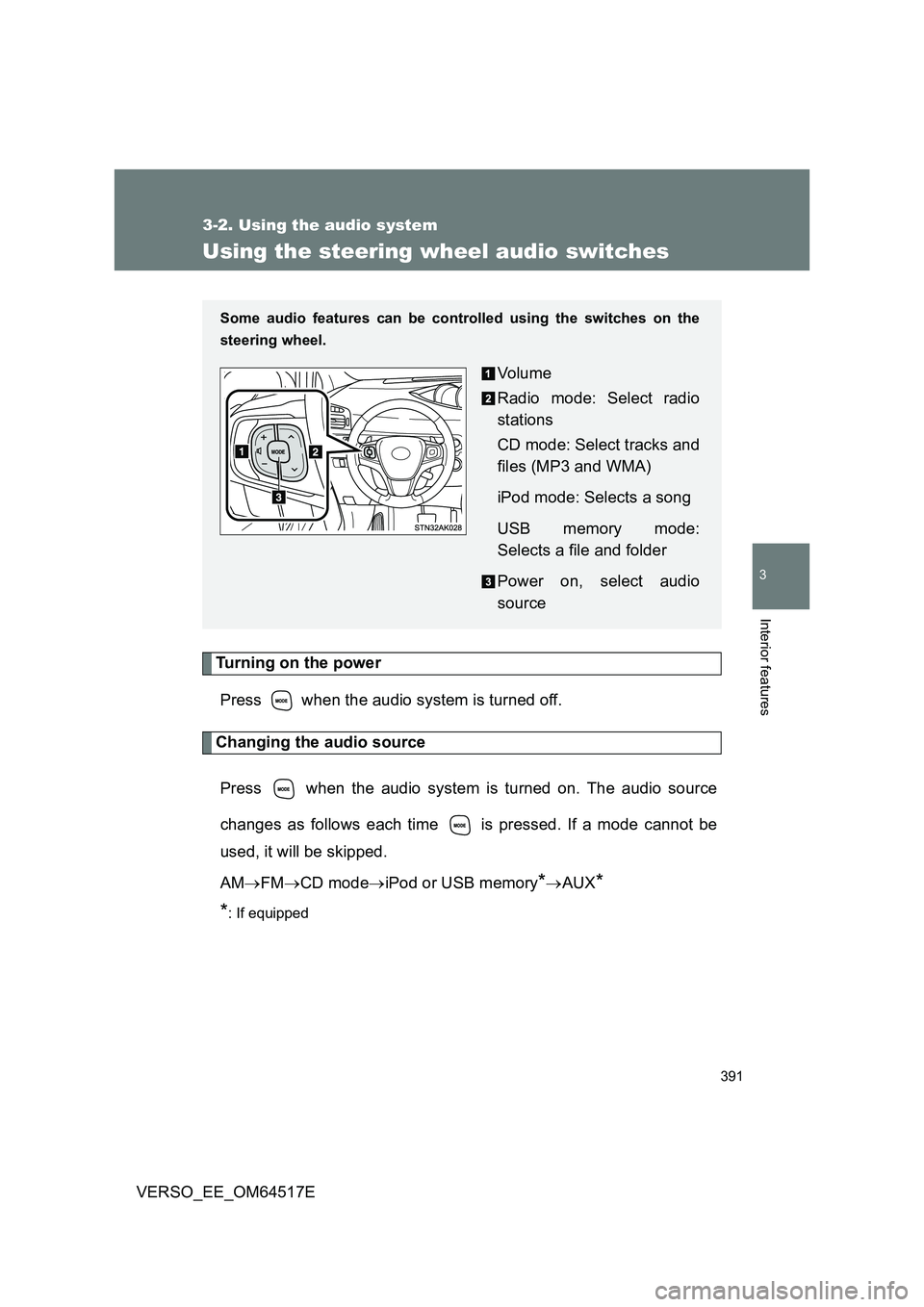
Some audio features can be cont rolled using the switches on the
steering wheel.
Vo lu m e
Radio mode: Select radio
stations
CD mode: Select tracks and
files (MP3 and WMA)
iPod mode: Selects a song
USB memory mode:
Selects a file and folder
Power on, select audio
source
Page 393 of 668
393
3-2. Using the audio system
3
Interior features
VERSO_EE_OM64517E
WARNING
■ To reduce the risk of an accident
Exercise care when operating the audio switches on the steering wheel.
Page 435 of 668
435
4-1. Maintenance and care
4
Maintenance and care
VERSO_EE_OM64517E
NOTICE
■ When using an automatic car wash (vehicles with rain-sensing wind-
shield wipers)
Set the wiper switch to off. If the wiper switch is in “AUTO”, the wipers may
operate and the wiper blades may be damaged.
■ When using a high pressure car wash
Do not bring the nozzle tip close to boots (rubber or resin manufactured
cover), connectors or the following parts. The parts may be damaged if they
come into contact with high-pressure water.
• Traction related parts
• Steering parts
• Suspension parts
• Brake parts
■ Handling of the camera (vehicles with rear view monitor system)
● As the camera has a water proof construction, do not detach, disassemble
or modify it. This may cause incorrect operation.
● If dirt or foreign matter (such as water droplets, snow, mud etc.) is adher-
ing to the camera, it cannot transmit a clear image. In this case, flush it
with a large quantity of water and wipe the camera lens clean with a soft
and wet cloth.
● Do not allow organic solvent, car wax, window cleaner or glass coat to
adhere to the camera. If this happens, wipe it off as soon as possible.
● When washing the vehicle, do not apply intensive bursts of water to the
camera or camera area. Doing so may result in the camera malfunction-
ing.
Page 497 of 668
497
4-3. Do-it-yourself maintenance
4
Maintenance and care
VERSO_EE_OM64517E
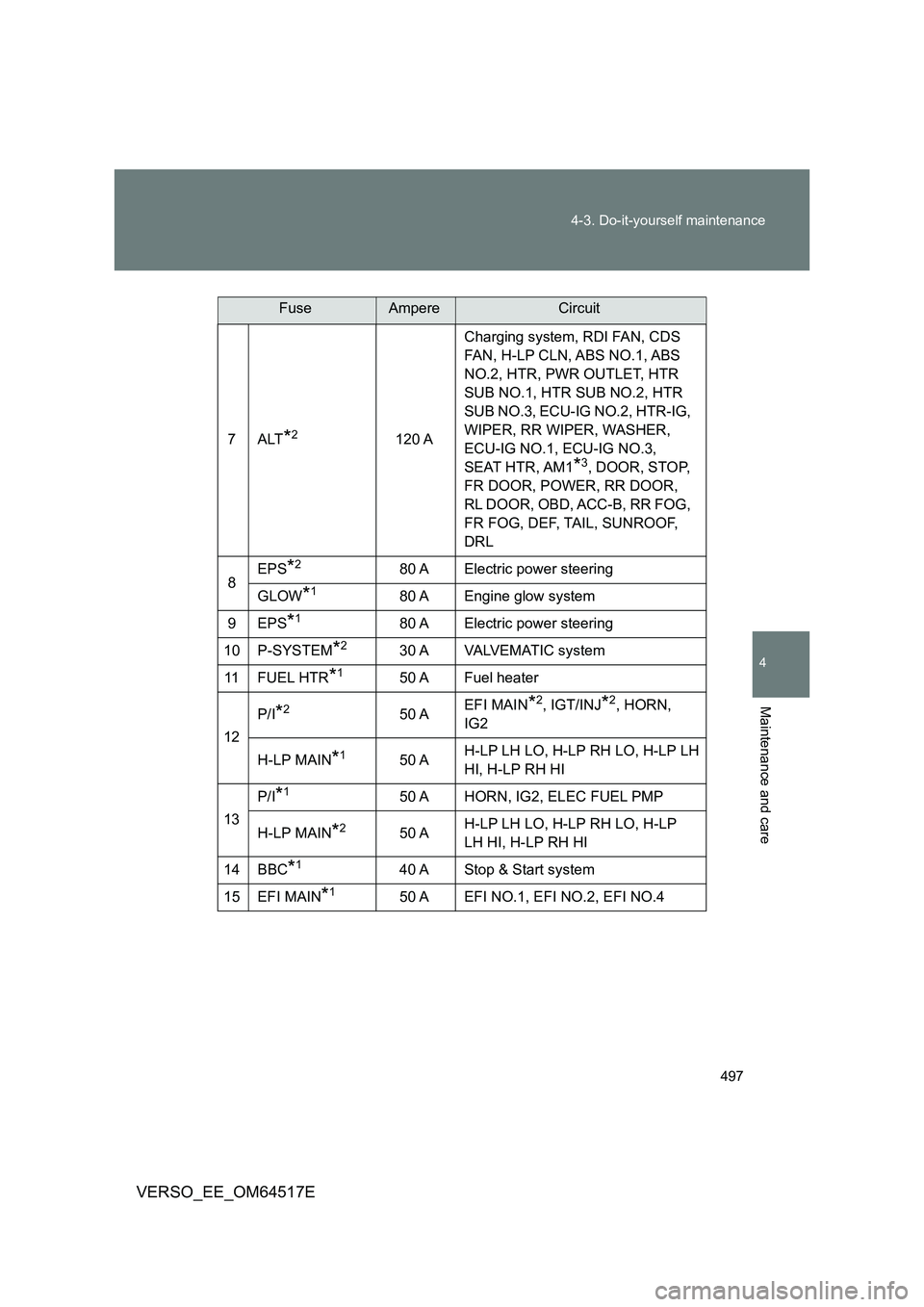
7ALT*2120 A
Charging system, RDI FAN, CDS
FAN, H-LP CLN, ABS NO.1, ABS
NO.2, HTR, PWR OUTLET, HTR
SUB NO.1, HTR SUB NO.2, HTR
SUB NO.3, ECU-IG NO.2, HTR-IG,
WIPER, RR WIPER, WASHER,
ECU-IG NO.1, ECU-IG NO.3,
SEAT HTR, AM1*3, DOOR, STOP,
FR DOOR, POWER, RR DOOR,
RL DOOR, OBD, ACC-B, RR FOG,
FR FOG, DEF, TAIL, SUNROOF,
DRL
8 EPS*280 A Electric power steering
GLOW*180 A Engine glow system
9 EPS*180 A Electric power steering
10 P-SYSTEM*230 A VALVEMATIC system
11 F U E L H T R*150 A Fuel heater
12
P/I*250 A EFI MAIN*2, IGT/INJ*2, HORN,
IG2
H-LP MAIN*150 A H-LP LH LO, H-LP RH LO, H-LP LH
HI, H-LP RH HI
13
P/I*150 A HORN, IG2, ELEC FUEL PMP
H-LP MAIN*250 A H-LP LH LO, H-LP RH LO, H-LP
LH HI, H-LP RH HI
14 BBC*140 A Stop & Start system
15 EFI MAIN*150 A EFI NO.1, EFI NO.2, EFI NO.4
FuseAmpereCircuit
Page 498 of 668
498
4-3. Do-it-yourself maintenance
VERSO_EE_OM64517E
16 SPARE 10 A Spare fuse
17 SPARE 30 A Spare fuse
18 SPARE 20 A Spare fuse
19 EFI MAIN
NO.2*17.5 A
Multiport fuel injection system/
sequential multiport fuel injection
system
20 ECU-B2 10 A
Smart entry & start system, air con-
ditioning system, power windows,
gateway ECU
21 D.C.C SHORT No circuit
22 ECU-B 10 A
Gauges and meters, sub-battery,
steering sensor, double locking
system, wireless remote control,
smart entry & start system
23 RAD NO.1*220 A Audio system
24 DOME 10 A
Luggage compartment light, vanity
lights, front door courtesy lights,
personal/interior lights, foot lights
25 AM2 NO.2 7.5 A Starting system
26 TURN-HAZ 10 A Turn signal lights, emergency
flashers
27 ETCS*210 A Electronic throttle control system
28 AM2 30 A Starting system
29 STRG LOCK 20 A Steering lock system
30 IGT/INJ*215 A
Multiport fuel injection system/
sequential multiport fuel injection
system
FuseAmpereCircuit
Page 502 of 668

502
4-3. Do-it-yourself maintenance
VERSO_EE_OM64517E
9 RR FOG 7.5 A Rear fog light
10 IGN 7.5 A
Steering lock system, SRS airbag
system, multiport fuel injection sys-
tem/sequential multiport fuel injec-
tion system, starting system,
gateway ECU
11 M E T E R 7 . 5 A Gauges and meters, Stop & Start
system*1
12 SEAT HTR 15 A Seat heaters
13 HTR-IG 10 A Air conditioning system, power
heater
14 WIPER 25 A Windshield wipers, rain-sensing
windshield wipers
15 RR WIPER 15 A Rear window wiper
16 WASHER 15 A Windshield washers, rear window
washer
17 ECU-IG NO.1 10 A
Main body ECU*2, electric cooling
fan(s), shift lock system, anti-lock
brake system, steering sensor, yaw
rate sensor, VSC+, headlight
cleaners, SEQUENTIAL switch,
automatic headlight leveling sys-
tem, electric power steering, tire
pressure warning system
18 ECU-IG NO.2 10 A
Back-up light, charging system*2,
emergency flashers, rear window
defogger, “PASSENGER AIRBAG”
indicator, air conditioning system,
Toyota parking assist-sensor indi-
cator, Toyota parking assist-sensor
switch, sub-battery
FuseAmpereCircuit