Page 270 of 588
2705-3. Using the audio system
List screen operation
: Select to scroll to the nextor previous page.
: If appears to the right of titles, the complete titles are
too long for the display. Select
this button to scroll the title.
Turn the “TUNE·SCROLL” knob
to move the cursor box to select a
desired item from the list, and
press the “TUNE·SCROLL” knob
to play it. The track that is being
played is highlighted.
To return to the top screen, select “Now Playing” on the list screen.
When a list style screen is displayed, use the appropriate but-
tons to scroll through the list.
How to scroll
Page 271 of 588
2715-3. Using the audio system
5
Multimedia
■Selecting a track/file/song
Press the “∧” or “∨ ” button on “SEEK/TRACK” or turn the
“TUNE·SCROLL” knob to select the desired track/file/song number.
To fast-forward or reverse, press and hold the “ ∧” or “∨ ” button on
“SEEK/TRACK”.
■Selecting a track/file/song from the track/file/song list
Select “Browse” or cover art.
Select the desired track/file/
song.
When an MP3/WMA/AAC disc or USB memory device is being used,
the folder can be selected. When a Bluetooth
® device or iPod is being
used, the album can be selected.
According to the audio device, the following is displayed.
Selecting, fast-forwarding a nd reversing tracks/files/songs
1
2
Audio sourceList name
Audio CDTrack
MP3/WMA/AAC disc, USBFolder, File
Bluetooth®Album, Track
iPodAlbum, Song
Page 273 of 588
2735-4. Using the radio
5
Multimedia
Radio operation
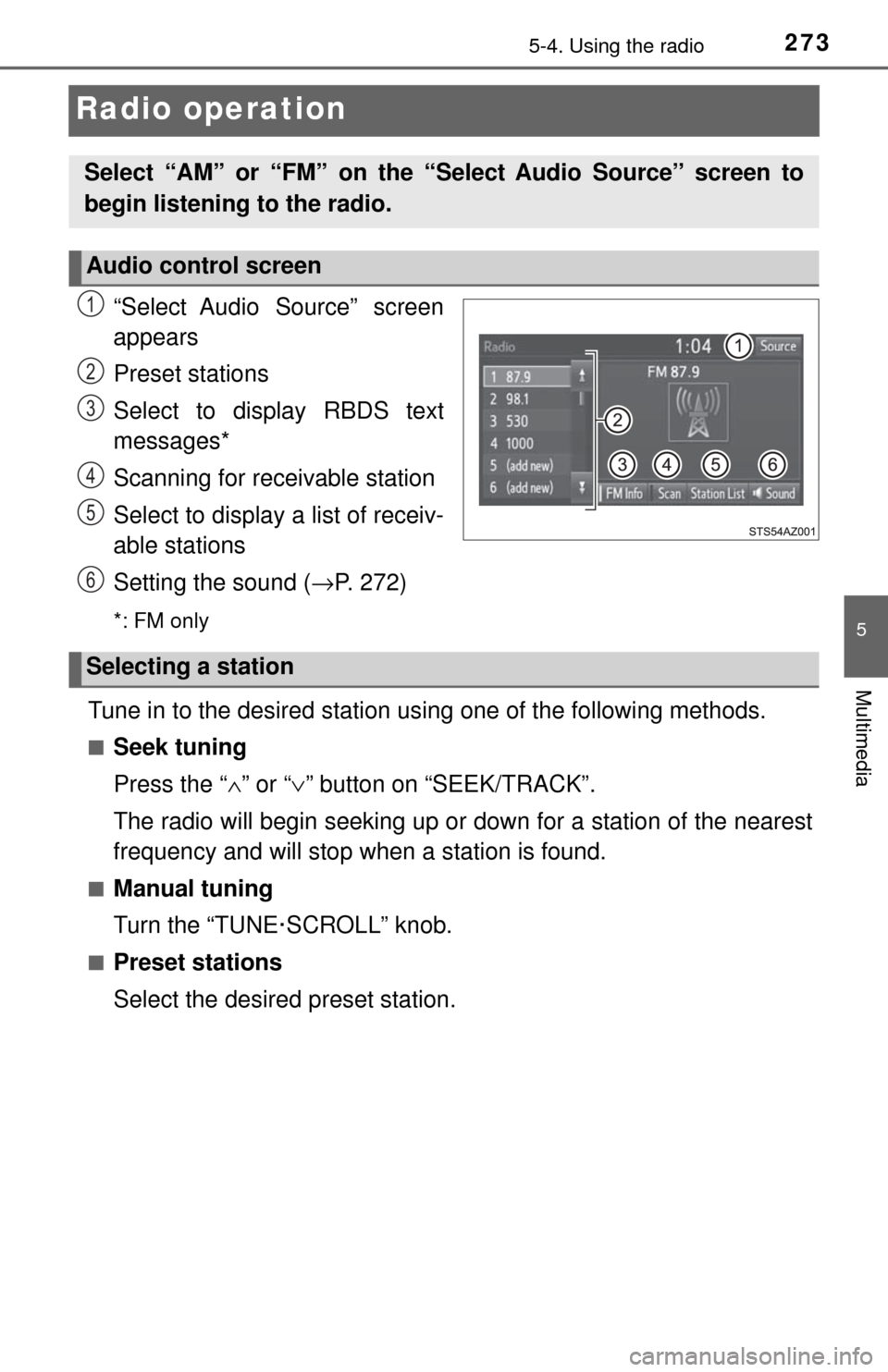
“Select Audio Source” screen
appears
Preset stations
Select to display RBDS text
messages*
Scanning for receivable station
Select to display a list of receiv-
able stations
Setting the sound (→P. 272)
*: FM only
Tune in to the desired station us ing one of the following methods.
■Seek tuning
Press the “∧” or “ ∨” button on “SEEK/TRACK”.
The radio will begin seeking up or down for a station of the nearest
frequency and will stop when a station is found.
■Manual tuning
Turn the “TUNE·SCROLL” knob.
■Preset stations
Select the desired preset station.
Select “AM” or “FM” on the “Select Audio Source” screen to
begin listening to the radio.
Audio control screen
1
2
3
4
5
6
Selecting a station
Page 275 of 588

2755-5. Playing an audio CD and MP3/WMA/AAC discs
5
Multimedia
CD player operation
“Select Audio Source” screen
appears
Audio CD:
Displaying the track list
(
→P. 271)
MP3/WMA/AAC:
Displaying the folder list
(
→P. 271)
Random playback
Repeat play
Pause
Select to resume play
Setting the sound (
→P. 272)
■ Displaying the title and artist name
If a CD-TEXT disc is inserted, the title of the disc and track will be displayed.
■ Error messages
If an error message is displayed, refer to the following table and take the
appropriate measures. If the problem is not rectified, take the vehicle to your
Toyota dealer.
Insert disc or select “CD” on the “Select Audio Source” screen
to begin listening to a CD.
Audio control screen
1
2
3
4
5
6
MessageCauseCorrection procedures
“Check DISC” • The disc is dirty or
damaged.
• The disc is inserted
upside down.
• The disc is not play-
able with the player. • Clean the disc.
• Insert the disc cor-
rectly.
• Confirm the disc is playable with the
player.
“Disc Error”There is a malfunction
within the system.Eject the disc.
“No music files found.”No playable data is
included on the disc.Eject the disc.
Page 277 of 588

2775-5. Playing an audio CD and MP3/WMA/AAC discs
5
Multimedia
●WMA file compatibility
• Compatible standards
WMA Ver. 7, 8, 9 (only compatible with Windows Media Audio Standard)
• Compatible sampling frequencies 32, 44.1, 48 (kHz)
• Compatible bit rates (only compatible with 2-channel playback) Ver. 7, 8: CBR 48-192 (kbps)
Ver. 9: CBR 48-320 (kbps)
● AAC file compatibility
• Compatible standards
MPEG4/AAC-LC
• Compatible sampling frequencies
11.025/12/16/22.05/24/32/44.1/48 (kHz)
• Compatible bit rates 16-320 (kbps)
● Compatible media
Media that can be used for MP3, WMA and AAC playback are CD-Rs and
CD-RWs.
Playback in some instances may not be possible if the CD-R or CD-RW is
not finalized. Playback may not be possible or the audio may jump if the
disc is scratched or marked with fingerprints.
● Compatible disc formats
The following disc formats can be used.
• Disc formats: CD-ROM Mode 1 and Mode 2
CD-ROM XA Mode 2, Form 1 and Form 2
• File formats: ISO9660 Level 1, Level 2, (Romeo, Joliet) UDF (2.01 or lower)
MP3, WMA and AAC files written in any format other than those listed
above may not play correctly, and their file names and folder names may
not be displayed correctly.
Items related to standards and limitations are as follows.
• Maximum directory hierarchy: 8 levels (including the root)
• Maximum length of folder names/file names: 32 characters
• Maximum number of folders: 192 (including the root)
• Maximum number of files per disc: 255
● File names
The only files that can be recognized as MP3/WMA/AAC and played are
those with the extension .mp3, .wma or .m4a.
● Discs containing multi-session recordings
As the multimedia system is compatible with multi session discs, it is possi-
ble to play discs that contain MP3, WMA and AAC files. However, only the
first session can be played.
Page 280 of 588
2805-6. Using an external device
Listening to an iPod
→P. 2 6 1
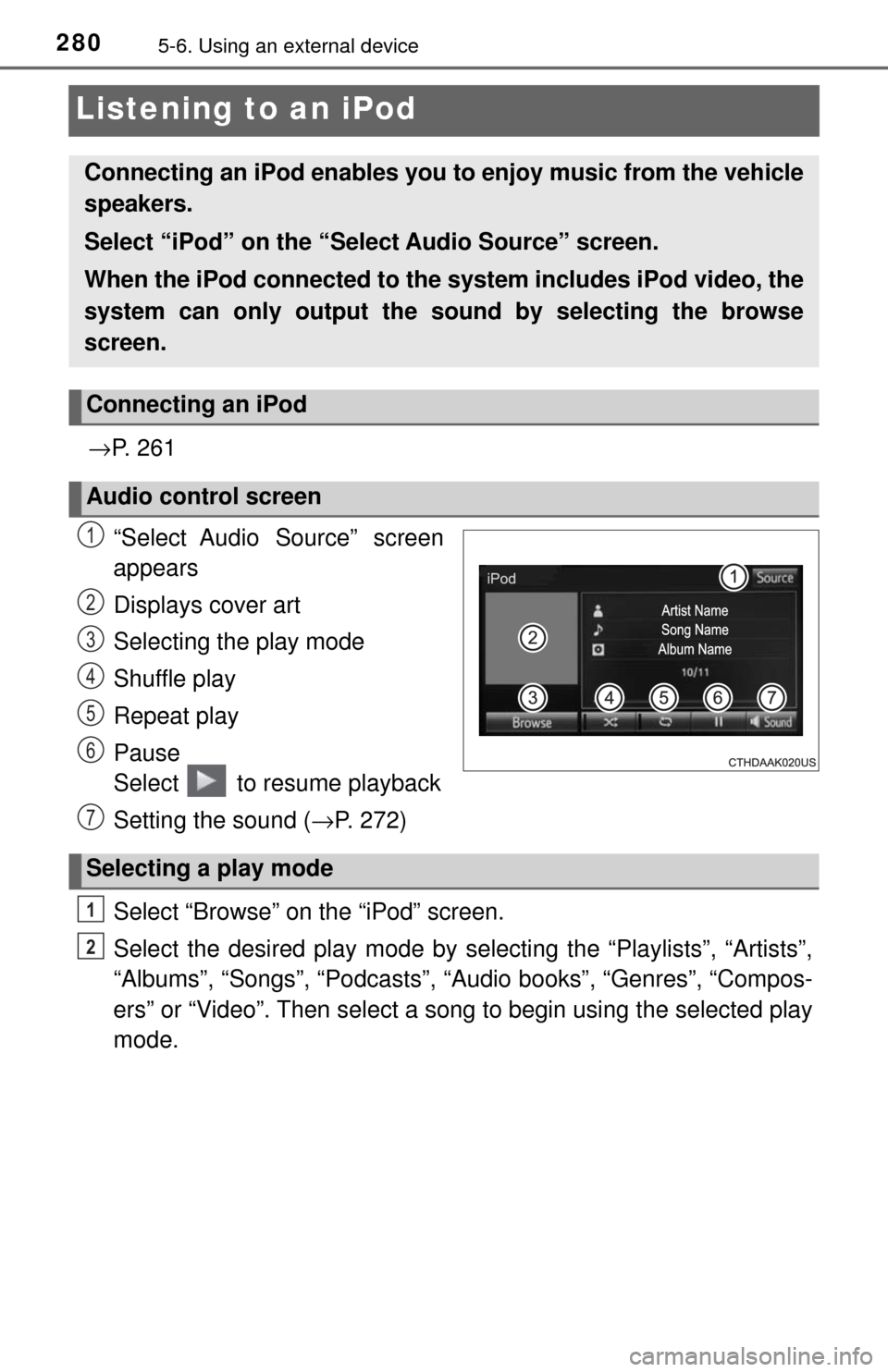
“Select Audio Source” screen
appears
Displays cover art
Selecting the play mode
Shuffle play
Repeat play
Pause
Select to resume playback
Setting the sound ( →P. 272)
Select “Browse” on the “iPod” screen.
Select the desired play mode by se lecting the “Playlists”, “Artists”,
“Albums”, “Songs”, “Podcasts”, “Audio books”, “Genres”, “Compos-
ers” or “Video”. Then select a song to begin using the selected play
mode.
Connecting an iPod enables you to enjoy music from the vehicle
speakers.
Select “iPod” on the “Select Audio Source” screen.
When the iPod connected to the system includes iPod video, the
system can only output the sound by selecting the browse
screen.
Connecting an iPod
Audio control screen
1
2
3
4
5
6
Selecting a play mode
7
1
2
Page 281 of 588

2815-6. Using an external device
5
Multimedia
■About iPod
●“Made for iPod” and “Made for iPhone” mean that an electronic accessory
has been designed to connect specifically to iPod or iPhone respectively,
and has been certified by the developer to meet Apple performance stan-
dards.
● Apple is not responsible for the operation of this device or its compliance
with safety and regulatory standards. Please note that the use of this acces-
sory with iPod or iPhone may affect wireless performance.
● iPhone, iPod, iPod classic, iPod nano, and iPod touch are trademarks of
Apple Inc., registered in the U.S. and other countries. Lightning is a trade-
mark of Apple Inc.
■ iPod cover art
●Depending on the iPod and songs in the iPod, iPod cover art may be dis-
played.
● This function can be changed to on/off. ( →P. 265)
● It may take time to display iPod cover art, and the iPod may not be operated
while the cover art display is in process.
● Only iPod cover art that is saved in JPEG format can be displayed.
■ iPod functions
●When an iPod is connected and the audio source is changed to iPod mode,
the iPod will resume play from the same point in which it was last used.
● Depending on the iPod that is connected to the system, certain functions
may not be available. If a function is unavailable due to a malfunction (as
opposed to a system specification), disconnecting the device and recon-
necting it may resolve the problem.
● While connected to the system, the iPod cannot be operated with its own
controls. It is necessary to use the controls of the vehicle’s multimedia sys-
tem instead.
● When the battery level of an iPod is very low, the iPod may not operate. If
so, charge the iPod before use.
● Compatible models ( →P. 283)
Page 282 of 588
2825-6. Using an external device
■iPod problems
To resolve most problems encountered when using your iPod, disconnect
your iPod from the vehicle iPod connection and reset it. For instructions on
how to reset your iPod, refer to your iPod Owner’s Manual.
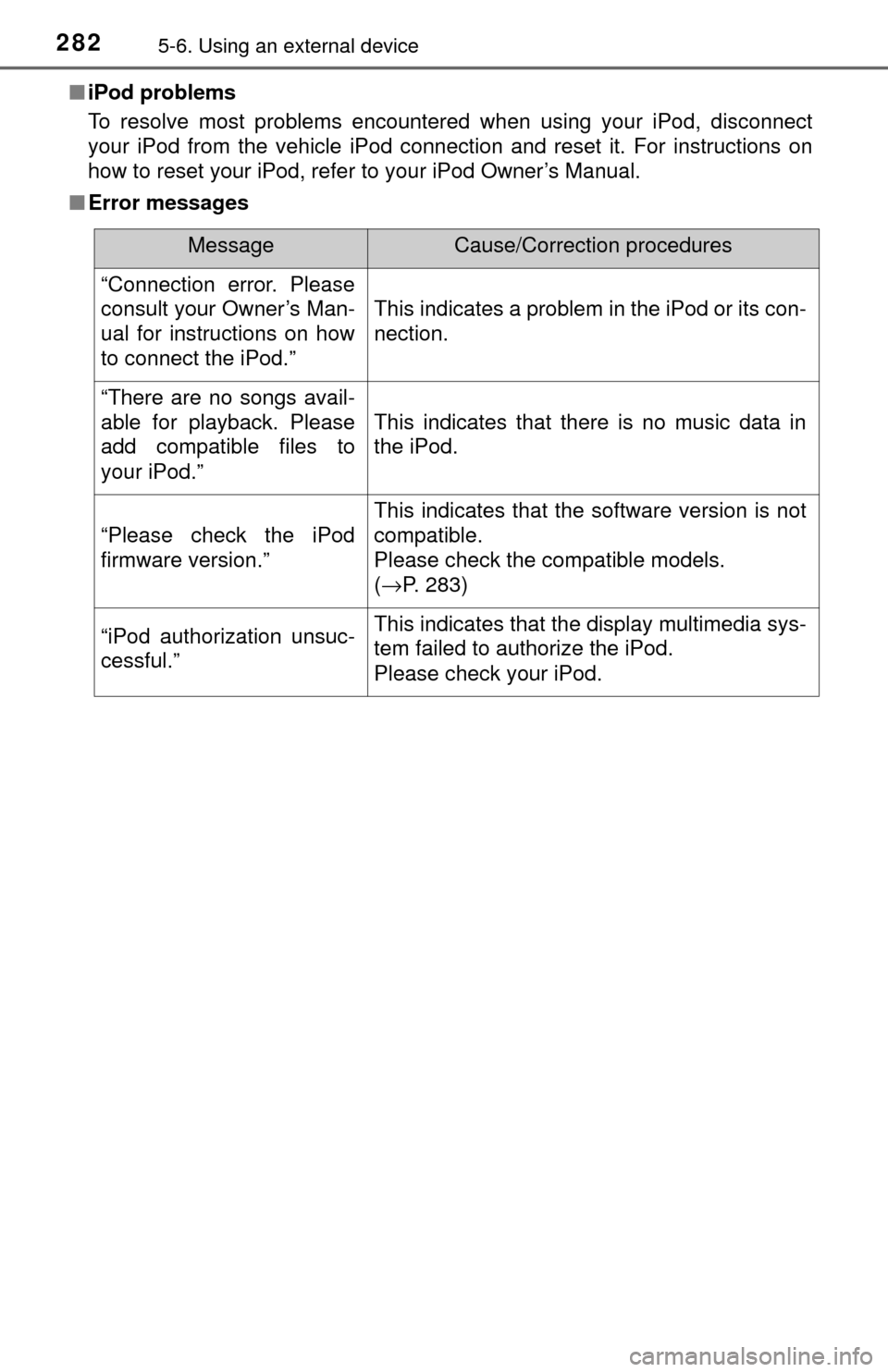
■ Error messages
MessageCause/Correction procedures
“Connection error. Please
consult your Owner’s Man-
ual for instructions on how
to connect the iPod.”
This indicates a problem in the iPod or its con-
nection.
“There are no songs avail-
able for playback. Please
add compatible files to
your iPod.”
This indicates that there is no music data in
the iPod.
“Please check the iPod
firmware version.”
This indicates that the software version is not
compatible.
Please check the compatible models.
(→P. 283)
“iPod authorization unsuc-
cessful.”This indicates that the display multimedia sys-
tem failed to authorize the iPod.
Please check your iPod.