Page 286 of 640
2865-1. Basic Operations
Audio system
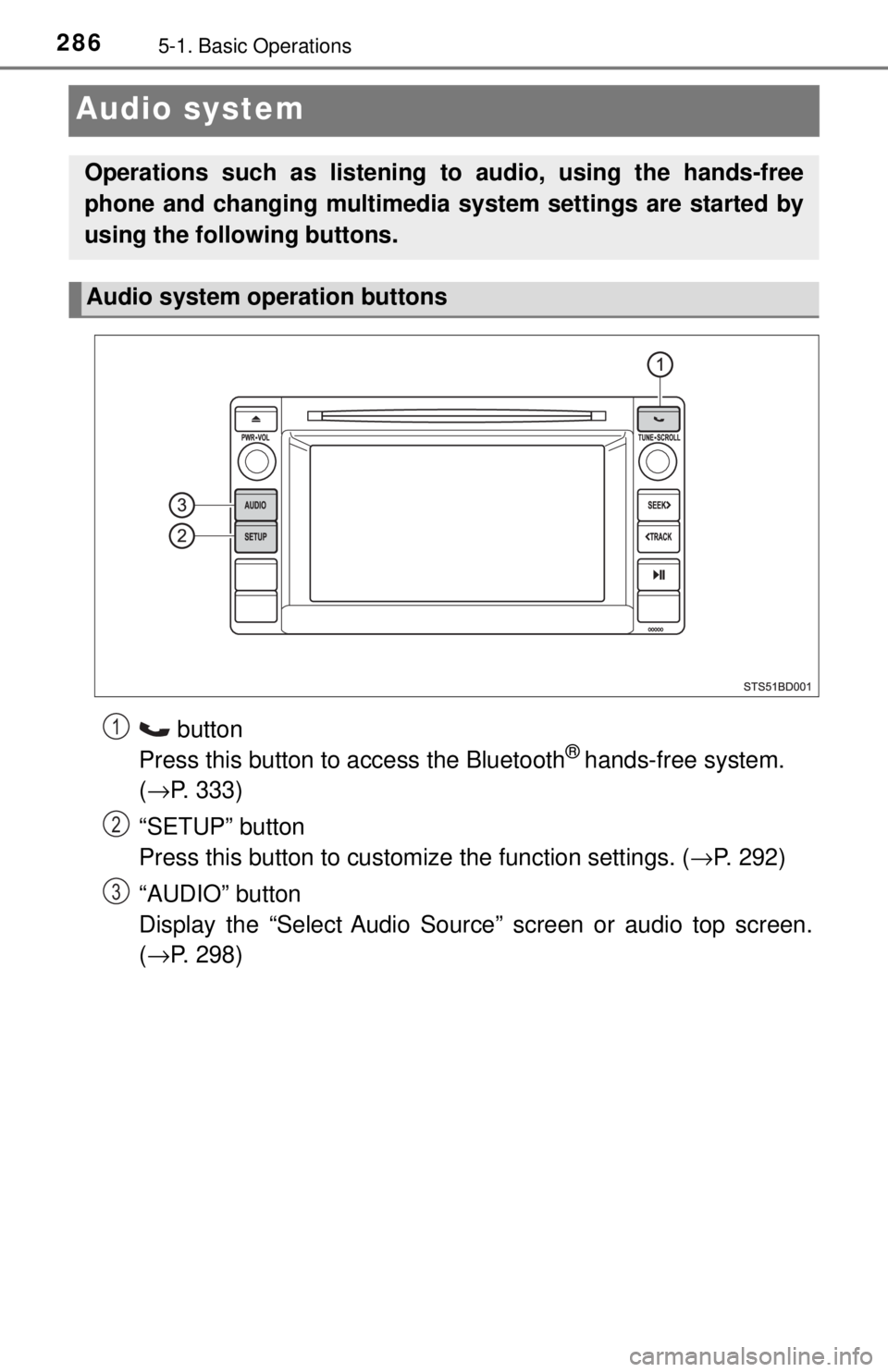
button
Press this button to access the Bluetooth® hands-free system.
( → P. 333)
“SETUP” button
Press this button to customize the function settings. ( →P. 292)
“AUDIO” button
Display the “Select Audio Source” screen or audio top screen.
( → P. 298)
Operations such as listening to audio, using the hands-free
phone and changing multimedia system settings are started by
using the following buttons.
Audio system operation buttons
1
2
3
Page 287 of 640
2875-1. Basic Operations
5
Multimedia
By touching the screen with your finger, you can control the multime-
dia system, etc.
■Drag*
Touch the screen with your finger, and move the screen to the
desired position.
● Scrolling the lists
■Flick*
Touch the screen with your finger and then quickly move the screen
by flicking your finger.
●Scrolling the main screen page
*: The above operations may not be performed on all screens.
■When using the touch screen
●If the screen is cold, the display may be dark, or the system may seem to be
operating slightly slower than normal.
● The screen may seem dark and hard to see when viewed through sun-
glasses. Change your angle of viewing, adjust the display on the “Display
Settings” screen ( →P. 296) or remove your sunglasses.
● Flick operations may not be performed smoothly in high altitudes.
Operating the touch screen
NOTICE
■To avoid damaging the touch screen
● To prevent damaging the screen, lightly touch the screen buttons with your
finger.
● Do not use objects other than your finger to touch the screen.
● Wipe off fingerprints using a glass cleaning cloth. Do not use chemical
cleaners to clean the screen, as they may damage the touch screen.
Page 299 of 640
2995-3. Using the multimedia system
5
Multimedia
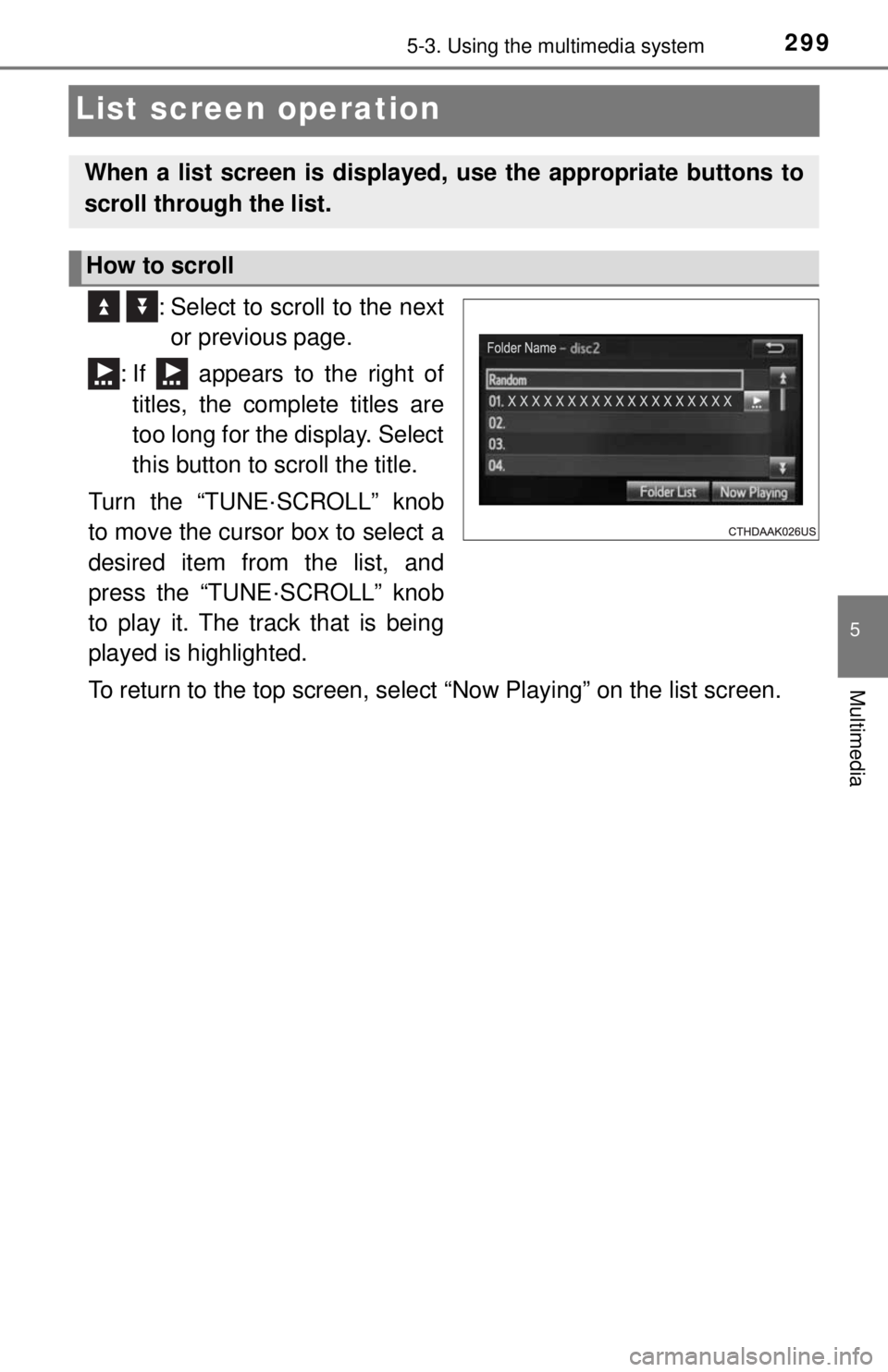
List screen operation
: Select to scroll to the nextor previous page.
: If appears to the right of titles, the complete titles are
too long for the display. Select
this button to scroll the title.
Turn the “TUNE·SCROLL” knob
to move the cursor box to select a
desired item from the list, and
press the “TUNE·SCROLL” knob
to play it. The track that is being
played is highlighted.
To return to the top screen, select “Now Playing” on the list screen.
When a list screen is displayed, use the appropriate buttons to
scroll through the list.
How to scroll
Page 425 of 640
4256-4. Other interior features
6
Interior features
Garage door opener∗
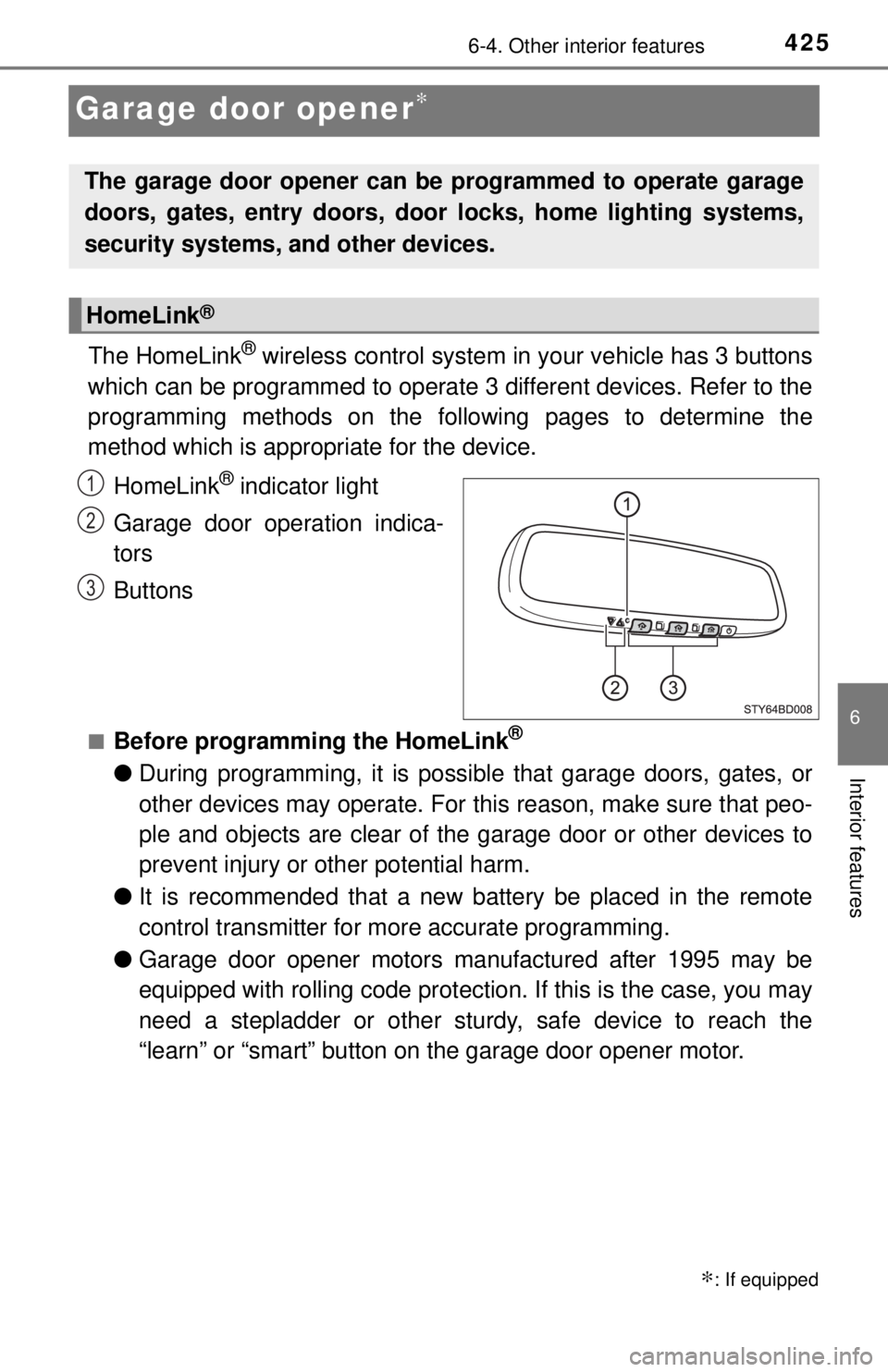
The HomeLink® wireless control system in your vehicle has 3 buttons
which can be programmed to operate 3 different devices. Refer to the
programming methods on the foll owing pages to determine the
method which is appr opriate for the device.
HomeLink
® indicator light
Garage door operation indica-
tors
Buttons
■Before programming the HomeLink®
● During programming, it is possible that garage doors, gates, or
other devices may operate. For this reason, make sure that peo-
ple and objects are clear of the garage door or other devices to
prevent injury or other potential harm.
● It is recommended that a new battery be placed in the remote
control transmitter for more accurate programming.
● Garage door opener motors manufactured after 1995 may be
equipped with rolling code protection. If this is the case, you may
need a stepladder or other sturdy, safe device to reach the
“learn” or “smart” button on the garage door opener motor.
∗: If equipped
The garage door opener can be programmed to operate garage
doors, gates, entry doors, door locks, home lighting systems,
security systems, and other devices.
HomeLink®
1
2
3
Page 426 of 640
4266-4. Other interior features
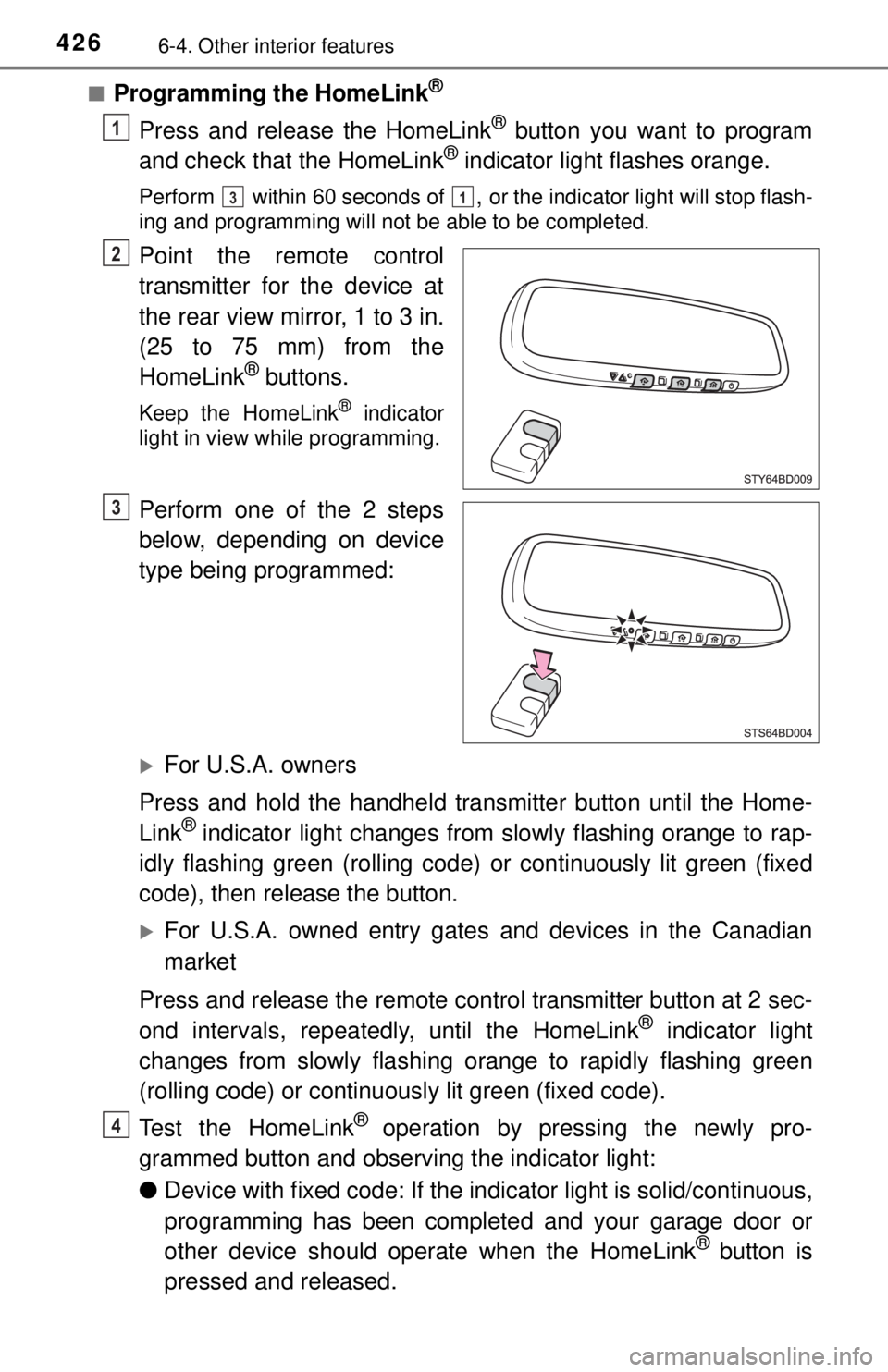
■Programming the HomeLink®
Press and release the HomeLink® button you want to program
and check that the HomeLink® indicator light flashes orange.
Perform within 60 seconds of , or the indicator light will stop flash-
ing and programming will not be able to be completed.
Point the remote control
transmitter for the device at
the rear view mirror, 1 to 3 in.
(25 to 75 mm) from the
HomeLink
® buttons.
Keep the HomeLink® indicator
light in view while programming.
Perform one of the 2 steps
below, depending on device
type being programmed:
For U.S.A. owners
Press and hold the handheld transmitter button until the Home-
Link
® indicator light changes from slowly flashing orange to rap-
idly flashing green (rolling code) or continuously lit green (fixed
code), then release the button.
For U.S.A. owned entry gates and devices in the Canadian
market
Press and release the remote control transmitter button at 2 sec-
ond intervals, repeatedly, until the HomeLink
® indicator light
changes from slowly flashing orange to rapidly flashing green
(rolling code) or continuous ly lit green (fixed code).
Test the HomeLink
® operation by pressing the newly pro-
grammed button and observing the indicator light:
● Device with fixed code: If the in dicator light is solid/continuous,
programming has been completed and your garage door or
other device should operate when the HomeLink
® button is
pressed and released.
1
31
2
3
4
Page 427 of 640
4276-4. Other interior features
6
Interior features
●Device with rolling code: If the indicator light flashes rapidly,
your garage door opener motor (or other device) is equipped
with a rolling code. Complete the programming process by
firmly pressing and holdi ng the programmed HomeLink
® but-
ton for 2 seconds and then release the button.
● If the garage door or other device does not operate, proceed
to “Programming a rolling code system”.
Repeat the steps above to program another device for any of the
remaining HomeLink
® buttons.
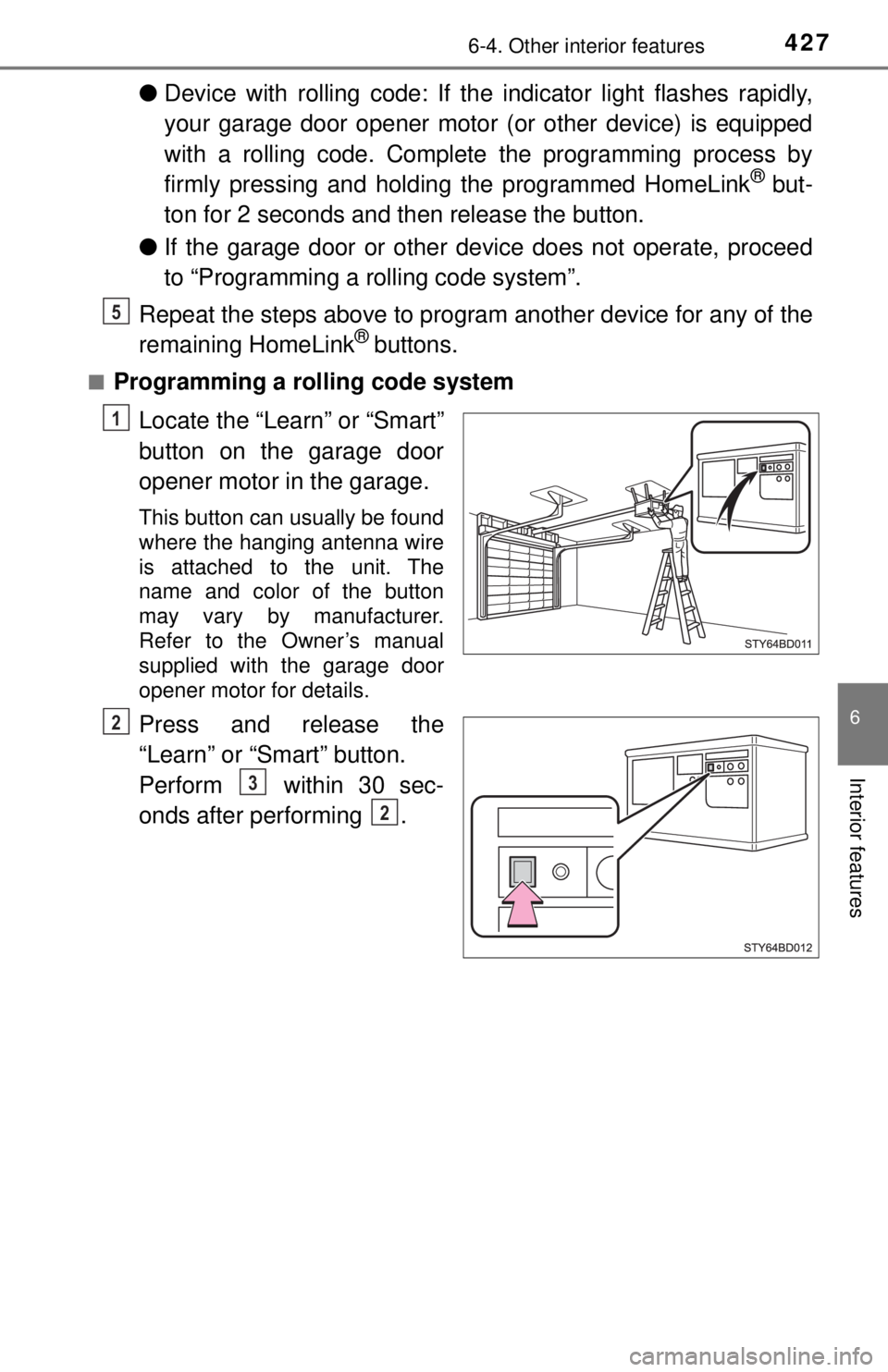
■Programming a rolling code system
Locate the “Learn” or “Smart”
button on the garage door
opener motor in the garage.
This button can usually be found
where the hanging antenna wire
is attached to the unit. The
name and color of the button
may vary by manufacturer.
Refer to the Owner’s manual
supplied with the garage door
opener motor for details.
Press and release the
“Learn” or “Smart” button.
Perform within 30 sec-
onds after performing .
5
1
2
3
2
Page 429 of 640
4296-4. Other interior features
6
Interior features
■Reprogramming a single HomeLink® button
When the following procedure is pe rformed, buttons which already
have devices registered to them can be overwritten:
With one hand, press and hold the desired HomeLink
® button.
When the HomeLink
® indicator starts flashing orange, release
the HomeLink® button and perform “Programming the Home-
Link®” (it takes 20 seconds for the HomeLink® indicator to
start flashing).
Press the appropriate HomeLink
® button. The HomeLink® indicator
light should turn on.
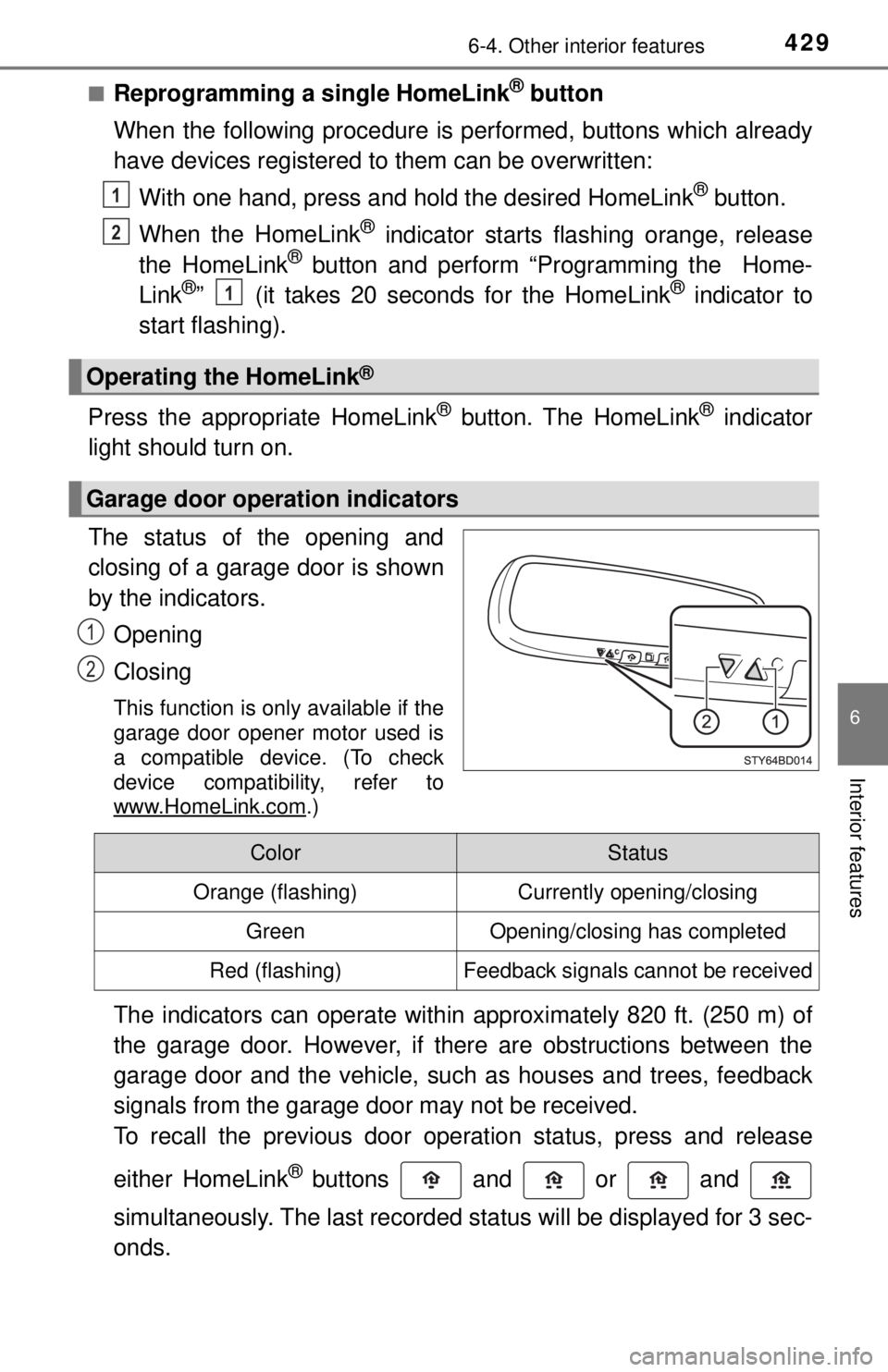
The status of the opening and
closing of a garage door is shown
by the indicators.
Opening
Closing
This function is only available if the
garage door opener motor used is
a compatible device. (To check
device compatibility, refer to
www.HomeLink.com
.)
The indicators can operate within approximately 820 ft. (250 m) of
the garage door. However, if there are obstructions between the
garage door and the vehicle, such as houses and trees, feedback
signals from the garage door may not be received.
To recall the previous door operation status, press and release
either HomeLink
® buttons and or and
simultaneously. The last recorded status will be displayed for 3 sec-
onds.
Operating the HomeLink®
Garage door operation indicators
1
2
1
1
2
ColorStatus
Orange (flashing)Currently opening/closing
GreenOpening/closing has completed
Red (flashing)Feedback signals cannot be received
Page 431 of 640
4316-4. Other interior features
6
Interior features
■Certification for the garage door opener
For vehicles sold in the U.S.A.
FCC ID: NZLAECHL5
NOTE:
This device complies with part 15 of the FCC Rules. Operation is subject to
the following two conditions: (1) This device may not cause harmful interfer-
ence, and (2) this device must accept any interference received, including
interference that may cause undesired operation.
FCC WARNING:
Changes or modifications not expressly approved by the party responsible for
compliance could void the user’s authority to operate the equipment.
For vehicles sold in Canada
NOTE:
This device complies with Industry Canada licence-exempt RSS standard(s\
).
Operation is subject to the following two conditions: (1) this device may not
cause interference, and (2) this device must accept any interference, includ-
ing interference that may cause undesired operation of the device.
REMARQUE:
Le présent appareil est conforme aux CNR d’Industrie Canada applicables
aux appareils radio exempts de licence. L’exploitation est autorisée aux deux
conditions suivantes: (1) l’appareil ne doit pas produire de brouillage, et (2)
l’utilisateur de l’appareil doit accepter tout brouillage radioélectrique subi,
même si le brouillage est susceptible d’en compromettre le fonctionnement.
■ When support is necessary
For compatible products and video programming instructions, please visit
www.homelink.com
, www.youtube.com/user/HomeLinkGentex, or call the
toll-free HomeLink Hotline at 1-800-355-3515 (North America).
■ About HomeLink
®
HomeLink and the HomeLink house icon are registered trademarks of Gen-
tex Corporation.
WARNING
■When programming a garage door or other remote control device
The garage door or other device may operate, so ensure people and
objects are out of danger to prevent potential harm.
■ Conforming to federal safety standards
Do not use the HomeLink
® compatible transceiver with any garage door
opener or device that lacks safety stop and reverse features as required by
federal safety standards.
This includes any garage door that cannot detect an interfering object. A
door or device without these features increases the risk of death or ser\
ious
injury.
■ When operating or programming HomeLink
®
Never allow a child to operate or play with the HomeLink® buttons.