Page 422 of 741
421
RAV4_OM_OM0R005U_(U)
5-17. Using an external device
5
Audio system
USB memory device player operation
→P. 3 9 3
Pressing the “AUDIO” button disp lays the audio control screen from
any screens of the selected source.
Audio source selection screen
appears
Displays cover art
Displaying the folder list
Random playback ( →P. 395)
Repeat play ( →P. 395)
Pause
Select to resume playback
Setting the sound ( →P. 406)
Connecting a USB memory device enables you to enjoy music
from the vehicle speakers.
Touch “USB” on the audio source selection screen.
Connecting a USB memory device
Audio control screen
1
2
3
4
5
6
7
Page 427 of 741
426
RAV4_OM_OM0R005U_(U)
5-17. Using an external device
Using the AUX port
→P. 3 9 3
Press the “AUDIO” button to displa y the audio control screen, then
select “AUX”.
■ Operating portable audio players connected to the audio system
The volume can be adjusted using the vehicle’s audio controls. All other
adjustments must be made on the portable audio player itself.
■ When using a portable audio player connected to the power outlet
Noise may occur during playback. Use the power source of the portable
audio player.
This port can be used to connect a portable audio device and lis-
ten to it through the vehicle’s speakers.
Connecting a portable audio player
Audio control screen
WARNING
■ While driving
Do not connect a portable audio player or operate the device controls.
Page 428 of 741
427
RAV4_OM_OM0R005U_(U)
5-18. Connecting Bluetooth®
5
Audio system
Preparations to use wireless communica-
tion
The following can be performed using Bluetooth® wireless com-
munication:
■A portable audio player can be operated and listened to via
audio system
■Hands-free phone calls can be made via a cellular phone
In order to use wireless communication, register and connect a
Bluetooth
® device by performing the following procedures.
Page 431 of 741
430
RAV4_OM_OM0R005U_(U)
5-18. Connecting Bluetooth®
Registering a Bluetooth® audio player for
the first time
Turn the Bluetooth® connection setting of your audio player on.
Press the “AUDIO” button.
Select “ Audio”.
Select “Select Device”.
Follow the steps in “How to register a Bluetooth
® device” from .
( → P. 432)
To use the Bluetooth® Audio, it is necessary to register an audio
player with the system.
Once the player has been registered, it is possible to use the
Bluetooth
® Audio.
For details about registering a Bluetooth
® device ( →P. 432)
1
2
3
4
52
Page 433 of 741

432
RAV4_OM_OM0R005U_(U)
5-18. Connecting Bluetooth®
Registering a Bluetooth® device
Display the “Bluetooth* Setup” screen. (→P. 429)
*: Bluetooth is a registered trademark of Bluetooth SIG, Inc.
Select “Add”.
When this screen is displayed,
search for the device name dis-
played on this screen on the
screen of your Bluetooth
®
device.
For details about operating the
Bluetooth® device, see the manual
that comes with it.
To cancel the registration, select
“Cancel”.
Register the Bluetooth® device using your Bluetooth® device.
A PIN-code is not required for SSP (Secure Simple Pairing) compatible
Bluetooth® devices. Depending on the type of Bluetooth® device being
connected, a message confirming registration may be displayed on the
Bluetooth
® device’s screen. Respond and operate the Bluetooth® device
according to the confirmation message.
Bluetooth® compatible phones (HFP) and portable audio players
(AVP) can be registered simultaneously. You can register up to 5
Bluetooth
® devices.
How to register a Bluetooth® device
1
2
3
4
Page 435 of 741
434
RAV4_OM_OM0R005U_(U)
5-18. Connecting Bluetooth®
Connecting a Bluetooth® device
Press the “SETUP” button.
Select “Bluetooth*”.
*: Bluetooth is a registered trademark of Bluetooth SIG, Inc.
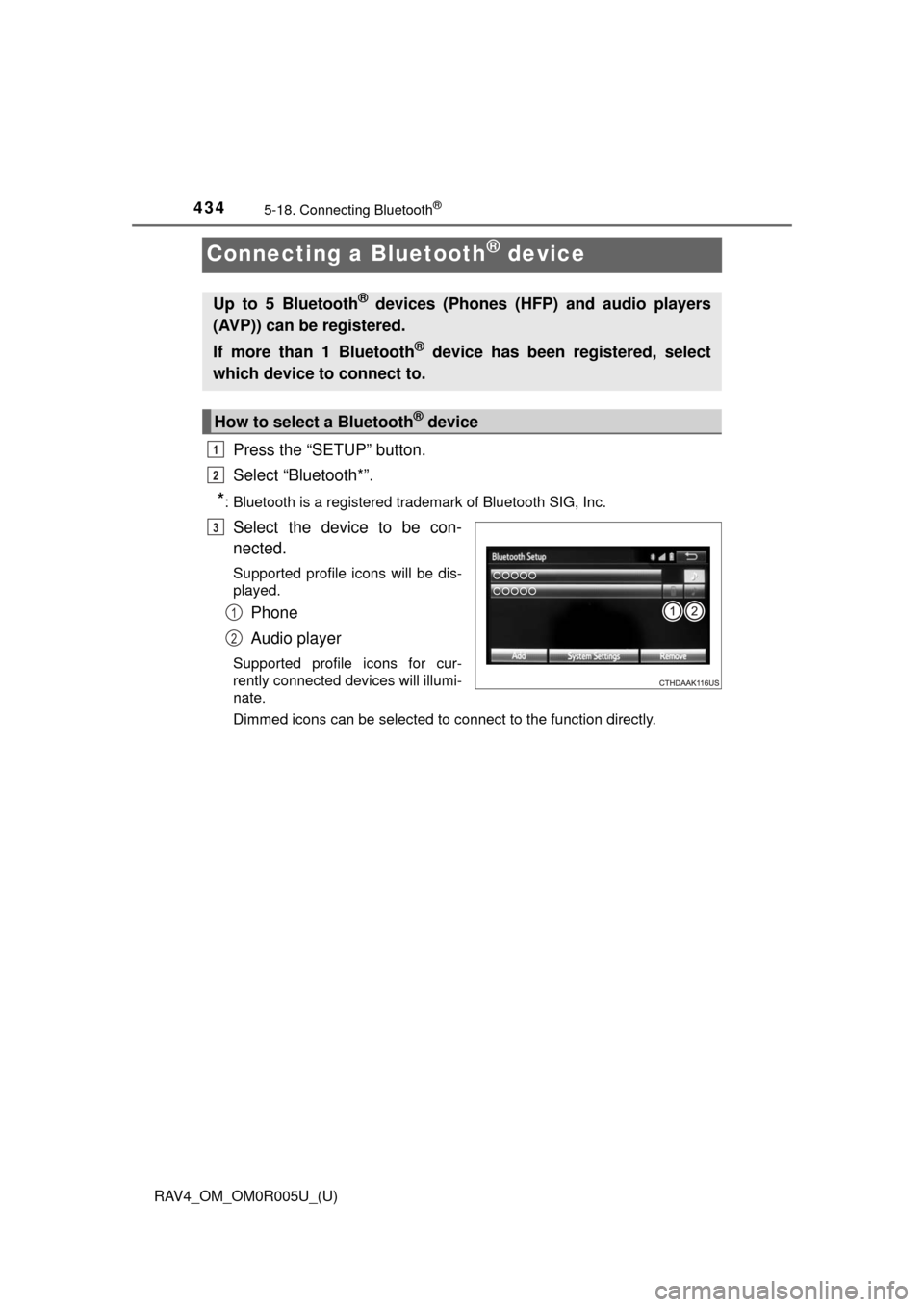
Select the device to be con-
nected.
Supported profile icons will be dis-
played.
Phone
Audio player
Supported profile icons for cur-
rently connected devices will illumi-
nate.
Dimmed icons can be selected to connect to the function directly.
Up to 5 Bluetooth® devices (Phones (HFP) and audio players
(AVP)) can be registered.
If more than 1 Bluetooth
® device has been registered, select
which device to connect to.
How to select a Bluetooth® device
1
2
3
1
2
Page 437 of 741
436
RAV4_OM_OM0R005U_(U)
5-18. Connecting Bluetooth®
Displaying a Bluetooth® device details
Display the “Bluetooth* Setup” screen. (→P. 429)
*: Bluetooth is a registered trademark of Bluetooth SIG, Inc.
Select the device.
Select “Device Info”.
Following screen is displayed:
Device Name
Change connection method
Bluetooth
® Address
Display your telephone num-
ber
The number may not be dis-
played depending on the
model of phone.
Compatibility profile of the
device
Restore default settings
Select “Connect Audio Player from”.
Select “Vehicle ” or “Device”.
“Vehicle”: Connect the audio system to the portable audio player.
“Device”: Connect the portable audio player to the audio system
You can confirm and change the registered device details.
Bluetooth® device registration status
1
2
3
4
1
2
3
4
5
6
Changing connection method
1
2
Page 438 of 741
437
RAV4_OM_OM0R005U_(U)
5-18. Connecting Bluetooth®
5
Audio system
Detailed Bluetooth® settings
Display the “Bluetooth* Setup” screen. (→P. 429)
Select “System Settings”.
The following screen is displayed:
Bluetooth
* Power on/off
You can change Bluetooth*
function on/off
Bluetooth* Name
Change PIN-code ( →P. 438)
Bluetooth
* Address
Display Phone Status
You can set the system to show
the status confirmation display
when connecting a telephone
Display Audio Player Status
You can set the system to show
the status confirmation display
when connecting an audio
player
Compatibility profile of the system
Restore default settings
*: Bluetooth is a registered trademark of Bluetooth SIG, Inc.
You can confirm and change the detailed Bluetooth® settings.
How to check and change detailed Bluetooth® settings
1
2
3
1
2
3
4
5
6
7
8