Page 65 of 741
651-1. For safe use
RAV4_OM_OM0R005U_(U)
1
For safety and security
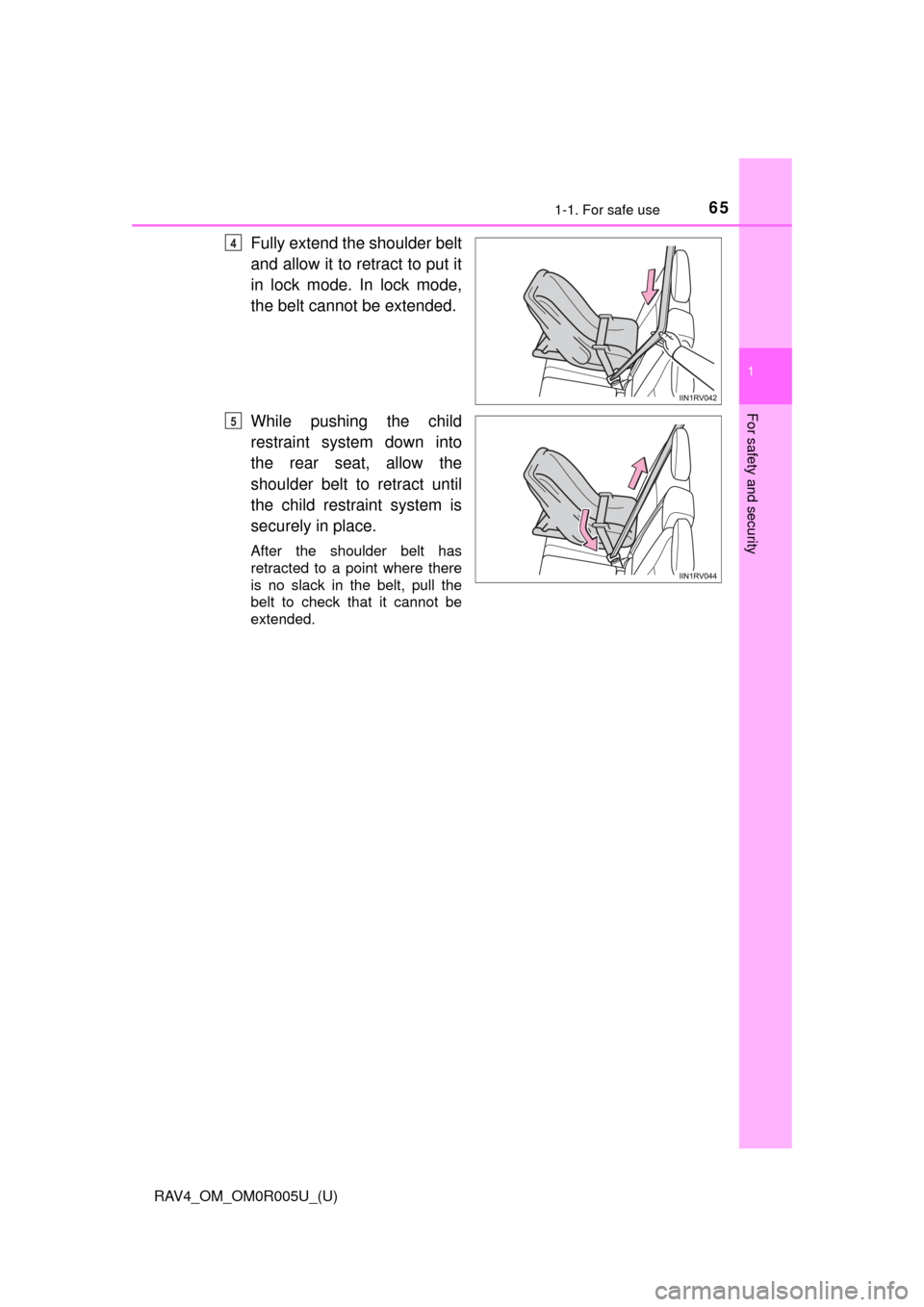
Fully extend the shoulder belt
and allow it to retract to put it
in lock mode. In lock mode,
the belt cannot be extended.
While pushing the child
restraint system down into
the rear seat, allow the
shoulder belt to retract until
the child restraint system is
securely in place.
After the shoulder belt has
retracted to a point where there
is no slack in the belt, pull the
belt to check that it cannot be
extended.
4
5
Page 66 of 741
661-1. For safe use
RAV4_OM_OM0R005U_(U)■
Forward-facing
⎯ Convertible seat
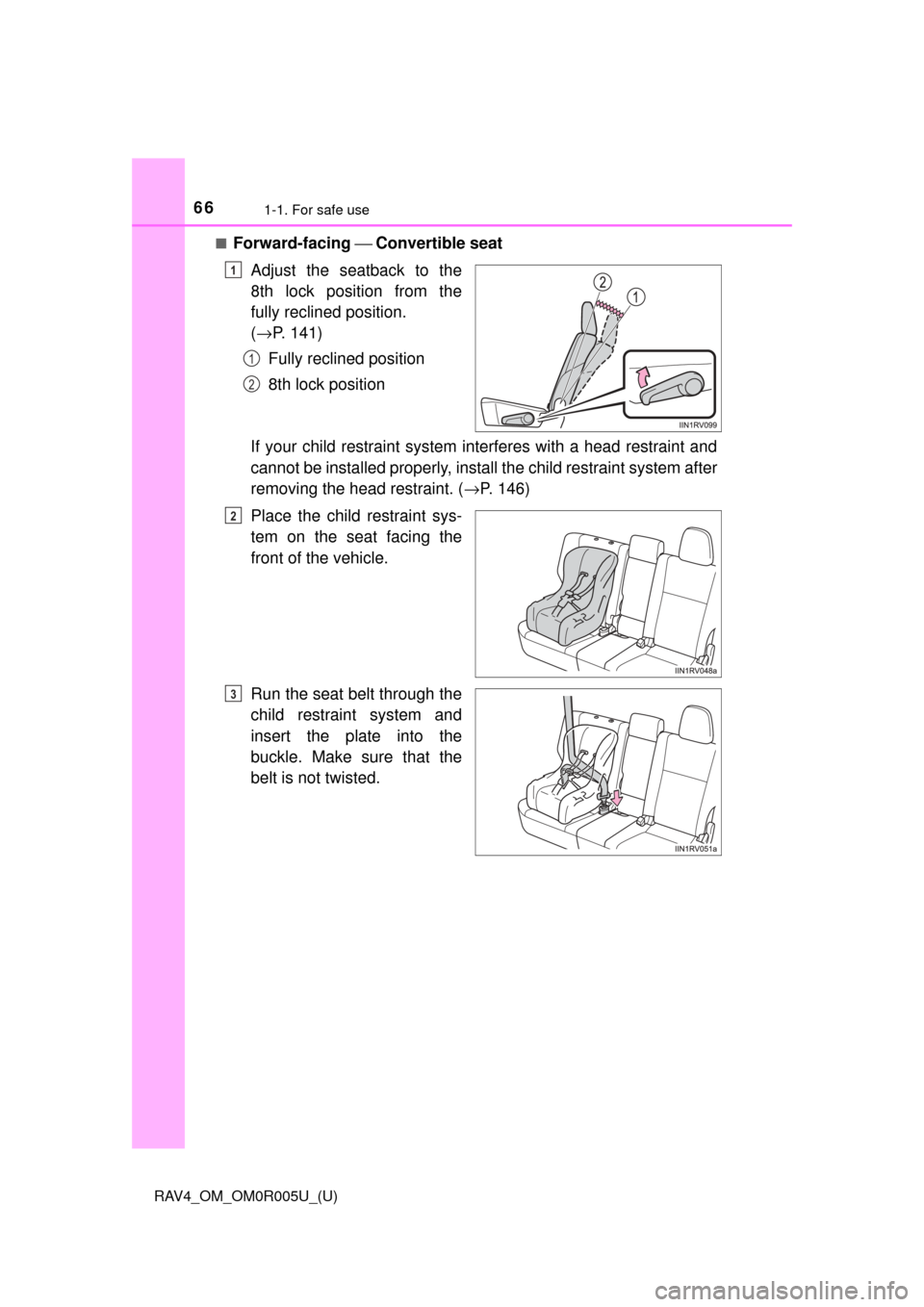
Adjust the seatback to the
8th lock position from the
fully reclined position.
( → P. 141)
Fully reclined position
8th lock position
If your child restraint system interferes with a head restraint and
cannot be installed properly, insta ll the child restraint system after
removing the head restraint. ( →P. 146)
Place the child restraint sys-
tem on the seat facing the
front of the vehicle.
Run the seat belt through the
child restraint system and
insert the plate into the
buckle. Make sure that the
belt is not twisted.
1
1
2
2
3
Page 67 of 741
671-1. For safe use
RAV4_OM_OM0R005U_(U)
1
For safety and security
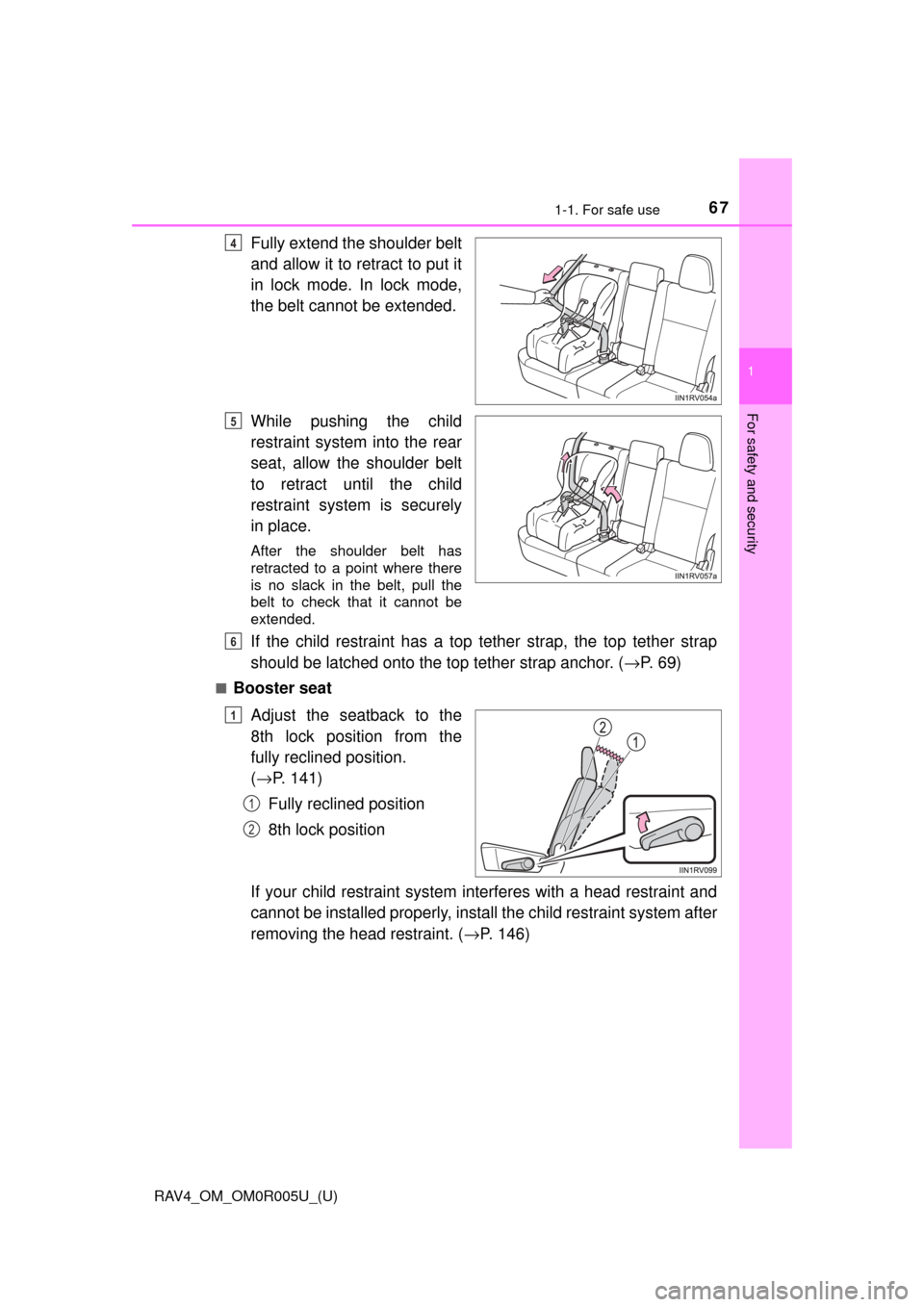
Fully extend the shoulder belt
and allow it to retract to put it
in lock mode. In lock mode,
the belt cannot be extended.
While pushing the child
restraint system into the rear
seat, allow the shoulder belt
to retract until the child
restraint system is securely
in place.
After the shoulder belt has
retracted to a point where there
is no slack in the belt, pull the
belt to check that it cannot be
extended.
If the child restraint has a top tether strap, the top tether strap
should be latched onto the top tether strap anchor. (→P. 69)
■Booster seat
Adjust the seatback to the
8th lock position from the
fully reclined position.
(→ P. 141)
Fully reclined position
8th lock position
If your child restraint system interferes with a head restraint and
cannot be installed properly, insta ll the child restraint system after
removing the head restraint. ( →P. 146)
4
5
6
1
1
2
Page 70 of 741
701-1. For safe use
RAV4_OM_OM0R005U_(U)
WARNING
■When installing a booster seat
To prevent the belt from going into ALR lock mode, do not fully extend the
shoulder belt. ALR mode causes the belt to tighten only. This could cause
injury or discomfort to the child. ( →P. 32)
■ When installing a child restraint system
Follow the directions given in the child restraint system installation manual
and fix the child restraint system securely in place.
If the child restraint system is not correctly fixed in place, the child or other
passengers may be seriously injured or even killed in the event of sudden
braking, sudden swerving or an accident.
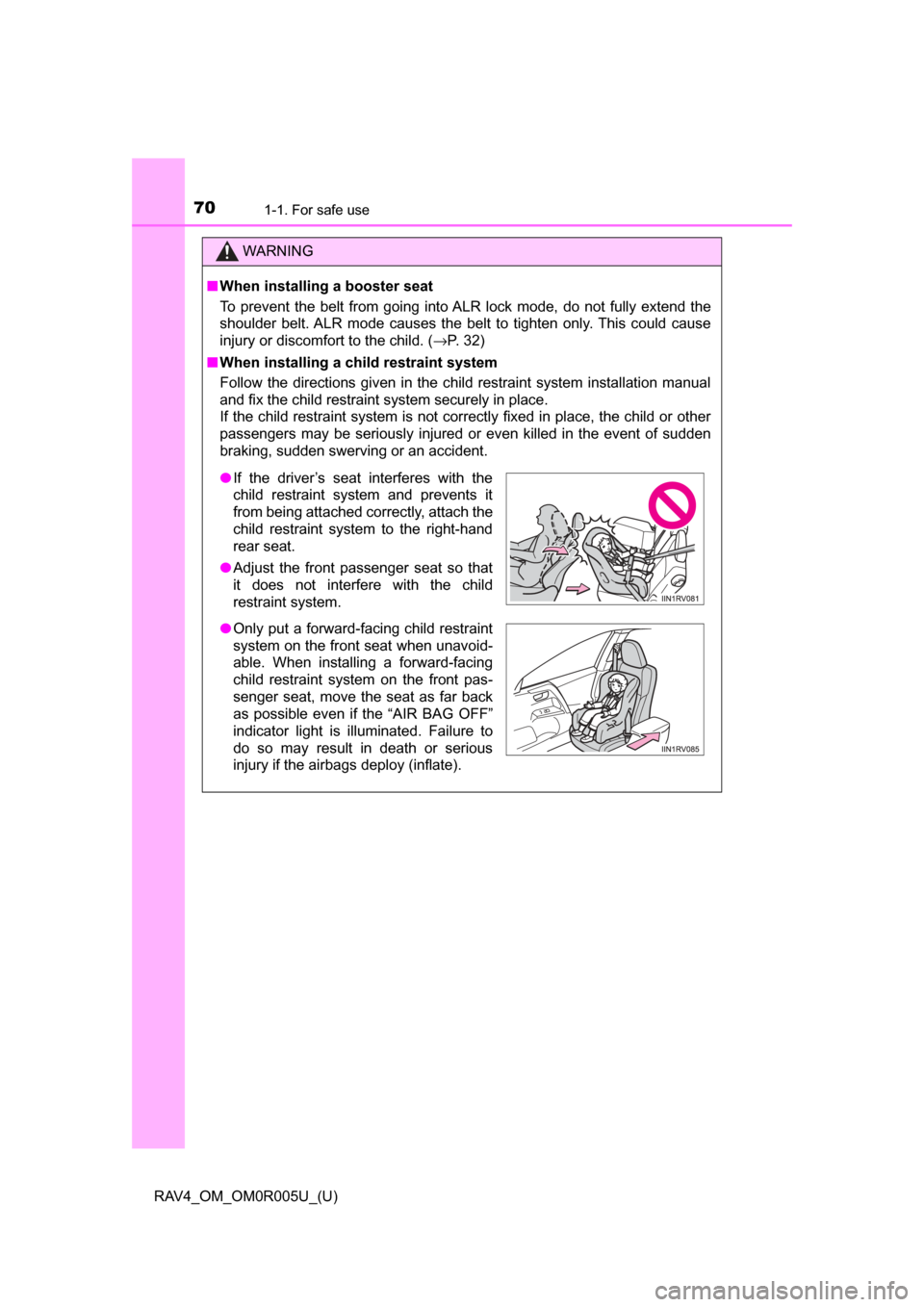
● If the driver’s seat interferes with the
child restraint system and prevents it
from being attached correctly, attach the
child restraint system to the right-hand
rear seat.
● Adjust the front passenger seat so that
it does not interfere with the child
restraint system.
● Only put a forward-facing child restraint
system on the front seat when unavoid-
able. When installing a forward-facing
child restraint system on the front pas-
senger seat, move the seat as far back
as possible even if the “AIR BAG OFF”
indicator light is illuminated. Failure to
do so may result in death or serious
injury if the airbags deploy (inflate).
Page 71 of 741
711-1. For safe use
RAV4_OM_OM0R005U_(U)
1
For safety and security
WARNING
■When installing a child restraint system
● When installing a child restraint system in the rear center seat, adjust both
seatbacks at the same angle. Otherwise, the child restraint system cannot
be securely restrained and this may cause death or serious injuries in the
event of sudden braking, sudden swerving or an accident.
● When a booster seat is installed, always ensure that the shoulder belt is
positioned across the center of the child’s shoulder. The belt should be
kept away from the child’s neck, but not so that it could fall off the child’s
shoulder. Failing to do so may result in death or serious injury in the event
of sudden braking, sudden swerving or an accident.
● Ensure that the belt and plate are securely locked and the seat belt is not
twisted.
● Shake the child restraint system left and right, and forward and backward
to ensure that it has been securely installed.
● After securing a child restraint system, never adjust the seat.
● Follow all installation instructions provided by the child restraint system
manufacturer.
● When securing some types of child restraint systems in rear seats, it may
not be possible to properly use the seat belts in positions next to the child
restraint without interfering with it or affecting seat belt effectiveness. Be
sure your seat belt fits snugly across your shoulder and low on your hips. if
it dose not, or if it interferes with the child restraint, move to a different
position. Failure to do so may result in death or serious injury.
■ Do not use a seat belt extender
If a seat belt extender is used when installing a child restraint system, the
seat belt will not securely hold the child restraint system, which could cause
death or serious injury to the child or other passengers in the event of a sud-
den braking, sudden swerving or an accident.
■ To correctly attach a child r estraint system to the anchors
When using the LATCH anchors, be sure that there are no foreign objects
around the anchors and that the seat belt is not caught behind the child
restraint system. Make sure the child restraint system is securely attached,
or it may cause death or serious injury to the child or other passengers in
the event of sudden braking, sudden swerving or an accident.
Page 81 of 741

RAV4_OM_OM0R005U_(U)
812. Instrument cluster
2
Instrument cluster
The indicators inform the driver of the operating state of the vehicle’s
various systems.
Indicators
Turn signal indicator
( →P. 211)*1VSC OFF indicator
(→P. 309)
(U.S.A.)
Headlight indicator
(→P. 213)*3Security indicator
(→P. 73)
(Canada)
Tail light indicator
(→P. 213) “SPORT” indicator
(
→P. 205)
Headlight high beam
indicator ( →P. 215) “ECO MODE” indicator
(
→P. 205)
(green)
(if equipped)
Automatic High Beam
indicator ( →P. 217)*1Eco Driving Indicator
Light (→P. 83)
(if equipped)
Fog light indicator
(→P. 221)*1
(if equipped)
All-wheel drive lock
indicator ( →P. 296)
(if equipped)
Cruise control indicator
(→P. 261, 273)*1
(if equipped)
“AUTO LSD” indicator
(→P. 309)
(if equipped)
Dynamic radar cruise
control indicator
(→P. 261)*3
(if equipped)
Intuitive parking assist
indicator ( →P. 277)
Cruise control “SET”
indicator ( →P. 261, 273)
(if equipped)
Intuitive parking assist
indicator (→P. 278)
*1, 2Slip indicator
(→P. 308)
(if equipped)
LDA indicator
(→P. 253)
Page 97 of 741
97
RAV4_OM_OM0R005U_(U)
3
Operation of
each component
3-1. Key information
Keys .................................... 98
3-2. Opening, closing and locking the doors
Side doors ......................... 107
Back door .......................... 113
Smart key system ............. 130
3-3. Adjusting the seats Front seats ........................ 139
Rear seats......................... 141
Driving position memory ... 144
Head restraints.................. 146
3-4. Adjusting the steering wheel and mirrors
Steering wheel .................. 149
Inside rear view mirror ...... 151
Outside rear view mirrors ............................. 153
3-5. Opening, closing the windows and moon roof
Power windows ................. 156
Moon roof .......................... 160
Page 99 of 741

RAV4_OM_OM0R005U_(U)
993-1. Key information
3
Operation of each component
Locks all the doors (→P. 107)
Check that the door is securely locked.
Unlocks all the doors ( →P. 107)
Pressing the button unlocks the driver’s door. Pressing the button again
within 3 seconds unlocks the other doors.
Opens and closes the power back door* (→ P. 11 4 )
Sounds the alarm ( →P. 100)
*: If equipped
To take out the mechanical key,
push the release button and take
the key out.
The mechanical key can only be
inserted in one direction, as the
key only has grooves on one side.
If the key cannot be inserted in a
lock cylinder, turn it over and re-
attempt to insert it.
After using the mechanical key, store it in the electronic key. Carry the
mechanical key together with the electronic key. If the electronic key bat-
tery is depleted or the entry function does not operate properly, you will
need the mechanical key. ( →P. 656)
Wireless remote control
Vehicles without smart key sys-
temVehicles with smart key sys-
tem
Using the mechanical key (veh icles with smart key system)
1
2
3
4