Page 315 of 741

314
RAV4_OM_OM0R005U_(U)
4-6. Driving tips
Winter driving tips
●Use fluids that are appropriate to the prevailing outside tempera-
tures. • Engine oil
• Engine coolant
• Washer fluid
● Have a service technician ins pect the condition of the battery.
● Have the vehicle fitted with four snow tires or purchase a set of tire
chains for the front tires.
Ensure that all tires are the same size and brand, and that chains match
the size of the tires.
Perform the following accordin g to the driving conditions:
● Do not try to forcibly open a window or move a wiper that is frozen.
Pour warm water over the frozen area to melt the ice. Wipe away
the water immediately to prevent it from freezing.
● To ensure proper operation of the climate control system fan,
remove any snow that has accumulated on the air inlet vents in
front of the windshield.
● Check for and remove any excess ice or snow that may have accu-
mulated on the exterior lights, vehicle’s roof, chassis, around the
tires or on the brakes.
● Remove any snow or mud from the bottom of your shoes before
getting in the vehicle.
Carry out the necessary preparations and inspections before
driving the vehicle in winter. Al ways drive the vehicle in a man-
ner appropriate to the prevailing weather conditions.
Preparation for winter
Before driving the vehicle
Page 384 of 741
RAV4_OM_OM0R005U_(U)
3835-9. Bluetooth® Phone
5
Audio system
■When talking on the phone
●Do not talk simultaneously with the other party.
● Keep the volume of the received voice down. Otherwise, voice echo will
increase.
■ Automatic volume adjustment
When vehicle speed is 50 mph (80 km/h) or more, the volume automatically
increases. The volume returns to the previous volume setting when vehicle
speed drops to 43 mph (70 km/h) or less.
■ Phone call system functions
Depending on the cellular phone, certain functions may not be available.\
■ Situations where the system m ay not recognize your voice
● When driving on a rough road
● When driving at high speeds
● When air is blowing out of the vents onto the microphone
● When the air conditioning fan emits a loud noise
Page 473 of 741

472
RAV4_OM_OM0R005U_(U)
5-22. Bluetooth®
Bluetooth®
■When using the Bluetooth® audio system
● In the following conditions, the system may not function.
• If the portable audio player is turned off
• If the portable audio player is not connected
• If the portable audio player’s battery is low
● There may be a delay if a cellular phone connection is made during
Bluetooth
® audio play.
● Depending on the type of portable audio player that is connected to the \
sys-
tem, operation may differ slightly and certain functions may not be available.
■ When using the hands-free system
●The audio system is muted when making a call.
● If both parties speak at the same time, it may be difficult to hear.
● If the received call volume is overly loud, an echo may be heard.
If the Bluetooth
® phone is too close to the system, quality of the sound may
deteriorate and connection status may deteriorate.
● In the following circumstances, it may be difficult to hear the other party:
• When driving on unpaved roads
• When driving at high speeds
• If a roof or window is open
• If the air conditioning is blowing directly on the microphone
• If there is interference from the network of the cellular phone
■ Conditions under which th e system will not operate
● If using a cellular phone that does not support Bluetooth
®
●If the cellular phone is turned off
● If you are outside of cellular phone service coverage
● If the cellular phone is not connected
● If the cellular phone’s battery is low
● When outgoing calls are controlled, due to heavy traffic on telephone lines,
etc.
● When the cellular phone itself cannot be used
● When transferring contact data from the cellular phone
Page 480 of 741

RAV4_OM_OM0R005U_(U)
4795-23. Other function
5
Audio system
■Microphone
→P. 442
■ When using the microphone
●It is unnecessary to speak directly into the microphone when giving a com-
mand.
● When “Voice Prompt Interrupt” is set on, it is not necessary to wait for the
confirmation beep before speaking a command. ( →P. 402)
● Voice commands may not be recognized if:
• They are spoken too quickly.
• They are spoken at a low or high volume.
• The roof or windows are open.
• Passengers are talking while voice commands are spoken.
• The air conditioning speed is set high.
• The air conditioning vents are turned towards the microphone.
● In the following conditions, the system may not recognize the command
properly and using voice commands may not be possible:
• The command is incorrect or unclear. Note that certain words, accents or
speech patterns may be difficult for the system to recognize.
• There is excessive background noise, such as wind noise.
Due to natural language speech recognition technology, this system
enables recognition of a command when spoken naturally. However,
the system cannot recognize ev ery variation of each command.
In some situations, it is possibl e to omit the command for the proce-
dure and directly state the desired operation.
Not all voice commands are displayed in the shortcut menu.
This function is available in English, Spanish and French.
■Expression examples for each function
Casual speech recognization
CommandExpression examples
“Call
”Get me .
I need to call at right away.
“Dial ”Please dial the number <3334445555>.
Ring <3334445555>.
Page 484 of 741

483
RAV4_OM_OM0R005U_(U)
6Interior features
6-1. Using the air conditioning system and defogger
Manual air conditioning system ............................ 484
Automatic air conditioning system ... 490
Heated steering wheel/ seat heaters .................... 499
6-2. Using the interior lights Interior lights list ................ 501• Interior lights ................. 502
• Personal lights .............. 502
6-3. Using the storage features List of storage features ..... 504• Glove box...................... 505
• Console box .................. 505
• Cup holders .................. 506
• Bottle holders ................ 507
• Auxiliary box ................. 507
Luggage compartment features ........................... 508
6-4. Using the other interior features
Other interior features ....... 519 • Sun visors .................... 519
• Vanity mirrors ............... 519
• Power outlets ................ 520
• Armrest ......................... 521
• Coat hooks.................... 521
• Assist grips .................. 522
Garage door opener.......... 523
Compass ........................... 530
Page 485 of 741
484
RAV4_OM_OM0R005U_(U)
6-1. Using the air conditioning system and defogger
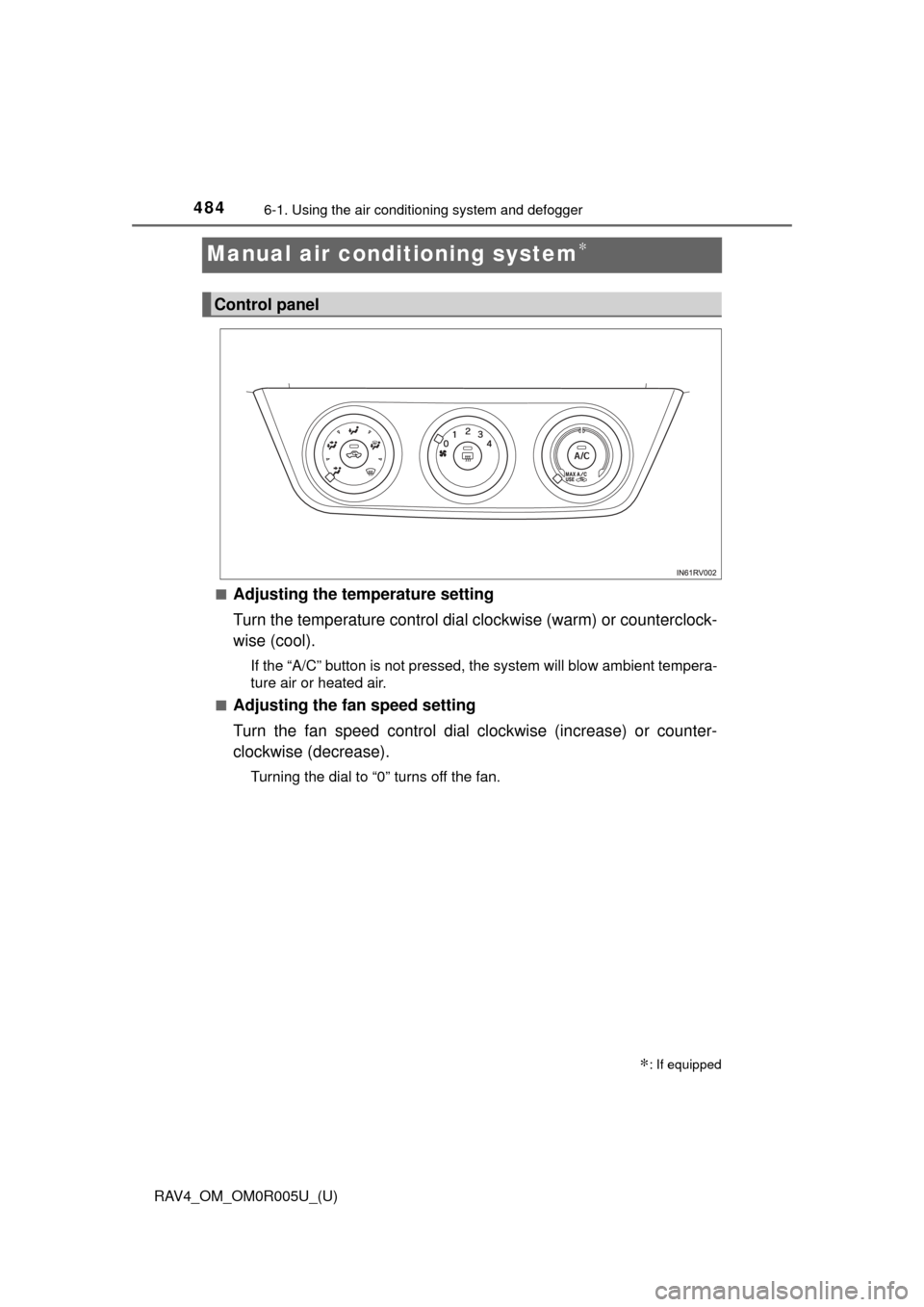
Manual air conditioning system∗
■Adjusting the temperature setting
Turn the temperature control dial clockwise (warm) or counterclock-
wise (cool).
If the “A/C” button is not pressed, the system will blow ambient tempera-
ture air or heated air.
■
Adjusting the fan speed setting
Turn the fan speed control dial clockwise (increase) or counter-
clockwise (decrease).
Turning the dial to “0” turns off the fan.
∗: If equipped
Control panel
Page 486 of 741
RAV4_OM_OM0R005U_(U)
4856-1. Using the air conditioning system and defogger
6
Interior features
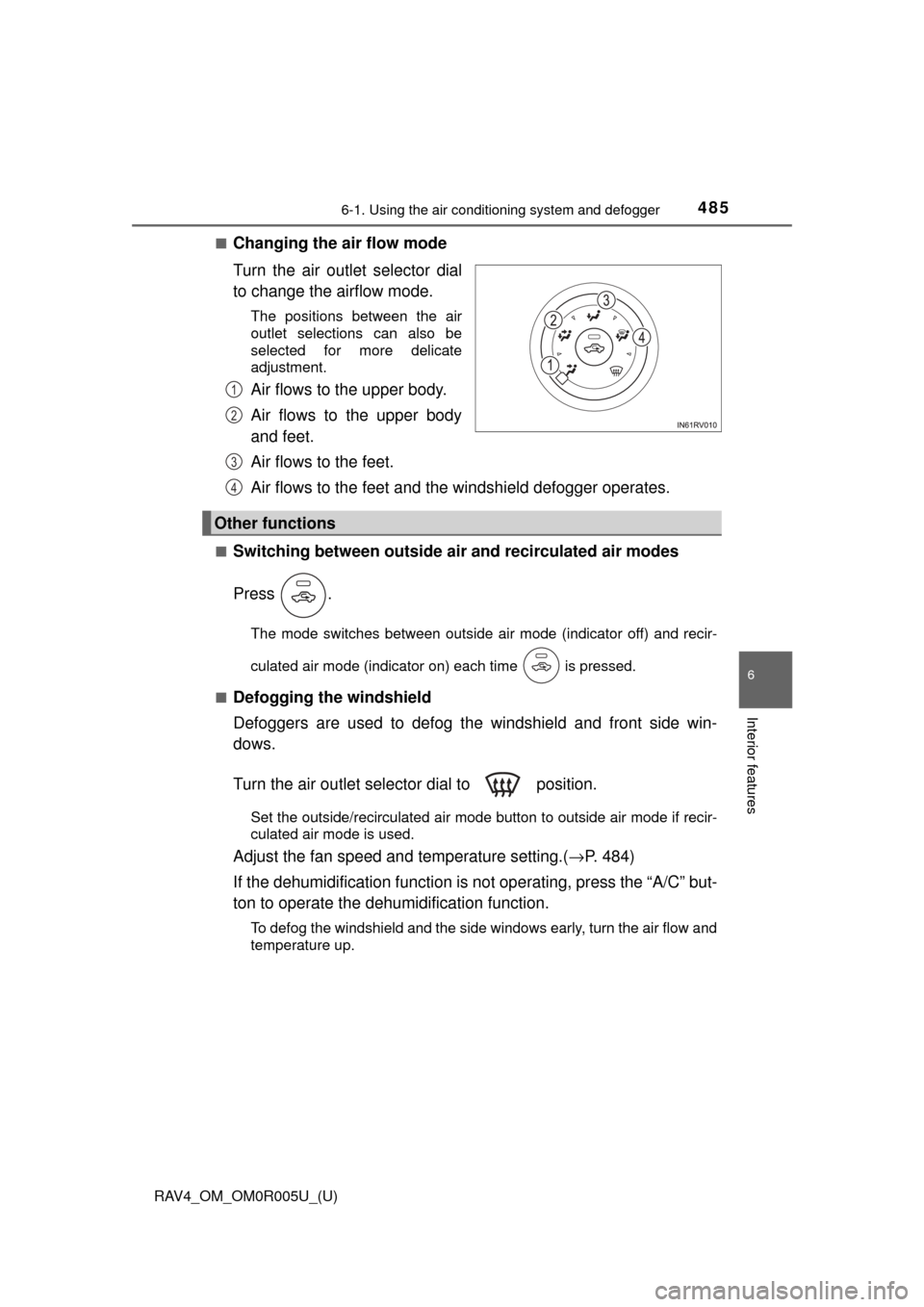
■Changing the air flow mode
Turn the air outlet selector dial
to change the airflow mode.
The positions between the air
outlet selections can also be
selected for more delicate
adjustment.
Air flows to the upper body.
Air flows to the upper body
and feet.
Air flows to the feet.
Air flows to the feet and the windshield defogger operates.
■Switching between outside air and recirculated air modes
Press .
The mode switches between outside air mode (indicator off) and recir-
culated air mode (indicator on) each time is pressed.
■
Defogging the windshield
Defoggers are used to defog the windshield and front side win-
dows.
Turn the air outlet selector dial to position.
Set the outside/recirculated air mode button to outside air mode if recir-
culated air mode is used.
Adjust the fan speed and temperature setting.( →P. 484)
If the dehumidification function is not operating, press the “A/C” but-
ton to operate the dehumi dification function.
To defog the windshield and the side windows early, turn the air flow and
temperature up.
1
2
Other functions
3
4
Page 487 of 741
486
RAV4_OM_OM0R005U_(U)
6-1. Using the air conditioning system and defogger
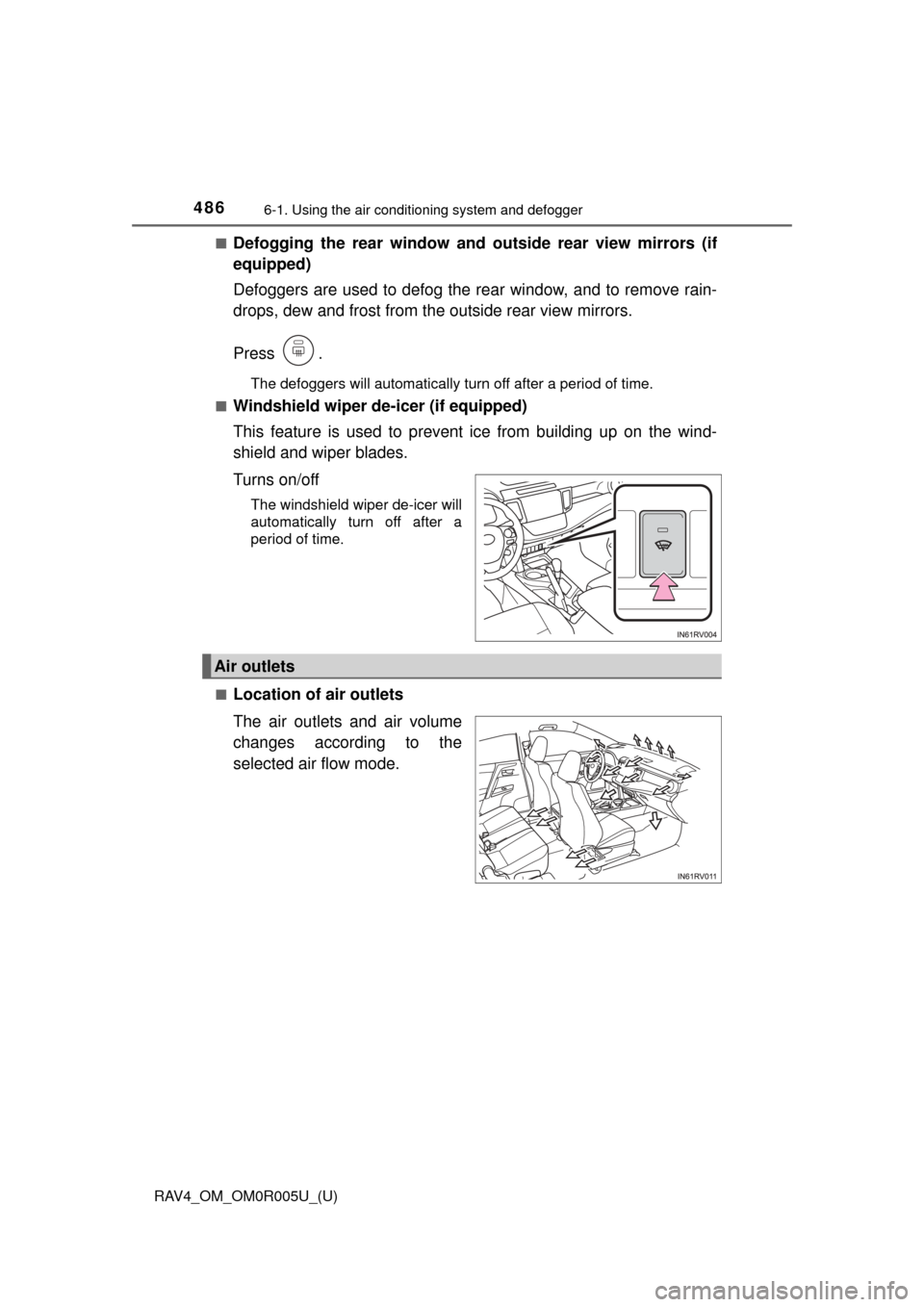
■Defogging the rear window and out side rear view mirrors (if
equipped)
Defoggers are used to defog the rear window, and to remove rain-
drops, dew and frost from the outside rear view mirrors.
Press .
The defoggers will automatically turn off after a period of time.
■
Windshield wiper de-icer (if equipped)
This feature is used to prevent ice from building up on the wind-
shield and wiper blades.
Turns on/off
The windshield wiper de-icer will
automatically turn off after a
period of time.
■
Location of air outlets
The air outlets and air volume
changes according to the
selected air flow mode.
Air outlets