Page 197 of 676
197
RAV4-HV_OM_OM42B03U_(U)
4-1. Before driving
4
Driving
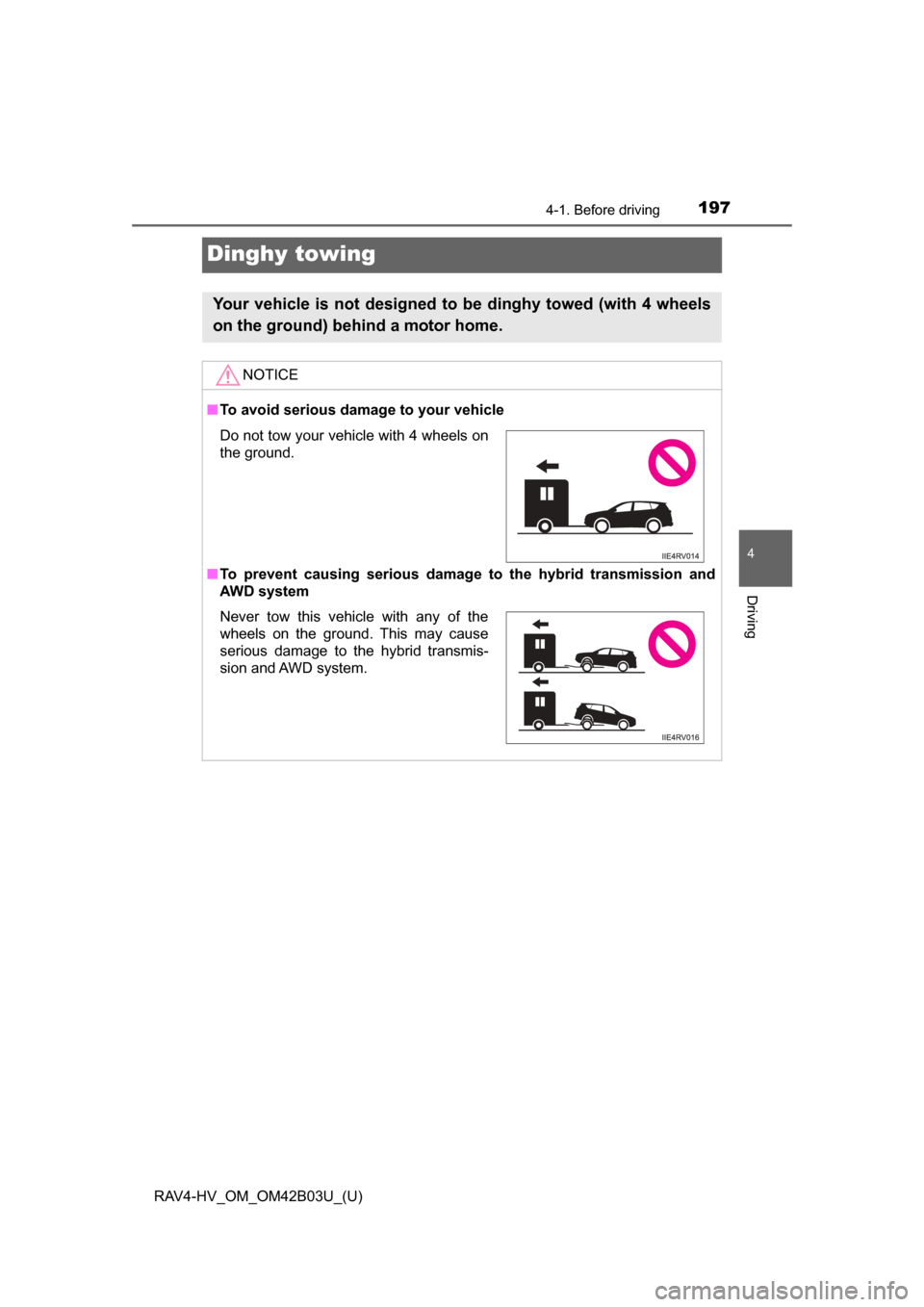
Dinghy towing
Your vehicle is not designed to be dinghy towed (with 4 wheels
on the ground) behind a motor home.
NOTICE
■To avoid serious damage to your vehicle
■ To prevent causing serious damage to the hybrid transmission and
AWD system
Do not tow your vehicle with 4 wheels on
the ground.
Never tow this vehicle with any of the
wheels on the ground. This may cause
serious damage to the hybrid transmis-
sion and AWD system.
Page 201 of 676

RAV4-HV_OM_OM42B03U_(U)
2014-2. Driving procedures
4
Driving
■Steering lock
After turning the power switch off and opening and closing the doors, the
steering wheel will be locked due to the steering lock function. Operating the
power switch again automatically cancels the steering lock.
■ When the steering lock cannot be released
■ Steering lock motor o verheating prevention
To prevent the steering lock motor from overheating, the motor may be sus-
pended if the hybrid system is turned on and off repeatedly in a short period
of time. In this case, refrain from operating the hybrid system. After about 10
seconds, the steering lock motor will resume functioning.
■ When “Check Access System with Elec. Key” is displayed on the multi-
information display
The system may be malfunctioning. Have the vehicle inspected by your Toy-
ota dealer immediately.
■ If the “READY” indicator does not come on
In the event that the “READY” indicator does not come on even after perform-
ing the proper procedures for starting the vehicle, contact your Toyota dealer.
■ If the hybrid system is malfunctioning
→P. 556
■ If the electronic key battery is depleted
→P. 518
■ Operation of the power switch
●If the switch is not pressed shortly and firmly, the power switch mode may
not change or the hybrid system may not start.
● If attempting to restart the hybrid system immediately after turning the power
switch off, the hybrid system may not start in some cases. After turning the
power switch off, please wait a few seconds before restarting the hybrid sys-
tem.
■ If the smart key system has been deactivated in a customized setting
→P. 590 A message will be displayed on the multi-
information display.
Check that the shift lever is set in P. Press
the power switch while turning the steer-
ing wheel left and right.
Page 219 of 676

RAV4-HV_OM_OM42B03U_(U)
2194-3. Operating the lights and wipers
4
Driving
■Camera sensor detection information
●The high beam may not be automatically turned off in the following situa-
tions:
• When oncoming vehicles suddenly appear from a curve
• When the vehicle is cut in front of by another vehicle
• When vehicles ahead are hidden from sight due to repeated curves, road
dividers or roadside trees
• When vehicles ahead appear from the faraway lane on wide road
• When vehicles ahead have no lights
● The high beam may be turned off if vehicles ahead that is using fog lights
without using the headlights is detected.
● House lights, street lights, traffic signals, and illuminated billboards or signs
may cause the high beam to switch to the low beams, or the low beams to
remain on.
● The following factors may affect the amount of time taken to turn the high
beam on or off:
• The brightness of headlights, fog lights, and tail lights of vehicles ahe\
ad
• The movement and direction of vehicles ahead
• When a vehicle ahead only has operational lights on one side
• When a vehicle ahead is a two-wheeled vehicle
• The condition of the road (gradient, curve, condition of the road surface
etc.)
• The number of passengers and amount of luggage
● The high beam may be turned on or off when the driver does not expect it.
● Bicycles or similar objects may not be detected.
Page 243 of 676

RAV4-HV_OM_OM42B03U_(U)
2434-5. Using the driving support systems
4
Driving
WARNING
■Pre-Collision braking
● When the pre-collision braking function is operating, a large amount of
braking force will be applied.
● If the vehicle is stopped by the operation of the pre-collision braking func-
tion, the pre-collision braking func tion operation will be canceled after
approximately 2 seconds. Depress the brake pedal as necessary.
● The pre-collision braking function may not operate if certain operations are
performed by the driver. If the accelerator pedal is being depressed
strongly or the steering wheel is being turned, the system may determine
that the driver is taking evasive action and possibly prevent the pre-colli-
sion braking function from operating.
● In some situations, while the pre-collision braking function is operating,
operation of the function may be canceled if the accelerator pedal is
depressed strongly or the steering wheel is turned and the system deter-
mines that the driver is taking evasive action.
● If the brake pedal is being depressed, the system may determine that the
driver is taking evasive action and possibly delay the operation timing of
the pre-collision braking function.
Page 244 of 676

244
RAV4-HV_OM_OM42B03U_(U)
4-5. Using the driving support systems
WARNING
■When to disable the pre-collision system
In the following situations, disable the system, as it may not operate prop-
erly, possibly leading to an accident resulting in death or serious injury:
● When the vehicle is being towed
● When your vehicle is towing another vehicle
● When transporting the vehicle via truck, boat, train or similar means of
transportation
● When the vehicle is raised on a lift with the hybrid system on and the tires
are allowed to rotate freely
● When inspecting the vehicle using a drum tester such as a chassis dyna-
mometer or speedometer tester, or when using an on vehicle wheel bal-
ancer
● When a strong impact is applied to the front bumper or front grille, due to
an accident or other reasons
● If the vehicle cannot be driven in a stable manner, such as when the vehi-
cle has been in an accident or is malfunctioning
● When the vehicle is driven in a sporty manner or off-road
● When the tires are not properly inflated
● When the tires are very worn
● When tires of a size other than specified are installed
● When tire chains are installed
● When a compact spare tire is used
● If equipment (snow plow, etc.) that may obstruct the radar sensor or cam-
era sensor is temporarily installed to the vehicle
Page 249 of 676

RAV4-HV_OM_OM42B03U_(U)
2494-5. Using the driving support systems
4
Driving
■Cancelation of the pre-collision braking
If either of the following occur while the pre-collision braking function is oper-
ating, it will be canceled:
●The accelerator pedal is depressed strongly.
● The steering wheel is turned sharply or abruptly.
■ Conditions under which the system ma y operate even if there is no pos-
sibility of a collision
● In some situations such as the following, the system may determine that
there is a possibility of a frontal collision and operate.
• When passing a vehicle or pedestrian
*2
• When changing lanes while overtaking a preceding vehicle
• When overtaking a preceding vehicle that is changing lanes
• When overtaking a preceding vehicle
that is making a left/right turn
• When passing a vehicle in an oncom- ing lane that is stopped to make a
right/left turn
• When driving on a road where relative location to vehicle ahead in an adja-
cent lane may change, such as on a
winding road
Page 252 of 676

252
RAV4-HV_OM_OM42B03U_(U)
4-5. Using the driving support systems
• If a vehicle ahead is irregularly shaped, such as a tractor or side car
• If the sun or other light is shining directly on a vehicle ahead
• If a vehicle cuts in front of your vehicle or emerges from beside a vehicle
• If a vehicle ahead makes an abrupt maneuver (such as sudden swerving,
acceleration or deceleration)
• When suddenly cutting behind a preceding vehicle
• When driving in inclement weather such as heavy rain, fog, snow or a sandstorm
• When the vehicle is hit by water, snow, dust, etc. from a vehicle ahead
• When driving through steam or smoke
• When driving in a place where the surrounding brightness changes sud- denly, such as at the entrance or exit of a tunnel
• When a very bright light, such as the sun or the headlights of oncoming traffic, shines directly into the camera sensor
• When the surrounding area is dim, such as at dawn or dusk, or while at night or in a tunnel
• After the hybrid system has started the vehicle has not been driven for a
certain amount of time
• While making a left/right turn and for a few seconds after making a left/ right turn
• While driving on a curve and for a few seconds after driving on a curve
• If your vehicle is skidding
• If the wheels are misaligned • If a vehicle ahead has extremely high ground clearance
• When a vehicle ahead is not directly in front of your vehicle
• If the front of the vehicle is raised or lowered
Page 253 of 676

RAV4-HV_OM_OM42B03U_(U)
2534-5. Using the driving support systems
4
Driving
• If a wiper blade is blocking the camera sensor
• The vehicle is wobbling.
• The vehicle is being driven at extremely high speeds.
• When driving on a hill
• If the radar sensor or camera sensor is misaligned
● In some situations such as the following, sufficient braking force may not be
obtained, preventing the system from performing properly:
• If the braking functions cannot operate to their full extent, such as when
the brake parts are extremely cold, extremely hot, or wet
• If the vehicle is not properly maintained (brakes or tires are excessively worn, improper tire inflation pressure, etc.)
• When the vehicle is being driven on a gravel road or other slippery sur- face
● Some pedestrians such as the following may not be detected by the radar
sensor and camera sensor, preventing the system from operating prop-
erly
*2:
• Pedestrians shorter than approximately 3.2 ft. (1 m) or taller than approx- imately 6.5 ft. (2 m)
• Pedestrians wearing oversized clothing (a rain coat, long skirt, etc.), mak- ing their silhouette obscure
• Pedestrians who are carrying large baggage, holding an umbrella, etc.,
hiding part of their body
• Pedestrians who are bending forward or squatting
• Pedestrians who are pushing a stroller, wheelchair, bicycle or other vehi-
cle
• Groups of pedestrians which are close together
• Pedestrians who are wearing white and look extremely bright
• Pedestrians in the dark, such as at night or while in a tunnel
• Pedestrians whose clothing appears to be nearly the same color or
brightness as their surroundings
• Pedestrians near walls, fences, guardrails, or large objects
• Pedestrians who are on a metal object (manhole cover, steel plate, etc.)
on the road
• Pedestrians who are walking fast
• Pedestrians who are changing speed abruptly
• Pedestrians running out from behind a vehicle or a large object
• Pedestrians who are extremely close to the side of the vehicle (outside rear view mirror, etc.)
*2: For countries/areas specified as Region B ( →P. 240), the pedestrian
detection function may not be available.