Page 423 of 624

PRIUS v_OM_OM47B23U_(U)
4237-3. Do-it-yourself maintenance
7
Maintenance and care
Washer fluid
(P. 440)• Water or washer fluid containing antifreeze (for win-
ter use)
• Funnel (used only for adding water or washer fluid)
WARNING
The engine compartment contains many mechanisms and fluids that may
move suddenly, become hot, or become electrically energized. To avoid death
or serious injury, observe the following precautions.
■ When working on the engine compartment
●Make sure that the “POWER ON” on the multi-information display or the
smart key system indicator, and the “READY” indicator are both off.
● Keep hands, clothing and tools away from the moving fan.
● Be careful not to touch the engine, power control unit, radiator, exhaust
manifold, etc. right after driving as they may be hot. Oil and other fluids
may also be hot.
● Do not leave anything that may burn easily, such as paper and rags, in the
engine compartment.
● Do not smoke, cause sparks or expose an open flame to fuel. Fuel fumes
are flammable.
■ When working near the electric cooling fans or radiator grille
Be sure the power switch is off.
With the power switch in ON mode, t he electric cooling fans may automati-
cally start to run if the air conditioning is on and/or the coolant temperature
is high. ( P. 436)
■ Safety glasses
Wear safety glasses to prevent flying or falling material, fluid spray, etc.
from getting in your eyes.
NOTICE
■If you remove the air cleaner filter
Driving with the air cleaner filter removed may cause excessive engine wear
due to dirt in the air.
ItemsParts and tools
Page 443 of 624

PRIUS v_OM_OM47B23U_(U)
4437-3. Do-it-yourself maintenance
7
Maintenance and care
Make sure that the 12-volt battery terminals are not corroded and that
there are no loose connections, cracks, or loose clamps.
Terminals
Hold-down clamp
■ Before recharging
When recharging, the 12-volt battery produces hydrogen gas which is flam-
mable and explosive. Therefore, observe the following precautions before
recharging:
●If recharging with the 12-volt battery installed on the vehicle, be sure to dis-
connect the ground cable.
● Make sure the power switch on the charger is off when connecting and dis-
connecting the charger cables to the 12-volt battery.
■ After recharging/reconnecting the 12-volt battery
●Unlocking the doors using the smart key system may not be possible imme-
diately after reconnecting the 12-volt battery. If this happens, use the wire-
less remote control or the mechanical key to lock/unlock the doors.
● Start the hybrid system with the power switch in ACCESSORY mode. The
hybrid system may not start with the power switch turned off. However, the
hybrid system will operate normally from the second attempt.
● The power switch mode is recorded by the vehicle. If the 12-volt battery is
reconnected, the vehicle will return the power switch mode to the status it
was in before the 12-volt battery was disconnected. Make sure to turn off
the power before disconnect the 12-volt battery. Take extra care when con-
necting the 12-volt battery if the power switch mode prior to discharge is
unknown.
● Restart the hybrid system, depress the brake pedal, and confirm that it is
possible to shift into each shift position.
If the system will not start even after multiple attempts at all methods above,
contact your Toyota dealer.
Exterior
1
2
Page 464 of 624
464
PRIUS v_OM_OM47B23U_(U)
7-3. Do-it-yourself maintenance
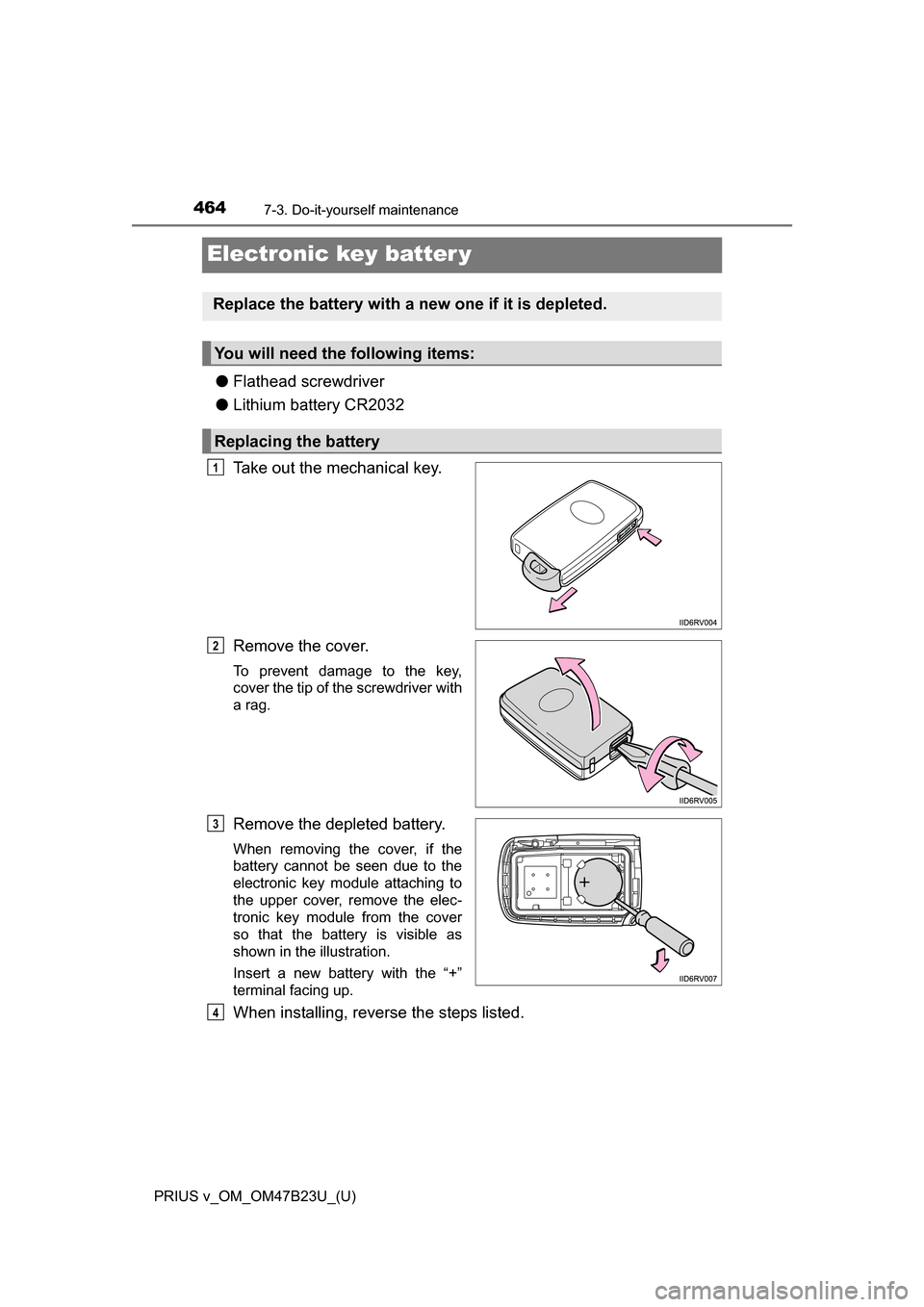
Electronic key batter y
●Flathead screwdriver
● Lithium battery CR2032
Take out the mechanical key.
Remove the cover.
To prevent damage to the key,
cover the tip of the screwdriver with
a rag.
Remove the depleted battery.
When removing the cover, if the
battery cannot be seen due to the
electronic key module attaching to
the upper cover, remove the elec-
tronic key module from the cover
so that the battery is visible as
shown in the illustration.
Insert a new battery with the “+”
terminal facing up.
When installing, reverse the steps listed.
Replace the battery with a new one if it is depleted.
You will need the following items:
Replacing the battery
1
2
3
4
Page 465 of 624

PRIUS v_OM_OM47B23U_(U)
4657-3. Do-it-yourself maintenance
7
Maintenance and care
■Use a CR2032 lithium battery
●Batteries can be purchased at your Toyota dealer, local electrical appliance
shops or camera stores.
● Replace only with the same or equivalent type recommended by the manu-
facturer.
● Dispose of used batteries according to the local laws.
■ If the electronic key battery is depleted
The following symptoms may occur:
●The smart key system and wireless remote control will not function properly.
● The operational range will be reduced.
WARNING
■ Removed battery and other parts
These parts are small and if swallowed by a child, they can cause choking.
Keep away from children. Failure to do so could result in death or serious
injury.
NOTICE
■For normal operation after replacing the battery
Observe the following precautions to prevent accidents:
●Always work with dry hands.
Moisture may cause the battery to rust.
● Do not touch or move any other component inside the remote control.
● Do not bend either of the battery terminals.
Page 483 of 624
483
PRIUS v_OM_OM47B23U_(U)
8When trouble arises
8-1. Essential informationEmergency flashers .......... 484
If your vehicle has to be stopped in an
emergency ...................... 485
8-2. Steps to take in an emergency
If your vehicle needs to be towed ......................... 486
If you think something is wrong .............................. 491
If a warning light turns on or a warning buzzer
sounds ............................ 492
If a warning message is displayed ......................... 506
If you have a flat tire.......... 524
If the hybrid system will not start ........................... 537
If the electronic key does not operate properly........ 539
If the 12-volt battery is discharged ...................... 541
If your vehicle overheats ... 546
If the vehicle becomes stuck ............................... 551
Page 486 of 624

486
PRIUS v_OM_OM47B23U_(U)
8-2. Steps to take in an emergency
If your vehicle needs to be towed
In the following situations, it is not possible to be towed by another
vehicle using cables or chains, as the front wheels may be locked due
to the parking lock. Contact your Toyota dealer or commercial towing
service.
●There is a malfunction in the shift control system. ( P. 494, 508)
● There is a malfunction in the immobilizer system. ( P. 83)
● There is a malfunction in the smart key system. ( P. 539)
● The 12-volt battery is discharged. ( P. 541)
The following may indicate a problem with your hybrid transmission.
Contact your Toyota dealer or commercial towing service before tow-
ing.
● The hybrid system warning light turns on or the hybrid system
warning message is displayed on the multi-information display and
the vehicle does not move.
● The vehicle makes an abnormal sound.
Do not tow with a sling-type truck
to prevent body damage.
If towing is necessary, we re commend having your vehicle
towed by your Toyota dealer or commercial towing service,
using a wheel-lift type tr uck or flat bed truck.
Use a safety chain system for all towing, and abide by all state/
provincial and local laws.
Situations when it is not possibl e to be towed by another vehicle
Situations when it is necessary to contact dealers before towing
Towing with a sling-type truck
Page 503 of 624

5038-2. Steps to take in an emergency
PRIUS v_OM_OM47B23U_(U)
8
When trouble arises
After taking the specified steps to correct the suspected problem,
check that the smart key system warning light or the smart key system
indicator light turn off.
Follow the correction procedures. (vehicles without multi-infor-
mation display)
Interior buzzerExterior buzzerWarning lightWarning light/DetailsCorrection procedure
Continuous Continuous
(Flashes in yellow)
Smart key system
warning light
The electronic key was
carried outside the
vehicle and the
driver’s door was
opened and closed
while any shift posi-
tion other than P was
selected without turn-
ing off the power
switch. • Change the
shift position to
P.
• Bring the elec- tronic key back
into the vehicle.
Once3 times
(Flashes in yellow)
Smart key system
warning light
The electronic key was
carried outside the
vehicle and the
driver’s door was
opened and closed
while the shift position
P was selected without
turning off the power
switch.
Turn the power
switch off or bring
the electronic key
back into the vehi-
cle.
Page 504 of 624

5048-2. Steps to take in an emergency
PRIUS v_OM_OM47B23U_(U)
Once3 times
(Flashes in yellow)
Smart key system
warning light
Indicates that a door
other than the driver’s
door has been opened
and closed with the
power switch in any
mode other than off
and the electronic key
outside of the detec-
tion area.
Confirm the loca-
tion of the elec-
tronic key.
OnceContinuous
(5 seconds)
(Flashes in yellow)
Smart key system
warning light
An attempt was made
to exit the vehicle with
the electronic key and
lock the doors without
first turning the power
switch off.
Turn the power
switch off and
lock the doors
again.
Once(Flashes in
yellow for 15 seconds)
Smart key system
warning light
Indicates that the elec-
tronic key is not
present when attempt-
ing to start the engine.
Confirm the loca-
tion of the elec-
tronic key.
9 times
(Flashes in yellow)
Smart key system
warning light
An attempt was made
to drive when the regu-
lar key was not inside
the vehicle.
Confirm that the
electronic key is
inside the vehicle.
InteriorbuzzerExterior buzzerWarning lightWarning light/DetailsCorrection procedure