Page 565 of 784
PRIUS PRIME_OM_OM47A88U_(U)
5657-1. Maintenance and care
7
Maintenance and care
WARNING
■Water in the vehicle
● Do not splash or spill liquid in the vehicle, such as on the floor, in the
hybrid battery (traction battery) air intake vent, and in the luggage com-
partment.
Doing so may cause the hybrid battery (traction battery), electrical compo-
nents, etc. to malfunction or catch fire.
● Do not get any of the SRS components or wiring in the vehicle interior wet.
(→P. 38)
An electrical malfunction may cause the airbags to deploy or not function
properly, resulting in death or serious injury.
● Vehicles with wireless charger:
Do not let the wireless charger ( →P. 532) get wet. Failure to do so may
cause the charger to become hot and cause burns or could cause electric
shock resulting in death or serious injury.
■ Cleaning the interior (especially instrument panel)
Do not use polish wax or polish cleaner. The instrument panel may reflect
off the windshield, obstructing the driver’s view and leading to an accident,
resulting in death or serious injury.
NOTICE
■Cleaning detergents
● Do not use the following types of detergent, as they may discolor the vehi-
cle interior or cause streaks or damage to painted surfaces:
• Non-seat portions: Organic substances such as benzene or gasoline,
alkaline or acidic solutions, dye, and bleach
• Seats: Alkaline or acidic solutions, such as thinner, benzene, and alco- hol
● Do not use polish wax or polish cleaner. The instrument panel’s or other
interior part’s painted surface may be damaged.
■ Preventing damage to leather surfaces
Observe the following precautions to avoid damage to and deterioration of
leather surfaces:
● Remove any dust or dirt from leather surfaces immediately.
● Do not expose the vehicle to direct sunlight for extended periods of time.
Park the vehicle in the shade, especially during summer.
● Do not place items made of vinyl, plastic, or containing wax on the uphol-
stery, as they may stick to the leather surface if the vehicle interior heats
up significantly.
Page 599 of 784

PRIUS PRIME_OM_OM47A88U_(U)
5997-3. Do-it-yourself maintenance
7
Maintenance and care
■Situations in which the tire pressure warning system may not oper-
ate properly
●In the following cases, the tire pressure warning system may not operate
properly.
• If non-genuine Toyota wheels are used.
• When a replacement tire is used , the system may not operate cor-
rectly due to the structure of the replacement tire.
• A tire has been replaced with a tire that is not of the specified size.
• Tire chains etc. are equipped.
• An auxiliary-supported run- flat tire is equipped.
• If a window tint that affects the radio wave signals is installed.
• If there is a lot of snow or ice on the vehicle, particularly around the wheels or wheel housings.
• If the tire inflation pressure is extremely higher than the specified level.
• If wheel without the tire pressure warning valve and transmitter is
used.
• If the ID code on the tire pressure warning valves and transmitters is not registered in the tire pressure warning computer.
●Performance may be affected in the following situations.
• Near a TV tower, electric power plant, gas station, radio station, largedisplay, airport or other facility that generates strong radio waves or
electrical noise
• When carrying a portable radio, cellular phone, cordless phone or other wireless communication device
●When the vehicle is parked, the time taken for the warning to start or go
off could be extended.
●When tire inflation pressure declines rapidly for example when a tire has
burst, the warning may not function.
■The initialization operation
●Make sure to carry out in itialization after adjusting the tire inflation pres-
sure.
Also, make sure the tires are cold be fore carrying out initialization or tire
inflation pressure adjustment.
●If you have accidentally turned the po wer switch off during initialization,
it is not necessary to press the reset switch again as initialization will
restart automatically when the powe r switch has been turned to ON
mode for the next time.
●If you accidentally press the reset s witch when initialization is not neces-
sary, adjust the tire inflation pressu re to the specified level when the
tires are cold, and conduct initialization again.
Page 628 of 784
628
PRIUS PRIME_OM_OM47A88U_(U)
7-3. Do-it-yourself maintenance
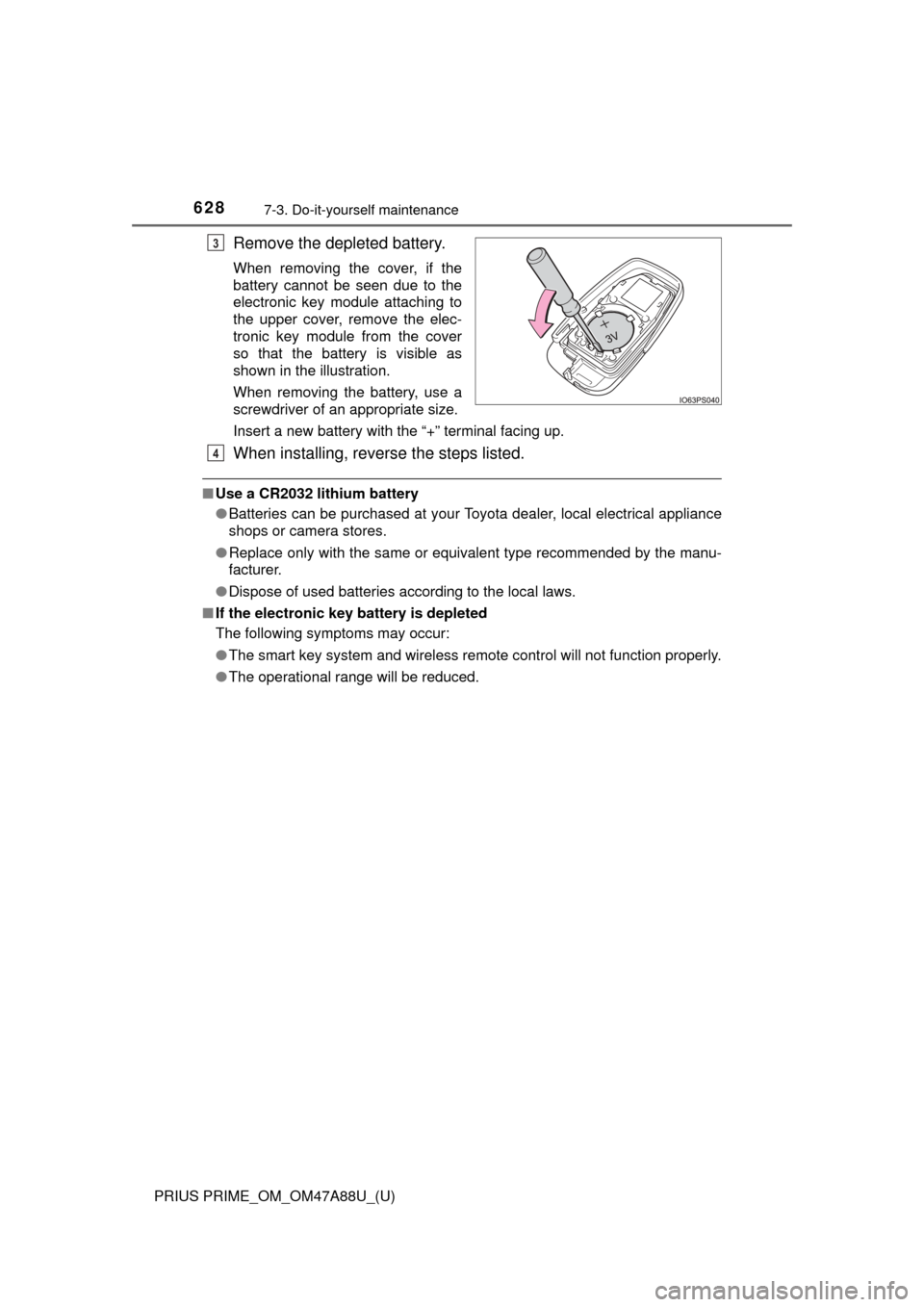
Remove the depleted battery.
When removing the cover, if the
battery cannot be seen due to the
electronic key module attaching to
the upper cover, remove the elec-
tronic key module from the cover
so that the battery is visible as
shown in the illustration.
When removing the battery, use a
screwdriver of an appropriate size.
Insert a new battery with the “+” terminal facing up.
When installing, reverse the steps listed.
■Use a CR2032 lithium battery
●Batteries can be purchased at your Toyota dealer, local electrical appliance
shops or camera stores.
● Replace only with the same or equivalent type recommended by the manu-
facturer.
● Dispose of used batteries according to the local laws.
■ If the electronic key battery is depleted
The following symptoms may occur:
●The smart key system and wireless remote control will not function properly.
● The operational range will be reduced.
3
4
Page 690 of 784
690
PRIUS PRIME_OM_OM47A88U_(U)
8-2. Steps to take in an emergency
If the electronic key does not operate
properly
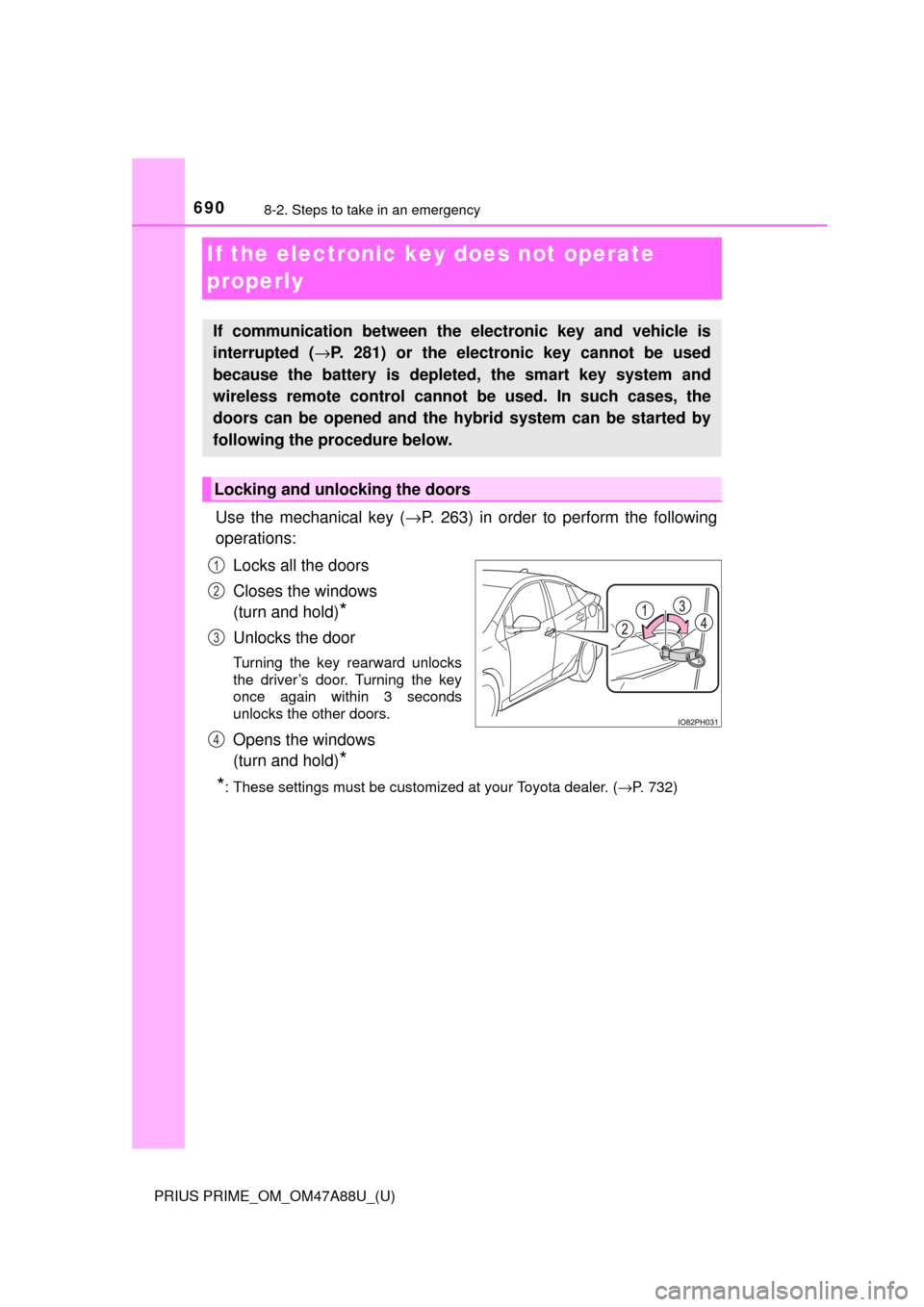
Use the mechanical key (→P. 263) in order to perform the following
operations:
Locks all the doors
Closes the windows
(turn and hold)
*
Unlocks the door
Turning the key rearward unlocks
the driver’s door. Turning the key
once again within 3 seconds
unlocks the other doors.
Opens the windows
(turn and hold)
*
*
: These settings must be customized at your Toyota dealer. ( →P. 732)
If communication between the electronic key and vehicle is
interrupted ( →P. 281) or the electronic key cannot be used
because the battery is depleted, the smart key system and
wireless remote control cannot be used. In such cases, the
doors can be opened and the hybrid system can be started by
following the procedure below.
Locking and unlocking the doors
1
2
3
4
Page 697 of 784

6978-2. Steps to take in an emergency
PRIUS PRIME_OM_OM47A88U_(U)
8
When trouble arises
■When recharging or repl acing the 12-volt battery
● In some cases, it may not be possible to unlock the doors using the smart
key system when the 12-volt battery is discharged. Use the wireless remote
control or the mechanical key to lock or unlock the doors.
● The hybrid system may not start on the first attempt after the 12-volt battery
has recharged but will start normally after the second attempt. This is not a
malfunction.
● Vehicles with smart lid & connector locking system:
It may be impossible to unlock the charging port lid or locking and unlocking
the charging connector immediately after the 12-volt battery is reconnected.
In this case, carry the electronic key on your person and operate the
charging port lid or charging connector lock switch again.
● The power switch mode is memorized by the vehicle. When the 12-volt bat-
tery is reconnected, the system will return to the mode it was in before the
12-volt battery was discharged. Before disconnecting the 12-volt battery,
turn the power switch off.
If you are unsure what mode the power switch was in before the 12-volt bat-
tery discharged, be especially careful when reconnecting the 12-volt battery.
● If the 12-volt battery discharges while the shift position is in P, it may not be
possible to shift the shift position to other positions. In this case, the vehicle
cannot be towed without lifting both front wheels because the front whee\
ls
will be locked. ( →P. 646)
■ When exchanging the 12-volt battery
●Use a 12-volt battery that conforms to European regulations.
● Use a 12-volt battery that the case size is same as the previous one (LN1),
20 hour rate capacity (20HR) is equivalent (45Ah) or greater, and perfor-
mance rating (CCA) is equivalent (295A) or greater.
• If the sizes differ, the 12-volt battery cannot be properly secured.
• If the 20 hour rate capacity is low, even if the time period where the vehi-
cle is not used is a short time, the 12-volt battery may discharge and the
hybrid system may not be able to start.
● For details, consult your Toyota dealer.
Page 735 of 784
PRIUS PRIME_OM_OM47A88U_(U)
7359-2. Customization
9
Vehicle specifications
■HUD (Head-up display)* (→ P. 238)
*: If equipped
■
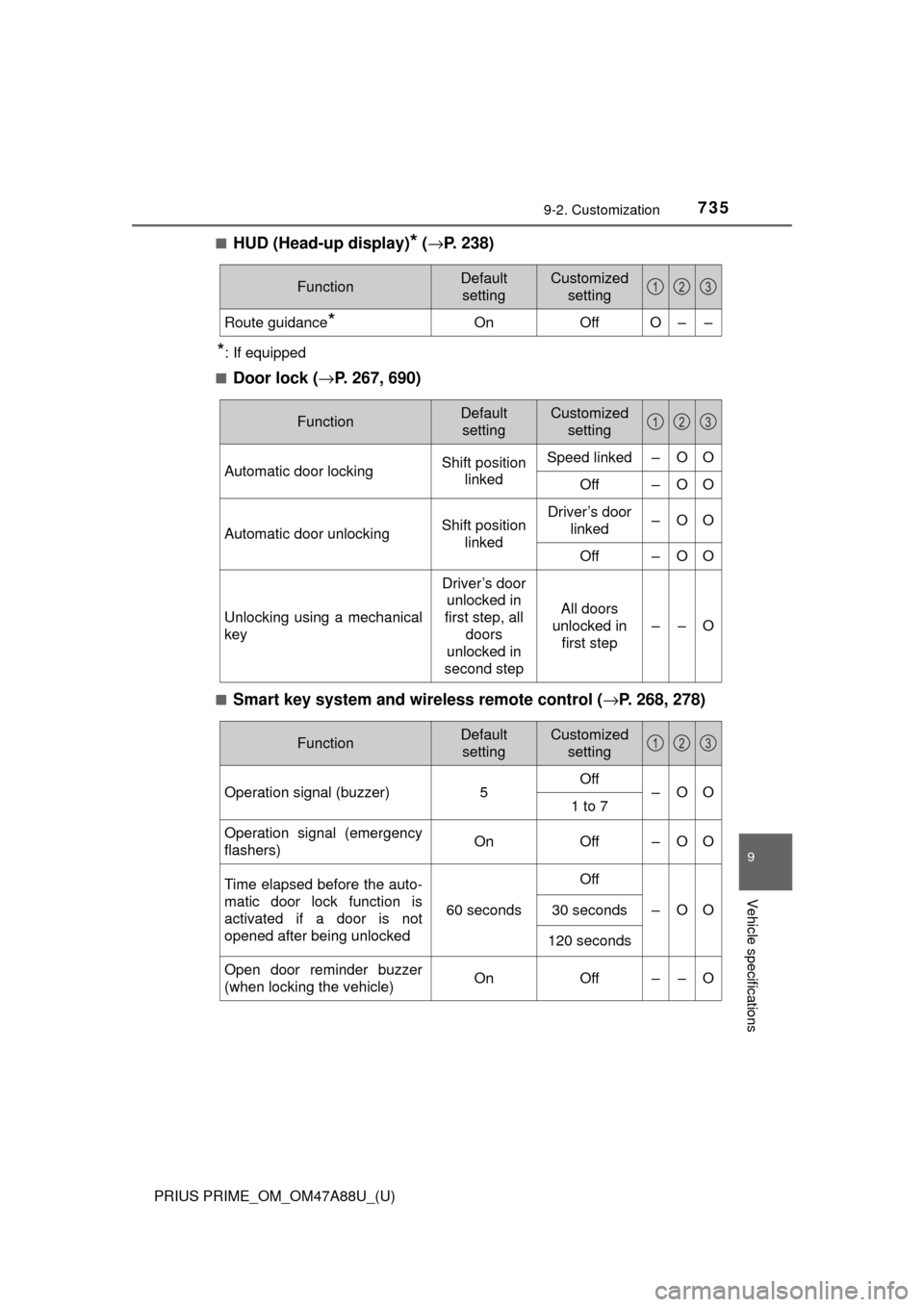
Door lock ( →P. 267, 690)
■Smart key system and wireless remote control ( →P. 268, 278)
FunctionDefault
settingCustomized setting
Route guidance*OnOffO––
123
FunctionDefault settingCustomized setting
Automatic door lockingShift position linkedSpeed linked–OO
Off–OO
Automatic door unlockingShift position linkedDriver’s door linked–OO
Off–OO
Unlocking using a mechanical
key
Driver’s door unlocked in
first step, all
doors
unlocked in
second step
All doors
unlocked in first step
––O
123
FunctionDefault settingCustomized setting
Operation signal (buzzer) 5Off
–OO
1 to 7
Operation signal (emergency
flashers) On
Off – O O
Time elapsed before the auto-
matic door lock function is
activated if a door is not
opened after being unlocked
60 seconds
Off
–OO30 seconds
120 seconds
Open door reminder buzzer
(when locking the vehicle)OnOff––O
123
Page 736 of 784
736
PRIUS PRIME_OM_OM47A88U_(U)
9-2. Customization
■Smart key system (→P. 278)
*: This function can also be changed using the wireless remote control.
(→P. 271)
■
Wireless remote control ( →P. 268)
FunctionDefault
settingCustomized setting
Smart door unlocking*Driver’s doorAll the doors–OO
Smart key systemOnOff––O
Time elapsed before unlock-
ing all the door when gripping
and holding the driver’s door
handle
2 seconds
Off
––O1.5 seconds
2.5 seconds
Number of consecutive door
lock operations2 timesAs many as
desired––O
123
FunctionDefault settingCustomized setting
Unlocking operation
Driver’s door unlocked in
first step, all
doors
unlocked in
second step
All doors
unlocked in first step
–OO
Wireless remote control On Off – – O
Locking operation when door
opened On Off – – O
123
Page 737 of 784
PRIUS PRIME_OM_OM47A88U_(U)
7379-2. Customization
9
Vehicle specifications
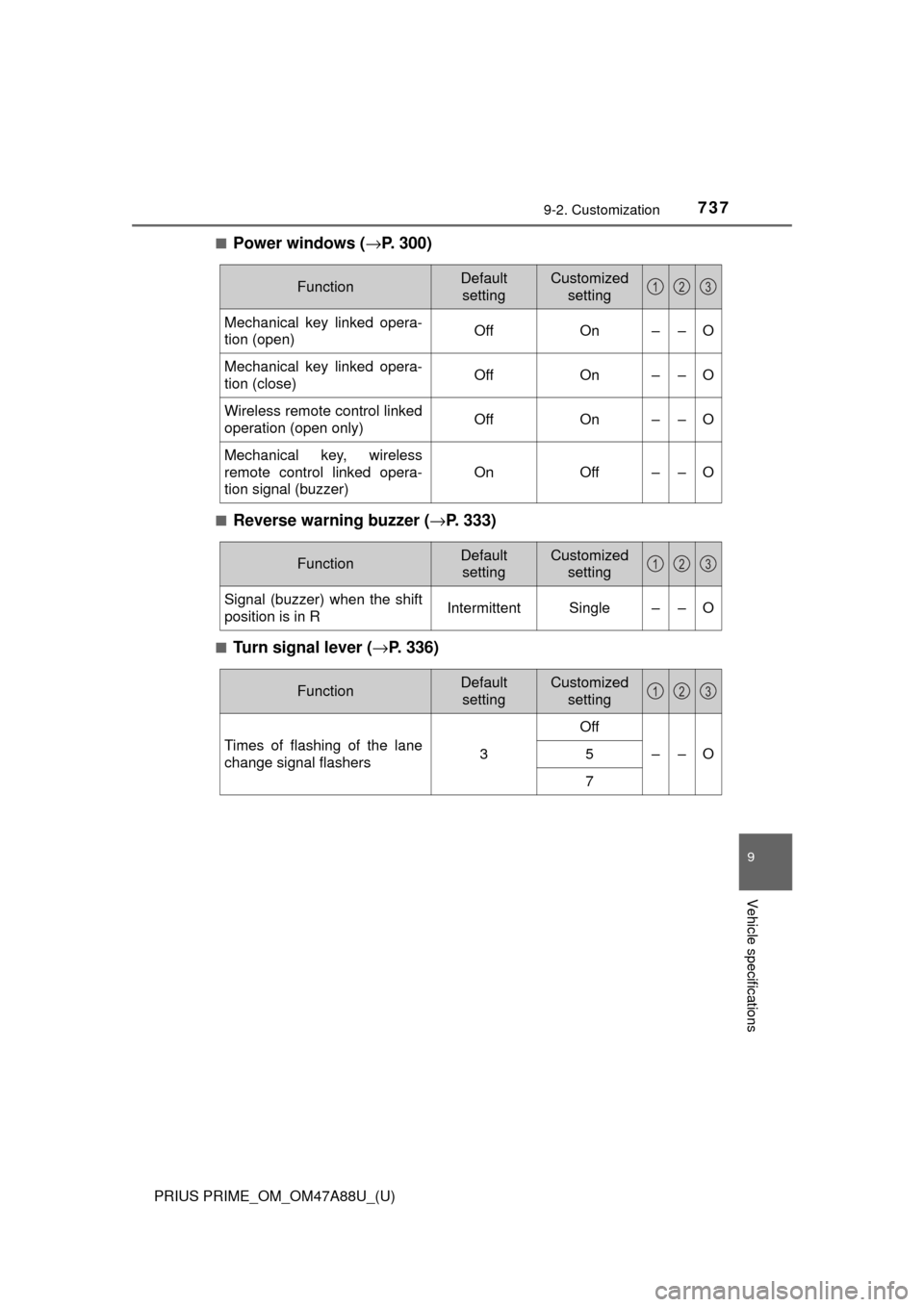
■Power windows (→P. 300)
■Reverse warning buzzer (→ P. 333)
■Turn signal lever (→P. 336)
FunctionDefault
settingCustomized setting
Mechanical key linked opera-
tion (open)OffOn––O
Mechanical key linked opera-
tion (close)OffOn––O
Wireless remote control linked
operation (open only)OffOn––O
Mechanical key, wireless
remote control linked opera-
tion signal (buzzer)
OnOff––O
123
FunctionDefault settingCustomized setting
Signal (buzzer) when the shift
position is in RIntermittentSingle––O
123
FunctionDefault settingCustomized setting
Times of flashing of the lane
change signal flashers3
Off
––O5
7
123