Page 179 of 796

PRIUS_OM_OM47B54U_(U)
1793-2. Opening, closing and locking the doors
3
Operation of each component
■Note for the entry function
●Even when the electronic key is within the effective range (detection areas),
the system may not operate properly in the following cases:
• The electronic key is too close to the window or outside door handle, near
the ground, or in a high place when the doors are locked or unlocked.
• The electronic key is on the instrument panel, floor, or in the door pockets
or glove box when the hybrid system is started or power switch modes
are changed.
● Do not leave the electronic key on top of the instrument panel or near t\
he
door pockets when exiting the vehicle. Depending on the radio wave recep-
tion conditions, it may be detected by the antenna outside the cabin and the
door will become lockable from the out side, possibly trapping the electronic
key inside the vehicle.
● As long as the electronic key is within the effective range, the doors may be
unlocked or locked by anyone.
● Even if the electronic key is not inside the vehicle, it may be possible to start
the hybrid system if the electronic key is near the window.
● The doors may unlock if a large amount of water splashes on the door han-
dle, such as in the rain or in a car wash when the electronic key is within the
effective range. (The door will automatically be locked after approximately
60 seconds if the doors are not opened and closed.)
● If the wireless remote control is used to lock the doors when the electronic
key is near the vehicle, there is a possibility that the door may not be
unlocked by the entry function. (Use the wireless remote control to unlock
the doors.)
● Touching the door lock sensor while wearing gloves may delay or prevent
lock operation. Remove the gloves and touch the lock sensor again.
● When the lock operation is performed using the lock sensor, recognition sig-
nals will be shown up to two consecutive times. After this, no recognition
signals will be given.
● If the door handle becomes wet while the electronic key is within the effec-
tive range, the door may lock and unlock repeatedly. In this case, follow the
following correction procedures to wash the vehicle.
• Place the electronic key in a location 6 ft. (2 m) or more away from the
vehicle. (Take care to ensure that the key is not stolen.)
• Set electronic key to battery-saving mode to disable the smart key sys-
tem. ( →P. 178)
● If the electronic key is inside the vehicle and a door handle becomes wet
during a car wash, a message may be shown on the multi-information dis-
play and a buzzer will sound outside the vehicle. To turn off the alarm, lock
all the doors.
Page 183 of 796

PRIUS_OM_OM47B54U_(U)
1833-2. Opening, closing and locking the doors
3
Operation of each component
WARNING
■Caution regarding interfer ence with electronic devices
● People with implantable cardiac pacemakers, cardiac resynchronization
therapy-pacemakers or implantable card ioverter defibrillators should keep
away from the smart key system antennas. ( →P. 176)
The radio waves may affect the operation of such devices. If necessary,
the entry function can be disabled. Ask your Toyota dealer for details, such
as the frequency of radio waves and timing of the emitted radio waves.
Then, consult your doctor to see if you should disable the entry function.
● Users of any electrical medical device other than implantable cardiac
pacemakers, cardiac resynchronization therapy-pacemakers or implant-
able cardioverter defibrillators should consult the manufacturer of the
device for information about its operation under the influence of radio
waves.
Radio waves could have unexpected effects on the operation of such
medical devices.
Ask your Toyota dealer for details on disabling the entry function.
Page 282 of 796
282
PRIUS_OM_OM47B54U_(U)
4-5. Using the driving support systems
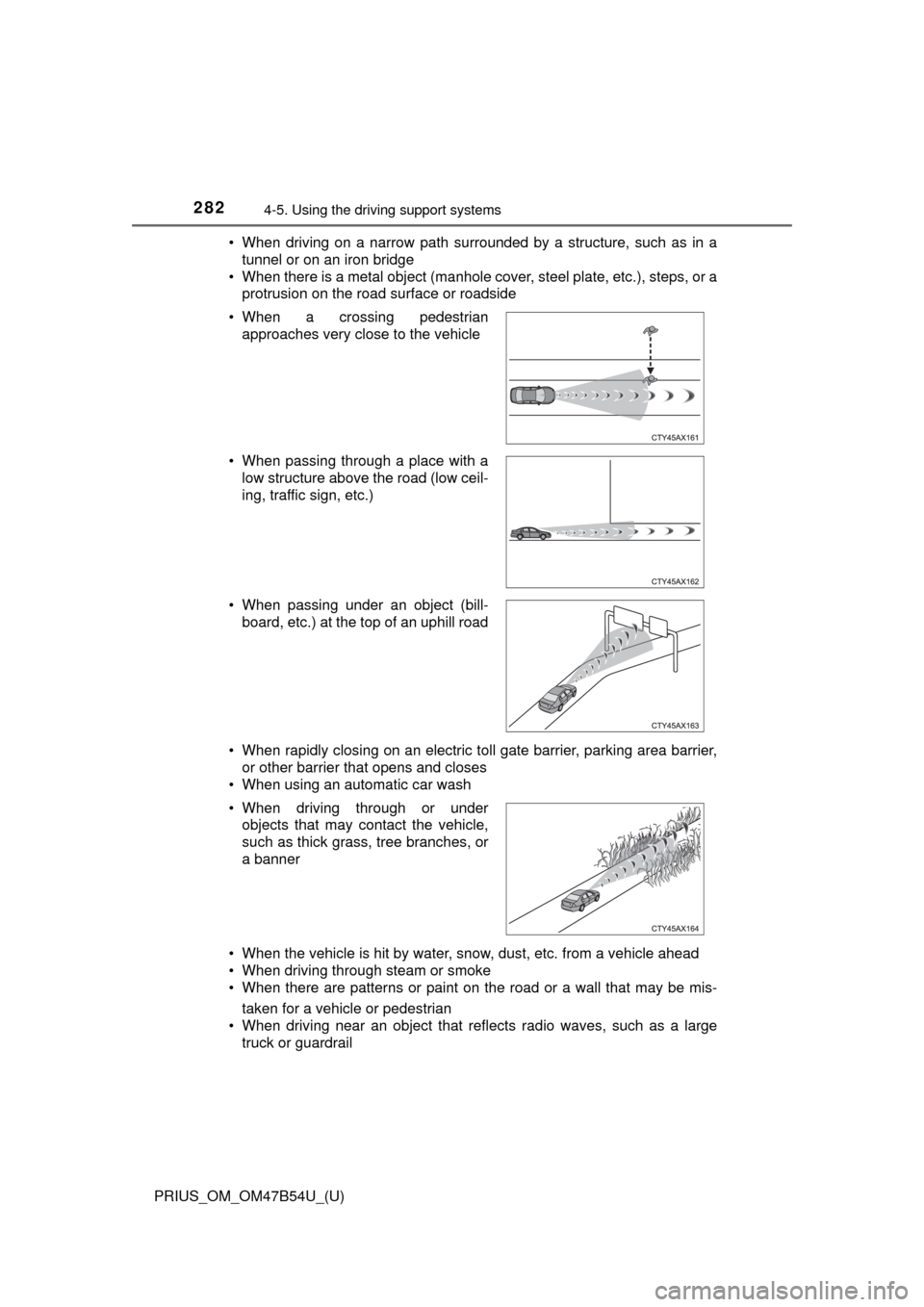
• When driving on a narrow path surrounded by a structure, such as in a
tunnel or on an iron bridge
• When there is a metal object (manhole cover, steel plate, etc.), steps, or a protrusion on the road surface or roadside
• When rapidly closing on an electric toll gate barrier, parking area barrier, or other barrier that opens and closes
• When using an automatic car wash
• When the vehicle is hit by water, snow, dust, etc. from a vehicle ahead
• When driving through steam or smoke
• When there are patterns or paint on the road or a wall that may be mis-
taken for a vehicle or pedestrian
• When driving near an object that reflects radio waves, such as a large truck or guardrail
• When a crossing pedestrian
approaches very close to the vehicle
• When passing through a place with a low structure above the road (low ceil-
ing, traffic sign, etc.)
• When passing under an object (bill- board, etc.) at the top of an uphill road
• When driving through or under objects that may contact the vehicle,
such as thick grass, tree branches, or
a banner
Page 283 of 796
PRIUS_OM_OM47B54U_(U)
2834-5. Using the driving support systems
4
Driving
• When driving near a TV tower, broadcasting station, electric power plant,
or other location where strong radio waves or electrical noise may be
present
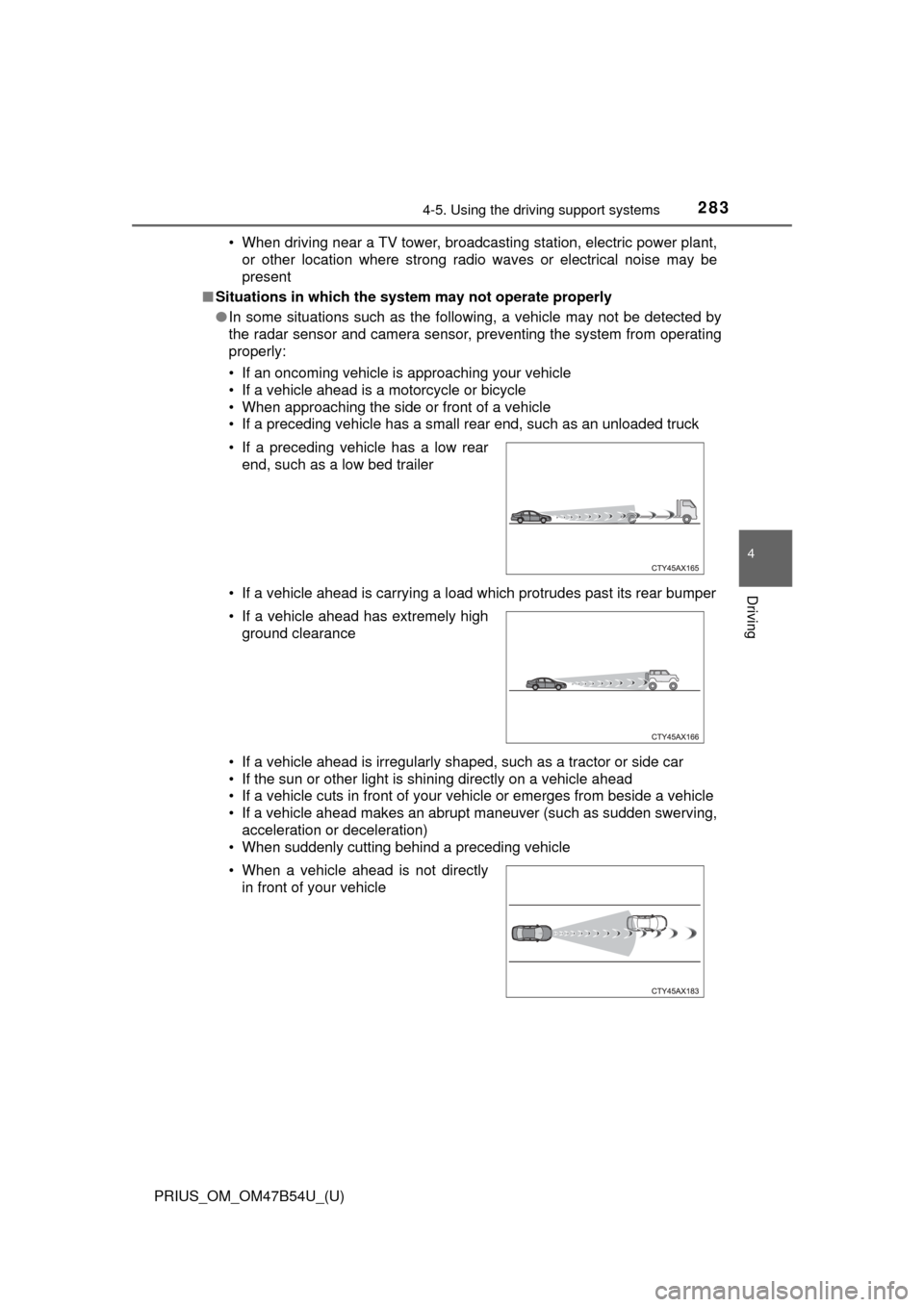
■ Situations in which the system may not operate properly
●In some situations such as the following, a vehicle may not be detected by
the radar sensor and camera sensor, preventing the system from operating
properly:
• If an oncoming vehicle is approaching your vehicle
• If a vehicle ahead is a motorcycle or bicycle
• When approaching the side or front of a vehicle
• If a preceding vehicle has a small rear end, such as an unloaded truck
• If a vehicle ahead is carrying a load which protrudes past its rear bumper
• If a vehicle ahead is irregularly shaped, such as a tractor or side car
• If the sun or other light is shining directly on a vehicle ahead
• If a vehicle cuts in front of your vehicle or emerges from beside a vehicle
• If a vehicle ahead makes an abrupt maneuver (such as sudden swerving,
acceleration or deceleration)
• When suddenly cutting behind a preceding vehicle • If a preceding vehicle has a low rear
end, such as a low bed trailer
• If a vehicle ahead has extremely high ground clearance
• When a vehicle ahead is not directly in front of your vehicle
Page 416 of 796
416
PRIUS_OM_OM47B54U_(U)
5-1. Basic OperationsAudio system types .......... 418
Audio system .................... 419
Using the steering wheel audio switches ................ 422
AUX Port/USB Port .......... 423
Basic audio operations ..... 424
5-2. Setup Setup menu ...................... 426
General settings ............... 427
Audio settings ................... 429
Display settings ................ 430
Voice settings ................... 431
5-3. Using the Multimedia system
Selecting the audio source............................. 432
List screen operation ........ 433
Optimal use of the audio system ............................ 435
5-4. Using the radio Radio operation ................ 436
5Audio system
Page 422 of 796
422
PRIUS_OM_OM47B54U_(U)
5-1. Basic Operations
Using the steering wheel audio switches
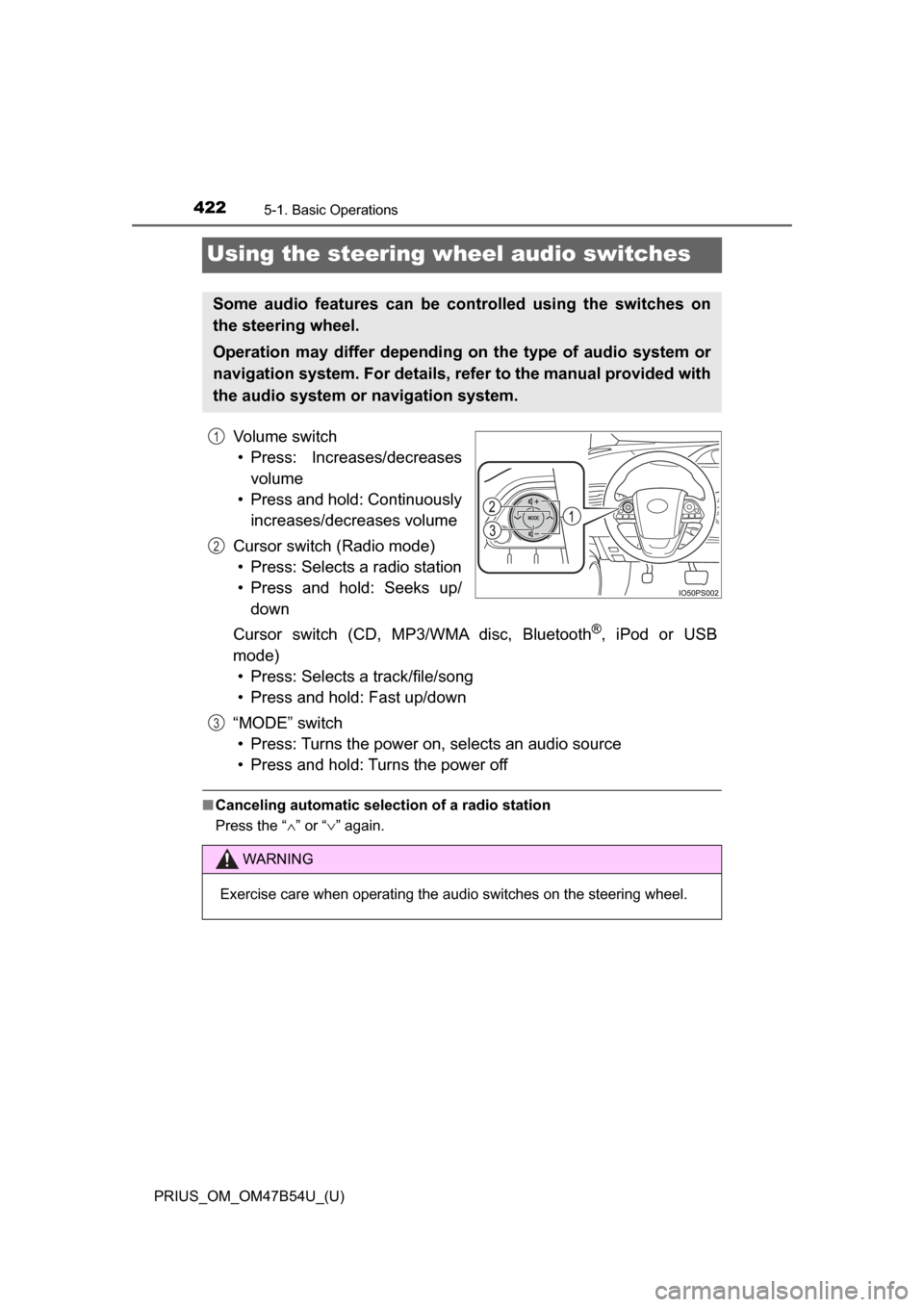
Volume switch• Press: Increases/decreases volume
• Press and hold: Continuously increases/decreases volume
Cursor switch (Radio mode) • Press: Selects a radio station
• Press and hold: Seeks up/ down
Cursor switch (CD, MP3/WMA disc, Bluetooth
®, iPod or USB
mode) • Press: Selects a track/file/song
• Press and hold: Fast up/down
“MODE” switch • Press: Turns the power on, selects an audio source
• Press and hold: Turns the power off
■ Canceling automatic selection of a radio station
Press the “ ∧” or “ ∨” again.
Some audio features can be controlled using the switches on
the steering wheel.
Operation may differ depending on the type of audio system or
navigation system. For details, refer to the manual provided with
the audio system or navigation system.
1
2
WARNING
Exercise care when operating the audio switches on the steering wheel.
3
Page 424 of 796
424
PRIUS_OM_OM47B54U_(U)
5-1. Basic Operations
Basic audio operations
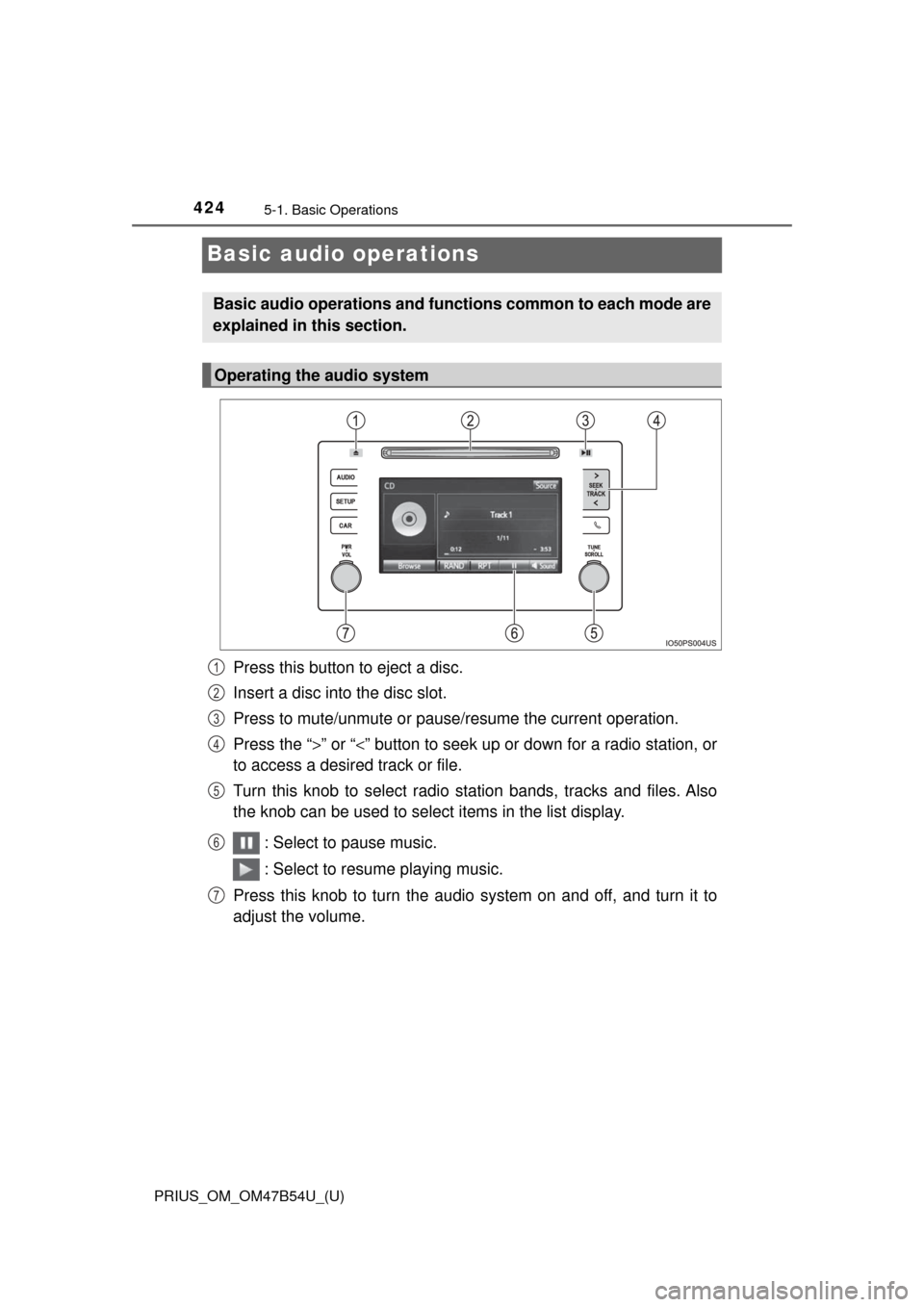
Press this button to eject a disc.
Insert a disc into the disc slot.
Press to mute/unmute or pause/resume the current operation.
Press the “>” or “<” button to seek up or down for a radio station, or
to access a desired track or file.
Turn this knob to select radio station bands, tracks and files. Also
the knob can be used to select items in the list display.
: Select to pause music.
: Select to resume playing music.
Press this knob to turn the audio system on and off, and turn it to
adjust the volume.
Basic audio operations and functi ons common to each mode are
explained in this section.
Operating the audio system
1
2
3
4
5
6
7
Page 429 of 796
429
PRIUS_OM_OM47B54U_(U)
5-2. Setup
5
Audio system
Audio settings
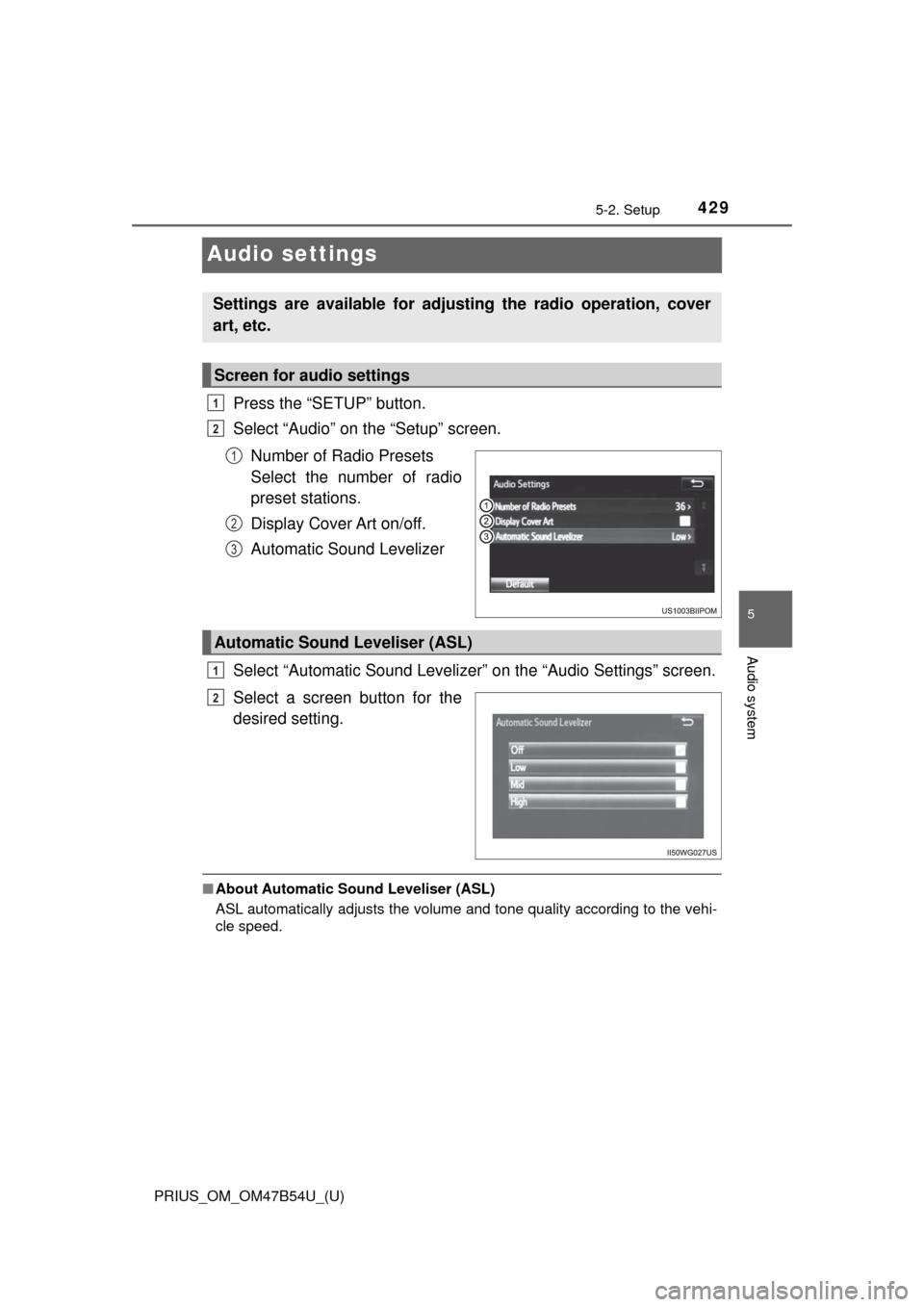
Press the “SETUP” button.
Select “Audio” on the “Setup” screen.Number of Radio Presets
Select the number of radio
preset stations.
Display Cover Art on/off.
Automatic Sound Levelizer
Select “Automatic Sound Levelizer” on the “Audio Settings” screen.
Select a screen button for the
desired setting.
■ About Automatic Sou nd Leveliser (ASL)
ASL automatically adjusts the volume and tone quality according to the vehi-
cle speed.
Settings are available for adjusting the radio operation, cover
art, etc.
Screen for audio settings
1
2
1
2
3
Automatic Sound Leveliser (ASL)
1
2