Page 257 of 464
257
6Interior features
MIRAI_OM_USA_OM62023U6-1. Using the air
conditioning system
and defogger
Automatic air conditioning system............................. 258
Heated steering wheel/ seat heaters .................... 267
6-2. Using the interior lights
Interior lights list ................ 269 • Interior lights ................. 270
• Personal lights .............. 270 6-3. Using the storage
features
List of storage features ..... 272 • Glove box...................... 273
• Console box .................. 273
• Cup holders .................. 274
• Bottle holders ................ 276
• Auxiliary box ................. 276
Trunk features ................... 277
6-4. Other interior features Other interior features ....... 279• Sun visors ..................... 279
• Vanity mirrors................ 279
• Clock ............................. 280
• Armrest ......................... 281
• Coat hooks.................... 281
• Assist grips ................... 282
• Power outlet .................. 283
• Wireless charger ........... 284
Garage door opener.......... 292
Safety Connect ................. 299
Page 266 of 464

2666-1. Using the air conditioning system and defogger
MIRAI_OM_USA_OM62023U
WARNING
■To prevent the windshield from fogging up
● Do not use during cool air operation in extremely humid weather.
The difference between the temperature of the outside air and that of the
windshield can cause the outer surface of the windshield to fog up, block-
ing your vision.
■ To prevent burns
● Do not touch the rear view mirror surfaces when the outside rear view mir-
ror defoggers are on.
● Do not touch the glass at lower part of the windshield or to the side of the
front pillars when the windshield wiper de-icer is on.
NOTICE
■ Humidity sensor
■ To prevent 12-volt battery discharge
Do not leave the air conditioning system on longer than necessary when the
fuel cell system is off.
● Do not place anything on the instrument
panel which may cover the air outlets.
Otherwise, air flow may be obstructed,
preventing the windshield defoggers
from defogging.
In order to detect fog on the windshield, a
sensor which monitors the temperature
of the windshield, the surround humidity,
etc., is installed. ( →P. 263)
Follow these points to avoid damaging
the sensor:
● Do not disassemble the sensor
● Do not spray the glass cleaner on the
sensor or subject it to strong impacts
● Do not stick anything on the sensor
Page 271 of 464
2716-2. Using the interior lights
6
Interior features
MIRAI_OM_USA_OM62023U
■Illuminated entry system
The lights automatically turn on/off according to power switch mode, the pres-
ence of the electronic key, whether the doors are locked/unlocked, and
whether the doors are opened/closed.
■ To prevent 12-volt battery discharge
If the following lights remain on when the power switch is turned off, the lights
will go off automatically after 20 minutes:
●Front interior lights
● Rear interior lights
● Personal lights
● Door courtesy lights
● Vanity lights
● Trunk light
■ Customization
Setting (e.g. the time elapsed before lights turn off) can be changed.
(Customizable features: →P. 438)
NOTICE
■ To prevent 12-volt battery discharge
Do not leave the lights on longer than necessary when the fuel cell system
is off.
Page 273 of 464
2736-3. Using the storage features
6
Interior features
MIRAI_OM_USA_OM62023U
Open (press the button)
Lock with the mechanical key
Unlock with the mechanical key
Front
Slide the armrest to the rear
most position.
Lift the lid while pulling up the
lever to release the lock.
Glove box
Console box
Page 274 of 464
2746-3. Using the storage features
MIRAI_OM_USA_OM62023U
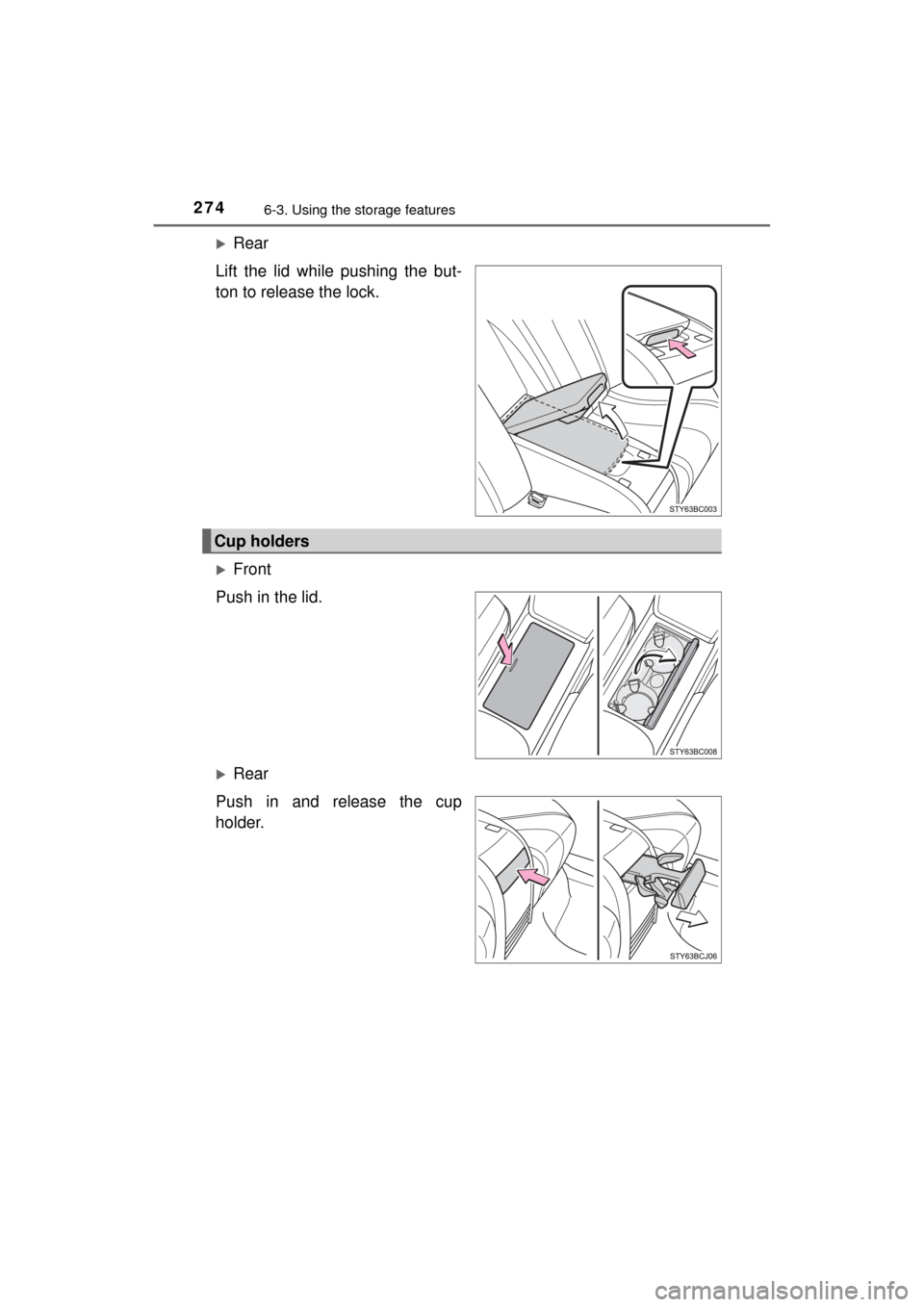
Rear
Lift the lid while pushing the but-
ton to release the lock.
Front
Push in the lid.
Rear
Push in and release the cup
holder.
Cup holders
Page 280 of 464
2806-4. Other interior features
MIRAI_OM_USA_OM62023U
The time can be adjusted through the [settings display] for the
multi-information display (→P. 107)
◆Round to the nearest hour
Press or of the meter control switches ( →P. 108), select
and press .
The minute section of the clock goes to 00.*
*
: e.g.1:00 to 1:29 → 1:00
1:30 to 1:59 → 2:00
◆Time adjustment
Press or of the meter control switches ( →P. 108), select
and press .
Press or on the meter control switches, select hours, min-
utes, or 12/24-hour clock, pres s or of the meter operation
switches to adjust.
When the adjustments are finished, press and check the time.
The clock is displayed when the power switch is in ON mode.
Clock
1
2
3
Page 292 of 464
2926-4. Other interior features
MIRAI_OM_USA_OM62023U
Garage door opener
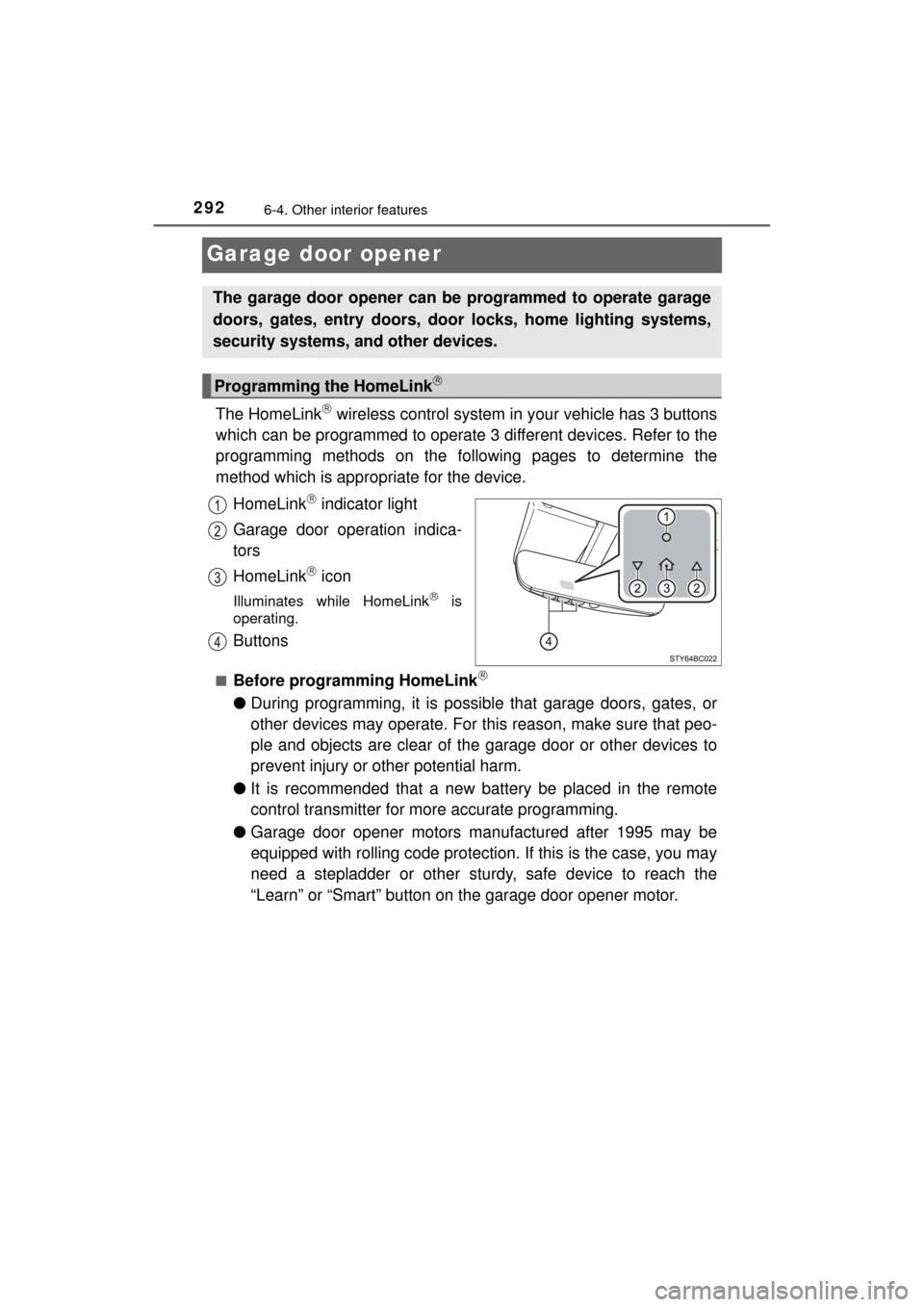
The HomeLink wireless control system in your vehicle has 3 buttons
which can be programmed to operate 3 different devices. Refer to the
programming methods on the foll owing pages to determine the
method which is appr opriate for the device.
HomeLink
indicator light
Garage door operation indica-
tors
HomeLink
icon
Illuminates while HomeLink is
operating.
Buttons
■Before programming HomeLink
● During programming, it is possible that garage doors, gates, or
other devices may operate. For this reason, make sure that peo-
ple and objects are clear of the garage door or other devices to
prevent injury or other potential harm.
● It is recommended that a new battery be placed in the remote
control transmitter for more accurate programming.
● Garage door opener motors manufactured after 1995 may be
equipped with rolling code protection. If this is the case, you may
need a stepladder or other sturdy, safe device to reach the
“Learn” or “Smart” button on the garage door opener motor.
The garage door opener can be programmed to operate garage
doors, gates, entry doors, door locks, home lighting systems,
security systems, and other devices.
Programming the HomeLink
Page 307 of 464

3077-1. Maintenance and care
MIRAI_OM_USA_OM62023U
7
Maintenance and care
■When using a car wash
If the door handle becomes wet while the electronic key is within the ef\
fective
range, the door may lock and unlock repeatedly. In that case, follow the fol-
lowing correction procedures to wash the vehicle:
●Place the key in a position 6 ft. (2 m) or more separate from the vehicle
while the vehicle is being washed. (Take care to ensure that the key is not
stolen.)
● Set the electronic key to battery-saving mode to disable the smart key sys-
tem. ( →P. 133)
■ Aluminum wheels
●Remove any dirt immediately by using a neutral detergent. Do not use hard
brushes or abrasive cleaners. Do not use strong or harsh chemical clean-
ers.
Use the same mild detergent and wax as used on the paint.
● Do not use detergent on the wheels when they are hot, for example after
driving for long distance in the hot weather.
● Wash detergent from the wheels immediately after use.
■ Bumpers
Do not scrub with abrasive cleaners.
■ Front side windows water-repellent coating
●The following precautions can extend the effectiveness of the water-repel-
lent coating.
• Remove any dirt, etc., from the front side windows regularly.
• Do not allow dirt and dust to accumulate on the windows for a long
period.
Clean the windows with a soft, damp cloth as soon as possible.
• Do not use wax or glass cleaners that contain abrasives when cleaning the windows.
• Do not use any metallic objects to remove condensation build up.
● When the water-repellent performance has become insufficient, the coating
can be repaired. Contact your Toyota dealer.
■ Restoration work for rain clearing effect of the rain clearing mirror
The rain clearing effect on the mirror surface will gradually recover after expo-
sure to sunlight ( →P. 152). However, if you want to restore the effect immedi-
ately, conduct the following procedures:
Apply water to the mirror surface to wash the dirt away from it.
Remove the dirt by using a clean, soft and wet cloth.
Clean the mirror surface with gla ss cleaner or detergent. When detergent is
used, rinse the mirror surface with a lot of water.
Wipe water on the mirror surface by using a clean and soft cloth, etc.
Park your vehicle outdoors to expose the mirror surface to sunlight for
about 5 hours. (The restoration time differs depending on the amount and
type of dirt.)
1
2
3
4
5
![TOYOTA MIRAI 2017 1.G Owners Manual 2806-4. Other interior features
MIRAI_OM_USA_OM62023U
The time can be adjusted through the [settings display] for the
multi-information display (→P. 107)
◆Round to the nearest hour
Press or](/manual-img/14/6553/w960_6553-279.png "TOYOTA MIRAI 2017 1.G Owners Manual 2806-4. Other interior features
MIRAI_OM_USA_OM62023U
The time can be adjusted through the [settings display] for the
multi-information display (→P. 107)
◆Round to the nearest hour
Press or")