2017 TOYOTA HIGHLANDER CD player
[x] Cancel search: CD playerPage 395 of 732
3955-7. Connecting Bluetooth®
5
Audio system
HIGHLANDER_U (OM0E017U)
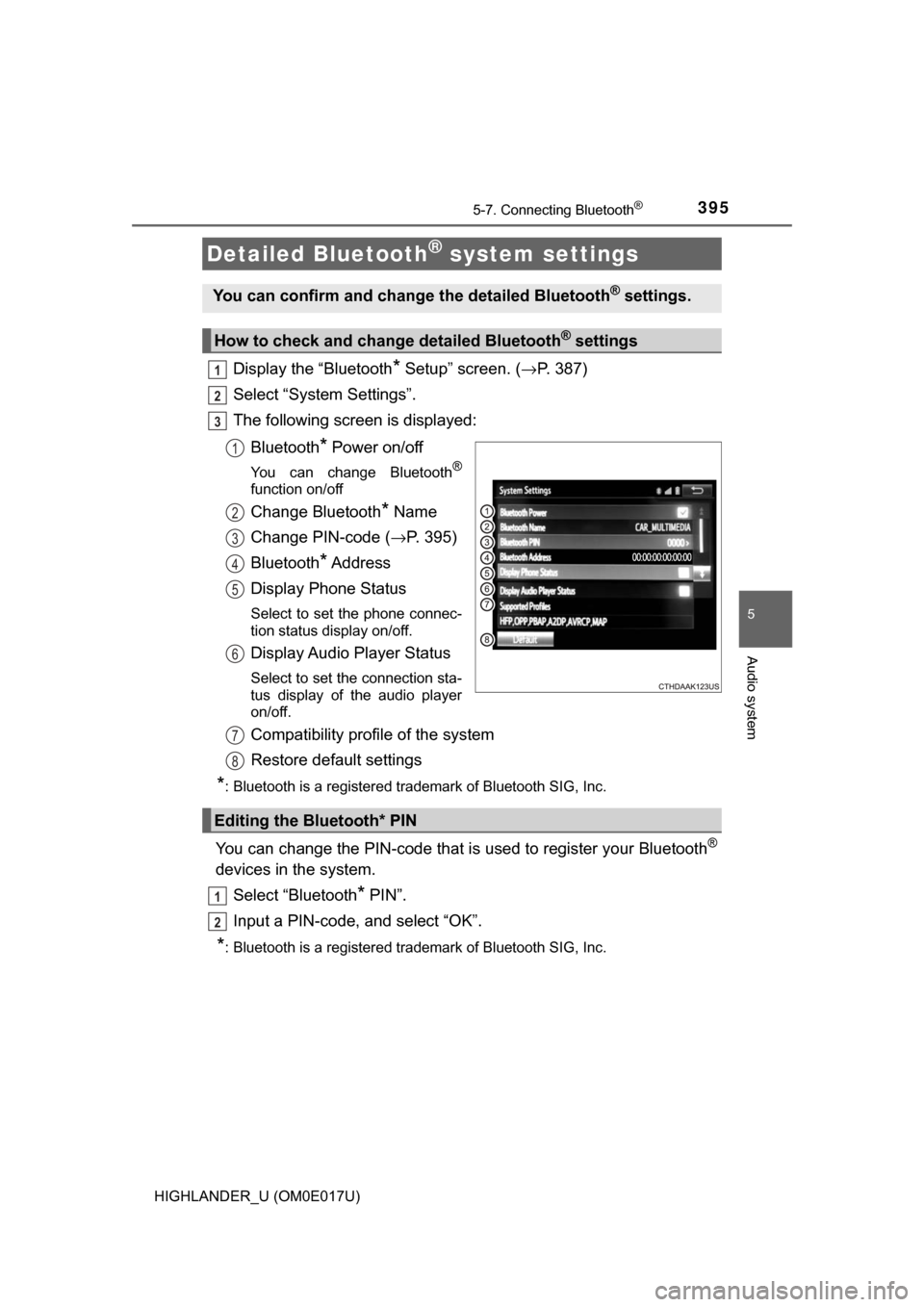
Display the “Bluetooth* Setup” screen. (→P. 387)
Select “System Settings”.
The following screen is displayed:
Bluetooth
* Power on/off
You can change Bluetooth®
function on/off
Change Bluetooth* Name
Change PIN-code ( →P. 395)
Bluetooth
* Address
Display Phone Status
Select to set the phone connec-
tion status display on/off.
Display Audio Player Status
Select to set the connection sta-
tus display of the audio player
on/off.
Compatibility profile of the system
Restore default settings
*: Bluetooth is a registered trademark of Bluetooth SIG, Inc.
You can change the PIN-code that is used to register your Bluetooth®
devices in the system.
Select “Bluetooth
* PIN”.
Input a PIN-code, and select “OK”.
*: Bluetooth is a registered trademark of Bluetooth SIG, Inc.
Detailed Bluetooth® system settings
You can confirm and change the detailed Bluetooth® settings.
How to check and change detailed Bluetooth® settings
1
2
3
1
2
3
4
5
6
Editing the Bluetooth* PIN
7
8
1
2
Page 396 of 732
396
HIGHLANDER_U (OM0E017U)
5-8. Bluetooth® Audio
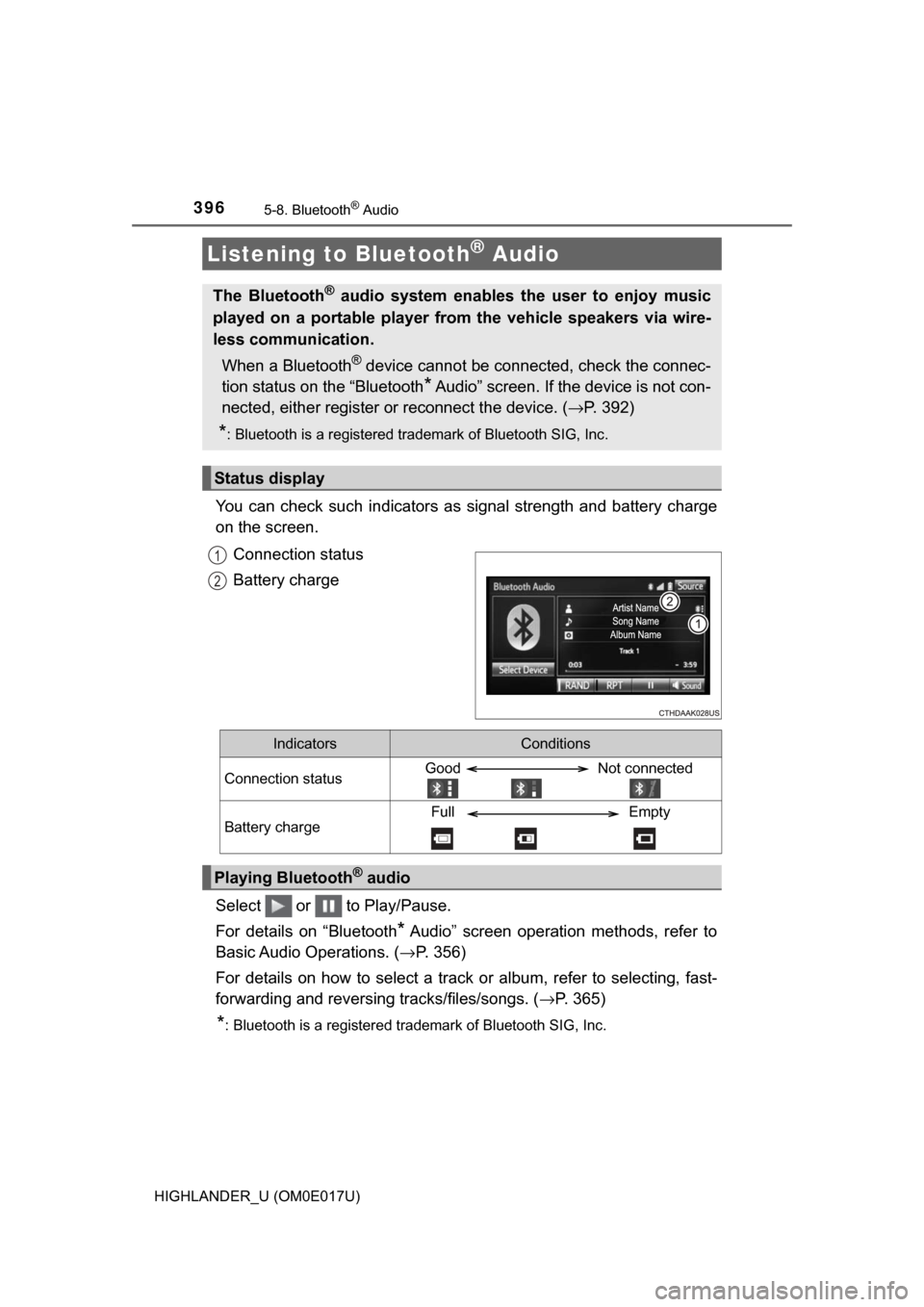
You can check such indicators as signal strength and battery charge
on the screen.
Connection status
Battery charge
Select or to Play/Pause.
For details on “Bluetooth
* Audio” screen operation methods, refer to
Basic Audio Operations. ( →P. 356)
For details on how to select a track or album, refer to selecting, fast-
forwarding and reversing tracks/files/songs. ( →P. 365)
*: Bluetooth is a registered trademark of Bluetooth SIG, Inc.
Listening to Bluetooth® Audio
The Bluetooth® audio system enables the user to enjoy music
played on a portable player from the vehicle speakers via wire-
less communication.
When a Bluetooth
® device cannot be connected, check the connec-
tion status on the “Bluetooth
* Audio” screen. If the device is not con-
nected, either register or reconnect the device. (→ P. 392)
*: Bluetooth is a registered trademark of Bluetooth SIG, Inc.
Status display
1
2
IndicatorsConditions
Connection statusGood Not connected
Battery chargeFull Empty
Playing Bluetooth® audio
Page 425 of 732
425
5
Audio system
HIGHLANDER_U (OM0E017U)
5-10. Bluetooth®
■When using the Bluetooth® audio system
● In the following conditions, the system may not function.
• If the portable audio player is turned off
• If the portable audio player is not connected
• If the portable audio player’s battery is low
● There may be a delay if a cellular phone connection is made during
Bluetooth
® audio play.
● Depending on the type of portable audio player that is connected to the \
sys-
tem, operation may differ slightly and certain functions may not be available.
■ When using the hands-free system
●Entune Audio is muted when making a call.
● If both parties speak at the same time, it may be difficult to hear.
● If the received call volume is overly loud, an echo may be heard.
If the Bluetooth
® phone is too close to the system, quality of the sound may
deteriorate and connection status may deteriorate.
● In the following circumstances, it may be difficult to hear the other party:
• When driving on unpaved roads
• When driving at high speeds
• If a roof or window is open
• If the air conditioning is blowing directly on the microphone
• If there is interference from the network of the cellular phone
■ Conditions under which th e system will not operate
● If using a cellular phone that does not support Bluetooth
®
●If the cellular phone is turned off
● If you are outside of cellular phone service coverage
● If the cellular phone is not connected
● If the cellular phone’s battery is low
● When outgoing calls are controlled, due to heavy traffic on telephone lines,
etc.
● When the cellular phone itself cannot be used
● When transferring contact data from the cellular phone
Bluetooth®
Page 426 of 732

4265-10. Bluetooth®
HIGHLANDER_U (OM0E017U)■
Bluetooth
® antenna
The antenna is built into the display.
If the portable audio player is behind the seat or in the glove box or console
box, or is touching or covered by metal objects, the connection status may
deteriorate.
If the cellular phone is behind the seat or in the console box, or touching or
covered by metal objects, the connection status may deteriorate.
■ Battery charge/signal status
●This display may not correspond exactly with the portable audio player or
cellular phone itself.
● This system does not have a charging function.
● The portable audio player or cellular phone battery will be depleted quickly
when the device is connected to Bluetooth
®.
■ When using the Bluetooth
® audio and hands-free system at the same
time
The following problems may occur.
● The Bluetooth
® audio connection may be interrupted.
● Noise may be heard during Bluetooth
® audio playback.
■ About the contact in this system
The following data is stored for every registered cellular phone. When
another phone is connecting, you cannot read the registered data.
●Contact data
● Call history
● Favorite
● Message
When removing a Bluetooth
® phone from the system, the above-mentioned
data is also deleted.
Page 427 of 732

4275-10. Bluetooth®
5
Audio system
HIGHLANDER_U (OM0E017U)■
Compatible models
The Bluetooth
® audio system supports portable audio players with the follow-
ing specifications
● Bluetooth
® specifications:
Ver. 2.0, or higher (Recommended: Ver. 3.0+EDR or higher)
● Profiles:
• A2DP (Advanced Audio Distribution Profile) Ver. 1.0, or higher
(Recommended: Ver. 1.2 or higher)
This is a profile to transmit stereo audio or high quality sound to Entune
Audio.
• AVRCP (Audio/Video Remote Control Profile) Ver. 1.0 or higher (Recommended: Ver. 1.4 or higher)
This is a profile to allow remote control the A/V equipment.
However, please note that some functions may be limited depending on the
type of portable audio player connected.
The hands-free system supports cellular phones with the following specifica-
tions.
● Bluetooth
® specification:
Ver. 2.0 or higher (Recommended: Ver. 3.0+EDR or higher)
● Profiles:
• HFP (Hands Free Profile) Ver. 1.0 or higher (Recommended: Ver. 1.6 or
higher)
This is a profile to allow hands-free phone calls using a cellular phone or
head set. It has outgoing and incoming call functions.
• OPP (Object Push Profile) Ver. 1. 1 or higher (Recommended: Ver. 1.2)
This is a profile to transfer contact data. When a Bluetooth
® compatible
cellular phone has both PBAP and OPP, OPP cannot be used.
• PBAP (Phone Book Access Profile ) Ver. 1.0 or higher (Recommended:
Ver. 1.1)
This is a profile to transfer contact data.
• MAP (Message Access Profile) Ver.1.0 or higher This is a profile to using phone message.
If the cellular phone does not support HFP, you cannot register it with the
hands-free system. OPP, PBAP or MAP services must be selected individu-
ally.
Page 428 of 732
4285-10. Bluetooth®
HIGHLANDER_U (OM0E017U)■
Reconnecting the portable audio player
If the portable audio player is disconnected due to poor reception, the system
automatically reconnects the portable audio player.
If you have switched off the portable audio player yourself, follow the instruc-
tions below to reconnect:
●Select the portable audio player again
● Enter the portable audio player
■ When you sell your car
Be sure to delete your personal data. ( →P. 359)
WARNING
■While driving
Do not use the portable audio player, cellular phone or connect a device to
the Bluetooth
® system.
■ Caution regarding interfer ence with electronic devices
● Your audio unit is fitted with Bluetooth
® antennas. People with implantable
cardiac pacemakers, cardiac resynchronization therapy-pacemakers or
implantable cardioverter defibrillators should maintain a reasonable dis-
tance between themselves and the Bluetooth
® antennas. The radio waves
may affect the operation of such devices.
● Before using Bluetooth
® devices, users of any electrical medical device
other than implantable cardiac pacemakers, cardiac resynchronization
therapy-pacemakers or implantable cardioverter defibrillators should con\
-
sult the manufacturer of the device for information about its operation
under the influence of radio waves. Radio waves could have unexpected
effects on the operation of such medical devices.
NOTICE
■ When leaving the vehicle
Do not leave your portable audio player or cellular phone in the vehicle. The
inside of the vehicle may become hot, causing damage to the portable
audio player or cellular phone.
Page 716 of 732

716Alphabetical index
HIGHLANDER_U (OM0E017U)
Care................................... 500, 504Aluminum wheels.................. 501
Exterior ................................. 500
Interior................................... 504
Seat belts .............................. 505
Cargo hooks............................. 467
CD player .................................. 369
Chains....................................... 341
Child restraint system ............... 61 Booster seats, definition ......... 62
Booster seats, installation ....... 73
Convertible seats, definition ............................... 62
Convertible seats,
installation ............................ 69
Front passenger occupant classification syst em............. 53
Infant seats, definition ............. 62
Infant seats, installation .......... 69
Installing CRS with LATCH anchors .................... 67
Installing CRS with seat belts ...................................... 69
Installing CRS with top tether strap ........................... 75 Child safety ................................ 60
Airbag precautions.................. 43
Back door precautions .......... 129
Battery precautions....... 528, 643
Child restraint system ............. 61
Glass hatch precautions ....... 138
How your child should wear the seat belt.......................... 36
Installing child restraints ......... 65
Moon roof precautions .......... 179
Panoramic moon roof precautions......................... 184
Power window lock switch .... 173
Power window precautions ... 175
Rear door child-protectors .... 120
Removed electronic key battery precautions............. 551
Seat belt extender precautions........................... 39
Seat belt precautions .............. 38
Seat heater precautions ....... 455
C
Page 719 of 732

719Alphabetical index
HIGHLANDER_U (OM0E017U)
Engine....................................... 653“ACC” position ...................... 218
ACCESSORY mode ............. 222
Compartment ........................ 519
Engine switch................ 218, 221
Hood ..................................... 516
How to start the engine......................... 218, 221
Identification number ............ 652
If the engine will not start ...... 633
Ignition switch (engine switch) ........... 218, 221
Overheating .......................... 644
Engine coolant ......................... 524
Capacity ................................ 656
Checking ............................... 524
Preparing and checking before winter....................... 339
Engine coolant temperature gauge........................................ 92
Engine immobilizer system ...... 80
Engine oil ................................. 521 Capacity ................................ 654
Checking ............................... 521
Oil pressure warning
message ............................. 598
Preparing and checking
before winter....................... 339
Engine switch .................. 218, 221
Enhanced VSC ......................... 331 Entune Audio ........................... 351
Audio input............................ 355
AUX port/
USB port............................. 355
CD player.............................. 369
iPod ...................................... 375
MP3/WMA disc ..................... 369
Optimal use .......................... 366
Portable music player ........... 383
Radio .................................... 367
Steering wheel audio
switch ................................. 354
USB memory ........................ 379
Entune Audio Plus
*
Entune Premium Audio*
EPS (Electric Power Steering) ..... 332
Function ................................ 332
Warning light......................... 582
Event data recorder (EDR)........ 10
*: Refer to “NAVIGATION AND MULTIMEDIA SYSTEM OWNER’S MANUAL”