Page 87 of 732
872. Instrument cluster
2
Instrument cluster
HIGHLANDER_U (OM0E017U)
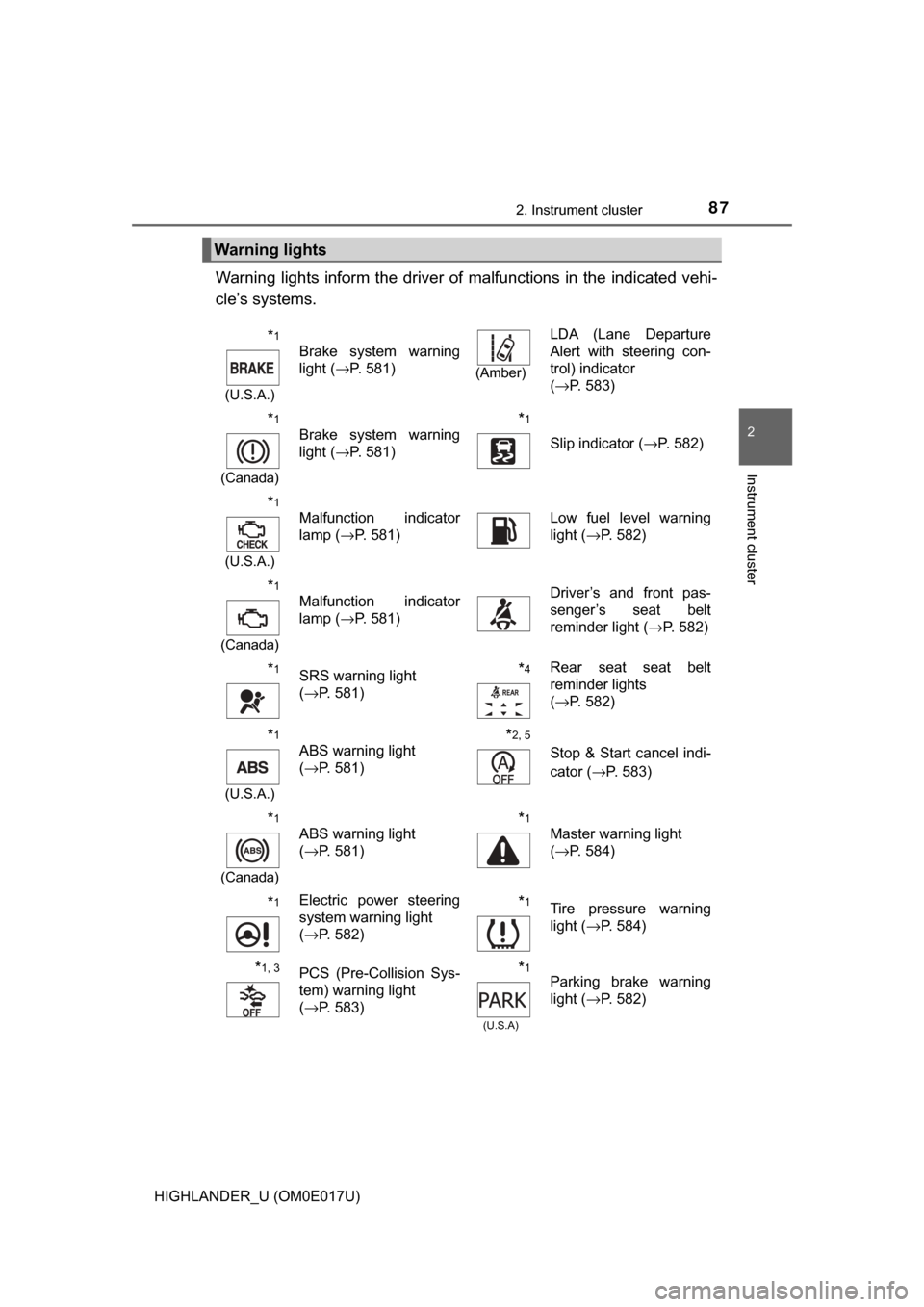
Warning lights inform the driver of malfunctions in the indicated vehi-
cle’s systems.
Warning lights
*1
(U.S.A.)
Brake system warning
light ( →P. 581)
(Amber)
LDA (Lane Departure
Alert with steering con-
trol) indicator
(→P. 583)
*1
(Canada)
Brake system warning
light ( →P. 581)*1
Slip indicator ( →P. 582)
*1
(U.S.A.)
Malfunction indicator
lamp (→P. 581)Low fuel level warning
light (→P. 582)
*1
(Canada)
Malfunction indicator
lamp ( →P. 581)Driver’s and front pas-
senger’s seat belt
reminder light ( →P. 582)
*1SRS warning light
(→P. 581)*4Rear seat seat belt
reminder lights
(→P. 582)
*1
(U.S.A.)
ABS warning light
(→P. 581)*2, 5
Stop & Start cancel indi-
cator
(→P. 583)
*1
(Canada)
ABS warning light
(→P. 581)*1
Master warning light
(→P. 584)
*1Electric power steering
system warning light
(→P. 582)*1Tire pressure warning
light ( →P. 584)
*1, 3PCS (Pre-Collision Sys-
tem) warning light
(→P. 583)*1
(U.S.A)
Parking brake warning
light ( →P. 582)
Page 90 of 732
902. Instrument cluster
HIGHLANDER_U (OM0E017U)
*1: These lights turn on when the engine switch is turned to the “ON” position(vehicles without a smart key system) or the engine switch is turned to
IGNITION ON mode (vehicles with a smart key system), to indicate that a
system check is being performed. They will turn off after the engine is
started, or after a few seconds. There may be a malfunction in a system if
a light does not come on, or turn off. Have the vehicle inspected by your
Toyota dealer.
*2: If equipped
*3: Refer to “NAVIGATION AND MULTIMEDIA SYSTEM OWNER’S MAN-UAL”.
*4: The light flashes to indicate that the system is operating.
*5: The light comes on when the system is turned off.
*2“PWR MODE” indicator
(→
P. 229)
*2, 5Stop & Start cancel indi-
cator ( →P. 297)
Snow mode indicator
( →P. 228)
*1, 8
(U.S.A.)
“AIR BAG ON/
OFF” indicator
(→P. 53)
*2
Stop & Start indicator
(→P. 297)
*1, 8
(Canada)
“AIR BAG ON/
OFF” indicator
(→P. 53)
Page 92 of 732
922. Instrument cluster
HIGHLANDER_U (OM0E017U)
Tachometer
Displays the engine speed in revolutions per minute.
Multi-information display
Presents the driver with a variety of driving-related data.
Speedometer
Fuel gauge
Trip meter reset knob
Switches the trip information.
Outside temperature
Odometer/trip meter/Stop & Start system operation time display*
Shift position and shift range
Displays the selected shift position or selected shift range. (→P. 227)
Meter panel lights control button
Engine coolant temperature gauge
Displays the engine coolant temperature.
*: If equipped
Gauge and meters
The displayed content may differ depending on the type of
meter.
1
2
3
4
5
6
7
8
9
10
Page 93 of 732

932. Instrument cluster
2
Instrument cluster
HIGHLANDER_U (OM0E017U)
Switches between the trip meter
“A” and “B” displays. When the trip
meter is displayed, pressing and
holding the knob will reset the trip
meter.
The brightness of the meter panel lights can be adjusted.
Pressing the button will adjust the
brightness of the meter panel
lights.
The brightness level of the meters
when the surroundings are bright
(day mode) and dark (night mode)
can be adjusted individually. How-
ever, when in day mode, adjusting
the brightness level will also
change the brightness level of
night mode.
■ The meters and display illuminate when
Vehicles without a smart key system
The engine switch is in the “ON” position.
Vehicles with a smart key system
The engine switch is in IGNITION ON mode.
■ Outside temperature display
In the following situations, the correct outside temperature may not be \
dis-
played, or the display may take longer than normal to change.
●When stopped, or driving at low speeds (less than 12 mph [20 km/h])
● When the outside temperature has changed suddenly (at the entrance/exit
of a garage, tunnel, etc.)
■ Stop & Start system operation ti me (current) (if equipped)
This display will be displayed when the engine is stopped due to the opera-
tion of the Stop & Start system.
Changing the trip meter display
Instrument panel light control
Page 95 of 732

952. Instrument cluster
2
Instrument cluster
HIGHLANDER_U (OM0E017U)
Drive information
Select to display various drive
data. (→P. 97)
Navigation system-
linked display (if
equipped)
Select to display the following navigation system-linked information.
• Route guidance
• Compass display (north-up display/heading-up display)
Audio system-linked display (if equipped)
Select to enable selection of an audio source or track on the meter
using the meter control switches.
Driving assist system information
Select to display the operational status of the following systems:• Dynamic radar cruise control ( →P. 285)
• LDA (Lane Departure Alert with steering control) ( →P. 275)
Stop & Start system information (if equipped)
Select to display the operational status of the Stop & Start system.
(→P. 297)
Warning message display
Select to display warning messages and measures to be taken if a
malfunction is detected. ( →P. 591)
Settings display
Select to change the meter display settings. ( →P. 99)
Multi-information display
Display contents
Page 98 of 732

982. Instrument cluster
HIGHLANDER_U (OM0E017U)■
Stop & Start system operation time
(current)/status notification
Displays the current amount of time the engine has been stopped
due to the operation of the Stop & Start system. Also shows the sta-
tus of the Stop & Start system with a pop-up display. ( →P. 303)
■Stop & Start system operation time (after start/after reset)
Displays the accumulated total of the following:
• Stop & Start system operation time since engine start
• Stop & Start system operation time since display was reset
■
Stop & Start system settings
Press the center button of the mete r control switches to display the
Stop & Start system settings screen.
On this screen, the following operations can be performed:
● Stop & Start
The length of time the Stop & Start system will operate when the “A/C”
switch of the air conditioning system is on can be set to 2 different lev-
els. This setting can also be changed on .
●Reset
Select to reset the Stop & Start system operation time display.
To reset, move the cursor to “Reset”, and then press and hold the center
button.
Stop & Start system information (if equipped)
Page 99 of 732

992. Instrument cluster
2
Instrument cluster
HIGHLANDER_U (OM0E017U)
Select using the meter control switches.
Select an item and then set it with the center button.
■LDA (Lane Departure Alert with steering control) settings
→ P. 6 8 3
■PCS (Pre-Collision System) settings
→P. 6 8 3
■BSM (Blind Spot Monitor) settings (if equipped)
Select to activate/deactivate the BSM (Blind Spot Monitor).
( → P. 684)
■Power mode (driving mode) settings (if equipped)
Select to activate/deacti vate the power mode. (→P. 684)
■Stop & Start system settings (if equipped)
The length of time the Stop & Star t system will operate when the “A/
C” switch of the air conditioning system is on can be set to 2 differ-
ent levels. (→ P. 684)
■Meter settings
●Language
Select to change the language on the display.
● Units
Select to change the unit of measure for fuel consumption.
● Maintenance system (for U.S.A.)
Select to reset the maintenance data after the required mainte-
nance is performed. (
→P. 508)
● Eco Driving Indicator Light
Select to activate/deactivate th e Eco Driving Indicator Light.
(
→P. 102)
● switch settings
You can register 1 screen as th e top screen. To register, press
and hold while the desired screen is displayed.
● Drive information 1 through 3
Select to select up to 2 items t hat will be displayed on a Drive
information screen, up to 3 Drive information screens can be set.
Settings display
1
2
Page 100 of 732

1002. Instrument cluster
HIGHLANDER_U (OM0E017U)
●Pop-up display
Select to set the following pop-up displays, which may appear in
some situations, on/off.
• Route guidance display of t he navigation system-linked sys-
tem (if equipped)
• Incoming call display of the hands-free phone system
• Stop & Start system duration (if equipped)
• Stop & Start system status (if equipped)
• Instrument panel brightness adjustment display
● Accent color
Select to change the accent colors on the screen, such as the
cursor color.
● Speed limit display
* (if equipped)
Select to set the display of speed limit information stored in the
navigation system to on with the speed limit caution indicator
(yellow) enabled, on with the sp eed limit caution not enabled, or
off. If enabled, the s peed limit caution indicator will come on if the
vehicle speed exceeds th e displayed speed limit.
● Initialization
Registered or changed meter settings will be deleted or returned
to their default setting.
*: Speed limit display may not be available for some regions.

