Page 466 of 732
4666-3. Using the storage features
HIGHLANDER_U (OM0E017U)
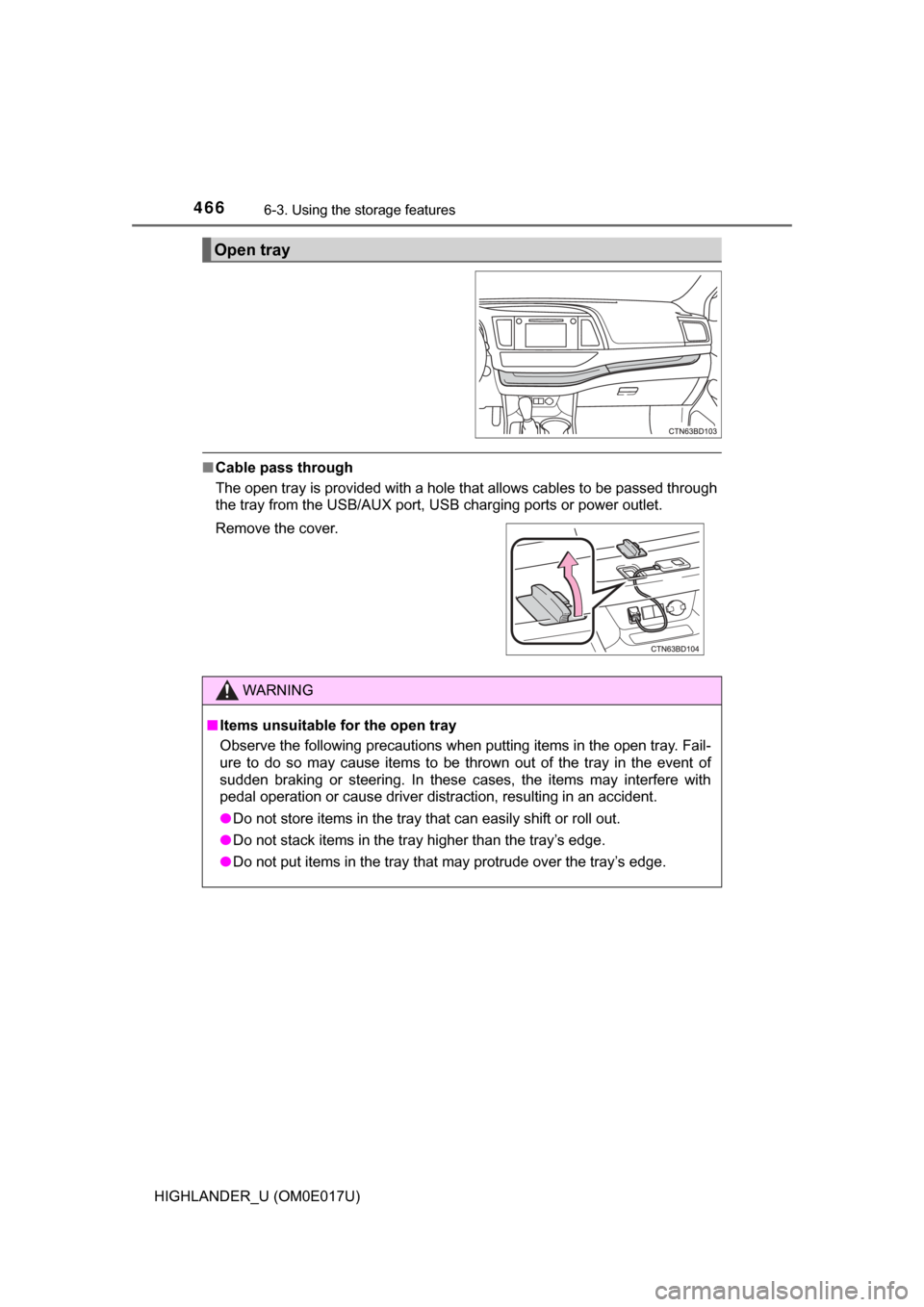
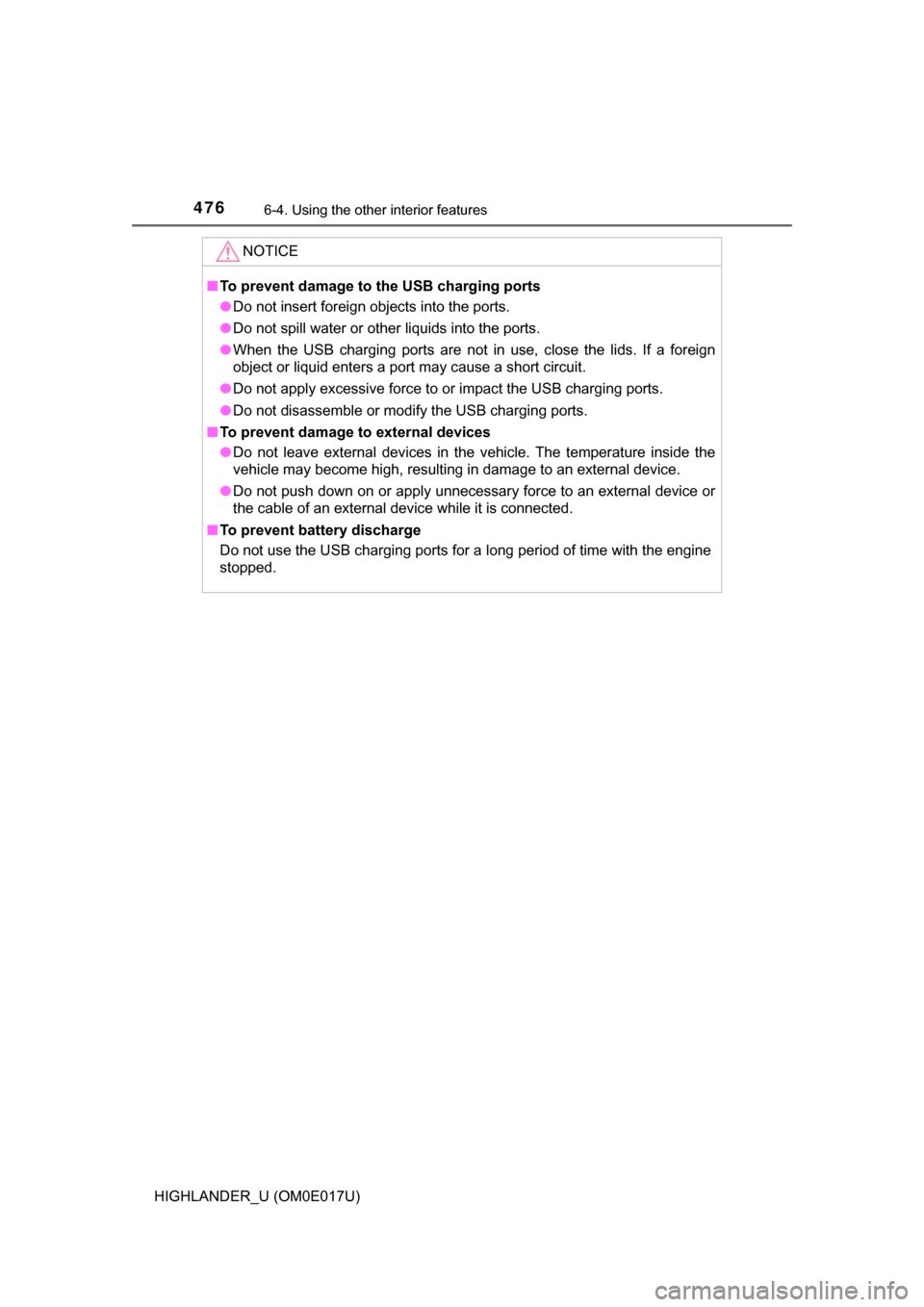
■Cable pass through
The open tray is provided with a hole that allows cables to be passed through
the tray from the USB/AUX port, USB charging ports or power outlet.
Open tray
Remove the cover.
WARNING
■Items unsuitable for the open tray
Observe the following precautions when putting items in the open tray. Fail-
ure to do so may cause items to be thrown out of the tray in the event of
sudden braking or steering. In these cases, the items may interfere with
pedal operation or cause driver distraction, resulting in an accident.
● Do not store items in the tray that can easily shift or roll out.
● Do not stack items in the tray higher than the tray’s edge.
● Do not put items in the tray that may protrude over the tray’s edge.
Page 475 of 732
4756-4. Using the other interior features
6
Interior features
HIGHLANDER_U (OM0E017U)
The USB charging ports are used to supply 2.1 A of electricity at 5 V
to external devices.
The USB charging ports are for charging only. They are not designed
for data transfer or other purposes.
Depending on the external device, it may not charge properly. Refer to
the manual included with the device before using a USB charging
port.
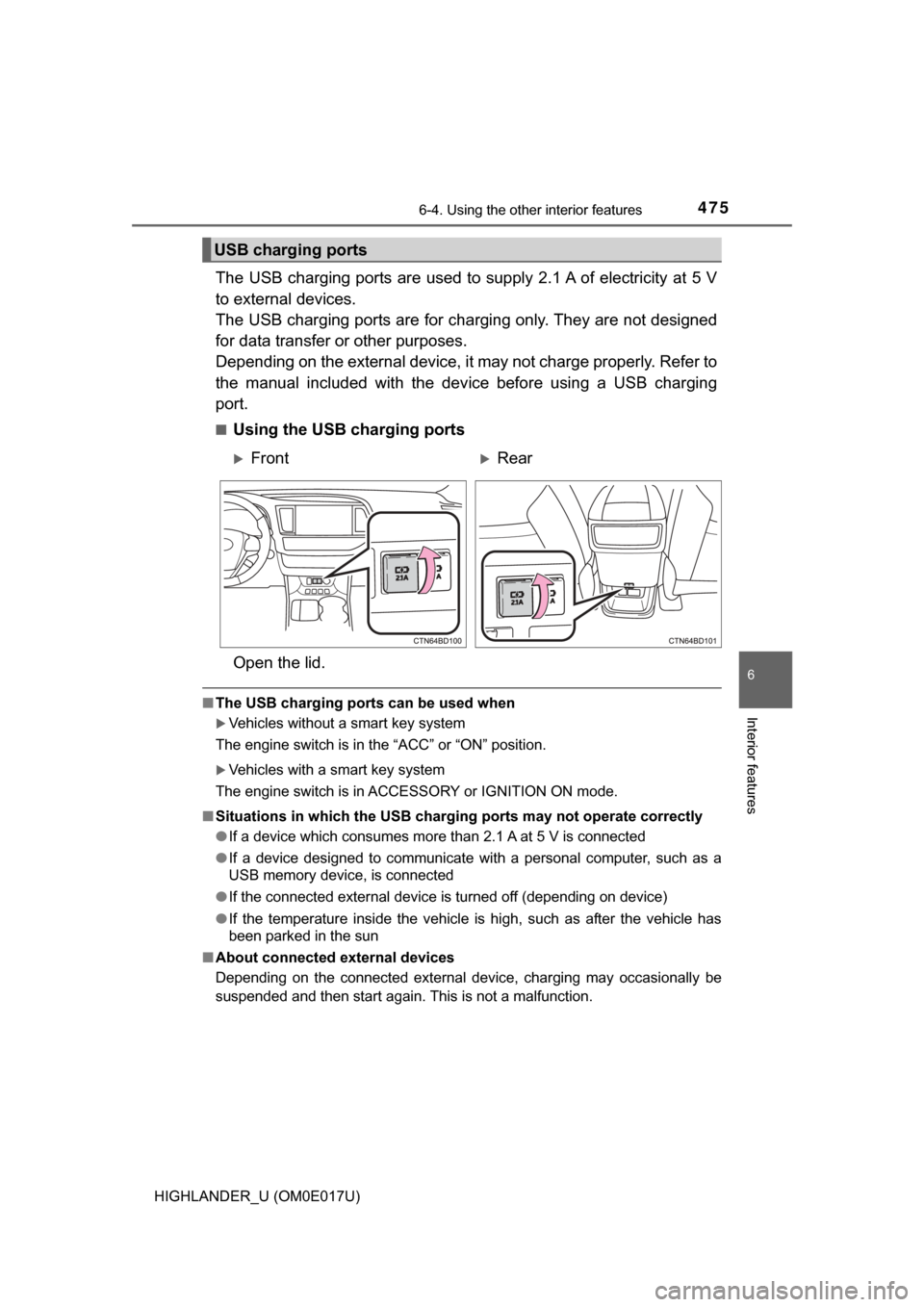
■Using the USB charging ports
Open the lid.
■ The USB charging ports can be used when
Vehicles without a smart key system
The engine switch is in the “ACC” or “ON” position.
Vehicles with a smart key system
The engine switch is in ACCESSORY or IGNITION ON mode.
■ Situations in which the USB chargi ng ports may not operate correctly
● If a device which consumes more than 2.1 A at 5 V is connected
● If a device designed to communicate with a personal computer, such as a
USB memory device, is connected
● If the connected external device is turned off (depending on device)
● If the temperature inside the vehicle is high, such as after the vehicle has
been parked in the sun
■ About connected external devices
Depending on the connected external device, charging may occasionally be
suspended and then start again. This is not a malfunction.
USB charging ports
FrontRear
Page 476 of 732
4766-4. Using the other interior features
HIGHLANDER_U (OM0E017U)
NOTICE
■To prevent damage to the USB charging ports
● Do not insert foreign objects into the ports.
● Do not spill water or other liquids into the ports.
● When the USB charging ports are not in use, close the lids. If a foreign
object or liquid enters a port may cause a short circuit.
● Do not apply excessive force to or impact the USB charging ports.
● Do not disassemble or modify the USB charging ports.
■ To prevent damage to external devices
● Do not leave external devices in the vehicle. The temperature inside the
vehicle may become high, resulting in damage to an external device.
● Do not push down on or apply unnecessary force to an external device or
the cable of an external device while it is connected.
■ To prevent battery discharge
Do not use the USB charging ports for a long period of time with the engine
stopped.
Page 527 of 732
5277-3. Do-it-yourself maintenance
7
Maintenance and care
HIGHLANDER_U (OM0E017U)
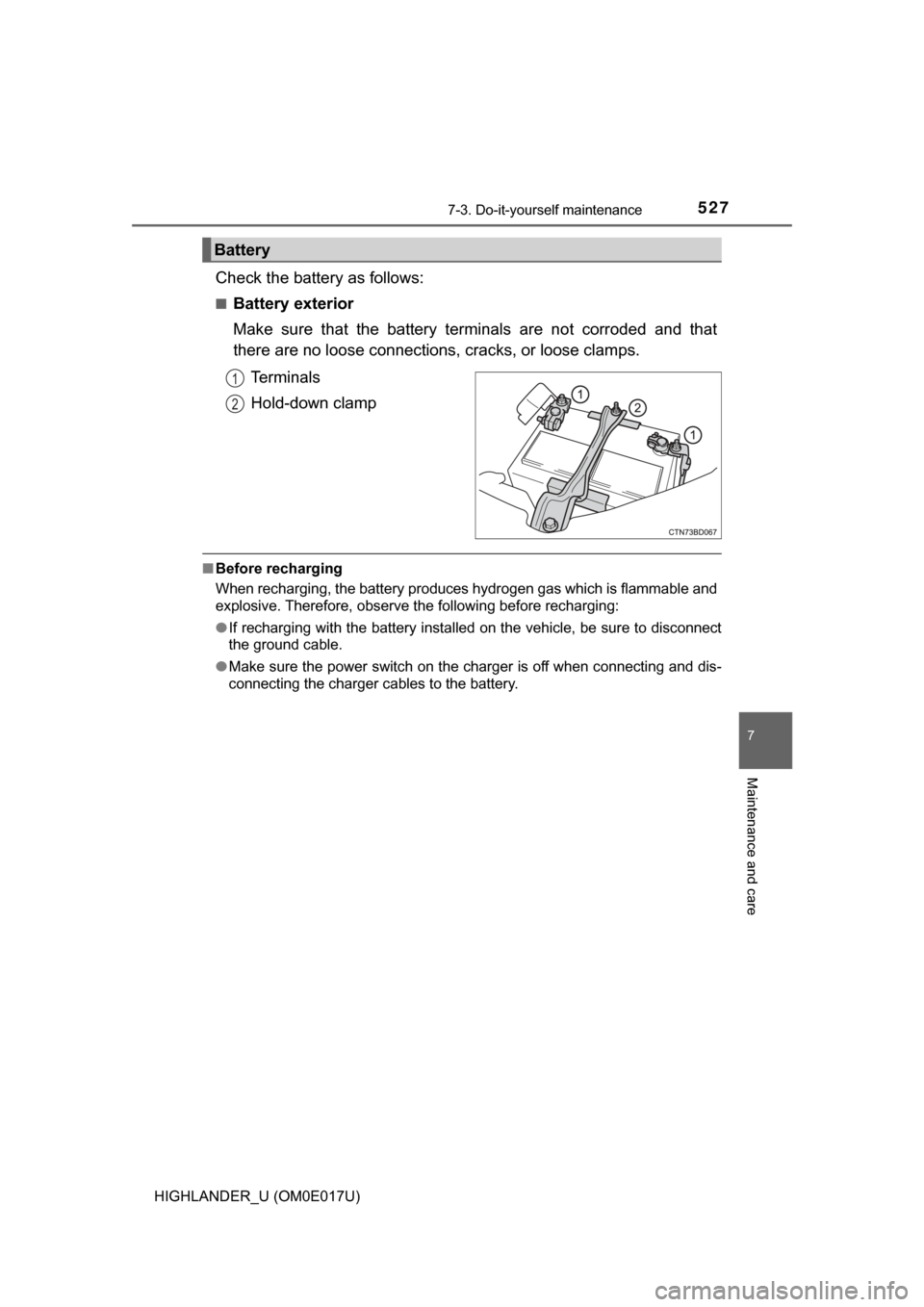
Check the battery as follows:
■Battery exterior
Make sure that the battery terminals are not corroded and that
there are no loose connections, cracks, or loose clamps.
Terminals
Hold-down clamp
■ Before recharging
When recharging, the battery produces hydrogen gas which is flammable and
explosive. Therefore, observe the following before recharging:
●If recharging with the battery installed on the vehicle, be sure to disconnect
the ground cable.
● Make sure the power switch on the charger is off when connecting and dis-
connecting the charger cables to the battery.
Battery
1
2
Page 528 of 732

5287-3. Do-it-yourself maintenance
HIGHLANDER_U (OM0E017U)■
After recharging/reconnecting the ba ttery (vehicles with a smart key sys-
tem)
The engine may not start. Follow the procedure below to initialize the system.
Shift the shift lever to P.
Open and close any of the doors.
Restart the engine.
● Unlocking the doors using the smart key system may not be possible imme-
diately after reconnecting the battery. If this happens, use the wireless
remote control or the mechanical key to lock/unlock the doors.
● Start the engine with the engine switch in ACCESSORY mode. The engine
may not start with the engine switch turned off. However, the engine will
operate normally from the second attempt.
● The engine switch mode is recorded by the vehicle. If the battery is discon-
nected and reconnected, the vehicle will return the engine switch mode to
the status it was in before the battery was disconnected. Make sure to turn
off the engine before disconnecting the battery. Take extra care when con-
necting the battery if the engine switch mode prior to the battery being dis-
connected is unknown.
If the system will not start even after multiple attempts, contact your Toyota
dealer.
WARNING
■ Chemicals in the battery
Batteries contain poisonous and corrosive sulfuric acid and may produce
hydrogen gas which is flammable and explosive. To reduce the risk of death
or serious injury, take the following precautions while working on or near the
battery:
● Do not cause sparks by touching the battery terminals with tools.
● Do not smoke or light a match near the battery.
● Avoid contact with eyes, skin and clothes.
● Never inhale or swallow electrolyte.
● Wear protective safety glasses when working near the battery.
● Keep children away from the battery.
1
2
3
Page 529 of 732
5297-3. Do-it-yourself maintenance
7
Maintenance and care
HIGHLANDER_U (OM0E017U)
WARNING
■Where to safely charge the battery
Always charge the battery in an open area. Do not charge the battery in a
garage or closed room where there is insufficient ventilation.
■ How to recharge the battery
Only perform a slow charge (5 A or less). The battery may explode if
charged at a quicker rate.
■ Emergency measures regarding electrolyte
● If electrolyte gets in your eyes
Flush your eyes with clean water for at least 15 minutes and get immedi-
ate medical attention. If possible, continue to apply water with a sponge or
cloth while traveling to the nearest medical facility.
● If electrolyte gets on your skin
Wash the affected area thoroughly. If you feel pain or burning, get medical
attention immediately.
● If electrolyte gets on your clothes
It can soak through clothing on to your skin. Immediately take off the cloth-
ing and follow the procedure above if necessary.
● If you accidentally swallow electrolyte
Drink a large quantity of water or milk. Get emergency medical attention
immediately.
NOTICE
■When recharging the battery
Never recharge the battery while the engine is operating. Also, be sure all
accessories are turned off.
Page 595 of 732
5958-2. Steps to take in an emergency
8
When trouble arises
HIGHLANDER_U (OM0E017U)
Indicates that the engine coolant temperature is
too highA buzzer also sounds.
→ P. 644
Indicates a malfunction in the vehicle’s charging
system.
→Immediately stop the vehicle in a safe place
and contact your Toyota dealer. Continuing
to drive the vehicle may be dangerous.
Indicates that the radar sensor is dirty or covered
with ice A buzzer also sounds.
→ Clean the sensor.
Indicates that the dynamic radar cruise control
system cannot be used temporarily due to bad
weather
A buzzer also sounds.
→ Use the dynamic radar cruise control sys-
tem when it becomes available again.
Warning messageDetails/Actions
Page 642 of 732

6428-2. Steps to take in an emergency
HIGHLANDER_U (OM0E017U)
■Starting the engine when the battery is discharged
The engine cannot be started by push-starting.
■ To prevent battery discharge
●Turn off the headlights and the audio system while the engine is stopped.
(Vehicles with Stop & Start system: except when the engine is stopped by
the Stop & Start system.)
● Turn off any unnecessary electrical components when the vehicle is running
at a low speed for an extended period, such as in heavy traffic.
■ When recharging or replacing the battery
●Vehicles with a smart key system: In some cases, it may not be possible to
unlock the doors using the smart key system when the battery is dis-
charged. Use the wireless remote control or the mechanical key to lock or
unlock the doors.
● Vehicles with a smart key system: The engine may not start on the first
attempt after the battery has recharged but will start normally after the sec-
ond attempt. This is not a malfunction.
● Vehicles with a smart key system: The engine switch mode is memorized by
the vehicle. When the battery is reconnected, the system will return to the
mode it was in before the battery was discharged. Before disconnecting the
battery, turn the engine switch off.
If you are unsure what mode the engine switch was in before the battery dis-
charged, be especially careful when reconnecting the battery.
● Vehicle with power back door: The power back door must be initialized.
(→P. 692)
● Vehicles with Stop & Start system: After the battery terminals have been dis-
connected then reconnected or the battery has been replaced, the Stop &
Start system may not automatically stop the engine for approximately 5 to
60 minutes.
■ Charging the battery
The electricity stored in the battery will discharge gradually even when the
vehicle is not in use, due to natural discharge and the draining effects of cer-
tain electrical appliances. If the vehicle is left for a long time, the battery may
discharge, and the engine may be unable to start. (The battery recharges
automatically during driving.)
■ When exchanging the battery (veh icles with Stop & Start system)
Use a genuine battery specifically designed for use with a Stop & Start sys-
tem or equivalent. If an unsupported battery is used, Stop & Start system
functions may be restricted to protect the battery. Also, battery performance
may decrease and the engine may not be able to restart. Contact your Toyota
dealer for details.