2017 TOYOTA HIGHLANDER light
[x] Cancel search: lightPage 318 of 732

3184-5. Using the driving support systems
HIGHLANDER_U (OM0E017U)
Press “<” or “>” of the meter contro l switches, select .
Press “ ∧” or “ ∨” of the meter control switches, select “BSM”.
■ Outside rear view mirror indicator visibility
In strong sunlight, the outside rear view mirror indicator may be difficult to
see.
■ Hearing the RCTA buzzer
The RCTA buzzer may be difficult to hear over loud noises, such as if the
audio system volume is high.
■ When there is a malfunction in the Blind Spot Monitor
If a system malfunction is detected due to any of the following, a warning
message will be displayed: ( →P. 591)
● A sensor is malfunctioning
● A sensor is dirty or covered with snow or a sticker
● The outside temperature is extremely high or low
● Sensor voltage is abnormal
● A sensor is misaligned
Turning the BSM function/RCTA function on/off
1
2
Page 320 of 732

3204-5. Using the driving support systems
HIGHLANDER_U (OM0E017U)
WARNING
■Handling the radar sensor
Blind Spot Monitor sensors are installed behind the left and right sides of the
rear bumper respectively. Observe the following to ensure the Blind Spot
Monitor can function correctly.
● Do not subject a sensor or its surrounding area on the rear bumper to a
strong impact.
If a sensor is moved even slightly off position, the system may malfunction
and vehicles may not be detected correctly.
In the following situations, have your vehicle inspected by your Toyota
dealer.
• A sensor or its surrounding area is subject to a strong impact.
• If the surrounding area of a sensor is scratched or dented, or part of
them has become disconnected.
● Do not disassemble the sensor.
● Do not attach stickers to the sensor or surrounding area on the rear
bumper.
● Do not modify the sensor or surrounding area on the rear bumper.
● Do not paint the rear bumper any color other than an official Toyota color.
●Keep the sensors and the surrounding
areas on the rear bumper clean at all
times.
If a sensor or its surrounding area on
the rear bumper is dirty or covered with
snow, the Blind Spot Monitor may not
operate and a warning message ( →P.
591) will be displayed. In this situation,
clear off the dirt or snow and drive the
vehicle with the operation conditions of
the BSM function ( →P. 322) satisfied for
approximately 10 minutes. If the warn-
ing message does not disappear, have
the vehicle inspected by your Toyota
dealer.
Page 333 of 732
3334-5. Using the driving support systems
4
Driving
HIGHLANDER_U (OM0E017U)
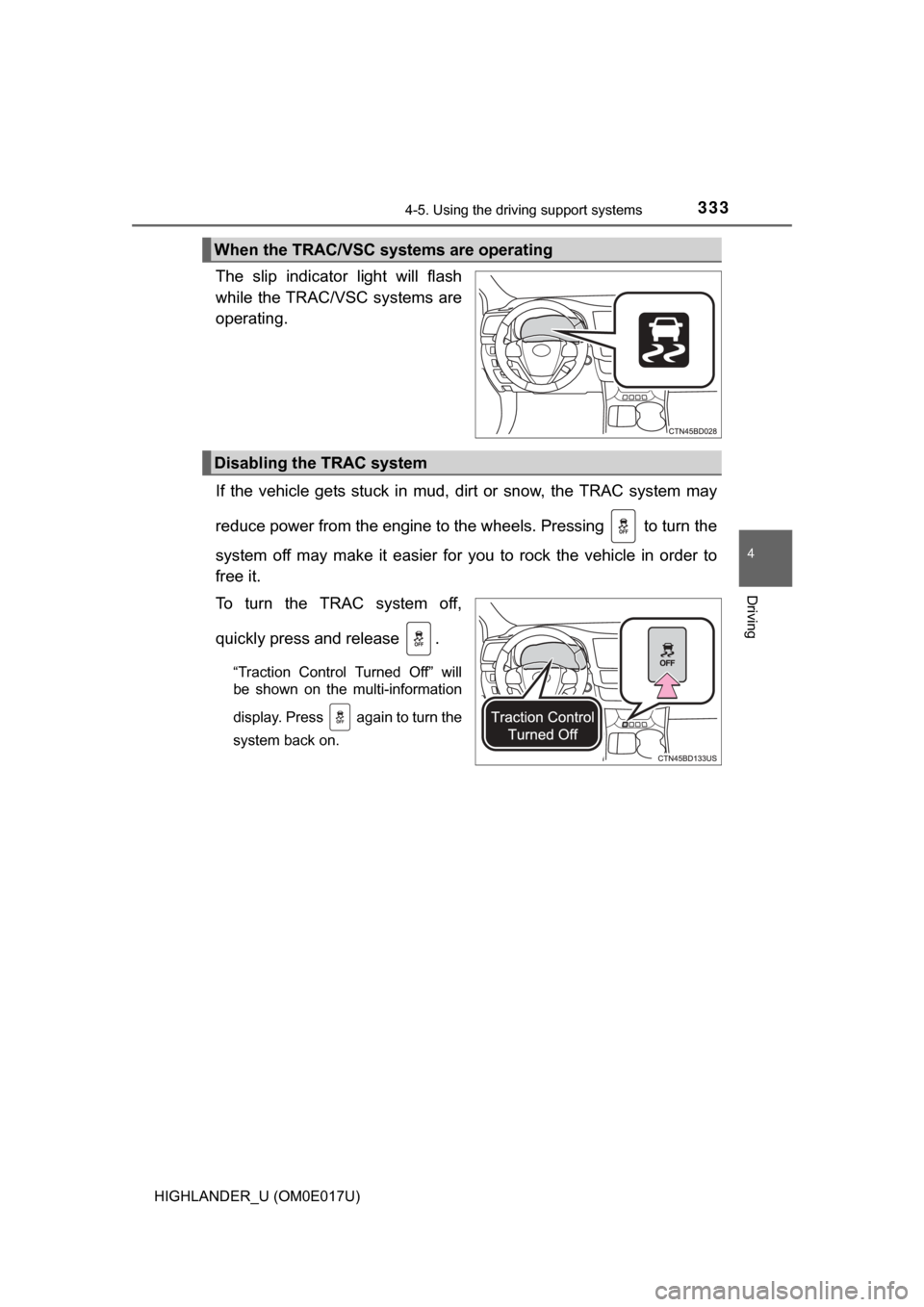
The slip indicator light will flash
while the TRAC/VSC systems are
operating.
If the vehicle gets stuck in mud, dirt or snow, the TRAC system may
reduce power from the engine to the wheels. Pressing to turn the
system off may make it easier for you to rock the vehicle in order to
free it.
To turn the TRAC system off,
quickly press and release .
“Traction Control Turned Off” will
be shown on the multi-information
display. Press again to turn the
system back on.
When the TRAC/VSC systems are operating
Disabling the TRAC system
Page 334 of 732
3344-5. Using the driving support systems
HIGHLANDER_U (OM0E017U)
■Turning off both TRAC and VSC systems
To turn the TRAC and VSC systems off, press and hold for more than 3
seconds while the vehicle is stopped.
The VSC OFF indicator light will come on and “Traction Control Turned Off”
will be shown on the multi-information display.
*
Press again to turn the systems back on.
*: Pre-collision brake assist and pre-collision braking will also be disabled.
(→ P. 274)
■ When the message is displayed on th e multi-information display show-
ing that TRAC has been disabled even if switch has not been
pressed
TRAC cannot be operated. Contact your Toyota dealer.
■ Operating conditions of hill-start assist control
When the following four conditions are met, the hill-start assist control will
operate:
● The shift lever is in a position other than P or N (when starting off forward/
backward on an upward incline).
● The vehicle is stopped.
● The accelerator pedal is not depressed.
● The parking brake is not engaged.
■ Automatic system cancelation of hill-start assist control
The hill-start assist control will turn off in any of the following situations:
● The shift lever is moved to P or N.
● The accelerator pedal is depressed.
● The parking brake is engaged.
● Approximately 2 seconds elapse after the brake pedal is released.
■ Sounds and vibrations caused by the ABS, brake assist, VSC, TRAC and
hill-start assist control systems
●A sound may be heard from the engine compartment when the brake pedal
is depressed repeatedly, when the engine is started or just after the vehicle
begins to move. This sound does not indicate that a malfunction has
occurred in any of these systems.
● Any of the following conditions may occur when the above systems are
operating. None of these indicates that a malfunction has occurred.
• Vibrations may be felt through the vehicle body and steering.
• A motor sound may be heard also after the vehicle comes to a stop.
• The brake pedal may pulsate slightly after the ABS is activated.
• The brake pedal may move down slightly after the ABS is activated.
Page 336 of 732

3364-5. Using the driving support systems
HIGHLANDER_U (OM0E017U)
WARNING
■TRAC/VSC may not operate effectively when
Directional control and power may not be achievable while driving on slip-
pery road surfaces, even if the TRAC/VSC system is operating.
Drive the vehicle carefully in conditions where stability and power may be
lost.
■ Hill- start assist control does not operate effectively when
● Do not overly rely on hill-start assist control. Hill-start assist control may
not operate effectively on steep inclines and roads covered with ice.
● Unlike the parking brake, hill-start assist control is not intended to hold the
vehicle stationary for an extended period of time. Do not attempt to use
hill-start assist control to hold the vehicle on an incline, as doing so may
lead to an accident.
■ When the VSC is activated
The slip indicator light flashes. Always drive carefully. Reckless driving may
cause an accident. Exercise particular care when the indicator light flashes.
■ When the TRAC/VSC syst ems are turned off
Be especially careful and drive at a speed appropriate to the road condi-
tions. As these are the systems to help ensure vehicle stability and driving
force, do not turn the TRAC/VSC systems off unless necessary.
Trailer Sway Control is part of the VSC system and will not operate if VSC
turned off or experiences a malfunction.
■ Replacing tires
Make sure that all tires are of the specified size, brand, tread pattern and
total load capacity. In addition, make sure that the tires are inflated to the
recommended tire inflation pressure level.
The ABS, TRAC and VSC systems will not function correctly if different tires
are installed on the vehicle.
Contact your Toyota dealer for further information when replacing tires or
wheels.
■ Handling of tires and the suspension
Using tires with any kind of problem or modifying the suspension will affect
the driving assist systems, and may cause a system to malfunction.
Page 337 of 732
3374-5. Using the driving support systems
4
Driving
HIGHLANDER_U (OM0E017U)■
Activating the downhill assist control system
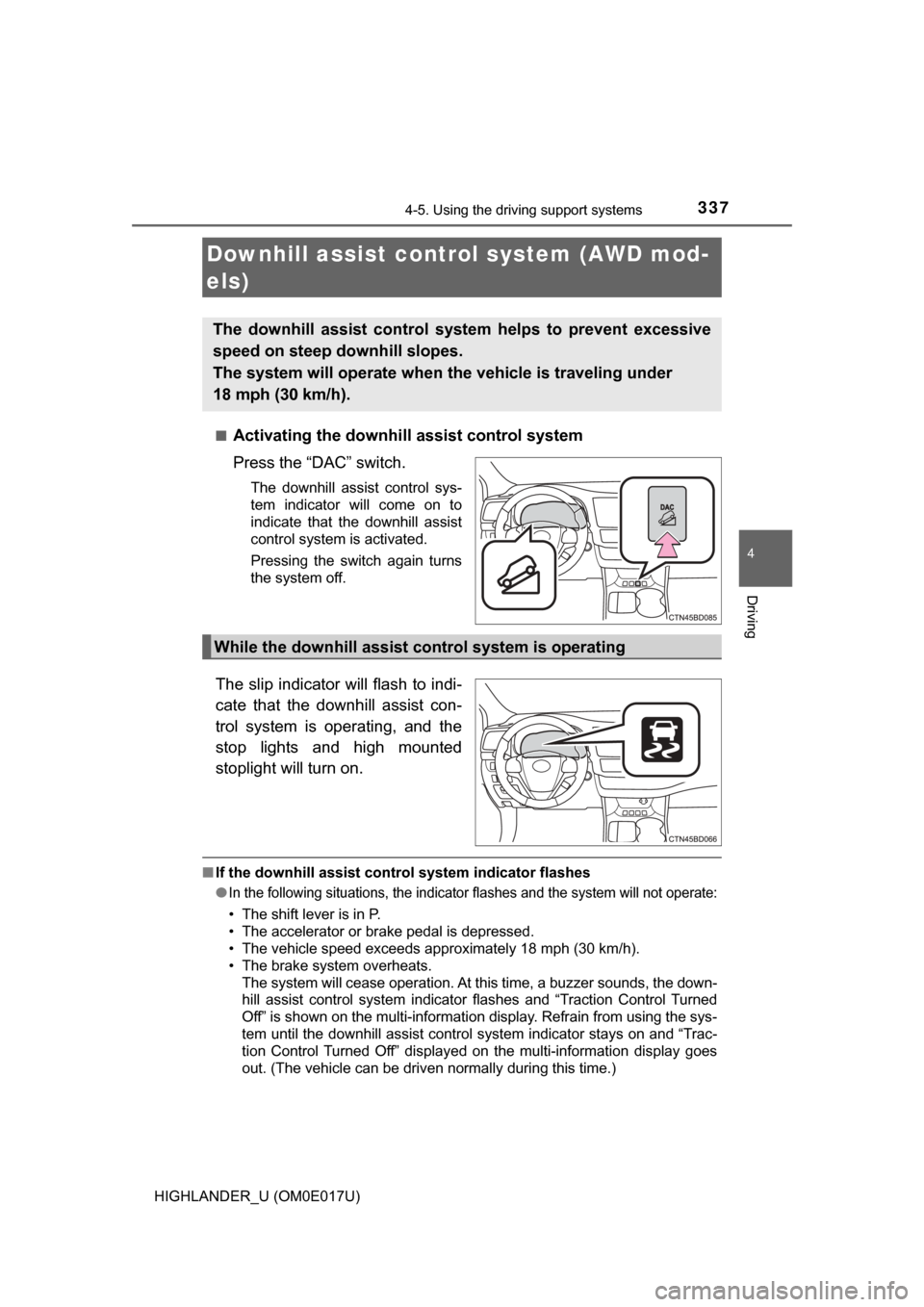
Press the “DAC” switch.
The downhill assist control sys-
tem indicator will come on to
indicate that the downhill assist
control system is activated.
Pressing the switch again turns
the system off.
The slip indicator will flash to indi-
cate that the downhill assist con-
trol system is operating, and the
stop lights and high mounted
stoplight will turn on.
■
If the downhill assist control system indicator flashes
●
In the following situations , the indicator flashes and the system will not operate:
• The shift lever is in P.
• The accelerator or brake pedal is depressed.
• The vehicle speed exceeds approximately 18 mph (30 km/h).
• The brake system overheats.
The system will cease operation. At this time, a buzzer sounds, the down-
hill assist control system indicator flashes and “Traction Control Turned
Off” is shown on the multi-information display. Refrain from using the sys-
tem until the downhill assist control system indicator stays on and “Trac-
tion Control Turned Off” displayed on the multi-information display goes
out. (The vehicle can be driven normally during this time.)
Downhill assist cont rol system (AWD mod-
els)
The downhill assist control system helps to prevent excessive
speed on steep downhill slopes.
The system will operate when th e vehicle is traveling under
18 mph (30 km/h).
While the downhill assist control system is operating
Page 340 of 732
3404-6. Driving tips
HIGHLANDER_U (OM0E017U)
Perform the following according to the driving conditions:
● Do not try to forcibly open a window or move a wiper that is frozen.
Pour warm water over the frozen area to melt the ice. Wipe away
the water immediately to prevent it from freezing.
● To ensure proper operation of the climate control system fan,
remove any snow that has accumulated on the air inlet vents in
front of the windshield.
● Check for and remove any excess ice or snow that may have accu-
mulated on the exterior lights, vehicle’s roof, chassis, around the
tires or on the brakes.
● Remove any snow or mud from the bottom of your shoes before
getting in the vehicle.
Accelerate the vehicle slowly, keep a safe distance between you and
the vehicle ahead, and drive at a reduced speed suitable to road con-
ditions.
● Park the vehicle and move the shift lever to P without setting the
parking brake. The parking brake may freeze up, preventing it from
being released. If the vehicle is parked without setting the parking
brake, make sure to block the wheels.
Failure to do so may be dangerous because it may cause the vehi-
cle to move unexpectedly, pos sibly leading to an accident.
● If the vehicle is parked without se tting the parking brake, confirm
that the shift lever ca nnot be moved out of P
*.
*: The shift lever will be locked if it is attempted to be shifted from P to any
other position without depressing the brake pedal. If the shift lever can be
shifted from P, there may be a problem with the shift lock system. Have the
vehicle inspected by your Toyota dealer immediately.
Before driving the vehicle
When driving the vehicle
When parking the vehicle
Page 353 of 732
3535-1. Basic Operations
5
Audio system
HIGHLANDER_U (OM0E017U)■
When using the touch screen
●If the screen is cold, the display may be dark, or the system may seem to be
operating slightly slower than normal.
● The screen may seem dark and hard to see when viewed through sun-
glasses. Change your angle of viewing, adjust the display on the “Display
Settings” screen ( →P. 361) or remove your sunglasses.
● Flick operations may not be performed smoothly in high altitudes.
NOTICE
■To avoid damaging the touch screen
● To prevent damaging the screen, lightly touch the screen buttons with your
finger.
● Do not use objects other than your finger to touch the screen.
● Wipe off fingerprints using a glass cleaning cloth. Do not use chemical
cleaners to clean the screen, as they may damage the touch screen.