Page 230 of 612
2304-5. Using the driving support systems
COROLLA_TMMMS_TMMC_U (OM02494U)
When driving on highways and freeways with white (yellow) lines, this
function alerts the driver when the vehicle might depart from its lane
and provides assistance by operating the steering wheel to keep the
vehicle in its lane.
The LDA system recognizes visi-
ble white (yellow) lines with the
camera sensor on the upper por-
tion of the windshield.
◆Lane departure alert function
When the system determines
that the vehicle might depart
from its lane, a warning is dis-
played on the multi-information
display and the warning buzzer
sounds to alert the driver.
When the warning buzzer
sounds, check the surrounding
road situation and carefully
operate the steering wheel to
move the vehicle back to the
center within the white (yellow)
lines.
LDA (Lane Departure Alert with steering
control)
Summary of functions
Functions included in LDA system
Page 231 of 612
2314-5. Using the driving support systems
4
Driving
COROLLA_TMMMS_TMMC_U (OM02494U)
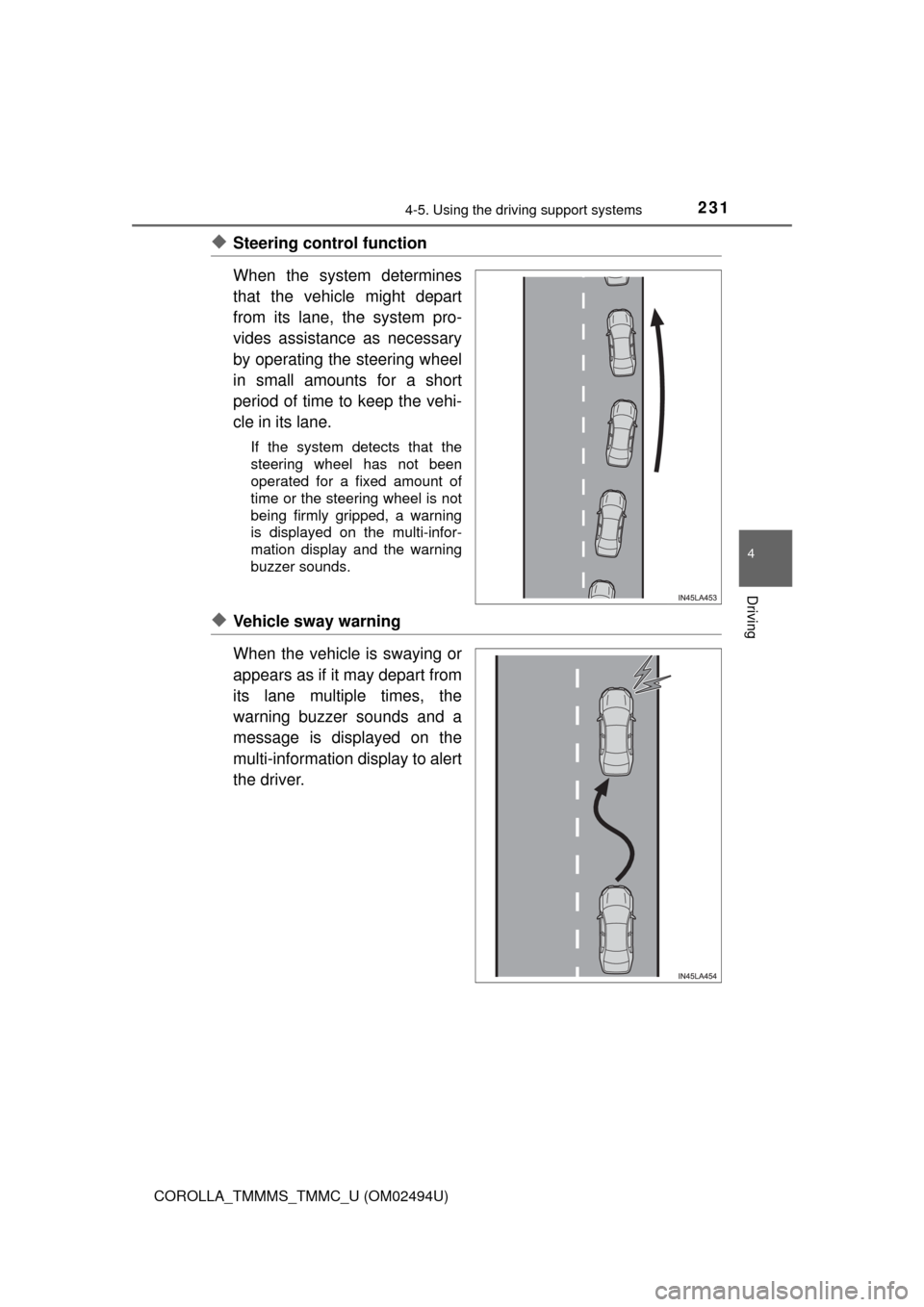
◆Steering control function
When the system determines
that the vehicle might depart
from its lane, the system pro-
vides assistance as necessary
by operating the steering wheel
in small amounts for a short
period of time to keep the vehi-
cle in its lane.
If the system detects that the
steering wheel has not been
operated for a fixed amount of
time or the steering wheel is not
being firmly gripped, a warning
is displayed on the multi-infor-
mation display and the warning
buzzer sounds.
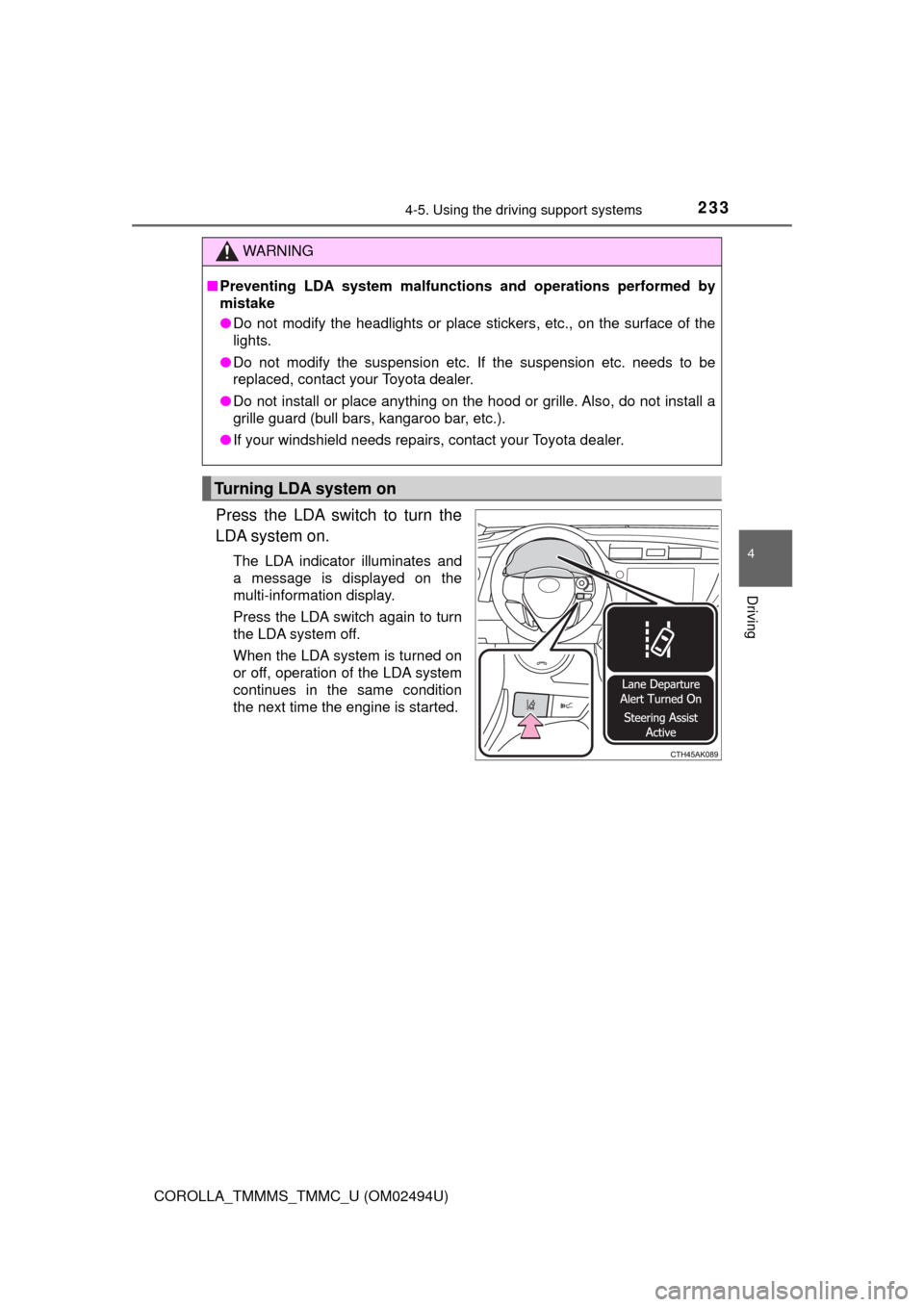
◆Vehicle sway warning
When the vehicle is swaying or
appears as if it may depart from
its lane multiple times, the
warning buzzer sounds and a
message is displayed on the
multi-information display to alert
the driver.
Page 233 of 612
2334-5. Using the driving support systems
4
Driving
COROLLA_TMMMS_TMMC_U (OM02494U)
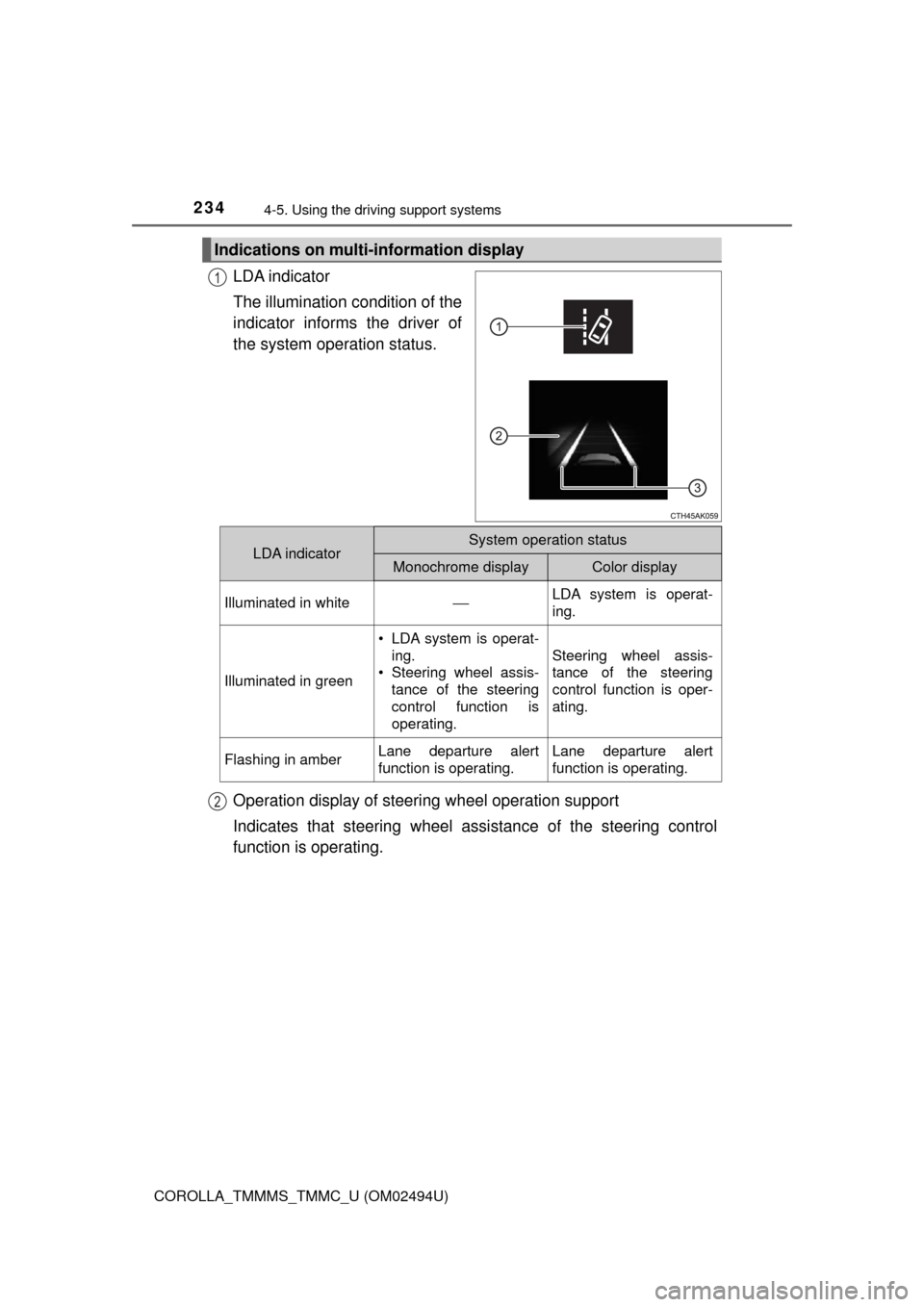
Press the LDA switch to turn the
LDA system on.
The LDA indicator illuminates and
a message is displayed on the
multi-information display.
Press the LDA switch again to turn
the LDA system off.
When the LDA system is turned on
or off, operation of the LDA system
continues in the same condition
the next time the engine is started.
WARNING
■Preventing LDA system malfunctions and operations performed by
mistake
●Do not modify the headlights or place stickers, etc., on the surface of the
lights.
●Do not modify the suspension etc. If the suspension etc. needs to be
replaced, contact your Toyota dealer.
●Do not install or place anything on the hood or grille. Also, do not install a
grille guard (bull bars, kangaroo bar, etc.).
●If your windshield needs repairs, contact your Toyota dealer.
Turning LDA system on
Page 234 of 612
2344-5. Using the driving support systems
COROLLA_TMMMS_TMMC_U (OM02494U)
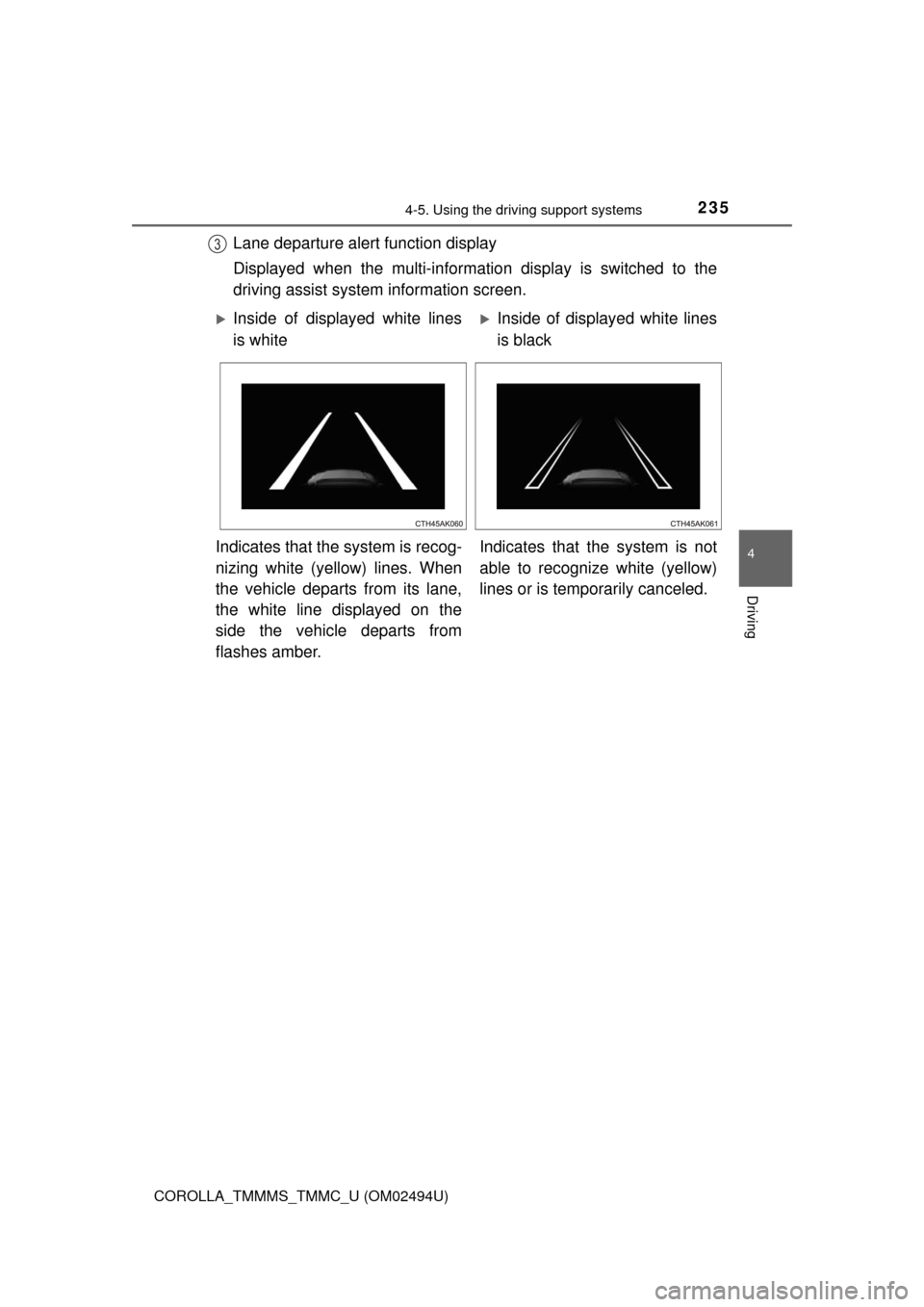
LDA indicator
The illumination condition of the
indicator informs the driver of
the system operation status.
Operation display of steering wheel operation support
Indicates that steering wheel assistance of the steering control
function is operating.
Indications on multi-information display
1
LDA indicatorSystem operation status
Monochrome displayColor display
Illuminated in white⎯LDA system is operat-
ing.
Illuminated in green
• LDA system is operat-
ing.
• Steering wheel assis-
tance of the steering
control function is
operating.
Steering wheel assis-
tance of the steering
control function is oper-
ating.
Flashing in amberLane departure alert
function is operating.Lane departure alert
function is operating.
2
Page 235 of 612
2354-5. Using the driving support systems
4
Driving
COROLLA_TMMMS_TMMC_U (OM02494U)
Lane departure alert function display
Displayed when the multi-information display is switched to the
driving assist system information screen.3
Inside of displayed white lines
is whiteInside of displayed white lines
is black
Indicates that the system is recog-
nizing white (yellow) lines. When
the vehicle departs from its lane,
the white line displayed on the
side the vehicle departs from
flashes amber.Indicates that the system is not
able to recognize white (yellow)
lines or is temporarily canceled.
Page 237 of 612
2374-5. Using the driving support systems
4
Driving
COROLLA_TMMMS_TMMC_U (OM02494U)■Temporary cancellation of functions
When operation conditions are no longer met, a function may be temporarily
canceled. However, when the operation conditions are met again, operation
of the function is automatically restored. (→P. 236)
■Steering control function
Depending on the vehicle speed, lane departure situation, road conditions,
etc., the operation of the functions may not be recognized or the functions
may not operate.
■Lane departure alert function
The warning buzzer may be difficult to hear due to external noise, audio play-
back, etc.
■Hands off steering wheel alert
When the system determines that the driver has removed their hands from
the steering wheel while the steering control function is operating, a warning
message is displayed on the multi-information display and the buzzer
sounds.
■White (yellow) lines are only on one side of road
The LDA system will not operate for the side on which white (yellow) lines
could not be recognized.
Page 240 of 612
2404-5. Using the driving support systems
COROLLA_TMMMS_TMMC_U (OM02494U)
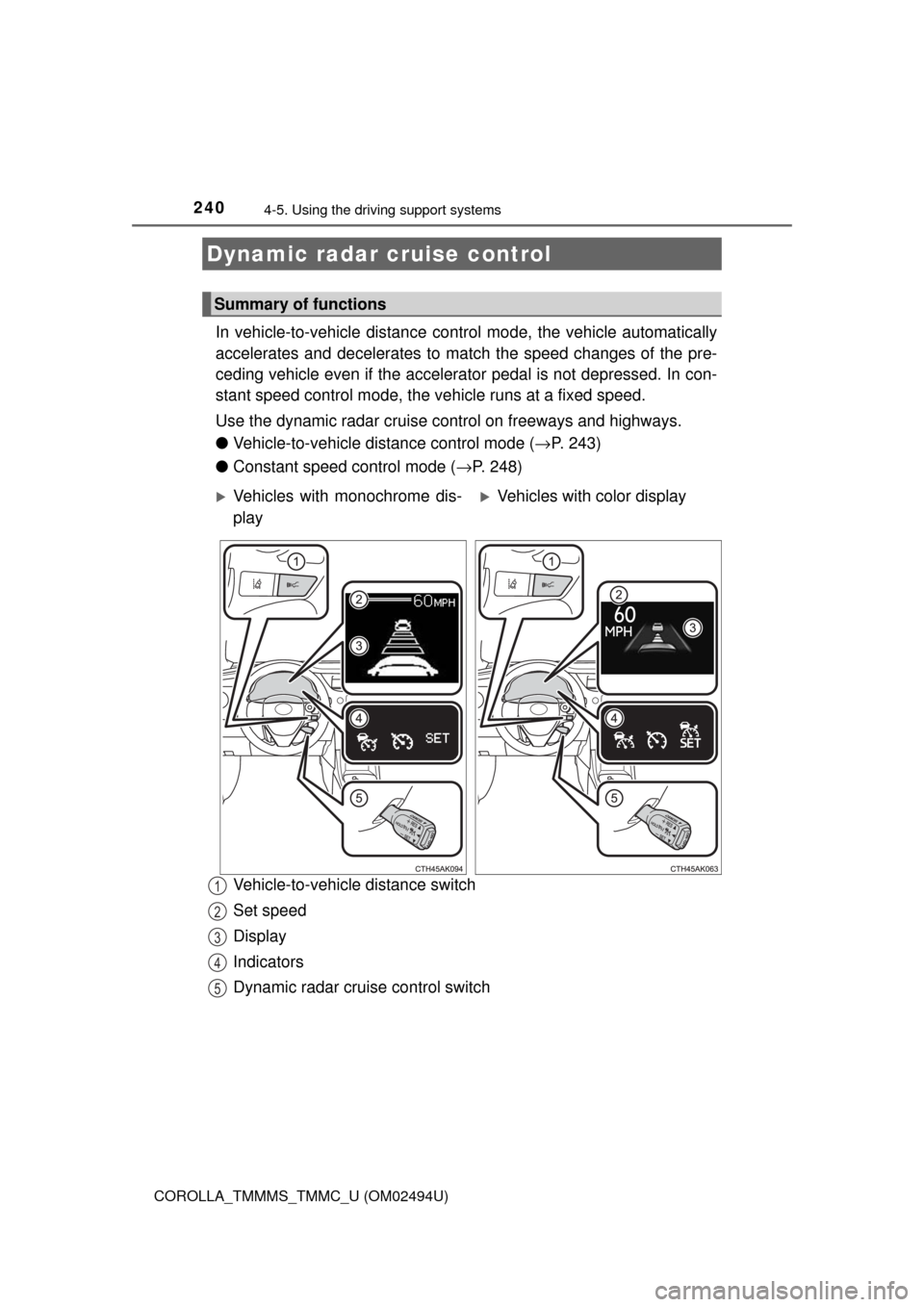
In vehicle-to-vehicle distance control mode, the vehicle automatically
accelerates and decelerates to match the speed changes of the pre-
ceding vehicle even if the accelerator pedal is not depressed. In con-
stant speed control mode, the vehicle runs at a fixed speed.
Use the dynamic radar cruise control on freeways and highways.
●Vehicle-to-vehicle distance control mode (→P. 243)
●Constant speed control mode (→P. 248)
Vehicle-to-vehicle distance switch
Set speed
Display
Indicators
Dynamic radar cruise control switch
Dynamic radar cruise control
Summary of functions
Vehicles with monochrome dis-
playVehicles with color display
1
2
3
4
5
Page 244 of 612
2444-5. Using the driving support systems
COROLLA_TMMMS_TMMC_U (OM02494U)
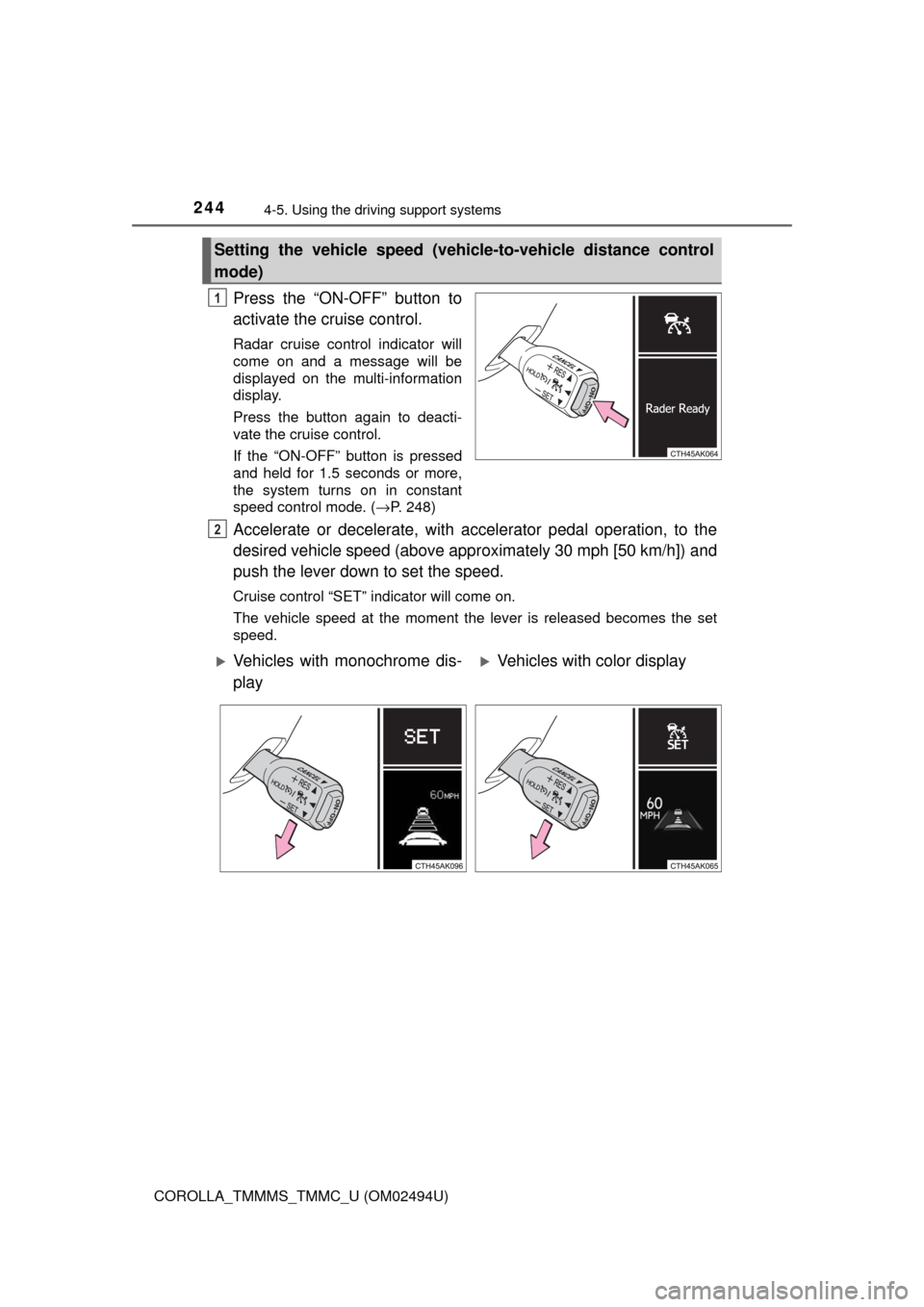
Press the “ON-OFF” button to
activate the cruise control.
Radar cruise control indicator will
come on and a message will be
displayed on the multi-information
display.
Press the button again to deacti-
vate the cruise control.
If the “ON-OFF” button is pressed
and held for 1.5 seconds or more,
the system turns on in constant
speed control mode. (→P. 248)
Accelerate or decelerate, with accelerator pedal operation, to the
desired vehicle speed (above approximately 30 mph [50 km/h]) and
push the lever down to set the speed.
Cruise control “SET” indicator will come on.
The vehicle speed at the moment the lever is released becomes the set
speed.
Setting the vehicle speed (vehicle-to-vehicle distance control
mode)
1
2
Vehicles with monochrome dis-
playVehicles with color display