Page 78 of 612

782. Instrument cluster
COROLLA_TMMMS_TMMC_U (OM02494U)
*1: These lights, except those shown on the multi-information display, turn on
when the engine switch is turned to the “ON” position (vehicles without a
smart key system) or the engine switch is turned to IGNITION ON mode
(vehicles with a smart key system) to indicate that a system check is being
performed. They will turn off after the engine is started, or after a few sec-
onds. There may be a malfunction in a system if a light does not come on,
or turn off. Have the vehicle inspected by your Toyota dealer.
*2: If equipped
*3: The light flashes to indicate that the system is operating.
*4: The light does not turn on when the system is disabled.
*5: This light illuminates on the center panel.
*6: The light turns on when the system is off.
*7: When the outside temperature is approximately 37°F (3°C) or lower, the
indicator will flash 10 times, then stay on.
WARNING
■If a safety system warning light does not come on
Should a safety system light such as the ABS and SRS warning lights not
come on when you start the engine, this could mean that these systems are
not available to help protect you in an accident, which could result in death
or serious injury. Have the vehicle inspected by your Toyota dealer immedi-
ately if this occurs.
Page 79 of 612
792. Instrument cluster
2
Instrument cluster
COROLLA_TMMMS_TMMC_U (OM02494U)
Tachometer
Displays the engine speed in revolutions per minute.
Multi-information display
The multi-information display presents the driver with a variety of driving-
related data including the current outside air temperature.
Speedometer
Fuel gauge
Display change button (for Canada)
Switches the trip information and instrument panel light control.
Display change button (for U.S.A.)
Switches the trip information.
Engine coolant temperature gauge
Displays the engine coolant temperature.
Gauges and meters (vehicles with mono-
chrome display)
The displayed content may differ depending on the type of
meter.
1
2
3
4
5
6
7
Page 80 of 612
802. Instrument cluster
COROLLA_TMMMS_TMMC_U (OM02494U)
Driving assist information
(→P. 101, 240)
Driving monitor (→P. 83)
Warning messages (→P. 493)
Eco Driving Indicator Zone Dis-
play
* (→P. 102)
Outside temperature display
(→P. 397)
Trip information (→P. 8 2 )
Shift position and gear position
indicator
* (→P. 183, 186)
*: Vehicles with a continuously vari-
able transmission
Multi-information display
1
2
3
4
5
6
7
Page 88 of 612
882. Instrument cluster
COROLLA_TMMMS_TMMC_U (OM02494U)
Tachometer
Displays the engine speed in revolutions per minute.
Multi-information display
Presents the driver with a variety of driving-related data.
Displays warning messages in case of a malfunction (→P. 493)
Outside temperature display
→P. 397
Shift position/gear position display
Displays the currently selected the shift position and gear position.
→P. 183, 186
Speedometer
Fuel gauge
Odometer and trip meter display/Instrument panel light control dis-
play
*
→P. 89, 90
Engine coolant temperature gauge
Displays the engine coolant temperature.
*: Canada only
Gauges and meters (vehicles with color
display)
1
2
3
4
5
6
7
8
Page 103 of 612
103
3
Operation of
each component
COROLLA_TMMMS_TMMC_U (OM02494U)3-1. Key information
Keys .................................. 104
3-2. Opening, closing and
locking the doors
Doors ................................ 110
Trunk ................................. 119
Smart key system ............. 124
3-3. Adjusting the seats
Front seats ........................ 132
Rear seats......................... 134
Head restraints.................. 136
3-4. Adjusting the steering
wheel and mirrors
Steering wheel .................. 139
Inside rear view mirror ...... 141
Outside rear view
mirrors ............................. 143
3-5. Opening and closing
the windows
Power windows ................. 145
Moon roof .......................... 149
Page 110 of 612
110
COROLLA_TMMMS_TMMC_U (OM02494U)
3-2. Opening, closing and locking the doors
◆Smart key system (if equipped)
Carry the electronic key to enable this function.
Grip the driver’s door handle
to unlock the door. Grip the
passenger’s door handle to
unlock all the doors.*
Make sure to touch the sensor
on the back of the handle.
The doors cannot be unlocked
for 3 seconds after the doors are
locked.
*: The door unlock settings can be changed. (→P. 117)
Touch the lock sensor (the indentation on the upper part of the
door handle) to lock all the doors.
Check that the door is securely locked.
◆Wireless remote control (if equipped)
Vehicles without a smart key system
Locks all the doors
Check that the door is securely
locked.
Unlocks all the doors
Pressing the button unlocks the
driver’s door. Pressing the but-
ton again within 5 seconds
unlocks the other doors.
Doors
Unlocking and locking the doors from the outside
1
2
1
2
Page 113 of 612
1133-2. Opening, closing and locking the doors
3
Operation of each component
COROLLA_TMMMS_TMMC_U (OM02494U)
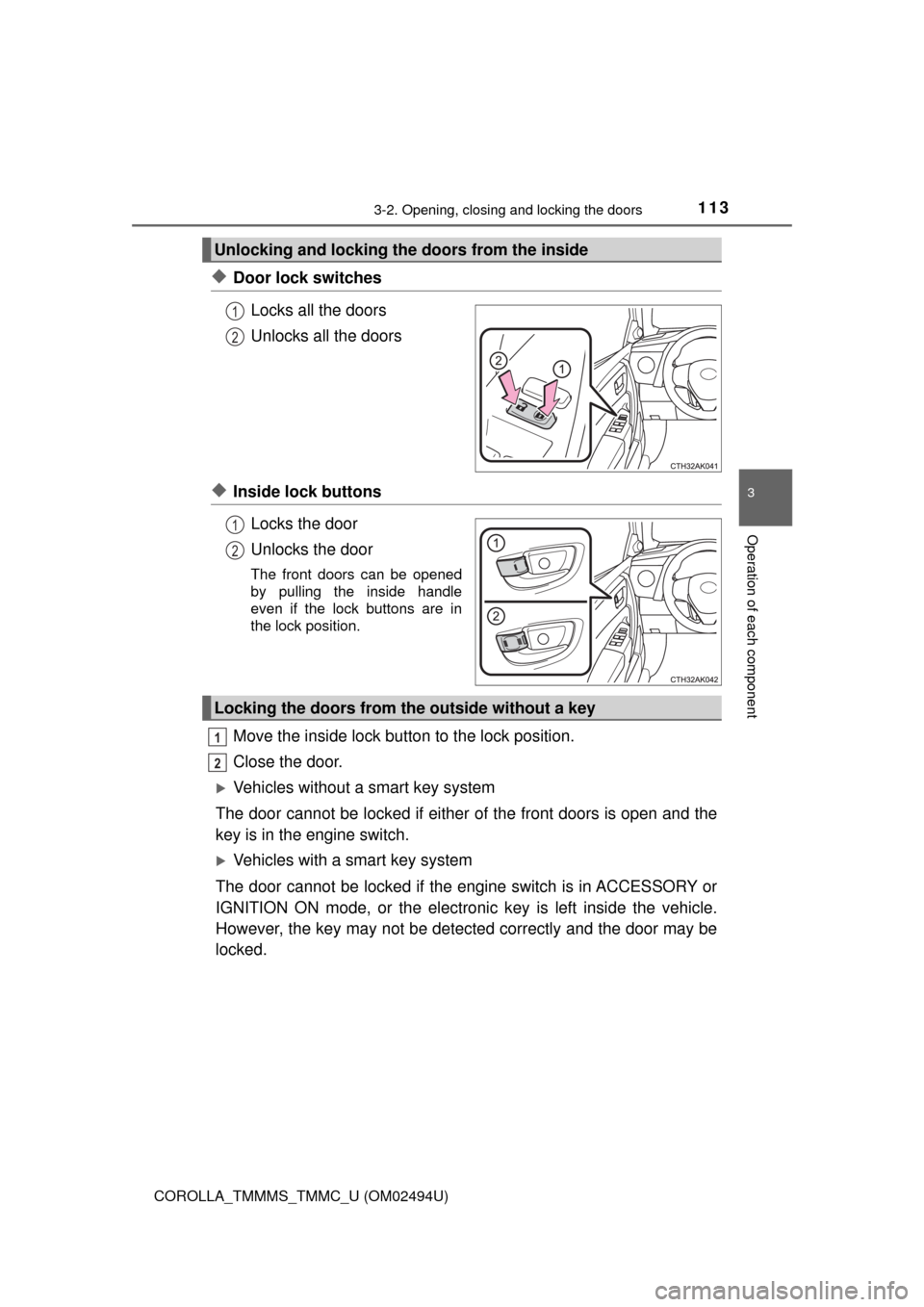
◆Door lock switches
Locks all the doors
Unlocks all the doors
◆Inside lock buttons
Locks the door
Unlocks the door
The front doors can be opened
by pulling the inside handle
even if the lock buttons are in
the lock position.
Move the inside lock button to the lock position.
Close the door.
Vehicles without a smart key system
The door cannot be locked if either of the front doors is open and the
key is in the engine switch.
Vehicles with a smart key system
The door cannot be locked if the engine switch is in ACCESSORY or
IGNITION ON mode, or the electronic key is left inside the vehicle.
However, the key may not be detected correctly and the door may be
locked.
Unlocking and locking the doors from the inside
1
2
1
2
Locking the doors from the outside without a key
1
2
Page 119 of 612
1193-2. Opening, closing and locking the doors
3
Operation of each component
COROLLA_TMMMS_TMMC_U (OM02494U)
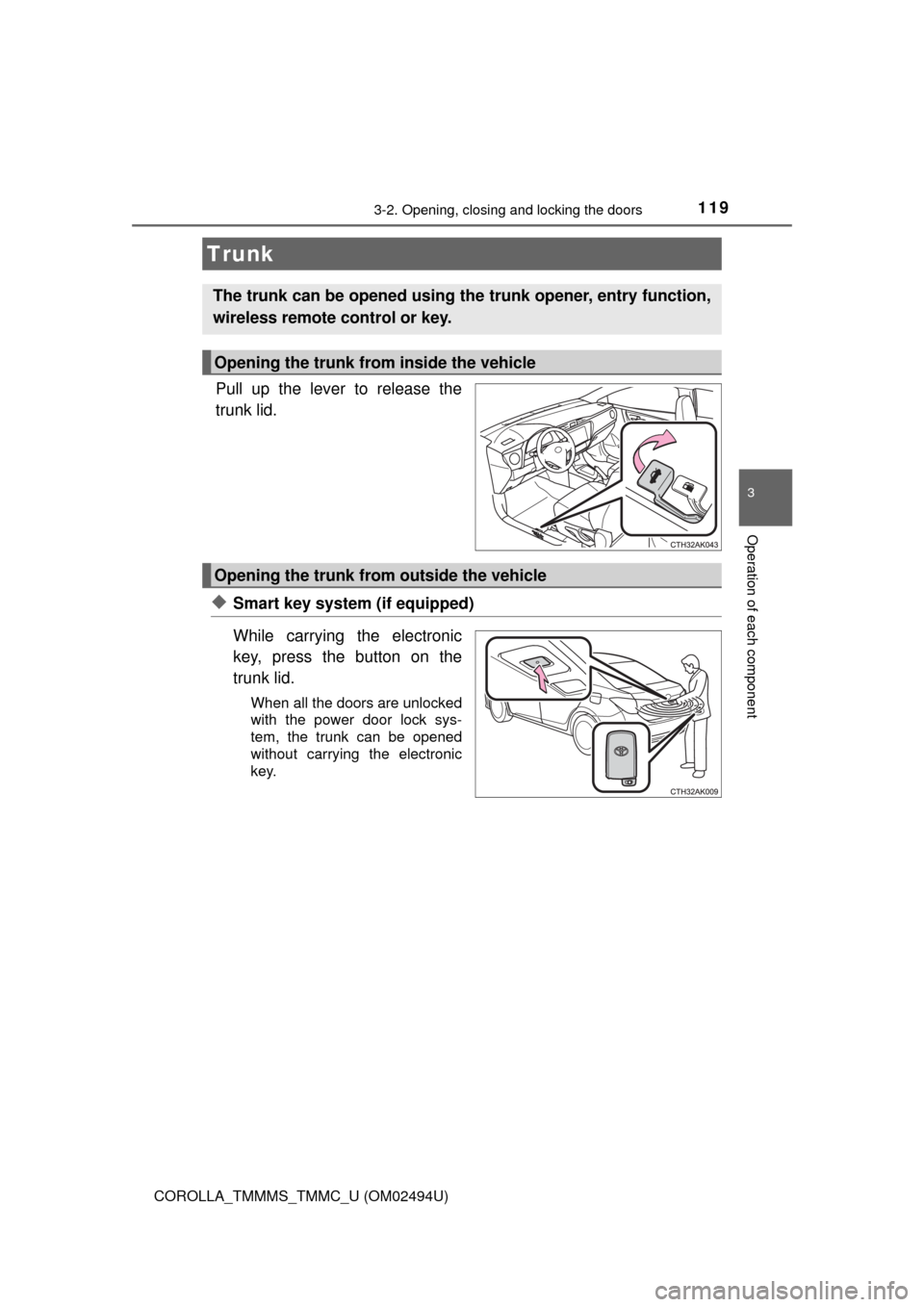
Pull up the lever to release the
trunk lid.
◆Smart key system (if equipped)
While carrying the electronic
key, press the button on the
trunk lid.
When all the doors are unlocked
with the power door lock sys-
tem, the trunk can be opened
without carrying the electronic
key.
Trunk
The trunk can be opened using the trunk opener, entry function,
wireless remote control or key.
Opening the trunk from inside the vehicle
Opening the trunk from outside the vehicle