Page 250 of 612

2504-5. Using the driving support systems
COROLLA_TMMMS_TMMC_U (OM02494U)■Automatic cancelation of constant speed control mode
Constant speed control mode is automatically canceled in the following situa-
tions:
●Actual vehicle speed is more than approximately 10 mph (16 km/h) below
the set vehicle speed.
●Actual vehicle speed falls below approximately 25 mph (40 km/h).
●VSC is activated.
●TRAC is activated for a period of time.
●When the VSC or TRAC system is turned off.
●Pre-collision braking is activated.
●The engine speed is too high, or too low. (vehicles with a manual transmis-
sion)
If constant speed control mode is automatically canceled for any other rea-
son, there may be a malfunction in the system. Contact your Toyota dealer.
■Warning messages and buzzers for dynamic radar cruise control
Warning messages and buzzers are used to indicate a system malfunction or
to inform the driver of the need for caution while driving. If a warning message
is shown on the multi-information display, read the message and follow the
instructions. (→P. 493)
■When the sensor may not be correctly detecting the vehicle ahead
In the case of the following and depending on the conditions, operate the
brake pedal when deceleration of the system is insufficient or operate the
accelerator pedal when acceleration is required.
As the sensor may not be able to correctly detect these types of vehicles, the
approach warning (→P. 247) may not be activated.
●Vehicles that cut in suddenly
●Vehicles traveling at low speeds
●Vehicles that are not moving in the same lane
●Vehicles with small rear ends (trailers with no load on board, etc.)
Page 260 of 612

2604-5. Using the driving support systems
COROLLA_TMMMS_TMMC_U (OM02494U)
WARNING
■When using the rear view monitor system
The rear view monitor system is a supplemental device intended to assist
the driver when backing up. When backing up, be sure to visually check all
around the vehicle both directly and using the mirrors before proceeding. If
you do not, you may hit another vehicle, and could possibly cause an acci-
dent.
Pay attention to the following precautions when using the rear view monitor
system.
●Never depend on the rear view monitor system entirely when backing up.
The image and the position of the guide lines displayed on the screen may
differ from the actual state.
Use caution, just as you would when backing up any vehicle.
●Be sure to back up slowly, depressing the brake pedal to control vehicle
speed.
●The instructions given are only guidelines.
When and how much to turn the steering wheel will vary according to traf-
fic conditions, road surface conditions, vehicle condition, etc. when park-
ing. It is necessary to be fully aware of this before using the rear view
monitor system.
●When parking, be sure to check that the parking space will accommodate
your vehicle before maneuvering into it.
●Do not use the rear view monitor system in the following cases:
• On icy or slick road surfaces, or in snow
• When using tire chains or the compact spare tire
• When the trunk lid is not closed completely
• On roads that are not flat or straight, such as curves or slopes.
●In low temperatures, the screen may darken or the image may become
faint. The image could distort when the vehicle is moving, or you may
become unable to see the image on the screen. Be sure to visually check
all around the vehicle both directly and using the mirrors before proceed-
ing.
●If the tire sizes are changed, the position of the fixed guide lines displayed
on the screen may change.
●The camera uses a special lens. The distances between objects and
pedestrians that appear in the image displayed on the screen will differ
from the actual distances. (→P. 255)
Page 266 of 612

2664-5. Using the driving support systems
COROLLA_TMMMS_TMMC_U (OM02494U)
WARNING
■The ABS does not operate effectively when
●The limits of tire gripping performance have been exceeded (such as
excessively worn tires on a snow covered road).
●The vehicle hydroplanes while driving at high speed on wet or slick roads.
■Stopping distance when the ABS is operating may exceed that of nor-
mal conditions
The ABS is not designed to shorten the vehicle’s stopping distance. Always
maintain a safe distance from the vehicle in front of you, especially in the
following situations:
●When driving on dirt, gravel or snow-covered roads
●When driving with tire chains
●When driving over bumps in the road
●When driving over roads with potholes or uneven surfaces
■TRAC may not operate effectively when
Directional control and power may not be achievable while driving on slip-
pery road surfaces, even if the TRAC system is operating.
Drive the vehicle carefully in conditions where stability and power may be
lost.
■Hill-start assist control does not operate effectively when
●Do not overly rely on hill-start assist control. Hill-start assist control may
not operate effectively on steep inclines and roads covered with ice.
●Unlike the parking brake, hill-start assist control is not intended to hold the
vehicle stationary for an extended period of time. Do not attempt to use
hill-start assist control to hold the vehicle on an incline, as doing so may
lead to an accident.
■When the VSC is activated
The slip indicator light flashes. Always drive carefully. Reckless driving may
cause an accident. Exercise particular care when the indicator light flashes.
■When the TRAC or VSC system is turned off
Be especially careful and drive at a speed appropriate to the road condi-
tions. As these are the systems to help ensure vehicle stability and driving
force, do not turn the TRAC or VSC system off unless necessary.
Page 267 of 612
2674-5. Using the driving support systems
4
Driving
COROLLA_TMMMS_TMMC_U (OM02494U)
WARNING
■Replacing tires
Make sure that all tires are of the specified size, brand, tread pattern and
total load capacity. In addition, make sure that the tires are inflated to the
recommended tire inflation pressure level.
The ABS, TRAC and VSC systems will not function correctly if different tires
are installed on the vehicle.
Contact your Toyota dealer for further information when replacing tires or
wheels.
■Handling of tires and the suspension
Using tires with any kind of problem or modifying the suspension will affect
the driving assist systems, and may cause a system to malfunction.
Page 271 of 612

2714-6. Driving tips
4
Driving
COROLLA_TMMMS_TMMC_U (OM02494U)
WARNING
■Driving with snow tires
Observe the following precautions to reduce the risk of accidents.
Failure to do so may result in a loss of vehicle control and cause death or
serious injury.
●Use tires of the size specified.
●Maintain the recommended level of air pressure.
●Do not drive in excess of 75 mph (120 km/h), regardless of the type of
snow tires being used.
●Use snow tires on all, not just some wheels.
■Driving with tire chains
Observe the following precautions to reduce the risk of accidents.
Failure to do so may result in the vehicle being unable to be driven safely,
and may cause death or serious injury.
●Do not drive in excess of the speed limit specified for the tire chains being
used, or 30 mph (50 km/h), whichever is lower.
●Avoid driving on bumpy road surfaces or over potholes.
●Avoid sudden acceleration, abrupt steering, sudden braking and shifting
operations that cause sudden engine braking.
●Slow down sufficiently before entering a curve to ensure that vehicle con-
trol is maintained.
●Do not use LDA (Lane Departure Alert with steering control) system.
NOTICE
■Repairing or replacing snow tires (vehicles with a tire pressure warn-
ing system)
Request repairs or replacement of snow tires from Toyota dealers or legiti-
mate tire retailers.
This is because the removal and attachment of snow tires affects the opera-
tion of the tire pressure warning valves and transmitters.
■Fitting tire chains (vehicles with a tire pressure warning system)
The tire pressure warning valves and transmitters may not function correctly
when tire chains are fitted.
Page 275 of 612
2755-1. Basic Operations
5
Audio system
COROLLA_TMMMS_TMMC_U (OM02494U)
Vo l u m e s w i t c h
• Increases/decreases volume
• Press and hold: Continuously increases/decreases volume
Cursor switch
• Selects (radio stations/radio presets/tracks/files/songs)
• Moves cursor
• Press and hold: Seeks up/down (radio stations)
• Fast up/down (tracks/files)
“MODE/HOLD” switch:
• Changes audio source
• Press and hold: Mutes or pauses the current operation.
To cancel the mute or pause, press and hold again.
Steering wheel audio switches
Some audio features can be controlled using the switches on
the steering wheel.
Operation may differ depending on the type of audio system or
navigation system. For details, refer to the manual provided with
the audio system or navigation system.
Operating the audio system using the steering wheel switches
Ty p e AType B
WARNING
■To reduce the risk of an accident
Exercise care when operating the audio switches on the steering wheel.
1
2
3
Page 276 of 612
2765-1. Basic Operations
COROLLA_TMMMS_TMMC_U (OM02494U)■
iPod
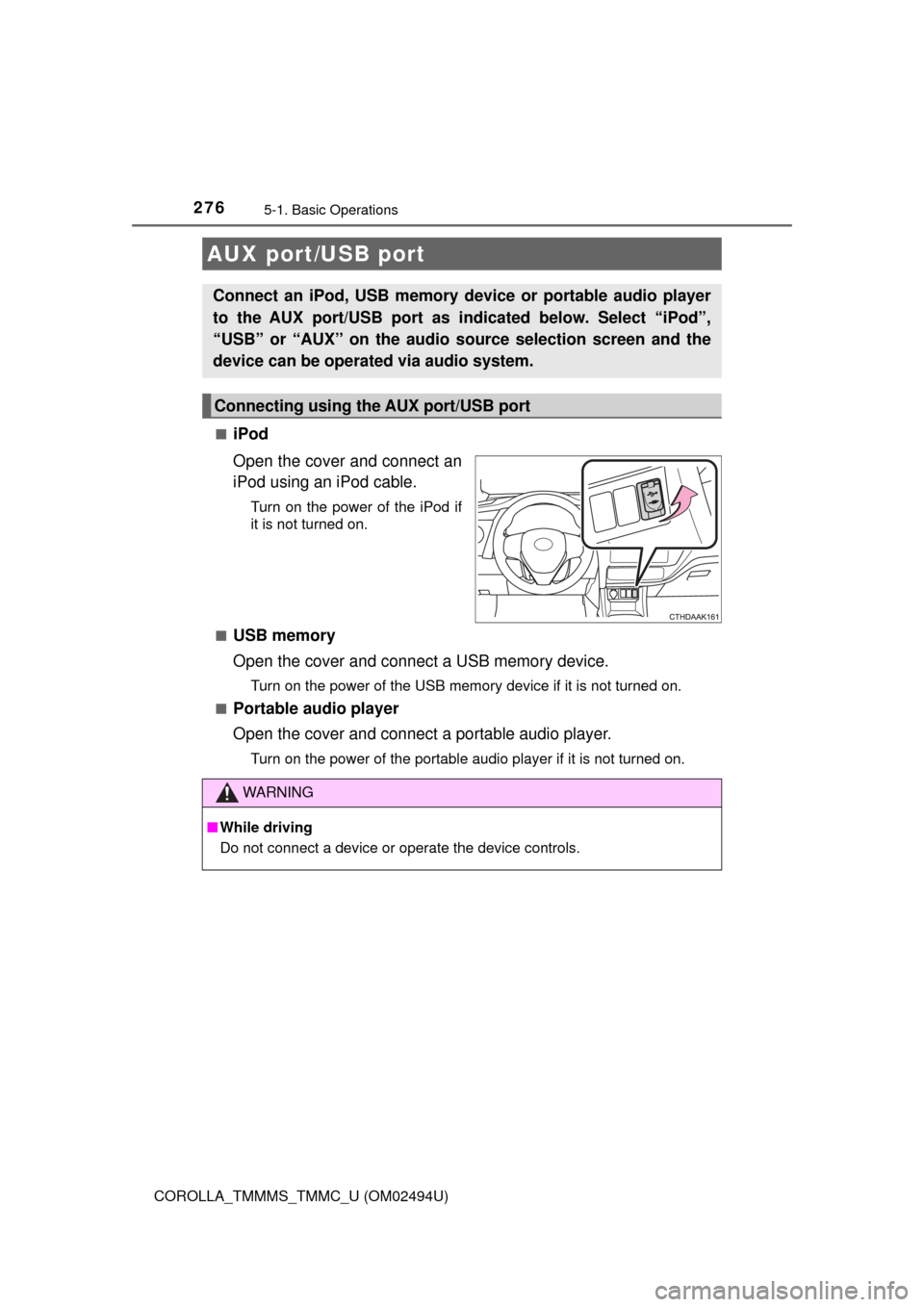
Open the cover and connect an
iPod using an iPod cable.
Turn on the power of the iPod if
it is not turned on.
■
USB memory
Open the cover and connect a USB memory device.
Turn on the power of the USB memory device if it is not turned on.
■
Portable audio player
Open the cover and connect a portable audio player.
Turn on the power of the portable audio player if it is not turned on.
AUX port/USB port
Connect an iPod, USB memory device or portable audio player
to the AUX port/USB port as indicated below. Select “iPod”,
“USB” or “AUX” on the audio source selection screen and the
device can be operated via audio system.
Connecting using the AUX port/USB port
WARNING
■While driving
Do not connect a device or operate the device controls.
Page 281 of 612
2815-1. Basic Operations
5
Audio system
COROLLA_TMMMS_TMMC_U (OM02494U)
Select to change on/off.
Select to change on/off.
■Using cellular phones
Interference may be heard through Entune Audio’s speakers if a cellular
phone is being used inside or close to the vehicle while Entune Audio is oper-
ating.
Random playback
Repeat play
WARNING
■Laser product
This product is a class 1 laser product.
Do not open the cover of the player or attempt to repair the unit yourself.
Refer servicing to qualified personnel.
●Laser products
• Do not take this unit apart or attempt to make any changes yourself.
This is an intricate unit that uses a laser pickup to retrieve information
from the surface of compact discs. The laser is carefully shielded so
that its rays remain inside the cabinet. Therefore, never try to disassem-
ble the player or alter any of its parts since you may be exposed to laser
rays and dangerous voltages.
• This product utilizes a laser.
Use of controls or adjustments or performance of procedures other than
those specified herein may result in hazardous radiation exposure.
THE USE OF OPTICAL INSTRUMENTS WITH THIS PRODUCT WILL
INCREASE EYE HAZARD.
NOTICE
■To prevent battery discharge
Do not leave Entune Audio on longer than necessary when the engine is off.
■To avoid damaging Entune Audio
Take care not to spill drinks or other fluids on Entune Audio.