Page 220 of 612

2204-5. Using the driving support systems
COROLLA_TMMMS_TMMC_U (OM02494U)■
Enabling/disabling the pre-collision system
The pre-collision system can be enabled/disabled on the settings
display (→P. 95) of the multi-information display.
The system is automatically enabled each time the engine switch is
turned to the “ON” position (vehicles without a smart key system) or
IGNITION ON mode (vehicles with a smart key system).
If the system is disabled, the
PCS warning light will turn on
and a message will be dis-
played on the multi-information
display.
■Changing the pre-collision warning timing
The pre-collision warning timing can be changed on the settings
display (→P. 95) of the multi-information display.
The operation timing setting is retained when the engine switch is
turned off.
Far
The warning will begin to oper-
ate earlier than with the default
timing.
Middle
This is the default setting.
Near
The warning will begin to oper-
ate later than with the default
timing.
Changing settings of the pre-collision system
1
2
3
Page 221 of 612

2214-5. Using the driving support systems
4
Driving
COROLLA_TMMMS_TMMC_U (OM02494U)
■Operational conditions
Availability of the pedestrian detection function depends on the region in
which the vehicle was sold.
Read the following for details:
Region A
(The pedestrian detection function is available)
The pre-collision system is enabled and the system determines that the pos-
sibility of a frontal collision with a vehicle or pedestrian is high.
Each function is operational at the following speeds:
●Pre-collision warning:
• Vehicle speed is between approximately 7 and 110 mph (10 and 180 km/h).
(For detecting a pedestrian, vehicle speed is between approximately 7 and
50 mph [10 and 80 km/h].)
• The relative speed between your vehicle and the vehicle or pedestrian
ahead is approximately 7 mph (10 km/h) or more.
●Pre-collision brake assist:
• Vehicle speed is between approximately 19 and 110 mph (30 and 180 km/h).
(For detecting a pedestrian, vehicle speed is between approximately 19 and
50 mph [30 and 80 km/h].)
• The relative speed between your vehicle and the vehicle or pedestrian
ahead is approximately 19 mph (30 km/h) or more.
●Pre-collision braking:
• Vehicle speed is between approximately 7 and 110 mph (10 and 180
km/h). (For detecting a pedestrian, vehicle speed is between approxi-
mately 7 and 50 mph [10 and 80 km/h].)
• The relative speed between your vehicle and the vehicle or pedestrian
ahead is approximately 7 mph (10 km/h) or more.
The system may not operate in the following situations:
●If a battery terminal has been disconnected and reconnected and then the
vehicle has not been driven for a certain amount of time
●If the shift lever is in R
●If VSC is disabled (only the pre-collision warning function will be opera-
tional)
●If the PCS (Pre-Collision System) warning light is flashing or illuminated
RegionsFunction availability
Region AThe pedestrian detection function is available
Region BThe pedestrian detection function is not available
Page 222 of 612

2224-5. Using the driving support systems
COROLLA_TMMMS_TMMC_U (OM02494U)
Region B
(The pedestrian detection function is not available)
The pre-collision system is enabled and the system determines that the pos-
sibility of a frontal collision with a vehicle is high.
Each function is operational at the following speeds:
●Pre-collision warning:
• Vehicle speed is between approximately 10 and 110 mph (15 and 180
km/h).
• The relative speed between your vehicle and the vehicle ahead is
approximately 7 mph (10 km/h) or more.
●Pre-collision brake assist:
• Vehicle speed is between approximately 19 and 110 mph (30 and 180
km/h).
• The relative speed between your vehicle and the vehicle ahead is
approximately 19 mph (30 km/h) or more.
●Pre-collision braking:
• Vehicle speed is between approximately 10 and 110 mph (15 and 180
km/h).
• The relative speed between your vehicle and the vehicle ahead is
approximately 7 mph (10 km/h) or more.
The system may not operate in the following situations:
●If a battery terminal has been disconnected and reconnected and then the
vehicle has not been driven for a certain amount of time
●If the shift lever is in R
●If VSC is disabled (only the pre-collision warning function will be opera-
tional)
●If the PCS (Pre-Collision System) warning light is flashing or illuminated
Page 228 of 612

2284-5. Using the driving support systems
COROLLA_TMMMS_TMMC_U (OM02494U)●Some pedestrians such as the following may not be detected by the radar
sensor and camera sensor, preventing the system from operating prop-
erly
*2:
• Pedestrians shorter than approximately 3.2 ft. (1 m) or taller than approx-
imately 6.5 ft. (2 m)
• Pedestrians wearing oversized clothing (a rain coat, long skirt, etc.), mak-
ing their silhouette obscure
• Pedestrians who are carrying large baggage, holding an umbrella, etc.,
hiding part of their body
• Pedestrians who are bending forward or squatting
• Pedestrians who are pushing a stroller, wheelchair, bicycle or other vehi-
cle
• Groups of pedestrians which are close together
• Pedestrians who are wearing white and look extremely bright
• Pedestrians in the dark, such as at night or while in a tunnel
• Pedestrians whose clothing appears to be nearly the same color or
brightness as their surroundings
• Pedestrians near walls, fences, guardrails, or large objects
• Pedestrians who are on a metal object (manhole cover, steel plate, etc.)
on the road
• Pedestrians who are walking fast
• Pedestrians who are changing speed abruptly
• Pedestrians running out from behind a vehicle or a large object
• Pedestrians who are extremely close to the side of the vehicle (outside
rear view mirror, etc.)
*2: Depending on the region in which the vehicle was sold, the pedestrian
detection function may not be available.
■If the PCS (Pre-Collision System) warning light flashes and a warning
message is displayed on the multi-information display
The pre-collision system may be temporarily unavailable or there may be a
malfunction in the system.
●In the following situations, the warning light will turn off, the message will
disappear and the system will become operational when normal operating
conditions return:
• When the radar sensor or camera sensor or the area around either sen-
sor is hot, such as in the sun
• When the radar sensor or camera sensor or the area around either sen-
sor is cold, such as in an extremely cold environment
• When the radar sensor or front grille emblem is dirty or covered with
snow, etc.
• If the camera sensor is obstructed, such as when the hood is open or a
sticker is attached to the windshield near the camera sensor
●If the PCS (Pre-Collision System) warning light continues to flash or the
warning message does not disappear, the system may be malfunctioning.
Have the vehicle inspected by your Toyota dealer immediately.
Page 229 of 612
2294-5. Using the driving support systems
4
Driving
COROLLA_TMMMS_TMMC_U (OM02494U)■If VSC is disabled
●If VSC is disabled (→P. 264), the pre-collision brake assist and pre-collision
braking functions are also disabled.
●The PCS (Pre-Collision System) warning light will turn on and “VSC Turned
Off Pre-Collision Brake System Unavailable” will be displayed on the multi-
information display.
Page 230 of 612
2304-5. Using the driving support systems
COROLLA_TMMMS_TMMC_U (OM02494U)
When driving on highways and freeways with white (yellow) lines, this
function alerts the driver when the vehicle might depart from its lane
and provides assistance by operating the steering wheel to keep the
vehicle in its lane.
The LDA system recognizes visi-
ble white (yellow) lines with the
camera sensor on the upper por-
tion of the windshield.
◆Lane departure alert function
When the system determines
that the vehicle might depart
from its lane, a warning is dis-
played on the multi-information
display and the warning buzzer
sounds to alert the driver.
When the warning buzzer
sounds, check the surrounding
road situation and carefully
operate the steering wheel to
move the vehicle back to the
center within the white (yellow)
lines.
LDA (Lane Departure Alert with steering
control)
Summary of functions
Functions included in LDA system
Page 231 of 612
2314-5. Using the driving support systems
4
Driving
COROLLA_TMMMS_TMMC_U (OM02494U)
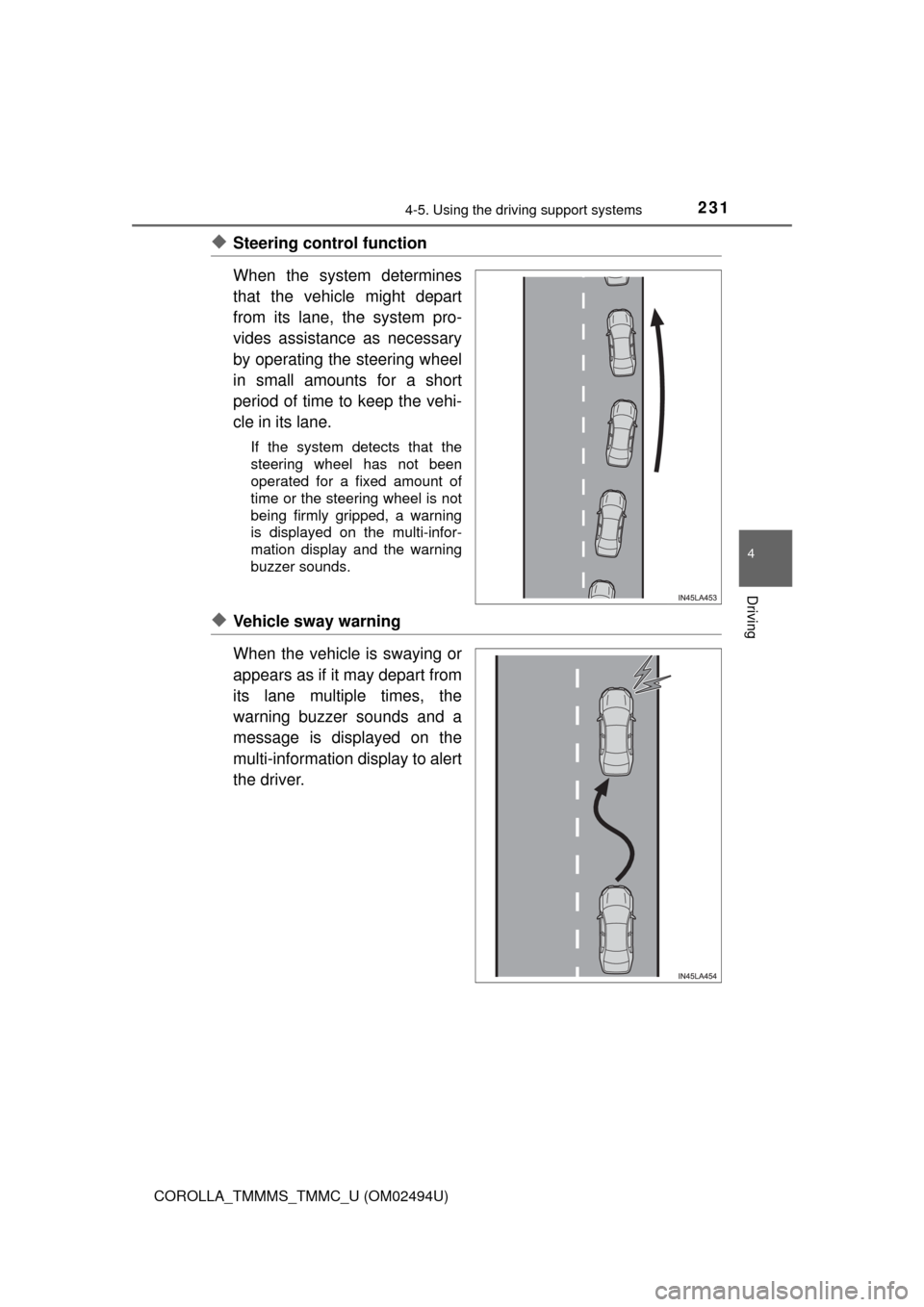
◆Steering control function
When the system determines
that the vehicle might depart
from its lane, the system pro-
vides assistance as necessary
by operating the steering wheel
in small amounts for a short
period of time to keep the vehi-
cle in its lane.
If the system detects that the
steering wheel has not been
operated for a fixed amount of
time or the steering wheel is not
being firmly gripped, a warning
is displayed on the multi-infor-
mation display and the warning
buzzer sounds.
◆Vehicle sway warning
When the vehicle is swaying or
appears as if it may depart from
its lane multiple times, the
warning buzzer sounds and a
message is displayed on the
multi-information display to alert
the driver.
Page 232 of 612
2324-5. Using the driving support systems
COROLLA_TMMMS_TMMC_U (OM02494U)
WARNING
■Before using LDA system
Do not rely solely upon the LDA system. LDA is not a system which auto-
matically drives the vehicle or reduces the amount of attention that must be
paid to the area in front of the vehicle. The driver must always assume full
responsibility for driving safely by always paying careful attention to the sur-
rounding conditions and operate the steering wheel to correct the path of
the vehicle. Also, make sure to take adequate breaks when fatigued, such
as from driving for a long period of time.
Failure to perform appropriate driving operations and pay careful attention
may lead to an accident, resulting in death or serious injury.
■To avoid operating LDA by mistake
When not using the LDA system, use the LDA switch to turn the system off.
■Situations unsuitable for LDA
Do not use the LDA system in the following situations.
The system may not operate properly and lead to an accident, resulting in
death or serious injury.
●A spare tire, tire chains, etc., are equipped.
●When the tires have been excessively worn, or when the tire inflation pres-
sure is low.
●Tires which differ by structure, manufacturer, brand or tread pattern are
used.
●Objects or patterns that could be mistaken for white (yellow) lines are
present on the side of the road (guardrails, curbs, reflective poles, etc.).
●Vehicle is driven on a snow-covered road.
●White (yellow) lines are difficult to see due to rain, snow, fog, dust, etc.
●Asphalt repair marks, white (yellow) line marks, etc., are present due to
road repair.
●Vehicle is driven in a temporary lane or restricted lane due to construction
work.
●Vehicle is driven on a road surface which is slippery due to rainy weather,
fallen snow, freezing, etc.
●Vehicle is driven in traffic lanes other than on highways and freeways.
●Vehicle is driven in a construction zone.
●During emergency towing